

Slack Icebreakers: 25 Ideas for Channels and Meetings

The best Slack icebreakers are short, optional and easy to answer in one line: a one-word check-in, a “would you rather,” or a photo of your desk. Post one in a dedicated social channel at a steady, modest rhythm, keep it low-stakes, and move the live, more playful games to a meeting where people can react in real time. Below you will find prompts you can paste today, games that work in a thread, a way to choose between async and live, and the habits that keep an icebreaker from turning into a chore.
TL;DR
- Use a dedicated casual channel and post a prompt about once a day or once a week, not more.
- Text-friendly formats work best in Slack: one-word check-ins, “would you rather,” photo prompts and Two Truths and a Twist.
- Save fast, competitive games for live meetings, and keep async prompts open for 24 hours or more so every time zone can join.
- Make everything optional, avoid assumptions such as alcohol, and let people skip without explanation.
- For onboarding and daily bonding, rotate who hosts and tie prompts to the team’s real routines.
Table of Contents
- Set up a home for icebreakers first
- Easy Slack icebreaker prompts to paste today
- Slack icebreaker games teams can play together
- Async or live: which icebreaker fits which moment
- Running an icebreaker in a meeting
- Adapting Slack icebreakers for onboarding and daily bonding
- Making icebreakers inclusive and low-pressure
- Our perspective: make it a habit, not an event
- When a channel is not enough: Gatherilla
- A simple four-week plan
- FAQ
- Sources
Set up a home for icebreakers first
Before you post a single question, decide where it lives. Icebreakers dropped into a busy project channel get buried or feel out of place. A separate channel gives people permission to be casual and lets anyone mute it without missing work updates.
Slack itself suggests creating a channel around topics such as pets, sports or baking so remote staff have a central place to socialize. Slack also says social channels give employees new ways to communicate and encourage greater engagement.
A few setup choices make the difference:
- Name it plainly. Something like #water-cooler or #off-topic tells people what it is for.
- Pin the ground rules. One short message: optional, no pressure, no work talk, be kind.
- Pick a rhythm. Owl Labs recommends a dedicated casual channel and prompts about once a day or once a week so the conversation does not become annoying. For most teams, weekly is the safer start.
- Agree on norms. Atlassian’s play on team communication norms covers time zones, working hours and expectations for async communication. An icebreaker channel is a good place to apply them: nobody should feel they have to answer at 9 p.m.
Easy Slack icebreaker prompts to paste today
The easiest icebreakers need no setup, no app and no preparation. Slack’s own list of team-building ideas includes one-word check-ins, Two Truths and a Twist, and sharing photos of personal desk items. They are short and light, and they can lead to candid conversation in minutes.
One-line questions
These work because anyone can answer in under ten seconds:
- What is one word for how your week is going?
- What is your favorite season, and why?
- Which hidden talent would surprise us?
- If you could have one superpower at work, what would it be?
- What three items would you take to a desert island?
The last four echo the kind of lightweight prompts in Poll Everywhere’s Slack icebreaker guide, which also lists a favorite part of the job and a one-word description of your life.
Weekly conversation starters
Owl Labs suggests starters about weekend highlights, current watchlists, planned trips, favorite memories, work-from-home snacks, books and focus strategies. Turn them into a rhythm:
- Monday: What is one thing you are looking forward to this week?
- Wednesday: What are you watching or reading right now?
- Friday: What was the best small moment this week?
Photo and show-and-tell prompts
Photos get replies because they give people something to react to without writing an essay.
- Share a photo of something on your desk and tell us why it is there.
- Post the view from your window.
- Show your current work-from-home snack.
- Share a picture of a pet, a plant or a project you are proud of.
Keep a rule that nobody has to share their home if they would rather not. A photo of a mug counts.
Reaction-based prompts
When you want participation from quiet people, ask for an emoji rather than a sentence. “React with the emoji that matches your Monday mood.” It takes a second, and the replies often spark real comments.
Slack icebreaker games teams can play together
Games add structure, which many people find easier than an open question. Several work well in a thread or a quick live call.
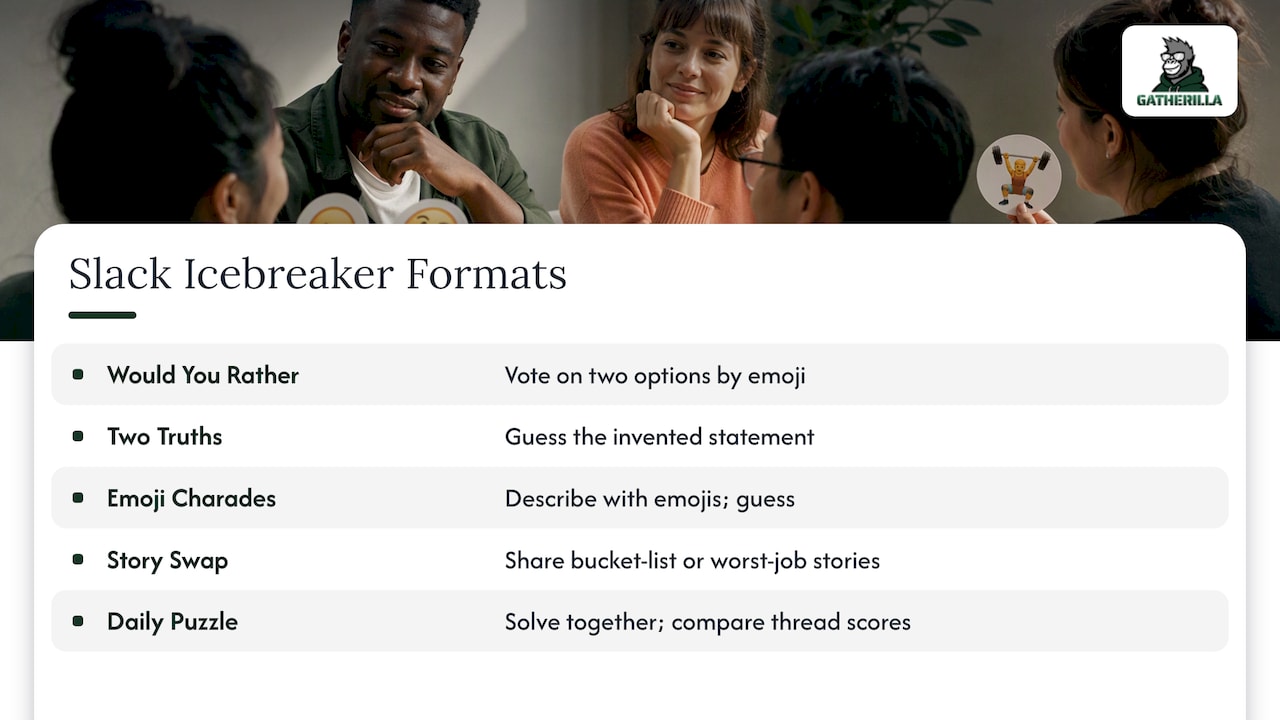
Would You Rather. The U.S. Chamber of Commerce notes that “Would You Rather?” is a quick game that can run asynchronously on Slack. Post two options, let people answer with a number emoji, and ask a few to explain in the thread. Work-flavored versions land well: “Would you rather have no meetings on Fridays or a four-hour lunch on Wednesdays?”
Two Truths and a Twist. Each person posts three statements, two true and one invented, and teammates guess in the thread. The “twist” wording keeps it friendlier than a lie. Asynchronous versions are common, and one roundup of async formats lists them next to workspace photos, book recommendations, memes, fun facts and quizzes.
Emoji charades. Someone describes a movie, song or workplace situation using only emojis, and the channel types guesses. Zoom’s Whiteboard template for Emoji Charades shows the same idea on a shared canvas, which is handy if you want to run it live instead.
Bucket list and worst-job stories. The same Chamber guide includes bucket-list sharing and worst-job stories. Both reveal personality fast. Offer them as a weekly theme, and let the host go first with a mild example so nobody feels they must top it.
Daily word or trivia puzzle. A shared puzzle everyone solves once a day, with scores compared in the thread, creates a tiny habit. Slack alone does not run one, so you either post a puzzle by hand or use a browser-based tool. More on that in the promo section below.
Async or live: which icebreaker fits which moment
The same question can fall flat in a meeting and thrive in a channel. Use the format that matches the way the group works.
| Situation | Better format | Why | Example |
|---|---|---|---|
| Team spread across several time zones | Async thread | Nobody has to be awake at the same time | Desk photo of the week |
| First five minutes of a long meeting | Live | Fast energy, immediate reactions | One-word check-in in chat |
| New hire’s first week | Both | Async intro plus a live welcome | Intro thread, then a short group game |
| Low-energy Friday | Async | Optional, easy to skip | Best small moment this week |
| Mid-meeting slump | Live | Resets attention | Five-minute energizer |
| Competitive team that likes scores | Live or daily puzzle | Leaderboards motivate | Trivia round |
Slack recommends a five-minute energizer during a long meeting or presentation, which is a good guide for live length: short enough to refresh people, not long enough to eat the agenda. If you want ready-made options, our guide to five-minute icebreakers lists twenty that need no preparation, and our workshop energizers work for longer sessions.
Keep async prompts open long enough
An async icebreaker that closes after two hours is just a live one with extra steps. Leave a prompt open for a full day, and longer for a global team. Zoom advises considering time zones, workloads and team availability when scheduling team-building, and Atlassian’s guidance recommends rotating times so no one region always gets the inconvenient slot. If your team crosses several zones, this walk-through on scheduling across time zones is a practical companion, and our own piece on async team building goes deeper on the format.
Running an icebreaker in a meeting
Slack is often the side channel of a video meeting, which makes it useful as a live icebreaker tool. A simple pattern:
- Post the prompt in the meeting chat or a Slack thread before people arrive. Early arrivals can answer while they wait.
- Give a clear time box. “Two minutes, one line.”
- Read a few answers aloud. This makes contributions feel noticed.
- Move on on time. The icebreaker is a warm-up, not the meeting.
The time is well spent. Atlassian’s Eugene Chung notes that a few minutes on icebreakers before collaborative sessions significantly improves contribution and comfort. Zoom also suggests promoting team-building events in advance through email and chat channels to keep engagement high, so a short Slack reminder the day before is worth sending.
On Zoom, Meet or Teams, the same ideas apply. We have written scripts for Zoom icebreakers and Microsoft Teams icebreakers, and a roundup of virtual meeting games for when you want something more playful than a question.
Use huddles for spontaneous chats
Not every icebreaker needs a calendar invite. Slack describes Huddles as an audio-first way to jump into casual, spontaneous conversations without formal scheduling or the pressure of being on camera. A standing “coffee huddle” that anyone can drop into is a gentle alternative for people who find video draining. If you are shaping a short, structured check-in, this daily huddle script shows how a tight timeline keeps it from sprawling.
Adapting Slack icebreakers for onboarding and daily bonding
New hires have the hardest time with icebreakers, because they do not yet know whom they are talking to. A few adjustments help.
Give new people an easy first post. A welcome thread with a template (“Name, role, one thing I do outside work, one question for the team”) removes the blank-page problem. Research backs the idea: a study of 28 virtual pairs found that asynchronous introductions significantly improved collaboration, effectiveness and engagement, and video introductions did best on engagement and trust compared with text or no introduction. A short video hello from the new hire, posted in the channel, is worth suggesting.
Assign a buddy. Pair each new employee with a teammate who answers their questions and replies to their first posts. Documenting what you tell new people helps too, and this page on onboarding knowledge capture shows how teams keep that information in one place.
Rotate the host. Atlassian’s “Chief Vibes Officer” play rotates the role so the ritual stays fresh without overburdening one person. In Slack, that can be as simple as a shared calendar: this week Priya picks the Friday question, next week Marcus does.
Schedule recurring prompts. Many teams set a recurring Monday watercooler question about the weekend, recent reading or upcoming plans. Geekbot’s guide to Slack icebreaker apps describes that pattern, with schedules adjusted to local time zones and editable questions. You can do the same by hand with Slack’s scheduled messages. For a first-day program, see our kickoff meeting games.
Making icebreakers inclusive and low-pressure
An icebreaker that makes one person uncomfortable has failed, however many others enjoyed it. SHRM’s guidance on fostering belonging with virtual teams recommends varying activities, choosing options everyone can join, avoiding assumptions such as alcohol-based events, and avoiding schedules that leave people out.
Put that into practice:
- Make it optional, always. Say so in the channel description and in the first post.
- Vary the type. Rotate between text, photo, emoji and game so people with different strengths get a turn.
- Start shallow. Wharton’s guidance on virtual connection recommends voluntary, progressively deeper questions, with permission to skip and attention to hierarchy. A manager who goes first with a light answer sets the tone. Even a shortened three-to-five-minute version can help before a meeting.
- Allow time. Slack advises accessible activities with ample time and a safe space for input. Screen reader users, non-native English speakers and people who think before they type all benefit from a longer window.
- Avoid proxies for personal life. “Show us your home” can feel intrusive. Offer an alternative such as “share something on your desk or something you are reading.”
- Watch for hidden barriers. Time zones, caregiving hours and religious holidays all affect who can join.
The payoff is psychological safety: Atlassian writes that icebreakers help colleagues feel free to speak up, contribute and question without fear of censure. That only happens if the activity feels safe in the first place.
Our perspective: make it a habit, not an event
We build team-building tools for remote teams, and the pattern we see most is the one-off icebreaker with a great launch and a slow fade. Someone posts a question in week one, ten people answer, and by week six the channel is silent. The question was not bad. The ritual had no owner, no rhythm and no payoff.
What works is smaller than most leaders expect. A prompt that takes ten seconds. A fixed day. A host who changes. A sense that answers are noticed. When engagement becomes a daily or weekly habit rather than a quarterly offsite, people begin to know each other’s quirks, and meetings start warmer without anyone forcing it.
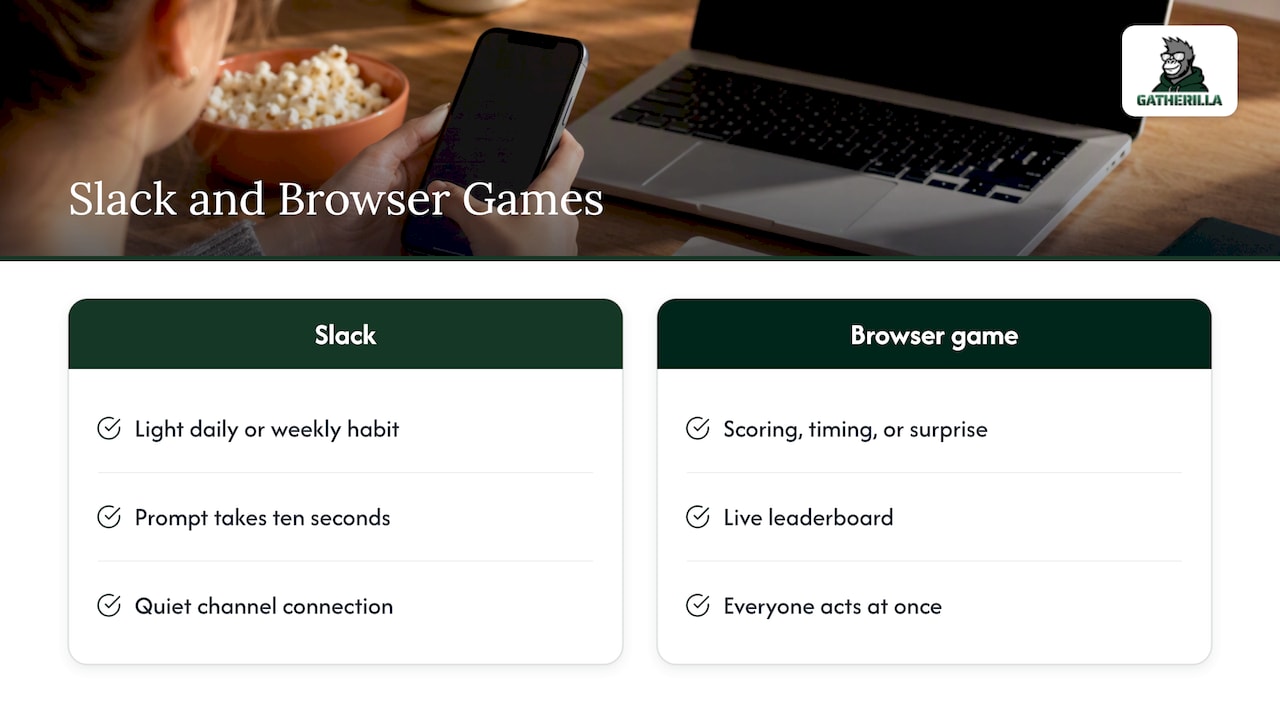
Slack is a good place for the lightest layer of that habit. Where it stops is anything that needs scoring, timing or surprise: a trivia round with a live leaderboard, a game where everyone acts at once. Those are easier in a browser tab that opens in one click, with no downloads and no accounts to create. Used together, a quiet Slack channel and a quick shared game cover both the slow and the fast kind of connection.
One caution from experience: do not measure success by how many people reply. Measure it by whether the quiet ones start to. That takes patience.
— Thomas
When a channel is not enough: Gatherilla
If your team wants games with scores and a daily rhythm rather than another thread to scroll, Gatherilla runs browser-based multiplayer games for remote and hybrid teams. There is nothing to download, it works alongside any video conferencing tool, and it includes daily word and trivia challenges, meeting icebreakers and onboarding games with real-time leaderboards.

There is a free tier to try it with your team. The Premium plan adds more games, analytics and priority support, and is listed at $0.50-$1.00 per seat per month or $5-$10 per seat per year on the pricing page. You can also browse all team-building activities before you decide, or read our remote icebreaker games guide and virtual conference icebreakers for ideas you can use right away.
A simple four-week plan
If you want a starting point, try this and adjust to your team.
| Week | Channel prompt | Live moment |
|---|---|---|
| 1 | One-word check-in, plus a pinned note that everything is optional | Open one meeting with a two-minute check-in |
| 2 | Desk or window photo | Five-minute energizer mid-meeting |
| 3 | Would You Rather, with three work-flavored options | Short trivia round at the end of a team call |
| 4 | Two Truths and a Twist | Ask the team what to keep, change or drop |
The fourth week matters most. Ask people which prompts they liked and which felt forced, then rotate a host and keep going. Anything nobody answers for two weeks should go.
FAQ
How often should I post an icebreaker in Slack?
Once a week is a safe start, and once a day suits a team that already chats a lot. Owl Labs advises limiting prompts to about once a day or once a week so the channel does not become annoying. If replies drop for several weeks in a row, post less often or change the format.
What is a good icebreaker for a brand-new team that does not know each other?
Start with low-risk questions such as a one-word check-in, favorite season or a desk photo. These feel safe because nobody has to reveal much. Save deeper questions for later, once people have replied a few times, and always allow people to skip.
Should Slack icebreakers be anonymous?
Usually not. Most Slack replies show who wrote them, and that is part of how colleagues get to know each other. If you want honest answers on a sensitive topic, use a separate tool or form, and keep icebreakers for light, personal-but-safe prompts.
Can I run icebreakers in Slack and in meetings?
Yes, and it often works best to do both. Use Slack for slow, optional prompts that anyone can answer within a day, and use meetings for quick energizers of about five minutes. Match the format to the time zones and availability of your team.
How do I get people who never reply to join in?
Lower the effort first: ask for an emoji or a single word, not a paragraph. Have a manager or senior person answer first with something light, and thank people by name when they reply. Never call out someone for staying silent.
Sources
- 29 Team-Building Activities for Work | Slack
- How to use Slack to maintain your team’s human connections | Slack
- New collaboration tools to help you work from anywhere | Slack
- 5 Slack team building ideas for your remote or hybrid team | Owl Labs
- 30 Fun Icebreakers Perfect for Engaging Your Team on Slack | Poll Everywhere
- Fun and Unique Meeting Icebreakers | U.S. Chamber of Commerce
- 10 Fun Async Icebreakers for Remote Agile Teams | Team O’Clock
- Emoji Charades | Zoom Gallery
- Virtual team building: importance, tips, and 25 ideas | Zoom
- Team Communication Norms | Atlassian
- Chief Vibes Officer Team Icebreaker | Atlassian
- 7 icebreaker games to help your team build authentic connections | Atlassian
- Should I Introduce myself? Asynchronous semi-guided introductions | ACM
- Fostering Belonging with Your Virtual Teams | SHRM
- Create Authentic Connections with Virtual Team Members | Wharton
- 3 Best Free Slack Icebreaker Apps | Geekbot