

20 Zero Prep 5 Minute Icebreakers Facilitators Can Run Today

Run One Word, Quick This-or-That, Would You Rather, Two Truths and a Lie, or a fast Show-and-Tell — each takes under five minutes, needs zero prep, and works whether your group is on Zoom or sitting around a conference table. One Word and This-or-That suit both formats; Show-and-Tell works best in person or on camera. None require downloads, materials, or advance planning, so you can drop any of them into a standup, training, or kickoff without shifting the rest of your agenda.
TL;DR:
- Short icebreakers under five minutes significantly improve engagement, focus, and psychological safety, especially in remote teams experiencing feelings of isolation.
- Structuring activities with clear time boundaries and simple prompts prevents them from dragging over and maintains momentum throughout the session.
- Virtual options like chat responses, camera-off participation, and options to opt-out increase accessibility and participation for all team members.
- Rotating a set of routine activities weekly and maintaining a prompt bank helps sustain interest and avoids repetition fatigue.
- Carefully timed, well-instructed transitions are essential to preserve energy and avoid activity overruns that could cut into the main agenda.
Table of Contents
- Why 5 Minute Icebreakers Actually Move the Needle
- 20 Ready to Run 5-Minute Icebreakers With Scripts
- How to Run Any of These in Under Five Minutes
- Making Icebreakers Work for Every Team Member
- Turning Short Icebreakers Into a Weekly Habit
- When to Skip the Icebreaker Entirely
- Try a Zero-Prep Icebreaker Routine This Week
- Sources
- FAQ
Why 5 Minute Icebreakers Actually Move the Needle
A short icebreaker resets attention faster than most meeting leaders expect. People walk into calls carrying whatever happened five minutes earlier, whether that’s a tense client email or a school drop-off scramble. A quick, low-stakes prompt gives their brain a clean transition point before the real agenda starts.
The value shows up in a few specific ways:
- Energy reset. A 60-second exchange snaps people out of autopilot faster than a slide deck ever will.
- Focus. Speaking or reacting even briefly pulls attention away from side tabs and phones.
- Psychological safety. Low-stakes sharing builds the trust that makes people speak up later when it actually matters.
- Engagement. Teams that feel connected participate more in the substantive parts of a meeting, not just the icebreaker itself.
Remote workers in particular report feeling flexible but isolated, and short recurring connection points are one of the practical ways teams counter that isolation, according to SHRM. That’s not a reason to run a 20-minute bonding exercise every Monday. It’s a reason to run something short, consistently.
Weekly standups, training kickoffs, onboarding sessions, and pre-sensitive discussions (performance reviews, layoffs, restructuring announcements) all benefit from a brief warmup, though the tone should shift with the context. A playful prompt before a budget review works. The same prompt before a difficult conversation about a missed deadline can feel tone-deaf, so read the room before you pick the activity.
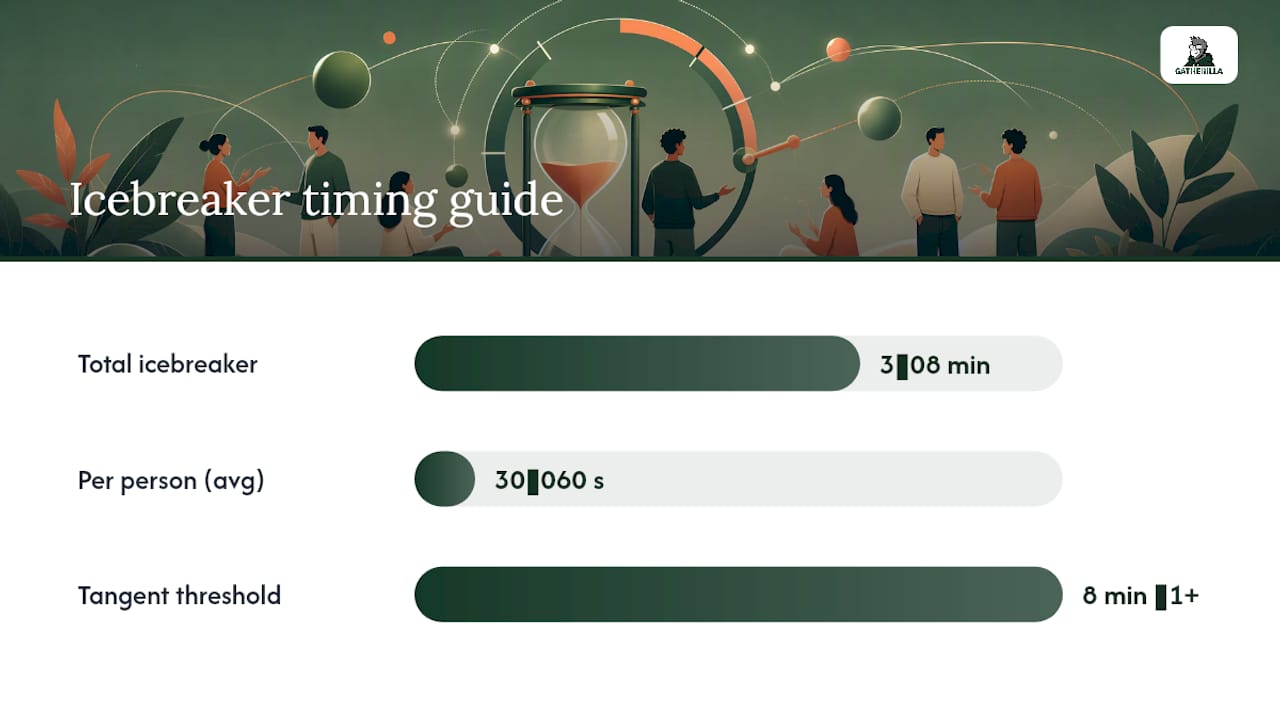
Time-boxing matters more than the activity itself. For a small team of 5 to 8 people, aim for 3 to 8 minutes total, with each person answering in roughly 30 to 60 seconds, according to Estimioo’s icebreaker guidance. Go longer than that and you’ve stopped running an icebreaker and started running a tangent.
20 Ready to Run 5-Minute Icebreakers With Scripts
Each entry below lists the goal, time, group size, and setting, plus a script you can read almost word for word. Pick based on your group size and whether people are virtual, in person, or a hybrid mix.
1. One Word Check-In
Goal: Surface everyone’s mood or focus in one word. Time: 2 to 3 minutes. Group size: Any. Setting: Virtual or in person. Script: “In one word, how are you showing up today? I’ll start: ‘caffeinated.’ Go around or drop it in chat.”
2. This-or-Would-You-Rather
Goal: Fast, low-pressure choice that reveals personality. Time: 3 minutes. Group size: Up to 15. Setting: Virtual or in person. Script: “Would you rather have unlimited vacation days or a permanent four-day workweek? Thumbs up for vacation, thumbs down for the shorter week. Chat your reasoning if you want.”
This format works especially well over video because reaction buttons let everyone answer at once instead of waiting in a queue, using the same emoji-driven mechanics that make polling feel instant on any device, per Emojipedia.
3. Two Truths and a Lie (Speed Round)
Goal: Light personal reveal with a guessing element. Time: 4 to 5 minutes. Group size: 4 to 8. Setting: Virtual or in person. Script: “Give us three statements about yourself. Two are true, one is false. We guess, then you tell us.”
4. Show-and-Tell 30
Goal: Quick object-based storytelling. Time: 3 minutes for three people. Group size: Any, using volunteers. Setting: Camera-on virtual or in person. Script: “Grab something within arm’s reach and tell us why it matters in one sentence, 30 seconds each.” This exact format is a favorite among professional facilitators because it stays contained no matter how big the group is, according to Playmeo.
5. Rose, Thorn, Bud
Goal: Quick emotional check-in with structure. Time: 3 to 5 minutes. Group size: Up to 10. Setting: Virtual or in person. Script: “Share one good thing (rose), one challenge (thorn), and one thing you’re looking forward to (bud). Keep each to a phrase.”
6. Emoji Mood Board
Goal: Non-verbal mood check for camera-shy groups. Time: 2 minutes. Group size: Any. Setting: Virtual only. Script: “Drop the emoji that matches your energy right now in the chat. No explanation needed unless you want to.”
7. Desk or Background Tour
Goal: Personal glimpse without a deep conversation. Time: 3 minutes. Group size: Up to 12. Setting: Virtual only. Script: “Point your camera at one interesting thing near you and tell us its story in ten words or less.”
8. Rapid-Fire Favorites
Goal: Fast personality snapshot. Time: 3 minutes. Group size: Up to 10. Setting: Virtual or in person. Script: “Favorite snack, favorite season, favorite way to waste 15 minutes. Quick answers, no debating.”
9. Name That Song
Goal: Shared culture moment with minimal effort. Time: 4 minutes. Group size: Any, using chat harvest for large groups. Setting: Virtual or in person. Script: “Type the song stuck in your head right now, no judgment. We’ll read a few out loud.”
10. One-Minute Draw
Goal: Quick creative break. Time: 4 minutes. Group size: Up to 12. Setting: Virtual with screen share or in person with paper. Script: “Draw your weekend in 60 seconds using only stick figures. Hold it up or share your screen.”
11. Would You Rather: Work Edition
Goal: Work-relevant lighthearted choice. Time: 3 minutes. Group size: Any. Setting: Virtual or in person. Script: “Would you rather answer emails on vacation or have zero meetings but triple the email volume? React with your pick.”
12. Gratitude Chat Harvest
Goal: Positive framing before heavy topics. Time: 3 minutes. Group size: Any, using chat for groups over 15. Setting: Virtual. Script: “Type one thing, work or personal, that you’re grateful for this week. I’ll read a handful out loud.”
13. Guess the Fact
Goal: Team trivia about each other. Time: 5 minutes. Group size: 5 to 10. Setting: Virtual or in person. Script: “One person shares an unusual fact about themselves anonymously ahead of time; the group guesses who it belongs to.”
14. Weather Report Check-In
Goal: Metaphorical mood check. Time: 3 minutes. Group size: Any. Setting: Virtual or in person. Script: “If your week were a weather forecast, what would it be? Sunny, stormy, foggy with a chance of clarity later?”
15. Rapid Recognition Round
Goal: Peer appreciation in a compressed window. Time: 4 minutes. Group size: Up to 10. Setting: Virtual or in person. Script: “Shout out one teammate for something small they did this week. Keep it to one sentence each.”
16. Chat Word Cloud
Goal: Instant collective snapshot for large groups. Time: 2 minutes. Group size: 15+. Setting: Virtual. Script: “Type one word describing this project so far. We’ll watch the pattern build in real time in chat.”
17. Breakout Pair Share
Goal: Deeper connection at scale without eating the clock. Time: 4 minutes (2 minutes per person in pairs). Group size: 12+, split into pairs. Setting: Virtual with breakout rooms or in person with quick pairing. Script: “You’ve got two minutes each. Tell your partner one high point from this month. We’ll pull back together after four minutes total.”
18. Photo Roulette
Goal: Visual storytelling with camera phones. Time: 4 minutes. Group size: Up to 10. Setting: Virtual, camera-friendly. Script: “Pull up the last photo on your phone and explain it in one sentence, however random it is.”
19. Representative Sampling Round
Goal: Inclusion signal for very large groups without the time cost. Time: 5 minutes. Group size: 20+. Setting: Virtual or in person. Script: “Chat your answer, and we’ll read three at random out loud so everyone’s voice is in the mix even if we can’t hear from all 40 of you.”
20. Would You Rather: Lightning Round
Goal: Closer variation for energizing a flagging group. Time: 3 minutes. Group size: Any. Setting: Virtual or in person. Script: “Three rapid-fire either-or questions, react fast, no overthinking. Ready? Coffee or tea…”
These twenty cover the range most teams need, but if you’re running training sessions specifically, a longer training-focused list can round out a multi-day agenda. For teams that live inside Zoom specifically, zero-setup Zoom scripts handle the platform quirks these general scripts don’t cover.
How to Run Any of These in Under Five Minutes
The activity matters less than the pacing. A great icebreaker run poorly turns into a ten-minute detour; a mediocre one run tightly still lands in under five.
Start with one clear sentence of instructions, not three. If you find yourself explaining the rules for longer than the activity itself will take, simplify the prompt. Set a visible timer, whether that’s a shared screen countdown or just you glancing at a clock and saying “we’ve got four minutes left,” so the group feels the boundary instead of guessing at it.
Time-box by group size:
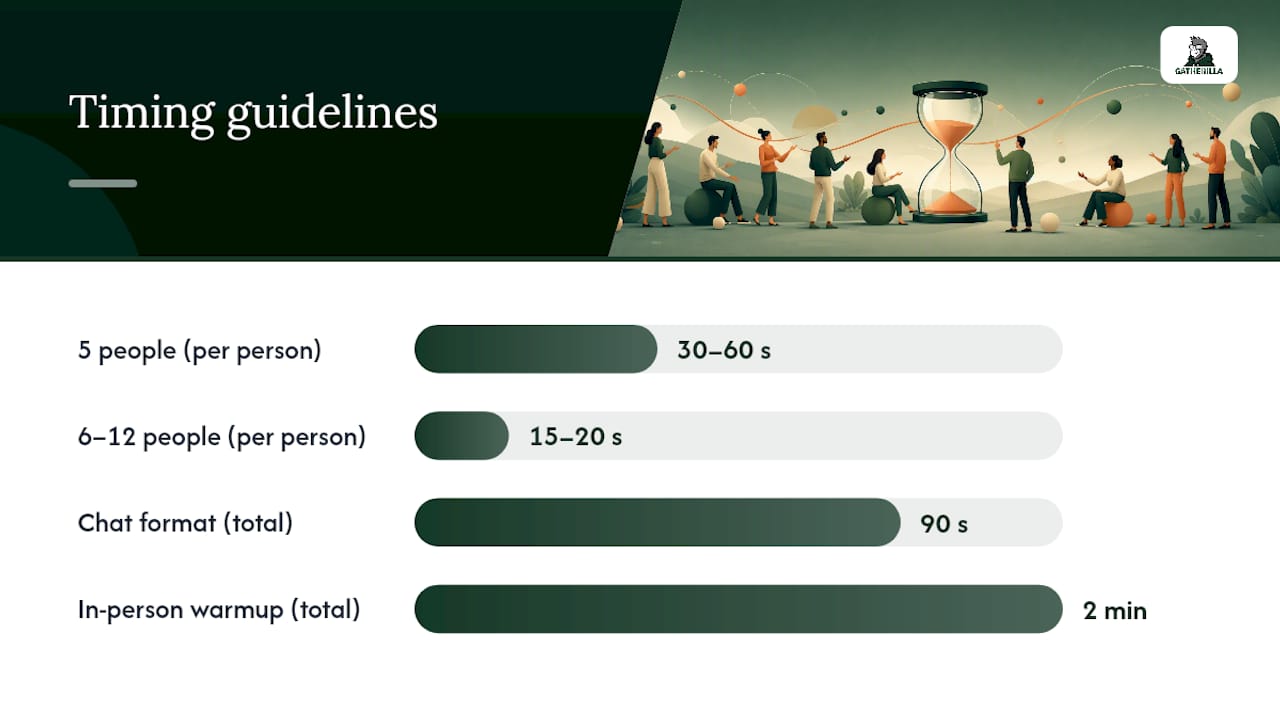
- 5 people: roughly 30 to 60 seconds per person, matching the pacing Estimioo recommends for small teams.
- 6 to 12 people: shorten to 15 to 20 seconds per person, or switch to a chat-based format so everyone answers simultaneously.
- 12+ people: skip full round-robin entirely. Use breakout rooms, chat harvesting, or representative sampling where you read a handful of answers aloud instead of hearing from everyone.
To keep pace, call on people by name rather than asking “who’s next,” which almost always produces an awkward five-second silence. A randomizer (even just picking names off a participant list) removes the social friction of choosing who goes first. Chat-based formats sidestep the whole problem since everyone types at once.
Sample virtual opening script: “Before we get into the agenda, quick one: drop your answer in chat, I’ll read a few out loud, then we’ll move on. You’ve got 90 seconds.”
Sample in-person opening script: “Two-minute warmup before we start. Turn to the person next to you and answer this, then we’ll come back together.”
Sample closing script (either setting): “Great, that’s our five minutes. Let’s carry that energy into today’s agenda.”
Common pitfalls tend to repeat across teams:
- Letting one person talk for two minutes when the budget was 30 seconds. Interrupt gently: “Love it, let’s hear from one more person and keep moving.”
- Choosing a prompt with no clear boundary, like “tell us about your weekend,” which invites rambling. Add a constraint: “in one sentence” or “in ten words or less.”
- Running the same format every week until people start disengaging before you even ask the question. Rotate.
- Forgetting to transition out cleanly. An icebreaker that just trails off into silence kills the momentum it was supposed to build.
Pro Tip: Write your one-sentence instruction and your closing line before the meeting starts. Facilitators who improvise the wording mid-meeting almost always run long, because they hedge, over-explain, or add a second example nobody asked for.
Making Icebreakers Work for Every Team Member
A prompt that works for a confident extrovert can be genuinely stressful for someone who processes slower, has social anxiety, or is neurodivergent. Building in flexibility isn’t extra work. It’s usually just a slight rewording.
Accessibility adjustments worth building into your default script:
- Chat-first responses. Let people type instead of speaking; this alone removes most of the pressure around on-the-spot verbal answers.
- Camera-off participation. Never require video for an icebreaker to count as participation.
- Closed captions. Turn them on by default for virtual sessions so anyone who processes speech differently, or simply has a noisy environment, doesn’t miss the prompt.
- Explicit opt-out language. Say “answer if you’d like, totally fine to just listen” up front. Opt-out phrasing and chat-first options measurably lower social pressure and raise actual participation, according to IceBreakerClub’s facilitation notes.
- One-word or short-answer formats as the default, not the exception, since open-ended prompts disproportionately burden people who need more time to formulate an answer.
For groups larger than 12, scale with breakout rooms, chat harvesting, or representative sampling rather than forcing every voice into a single round-robin, which drags a five-minute activity toward twenty. Stick to culturally neutral prompts, too. “Favorite holiday tradition” can unintentionally exclude people who don’t celebrate the ones you’re picturing. “Favorite way to spend a day off” gets the same warmth without the assumption.
Turning Short Icebreakers Into a Weekly Habit
Treat icebreakers as a rhythm, not a one-off event. Rotating formats weekly, mixing quick questions, movement breaks, and low-prep games, keeps the ritual from going stale and stops the same three people from always dominating, per Rhythm Systems. Given that remote employees report feeling isolated even when they value the flexibility, a five-minute connection point every week does real work over a quarter, according to SHRM.
A simple 4-week rotation:
- Week 1: One Word Check-In (verbal or chat)
- Week 2: Show-and-Tell 30 (camera-on, three volunteers)
- Week 3: Rose, Thorn, Bud (structured reflection)
- Week 4: Photo Roulette or Rapid-Fire Favorites (visual or fast-paced)
Keep a running prompt bank so nobody has to invent something fresh every Monday morning. Teams that want this automated rather than manually tracked in a spreadsheet can lean on Gatherilla’s browser-based scripts and daily micro-challenges, which are built specifically for recurring, zero-setup routines that don’t require anyone to remember whose turn it is to plan the icebreaker.
When to Skip the Icebreaker Entirely
Not every meeting needs a warmup, and pretending otherwise is its own facilitation mistake. Skip icebreakers in short tactical meetings where the agenda is already tight, in emergency briefings where the tone needs to stay serious, and in any session where the clock is genuinely too short to spare 300 seconds without cutting something that matters more.
The single lesson worth taking from years of watching meetings run long: the icebreaker isn’t the problem when a meeting drags. The lack of a visible timer is. I’ve watched more five-minute activities balloon into fifteen-minute ones from an unclear instruction than from a bad activity choice. Pick a simple prompt, say it once, and hold the boundary. Teams that use platforms like Gatherilla for their recurring check-ins tend to report the routines stick better precisely because the format is already built and nobody has to improvise it live.
— Thomas
Try a Zero-Prep Icebreaker Routine This Week
If the scripts above solved your immediate problem, the harder question is whether you’ll still be running fresh icebreakers a month from now, or whether the prompt bank quietly disappears the way most manual rituals do. The platform offers browser-based games and curated scripts that require no downloads, allowing teams to click a link and start games, compatible with video conferencing or in person settings.

The free tier lets you test the daily challenge format without committing to anything, and the Premium plan unlocks a larger library plus reporting if you want to track engagement over time. If you’d rather see what’s available before picking a plan, browse the full activities library for ready-made 5-minute scripts you can drop into next week’s standup today.
Sources
The activity formats and timing guidance in this article draw on Rhythm Systems’ virtual meeting icebreaker guide, which covers zero-setup formats and weekly rotation advice; Playmeo’s collection of under-five-minute icebreakers, which informed the Show-and-Tell 30 format; Estimioo’s icebreaker question generator, the source for the 30 to 60 second per-person timing rule; and SHRM’s research on remote worker isolation, which grounds the case for recurring connection rituals. For teams looking to pair prompt generation with broader productivity tooling, this overview of AI-driven productivity gains for agencies is a useful adjacent read.
- Complete List of Virtual Meeting Icebreakers for 2026 (Zoom and Beyond) | Rhythm Systems
- Icebreaker Questions Generator — Free, 340+ for Team Meetings | Estimioo
- 5 Brilliant Icebreakers That Take Less Than 5 Minutes | Playmeo
FAQ
What are good short icebreakers for meetings?
One Word Check-In, This-or-That, Would You Rather, and Show-and-Tell 30 are among the most reliable, since each takes under five minutes and needs zero preparation, according to Rhythm Systems. All four work for virtual, in-person, or hybrid groups without modification.
What are 5 great icebreaker questions?
Try: “What’s one word for how you’re showing up today?” “Would you rather work from a beach or a mountain cabin?” “What’s the last photo on your phone?” “What’s one thing you’re grateful for this week?” and “If your week were weather, what would it be?” Each fits inside a 30 to 60 second answer window, matching the pacing Estimioo recommends for small groups.
What activities can I run in exactly 5 minutes?
Show-and-Tell 30, One-Minute Draw, Rapid-Fire Favorites, and a Breakout Pair Share all fit inside five minutes with the scripts above. For virtual teams, platforms like Gatherilla offer browser-based versions of these formats that run without any setup or download.
What’s a good 15-minute icebreaker activity?
For a longer session, stack three or four of the 5-minute activities above back to back, or run a full breakout pair share where each person gets closer to five minutes instead of two. A 15-minute window also gives room for a debrief question afterward, like asking one person from each pair to share a highlight with the full group.
How do I transition out of an icebreaker without losing momentum?
Close with one clear sentence that names the shift, such as “Great, that’s our five minutes, let’s carry that energy into today’s agenda.” Avoid letting the activity trail off in silence. A clean verbal handoff keeps the energy the icebreaker built instead of letting it evaporate before the real conversation starts.