

Remote Teams: Under 2 Minutes Zoom Icebreakers with Scripts, Zero Setup

The best Zoom icebreakers take under two minutes, give every participant a low-pressure way to speak up, and don’t require a camera. Run an emoji check-in (30 seconds), a one-word round (about a minute per person, capped at 10 people), a 60-second show-and-tell (3 to 5 minutes total), or a three-item scavenger micro-round (3 minutes) and you’ll have a warmed-up group before the real agenda starts. Everything below explains how to pick, time, and run each one, including chat and reaction fallbacks for anyone who’d rather not turn on their camera.
TL;DR:
- Quick icebreakers like emoji check-ins and one-word rounds are effective for groups of any size when under two minutes, especially with camera-off participants.
- Longer activities such as show-and-tell or virtual scavenger hunts should be limited to 3-8 minutes for groups of 5 to 15, fostering genuine connection.
- Breakout room games like emoji charades or team trivia work well with 10 to 20 minutes, provided roles are assigned and activities are well-facilitated.
- Choose activities based on group size, familiarity, energy goals, and safety, avoiding personal disclosures in new or cross-department teams.
- Recurring, simple icebreakers performed consistently build engagement and trust better than one-off games, especially when supported by tools like Gatherilla for automation.
Table of Contents
- Quick Zoom Icebreaker Ideas Under Two Minutes
- Short Zoom Icebreaker Games (3 to 8 Minutes)
- Longer Team-Building Games and Breakout Room Formats
- How to Choose the Right Icebreaker for Your Meeting
- Running Icebreakers Smoothly on Zoom
- Why Recurring Icebreakers Beat One-Off Games
- A Practitioner’s Checklist for the First Month
- Try Gatherilla for Recurring, Zero-Setup Team Games
- Sources
Quick Zoom Icebreaker Ideas Under Two Minutes
Fast openers exist for one reason: to get voices in the room before the meeting’s real business eats the clock. Each of these fits inside two minutes, even with a group of 15.
- Emoji check-in (30 seconds): Ask everyone to drop one emoji in chat that matches their energy today. No talking required, so it works for camera-off attendees instantly.
- One-word round (1 minute per speaker, cap at 10 people): “Describe your weekend in one word.” Go around the gallery view in order.
- Weather report (45 seconds): “If your mood were weather, what would it be?” Great for daily stand-ups because it’s fast and repeatable.
- Two-truths poll (90 seconds): Post one fact and one lie about yourself in chat; the group reacts with 👍 for true, 👎 for false.
- Rose or thorn (1 minute per person): One good thing, one rough thing, said in a single breath.
- Coffee or tea (30 seconds): A binary chat poll. Useless information, but it breaks silence fast.
- First word of the day (30 seconds): Type the first word you said out loud this morning into chat.
- Reaction roll call (20 seconds): Instead of a verbal roll call, ask people to hit the 🙌 reaction when their name is said.
- Pet or plant cameo (1 minute): If a pet or plant is nearby, hold it up; if not, describe it.
- Song stuck in your head (45 seconds): Type the song title in chat, no explanation needed.
- Number of cups of coffee (30 seconds): Simple, silly, and works via chat for large all-hands calls.
- Thumbs-up temperature check (20 seconds): Use Zoom’s reaction bar to gauge energy before diving into a dense agenda.
For groups over 20, skip verbal rounds entirely and lean on Zoom’s built-in poll or the reaction bar. A new team benefits more from one-word rounds that surface names and faces; an established team doing a daily stand-up does better with a 20 to 30 second reaction check that doesn’t eat into work time.
Short Zoom Icebreaker Games (3 to 8 Minutes)
These formats need a little more setup but pay off with actual connection, not just noise. Each works for groups of 5 to 15 and takes no more than 8 minutes total.
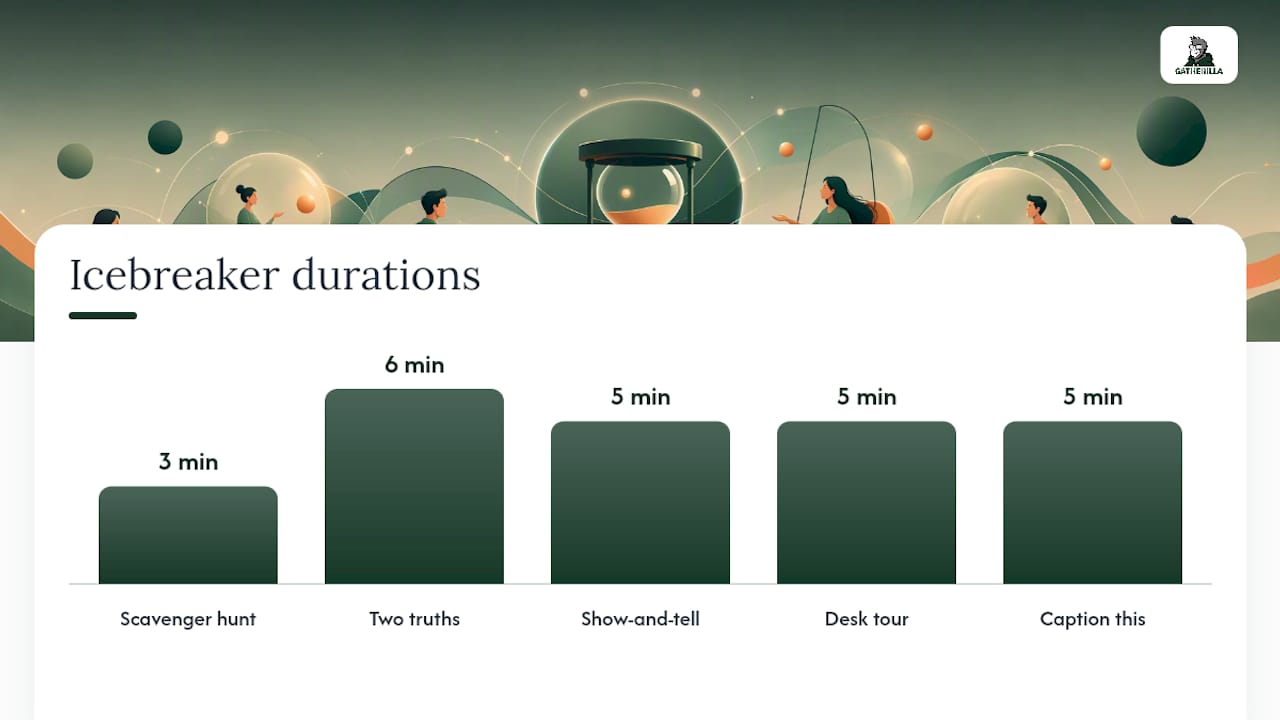
- 60-second show-and-tell (5 people, 5 minutes): Ask everyone to grab an object within arm’s reach and explain its story in under a minute. Script: “You have 60 seconds. Go.”
- Micro scavenger hunt (any size, 3 minutes): Call out three household items (“something red, something older than you, something with a logo”) and race to bring them into frame.
- Two truths and a lie, speed version (6 people, 6 minutes): Each person states three facts; the group votes in chat before the reveal.
- Desk or workspace tour (8 people, 5 minutes): One camera pan, 15 seconds each, no narration needed.
- Would you rather (10 people, 4 minutes): Poll-based, one question, instant results.
- Caption this (any size, 5 minutes): Share your screen with a random image; participants type captions in chat.
- Guess the sound (6 people, 5 minutes): Play a short clip; people guess in chat before revealing.
- This or that lightning round (12 people, 4 minutes): Rapid binary choices via reactions, five rounds deep.
Chat-only variants work for every one of these. Show-and-tell becomes “type three words about the object,” and a scavenger hunt becomes “list your three items in chat” for anyone skipping video.
Pro Tip: Skip personal-disclosure formats like “share a challenge you’re facing” in mixed groups with new hires or cross-departmental attendees. Save vulnerability-based prompts for teams that already trust each other.
Longer Team-Building Games and Breakout Room Formats
When a meeting has 10 to 20 minutes carved out specifically for team building, breakout rooms turn a quick icebreaker into a real bonding exercise. These formats need slightly more prep, but the payoff is a team that actually remembers the activity afterward.
- Emoji charades (15 minutes, groups of 4 to 6): One person acts out a phrase using only Zoom reactions while others guess in chat. Zoom’s own emoji charades template shows how to set this up directly in the platform.
- Virtual scavenger hunt (15 to 20 minutes, any size): Breakout teams race to collect a themed list of items and report back. Full scripts and variants are covered in this virtual scavenger hunt guide.
- Story chain (12 minutes, groups of 5): Each person adds one sentence to a group story, no planning allowed.
- Trivia sprint (20 minutes, any size): Company trivia or pop culture rounds scored live. A ready-to-run structure lives in this team trivia playbook.
- Desert island breakout (15 minutes, groups of 4): Each team picks three items to survive together, then pitches their choices to the main room.
- Two truths, team edition (18 minutes, groups of 6): Breakout rooms guess facts about teammates, then the funniest wrong guesses get shared back.
- Onboarding bingo (15 minutes, new hire groups): Works especially well paired with an onboarding scavenger hunt for new team members finding their footing.
Every breakout format needs three assigned roles: a facilitator to explain the task, a timekeeper to call the halfway mark, and a reporter to summarize back to the main room in under 30 seconds. After the session, a one-question pulse poll (“Did that feel worth the time?”) or a quick Slack reaction thread tells you whether the format is worth repeating.
How to Choose the Right Icebreaker for Your Meeting
Matching the activity to the room matters more than the activity itself. A story-based exercise that works beautifully for five people who’ve worked together for years falls flat with 40 strangers on an all-hands call, and the reverse is just as true.
Run through five questions before picking anything:
- Time available: Under 2 minutes, use a chat or reaction-based opener. Under 8 minutes, go with a light activity. Over 10 minutes, only if it’s dedicated team-building time.
- Group size: Quick mood checks scale to any size; story-based or collaborative tasks work best under 15 people, according to guidance from Slido.
- Familiarity: New teams need name and face exposure. Established teams can handle inside jokes and callbacks.
- Energy goal: Are you waking people up before a 9 a.m. call or settling them down before a serious discussion?
- Psychological safety: Skip anything requiring personal disclosure until trust is already built.
A quick reference for common scenarios: a new team’s first meeting calls for a one-word round or show-and-tell so names stick. A weekly stand-up works best with a 20 second reaction check that respects everyone’s time. A company all-hands needs poll-based or chat-based formats because verbal rounds simply don’t scale past 20 people.
Watch for red flags. If someone consistently skips their turn or leaves camera off during participation rounds, that’s a signal to build an opt-out into the script explicitly, offer a smaller breakout instead, or switch to an asynchronous chat-based variant. Forcing participation defeats the entire purpose of an icebreaker.
Running Icebreakers Smoothly on Zoom
The mechanics matter as much as the activity itself. A great icebreaker script falls apart if the host fumbles breakout room settings mid-meeting.
For polls and reactions, enable polling in your Zoom account settings before the call starts, not during it. For breakout rooms, pre-assign groups when you know attendees in advance. It saves two minutes of chaos and lets you jump straight into the activity. For chat-based formats, pin the instructions at the top so latecomers can catch up without asking.
Facilitator checklist before every session:
- Confirm co-host permissions if someone else will manage breakout rooms.
- Test your poll or reaction feature 5 minutes before the call.
- Have the activity script written out, not improvised.
- Set a visible timer or verbal countdown so the activity doesn’t run long.
- Queue the next agenda item so the transition out of the icebreaker feels natural.
Inclusion isn’t an afterthought, it’s a design choice. Offer chat-first response options for every activity, script an explicit “camera off is fine” line at the start, and use reactions for group votes so no one has to unmute to participate. Running icebreakers across time zones or cultures adds one more layer: keep prompts culturally neutral (skip holiday-specific or region-specific references) and rotate meeting times when a distributed team spans more than a few zones, so the same group isn’t always joining at 7 a.m.
Pro Tip: If more than a third of your group typically joins with cameras off, default to chat and poll formats as your primary format, not the fallback. Design for the room you actually have.
Why Recurring Icebreakers Beat One-Off Games
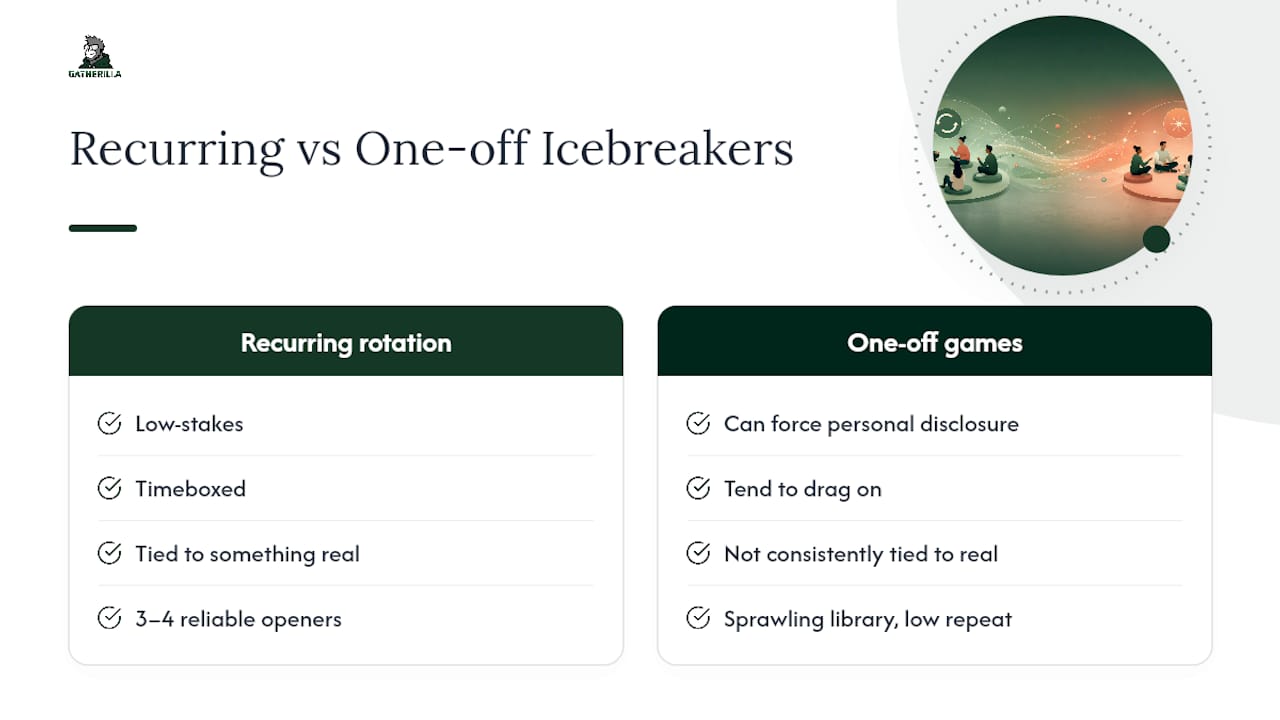
The strongest evidence on virtual icebreakers points to a specific formula: low-stakes, timeboxed, and tied to something real, according to Vantage Circle’s research on remote team engagement. Icebreakers that hit those three marks build inclusion; ones that drag on or force personal disclosure tend to backfire.
The bigger lesson from HR and engagement research is about repetition. A small rotation of three or four reliable openers builds habit far better than a sprawling library of one-off games, per Workhuman’s analysis of virtual meeting engagement. Teams that measure engagement with a quick pulse poll or Slack reaction thread after each session, rather than guessing, tend to stick with the practice longer.
That’s the exact gap Gatherilla was built to close. Its browser-based games run with zero downloads, work inside any video call, and rotate daily challenges automatically. For onboarding waves, weekly warm-ups, or a standing icebreaker rotation, it removes the planning burden entirely.
A Practitioner’s Checklist for the First Month
Getting icebreakers to stick is less about finding the perfect game and more about consistency. Week one, pick one opener and run it at the same meeting every time, so it becomes expected rather than a surprise. Week two, add a second short activity for team-specific calls. Week three, rotate facilitators so it’s not always the same person leading. Week four, check a quick pulse poll or count Slack reactions to see if energy actually shifted.
Keep opt-outs visible the entire time. A team that feels forced into disclosure disengages faster than a team with no icebreaker at all, and that’s the one mistake worth avoiding above everything else. For more structured formats to rotate in, this remote icebreaker guide is a solid next stop, and this take on sustaining remote team culture backs up why small consistent rituals outperform big occasional events.
— Thomas
Try Gatherilla for Recurring, Zero-Setup Team Games
Gatherilla is the fastest way to turn a one-off icebreaker into a repeatable habit without adding to your workload. There’s no download, no app to install, and no game to design from scratch. Open a browser, drop the link into your Zoom chat, and your team is playing within a minute, whether that’s a daily word challenge, a trivia rotation, or an onboarding game for a new hire’s first week.

HR teams use it for onboarding cohorts that need fast rapport, and team leads use it for a standing Friday warm-up that doesn’t require fresh planning every week. Built-in analytics show which games land and which ones don’t, so you’re not guessing at engagement the way you would with a manual icebreaker rotation. If your team’s icebreaker habit keeps dying after two weeks because someone forgot to plan the next one, that’s the exact problem this solves. Start a free trial at Gatherilla and run your first game before your next scheduled meeting.
Sources
For deeper libraries and structured formats beyond this guide, see Slido’s virtual icebreaker collection, TeamRetro’s icebreaker directory, and Krisp’s roundup of top Zoom icebreakers.
- 30 Icebreakers Perfect for Virtual and Hybrid Meetings
- Best Zoom Icebreakers for Remote Teams + Free Generator
- 135 Best Ice Breaker Questions for Virtual Meetings | Workhuman