

Virtual Meeting Games That Build Real Connection Fast
If you only have two minutes before a meeting starts, run a one-word check-in or a lightning scavenger hunt. Neither needs prep, both work for almost any group size, and both reliably pull energy into a room that’s staring at frozen video tiles. These are the kind of virtual meeting games that earn their spot on a packed agenda because they cost almost nothing and pay off immediately.
Here’s what to grab right now:
- One-word check-in (2 minutes, any size): everyone types one word describing their week into chat. No talking required, no one put on the spot.
- Lightning scavenger hunt (3 to 5 minutes, best under 20 people): call out an object (“something blue,” “a coffee mug”) and have people race to grab it and hold it to the camera.
- Emoji check-in (2 minutes, any size): ask each person to drop an emoji that matches their energy level, then invite one or two to explain their choice.
For teams running these more than once a week, a browser-based platform like Gatherilla removes the setup entirely. No downloads, no explaining the rules again, just a link that drops people straight into a game while the video call stays open.
Pro Tip: Post the instructions in chat before you explain them out loud. Half your group will read faster than you can talk, and it cuts confused silence in half.
Key Takeaways
The most effective virtual meeting games match strict time and group-size limits with a built-in opt-out, and platforms built for recurring use make that rotation sustainable long-term.
| Point | Details |
|---|---|
| Match game to timebox | Use quick openers under 5 minutes for daily standups and reserve 20 to 30 minute activities for monthly sessions. |
| Always include an opt-out | State explicitly that anyone can pass or watch, which protects psychological safety and participation rates. |
| Prefer browser-based tools | No-download options keep video and audio active, avoiding the tech friction that kills momentum mid-game. |
| Rotate to avoid fatigue | Repeating the same three activities burns out even a willing group; rotate formats every few weeks. |
| Use Gatherilla for recurring needs | Gatherilla’s browser-based games and daily challenges remove the weekly planning burden for HR teams and leaders. |
Table of Contents
- Quick Virtual Meeting Games Under 5 Minutes
- Energizers That Reset Attention in 5 to 10 Minutes
- Deeper Connection: Storytelling and Team Problem-Solving Games
- How to Pick and Run a Game Without Derailing the Meeting
- Tech Setup: Running Games Without Losing Video or Audio
- When Games Actually Help, According to the Evidence
- Running Games Across Time Zones and Cultures
- Troubleshooting Common Problems During Virtual Games
- Measuring Whether Your Games Are Actually Working
- What I’ve Learned Running Games at Scale
- Where Gatherilla Fits Into Your Weekly Rotation
- Frequently Asked Questions
- Sources
Quick Virtual Meeting Games Under 5 Minutes
Short openers work because they ask for almost nothing and give almost everyone a way in. The best ones share three traits: they take under five minutes, they don’t require a webcam-on mandate, and they give quieter people an escape hatch if they don’t want to speak. SessionLab’s collection of Zoom games is a useful reference for matching activity length to group size, and the same logic applies to almost any video platform.
Here are ten that consistently work:
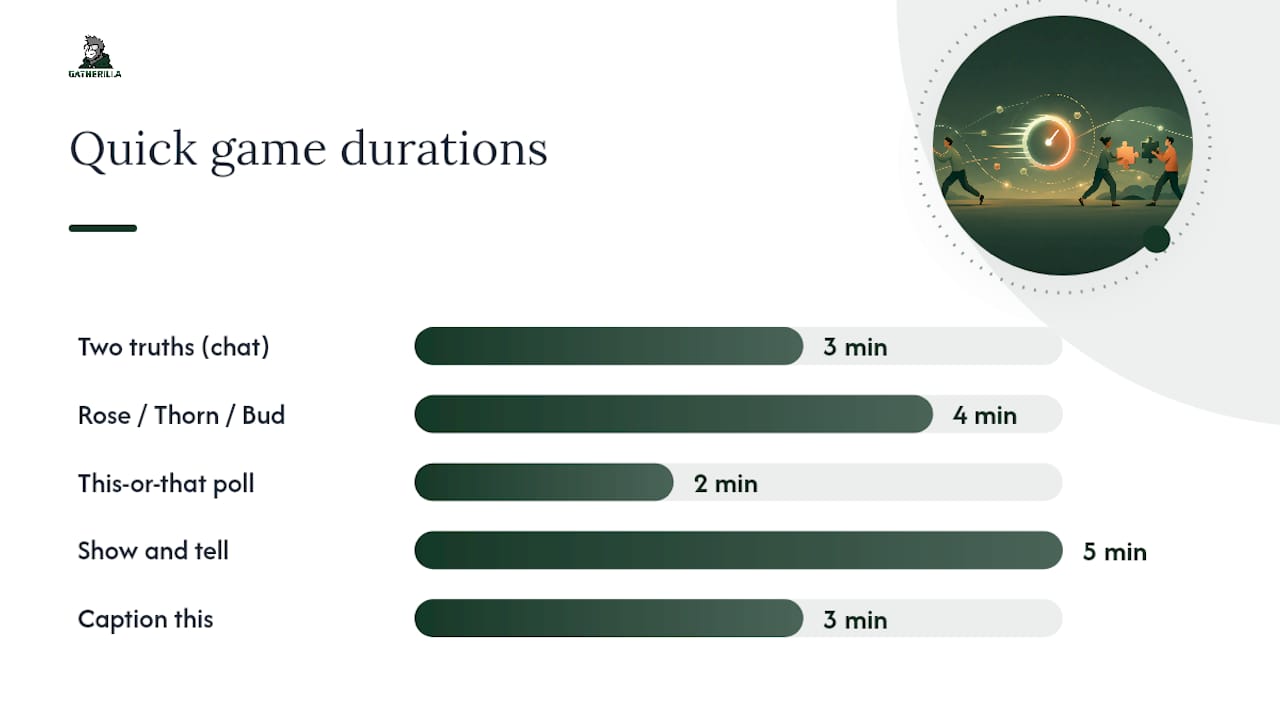
- Two truths and a lie (chat version). Three minutes, any group size. Everyone types three statements in chat, the group votes on which is false. Works because it rewards creativity over performance.
- Rose, thorn, bud. Four minutes, teams of 4 to 15. Each person shares one good thing, one challenge, one thing they’re looking forward to. Gives structure so people aren’t left improvising.
- Would you rather. Three minutes, any size. Ask a lighthearted either/or question and have people answer in chat or via reaction emoji.
- This or that poll. Two minutes, works for large groups. Built into most meeting platforms already, so there’s zero setup.
- Show and tell (30 seconds each). Five minutes, groups under 12. Ask people to grab something within arm’s reach and explain it. Low pressure because the object does the talking.
- Caption this. Three minutes, any size. Drop a funny or odd photo on screen and ask for captions in chat.
- Desert island object. Four minutes, groups under 20. One object you’d bring to a desert island, explained in one sentence.
- Weather report check-in. Two minutes, any size. Describe your mood as a weather forecast (“partly cloudy with a chance of coffee”).
- First job, worst job. Four minutes, groups under 15. People share their first job title in chat; leader reads a few out loud.
- Guess the sound. Three minutes, any size. Play a short audio clip and let people guess what it is.
Each of these scales down naturally for introverts because chat-based answers remove the spotlight. If someone doesn’t want to unmute, they still get to participate by typing. For groups over 25, skip anything that requires individual verbal answers and lean on polls, chat, or reaction emoji instead. Calling on 30 people one by one eats the clock and kills momentum.
A short script helps more than most leaders expect. Something like: “We’re doing a quick one-word check-in. Type a word that describes your week into chat, no explanation needed unless you want to add one.” That sentence removes ambiguity about whether speaking is required, which is often the real barrier to participation.
For teams that run standups daily, rotating through a small set of these openers beats picking a new one every time. Repetition builds a shared shorthand that speeds up the game itself. If you want a deeper library organized specifically around low-pressure formats, Gatherilla’s remote icebreaker guide breaks down which openers work best for shy groups versus outgoing ones. And if your team is more technical or skews toward fast, competitive formats, minute-to-win-it style challenges tend to land well with engineering and product teams specifically.
The common failure mode with quick openers isn’t picking a bad game. It’s running the same one too often without variation, or picking something that quietly requires camera-on participation from people who’d rather not. Watch for silence after you ask a question. That’s usually a sign the format demands more visibility than the group is comfortable giving.
Energizers That Reset Attention in 5 to 10 Minutes
Energizers exist to solve a specific problem: attention has cratered, but the meeting isn’t over. Run them right after a dense presentation or during the predictable midafternoon slump, not at the very start when people still have energy to spare.
- Virtual stretch break. 3 minutes. Leader shares screen with a simple stretch sequence, everyone follows along on camera. Quiet variant: ask people to just close their eyes and take three deep breaths instead.
- Speed networking pairs. 8 minutes. Send pairs into breakout rooms for 90 seconds each on a rotating question, then bring everyone back. Quiet variant: swap verbal pairs for a shared doc where each pair writes answers instead of talking.
- Chat-based charades. 6 minutes. One person describes a word using only chat messages (no talking), others guess. Naturally low-contact since it’s text-based already.
- Draw it. 7 minutes. Use a shared whiteboard tool, give everyone 60 seconds to sketch a prompt, then reveal. Quiet variant: let people submit drawings without narrating them live.
- Trivia sprint. 8 minutes. Five rapid-fire questions, answers submitted via poll or chat. Works well because it’s genuinely competitive without requiring anyone to be on camera.
- Name that tune. 5 minutes. Play 10 seconds of a song, first correct chat guess wins. Low contact by design.
- Object relay. 6 minutes. Give a category (“something that starts with the letter S”) and everyone races to find and show an object. Quiet variant: allow chat descriptions instead of camera reveals for anyone who prefers it.
- Two-minute dance break. 2 minutes. Play music, everyone stands and moves for the duration. Quiet variant: swap dancing for a stretch or a quick walk around the room, camera optional.
The timing rule matters more than the specific game. Run an energizer within the first two minutes after a slump becomes visible, not after it’s already cost you ten minutes of disengagement. Waiting too long means people have already checked their phones, and pulling attention back takes longer than it would have if you’d caught the dip early.
Pro Tip: Assign someone other than yourself to watch chat and camera engagement during long meetings. Leaders running the agenda rarely notice the slump until it’s already deep, because they’re focused on content instead of the room.

Deeper Connection: Storytelling and Team Problem-Solving Games
Longer activities ask for something quick openers don’t: a bit of trust. Ten to thirty minutes is enough time to move past small talk into shared problem-solving or genuine storytelling, but only if the group already has some baseline comfort with each other. Running a 20-minute vulnerability exercise with a team that’s never done an icebreaker before tends to backfire.
- Collaborative story building. 15 minutes. One person starts a story with a sentence, each person adds a line in turn. Debrief with: “What surprised you about where the story went?”
- Virtual escape room style puzzle. 20 to 30 minutes. Teams solve a series of linked clues using a shared document or whiteboard. Debrief with: “What role did you naturally fall into during the puzzle?”
- Team trivia (custom questions about teammates). 15 minutes. Questions are pulled from a pre-meeting survey about team members’ hobbies or history. Debrief with: “What’s one answer that surprised you?”
- This is my life in six photos. 20 minutes, groups under 10. Each person shares six photos representing their life story, others ask one question each. Debrief with: “What’s one thing you have in common with someone you didn’t expect?”
- Values auction. 20 minutes. Give each person fake currency to “bid” on values (honesty, humor, ambition) that matter most to them, then discuss the results. Debrief with: “Did anyone’s bids surprise you?”
- Desert island team challenge. 25 minutes. Groups collaboratively rank ten survival items and justify the order, then compare answers across teams. Debrief with: “Where did your team disagree, and how did you resolve it?”
- Appreciation circle. 15 minutes, groups under 12. Each person names one thing they appreciate about the person to their “right” (in speaking order). Debrief with a simple thank-you round, no forced reflection needed.
Facilitation matters more here than in shorter games. Pacing a 25-minute activity means checking in around the halfway mark to confirm groups are on track, not waiting until time’s nearly up to discover one breakout room is stuck. Psychological safety also depends on making the stakes explicit up front: tell people this is a low-stakes creative exercise, not a performance review of their communication skills. A single sentence like “there’s no wrong answer here, we’re just building something together” does real work in lowering guardedness before the activity even starts.
Groups new to these formats do better starting with something structured, like trivia or the story-building exercise, before moving to anything that asks for personal disclosure like the six-photos activity. Trust builds in layers, and skipping straight to vulnerability with a team that barely knows each other usually produces awkward silence instead of connection.
How to Pick and Run a Game Without Derailing the Meeting
Choosing the right activity comes down to four questions: how much time do you actually have, how big is the group, what’s the current energy level, and does everyone in the room have an equal way to participate. A 20-person all-hands calls for poll-based games, not breakout rooms that require you to herd people back on time.
Before you launch anything, run through this checklist:
- Introduce the rules in one or two sentences, then repeat them in chat so no one has to ask what’s happening.
- Set a visible timebox and say it out loud: “We’ve got five minutes for this.”
- Have a backup plan if tech fails. If breakout rooms won’t load, drop to a chat-based version of the same idea.
- Always include an opt-out. Say explicitly that anyone can pass or just watch, no explanation required.
- State why you’re doing it. One sentence connecting the game to a real goal (“this helps us get to know the new hires”) makes it feel less like filler.
Three scripts worth stealing:
“We’ve got five minutes before we dive in. Type one word in chat describing your week, no explanation needed unless you want to add one.”
“Quick energizer before we get back to the roadmap. Grab something on your desk that’s a color, any color, and hold it up. You’ve got 30 seconds.”
“This next activity is optional and takes about 20 minutes. If you’d rather sit this one out and just listen, that’s completely fine.”
Pro Tip: If you’re not sure whether a group is ready for a longer bonding activity, run a 5-minute version first and watch the energy. If people lean in and keep talking after time’s up, you’ve got the green light for something longer next time.
Tech Setup: Running Games Without Losing Video or Audio
Browser-based games beat downloadable apps for one practical reason: nobody has to install anything, and the video call stays the primary window the whole time. Expert facilitators generally prefer overlay tools that don’t require a download, because switching windows to launch an app tends to knock out someone’s camera feed or mute their mic without them noticing.
Most quick games don’t need a separate tool at all. Microsoft Teams already has polls, breakout rooms, and reactions built in, which covers the majority of quick openers and energizers listed above. For anything more involved, like a puzzle or trivia game with a visual board, a companion browser tab or second device works better than trying to cram everything into the call itself. PartyRoomGames’ model is a good example: participants keep the video grid open on their laptop while playing on a phone or second tab, so faces and reactions stay visible the entire time.
A short setup checklist before you launch anything:
- Confirm the game link works in a private/incognito window (some corporate firewalls block certain domains).
- Ask if anyone needs a text-based alternative instead of a visual or audio-based prompt.
- Check that closed captions are on for anyone who needs them.
- Have a no-camera option ready for every activity, stated upfront rather than left implicit.
Teams using Microsoft Teams for team building specifically benefit from leaning on native features first, since they require zero extra logins or links.
When Games Actually Help, According to the Evidence
Structured connection rituals do measurable work. Research on remote employees shows that consistent, structured opportunities to connect reduce loneliness and strengthen workplace relationships, particularly when those opportunities happen before or during regular meetings rather than as separate, optional events. Harvard Business Review makes a similar point about deliberate social rituals: recurring, small rituals build real relationships more reliably than occasional big events do.
The practical implication for HR leaders is frequency over intensity. One or two brief activities per meeting, done consistently, tend to build psychological safety more effectively than an elaborate quarterly team-building event that happens once and gets forgotten.
Structured icebreakers correlate with stronger psychological safety and better cross-functional relationships when leaders mix quick daily energizers with longer collaborative sessions reserved for team-building meetings, rather than treating every meeting the same way.
A few rules worth following on rotation:
- Run a quick opener at the start of most recurring meetings, not just occasionally.
- Reserve longer bonding activities for monthly or quarterly sessions where the agenda allows extra time.
- Rotate games regularly so the same three people aren’t always dominating the same format.
- Track which activities get genuine engagement versus polite silence, and drop the ones that consistently flop.
Platforms designed for recurring use, including daily challenge formats like the ones Gatherilla runs, make this rotation easier to sustain without a leader having to plan something new every single week.
Running Games Across Time Zones and Cultures
A game that lands well with one team can fall flat with another, and the difference is usually cultural, not a flaw in the activity itself. Some teams find rapid-fire personal disclosure (favorite childhood memory, most embarrassing moment) uncomfortable in cultures where sharing personal details with colleagues isn’t the norm. Swap those for lower-disclosure formats like trivia, this-or-that polls, or object-based games that don’t ask anyone to reveal anything personal.
Time zones create a separate problem: energy levels vary wildly depending on whether it’s 8 a.m. or 9 p.m. for a given participant. A high-energy dance break might work great for the group that’s mid-morning and land terribly for the person joining at what’s effectively their bedtime. Building in a quiet, low-movement alternative for every energizer (as covered in the energizers section above) solves this without singling anyone out.
Language also matters more than most leaders account for. Wordplay-heavy games like puns or rhyming categories favor native speakers and can quietly exclude non-native English speakers from full participation, even when everyone technically understands the instructions. Visual and object-based games (show and tell, desert island object, draw it) travel across language barriers far better than anything relying on wordplay or idiom.
When in doubt, ask your team directly what’s worked and what hasn’t. A two-question survey (“what’s your favorite virtual game we’ve run” and “is there anything you’d rather we not do again”) takes five minutes to build and saves a lot of guesswork about what actually lands with your specific group.
Troubleshooting Common Problems During Virtual Games
The most common failure isn’t a bad game choice. It’s a technical hiccup that derails momentum before the activity even gets going. A few problems come up often enough to plan around.
Breakout rooms that won’t load or assign correctly. Have a chat-based fallback ready before you start. If breakout rooms fail, run the same activity as a simple pair-up in the main room using private chat messages instead.
Screen share lag during whiteboard or drawing games. Keep a backup plan of switching to a shared document (Google Docs, for instance) that loads faster than a live whiteboard tool on a slow connection.
Someone’s audio or video drops mid-game. Don’t stop the whole activity to troubleshoot one person’s connection. Keep going, and loop them back in verbally once they’ve reconnected.
A game link gets blocked by a corporate firewall. This happens more than expected with browser-based tools. Test any new link in advance, ideally from a work laptop, not just your personal device.
Latency makes “first to answer” games unfair. Poll-based games with a locked submission window are more equitable than “type it in chat first” formats, since network speed varies wildly between participants.
The fix for most of these is the same: always have a text-based, low-tech version of whatever you’re running as a fallback. It’s rarely as fun as the original, but it keeps the meeting moving instead of grinding to a halt while someone reboots their Wi-Fi.
Measuring Whether Your Games Are Actually Working
Engagement is easy to measure and easy to get wrong at the same time. Camera-on counts don’t tell you much on their own, since some people are camera-shy regardless of how good the activity is. Better signals include chat activity during the game, how many people volunteer answers unprompted, and whether conversation continues informally after the activity officially ends.
A simple post-meeting pulse check works better than a formal survey for most teams. Ask one question, either verbally or in a quick poll: “Was that worth the five minutes?” Track the answer over a few weeks and you’ll start to see patterns in which formats consistently land and which ones people tolerate rather than enjoy.
Watch for a few concrete signs of success: people referencing the game later in the week, unprompted requests to repeat a specific activity, or a visible shift in energy on video immediately after running it. Signs it’s not working include silence when you ask for volunteers, the same two or three people always answering, or people muting and turning cameras off right as the activity starts.
For teams tracking this more formally, some platforms provide built-in analytics on participation rates and repeat engagement, which removes the guesswork of trying to eyeball energy levels across dozens of remote faces on a grid.
What I’ve Learned Running Games at Scale
The biggest mistake I keep seeing is optimizing every game for the loudest, most extroverted person in the room. That approach makes for a great highlight reel and a mediocre team experience, because the quieter half of your group checks out and never says why.
Three anti-patterns to drop immediately: leaning on activities that require camera-on verbal answers as the default, skipping the timebox and letting a five-minute game eat fifteen, and never explicitly offering an opt-out even when you assume people know they have one.
Try this next meeting: pick one opener from the quick list above, state the opt-out out loud before you start, and watch who participates who normally wouldn’t. That’s the real signal worth tracking.
Where Gatherilla Fits Into Your Weekly Rotation
Running a fresh game every meeting sounds simple until you’re the one scrambling for an idea five minutes before your Monday standup, for the twentieth week straight. That’s the actual problem most HR leaders and team leads run into: not a lack of good games, but the ongoing effort of picking, explaining, and running one, week after week, without burning out on the planning.

Gatherilla solves that by turning the whole process into a link. There’s nothing to download, no app for IT to approve, and no explaining the rules from scratch each time since your team already knows the format. Weekly standups get a two-minute daily challenge baked in, and new hires get dropped into onboarding-specific games that give them a low-stakes way to meet the team in their first week instead of sitting silently through introductions. Built-in analytics show which games actually get people participating versus which ones people quietly tolerate, so you’re not guessing at what’s landing.
If your team runs recurring meetings and you’re tired of reinventing the wheel every week, check out Gatherilla’s platform and see how a five-minute setup replaces the planning you’re doing right now.
Frequently Asked Questions
What are the best virtual meeting games for large groups?
Poll-based games, chat-based trivia, and this-or-that questions scale best past 20 people, since they don’t require calling on individuals one by one. For groups over 30, avoid anything that needs verbal answers from each participant. A large-group icebreaker guide covers formats built specifically for this scale.
How long should Zoom icebreakers last?
Most quick openers work best under 5 minutes, and energizers should stay in the 5 to 10 minute range to avoid eating into agenda time. Longer bonding activities can run 20 to 30 minutes, but only for meetings where that time is explicitly budgeted.
Do virtual meeting games need a downloadable app?
No. Built-in features like polls and breakout rooms in tools such as Microsoft Teams cover most quick games, and browser-based companion platforms handle anything more visual without requiring a download.
How often should teams run icebreakers for virtual meetings?
Running one or two brief activities per meeting, consistently, tends to build stronger relationships than occasional elaborate events. Daily standups suit a 2 to 5 minute opener, while monthly or quarterly meetings can support a longer bonding activity.
What’s the best way to include introverts in Zoom icebreaker games?
Offer a chat-based or written alternative to any verbal or camera-on activity, and state the opt-out clearly before starting. Object-based and poll-based games also tend to feel lower-pressure than anything requiring spoken answers.
Sources
- 20 fun games to play on Zoom (SessionLab)
- How remote workers build relationships (Georgia State University news)
- How to build real relationships at work (Harvard Business Review)
- Microsoft Teams features (product page)
- PartyRoomGames — browser-based video-call games
Recommended
- Virtual Minute to Win It: Best Games for Remote Teams | Gatherilla Blog
- Morning Meeting Games for Remote Teams: 2026 Guide | Gatherilla Blog
- Team Building Games for Microsoft Teams (That Actually Work in a Call) | Gatherilla Blog
- Virtual Halloween Games for Remote Teams: Low-Prep Ideas | Gatherilla Blog