

Onboarding Quiz Ideas That Help New Hires Connect

The best onboarding quiz does two jobs at once. It shows a new hire how the company works, and it gives them a reason to talk to the people they will work with. Quizzes that only test policy recall do the first job badly and skip the second. Quizzes built around people, stories and real scenarios do both, in 10 to 15 minutes, with no pressure.
Below you will find seven formats you can run this week, sample questions for each, advice on timing and remote delivery, and how to keep the whole thing welcoming. A browser-based game platform like Gatherilla can run these formats for you, so you spend your time on the content instead of slides and scoring.
TL;DR
- Mix three kinds of questions: people (who is who), company (how we work) and scenario (what would you do). Pure trivia connects, scenarios check understanding.
- Keep each quiz to 5 to 15 minutes, run it inside a meeting that already exists, and make it team-based so no newcomer is alone in the spotlight.
- Run a longer knowledge quiz at the end of week one, then review missed questions with a buddy or manager instead of grading.
- Structured onboarding pays off: SHRM reports that employees are 58% more likely to stay three years with it.
- Keep it going after day one with a short daily challenge, so connection becomes a habit.
Table of Contents
- Why a quiz works better than another welcome slide
- Seven onboarding quiz formats to run
- A simple structure for a 15-minute onboarding quiz
- Running it in a remote meeting
- Keeping it welcoming and personal
- After day one: make it a habit
- Common mistakes to avoid
- Run these quizzes with Gatherilla
- Our perspective
- FAQ
- Sources
Why a quiz works better than another welcome slide
Most new hires get information in bulk and connection by accident. A Gallup poll reported by SHRM found that only 12% of U.S. employees strongly agree their company does a good job onboarding. The same article describes one company whose four-hour, policy-only orientation felt so penalizing to new employees that it became a lesson in what not to do.
A quiz flips that format. Instead of listening, the newcomer guesses, laughs at a wrong answer, and learns a name attached to a story. That is a small thing, but small things add up. The same SHRM Executive Network piece cites a Click Boarding study finding new hires are 50% more productive with standardized onboarding, and notes that buddy-paired new hires were 36% more satisfied in one Microsoft program.
For remote teams, the case is stronger still. A Harvard Business School study of 1,370 summer interns, reported in HBS Working Knowledge, found that interns who joined informal virtual watercooler sessions with senior managers were 4.7 to 7.3% more likely to be offered a job and reported 3 to 5% higher job satisfaction than interns who only sent written questions. A light quiz is an easy structure for exactly this kind of informal contact, because nobody has to think of something to say.
Seven onboarding quiz formats to run
1. Who said that?
Before day one, ask teammates for a memorable or funny quote, a favorite work-from-home habit or a one-line bio. In the session, the new hire matches each quote to a colleague. Teammates reveal the story behind it after each guess.
Why it works: the newcomer learns who is who without a stiff round of introductions, and the existing team gets to be a little silly. Keep quotes kind and work-safe, and ask permission from each person first.
Sample prompts:
- “Which teammate once joined a call from a parked car because the home internet died?”
- “Who describes their ideal Friday as ‘zero meetings and one good playlist’?”
- “Who has been here longest, and what did the first project look like?”
2. Company story trivia
This is the classic: founding story, products, customers, milestones. The risk is that it turns into a history exam. Keep it to five questions, make each answer a one-sentence story, and write questions with a surprising answer.
Sample questions:
- What was the very first product or service we sold?
- Which city or country is our oldest customer in?
- What was the original name of the company, or of our flagship product?
- Which team shipped the project we are proudest of this year?
- What is the one value we use to settle disagreements?
If you want ready-made structures, our company trivia templates fit 15 to 20 minutes, and the virtual team trivia playbook covers rounds and scoring.
3. Unwritten rules quiz
The SHRM retention article advises explaining the unwritten rules, not only the org chart. A quiz is a friendly way to do it. Ask multiple-choice questions where every option sounds plausible.
Sample questions:
- When a message is urgent, where do we post it: a direct message, the team channel, or email?
- How far ahead do we usually share a draft before a review meeting?
- Which of these is normal here: turning your camera off during a long call, blocking focus time on your calendar, or both?
- Who do you ask first when you are stuck: your manager, your buddy, or the channel?
There are no wrong answers in spirit, only a chance to say “here is how we actually do it.”
4. Scenario quiz
Trivia checks whether someone remembers a fact. A scenario checks whether they can use it. Company quiz guidance from Flipsnack recommends scenario-based questions over trivia to check real understanding, and suggests running the quiz at the end of week one or after the first training block.
Sample scenarios:
- A customer writes in angry about a late delivery. Which of these three replies matches our tone?
- You notice a typo in a file that is already shared with a client. What is the first step?
- You need access to a tool you do not have. Where do you request it?
The key is what happens next. Review the missed questions together with a buddy or manager and turn each one into a small plan, such as “review tags and permissions on Thursday.” The quiz becomes a map of what to learn next, not a grade.
5. Light icebreaker trivia
These are the low-stakes questions that make people laugh and reveal personality. Use them at the start of a meeting.
- What is your go-to productivity tool?
- What is the first thing you do when you start work?
- Which snack keeps the team going?
- Which has the better view: your desk or your window?
- Pick one: mountains or beach, early bird or night owl, call or message.
For more, see our list of new hire icebreakers and the remote icebreaker games guide.
6. Two truths and a lie, and this-or-that
These are quiz formats in disguise. Deel suggests Two Truths and a Lie at about 10 minutes, This or That at about 5 minutes with answers in chat or on camera, and Word Association at 5 to 10 minutes. All three fit at the start or end of an existing meeting, so no extra session is needed.
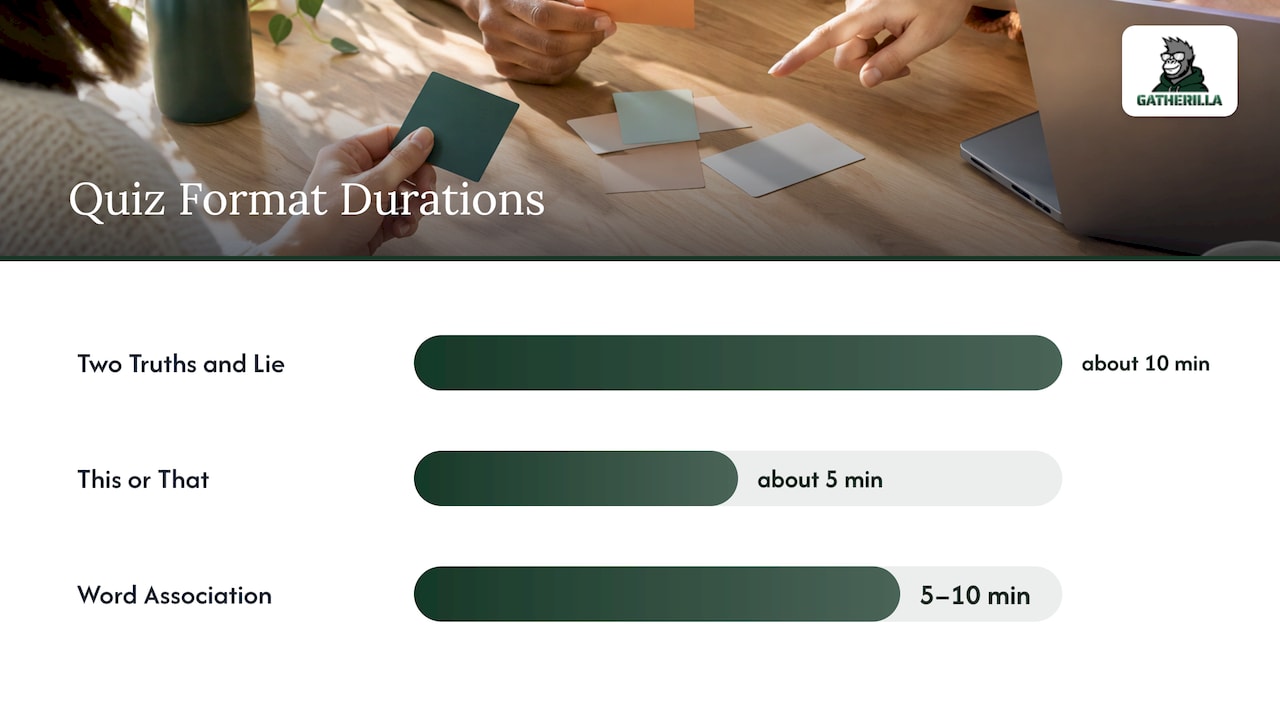
For a new hire, this is the lowest-pressure way in. They can share a lie that is easy to spot or a fun truth, and the group does the guessing.
7. Team-versus-team knowledge round
Split the group into small teams and mix tenured people with new ones. Ask a mix of people, company and scenario questions. Because answers are shared, a newcomer who does not know something is never exposed, and a veteran gets to explain. Use a leaderboard for energy, but keep the prize symbolic.
A simple structure for a 15-minute onboarding quiz
If you want one plan to copy, use this:
| Minutes | Round | Purpose |
|---|---|---|
| 0 to 3 | Warm-up: this-or-that or an icebreaker question | Get every voice in the room |
| 3 to 8 | People round: who said that, or who is who | Attach names to stories |
| 8 to 12 | Company and unwritten rules round | Share how things actually work |
| 12 to 15 | One scenario, discussed aloud | Show how to apply what was learned |
If you are asking what rounds to put in a quiz, this is the answer for onboarding: a warm-up, a people round, a company round and one scenario. Add a bonus question at the end that the newcomer writes for the team. It hands them a turn at being the expert.
Running it in a remote meeting
Remote delivery needs a little more structure, because silence is harder to read on a call. SessionLab’s guidance for virtual icebreakers is a good checklist:
- Timebox it. Say upfront that this takes ten minutes, then stick to it.
- Go first. Model a short, honest answer so the newcomer knows the right size of response.
- Invite, do not force, cameras. Make it easy to join, and give positive feedback to every answer.
- Use breakout groups for larger meetings. The advice is to split groups over roughly 10 to 15 people.
- Let each person choose who answers next. This keeps the conversation moving between teammates, not through the host.
Two more habits help. Share the questions in the meeting chat so people on a weak connection can follow, and keep scoring visible but light. If a new hire is quiet, ask a team to answer instead of a person.
The tool matters here too. Any game you pick should open in a browser, work with whichever video conferencing tool your company uses, and not make a new hire install anything on their first day. That is how we built Gatherilla: games run in the browser with no downloads and work with all video conferencing tools.
Keeping it welcoming and personal
A quiz is only fun if the newcomer feels safe. Three habits make the difference.
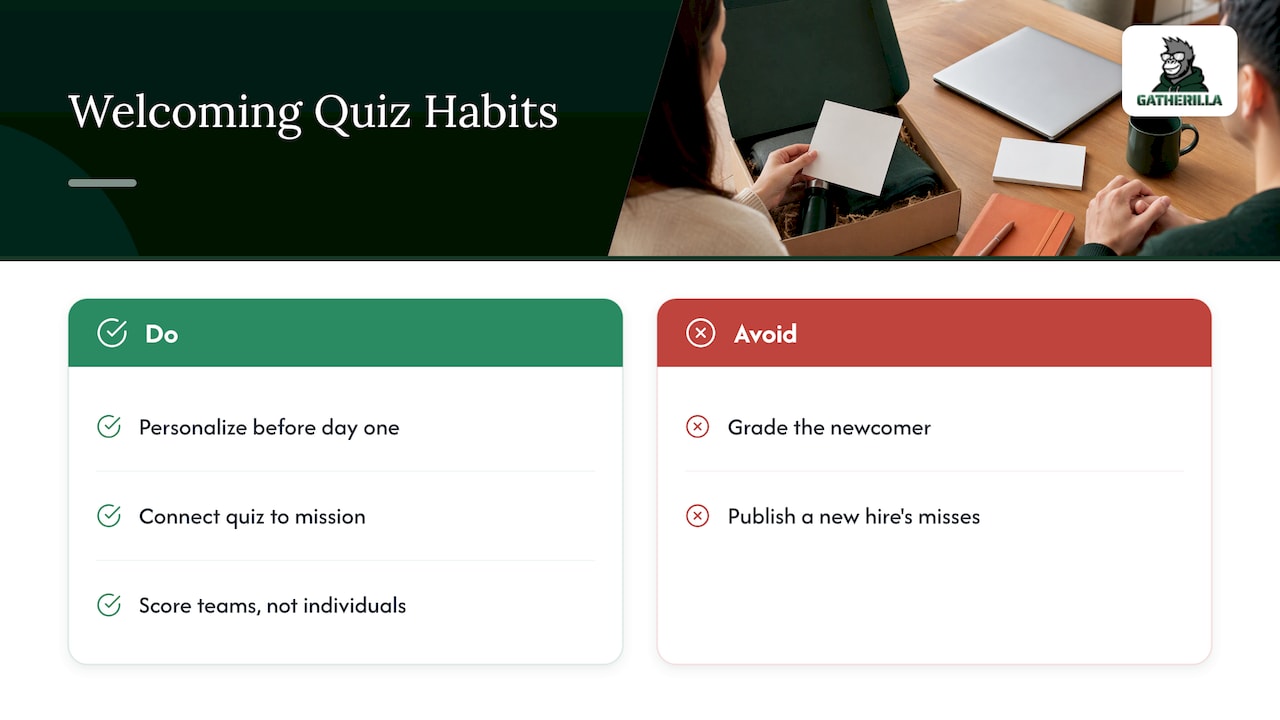
Personalize before day one. Send a short survey asking what the new hire likes to be asked about, such as hobbies, a hometown or a skill. If you want help writing good questions, this guide to effective survey questions is a practical start. Use the answers to write a question about them, so they are a character in the quiz, not only a contestant.
Connect the quiz to the mission. The SHRM retention article quotes a Gallup consultant saying successful onboarding helps employees learn what makes the company unique and how their job fulfills the mission. One mission question per quiz, such as “which of our customers did this project help?”, does more than ten facts about office policies.
Do not grade the newcomer. Score teams, not individuals, and never publish a new hire’s misses. Treat a wrong answer as a prompt for the buddy conversation. Our guide to onboarding buddy activities shows how to pair that follow-up with the first 90 days.
After day one: make it a habit
A single welcome quiz fades fast. The people who stay connected are the ones who keep seeing their teammates in light, repeated moments. A few ways to do it:
- Open weekly team meetings with a 5-minute this-or-that or word association round.
- Run a monthly company trivia round where the newest hire writes a question.
- Use a daily word or trivia challenge, so the team has a shared two-minute routine and a running leaderboard.
- Ask managers to hold informal, non-agenda sessions with new remote hires. The HBS authors’ takeaway was that regular informal contact with managers is especially valuable for newly hired workers, and one of them advised managers to go to their remote workers first.
If your team is technical, see our developer team icebreakers for question styles engineers tend to enjoy.
Common mistakes to avoid
- Too many questions. Five to eight well-chosen questions beat thirty. People remember the stories, not the count.
- Insider jokes only. A question that only tenured staff can answer makes a newcomer feel further outside. Add context to every answer.
- A quiz as the only onboarding. Pair it with a buddy, a manager check-in and meaningful early work.
- Real prizes that create stress. A shared reward, such as choosing the next meeting’s icebreaker, keeps the tone friendly.
- No follow-up. Always end by asking the new hire what they want to learn next.
Run these quizzes with Gatherilla
If you want to run these formats without building slides and keeping score by hand, Gatherilla gives remote and hybrid teams customizable multiplayer games, onboarding games for new employees, icebreakers for meetings, daily word and trivia challenges and real-time leaderboards. Everything runs in the browser and works with all video conferencing tools.
The Free plan lets you start with limited games. Premium adds more games, analytics, reporting and priority support, at $0.50 to $1.00 per seat per month or $5 to $10 per seat per year. See the plans and pricing, or start from the Gatherilla home page. For more game ideas, read our virtual onboarding games guide.
Our perspective
Most onboarding fails quietly. Nobody is rude to the new hire, but nobody is memorable either. The first week is a pile of documents and logins, and the newcomer leaves it knowing the tools and not the people.
We think quizzes are one of the cheapest ways to fix that, as long as they are built around people and not policies. A good question gives a teammate a chance to tell a story. A good game gives a new hire a reason to laugh with the team on day two.
That is why we built Gatherilla around zero-preparation games, no downloads and a daily challenge. A one-off welcome event is nice, but connection builds when it is a routine. When a team plays a short round together every day, the newest person is already part of the habit, and peer recognition tied to your company values can grow from there.
If you take one thing from this article, take this: run a short quiz in the first week, make it about people as much as facts, and keep it going afterward.
Thomas
FAQ
What are good onboarding trivia questions for new hires?
Mix three types: people questions (who said this, who has been here longest), company questions (our first product, our oldest customer) and light icebreakers (favorite snack, go-to productivity tool). Add one scenario question about a real situation. Five to eight questions are plenty for a 15-minute session.
When should I run an onboarding quiz?
Run a light, people-focused quiz in the first days, ideally in a meeting that is already scheduled. Run a knowledge or scenario quiz at the end of week one or after the first training block, then review any missed questions with a buddy or manager. Short follow-up rounds after that keep the connection going.
How do I include everyone in a remote quiz?
Timebox the session, go first to show the size of answer you want, and use small teams so no one is alone on the spot. For groups larger than about 10 to 15, use breakout groups. Let each person pick who answers next so the conversation moves between teammates.
Should onboarding quizzes be scored?
Score teams and keep the stakes playful. Avoid ranking new hires individually or sharing their misses. Use the results to build a short learning plan with the new hire instead.
Can I use the same quiz for every new hire?
Reuse the company and unwritten rules rounds, since they stay the same. Rewrite the people round each time so it features the newcomer and their new teammates. A short pre-start survey gives you the material.
Sources
- Onboarding: The Key to Elevating Your Company Culture (SHRM Executive Network)
- How to Reduce Employee Turnover Through Robust Retention Strategies (SHRM)
- Managers, Here’s How to Bond with New Hires Remotely (HBS Working Knowledge)
- Company Quiz Templates for Onboarding, Culture, Team
- 32 engaging ice breakers for virtual meetings
- 20 Non-Cheesy Five-Minute Virtual Team Building Activities
- How to Create Effective Surveys for Actionable Insights