

Fun Friday Activities Online: 15 Ideas That Work

The best online Fun Friday activities are short, need no preparation and let everyone join without installing anything: a 10-minute trivia round, a team word puzzle, a round of Two Truths and a Lie, or a shared lunch on camera. Pick one format, run it at the same time every week, and keep it optional. Below you will find 15 ideas sorted by time, a way to choose between them, and the research on why a Friday ritual is worth the effort.
TL;DR
- Under 15 minutes works best. Short, repeatable activities get higher turnout than a long Friday event that people have to plan around.
- Rotate between three types: quick games, conversation prompts, and a shared break such as a virtual lunch.
- Choose browser-based activities. If people must download an app or create an account, half the team will skip it.
- Keep it optional and camera-flexible. Videoconference fatigue is real, and a Friday game should not add to it.
- Consistency beats novelty. The same slot every week builds a habit faster than a big one-off event.
Table of Contents
- Why Friday is the right day for this
- How to choose an activity
- Quick activities (5 to 10 minutes)
- Medium activities (15 to 30 minutes)
- Longer activities (30 to 60 minutes)
- Best lunch break games online
- Make it comfortable, not compulsory
- A simple monthly rotation
- Perspective: why we think a daily habit beats a Friday event
- Run Fun Friday with Gatherilla
- How to launch your first Fun Friday
- FAQ
- Sources
Why Friday is the right day for this
Friday afternoons are the slowest stretch of the work week for most teams. Deep work is winding down, inboxes are quiet, and nobody wants another status meeting. That makes it the one slot where a light team activity feels like a relief rather than an interruption.
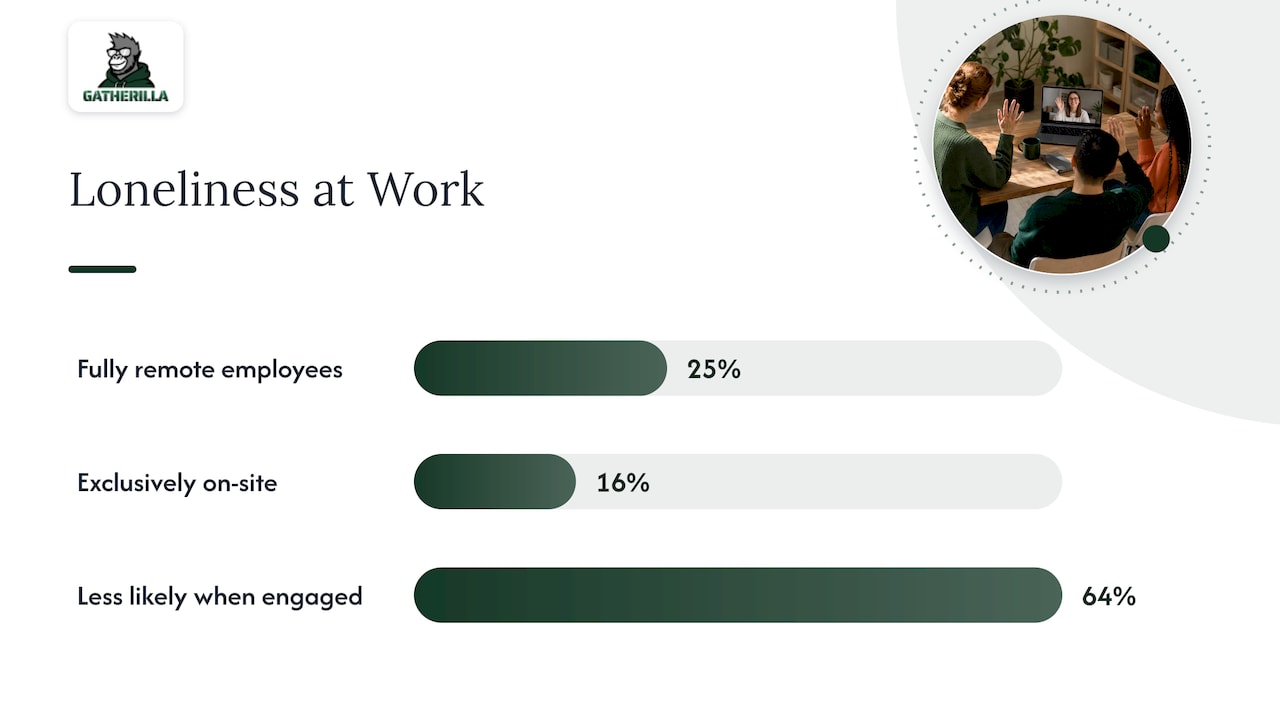
For remote teams there is a more serious reason. Gallup reports that 25% of fully remote employees experience loneliness, compared with 16% of those working exclusively on-site. The same data shows that engaged employees are 64% less likely to report loneliness. A weekly ritual will not solve isolation alone, but it gives people a predictable moment of contact that is not about tasks.
Gallup’s work on friendship at work points the same way. Its research on having a best friend at work links those relationships to retention and to lower loneliness, and it recommends that leaders support friendships with social events that give people time to chat. Fun Friday is a low-cost version of exactly that.
How to choose an activity
Before you pick from the list, answer four questions.
- How much time do you really have? Most teams can protect 10 to 15 minutes. Few can protect an hour every week.
- How well do people know each other? New teams need low-stakes prompts. Established teams enjoy competition and inside jokes.
- How many time zones? If your team spans several, choose activities people can play asynchronously, such as a daily puzzle with a shared leaderboard.
- How tired is everyone of video? If the answer is “very”, choose games where people can keep the camera off and play in a browser tab.
That last point matters. A study of 279 meetings, published in the Journal of Applied Psychology, found that group belongingness was the most consistent protective factor against post-meeting fatigue, along with turning off the microphone when you are not speaking. In other words, a game that makes people feel part of the group can leave them less drained than a silent status call.
Quick activities (5 to 10 minutes)
These fit before a Friday standup, at the end of a weekly meeting, or in a lull on a Friday afternoon.
1. Daily word or trivia challenge
Everyone solves the same puzzle on their own time, then compares scores on a leaderboard. It takes five minutes, needs no facilitator, and gives people something to tease each other about in chat. This is the format we built Gatherilla around.
2. Something in Common
Split into small breakout groups for three minutes and find one thing everyone shares that is not work and not obvious. “We all have a sibling” does not count. “We all have burned toast this month” does. Then each group reports back.
3. Two Truths and a Lie
A classic for a reason. Each person shares three statements, and the team votes in chat on which one is false. Limit it to three or four people per session so it stays brisk.
4. One-word check-in
Everyone types one word for their week into the chat and hits enter at the same time. It is fast, it surfaces mood, and it works for large groups.
5. Desk show and tell
Ask everyone to bring one object within arm’s reach and explain it in 30 seconds. It shows people’s homes and personalities without anyone preparing anything.
Medium activities (15 to 30 minutes)
These suit a team that has agreed to protect a regular Friday slot.
6. Virtual Minute to Win It
Short physical challenges using household items, each timed at 60 seconds: stack cups, move cotton balls with a straw, balance a pen. People compete live while teammates cheer. Our guide to virtual Minute to Win It games lists the challenges that work on camera.
7. Draw and guess
One person draws on a shared whiteboard or in a browser drawing game while the others guess. Keep rounds to 60 seconds. The worse the drawings, the better the game.
8. Virtual bingo
Use a custom card with things like “has a pet on camera” or “mentions weekend plans”. Play it during a regular meeting, so it costs no extra time.
9. Team trivia
Build categories around your company, your industry and pop culture. Mix easy and hard questions so that new hires and veterans both score. Teams of three or four make it more social than solo play.
10. Bucket list share
Each person names one thing they want to do before the year ends and why. It starts conversations that last well past Friday.
11. Fast Friends questions
This one rests on evidence. Researchers at the Wharton Neuroscience Initiative adapted an exercise called Fast Friends for remote teams, in which pairs take turns answering questions that gradually become more personal. Start with “What was the best meal you had this month?” and move to “What is something you are looking forward to?” Let people pass on any question.
Longer activities (30 to 60 minutes)
Save these for monthly or quarterly sessions rather than every Friday.
12. Virtual escape room or scavenger hunt
Both work well in teams of four to six. A home scavenger hunt, where players race to find items that match a clue, needs no software at all.
13. Show-and-tell talent hour
People share a hobby, a recipe or a skill for five minutes each. It turns a Friday into a chance to learn what colleagues do outside work.
14. Movie or video watch party
Pick a short film or a funny compilation and chat alongside. The activity is passive, so it suits a tired team.
15. Virtual lunch
This may be the most effective idea on the list. Gallup’s analysis of the remote work paradox found that fully remote workers are more engaged yet more likely to report loneliness, and it suggests that leaders schedule virtual time that mimics on-site informality, such as remote lunches where the employer covers the cost. Games help, but a shared meal does something games cannot.
Best lunch break games online
If your team wants something for the lunch hour instead of a Friday-afternoon block, the rules change slightly. People are eating, they might be away from the desk, and they did not sign up for a performance.
Good lunch break formats:
- Daily word or trivia rounds. People can play with a sandwich in one hand and still compete.
- Chat-based games. Caption contests, “guess the photo” and one-word stories need no camera or audio.
- Drop-in table. Open a video room at lunchtime with no agenda. A few people will come, and that is fine.
- Group puzzles. A crossword or jigsaw that everyone chips away at over the week.
Avoid anything that needs equipment, loud setup or a long explanation. If you need more than 30 seconds to explain the rules, it is not a lunch game.
Make it comfortable, not compulsory
The fastest way to kill Fun Friday is to make it feel mandatory. A few habits help.
- Make it opt-in and say so. People who skip should not need an excuse.
- Let cameras stay off for game formats that do not need faces.
- Respect introverts. Offer typed responses alongside spoken ones.
- Rotate who hosts. When leaders run it every week it feels like a meeting. When the role rotates it feels like a club.
- Keep personal questions optional. People disclose more when they choose the depth.
Some Friday formats drift into more personal territory, especially anything like Fast Friends. If you are a manager who wants to be ready for the moments where a light chat turns serious, a short written plan helps, and this one-page brief for rehearsing difficult conversations shows how to prepare one.
Research on global virtual teams adds a useful nuance. A survey of 148 participants found that both digital nudges and team-based interventions support psychological safety, and that team-based interventions were even more effective for high-context, indirect communicators. If your team is international, mix recurring prompts with a few live, facilitated sessions rather than relying on one format.
A simple monthly rotation
If you do not want to think every Friday, use this pattern.
| Week | Format | Time | Good for |
|---|---|---|---|
| 1 | Daily challenge with a leaderboard | 5 to 10 min | Everyone, any time zone |
| 2 | Conversation prompt (Something in Common or Fast Friends) | 15 min | Building trust |
| 3 | Live game (trivia, draw and guess, Minute to Win It) | 20 to 30 min | Energy and laughter |
| 4 | Virtual lunch or talent hour | 30 to 45 min | Depth and relationships |
Post the plan at the start of the month so people know what to expect. Predictability is part of what makes the ritual feel safe.
Perspective: why we think a daily habit beats a Friday event
We build for remote and hybrid teams, and the pattern we see repeats: a team launches a big Fun Friday, attendance is great for three weeks, and then it fades because it depends on someone organizing it. The events that survive are the ones that cost almost nothing to run.
That is why we focus on zero-preparation, browser-based games with no downloads and no accounts needed for players. If a team leader has to spend an hour each week planning, the plan dies. If the activity opens from a link and takes five minutes, it lives.
We also think Friday should be the peak of a habit, not the only moment of it. A daily word or trivia challenge keeps small connections going Monday through Thursday, so Friday builds on something instead of starting from zero. And we believe games are one tool among several. Gallup’s findings on remote loneliness are a reminder that a leaderboard does not replace a real conversation, a team lunch or a manager who checks in. Use games to make those moments easier to start.
— Thomas
Run Fun Friday with Gatherilla
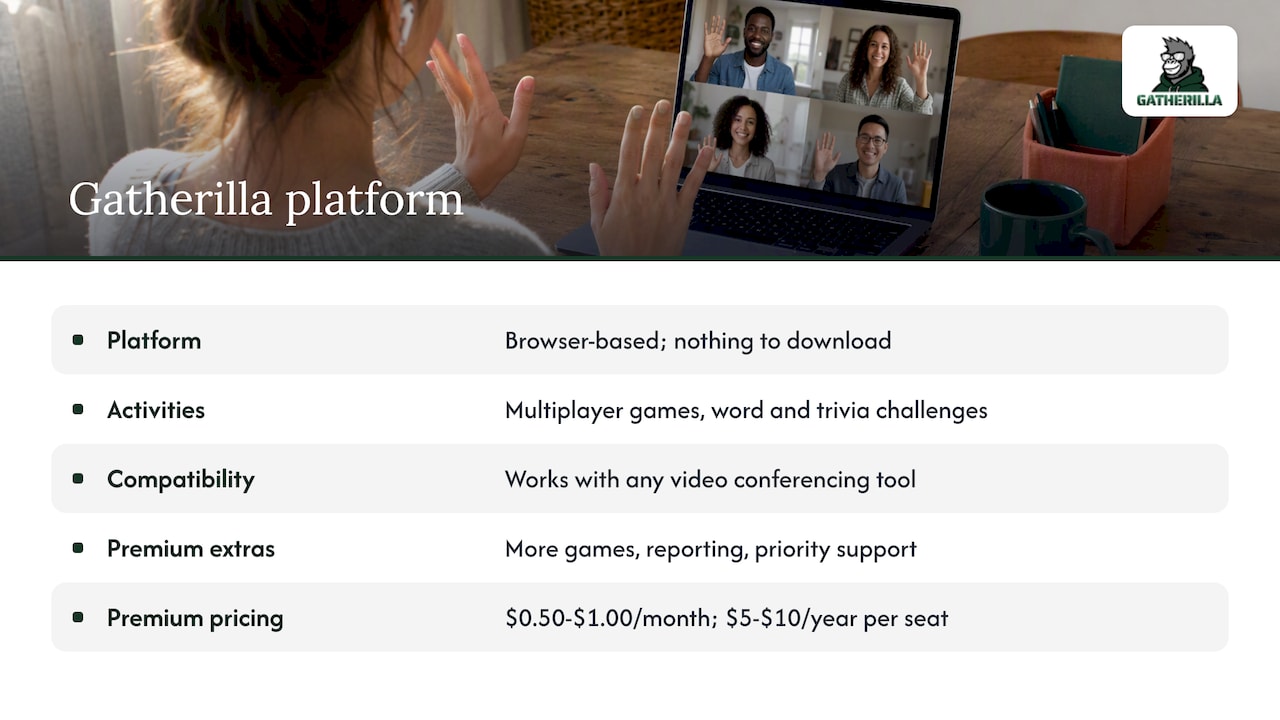
If you want a ready-made option, Gatherilla is a browser-based platform with multiplayer team games, daily word and trivia challenges, icebreakers and real-time leaderboards. It works with any video conferencing tool, and there is nothing to download. You can start on the free plan. The Premium plan adds more games, reporting and priority support, and costs $0.50 to $1.00 per seat per month, or $5 to $10 per seat per year. See plans and pricing or head to the Gatherilla homepage to try a game with your team.
Looking for more material? Our guides cover virtual meeting games that build real connection, Zoom icebreakers that take under two minutes, and team building games for Microsoft Teams. If browser access and IT approval worry you, read about browser-based team building games.
How to launch your first Fun Friday
- Pick the slot. Choose the last 15 minutes of a recurring Friday meeting, or a 12:30 p.m. lunch slot.
- Announce it as optional. One short message is enough: what, when, how long.
- Start with the easiest format. A daily challenge or a one-word check-in lowers the barrier.
- Ask for feedback after three weeks. A two-question poll is enough: what to keep, what to drop.
- Hand off hosting. By week four, let someone else run it.
- Adjust for time zones. Where the team is spread out, use an asynchronous game and share the results on Friday.
Track simple signals rather than formal metrics: how many people join, how many comment in chat, and whether the same people come back. If turnout drops below a third of the team for several weeks, change the format rather than pushing harder.
FAQ
What are some fun activities I can do online with coworkers?
Quick games work best: a trivia round, a daily word puzzle, Two Truths and a Lie, or a one-word check-in. For something longer, try a virtual scavenger hunt or a shared lunch. Choose browser-based tools so nobody has to install anything.
How long should a virtual Fun Friday last?
Five to fifteen minutes is enough for a weekly habit. Reserve 30 to 60 minute formats such as escape rooms or talent hours for monthly sessions. A short, predictable slot is easier for people to protect.
How do I get quiet or camera-shy people to join?
Make participation optional, allow cameras off, and offer typed responses. Games with a leaderboard or chat-based answers let people take part without speaking. Rotating the host also takes pressure off the same few voices.
Do virtual team activities actually help with loneliness?
They help, but they are not a cure. Gallup’s data shows higher loneliness among fully remote employees and lower loneliness among engaged ones, so regular positive contact matters. Combine games with real conversations, one-to-ones and shared meals.
Sources
- Gallup: State of the Global Workplace, global data
- Journal of Applied Psychology: videoconference fatigue study (APA PsycNet)
- Gallup: The Increasing Importance of a Best Friend at Work
- Knowledge at Wharton: Create Authentic Connections with Virtual Team Members
- Gallup: The Remote Work Paradox
- Fostering psychological safety in global virtual teams (University of Hawaii ScholarSpace)