

30–60 Second Icebreakers for Customer Support Teams That Fit Shifts

Yes: the mix that works best is a rotation of 30 to 60 second micro-prompts, an occasional 5 to 10 minute low-prep game, and one recurring asynchronous question for people on different shifts. Both virtual and in-person formats fit this pattern, and resources like Gatherilla and this guide from Thomas give you ready scripts so you are not building from scratch. Pick one opener today and run it for your next three meetings before adding anything else.
TL;DR:
- Using short, structured icebreakers of 2 to 7 minutes consistently boosts team cohesion and engagement, especially in remote support teams.
- Support leaders should select icebreakers based on time, group size, energy level, prep needs, and accessibility to maximize participation.
- Virtual activities like mood checks, support-specific games, and asynchronous recognition help maintain rituals across shifts with minimal setup.
- In-person or hybrid huddles benefit from low-movement, quick-turnaround activities such as pair sharing, recognition rounds, and non-evaluative role plays.
- Tools like Gatherilla enable automatic, setup-free recurring icebreakers that sustain social rituals without extra planning or software installation.
Table of Contents
- Why icebreakers matter for customer support teams
- How to pick the right icebreaker fast
- Virtual icebreakers with scripts, timing, and accessibility notes
- In-person and hybrid icebreakers for floor teams and huddles
- Evidence-based facilitation: Observe-Ask-Intervene and inclusive norms
- Scripts and micro-formats for standups and shift handoffs
- Thomas’s quick playbook: sustaining icebreakers in support ops
- Try Gatherilla for zero-setup, recurring icebreakers
- FAQ
- Sources
- Primary sources and further reading
Why icebreakers matter for customer support teams
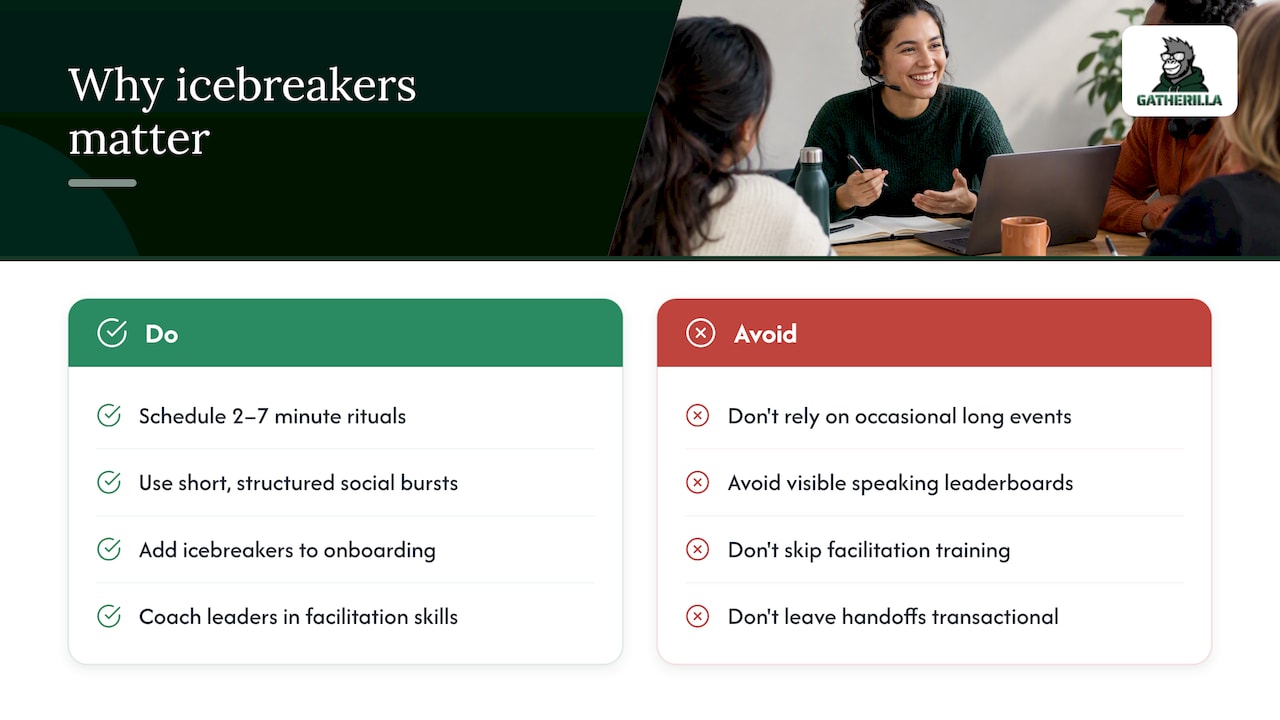
Support work is fragmented by design: shifts overlap for minutes, not hours, and agents often take back-to-back calls with little room to connect. Short social rituals close that gap. Teams that build in brief, consistent moments of connection report higher engagement and faster cohesion than teams that skip them, according to Harvard Business Review’s research on remote team communication. Short, structured bursts of social contact, in the 2 to 7 minute range, appear to matter more than occasional long events for keeping distributed teams bonded.
For support leaders, the payoff shows up twice: new hires absorb team norms faster when icebreakers are part of onboarding, and handoffs between shifts feel less transactional when people have a shared reference point. The catch is facilitation style; many leaders benefit from clear communication coaching for leaders to develop their facilitation, difficult conversations, and communication skills. Tools that visibly track who has spoken or for how long can backfire, a point worth keeping in mind before you reach for a leaderboard.
How to pick the right icebreaker fast
Choosing an icebreaker under time pressure gets easier with a short rubric. Run through these axes before a meeting starts:
- Time available: under 2 minutes calls for a one-word mood check; 5 to 10 minutes allows a light game.
- Group size: pairs or trios work for sensitive topics; full-team rounds work for quick wins or shout-outs.
- Energy level: low-energy shifts need low-movement prompts, not high-stakes performance.
- Prep required: anything that needs props, slides, or pre-reading will get skipped during a busy week.
- Accessibility: avoid prompts that require fast typing, vision-dependent visuals, or spoken answers without an opt-out.
Watch for red flags: forced personal disclosures, activities with high cognitive load during a stressful shift, or any visible speaking-time meter that turns a warm-up into a performance review.
Virtual icebreakers with scripts, timing, and accessibility notes
Remote and hybrid support teams benefit most from activities that need zero setup and respect people’s bandwidth. Here is a working set, grouped by length.
- One-word mood check (30 seconds): Ask, “In one word, how’s your energy today?” and go around the call or drop it in chat. Works for groups of any size and needs no prep.
- Single-question check-in (60 seconds): Ask something concrete like “What’s one thing that made a customer’s day easier this week?” This keeps the focus work-relevant, which lowers the bar for shy participants.
- Virtual scavenger hunt (5 to 7 minutes): Give a short list (“something blue, something that makes you laugh”) and have people grab items on camera. Best for groups of 6 to 12 with cameras on; skip it for audio-only standups.
- Two truths and a lie, support edition (7 minutes): Each person shares two real customer stories and one invented one; the team guesses. This works well for teams of 4 to 8 and doubles as a knowledge share.
- Customer win share (5 minutes): One person reads a short customer compliment or resolved ticket aloud. Rotate who shares so recognition does not always land on the same people.
- Quick role-play (5 to 10 minutes): Pair two agents to practice a tricky scenario, no grading, just a chance to try a new phrase out loud.
For asynchronous coverage across shifts, post a Slack question of the day or a recognition thread where anyone can drop a shout-out whenever their shift allows. Low-bandwidth teams can skip video entirely and run any of the above as a text thread instead, which keeps accessibility intact without losing the ritual. For more structured scripts timed to the minute, our under-two-minute Zoom icebreaker scripts cover several variations you can copy directly.
Pro Tip: Rotate who picks the icebreaker each week so the same person is not always carrying the social labor.
In-person and hybrid icebreakers for floor teams and huddles
Floor teams and call centers need activities that fit inside a standing huddle, not a seated workshop. Keep movement low and timing tight:
- Pair share (2 minutes): Agents turn to a neighbor and answer one quick question, then one pair reports back to the group.
- Recognition round (3 minutes): Each shift lead calls out one win from the previous shift by name, which doubles as a handoff and a morale boost.
- Non-evaluative role play (5 minutes): Two agents rehearse a scripted response to a difficult customer scenario with no scoring, just practice saying the words out loud.
Hybrid huddles need a small adjustment: assign a co-host or dedicated remote monitor whose only job is repeating remote responses aloud for the room, since a single laptop speaker rarely carries across a floor. If your team splits time between office and home, our hybrid meeting engagement guide walks through more of these adaptations, including mic placement and turn-taking cues that keep remote voices from getting lost.
Evidence-based facilitation: Observe-Ask-Intervene and inclusive norms
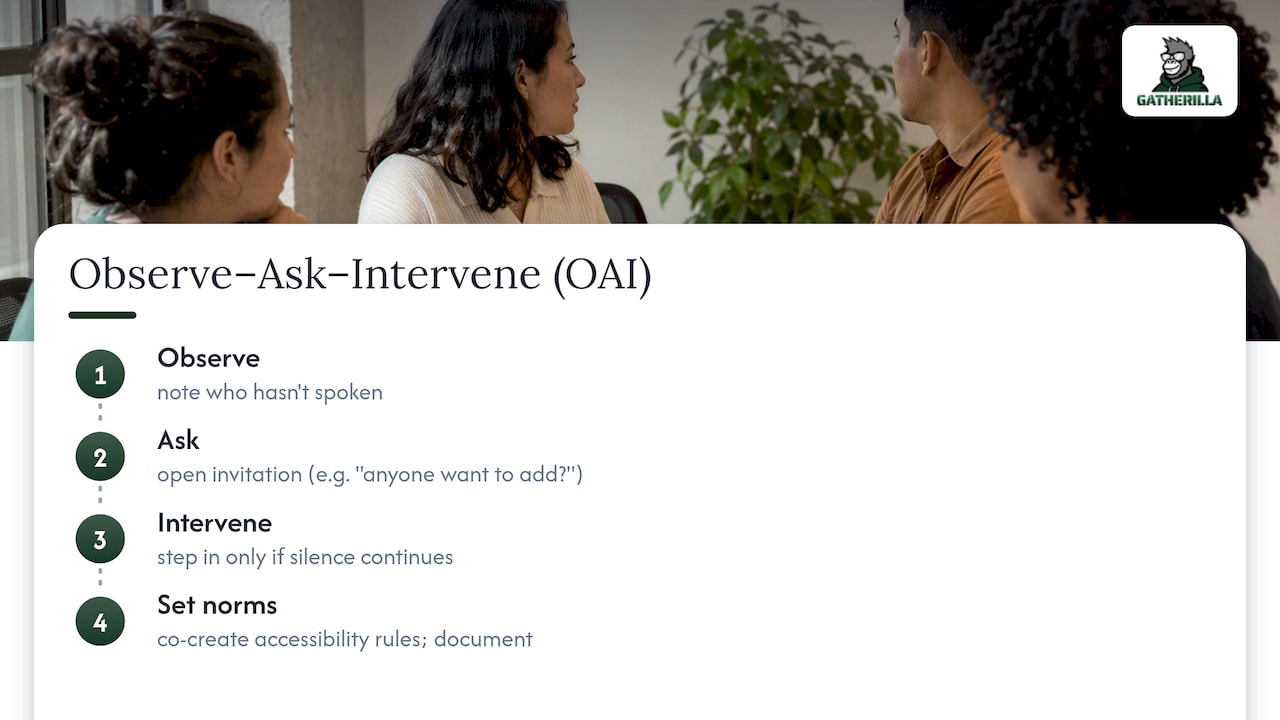
A simple framework called Observe, Ask, Intervene (OAI) helps facilitators keep icebreakers inclusive without turning them into surveillance. You observe group dynamics quietly, ask for input before assuming someone is struggling, and intervene only once an imbalance is clear, an approach that research on inclusive meeting facilitation found participants preferred over facilitators who jumped in unprompted.
Applied to a 3-minute check-in: observe who has not spoken, ask an open invitation like “anyone want to add something,” and only intervene directly if silence continues. Avoid visible speaking-time meters. Design research on awareness feedback found that public participation displays can add pressure and reduce idea fluency, while simple yes/no micro-prompts raised response rates with less effort.
Checklist: co-create accessibility norms with the team, document any accommodations, and revisit them after a month.
Pro Tip: Swap a leaderboard-style tracker for a quiet facilitator note card; the ritual stays, the pressure does not.
Scripts and micro-formats for standups and shift handoffs
Three ready scripts, each with a built-in adaptation:
- 30-second mood pulse: “One word for your energy today?” Slack variant: post the same question as a daily poll for people on different shifts.
- 60-second customer win or lesson: “Share one thing a customer taught you this week.” For part-time staff, let them answer in a shared doc instead of live.
- 5-minute micro scavenger or role-play: Give one scavenger item or one role-play prompt. Facilitator note: keep cameras optional so no one feels pressure to perform.
Thomas’s quick playbook: sustaining icebreakers in support ops
I always tell teams to start small: pick one experiment, run it for three meetings, and ask a single pulse question afterward, something as plain as “did that feel useful?” Rotate who facilitates so the habit does not depend on one person’s energy, and build in an asynchronous version for anyone on a shift that never overlaps with the main group. Consistency beats novelty here.
— Thomas
Try Gatherilla for zero-setup, recurring icebreakers
If you want these rituals to survive a busy quarter without someone maintaining a slide deck, our browser-based games at Gatherilla need no downloads and slot into whatever video tool your team already uses, including a daily challenge that keeps the habit going without extra planning. A sensible pilot: run the free tier with one team for two to four weeks before deciding whether to upgrade on the pricing page.

| Format | Typical time | Gatherilla support |
|---|---|---|
| Micro mood check | 30 to 60 seconds | Daily challenge covers this |
| Light multiplayer game | 5 to 10 minutes | Built-in customizable games |
| Recurring async prompt | Ongoing | Daily challenge rotation |
FAQ
What are some good icebreaker questions for a support group?
Work-relevant prompts tend to land best, such as “what’s one thing a customer taught you this week” or “what’s a small win from your last shift.” These keep the focus professional while still inviting a personal answer, which research on remote team rituals ties to stronger engagement.
What are some fun icebreakers for a Teams meeting?
A one-word mood check or a quick two-truths-and-a-lie round both work well on Teams calls and need no extra software. For teams that want more variety, a short browser-based game run through a tool like Gatherilla can add a scavenger hunt or trivia round without anyone installing anything.
What are 5 great icebreaker questions?
Strong options include: what’s one word for your energy today, what’s a recent customer win, what’s something small that made your week easier, what’s one thing you’re looking forward to, and what’s a skill you’re proud of using recently. Keep each one optional and skippable.
What are some fun and engaging games about customer service?
Two truths and a lie adapted with real customer stories, a customer win share, and a short non-evaluative role-play all build empathy and shared language without grading anyone’s performance. These formats work in groups of 4 to 12 and need five to ten minutes.
How do I know if an icebreaker is actually working?
Watch for simple signals: more people volunteering answers over time, shorter silences before someone speaks, and informal feedback when you ask a single pulse question after a few sessions. A documented accommodation process and consistent participation, rather than a spike in one meeting, are better indicators than attendance alone.
Sources
- Observe, Ask, Intervene: Designing AI Agents for More Inclusive Meetings (UMN conservancy excerpt)
- Design guidelines from OAI research (arXiv)
- ACM: Accessibility, workload redistribution, and team norms (2026)
- HBR: Successful remote teams communicate in bursts
Primary sources and further reading
- Observe, Ask, Intervene: Designing AI Agents for More Inclusive Meetings
- Design guidelines from OAI research
- ACM: Accessibility, workload redistribution, and team norms
- HBR: Successful remote teams communicate in bursts
- Under-two-minute Zoom icebreaker scripts
- Hybrid meeting engagement guide