

14 Zoom Whiteboard Games That Actually Get Teams Talking

Yes, Zoom Whiteboard runs great games, and four belong on every host’s shortlist. Pictionary/Quick Draw is a popular icebreaker, with one player sketching and everyone else typing guesses in chat. Team Draw Relay turns the board into a shared canvas where small groups race to finish a picture in tag-team rounds, which works well as a mid-meeting energizer. Brainwriting repurposes the whiteboard’s frame layout so everyone contributes ideas in silence before the group discusses, a smart move for creative sessions where louder voices tend to dominate. Whiteboard Bingo scales to large groups because each participant only needs to mark boxes, not draw or type fast.
- Pictionary/Quick Draw — best for icebreakers, low-prep, designed for short rounds
- Team Draw Relay — best for energizers, requires light setup with frames
- Brainwriting — best for creativity and brainstorming, supports quieter groups
- Whiteboard Bingo — best for large-group engagement, near-zero prep once the grid exists
Table of Contents
- The Full Zoom Whiteboard Games Lineup for Team Meetings
- How to Run Whiteboard Games Without Losing the Room
- Whiteboard Features and Templates Worth Knowing
- Why Whiteboard-First Games Beat Bolted-On Apps
- Making Sure Everyone Can Actually Play
- Fixing the Technical Problems That Aren’t Lag
- Turning Classic Party Games Into Whiteboard Rounds
- Getting the Quiet People to Actually Participate
- What Actually Makes These Games Work
- Try Gatherilla for Games That Start the Moment You Click
- Sources
The Full Zoom Whiteboard Games Lineup for Team Meetings
These are the games worth building into a rotation, not one-off novelties. Each entry gives you the setup, the timing, and a variation so you’re not stuck running the exact same round every week. To enable Zoom Whiteboard in any meeting, click the Whiteboards icon in the meeting toolbar, select New Whiteboard, then use the share icon to set collaboration permissions before participants join.
1. Pictionary / Quick Draw
One host or rotating “artist” gets a word (send it privately via chat) and draws it on the whiteboard while everyone else guesses in the chat panel. First correct guess scores a point and becomes the next artist.
Setup: Open a blank whiteboard, grant “Anyone can view” but keep draw access limited to the current artist under participant permissions. Group size: 4 to 15 people. Timing: Around a minute to a minute and a half per round, with options for short sessions. Scoring: Track points in a sticky note column; fastest guesser each round gets a tally mark. Variation: Split into breakout rooms of 4 to 6 for simultaneous rounds, then bring winners back to a final showdown.
2. Team Draw Relay
Break into teams of 3 to 5. Each team gets its own frame on a shared whiteboard. One member draws for 20 seconds, passes drawing rights to the next teammate (who continues the same image blind, without hearing the prompt), and so on until time runs out or the picture is guessed.
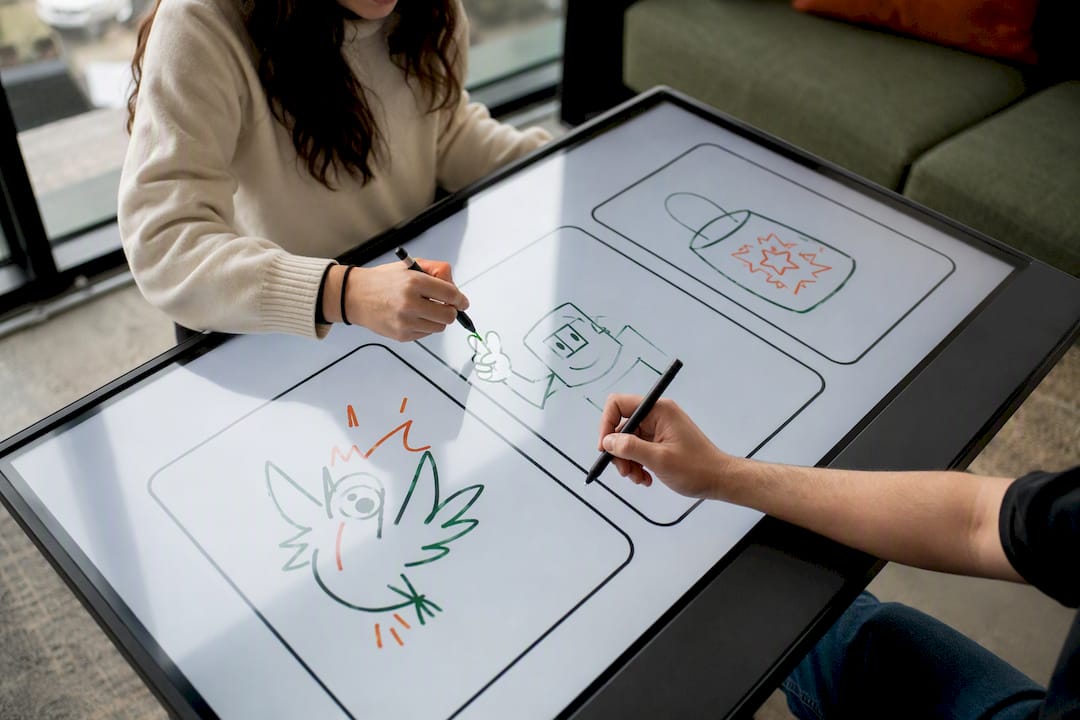
Setup: Use the Frames tool in the Whiteboard toolbar to create one section per team so drawings don’t overlap. Group size: Suitable for small to medium groups, scalable with breakout rooms. Timing: Several minutes per round. Scoring: A designated moderator judges recognizability and awards 1 to 3 points per team. Breakout room note: For groups over 20, assign one co-host per breakout to manage the pass order, since the main room host can’t watch every board at once.
3. Brainwriting (Silent Idea Pass)
Everyone writes ideas onto individual sticky notes simultaneously, in silence, for a set window, then rotates or clusters notes for group review. Zoom’s Gallery offers a ready-made brainwriting template with individual rows and timed rounds built in.
Setup: Load the template from the Whiteboard’s template gallery instead of building rows from scratch. Group size: 5 to 20. Timing: Several minutes for writing and clustering phases. Scoring: Skip scoring entirely; use dot-voting stickers to rank the strongest ideas instead. Variation: Run it as an actual brainstorm for a real work problem instead of a game. It doubles as a functional planning tool.
4. Whiteboard Bingo
Prebuild a bingo grid with squares like “has a pet on camera,” “worked here over 5 years,” or “prefers tea to coffee.” Participants mark squares as facts come out during a short mingling or Q&A segment.
Setup: Build the grid once using the Frames and shape tools, then duplicate it for each new session. Group size: Scales to 50+ with no extra facilitation effort. Timing: Approximately ten minutes. Scoring: First to call “bingo” in chat wins; verify by screenshot. Variation: Theme the squares around a new-hire’s bio for onboarding sessions.
5. Whiteboard Memory Match
Hide 12 to 16 image pairs behind sticky notes arranged in a grid. Two players take turns “flipping” notes (moving them aside) to find matches, calling their picks out loud since only one person can hold draw control at a time.
Setup: Place images under stacked sticky notes ahead of time, then lock editing until the game starts. Group size: Best with 2 to 8 active players, others can spectate. Timing: 5 to 8 minutes. Scoring: Most matched pairs wins; low-prep once the grid template is saved and reused.
6. Collaborative Storytelling Board
One frame per “chapter.” Each participant adds a sentence or a doodle to the next blank frame, building a story nobody planned in advance.
Setup: Pre-create 6 to 10 frames in sequence using the Frames tool. Group size: 6 to 12 works best; more people means longer waits for a turn. Timing: 8 to 12 minutes. Variation: Add a “plot twist” sticky note that gets flipped over at the halfway point, forcing a sudden story pivot.
7. Two Truths and a Lie, Drawn
Instead of saying three facts out loud, each person draws three simple images representing two true things and one lie. The group votes on which sketch is fiction by dropping a colored sticky dot on their guess.
Setup: No template needed, just a blank frame per participant. Group size: 4 to 10 for a full round in one meeting. Timing: 90 seconds per person. Scoring: None needed. This one’s about laughs, not points.
8. Whiteboard Scavenger Sketch
Give a list of oddly specific prompts (“draw the worst gift you’ve received,” “draw your Monday morning”). Everyone draws simultaneously on their own frame, then the group scrolls through and guesses whose is whose.
Setup: Pre-load 5 prompts as sticky notes at the top of the board. Group size: Up to 20. Timing: 60 seconds per prompt, 5 prompts total. Variation: Run this as a low-prep, 10-minute filler before a meeting officially starts.
9. Team Contest Draw-Off
Split into two or three color-coded teams, each assigned a section of the whiteboard. A moderator calls a topic, and teams race to draw the best representation before time runs out, similar in spirit to informal whiteboard contests like White Board Fight, where assigned team colors and a scoring moderator keep the contest structured.
Setup: Assign team sections with the Frames tool and give each team a distinct sticky-note color. Group size: 10 to 40, using breakout groupings for team chat if needed. Timing: 4 rounds of 90 seconds each. Scoring: Moderator or a rotating judge scores each round 1 to 5.
10. Sticky Note Word Cloud
Ask a single open question (“What’s one word for how this quarter felt?”). Everyone drops a sticky note with their word simultaneously, then the group clusters similar answers.
Setup: Use Whiteboard’s clustering feature to auto-group similar sticky note text. Group size: Unlimited. Works even with 100+ in a town hall. Timing: 3 minutes.
11. Emoji Charades on the Board
Someone draws only using shapes and simple emoji-style icons (no words, no letters) to represent a movie, book, or company inside joke. Others guess in chat.
Setup: No template. A blank frame and the shape tool are enough. Group size: 5 to 15. Timing: 60 to 90 seconds per round. Low-prep, 10-minute variant.
12. Whiteboard Trivia Grid
Build a grid of categories and point values like a game show board. Teams pick a square, answer verbally or by typing on their frame, and the host marks it complete.
Setup: Build the grid once with frames and reuse it weekly, swapping question content only. Group size: 8 to 30 in team pods. Timing: 15 to 20 minutes for a full board.
13. Doodle Chain Reaction
Similar to Team Draw Relay but competitive rather than collaborative: each person draws for 15 seconds on their own frame, then the frames get shuffled and shown anonymously for the group to guess authorship.
Setup: Number the frames instead of labeling them with names to keep authorship hidden. Group size: 6 to 15. Timing: 5 minutes.
14. Whiteboard Would You Rather
Post two options as sticky notes on opposite sides of the board. Participants drag a personal marker (their initials on a small note) to the side they agree with, then a few explain their pick out loud.
Setup: Prebuild the split layout once; swap the two options each session. Group size: Any size, visually the clearest under 25. Timing: 2 minutes per question.
Pro Tip: Save your favorite whiteboard layouts as templates before the meeting ends. Zoom keeps whiteboards tied to your account, so reopening a saved bingo grid or story-chain frame next week takes seconds instead of rebuilding from scratch.
How to Run Whiteboard Games Without Losing the Room
A game only works if the tech gets out of the way. Run through this before you unmute anyone:
- Confirm Whiteboard is enabled account-wide under Settings > In Meeting (Basic), since some organizations restrict it by default.
- Test draw permissions yourself beforehand. “View only” versus “can edit” trips up more first-time hosts than any actual bug.
- Assign a co-host or moderator role if the group is over 15, so one person scores while the other manages the tech.
- Pick a scoring method before you start (chat tally, sticky note points, or verbal count) rather than improvising mid-game.
Screen share versus opening Whiteboard directly: open Whiteboard through the toolbar icon rather than sharing your screen and drawing in a separate app. Native Whiteboard gives every participant a live cursor, so multiple people can draw or place stickies at once without fighting for control, a feature Zoom built specifically for collaborative sessions.
Handling lag and drawing delays: cap active drawers at 4 to 5 people per board at once. Beyond that, cursors start overlapping and rounds slow down. If someone’s connection is clearly behind, switch them to chat-based guessing instead of drawing duty for that round.
When Whiteboard breaks down: keep a backup plan. If a participant can’t load the board (older browser, corporate firewall, mobile app limitation), fall back to verbal descriptions or have them screenshot their screen and describe what they see.
Short structured activities like these are worth defending on the calendar, and you can find a great variety of ideas in this top online team games list for remote teams. Gallup’s research on remote work points to a real risk: employees and their organizations drift apart without deliberate, recurring connection points, and short whiteboard games are a low-cost way to build that in.
Timing templates:
- 5-minute energizer: One round of Pictionary or Emoji Charades, no breakouts, no scoring needed.
- 10-minute icebreaker: Whiteboard Bingo or Scavenger Sketch, works for groups of any size.
- 20-minute team-build: Team Draw Relay or Brainwriting with breakout rooms and a wrap-up discussion.
Whiteboard Features and Templates Worth Knowing
You don’t need to build every board from scratch. Zoom Whiteboard ships with reusable components that map directly onto the games above:
- Sticky notes power Bingo, Word Cloud, and Two Truths and a Lie.
- Frames section off Team Draw Relay, Storytelling, and the Trivia Grid so groups don’t draw over each other.
- Activities and templates, including matching games, polls, and the brainwriting layout, sit ready-made in the template gallery and load in a couple of clicks.
- AI clustering groups similar sticky notes automatically, which turns a messy Word Cloud round into a readable summary instantly.
- Built-in timers keep rounds honest without a separate stopwatch app running in another tab.
| Whiteboard Feature | Game Mechanic It Supports |
|---|---|
| Sticky notes | Bingo squares, word clouds, voting |
| Frames | Team sections, story chapters, trivia grids |
| Templates | Brainwriting, matching, comic-style layouts |
| Timers | Round pacing for drawing and writing games |
For exact click-by-click steps, Zoom’s own support documentation on running activities walks through opening templates and enabling timed interactions during a live meeting.
Why Whiteboard-First Games Beat Bolted-On Apps
Thomas, who covers remote team engagement for Gatherilla, has watched the appeal of Zoom Whiteboard grow specifically because it removes a step: nobody downloads anything, clicks an unfamiliar link, or waits for a browser tab to load a third-party tool mid-meeting.
The best team game is the one people actually play. A whiteboard game that starts the second you click the icon in your Zoom toolbar beats a “better” game buried behind a login screen, every single time.
Gatherilla’s own platform runs on that same principle: browser-based, no downloads, quick enough to start that a host can launch a round between agenda items without derailing the meeting.
Making Sure Everyone Can Actually Play
A whiteboard game only works if every participant can see, draw, and click without a fight. Start with device basics: whiteboard collaboration works on desktop browsers and the Zoom desktop app most reliably, while some mobile and tablet users get view-only access depending on their app version. Check this before the meeting, not during it.
For participants using screen readers or who have low vision, drawing-based games like Pictionary create a real barrier since the content is entirely visual. Pair every visual round with a verbal description option, letting someone narrate what’s on the board for anyone who needs it, and make chat-based participation (typing guesses, adding text-based sticky notes) always available as an equal alternative to drawing.
Color choice matters more than most hosts realize. Default whiteboard palettes can be hard to distinguish for participants with color blindness, so when running the Team Contest Draw-Off or any color-coded team game, label teams by name or shape as well as color, never color alone.
Motor and dexterity differences matter too. Precise mouse control for fine drawing can be difficult for some participants, so games like Bingo, Word Cloud, and typed guesses (which rely on clicking and typing rather than freehand drawing) are naturally more accessible than fast sketch rounds. Building a mix of both game types into your rotation, rather than defaulting to drawing every time, keeps the whole group engaged.
Fixing the Technical Problems That Aren’t Lag
Lag gets blamed for everything, but permissions issues cause more failed whiteboard sessions. If participants can’t draw at all, check that the host hasn’t accidentally restricted the board to “view only” under the share settings, a default some Zoom accounts apply automatically for security reasons.
Corporate firewalls are a quieter culprit. Some company networks block the specific ports Whiteboard needs to sync in real time, which shows up as notes that won’t move or drawings that never appear for other participants. There’s no in-meeting fix for this beyond switching to a personal network or asking IT to whitelist Zoom’s whiteboard traffic ahead of time.
Device compatibility trips up more people than hosts expect. Older tablets and some Android browsers render Whiteboard inconsistently, sometimes stripping out sticky notes or frames entirely. Test your board on a phone and a tablet before a big session if you know your group is mixed-device, not just on your own laptop.
Account-level settings block plenty of games before they start. If Whiteboard doesn’t appear in your toolbar at all, an admin has likely disabled it under account settings, and no amount of troubleshooting on your end will fix that; it requires an account admin to enable it centrally.
Finally, watch for stale permissions from a previous meeting. Whiteboards saved and reused across sessions sometimes carry over the collaboration settings from last time, so a board you locked down for Pictionary last week might still be locked when you try to open it for a free-for-all Brainwriting session today. Reset permissions at the start of every session rather than assuming last time’s settings carried over correctly.
Turning Classic Party Games Into Whiteboard Rounds
Most party games translate to Whiteboard with one adjustment: replace physical objects with digital ones. Charades becomes Emoji Charades using shapes instead of gestures. Telephone becomes the Storytelling Board, where each frame replaces a whispered relay. Pictionary needs almost no adaptation at all, just a digital canvas instead of a paper pad.
Trivia night maps cleanly onto the Whiteboard Trivia Grid, with the added benefit that scores stay visible to everyone instead of living on a scorekeeper’s notepad. Scattergories works well as a timed sticky-note round, where everyone races to fill a grid of categories with words starting with a given letter, then compares answers by revealing all notes at once.
Some games resist translation and that’s worth admitting rather than forcing. Anything requiring physical movement, like musical chairs or a relay race, just doesn’t have a whiteboard equivalent, and trying to simulate it usually falls flat. The games that adapt best share one trait: they were always primarily visual or verbal to begin with, which is exactly why drawing and word games dominate this list over movement-based ones.
Getting the Quiet People to Actually Participate
The person who never unmutes on a video call often will type in chat or drop a sticky note, so building games around silent, simultaneous input (like Brainwriting or Word Cloud) gives shy participants a way in that doesn’t require speaking up first. That’s the single biggest lever available to a host, more effective than any icebreaker script.
Calling on people by name to guess or draw next puts quiet participants on the spot in a way that backfires. Let guesses happen organically in chat instead, where anyone can jump in without the pressure of being singled out in front of the group.
Rotating who goes first, rather than always starting with the most vocal person, spreads the spotlight around without forcing anyone into it. In Team Draw Relay or the Trivia Grid, randomize turn order using a simple random-name picker rather than letting the loudest voice claim the first turn every time.
Breakout rooms genuinely help here too. A group of 5 feels far less exposing than a group of 40, so shy participants who freeze in a large Bingo round often loosen up considerably once moved into a smaller Team Draw Relay pod. If you’re consistently running games for large teams, our guide to icebreaker games for large groups covers breakout structuring in more depth.
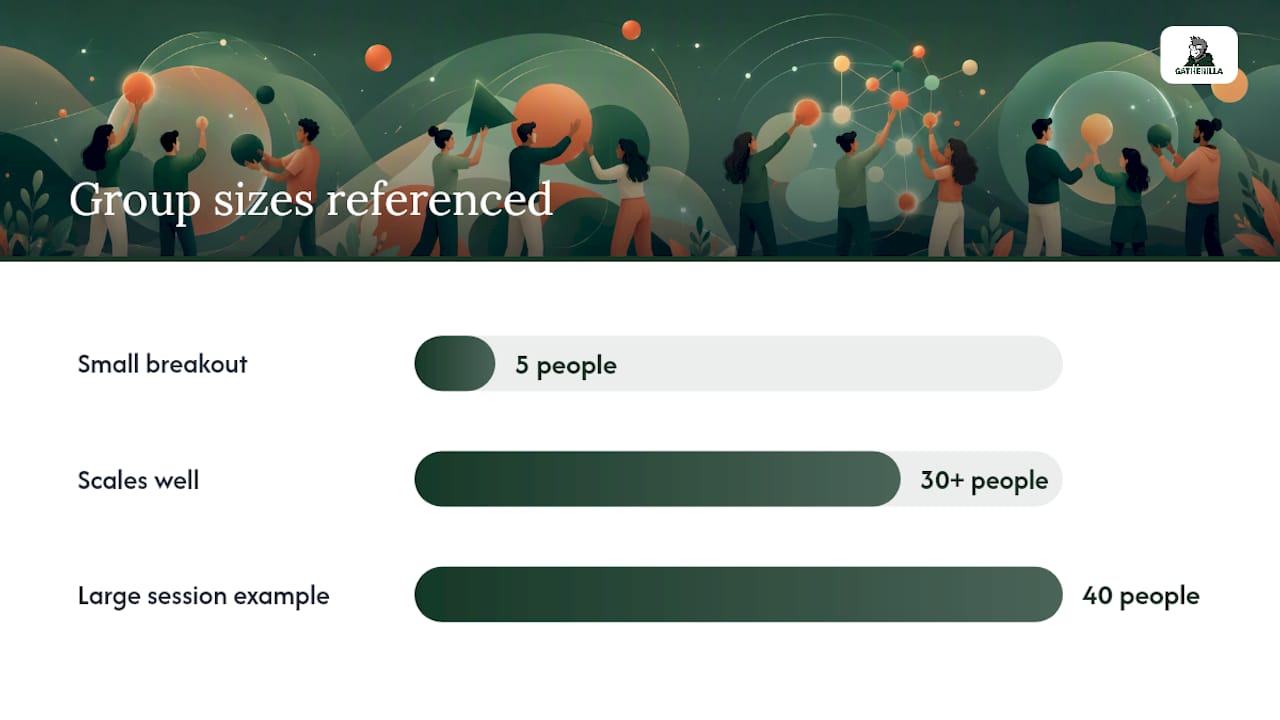
Finally, resist scoring everything. Games with a visible leaderboard reward the fastest and most confident players by design, which quietly discourages anyone who needs a beat longer to think. Reserve competitive scoring for the games built for it (Draw Relay, Team Contest) and keep low-pressure games like Storytelling or Word Cloud entirely score-free.
Yes, Zoom Whiteboard handles fast drawing games, silent brainstorms, and large-group activities equally well when a host matches the format to the group size and energy needed.
| Point | Details |
|---|---|
| Icebreaker pick | Use Pictionary or Whiteboard Bingo for low-prep starts under 10 minutes. |
| Creativity pick | Run Brainwriting when quieter voices need a fair shot at contributing ideas. |
| Large-group pick | Whiteboard Bingo and Trivia Grid scale past 30 without extra facilitation load. |
| Fix permissions first | Most failed sessions trace back to draw access, not lag or bandwidth. |
| Gatherilla fits the same need | Its browser-based, no-download multiplayer games follow the same quick-start logic as these whiteboard rounds. |
What Actually Makes These Games Work
The conventional advice on virtual team games treats every activity as interchangeable, just pick something fun and run it. That’s backward. The games that survive past a single try are the ones matched deliberately to group size and energy level, not the cleverest concept on paper. Whiteboard Bingo beats a complicated trivia format for a 40-person town hall for one reason: nobody has to wait their turn.
The bigger miss most hosts make is treating drawing games as the only option. Silent, simultaneous formats like Brainwriting and Word Cloud consistently pull in participation from people who never touch a Pictionary round, and they take less facilitation effort to run well. Prioritize permissions and device testing before you worry about which game is “best.” A great game with broken draw access is worse than a mediocre one everyone can actually join. Start there, then build your rotation.
— Thomas
Try Gatherilla for Games That Start the Moment You Click
Building a fresh whiteboard board every week works fine for occasional use, but teams running weekly standups or monthly all-hands need something that doesn’t require rebuilding a bingo grid from scratch every time. Gatherilla gives HR leads and team facilitators a library of ready-made multiplayer games that launch instantly in any browser, no download, no template rebuilding, no account setup for participants.

It fits the exact gap this article’s game list leaves open: once you’ve run through your favorite whiteboard rounds a few times, Gatherilla’s rotating daily challenges and customizable game suite keep the novelty going without you personally designing a new activity every week. Teams get real-time leaderboards built in, so the scoring headaches covered earlier here just disappear. Visit Gatherilla to see the current game library and start a session with your team today.