

Zero Prep No Download Zoom Team Building Ideas for HR

The most effective approach mixes frequent short energizers with occasional longer facilitated events. Short activities keep connection alive week to week without adding to meeting fatigue, while a bigger monthly event builds the shared stories teams actually remember. Pick two quick activities from the list below and schedule one for this week.
TL;DR:
- Short energizers like Desk Show and Tell or One-Word Check-In are effective when scheduled weekly, lasting about five minutes with no prep needed.
- Larger, milestone-focused activities such as virtual cooking classes or company trivia should be scheduled monthly to maximize impact and engagement.
- Clear rules, a designated facilitator, and matching activity type to group size and goal are crucial for running smooth and inclusive Zoom team games.
- Utilizing Zoom features like breakout rooms, polls, and the whiteboard helps tailor activities for depth, speed, or visual interaction, reducing technical setup time.
- A recurring cadence of weekly micro-activities combined with monthly facilitated events prevents fatigue and fosters sustained social connection.
Table of Contents
- Zoom Team Building Ideas You Can Run in Under 15 Minutes
- A Full Library of Zoom Team Activities by Purpose and Effort
- How to Run Zoom Games Without the Awkward Silence
- Which Zoom Features Actually Support These Activities
- When a Hosted Platform Beats a DIY Zoom Game
- The Cadence That Actually Sticks
- Try a No-Download Way to Run These Games Every Week
- Sources
- FAQ
Zoom Team Building Ideas You Can Run in Under 15 Minutes
These need no setup, no budget, and no calendar-clearing. Each one fits inside a standup or before a longer meeting starts, and none require anyone to download anything beyond Zoom itself.
- Two Truths and a Lie (5 minutes, any group size). Each person shares three statements about themselves; the group votes on which one is false in the chat. Facilitation tip: cap it at three or four people per round so it doesn’t drag.
- Desk Show and Tell (5 minutes, 4 to 12 people). Everyone grabs the weirdest object within arm’s reach and explains its backstory in 30 seconds. Facilitation tip: go first yourself, since modeling brevity keeps the whole round tight.
- This or That (5 minutes, any group size). Call out quick binary choices (coffee or tea, morning person or night owl) and have people answer with Zoom reactions instead of unmuting. Facilitation tip: reactions keep it fast and spare the awkward audio overlap.
- 60-Second Trivia Sprint (8 minutes, 5 to 20 people). Run five quick trivia questions using Zoom’s poll feature and reveal the leaderboard at the end. Facilitation tip: pull questions from pop culture rather than work topics so everyone competes on equal footing.
- One-Word Check-In (5 minutes, any group size). Ask everyone to type one word describing their week into chat, then read a handful aloud. Facilitation tip: never force anyone to explain their word. Chat-only participation is the point.
- Virtual Scavenger Hunt Lite (10 minutes, 6 to 15 people). Name five household items (something red, something older than you, a coffee mug) and give people 90 seconds to grab them and hold them up on camera. Facilitation tip: set a visible countdown timer so the hunt has real urgency.
- Would You Rather Bracket (10 minutes, 6 to 20 people). Run a quick tournament of absurd would-you-rather questions using breakout rooms for the first round, then reconvene for the final vote. Facilitation tip: keep the questions light. Work-related dilemmas kill the fun fast.
- Emoji Story Relay (10 minutes, 4 to 10 people). One person starts a story with three emojis in chat, the next person adds three more, and the group reads the finished chaos aloud. Facilitation tip: this works best in smaller groups where everyone can see the thread build in real time.
These match the guidance from SessionLab’s breakdown of Zoom games, which maps activities to time and headcount so leaders aren’t guessing what fits a 15-minute slot.
A Full Library of Zoom Team Activities by Purpose and Effort
Not every meeting calls for the same energy. A Monday standup needs a quick spark; a quarterly onboarding session might justify something bigger. Organizing activities by purpose and effort level, an approach Springworks recommends for exactly this reason, keeps leaders from over- or under-investing in the wrong moment.
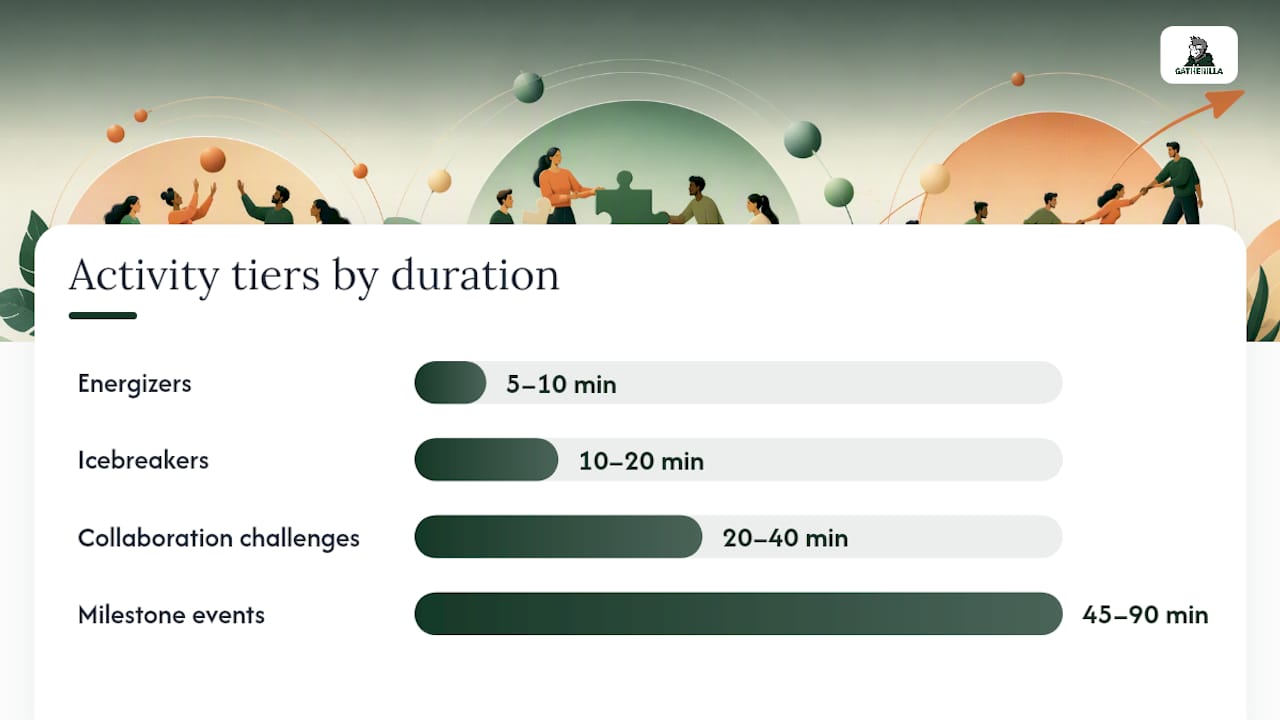
Energizers (zero prep, 5 to 10 minutes)
These exist to wake people up, not to build deep relationships. Run them at the start of a meeting when energy is flat.
Chair Yoga Break. Play a 90-second stretch video and have everyone follow along on camera. No setup beyond a YouTube link, and it works for any group size.
Speed Compliments. Pair people in breakout rooms for 60 seconds and have each person give the other a genuine compliment about their work. Setup takes 30 seconds if breakout rooms are pre-enabled. Run notes: assign pairs randomly, set a hard 60-second timer, and pull everyone back before it gets awkward.
Rapid Fire Yes/No. Ask ten quick yes-or-no questions (“Have you ever sung karaoke?”) and have people respond with thumbs up or down reactions. Zero prep. Best for groups under 20 where reactions stay visible on screen.
Icebreakers and bonding activities (low prep, 10 to 20 minutes)
These go one layer deeper than energizers. They’re built for teams that don’t know each other well yet, or for reconnecting after a stretch of heads-down work.
Two Truths and a Lie, Extended Version. The classic game, but run in breakout rooms of four so each person gets real attention instead of competing for airtime in a group of 20. Setup: pre-assign groups, give a 90-second brief on the rules, then rotate rooms once. Run notes: appoint one person per room to keep time, since unstructured rooms tend to run long.
Show Your Shelf. Ask everyone to grab a book, mug, or piece of art visible from their desk and share a 30-second story about it. Zero setup cost, works for remote workers spread across any time zone, and tends to surface details coworkers never knew about each other.

Map Your Path. Using Zoom’s whiteboard feature, have each person drop a pin on a shared map showing where they grew up or where they’d love to travel next. Setup: enable the whiteboard before the call starts. Run notes: give people two minutes to add pins, then spend five minutes letting a few explain their choice.
Pro Tip: Rotate who leads the icebreaker each week instead of always defaulting to the manager. It signals that connection is a shared team responsibility, not a top-down assignment, and quieter team members often bring the best questions once they get a turn.
Collaboration and problem-solving challenges (moderate prep, 20 to 40 minutes)
These activities ask teams to actually work together, which makes them better suited to a dedicated slot than a meeting warm-up.
Virtual Escape Room (self-hosted version). Use a free online puzzle generator to build a simple riddle chain, then split the team into breakout rooms to solve it against a clock. Setup takes 20 to 30 minutes beforehand to build or source the puzzles. Run notes: brief the rules clearly (what counts as a clue, how to signal completion), and have one moderator floating between rooms to answer stuck teams.
Collaborative Whiteboard Sprint. Give the team a prompt (design your ideal office, sketch a mascot for the team) and 15 minutes on Zoom’s whiteboard to build it together. Setup: nothing beyond enabling the whiteboard. Run notes: assign a “scribe” who consolidates ideas, since unmoderated whiteboards get chaotic fast with more than six contributors.
Reverse Engineering Trivia. Split into teams, give each a set of clues about a mystery object or process, and have them work backward to identify it before time runs out. Setup: write or source the clue sets ahead of time, roughly 15 minutes of prep. Run notes: use breakout rooms for team huddles and the main room for reveals.
Cross-Department Speed Networking. Pair people from different teams for three-minute one-on-one breakout conversations, rotating four or five times. Setup: pre-assign random pairs across departments, not within them. Run notes: post a rotating question (“what’s a project you’re proud of this quarter?”) in chat before each round so no one stares blankly at their screen.
Milestone and higher-effort events (significant prep or cost, 45 to 90 minutes)
These are worth the calendar space when the occasion calls for something memorable, not just another Tuesday activity.
Live Virtual Cooking Class. Book a facilitator who guides the team through making a dish together on camera, with ingredient kits shipped ahead of time. Cost and prep are real here (ingredient shipping alone takes coordination), but the shared experience tends to outlast a dozen quick trivia rounds.
Professional-Led Virtual Escape Room. Hire a facilitated escape room service instead of building one yourself. It costs more than the DIY version but removes all the setup burden and usually runs tighter, with a professional host managing pacing across breakout rooms.
Company Trivia Championship. Run a multi-round tournament with a leaderboard, prizes, and a live host, spread across 60 to 90 minutes. This works best as a quarterly event rather than a weekly habit. It needs real planning: question banks, bracket structure, and someone dedicated to hosting rather than juggling both host and player roles.
New Hire Onboarding Games Marathon. A structured 60-minute session mixing icebreakers, team trivia about company history, and a scavenger hunt built around company values. Worth the investment because first impressions on a remote team form fast, and a flat, all-business onboarding call sets the wrong tone from day one.
Peer-reviewed work on remote work and social connection backs up why these structured formats matter beyond simple fun. Structured social activities measurably help reduce feelings of isolation among people working away from a shared office, according to a systematic review on remote work and social connection. The format matters less than the fact that it’s structured and recurring.
How to Run Zoom Games Without the Awkward Silence
Most virtual team building fails for one reason: nobody stated the rules clearly before the game started. Fix that first, and the rest gets much easier.
- Brief the rules in under 90 seconds. State the goal, the time limit, and what a finished answer looks like before anyone starts. Skipping this step is the single most common facilitation mistake, according to guidance on leading effective virtual teams.
- Appoint one facilitator, not a committee. Someone needs to own timekeeping and calling on people. Without a named host, every activity drifts 5 to 10 minutes past its slot.
- Match the tool to the goal. Use breakout rooms when you want depth (a handful of people talking for a few minutes), and use polls or reactions when you want speed across a big group at once.
- Build in opt-in participation. Let people respond in chat first before asking anyone to unmute or go on camera. Quiet team members often engage more when the first move is low-stakes.
- Keep groups small for sharing activities. Breakout rooms of three or four beat a “share with the whole team” format almost every time, since fewer people means more airtime per person.
- Ask one quick feedback question after new activities. A simple “was that worth our time?” poll after trying something new tells you fast whether to repeat it or retire it.
Pro Tip: Pre-assign breakout room groups before the meeting starts instead of using automatic assignment. It saves two minutes of shuffling every single session, and rotating group membership over time surfaces connections between people who’d otherwise never end up in the same room.
Which Zoom Features Actually Support These Activities
Zoom’s built-in toolkit covers most of what these activities need, and knowing which feature fits which format saves real setup time.
- Breakout rooms for anything requiring depth: extended icebreakers, collaboration challenges, speed networking. Pre-assign groups where the meeting allows it.
- Polls for trivia, quick votes, and any moment you need a fast group answer without unmuting a dozen people.
- Whiteboard for collaborative sketching, mapping activities, and visual brainstorms that benefit from everyone seeing the same canvas.
- Reactions for binary or low-stakes responses (yes/no questions, quick reads on energy level) that don’t need a full poll setup.
- Chat as the default first-response channel for anyone who’d rather type than talk, especially in larger groups.
Zoom’s own guidance on virtual team building recommends matching the tool to the goal rather than defaulting to the same feature every time. That advice holds up: a poll-only meeting feels transactional, while an all-breakout-room session can exhaust people who’d rather stay in the main room.
Browser-based, no-download tools matter here too. IT departments at larger companies often restrict what employees can install, and any activity that requires a new download before it starts loses a chunk of the group before it even begins. Before the meeting, run through a quick checklist: breakout rooms enabled, mute-on-entry turned on so latecomers don’t disrupt an activity in progress, and computer audio sharing tested if the activity involves music or video.
When a Hosted Platform Beats a DIY Zoom Game
DIY games work fine for weekly energizers. They start to strain when the occasion is bigger: onboarding a new hire, marking a milestone, or rebuilding morale after a rough quarter. Those moments deserve something that doesn’t rely on one manager improvising rules on the fly.
That’s the gap a hosted platform fills. It runs directly in the browser, with no downloads or account setup required for participants, which matters most for IT-restricted environments. Instead of one person hunting for trivia questions every Friday, teams get a daily challenge built in, plus a library of customizable multiplayer games that scale from small groups to company-wide events.
A practical way to pilot it:
- Start with the free tier for two or three weeks and gauge whether the team actually opens the daily challenge.
- Track a simple engagement number: how many people participate without a reminder.
- If it sticks, move to the paid tier for the added game library and reporting, and use those numbers to justify the budget line to leadership.
The Cadence That Actually Sticks
A weekly five-minute energizer paired with one monthly facilitated session beats either extreme. All energizers, all the time, starts to feel hollow by month three. All big events and nothing in between leaves too much silence for connection to build.
Measuring impact doesn’t need to be complicated. Track attendance rate on the optional sessions (a drop-off tells you the format is tired before anyone complains out loud), ask a single one-to-ten engagement question once a quarter, and actually read the free-text comments instead of skimming past them. Teams serious about tying this to broader performance metrics can borrow from how HR teams use engagement data to track productivity to connect participation trends to retention or output over time.
The one rule that matters most: never make participation mandatory in a way that punishes opting out. Psychological safety erodes fast the moment “fun” becomes another obligation on the calendar. Vary the format monthly, retire anything that gets eye-rolls twice in a row, and let the team’s own reactions tell you what’s working.
— Thomas
Try a No-Download Way to Run These Games Every Week
Building a rotation from scratch works, but it takes someone remembering to do it every single week, which is usually the first thing that slips when deadlines pile up. This platform is built to remove that burden entirely: it is a browser-based platform with customizable multiplayer games, a daily challenge that keeps momentum going without anyone having to plan it, and zero downloads for participants to fuss with before a meeting starts.

Teams can start on the Free plan and see how quickly participation builds before upgrading to Premium for the deeper game library and reporting. Browse the full catalog of activities to preview what a session actually looks like before committing your team’s calendar to it.
Sources
- 20 fun games to play on Zoom (that won’t annoy your team) | SessionLab
- PMC article on remote work and social connection
- Virtual team building: importance, tips, and 25 ideas | Zoom
FAQ
What Are Some Good 10-Minute Virtual Team Building Activities?
Two Truths and a Lie, a Would You Rather Bracket, and a Virtual Scavenger Hunt Lite all fit comfortably inside 10 minutes with zero prep required. Each works for groups up to about 15 people and needs only a facilitator to keep time and call on participants.
What Are Some Fun Things to Do in a Zoom Meeting?
Quick polls, reaction-based rapid-fire questions, and a shared whiteboard sketch session all add energy without derailing the meeting’s actual agenda. Zoom’s whiteboard and poll features make both easy to launch without any extra tools.
What Are Some Fun Team Building Ideas Beyond Zoom Games?
Hosted experiences like professionally facilitated cooking classes or escape rooms work well for milestone moments such as onboarding or celebrating a big project win. A platform like Gatherilla covers the more frequent, lower-effort side of this with browser-based multiplayer games and daily challenges that don’t require special-occasion planning.
What Are Some Fun and Engaging 5-Minute Games for Virtual Meetings?
Desk Show and Tell, One-Word Check-In, and This or That using Zoom reactions all run in about five minutes with no setup. They work best as openers before a meeting’s real agenda starts, warming up the group without eating into work time.
How Often Should Teams Schedule Zoom Team Building Sessions?
A weekly five to fifteen minute energizer paired with one monthly facilitated session tends to sustain engagement without causing fatigue. This rhythm keeps connection consistent while reserving bigger, higher-effort events for moments that genuinely call for them, like onboarding or morale recovery.