

Day One Remote Onboarding Activities That Actually Work

The best day-one activities for a remote hire are short, structured and social: a call before the start date, a welcome meeting with the team, a buddy introduction, one or two guided icebreakers, and a light close-out at the end of the day. A new hire who works from a spare room has no hallway to bump into people in, so you have to build those moments on purpose. Below you’ll find the activities, how long each takes, a sample schedule and ways to adapt it for shy or scattered teams.
TL;DR
- Call the new hire a day or two before they start, and book time at the beginning and end of day one.
- Structured social onboarding beats leaving connection to chance, so give every introduction a format, a time limit and a host.
- Use 10 to 20 minute activities such as paired conversations, a team icebreaker and a buddy chat, not a marathon of games.
- Make cameras, speaking and sharing easy to join: state the rules up front, model an answer, and keep personal questions optional.
- Follow day one with a recurring habit, like a daily challenge or a casual team channel, so the connection doesn’t stop at 5 p.m.
Table of Contents
- Why the first day needs a plan when no one is in the building
- Before day one: the call that sets the tone
- The core day-one activities
- A sample day-one schedule
- Making activities welcoming rather than awkward
- From day one to a daily habit
- Our perspective
- Run your first day-one game with Gatherilla
- FAQ
- Sources
Why the first day needs a plan when no one is in the building
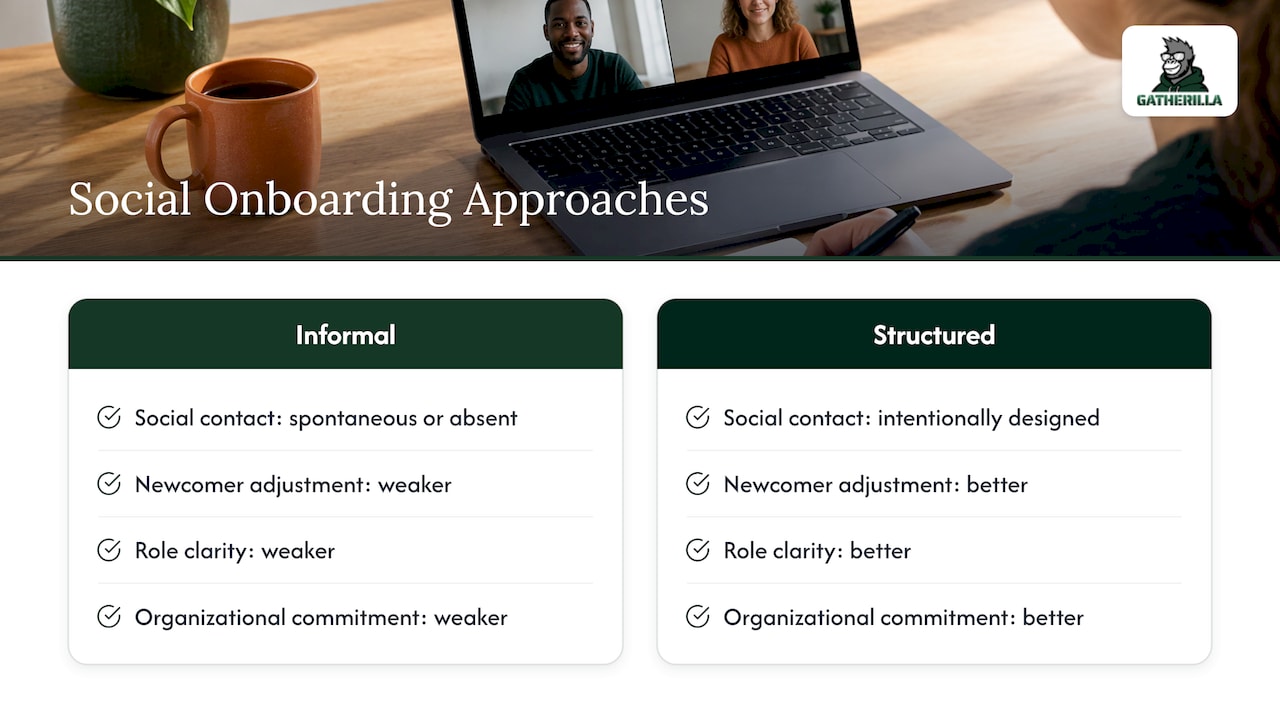
In an office, a new hire absorbs a lot by accident: who sits where, who laughs at which jokes, who to ask about the printer. Remotely, none of that happens unless someone designs it. Researchers reviewing onboarding during COVID-19 noted that without spontaneous office interactions, remote hires risk social isolation and weaker adjustment, which is why intentional, formal social onboarding matters. The same review reports that structured social onboarding programs lead to better newcomer adjustment, role clarity and organizational commitment than informal approaches.
That is good news for a team lead or HR manager. You don’t need a big budget. You need a clear order of events, a few good formats and someone responsible for each one. If you want a ready-made layout to start from, our copyable day 1 schedule turns the ideas below into a checklist.
For teams building a longer program around this, a 30-60-90 onboarding cadence shows how to keep coaching touchpoints going well past the first week.
Before day one: the call that sets the tone
The first activity actually happens before the first day. Cornell’s supervisor guide recommends calling the new team member a day or two before their start date to answer immediate questions and invite them to call with new ones. It’s a five to ten minute conversation, and it removes most of the first-morning nerves.
Use the call to cover:
- The shape of day one. Who they will meet, at what time, and which video tool the team uses.
- Logistics. Whether equipment has arrived and how they will log in, so the first hour isn’t spent on passwords.
- Accommodations and details. The same guide suggests arranging requested accommodations in advance and including preferred pronouns in welcome notices.
- One easy question. Ask how they like to be introduced to the team, so you don’t put them on the spot later.
The core day-one activities
The research behind the Cornell guide points to a simple pattern: virtual welcome events (a lunch, a coffee break or a meet-and-greet), an introduction to colleagues and a buddy, and scheduled time at both the start and the end of the day. Here is how that looks in practice.
A 15-minute welcome huddle with the team
Keep it short and warm. The manager greets the new hire, each teammate says their name, their role and one thing they’d happily help with, and the new hire says as much or as little as they like. Send the agenda in advance. Resist the urge to ask the newcomer for a long self-introduction on their first morning.
A buddy introduction
Pair the new hire with a peer, not their manager, who is the person to ask the “silly” questions. The buddy should reach out by message before the huddle and hold a 20 to 30 minute chat on day one. If you want ideas for what buddies can do beyond day one, see our list of onboarding buddy activities for the first 90 days.
A virtual coffee or lunch
Schedule a 20 to 30 minute informal chat with two or three colleagues, with no agenda and no slides. Cornell’s guide names virtual lunch, coffee breaks and meet-and-greets as welcome events. Offer it as an invitation, not a requirement, and have the host bring two or three easy questions in case conversation stalls.
Paired conversations that go a little deeper
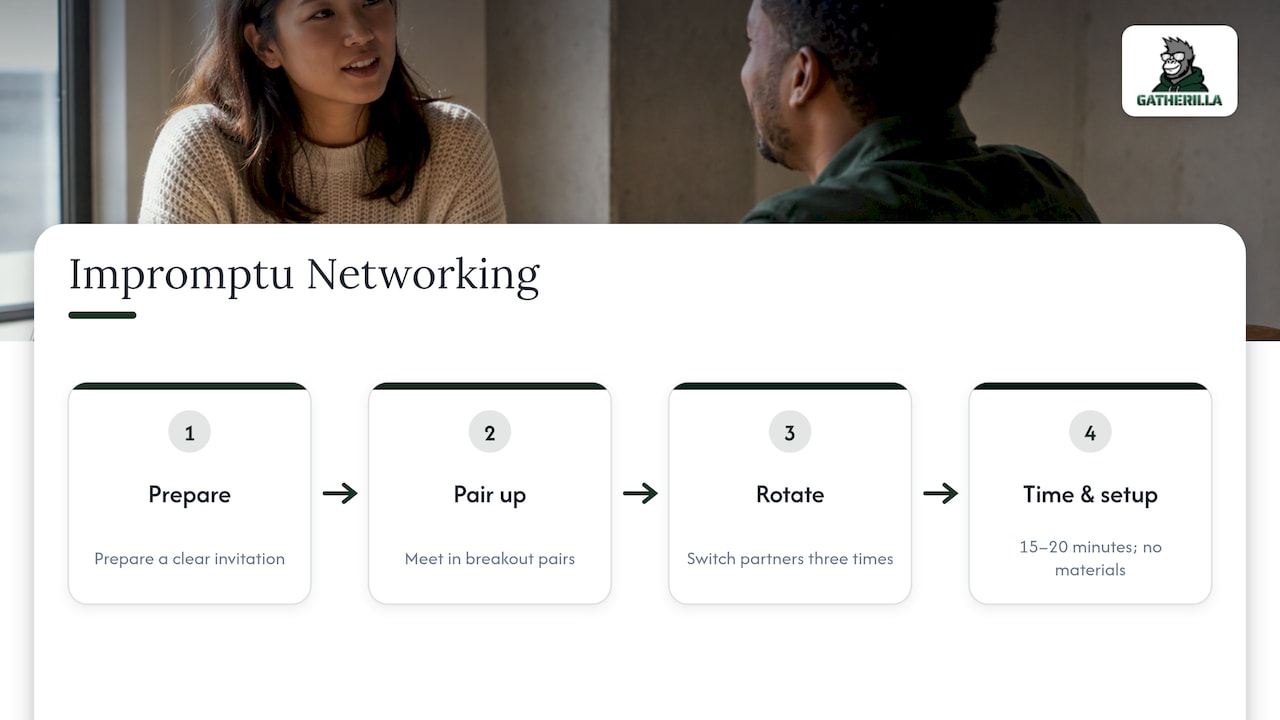
A structured format called Impromptu Networking works well for this. According to Liberating Structures, you prepare a clear invitation, set up breakout pairs, switch partners three times and allow 15 to 20 minutes in total, with no materials needed. Three rounds mean the new hire meets three colleagues one on one, and each person speaks and listens in equal measure.
A deeper version is the “Fast Friends” approach, where people answer increasingly personal questions in pairs or trios. Wharton’s executive education team says a full session can run 45 minutes, while a 3 to 5 minute version before a meeting can also help. For day one, keep to the lighter end of the question ladder: favorite breakfast, a skill you’d like to learn, the best trip you took recently. Save the more personal prompts for weeks later, when people know each other.
Wharton’s materials also explain why this works: self-disclosure in structured conversations engages the brain’s reward systems and helps build trust and cooperation in distributed teams. If trust is your goal, our guide to trust building activities online has 12 more exercises.
One team icebreaker or game
A light game gives the whole team a shared experience, and it gives the new hire something to talk about afterward. Formats that tend to work on day one include:
- Would You Rather. Zero preparation, and everyone can answer in a chat message.
- Two Truths and a Lie. Lets people share something surprising without sharing anything private.
- Guess That City. Each person shares a photo of a place that matters to them, and the rest guess.
- One-word weather report. A single word describing how you feel today. It takes about two minutes and works for large groups.
- A quick trivia round. Easy for newcomers because no one needs prior knowledge of the company. Our virtual team trivia playbook walks through how to run one.
Teams that live in Microsoft Teams can find more ideas in our roundup of Microsoft Teams icebreakers.
An end-of-day check-in
The Cornell guide recommends scheduling time at the end of day one, not only the start. Ten minutes with the manager or buddy is enough: what went well, what was confusing, what’s planned for tomorrow. It also tells you whether anything was missed, such as an unanswered access request, while it’s still easy to fix.
A sample day-one schedule
Adjust the times to the new hire’s time zone. This is a template, not a rule.
| Time | Activity | Length | Host |
|---|---|---|---|
| 9:00 a.m. | Manager check-in: agenda, tools, questions | 20 min | Manager |
| 9:30 a.m. | Equipment and access walkthrough | 30 min | IT or HR |
| 10:15 a.m. | Team welcome huddle | 15 min | Manager |
| 10:30 a.m. | Buddy introduction chat | 30 min | Buddy |
| 12:00 p.m. | Lunch on their own, no meetings | 60 min | None |
| 1:00 p.m. | Team icebreaker or short game | 15 min | Team lead |
| 1:30 p.m. | Paired conversations (three rounds) | 20 min | HR or team lead |
| 2:00 p.m. | Self-paced reading and first small task | 90 min | New hire |
| 4:30 p.m. | End-of-day check-in | 10 min | Manager or buddy |
Notice the white space. A remote first day full of back-to-back video calls is exhausting, and the new hire is also trying to learn new software. Leave the afternoon lighter than the morning.
Making activities welcoming rather than awkward
Most awkwardness comes from ambiguity: nobody knows how long it lasts, how to answer or whether it’s optional. The fixes are simple.
- State the rules first. Wharton’s guidance is to name the response channel and time limit in advance, model one response yourself and give clear instructions. If answers go in chat, say so.
- Go first. When the host answers the first question with something brief and low-stakes, everyone else calibrates to that level.
- Keep personal questions optional. Offer two or three prompts and let people choose or pass.
- Use video where you can. Cornell’s guide suggests using video as much as possible and keeping cameras on when possible, while providing virtual options for meetings. Treat that as an invitation, and let someone who is on a weak connection join with audio and chat.
- Watch the clock and the time zone. Be mindful of time zones so the new hire isn’t the only one joining at 6 a.m. or 9 p.m.
- Never single out the new hire. Ask the whole group the same question, so the newcomer is one voice among many.
Adapting to team size and personality
For a team of four to six, one open conversation works. For ten or more, split into pairs or trios, as the Impromptu Networking format does, so quieter people aren’t competing for airtime. For a large department joining a company-wide welcome, use chat-based formats such as one-word answers or polls. If the new hire is introverted, give them the questions ahead of time and let them answer in writing.
From day one to a daily habit
A great first day can fade fast if the second week is silent. The next step is a low-pressure recurring routine. Good options include a non-work chat channel for pets, recipes or weekend plans, a few minutes of informal chat at the start of meetings, and a recurring optional game or challenge. Keep these optional, because forced fun is the quickest way to kill participation. A brief daily puzzle or word challenge takes two minutes and gives the whole team a shared topic. For more structured ideas, see our collection of remote team challenge ideas, or the broader guide to remote team building.
Our perspective
We built Gatherilla around one belief: connection on a remote team is a habit, not an event. A single welcome call can feel great on day one, but a new hire decides how much they belong over the following weeks, in small repeated moments.
That’s why we focus on zero-preparation games that run in the browser, with no downloads and no accounts to create, and that work with whatever video tool your team already uses. When HR or a team lead can start an icebreaker in under a minute, they actually do it. When a new hire can join by clicking a link, nobody is troubleshooting software in the middle of an introduction.
Our approach is designed to make engagement a daily routine through a shared daily challenge, with real-time leaderboards and peer recognition tied to company values. For day one, we’d suggest a light game after the welcome huddle, because shared laughter does more in ten minutes than a long round of formal introductions. Then keep the daily rhythm going so the new hire is part of the team’s routine from the first week.
Thomas
Run your first day-one game with Gatherilla
If you’d like a game ready to go for your next hire, Gatherilla gives your team browser-based multiplayer games, daily word and trivia challenges, icebreakers for meetings and onboarding games for new employees. There’s nothing to download, and it works with any video conferencing tool.
The Free plan lets you try it out. Premium adds more games, reporting and priority support, and is published at $0.50 to $1.00 per seat per month, or $5 to $10 per seat per year. See the pricing page for the details, or visit Gatherilla to see the games. If you’re comparing options first, our overview of virtual team building tools explains the main types and what to look for.
FAQ
What are good first day icebreakers for a virtual team?
Pick formats that need no preparation and no private disclosure, such as Would You Rather, Two Truths and a Lie, Guess That City or a one-word weather report. Keep them to 5 to 15 minutes and have the host answer first. A quick trivia round also works well because the new hire doesn’t need any company knowledge to join in.
How long should day-one social activities last in total?
Around 60 to 90 minutes spread across the day is plenty: a 15-minute team huddle, a 30-minute buddy chat, one 15-minute icebreaker and a 20-minute paired conversation. Spreading them out avoids video fatigue. Add a 10-minute check-in at the end of the day.
What if the new hire is uncomfortable on camera?
Invite, don’t require. Cornell’s guidance favors video and cameras on when possible, but offering an audio-and-chat option keeps the activity inclusive. Tell the new hire in the pre-start call what to expect, so nobody is surprised by a camera request on the first morning.
Should day one include a lot of games?
One or two short activities are enough. The priority is a clear plan, working equipment and a few real conversations with the buddy, the manager and teammates. Use the game to lighten the mood, then rely on the buddy system and recurring routines to build relationships over time.
Sources
- Hiring Supervisor Guide to New Employee Orientation and Welcoming (Cornell University, 2022)
- Onboarding during COVID-19: Create structure, connect (PMC)
- Create Authentic Connections with Virtual Team Members (Wharton Executive Education, 2024)
- Impromptu Networking (Liberating Structures)
- 30, 60, 90 Manager Onboarding: Coaching Cadence for Mid Market HR