

Silent Meeting Games: 12 Quiet Activities for Remote Teams

Silent meeting games are short activities where people take part through chat, polls, typing, drawing or gestures instead of speaking. They work well in video calls because everyone answers at once, nobody is cold-called, and quieter people get the same airtime as the loudest voice. Below are 12 you can run this week, with steps, timing and the group size each one suits.
TL;DR
- Silent games run on chat, reactions, shared documents or gestures, so they fit any video tool and any comfort level with speaking.
- Five minutes is enough for most meetings. Pick a format by group size: open prompts for small teams, structured games for mid-size groups, polls or app-based play for large ones.
- Say the camera policy up front and always offer one non-video way to respond.
- A short, regular silent game beats a big occasional event for building connection.
- Skip lighthearted games on grim days, such as layoff weeks or deadline crunches.
Table of Contents
- What silent meeting games are, and when they help
- 12 silent games to try
- Quick comparison
- How long to run them and for how many people
- Include introverts and camera-shy teammates
- Make it a habit without eating meeting time
- A simple five-minute script
- Perspective
- Run silent games with Gatherilla
- FAQ
- Sources
What silent meeting games are, and when they help
Think of a silent game as a meeting warm-up that swaps talking for typing, tapping or showing. The “silence” is about the channel, not the mood. A good one is lively: the chat scrolls, reactions fly, and people laugh at the same moment.
They help most in three situations:
- Mixed-comfort teams. Some people think out loud, others need a minute to write. Silent formats give both groups room.
- Multilingual teams. Typing or gesturing removes the pressure of finding the right words live.
- Large calls. As a meeting grows, introverted voices get lost. Kreamer and Rogelberg’s Harvard Business Review article explains that silent brainstorming lets many people contribute at once through a written document and reduces fear of judgment through anonymity.
There is also evidence on the thinking side. Harvard Business Review reports that research shows embracing silence in a brainstorm helps teams produce significantly more and higher-quality ideas, and that it can be particularly useful in remote meetings. The games below borrow that principle and make it playful.
One timing note. Managers should avoid scheduling icebreakers on grim days, such as during layoffs or high-pressure deadlines, because the activity can come across as tone-deaf and hurt trust. Read the room first.
12 silent games to try
Each game lists the setup, the steps and a rough time. Times are starting points: adjust them to your team.
Chat-based games (no extra tools)
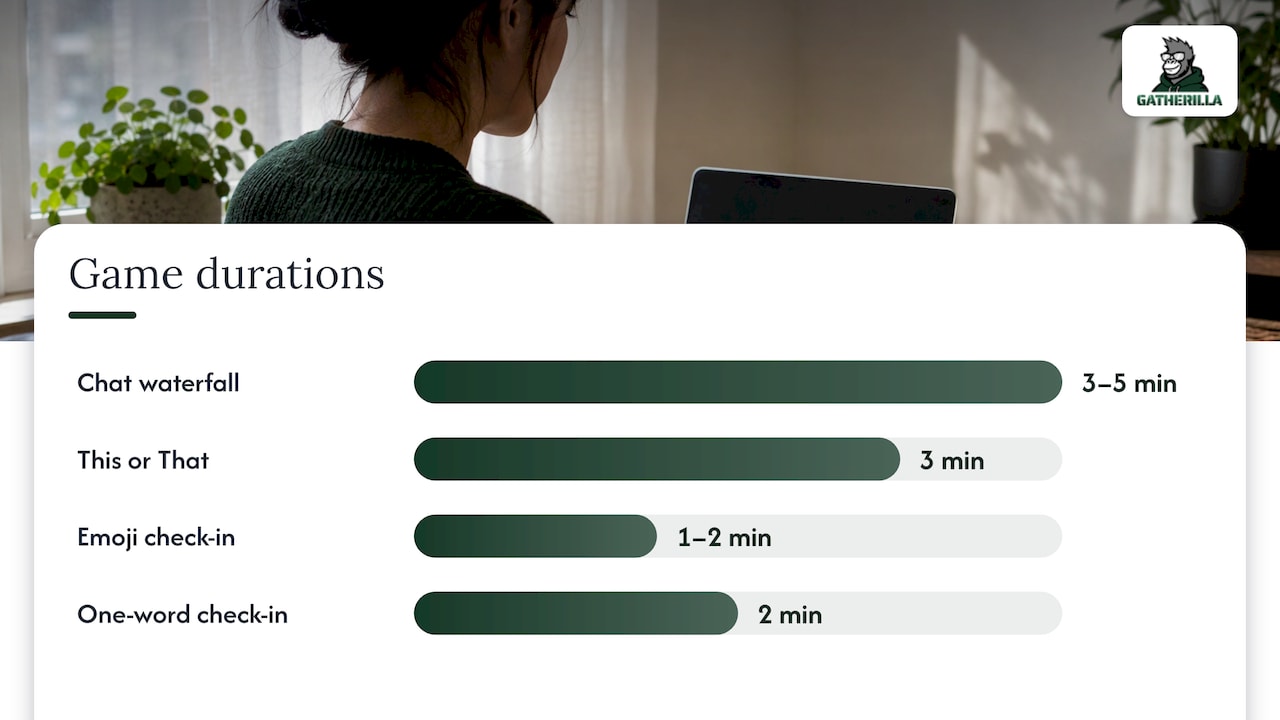
1. Chat waterfall (3 to 5 minutes, any size)
A chat waterfall is a technique where the facilitator poses a question and participants type an answer but do not hit send until a collective countdown. Everyone appears at once, and nobody is influenced by earlier answers.
- Ask a simple question: “What was the best thing you ate this week?”
- Give 30 seconds to type.
- Count down from three, then everyone sends.
- Read two or three answers aloud, or just let people react.
2. This or That in chat (3 minutes, any size)
Post a pair, such as “mountains or beach” or “early bird or night owl,” and ask people to type one word. Run five pairs in a row. It is fast, low-stakes and gives you quick small talk material for later.
3. Emoji check-in (1 to 2 minutes, any size)
Ask everyone to post one emoji that matches their week. It doubles as a mood read for the facilitator, and nobody has to explain themselves unless they want to.
4. One-word check-in (2 minutes, up to about 25)
Each person types one word describing how they arrive at the meeting. Group the words aloud: “I see a lot of busy and a couple of curious.”
Games for onboarding
5. Two Facts and a Goal (5 to 8 minutes, under 15)
New hires type two facts about themselves and one goal for their first 90 days. Teammates respond with a reaction or a one-line welcome in chat. It gives the newcomer a script, which makes the first meeting less scary, and it gives the team natural follow-up questions.
6. Ask Me Anything, typed (5 to 10 minutes, under 15)
The new person or a team lead opens a shared doc or the chat. Colleagues type questions, and the host answers a few aloud. Because questions arrive in writing, people ask things they would not raise out loud.
Games that use gestures or drawing
7. Back-to-back drawing (10 to 15 minutes, pairs)
In the back-to-back drawing game, one person describes an image using only words while the other draws it, with no gestures or facial cues. In a video call, use breakout rooms of two. Compare drawings at the end and discuss what made a description clear.
8. Silent organization (5 to 10 minutes, 6 to 20 with cameras on)
In Silent Organization, the group arranges itself in a specific order, such as birthday or years with the company, using only eye contact, gestures and nonverbal negotiation. Online, ask people to line up their camera tiles or hold up fingers for their number. Offer a chat-only version for anyone with cameras off.
9. Gesture your weekend (3 to 5 minutes, up to 12)
One at a time, people act out their weekend without words while others guess in chat. This is one of the examples that The Offsite Substack lists under silent or nonverbal challenges, which it calls perfect for introverts, multilingual teams or mid-afternoon resets. Make it volunteer-only.
Silent thinking structures
10. 1-2-4-All (12 minutes, any size)
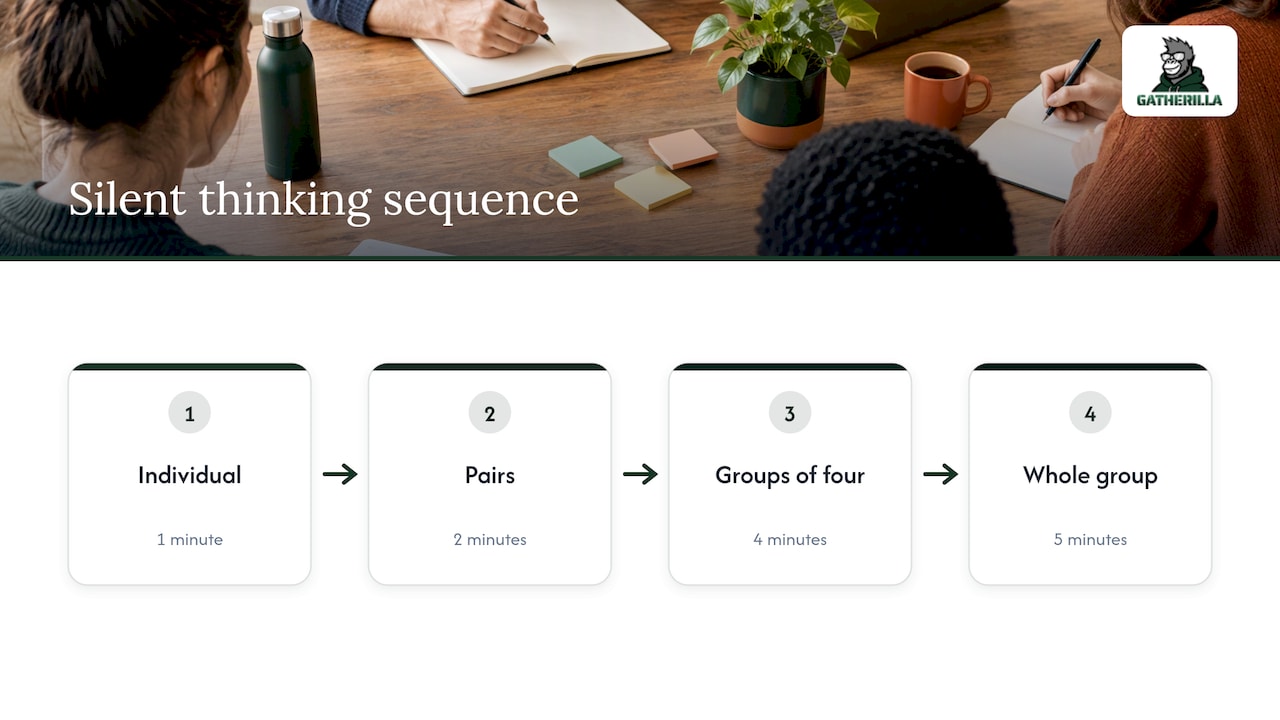
1-2-4-All takes 12 minutes: one minute of individual reflection, two minutes in pairs, four minutes in groups of four, and five minutes for a whole-group share. It works online through breakout rooms. Use it for a real question, such as “What would make our Monday sync more useful?” The silent first minute is what gives quieter people a head start.
11. Silent brainstorm in a shared doc (10 minutes, any size)
Share a doc or whiteboard with a question at the top. Everyone adds ideas at the same time for five minutes with no talking. Then the group votes with a reaction or a plus sign, and discusses the top three. It is the format the research above points to.
Light competitive games
12. Silent word and trivia challenge (5 minutes, any size)
Everyone plays the same word puzzle or trivia round in their browser while the call stays quiet. The scoreboard does the talking afterward. This is the format our platform is built around (more on that below), but you can run a version with a paper word list and a chat vote.
Quick comparison
| Game | Time | Best group size | Needs |
|---|---|---|---|
| Chat waterfall | 3 to 5 min | Any | Video-call chat |
| This or That | 3 min | Any | Chat |
| Emoji check-in | 1 to 2 min | Any | Reactions or chat |
| One-word check-in | 2 min | Up to about 25 | Chat |
| Two Facts and a Goal | 5 to 8 min | Under 15 | Chat |
| Typed Ask Me Anything | 5 to 10 min | Under 15 | Chat or shared doc |
| Back-to-back drawing | 10 to 15 min | Pairs | Breakout rooms, paper |
| Silent organization | 5 to 10 min | 6 to 20 | Cameras (chat option) |
| Gesture your weekend | 3 to 5 min | Up to 12 | Cameras |
| 1-2-4-All | 12 min | Any | Breakout rooms |
| Silent brainstorm | 10 min | Any | Shared doc |
| Word or trivia challenge | 5 min | Any | Browser |
How long to run them and for how many people
Short wins. One widely shared guideline from Gable puts five minutes as the sweet spot for most meetings, and treats under 10 people as a case for open prompts, 10 to 50 for structured games, and over 50 for polls or app-based interaction. Treat it as a rule of thumb, not a law.
In practice:
- Under 10 people: a chat waterfall or typed Ask Me Anything is enough. See our guide to team building for small groups for more ideas at that size.
- 10 to 50 people: use a structure with clear steps, like 1-2-4-All or a timed trivia round.
- Over 50 people: use a tool where everyone plays at once and the results show live. Breakout rooms get messy at this size.
Include introverts and camera-shy teammates
Silent formats help only if the setup is welcoming. A few habits from facilitation guides make the difference:
- Make cameras optional and say so first. Facilitators should state the camera policy before an activity begins and offer at least one non-video way to respond, such as chat or reactions.
- Keep it volunteer-based. SessionLab’s facilitation guide recommends chat-based or anonymous poll responses, volunteer participation instead of cold-calling, and clear, low-pressure instructions.
- Model the answer first. The same guide says the leader should answer first, show some vulnerability, and name the response channel before starting the timer.
- Do not stack features. Choose one participation method everyone can use. Asking people to click a link, create an account, share a screen and join breakout rooms in one game loses half the room.
That last point is why we built our games to run in a browser with no downloads. Fewer steps means more people join in.
Make it a habit without eating meeting time
One big team-building event a quarter does less than a small ritual every week. Guidance from First Time Managers says consistent, low-friction activities, such as a weekly five-minute game, build stronger connections than infrequent, high-effort events.
Three easy ways to fit them in:
- Open or close an existing meeting. Deel’s roundup suggests tacking five to ten minutes onto a regular meeting, or running it as an ongoing Slack conversation.
- Go async. A daily question in a team channel needs no meeting at all. We have ideas in our guides to Slack icebreakers and async team building across time zones.
- Anchor it to a weekday. Pick the same slot each week so the game becomes part of the rhythm. Our post on weekly five-minute rituals walks through how.
For a fast start before a stand-up, see our morning meeting games and Zoom icebreakers with scripts. If your team likes quick physical challenges, virtual Minute to Win It games are worth a look, and our overview of virtual meeting games covers the wider field.
A simple five-minute script
Here is a run sheet you can copy for your next team meeting:
- Minute 0: “Cameras are optional today. You can answer in chat or with a reaction.”
- Minute 1: Post the prompt and answer it yourself first, in one line.
- Minutes 1 to 2: Everyone types, but nobody sends.
- Minute 2: Count down from three. Everyone sends.
- Minutes 3 to 4: Read out a few answers, or ask who wants to expand.
- Minute 5: Move on to the agenda.
Keep prompts light and specific. “Favorite snack at your desk” works better than “Tell us something personal.”
Perspective
We built Gatherilla around one belief: team connection should be a daily habit, not an annual event. Silent games are the easiest way to start that habit, because nobody has to prepare, perform or be on camera to play.
When we talk to team leaders and HR managers, the same problem comes up. The quiet people are the ones who most need to feel part of the team, and the usual icebreaker, where everyone speaks in turn, is the one they dread. A game that runs in the browser, needs no download or account, and shows a live leaderboard changes that. People join in because it is easy, and they come back because it is fun.
Our approach is zero preparation, works with any video tool, and a daily challenge that keeps the team in touch between meetings. Our word and trivia games are designed to get a whole team playing at once in a few quiet minutes, so a facilitator does not have to be a performer.
Thomas
Run silent games with Gatherilla
If you would rather not build the setup yourself each time, Gatherilla is a browser-based platform for remote and hybrid teams. It offers customizable multiplayer games, daily word and trivia challenges, icebreakers for meetings, onboarding games for new hires and real-time leaderboards. There is nothing to download, and it works with all video conferencing tools.
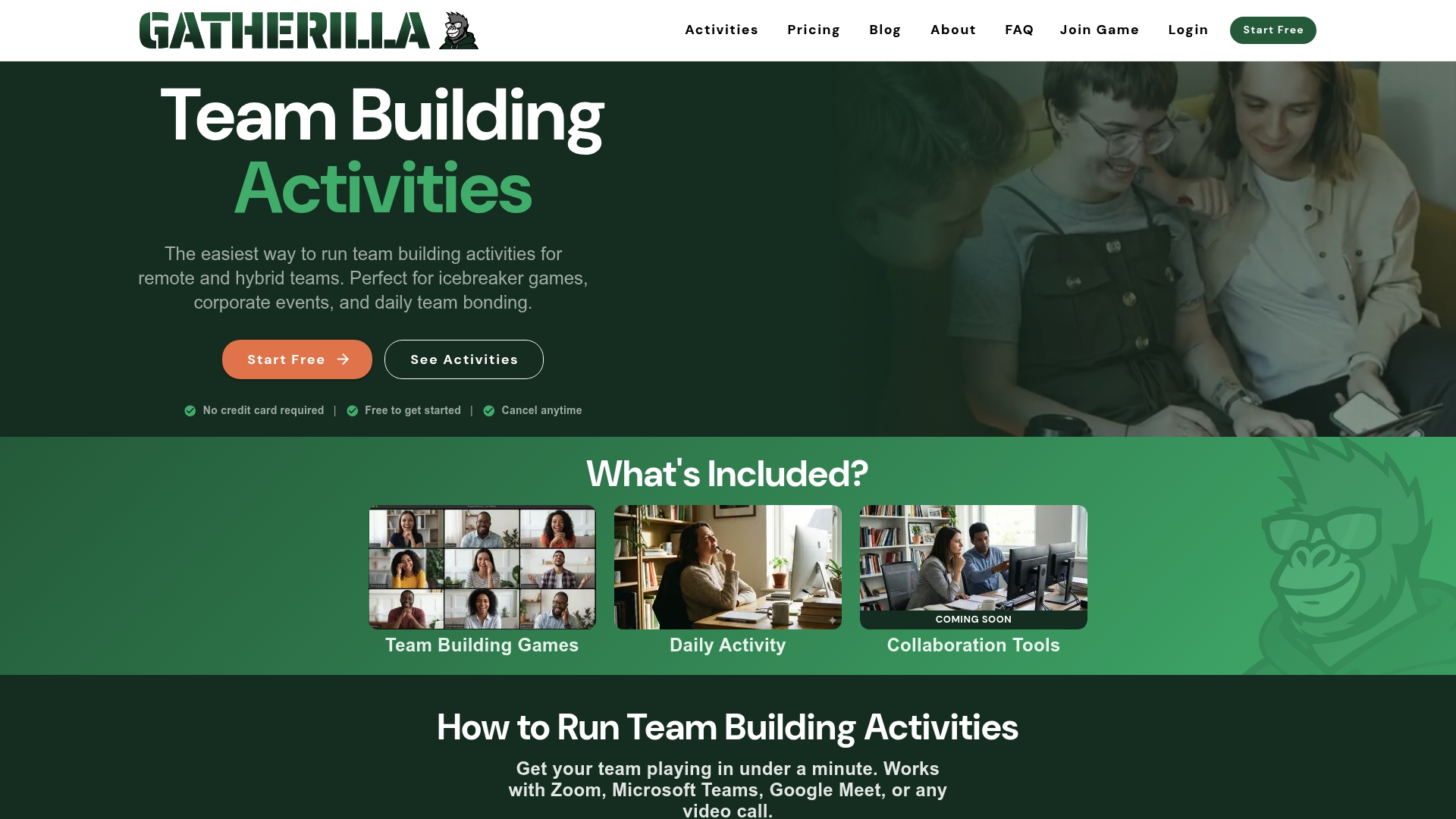
There is a free plan, and the Premium plan is priced per seat: $0.50-$1.00 per month or $5-$10 per year per seat, as published on our site. Premium adds more games, reporting and priority support. See the current details on the pricing page, or start from Gatherilla’s home page.
FAQ
What are silent meeting games?
They are short team activities where people take part by typing, reacting, drawing, gesturing or playing in a browser instead of speaking. They suit remote and hybrid meetings because everyone can take part at the same time, whatever their comfort with speaking or being on camera.
How long should a silent game last?
For most meetings, about five minutes is plenty. Longer structures such as 1-2-4-All take about 12 minutes and suit meetings where the output matters, such as gathering ideas. If the agenda is tight, run a one-minute emoji check-in.
What is a good silent game for a new hire’s first meeting?
Try Two Facts and a Goal. The new person types two facts and one goal, and teammates answer with reactions or short welcomes in chat. It gives the newcomer a clear script and gives the team easy follow-up questions. A typed Ask Me Anything works well as a second step.
How do I get people to join in without forcing them?
State that cameras are optional, offer chat or reactions as an answer path, and keep participation volunteer-based. Answer the first prompt yourself so people see what is expected. Keep prompts light and avoid cold-calling.
Can silent games replace talking in meetings?
They are a warm-up and a way to hear from everyone, not a replacement for discussion. Use them to open a meeting, collect ideas silently, then talk through the best ones together.
Sources
- Try Silence During Your Next Remote Brainstorm, Harvard Business Review
- Break Up Your Big Virtual Meetings, Kreamer and Rogelberg
- Quick Team Building for Meetings: 15 Fast Activities, First Time Managers
- Virtual Icebreakers for all kinds of Meetings, Slido blog
- Back-to-Back Drawing Game, Building Your Team
- Silent Organization, The Improv Archive
- 100 Icebreaker Ideas for Your Next Offsite, The Offsite Substack
- 1-2-4-All, Liberating Structures
- Icebreaker Games Your Team Won’t Roll Their Eyes At, Gable
- 32 engaging ice breakers for virtual meetings, SessionLab
- How to Host Virtual Icebreakers on Zoom, Teams, or Meet
- 20 Non-Cheesy Five-Minute Virtual Team Building Activities, Deel