

12 Web Based Team Games With Copy Paste Host Scripts, No Downloads

Browser-playable team games that force interdependence and shared objectives are the fastest, lowest-friction way to build communication, trust, and team flow. No downloads, no IT tickets, no wasted meeting time explaining rules. This article covers a quick shortlist, twelve ready-to-run games with host scripts, a selection framework, the research behind why these games work, setup best practices, and a full session plan you can copy today.
TL;DR:
- Browser-based team games that require interdependence and shared objectives are highly effective for building communication and trust without technical barriers.
- Short micro-games like trivia, drawing, and icebreaker activities scale well for different team sizes and can be completed within 10 to 15 minutes, with minimal setup.
- Role-based puzzle and mission games foster trust and coordination by forcing players to verify each other’s reliability and share information under pressure.
- Testing links, confirming browser access, running practice rounds, and offering fallback options are essential for ensuring smooth session execution.
- Regular, recurring sessions backed by platforms like Gatherilla promote sustained team engagement and measurable improvements in key behaviors such as cooperation and delegation.
Table of Contents
- Quick shortlist of web-based game formats to try
- Twelve ready-to-run browser games with host scripts
- How to choose the right game for your team
- What the research says about team games and their limits
- Setup checklist and browser best practices
- A sample 30 to 45 minute session you can copy
- What I have learned pitching recurring team games to leadership
- How Gatherilla makes recurring team games effortless
- Sources
- FAQ
Quick shortlist of web-based game formats to try
Every format below runs entirely in a browser and asks players to depend on each other to win, which is what separates a team-building game from a distraction.
- Cooperative puzzle room: best for 4 to 8 people, 20 to 30 minutes, a single shared link with no account needed.
- Timed shared-drawing rounds: works for 6 to 20 people, 10 to 15 minutes, one link and one host device.
- Live multiplayer trivia with a shared board: fits 5 to 30 people, 15 to 25 minutes, low setup since most tools run from a browser tab.
- Role-based mission games: ideal for 4 to 6 people, 30 to 45 minutes, slightly more setup since roles need assigning in advance.
- Collaborative story-building: suits any size group, 10 to 20 minutes, almost zero friction since it can run in a chat window.
- Browser Minute-to-Win-It challenges: best for pairs or small groups, 15 to 20 minutes, minimal setup beyond a timer.
- Live scavenger hunt with in-chat proof: works for 6 to 25 people, 20 to 30 minutes, needs a shared doc or chat channel for submissions.
- Asynchronous challenge chains: fits any team size, spread across a day or week, the lowest friction of all since no one needs to be online at the same time.
Each format builds teamwork differently. Puzzle rooms and mission games force explicit coordination because no single player has all the information. Trivia and drawing rounds build shared momentum toward a score. Story-building and scavenger hunts reward creative interdependence rather than speed. The common thread is a shared objective that cannot be reached alone, which is the mechanism that turns a game into a team-building exercise instead of a solo distraction with an audience.
Twelve ready-to-run browser games with host scripts
These games are ordered from shortest to longest so you can match one to the time you actually have. Each includes what you need, what to say, and a fallback if someone cannot join.
- Two-truths-and-a-lie, speed round. Objective: quick warmup that surfaces shared context. Materials: none beyond video or chat. Script: “Type one lie and two truths about yourself in the chat right now. You have 90 seconds. Everyone else votes on the lie before I reveal it.” Timing: 5 minutes for 6 people. Scoring: track correct guesses. Fallback: if chat lags, do it verbally by name.
- Shared drawing relay. Objective: build quick coordination under time pressure. Materials: a browser whiteboard tool with one shared canvas. Script: “You each get 20 seconds to add to this drawing before it passes to the next person. No talking about what it should become.” Timing: 10 minutes. Scoring: vote on the funniest or most coherent result. Fallback: switch to a text-based version where players add one word at a time to a story.
- Trivia with a shared scoreboard. Objective: build momentum around a shared score. Materials: any browser trivia tool with team mode. Script: “You’re in two teams. Answer as a group, not individually, and talk through your answer before submitting.” Timing: 15 minutes for 10 questions. Scoring: built into the tool. Fallback: if the tool lags, run questions manually and tally by hand.
- Minute-to-Win-It, browser edition. Objective: fast physical or visual challenges done on camera. Materials: everyday household items, a timer. Script: “You have 60 seconds to stack five items on your desk without them falling. Camera on so we can all watch.” Timing: 15 minutes for four rounds. Scoring: fastest completion or most attempts. Accessibility note: offer a seated or camera-off alternative like a typing-speed challenge.
- Cooperative puzzle room. Objective: force interdependence through split information. Materials: a browser escape-room tool where each player sees different clues. Script: “Nobody has the full picture. Read your clue out loud and listen for what connects.” Timing: 25 minutes. Scoring: time to completion. Fallback: if one player drops, the host reads their clue aloud.
- Role-based mission game. Objective: verify reliability under pressure through assigned roles. Materials: a browser tool like Spaceteam-style role interfaces. Script: “You each control one part of the ship. Call out instructions clearly and confirm you heard them before acting.” Timing: 30 minutes. Scoring: missions survived or completed. Accessibility note: pair players with limited typing speed with a partner who can relay instructions.
- Collaborative story chain. Objective: build creative trust with low stakes. Materials: a shared doc or chat thread. Script: “Add two sentences to the story, then pass it on. No erasing what came before.” Timing: 15 minutes. Scoring: none needed, read the result aloud at the end.
- Live scavenger hunt. Objective: build energy and light competition. Materials: a shared chat channel for photo or text proof. Script: “Find something blue in your space and post a photo in 3 minutes. First five teams score a point.” Timing: 20 minutes for five rounds. Fallback: swap photo proof for a spoken description if cameras are off.
- Asynchronous challenge chain. Objective: sustain engagement outside of meetings. Materials: a shared channel or platform with daily prompts. Script: posted once: “Answer today’s prompt before 3pm and tag the next person to go.” Timing: spread across a day. Scoring: participation rate.
- Timed strategy mission with rotations. Objective: build coordination for established teams who already trust each other. Materials: a browser strategy game with rotating roles. Script: “Every five minutes, roles rotate. Whoever has the map cannot see the obstacles, so describe what you know.” Timing: 35 minutes. Scoring: objectives completed under rotation.
- Icebreaker bingo. Objective: low-pressure mingling for larger groups. Materials: a shared bingo card generated in-browser. Script: “Find someone on the call who matches each square and get them to confirm in chat.” Timing: 15 minutes. Fallback: reduce the card to five squares for larger groups.
- Debate and defend. Objective: build persuasive communication in pairs. Materials: none beyond video. Script: “You have two minutes to argue that cereal is a soup. The other team decides who wins.” Timing: 10 minutes for two rounds.
Pro Tip: Run a one-minute practice round before scoring starts, even for a familiar game. It catches connection problems before they cost you real time.
How to choose the right game for your team
The right choice depends on constraints you can name in under a minute: team size, the objective, the time you have, and the tech everyone is working with.
- Team size: puzzle rooms and mission games work best under 8 people, while trivia and scavenger hunts scale past 20.
- Objective: use role-based games for trust-building, drawing or story games for creativity, and trivia for quick energy.
- Time available: anything under 15 minutes should be a micro-game with no learning curve.
- Technical constraints: confirm whether your company’s network blocks the tool before you build a session around it.
- Accessibility: check camera requirements, typing speed demands, and whether captions are available.
- Success measure: decide before the session whether you’re tracking participation, observed cooperation, or a follow-up task outcome.
| Check | When to do it | Who owns it |
|---|---|---|
| Test the shared link | Day before | Host |
| Confirm browser and network access | Day before | Host or IT contact |
| Run a one-minute practice round | First two minutes of session | Host |
| Assign a backup moderator | Before session starts | Host |
| Record a simple follow-up metric | Within hours after | Host or team lead |
Red flags to watch for: half the team can’t load the link, someone can’t participate due to a camera requirement, or the game runs long and eats into work time. The fix in each case is the same: swap to the shortest micro-game on your list rather than troubleshooting live. A browser-based platform that never requires downloads or IT approval removes most of these red flags before they happen.
What the research says about team games and their limits
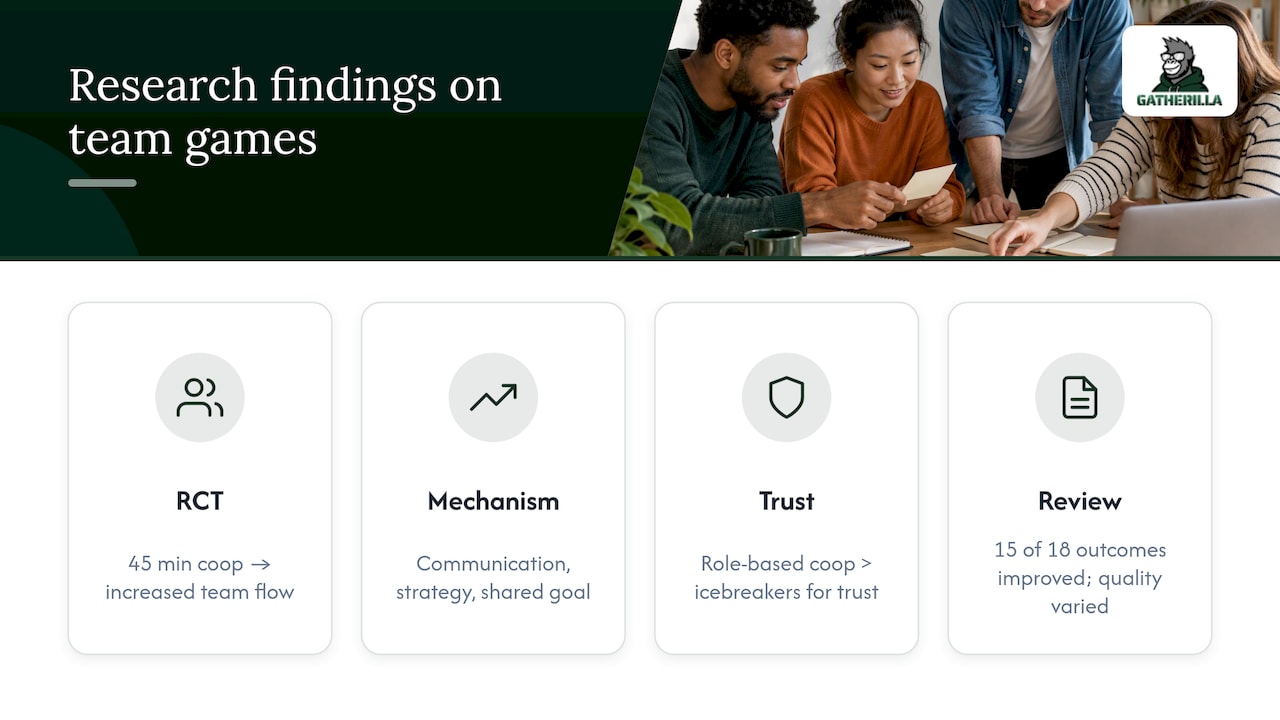
A randomized controlled trial found that teams who played cooperative video games for 45 minutes showed increased team flow, and that flow contributed more to later task performance than cohesion did. The mechanism was not simply having fun together: it was communication, strategy formation, and a shared goal that required real coordination.
Fun alone does not reliably predict better team performance. Communication, shared goals, and appropriate challenge do.
A separate trust-focused study found that a cooperative role-based game produced more trusting behavior in virtual teams than a typical social icebreaker, because interdependence let teammates verify each other’s reliability under pressure. That is the case for choosing role-based mission games over passive icebreakers when trust is the actual goal.
A 2023 review of seven studies found that 15 of 18 measured outcomes improved after digital game interventions, including communication, delegation, trust, and team flow, though study quality and duration varied widely. That variance is a caution against assuming one fun session will transform team culture on its own. The review recommended measuring behavioral outcomes such as observed cooperation or a follow-up task, not just self-reported mood after the game ends.
Setup checklist and browser best practices
Most dropped sessions fail for boring reasons: a blocked domain, an unfamiliar interface, or no plan for the person whose laptop won’t cooperate.
- Test the shared link yourself the day before, not five minutes before the meeting.
- Confirm the tool works on your team’s actual browser and check for firewall or domain blocks common on corporate networks.
- Run a one-minute practice round at the start so confusion doesn’t eat into your real time.
- Assign one person as host or moderator separate from whoever is presenting.
- Offer a low-bandwidth or phone-based fallback, and a screen-share option for anyone who can’t load the tool directly.
- Turn on captions where available, and never require cameras to be on as the only way to participate.
Practitioner guidance on building browser activities that work reliably points to the same pattern: every extra step, whether it’s installing an app or creating an account, reduces how many people actually join in.
A sample 30 to 45 minute session you can copy
This works for two situations: a newly formed team that needs trust, and an established team that wants a sharper challenge.
- Five days before: send the link, confirm the tool loads on your team’s network, and pick a backup moderator.
- Minute 0 to 5: warm up with two-truths-and-a-lie or a one-question check-in.
- Minute 5 to 10: run a one-minute practice round of the main game so nobody is learning rules under pressure.
- Minute 10 to 35 (new team): run the cooperative puzzle room, assigning roles so no one holds all the information.
- Minute 10 to 40 (established team): run the timed strategy mission with role rotations every five minutes.
- Minute 35 to 40: debrief with one question: “What made coordination easier or harder just now?”
- Minute 40 to 45: close with one follow-up action, like a shared doc where people log one thing they’ll try differently this week.
What I have learned pitching recurring team games to leadership
Weekly micro-games and one monthly longer session tend to stick better than occasional one-off events, because leadership sees consistent participation numbers instead of a single spike. Common pitfalls are picking a game too complex for a 15-minute slot and skipping the practice round, both of which are easy to fix once you notice them.
— Thomas
How Gatherilla makes recurring team games effortless
Running a new game every week from scratch gets old fast, which is why a platform built for this beats reinventing a session plan each time. Some platforms offer customizable multiplayer browser games built for recurring team engagement, with no downloads and quick setup for hosts who need to avoid extensive tool testing before a meeting.

- Daily challenges keep teams connected without requiring a scheduled meeting every time.
- Templates built for HR teams mean less time designing scripts and more time running sessions.
- Enterprise-grade security controls matter once a program scales past a handful of casual games.
A single DIY game works fine for one session. A recurring program with reporting and consistent quality is where a dedicated platform earns its place. Gatherilla’s Premium plan runs from $0.50 to $1.00 per seat per month, or $5 to $10 per seat per year, with a free tier available for teams who want to try it first. Check the pricing page to see which plan fits your team.
Sources
The claims in this article draw on a randomized controlled trial on team gaming, a trust-building study on virtual teams, and a 2023 review of digital game interventions. For deeper reading on trust-building outside gaming specifically, see this guide on building trust online.
- Team building through team video games: randomized controlled trial
- Review: digital games and team cohesion (2023)
- Trusted teammates: commercial digital games can be effective trust-building tools
FAQ
What are some fun games to play virtually with teams?
Cooperative puzzle rooms, role-based mission games, and timed trivia with a shared scoreboard are strong choices because they require players to coordinate toward one goal. Shorter options like a drawing relay or two-truths-and-a-lie work well when you only have 10 to 15 minutes.
What are some fun online games to play with teammates?
Browser-based Minute-to-Win-It challenges, live scavenger hunts with photo proof, and collaborative story chains all work without downloads or accounts. Pick based on your group size and how much time you have, since puzzle and mission games need more setup than quick trivia rounds.
What are the 10 most popular online games?
There is no single authoritative ranking of the most popular online team games, since popularity varies by platform and audience. For team-building specifically, cooperative puzzle rooms, trivia formats, and role-based mission games consistently show up as reliable options across research on team gaming and practitioner guides.
What are some good web games to play at parties?
Icebreaker bingo, debate-and-defend rounds, and shared drawing relays work well for larger, lower-stakes groups where the goal is energy rather than deep coordination. Keep party games under 15 minutes each so momentum doesn’t drop.
How do I measure whether a team game actually worked?
Track participation rate and observe whether players communicated and coordinated during the game itself, rather than relying only on how people say they felt afterward. A 2023 review recommends behavioral measures and a short follow-up task to detect changes that last beyond the session.