

Hybrid Offsite Activities That Work for Remote and In-Office Teams
The best hybrid offsite activities are short, interactive and designed for the person on the screen first, so the people in the room can join without any extra effort. Pick a few that need no props, give every participant the same way to take part, and keep the connection going after the offsite ends. A browser-based game that everyone opens on their own device does all three, which is why we built Gatherilla around it.
This guide covers what a hybrid offsite is, how to structure the day, which activities work for mixed groups, and how to turn one event into a habit.
TL;DR
- A hybrid offsite only counts if remote participants have an equal right to speak. If they just watch, it is a broadcast.
- Design for remote attendees first, then adapt for the room. Keep segments to 10 to 15 minutes and assign one facilitator per side.
- Put plenaries and Q&A online for everyone, and keep brainstorming and breakout workshops for in-person time or small online groups.
- Quick icebreakers, onboarding pairings and daily rituals do more for connection than one big event.
- Everyone joins from their own device: no downloads, no shared-screen spectators.
Table of Contents
- What a hybrid offsite actually means
- Design for the remote participant first
- A single-day structure that respects both formats
- Hybrid offsite activities that work
- Use the offsite to onboard new hires
- Make the connection last after the offsite
- A planning checklist for the week before
- Our perspective
- Run your next hybrid offsite with Gatherilla
- FAQ
- Sources
What a hybrid offsite actually means
An offsite is a planned session away from the usual daily routine, with the goal of aligning, bonding or planning. In a hybrid offsite, some people are on site and others join remotely, with an equal right to speak. The test is simple: if remote participants listen without being able to intervene, you have run a broadcast, not a hybrid event.
MIT Sloan calls this format a mixed-mode meeting, and its advice for deciding when to use one is useful for any planner: use it when having some people together creates real business value, not just because some employees happen to live near an office. Otherwise proximity quietly creates inequity in relationships and influence.
Three situations make a hybrid format the right call: teams spread across several sites or countries, colleagues who cannot travel for two days, and a wish to cut travel without losing shared time. Be honest about the cost, too. A hybrid event takes more preparation than a conventional one, because you are designing two simultaneous experiences instead of one.
Design for the remote participant first
Most hybrid offsites fail the same way: the room has a great time, and the screen becomes background noise. The fix is a design rule, not a bigger budget.
Buffer, when it ran a hybrid meetup, designed the agenda for whoever would find collaboration hardest, which was the remote participant. Its team also had everyone join video calls individually instead of one shared room feed, and recorded sessions so people could contribute asynchronously. Lattice took the same approach: its Design team started with an event that included everyone and planned the agenda around that.
A few rules follow from this:
- Everyone joins on their own device. One laptop on a conference table for ten colleagues makes the remote people spectators. Individual logins put a face, a voice and a cursor for each person on equal footing.
- Remote voices go first. Leaders who greet and call on remote attendees first make it easier for them to chime in later. Monday.com’s hybrid meeting guidance adds calling people by name and pausing to check for remote input before shifting into room conversation.
- Give each side a facilitator. One person should run the virtual group, one the room, and one should watch the chat. Gable describes the remote facilitator as the most important assignment for a hybrid all-hands: one remote person whose only job is to monitor the chat, read questions aloud, flag audio drops and advocate for the remote experience.
- Keep segments short. Ten to fifteen minutes is the target, and longer sessions should alternate between whole-group discussion and small breakout groups.
- Schedule remote connection during breaks. MIT Sloan suggests giving virtual participants a strong presence and arranging online pair or trio connections during breaks, so they are not left alone while the room gets coffee.
For a deeper look at keeping remote people involved in the meeting itself, see our guide to keeping remote participants engaged in hybrid meetings.
A single-day structure that respects both formats
Not every activity travels well over video. La Fleur de Bouard, a venue that hosts hybrid offsites, notes that top-down plenaries, figures presentations, chaired Q&A sessions and progress reviews work well remotely, while breakout workshops, brainstorming and anything depending on spontaneity work badly.
That suggests a day built in two halves:
| Time block | Format | What happens |
|---|---|---|
| Morning | Hybrid, everyone connected | Welcome icebreaker, plenary, key figures, chaired Q&A |
| Midday | Parallel, with a shared activity | Lunch in each location plus a short multiplayer game that mixes both groups |
| Afternoon | In person, with online small groups | Workshops and informal time; remote colleagues join breakout groups of their own |
| End of day | Hybrid, short | Wrap-up for everyone who stayed remote, with a closing round |
The morning/afternoon split comes from the same venue’s recommended single-day format, which pairs a hybrid morning with an in-person afternoon and a short wrap-up for those who stayed remote. Adapt it: if your remote colleagues are the majority, flip it and make the afternoon workshops online-first.
The location does not have to be the same for all participants, either. Lattice allowed people to take part remotely or from different offices while keeping a remote-first approach to equity across locations. If you have three small offices, treat each as a node rather than forcing a single venue.
Hybrid offsite activities that work
The activities below are chosen because each gives every participant the same input method and runs in short bursts.
Opening icebreakers
Start with something low-risk that everyone can answer in one line. Columbia University Human Resources recommends opening team meetings with a short icebreaker and suggests prompts such as naming a hobby or talent, the last thing you cooked, the last book or article you read for pleasure, a highlight from the weekend, the music you are enjoying, or the origin of your name.
On the screen, these prompts work best when answers appear at the same time, for example in the chat or a shared board, so that the fastest typist in the room does not set the tone. For ready-made formats, our hybrid meeting icebreakers and remote icebreaker games guides give you prompts you can run in minutes.
Multiplayer games that mix both groups
A short multiplayer game, played in the browser from each person’s own device, is the most reliable way to avoid the “room versus screen” split. Word and trivia challenges, team leaderboards and quick rounds mean the person in the conference room and the person at a kitchen table compete on the same terms. Mix teams across locations on purpose, so every team has a mix of remote and in-office people.
Our hybrid team building ideas for HR cover formats that need about ten minutes of preparation and leave nobody watching from the sidelines.
Skill shares and career reflection
Lattice’s event used internal skill shares on both work topics and personal passions, plus a career reflection exercise followed by small-group sharing. These work well because they are talk-based, so the format matters less than in a physical activity. Run the small groups in breakout rooms, with at least one remote person in each.
Breakout games
Breakout groups of three or four are where quiet people speak. Keep them short and give each group a task with a clear output. If you want ideas, see our list of breakout room games that actually work.
Pairing and connection time
Slack’s Donut feature, which Columbia’s guidance mentions, randomly pairs colleagues for 30-minute coffee chats. Schedule one pairing round at the offsite with a remote-in-office match for each pair, then let it continue afterward.
Activities to skip or move
Anything that depends on physical proximity (a scavenger hunt in one building, a whiteboard sprint around a table) should be moved to the in-person block or redesigned so the remote group has its own version. If you want ideas built for fully remote groups that you can slot into the hybrid day, our virtual offsite ideas are a good starting point.
Use the offsite to onboard new hires
An offsite is a good moment to introduce someone who joined recently, particularly if they work remotely. Columbia recommends that new hires get 30-minute one-on-one meetings with every member of their immediate team and with department managers, arranged by the hiring manager within the first one to three months. It also recommends a “Spotlight on…” rotation, where team members share a short personal intro on a set schedule with predetermined questions, and people answer in writing, video or audio, whichever feels most comfortable.
Yelp’s engineering team brings the whole team together on a new hire’s first day for a virtual lunch, coffee or watercooler chat, and invites new hires to a virtual meet-and-greet with its community manager within their first 30 days.
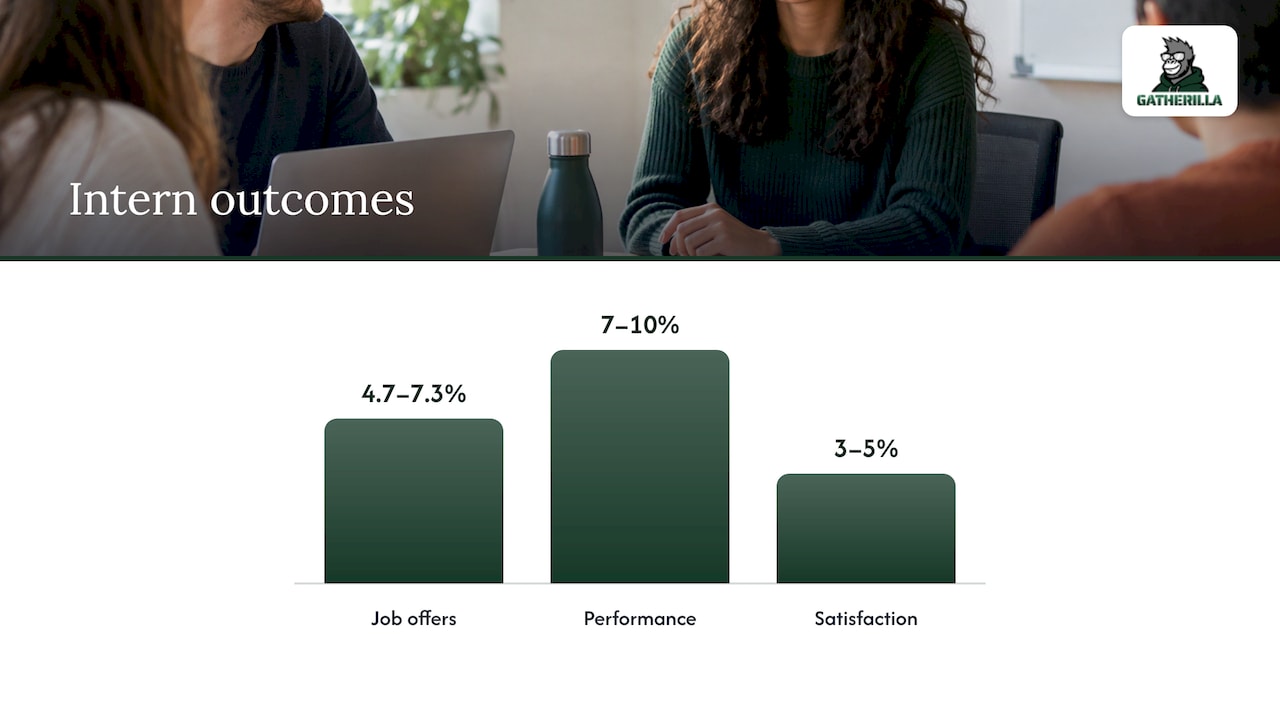
The payoff is measurable. In a field experiment with 1,370 summer interns in 16 cities, interns who had informal virtual time with senior managers were 4.7 to 7.3 percent more likely to receive a job offer, performed 7 to 10 percent better and reported 3 to 5 percent higher satisfaction. The researchers’ advice was to reach out to remote workers first.
At the offsite, a getting-to-know-you game with new hires on every team does the same job in a more relaxed way than a formal round of introductions.
Make the connection last after the offsite
Offsites are expensive and rare. The connections they create fade unless something keeps them alive. Research cited by Charterworks suggests that bonds between colleagues stay stronger for three to five months after an offsite, which is a reasonable window to plan follow-up around.
Rituals are the most effective follow-up. Harvard Business School research by Michael Norton found that a group bonding ritual, such as a closing cheer at the end of a project, raised how meaningful employees judged their work by 16 percent. He describes three core elements of a ritual: physical, communal and psychological. Roughly 48 percent of surveyed workers said they already did activities with all three.
Social time also affects retention and teamwork. In a field experiment across more than 100 offices of a microfinance company, offices given small budgets for regular social activities over three months saw employee turnover fall by about 4 to 5 percentage points and performed better on team tasks. The researchers say the findings are especially relevant in hybrid settings, where informal contact is scarcer.
So plan the follow-up before the offsite ends:
- Daily: a five-minute word or trivia challenge the whole team plays at the same time each day.
- Weekly: a short ritual, such as the formats in our guide to weekly five-minute rituals.
- Across time zones: asynchronous versions for colleagues who cannot join live, covered in our async team building guide.
If you want a broader view of options, our complete guide to remote team building puts the formats side by side.
A planning checklist for the week before
Preparation is where hybrid offsites are won. Work through these items in order:
- Decide who is remote and who is in the room, and why. If proximity is the only reason, reconsider the format.
- Name the three facilitators: remote lead, room lead and chat monitor.
- Send a short guide in advance so everyone knows how to join, which device to use and which tools will be on screen.
- Test audio and cameras in the room, with a remote colleague checking what they can hear.
- Set ground rules. Buffer’s team used a playful safe word to flag discussions going off track, which helps remote participants who cannot easily interrupt.
- Build the agenda in 10 to 15 minute blocks, with remote participants speaking first in each.
- Schedule the follow-up ritual so it starts within a week.
One caution on scale: Dropbox built a dedicated planning team that handled more than 90 offsites in 2024 and saved team leaders 2,500 hours of planning. You do not need a dedicated team, but the lesson holds: a repeatable template saves more time than starting each offsite from scratch.
Our perspective
Most advice about hybrid offsites is about the one big day. We think the day matters less than what happens on the other 200 working days.
The research points the same way. Offsite bonds fade over a few months, and rituals build meaning over time. So we built Gatherilla for the small, repeatable moments: a daily challenge, a quick icebreaker at the start of a meeting, an onboarding game for the new hire.
The other thing we care about is that nobody watches from the sidelines. When everyone plays in the browser from their own device, with no downloads, the person in the conference room and the person at home have exactly the same controls. That is the equal right to speak that makes an event hybrid.
If you take one thing from this guide, make the offsite the start of a habit, not the whole plan.
Thomas
Run your next hybrid offsite with Gatherilla
Gatherilla is a browser-based platform of customizable multiplayer games for remote and hybrid teams. It needs no downloads, works with all video conferencing tools, and includes icebreakers for meetings, onboarding games for new employees, a daily word and trivia challenge and real-time leaderboards.
There is a free plan to start with. Premium, which adds more games, reporting and priority support, costs $0.50 to $1.00 per seat per month or $5 to $10 per seat per year. See the plans on our pricing page, or explore the team building games for remote and hybrid teams.
FAQ
What does “offsite event” mean?
An offsite event is a planned session held away from the usual daily routine, with a purpose such as planning, alignment or bonding. WorkLife lists the usual objectives as having a clear goal, boosting morale, fuelling creativity and improving long-term productivity. It can happen in a venue, in an office on a different day, or online.
What do hybrid events mean?
A hybrid event has some participants on site and others joining remotely. For work settings, Microsoft describes hybrid work as a combination of in-person office work and remote work. In an offsite, the key is that both groups can take part on equal terms.
What are some fun activities for a team offsite?
Short multiplayer games, skill shares on work topics and personal passions, small-group career reflection, quick icebreaker prompts and randomly paired coffee chats all work for mixed groups. Choose formats where everyone uses the same input method, such as their own device, and keep each segment to 10 to 15 minutes.
How do I keep remote employees from feeling like spectators?
Design for them first. Have everyone join on their own device, call on remote people before the room, and assign a facilitator for each side plus someone to watch the chat. Pair remote and in-office colleagues in breakout groups so conversation does not default to whoever is in the room.
Sources
- When Does It Make Sense to Have Mixed-Mode Meetings?
- How We Made Our Hybrid Meetup Inclusive
- How to Host a Hybrid Onsite
- Three lessons from five years of flexible working
- Hybrid Meetings: Best Practices & Top Solutions
- How to Run an All-Hands Meeting That Works for Hybrid Teams
- Best in Flex | Human Resources, Columbia University
- How we onboard engineers across the world at Yelp
- Managers, Here’s How to Bond with New Hires Remotely
- Rituals at Work: Teams That Play Together Stay Together
- Friends at Work: Do Social Connections Make Teams Perform Better?
- Inside the hybrid and remote offsite playbook, WorkLife
- What Is Hybrid Work? Microsoft Teams