

Virtual Team Building Cost: What Teams Pay in 2026

Virtual team building costs anywhere from nothing to about $100 per person for a single event. Self-serve games and async challenges sit at the bottom of that range, facilitated sessions in the middle, and kit-based experiences at the top. The cheapest way to keep a distributed team connected is a small, recurring habit on a per-seat subscription rather than a few big one-off events. Below you’ll find the typical price of each format, a worked budget for a two-hour session, the factors that move the total, and how to build a yearly plan.
TL;DR
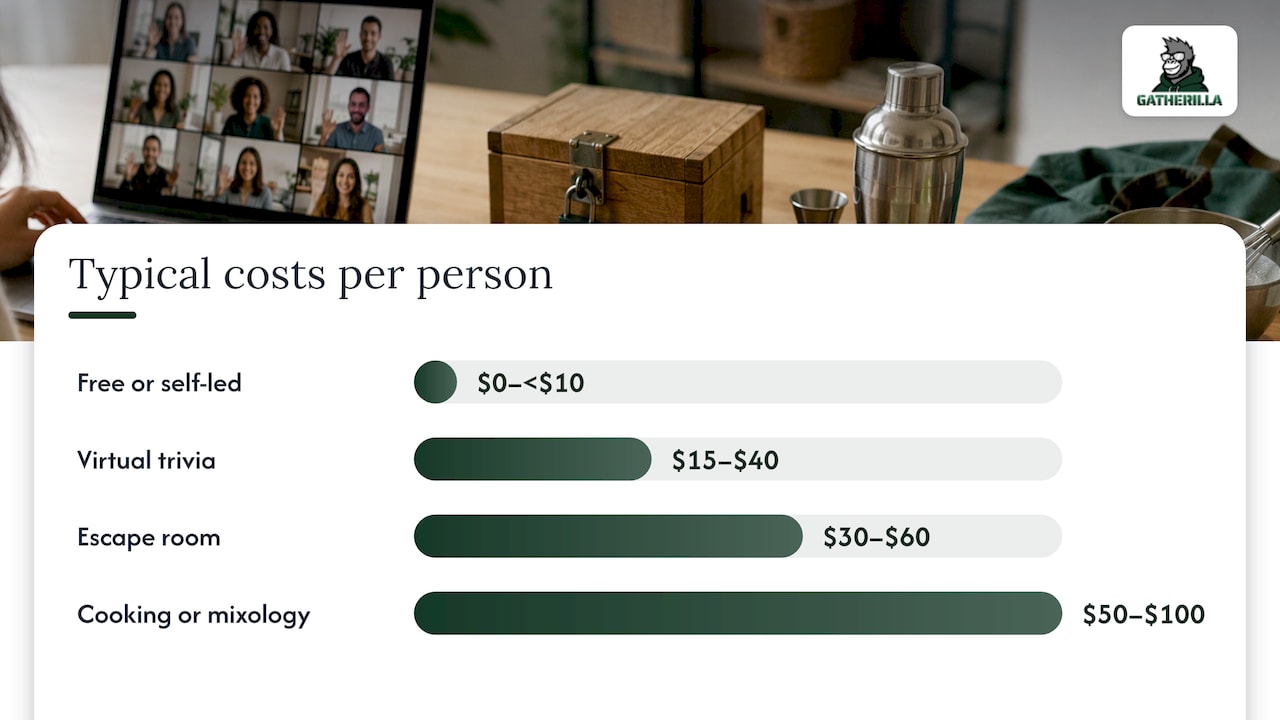
- Facilitated virtual trivia runs about $15 to $40 per participant, escape rooms $30 to $60, and cooking or mixology classes $50 to $100, according to Stealth Agents’ 2026 benchmarks.
- Async social challenges are often priced under $10 per participant, and browser-based game platforms can cost far less than that per person per month.
- A two-hour hosted session can total roughly $270 to $750 once platform, facilitator, materials and extras are added up, per Offsiteio’s planning estimate.
- Group size, kits and shipping, customization and how often you run events drive the bill more than the activity name does.
- Our Premium plan is listed at $0.50 to $1.00 per seat per month, or $5 to $10 per seat per year, with a free tier to start.
Table of Contents
- What virtual team building typically costs
- How providers charge
- What pushes the price up or down
- A sample budget for a two-hour virtual session
- Building a yearly budget
- Low-cost and free options that still work
- Perspective
- Questions to ask before you buy
- When a bigger spend is worth it
- Try the recurring layer first
- FAQ
- Sources
What virtual team building typically costs
The price depends first on the format. A game you launch yourself in a browser costs a fraction of a live host with a physical kit mailed to every home. Here is how the formats usually stack up for a U.S. team.
| Format | Typical cost | What you are paying for |
|---|---|---|
| Free or self-led games, async challenges | $0 to under $10 per person | Software or a free tier; your own time to run it |
| Facilitated virtual trivia | $15 to $40 per person | A host, question writing, platform |
| Virtual escape room | $30 to $60 per person | Game design, host, platform |
| Cooking or mixology class | $50 to $100 per person | Instructor, ingredient list or kit, shipping |
The trivia, escape room and class ranges come from Stealth Agents’ 2026 remote work team building statistics, which also puts asynchronous photo or writing challenges under $10 per participant. Treat these as ballpark figures from one market survey, not quotes: providers set their own minimums, and a ten-person team often pays more per head than a fifty-person one.
The same source notes that virtual formats come in roughly 75% cheaper per head than traditional in-person offsites. That gap is why distributed teams run them far more often than they travel.
Hosted events versus self-serve tools
A hosted event is a one-time purchase of a person’s time. You pay for the host, their preparation, and often a minimum headcount. A self-serve tool is a standing license: you pay per seat and run activities whenever you like, with no host to schedule.
Neither is wrong. A leadership offsite or a milestone celebration may deserve a skilled host. A Tuesday stand-up icebreaker does not, and paying $30 a head for it is where team-building budgets quietly leak.
How providers charge
Most pricing falls into four models. Knowing which one you are looking at makes quotes comparable.
- Per person, per event. The most common for hosted sessions. A quote of $25 per person for 40 people is $1,000, usually with a minimum. Ask whether the minimum applies if your headcount drops.
- Flat fee per session. Common for small groups. You pay one number for up to a set group size, and extra attendees add a surcharge.
- Kit-based pricing. A per-person price that includes materials and shipping, or a lower base price with kits billed separately. Always compare the all-in figure.
- Subscription per seat. A recurring fee, monthly or annual, that unlocks a library of activities. Cost scales with headcount, and the price per activity falls the more you use it.
A useful habit: convert every quote to cost per person per hour of engagement. A $60 cooking class that lasts 90 minutes and a $0.75-per-month seat that supports twenty 10-minute games are different purchases, and the math should show it.
What pushes the price up or down
Six variables account for most of the difference between two quotes for “the same” event.
- Group size. Small teams pay more per head because the host’s time is fixed. Very large groups may need extra facilitators or breakout rooms.
- Kits and shipping. Materials mailed to remote homes add product, packing and postage, and international or rural addresses cost more.
- Customization. Branded trivia, company-specific questions or a custom storyline usually adds a design fee.
- Duration. A 30-minute session costs less than a 90-minute one, but not proportionally; setup is the same.
- Time zones. Teams spread across several regions may need two or three sessions to cover everyone, which multiplies the price.
- Accessibility. If your event needs live captions or translation for attendees, plan for that line item. A breakdown of event translation costs shows how a software-based option can anchor a U.S. budget far below human interpreters.
One more cost rarely makes it into a quote: employee time. Sixty minutes with 40 people is 40 working hours. That is why short, well-run activities often return more than long ones.
A sample budget for a two-hour virtual session
Offsiteio’s planning article estimates a two-hour virtual team building session at $270 to $750 in total. That is a planning estimate, not a market average, but it is a handy template for your own line items:
| Line item | Estimate |
|---|---|
| Platform subscription | $50 to $200 |
| Facilitator fee | $200 to $500 |
| Materials | $20 to $50 |
| Miscellaneous | up to $50 |
| Total | $270 to $750 |
The facilitator is the biggest line. If someone on your team can host (a people-ops lead or a team captain), the total drops sharply, and a tool with built-in game logic reduces what the host needs to do.
Worked example: a 50-person team
Say you run a 50-person remote team and want to compare two plans for the year.
Plan A: quarterly hosted events. Four sessions at $30 per person is $120 per person, or $6,000 for the team. That buys four shared moments a year.
Plan B: a seat-based platform plus one hosted event. Using our Premium pricing of $5 to $10 per seat per year, 50 seats cost $250 to $500 annually. Add one hosted event at $30 per person ($1,500) and the total is $1,750 to $2,000, with daily and weekly activities running in between.
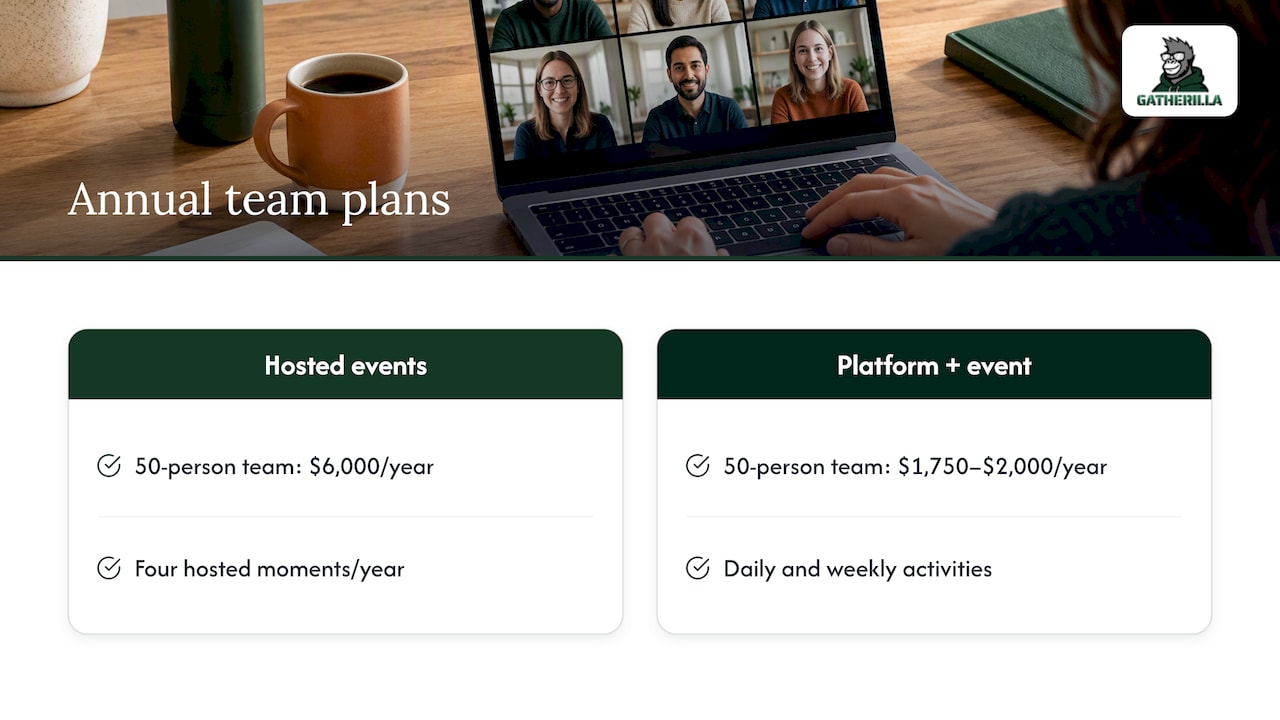
Those are illustrations built from the listed prices, not a promise of outcomes. Your headcount, host rates and how often people actually play will change the result. The point is the shape: the recurring habit costs little, so the big events can be fewer and better chosen.
Building a yearly budget
Remote-first U.S. companies report spending an average of $800 to $2,200 per employee per year on combined team building, virtual events and offsite retreats together. Your virtual-only line will be a fraction of that. A practical way to set it:
- Count heads, not teams. Use the full number of people who should be invited, including new hires you expect in the next two quarters.
- Split by rhythm. Assign a share to daily or weekly lightweight activity, a share to quarterly team sessions, and a share to one or two company-wide moments.
- Price the recurring layer first. It is the cheapest and the most consistent. See how weekly five-minute rituals keep distributed teams engaged between bigger events.
- Reserve a contingency. Ten percent covers late joiners, a rescheduled session or an extra time-zone run.
- Review after two quarters. Keep what people actually attend and cut what they skip.
If your team is small, fixed-fee hosted pricing can be inefficient, and self-serve games fit better. Our guide to team building for small groups covers that case.
Low-cost and free options that still work
Budget does not have to limit quality. Several formats cost almost nothing and run well in a normal workday:
- Trivia and word games in the browser, with no installs. Our overview of browser-based team building games explains why skipping downloads also avoids IT approval delays.
- Minute-to-win-it style challenges using items people already have at home. See virtual Minute to Win It for formats.
- Async challenges such as a photo prompt of the week or a short writing task. They suit teams spread across time zones; our guide to async team building shows how.
- Team-led events like a virtual office Olympics, run by volunteers. The planning guide lays out the steps.
Costs that can still appear even with free activities: a premium tier for larger groups or reporting, a prize or gift-card budget, and the time of whoever organizes. Keep prizes small and symbolic; recognition matters more than the value of the reward.
For engineering and other deep-work teams, low-interruption formats matter as much as price. These tips for scalable team management are useful when you plan activities around remote workflows.
Perspective
Most companies overspend on team building because they treat it as an event. They book a host, pay per head, run a session, and then nothing happens for three months. The cost per person looks fine on the invoice, but the connection fades before the next one.
We built Gatherilla on the opposite idea: engagement is a habit, and habits are cheap when the friction is gone. Our games run in the browser with no downloads and work with any video tool, so a team leader can open a game in the first two minutes of a meeting without preparing anything. A daily challenge and peer-to-peer recognition tied to company values keep people coming back.
That is also why our pricing is per seat and small. Our Premium plan is listed at $0.50 to $1.00 per seat per month, or $5 to $10 per seat per year, and there is a free tier to try it. If you want a large hosted event once or twice a year, great. But we’d put the budget into the daily rhythm first, because that is where a team’s culture is actually built.
Thomas
Questions to ask before you buy
Whether you choose a host or a tool, a handful of questions will keep the quote honest.
- What is the minimum group size or minimum spend, and what happens if attendance drops?
- Are kits, shipping, taxes and platform fees included in the per-person price?
- Is there a customization or design fee, and is it one-time or per event?
- Can the activity run with our video conferencing tool, or does it need a separate download?
- Are there security controls such as access settings, and does the vendor explain how they handle company data?
- If we run the activity again next quarter, is there a repeat or annual discount?
- What reporting is available, so we can see participation instead of guessing?
For a broader look at the tool category, our roundup of virtual team building tools for HR teams compares what each type includes, and the complete guide to remote team building puts cost in the context of a full program.
When a bigger spend is worth it
A larger budget makes sense in a few situations: a company-wide kickoff, a leadership offsite moved online, or a milestone worth marking with a shared experience. For those, a skilled host and a polished format can justify $30 to $100 per person. Our list of virtual offsite ideas shows which formats hold attention for longer sessions.
Even then, avoid cringe. If an activity feels forced, the cost is wasted whatever the price. Our piece on team building games that don’t make people cringe is a good checklist before you commit.
Try the recurring layer first
If you’re not sure where to start, start with the cheapest layer: a free tier of quick games for meeting icebreakers, onboarding and daily challenges. Gatherilla’s free plan lets your team try the format, and Premium adds more games, reporting and priority support at a per-seat price you can check on the pricing page. Everything runs in the browser, with no downloads, and works with any video conferencing tool.
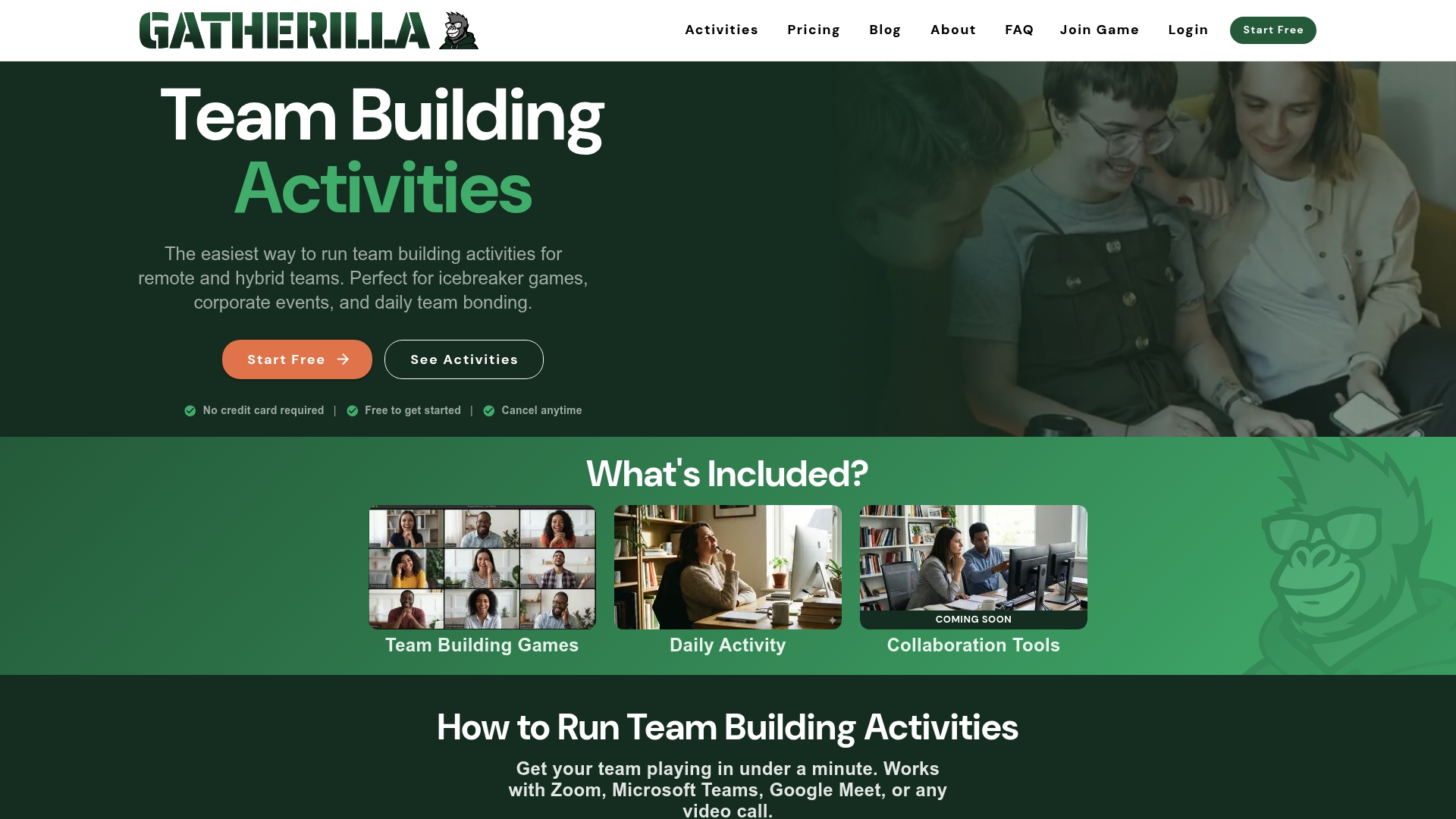
You can see the full library and start a game from the Gatherilla homepage.
FAQ
How much should we budget per employee for virtual team building?
A reasonable starting point is to split the budget between a low-cost recurring layer and one or two hosted events. Remote-first U.S. companies report $800 to $2,200 per employee per year on all team building combined, including offsites. A virtual-only program can sit well below that, especially if most activity runs on a per-seat tool.
Is free virtual team building worth it?
Yes, for regular touchpoints like icebreakers, trivia and async challenges. Free options work best when someone owns the rhythm and the activities are short. Add a paid tier or a hosted event when you need reporting, bigger groups or a special occasion.
Why do two quotes for the same activity differ so much?
Usually because of what is included: kits, shipping, customization, host experience and minimum group size. Ask for the all-in price per person and compare that, not the headline rate.
Is virtual team building cheaper than in-person?
Generally, yes. Stealth Agents reports virtual formats cost roughly 75% less per head than traditional in-person offsites, since there is no travel, venue or catering.
How much does Gatherilla cost?
The Free plan has no published price. Premium is listed at $0.50 to $1.00 per seat per month or $5 to $10 per seat per year, as shown on our pricing page. Check that page for the current details.
Sources
- Remote Work Team Building Statistics 2026, Stealth Agents
- How to Organize a 2-Hour Virtual Team Building Session, Offsiteio
- Event Translation Costs: $19.99 a Month as a U.S. Budget Anchor, Live Caption AI
- Tips for Scalable Team Management: 2026 Guide, Altiam CX