

Low Prep Virtual Summer Party Ideas for Hosts and Team Leaders

Pick one of three approaches and you’re set: a themed party (beach, luau, pool) for groups that want visuals and costumes, an activity-driven party (trivia, scavenger hunt) for groups that bond over competition, or a shared experience (cook-along, mixology) for smaller, closer circles. Friends and family tend to gravitate toward themes and shared experiences; coworkers and teams get more out of activity-driven formats with a clear winner. Below you’ll find the full theme list, a planning checklist, low-prep shortcuts, and a ready 60-minute schedule you can copy today.
TL;DR:
- Virtual parties should include one simple preparation, such as a theme wardrobe or a shared activity, along with a clear time limit for better engagement.
- Teams benefit from structured formats like trivia with leaderboards, timed scavenger hunts, or cooking demos with assigned discussion prompts.
- To prevent technical issues, hosts should run a quick trial, assign a tech support person, and focus on breakout rooms and screen sharing features for seamless interaction.
- Planning a 60-minute event with time for tech check, icebreaker, main activity, and social wrap ensures high energy and prevents fatigue.
- Using ready-made, no-download platforms like Gatherilla simplifies setup, automates scoring, and makes virtual activities more interactive and enjoyable.
Table of Contents
- Virtual Summer Party Ideas by Theme
- Matching the Party Format to Your Group
- Planning Checklist Before You Send Invites
- Low-Prep Ideas That Still Feel Special
- Which Platform Features Actually Matter
- Running Team Parties Through Gatherilla
- A Sample Schedule You Can Copy
- Music and Entertainment That Set the Mood
- Party Favors and Digital Keepsakes Worth Sending
- Adjusting Themes for Different Group Dynamics
- A Host’s 60-Minute Blueprint, Worked Through
- Make Team Parties Effortless With Gatherilla
- Where to Find Recipes, Invitations, and More Templates
- Sources
- FAQ
Virtual Summer Party Ideas by Theme
Each theme below works as a standalone plan. Pick one, tell guests what to prepare, and budget your time accordingly.
- Tropical or beach bash. Send everyone a tropical Zoom background link, queue a beach playlist, and run a limbo contest using a broomstick on camera or a photo contest for “best beach outfit.”
- Pool party. Skip the actual water. Ask guests to wear sunglasses or a swimsuit top, run water-themed trivia (deepest ocean, fastest swimmer records), and hold a floatie photo booth where guests hold up pool toys for a group screenshot.
- Luau or flamingo night. A hula contest judged by chat reaction emojis works surprisingly well on video, and a five-minute mocktail demo (or real cocktail for 21+ groups) gives everyone something to do with their hands.
- Summer BBQ or picnic. This is the cook-along format: everyone grills or preps a simple dish on their own patio, then shares it on camera. Add a recipe swap in the chat and a backyard photo share at the end.
- Movie watch party. Use a synchronized streaming extension so nobody’s five seconds ahead, and drop light trivia questions between acts to keep chat active during slow scenes.
- Cocktail or mocktail night. Send a short recipe card ahead of time so ingredients are on hand, then run an optional tasting scorecard where guests rate each other’s pours.
- Fruit-themed party. Assign a color dress code (all red, all yellow), demo a fruit-based recipe, and run a blind fruit-guessing game using taste or smell.
- Pajama sleepover. A pajama runway, a show-and-tell round, and a shared popcorn recipe recreate the sleepover feel without anyone leaving their couch.
- Decades or 80s night. Costume contests translate well to video calls, and decade-themed trivia (one-hit wonders, retro slang) gives quieter guests an easy way to jump in.
- Scavenger hunt. Give guests a brief timed challenge to find a set number of household items and race back to the screen. This format works well for groups ranging from a few participants to many.
- Virtual cooking class. Send an ingredient list and prep notes at least a day ahead so nobody’s scrambling mid-demo. 4CornerResources points to online cooking classes as one of the higher-engagement formats for remote groups specifically because everyone finishes with something to eat.
- Virtual bingo. Printable summer bingo cards (beach ball, sunscreen, popsicle) plus a small prize for the winner keep this one moving without much host effort.
- Talent show or open mic. Assign sign-up slots in advance and keep a visible timer so no single act runs long. This format needs the loosest structure but the tightest timekeeping.
- Superhero or kids’ party. Character dress-up and short mini-games (freeze dance, simple trivia) suit family groups with younger guests who lose focus fast.
Themed parties borrow heavily from The Bash’s roster of virtual party themes, and the strongest ones all share a pattern: one thing to wear or prepare, one anchor activity, and a clear time limit.
Matching the Party Format to Your Group
The same idea plays differently depending on who’s in the room. Here’s how to adjust the core formats for friends, family, or a work team.
- Trivia. For friends and family, keep questions pop-culture and nostalgic, and let scoring stay loose. For teams, add a leaderboard and break into small breakout rooms so quieter coworkers get airtime before reporting back to the main group.
- Scavenger hunts. Social groups do best with silly, open-ended prompts. Teams benefit from a micro-competition structure, timed rounds, and a visible tally, since 4CornerResources notes that scavenger-hunt formats work particularly well for remote teams when there’s a clear winner at the end.
- Watch parties. Friends can run these with zero structure beyond a shared link. Teams should cap it at 20 to 30 minutes and pair it with a short debrief question rather than a full-length movie.
- Cooking demos and mixology. Close friends and family enjoy a relaxed, unstructured cook-along with side chatter. Teams get more value from a tighter script, assigned discussion prompts during downtime, and a short wrap-up where each person shares one takeaway.
The dividing line is simple: social-forward gatherings want open mic time, a relaxed clock, and shared playlists running in the background. Team-forward gatherings want breakout rooms, a visible leaderboard, and a short debrief so the activity ties back to actual connection, not just entertainment.
Planning Checklist Before You Send Invites
Length depends on format. Trivia and scavenger hunts run well at 30 to 45 minutes. Themed parties with multiple activities need 60 to 90 minutes. Anything longer risks video fatigue, especially with groups over 15 people.
- Confirm time zones before you pick a slot, especially for distributed friend groups or remote teams.
- Send the platform link, a one-line theme or dress note, and anything guests need to prepare, at least 48 hours ahead.
- Use a digital invitation that collects RSVPs directly rather than tracking replies across texts and email.
- Test your own screen share and breakout rooms at least once before the actual event.
- Name a co-host or tech contact so you’re not troubleshooting audio while also running the party.
- Turn on captions if any guest needs them, and let people know it’s fine to participate by chat instead of camera.
Pro Tip: Run a five-minute solo test of your video platform an hour before guests arrive. A stalled screen share is the single fastest way to kill momentum once people are already in the call.
This kind of dry run matters more than most hosts expect. A short run sheet and a designated tech contact are among the most repeated pieces of planning advice across event-planning guides, precisely because most virtual party failures are technical, not creative.
Low-Prep Ideas That Still Feel Special
You don’t need shipped kits or store-bought decorations to make a virtual summer party feel intentional.
- Set a themed playlist and one polished digital background. That’s often enough visual identity for the whole event.
- Run a “hot takes” icebreaker (unpopular food opinions, worst vacation memory) that needs zero setup.
- Do a show-and-tell round where guests grab one object from their home tied to the theme.
- Run a photo contest using phone cameras only, judged live by chat reaction.
- Source free printable bingo cards, scavenger hunt lists, or recipe cards from party-planning sites rather than designing your own.
The value bump comes from consistency, not spending. One good playlist, one clean background, and a host who knows the timeline cold will outperform an elaborate theme run without a plan.
Which Platform Features Actually Matter
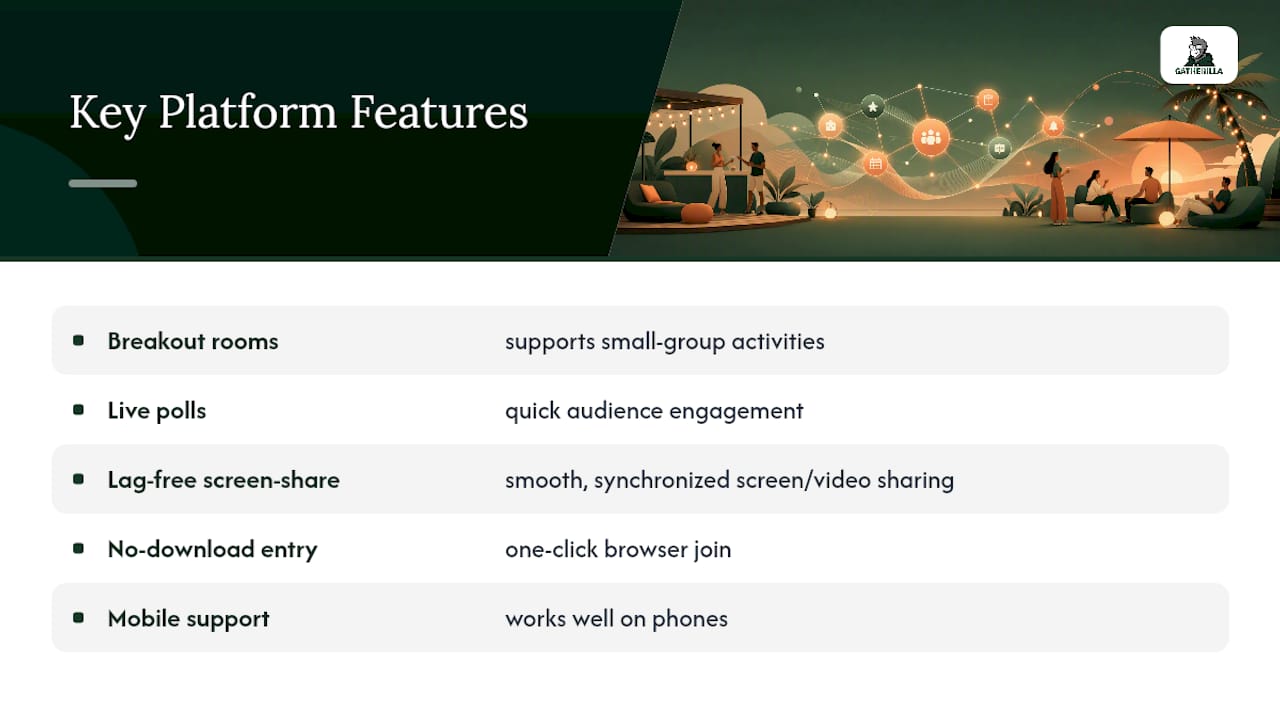
Prioritize breakout rooms, live polls, and screen-share that doesn’t lag, since these three carry most of the interactive load in any virtual party. No-download entry matters more than people expect. Every extra click before guests can join is a chance for someone to give up and skip the party. Mobile support matters too, since a fair number of guests will join from a phone, not a laptop.
For music and video, don’t try to stream through your own speakers into the call. Use a platform’s built-in audio share or a synchronized watch feature, since ambient laptop-speaker audio sounds distorted on the other end and drifts out of sync fast.
If audio cuts out, the fastest fix is usually a full leave-and-rejoin rather than troubleshooting settings mid-call. Stage transitions between activities by giving a 30-second verbal warning (“wrapping up trivia, cooking demo starts next”) so guests aren’t caught mid-conversation when you switch screens.
Running Team Parties Through Gatherilla
For team leaders specifically, running games from scratch every time gets old fast. Gatherilla’s browser-based multiplayer games are built for exactly the formats covered above, without asking anyone to download software first.
- 15-minute icebreaker rounds that work as a warm-up before a longer party
- 30-minute trivia sessions with built-in scoring, no manual tallying required
- Scavenger-hunt style formats adapted for remote play
- Office-Olympics style microgames for a lighter, competitive close to the event
Since scavenger hunts and other high-interactivity formats consistently outperform passive activities for remote teams, having a ready-made leaderboard removes the manual scoring work that usually falls on whoever’s hosting. Real-time leaderboards add a layer of friendly competition without anyone needing to build a spreadsheet, and customizable templates mean the same game can be reused for a summer party, an onboarding session, or a Friday wind-down. Thomas’s guides on the Gatherilla blog, including a minute-to-win-it style playbook, walk through how to sequence these games for maximum energy.
A Sample Schedule You Can Copy
A 60-minute virtual summer party holds together best with a fixed rhythm rather than a loose “we’ll figure it out” flow. The version below, built around a pacing model that preserves energy for mixed audiences, works for both social and team events.
- 0 to 10 minutes: Welcome and tech check. Let stragglers join, confirm audio and video, do a quick round of names if the group doesn’t know each other.
- 10 to 20 minutes: Icebreaker. A hot-takes round or show-and-tell warms people up before the main event.
- 20 to 45 minutes: Main activity. This is where trivia, a scavenger hunt, or a cooking demo lives. Give it the biggest chunk of time on purpose.
- 45 to 55 minutes: Social wrap. Open mic time, casual chat, or a slower photo-sharing round while energy naturally comes down.
- 55 to 60 minutes: Prizes and close. Announce winners, thank everyone, and end on time rather than letting the call drag.
For longer 90-minute themed parties, just double the main activity block and add a second short activity instead of stretching one game past its natural length. Guests disengage fast once a single activity runs longer than 30 minutes without a change of pace.
Music and Entertainment That Set the Mood
A themed playlist does more work than most hosts give it credit for. Queue tropical or reggae tracks for a beach bash, synth-heavy hits for an 80s night, or a mellow acoustic set for a backyard BBQ theme, and start it playing quietly as guests join, before the party officially starts.
For entertainment beyond music, a short highlight reel of photos from a previous gathering, a playlist-guessing game (name that summer song), or a two-minute dance-off using whatever song comes on next all add texture without needing a real production budget. Keep any music segment under five minutes unless it’s the entire point of the party. Music works best as a backdrop and transition tool, not the main event, since most virtual platforms handle spoken interaction better than layered audio.
If you’re running a cocktail or mocktail night, pair the playlist to the drink theme. Tiki and tropical tracks alongside a mocktail demo reinforce the theme without anyone having to say a word about it.

Party Favors and Digital Keepsakes Worth Sending
Physical favors are tough to coordinate across a scattered guest list, but digital keepsakes close that gap. A custom photo collage from screenshots taken during the party, sent out the next day, tends to get the warmest response of any option, since it’s proof the event actually happened and people actually showed up.
Other easy options include a shared Spotify playlist built from songs guests requested during the party, a printable recipe card from whatever was cooked or mixed that night, or a simple digital certificate for trivia winners. For team events, a screenshot of the final leaderboard doubles as a lighthearted keepsake and a nudge for the next round. None of these require shipping, budget approval, or lead time, which makes them realistic even for last-minute parties.
Adjusting Themes for Different Group Dynamics
The same beach theme that delights a group of old friends can fall flat with coworkers who barely know each other, and the fix is almost always about structure, not creativity. Close friend groups can handle loose, unstructured time. Give them a theme and a playlist and they’ll fill the rest in themselves.
Family groups, especially ones spanning several generations, do better with simpler mechanics and shorter activity blocks, since not every relative wants to learn a new game format on the fly. Superhero themes, bingo, and show-and-tell rounds translate across ages more easily than trivia that assumes shared cultural references.
Work teams need the most scaffolding of the three. Breakout rooms, visible scoring, and a facilitator keeping time all matter more here than theme creativity. A trivia night with a strong leaderboard will outperform an elaborate luau theme with no structure, because coworkers relax faster when there’s a clear format to follow rather than open-ended socializing.
A Host’s 60-Minute Blueprint, Worked Through
Running one of these parties myself would look almost exactly like the schedule above, minute for minute. Ten minutes for welcome and tech check, ten to twelve for an icebreaker, twenty five to thirty for the main event, ten for social wrap, five to close with prizes. One person hosts and keeps time, a second runs tech and handles screen shares, a third acts as MC for any games, and someone tracks prizes so the ending doesn’t stall. The lesson that keeps showing up: pacing matters more than theme polish. A simple trivia night run on time beats an elaborate luau party that runs twenty minutes over and loses half the room to disengagement.
— Thomas
Make Team Parties Effortless With Gatherilla
Running the activities above for a work team gets easier once you stop rebuilding trivia decks and scavenger lists from scratch every time. Browser-based multiplayer games that need no download, work inside whatever video call your team already uses, and come with customizable templates for trivia, icebreakers, and scavenger-hunt style formats can help with that.

For a summer party, that means setup takes minutes instead of an afternoon, and a real-time leaderboard handles the scoring so the host can actually enjoy the party too. HR leads and team managers use it to keep remote and hybrid teams connected without booking a venue or coordinating shipped kits. If you’re planning a team’s summer send-off or a monthly connection break, check out Gatherilla’s team-building games and try a free game with your team before your next call.
Where to Find Recipes, Invitations, and More Templates
For drink ideas, MyPlate’s flavored water recipes offer simple, family-friendly options for a BBQ or picnic theme. For invitations, Minted’s digital party invitation templates handle RSVPs directly. For more team activity formats, Gatherilla’s remote team building guide covers additional ready-to-run templates.
Sources
- Virtual Party Theme Ideas for Summer Parties - The Bash
- 21+ Summer Work Party Ideas Your Team Will Actually Enjoy - 4CornerResources
- Flavored water recipes | MyPlate
FAQ
What are some creative ideas for a virtual party?
Try a tropical or luau theme with digital backgrounds and a hula contest, a fruit-themed dress code with a guessing game, or a decades night with costume and trivia rounds built around one era.
What are some virtual event ideas for a work team?
Trivia with breakout rooms and a leaderboard, a scavenger hunt with a timed micro-competition, or a virtual cooking class with ingredients sent ahead all scale well for remote teams. Platforms like Gatherilla can run these with no downloads and built-in scoring.
What are some fun virtual activities for a team?
Short icebreaker rounds, office-Olympics style microgames, and trivia sessions with a visible leaderboard tend to keep remote teams the most engaged, since the competitive element gives quieter coworkers an easy way to participate.
What are some fun things to do virtually with friends?
A movie watch party with synchronized streaming, a cocktail or mocktail night with recipe cards sent ahead, or a pajama sleepover theme with a show-and-tell round all work well for close friend groups with a relaxed timeline.