

Five Minute No Download Virtual Networking Activities for HR Teams
The fastest way to build connection on a distributed team is to embed short, optional, no-download browser games and daily micro-rituals directly into meetings people already attend. This works because it scales without IT tickets, respects everyone’s calendar, and gives new hires a low-stakes way to meet people. Platforms like Gatherilla build entire products around this idea, and the guidance lines up with what SHRM and Gallup have found about what actually builds trust on remote teams.
TL;DR:
- Short, browser-based activities like micro-rituals, show and tell, and multiplayer games should be limited to five minutes daily or 15 to 20 minutes monthly for effective engagement.
- Activities must be optional, accessible without downloads, and designed to match the meeting’s purpose, group size, and time zone considerations.
- Facilitation should be simple, with clear objectives, a straightforward agenda, and fallback plans to ensure smooth execution.
- Participation rates, repeat engagement, and short pulse surveys are key metrics to evaluate the success of virtual connection activities.
- Habits built through consistent, low-friction routines outperform one-off events for fostering trust and connection in remote teams.
Table of Contents
- Ideas for scalable, no-download networking activities
- Matching the format to the moment
- How to run a no-download networking session
- Designing for time zones and low-pressure participation
- Measuring whether it’s actually working
- Why habits beat one-off events
- Where Gatherilla fits into your engagement plan
- Sources
- FAQ
Ideas for scalable, no-download networking activities
Every activity below runs in a browser, needs zero installation, and maps to a specific goal, whether that’s onboarding a new hire or keeping a mature team from drifting apart.
- Question of the day: a 2 to 5 minute opener where each person answers one quick prompt before the “real” meeting starts. Repetition, not novelty, is what makes it stick.
- Virtual show and tell: 5 to 10 minutes where one or two people share an object, a project, or a quick story. It works especially well for new hires because it gives them a script for showing up without having to perform.
- Browser-based multiplayer quick games: trivia, word games, or light competitive rounds that run 10 to 20 minutes and fit naturally into all-hands calls or cross-team socials.
- Randomized pairings (“donut” style): 20 to 30 minutes per cycle, pairing people who would not otherwise cross paths. This recreates the hallway serendipity that offices generate for free.
- Interest-based micro-groups: smaller clusters built around a shared hobby or topic, meeting asynchronously or briefly, aimed at deeper bonds rather than broad coverage.
- Asynchronous challenges and daily trivia: opt-in, low-barrier engagement that people can join on their own time without adding another meeting to the calendar.
None of these require a download or a login flow, which matters more than it sounds. Research on team-based interventions shows that structured activities and simple digital nudges can raise psychological safety and coordination in virtual teams, but only when the friction to join is close to zero. A five-minute icebreaker that requires installing software before the meeting starts is functionally a fifteen-minute commitment, and attendance drops accordingly.
Matching the format to the moment
Not every activity fits every meeting. The right format depends on your objective, group size, and how much time you actually have.
- Rapport building: short daily or weekly rituals, 2 to 5 minutes, work best inside standups or team check-ins.
- Onboarding: slightly longer modules, 15 to 30 minutes, give new hires structured ways to meet teammates without the pressure of a blank “get to know you” call.
- Recognition: peer shout-outs or lightweight games woven into existing recurring meetings rather than standalone events.
- All-hands or cross-team mixing: browser-based multiplayer games with leaderboards, run for 15 to 20 minutes, work at larger scale because everyone participates from their own screen with no host bottleneck.
Group size changes the math too. A team of six can run a full donut pairing cycle in a week; a department of 200 needs randomization built into the tool itself. Browser compatibility is the one non-negotiable: if a game requires a plugin or an app store visit, assume a third of your audience will not finish the setup.
How to run a no-download networking session
Running these activities well is mostly about removing decisions in the moment, not adding new ones.
- Define the objective and audience. Decide if this is for rapport, onboarding, or recognition, and confirm who is expected to join and who is simply invited.
- Check opt-in and accessibility. Make attendance genuinely optional and confirm the activity works with screen readers and slower connections.
- Run the tech checklist. Confirm browser compatibility, that the host has screen-share and moderator controls, and that no participant needs to download anything.
- Assign facilitation roles. One person introduces the activity, one runs it, one watches the chat for questions. On smaller teams, one person can cover all three.
- Follow a simple agenda. Introduce in one sentence, play for the allotted time, debrief with one reflection question.
- Plan your fallback. Have a backup activity ready if the tool lags, and a shorter version ready if attendance is light.
- Set a cadence. Weekly for micro-rituals, monthly for anything longer than 20 minutes, so the routine becomes familiar rather than another meeting to dread.
Pro Tip: Standardize a three-step host script, introduce, play, debrief, so any team lead can run a session cold without rehearsing.
Designing for time zones and low-pressure participation
The SHRM analysis on virtual team-building is blunt about why so many programs fail: they get treated as mandatory events rather than optional, ongoing practices. Fix that structurally, not just in tone.
- Rotate meeting times across a quarter so the same time zone is not always stuck with a 6 a.m. call.
- Offer an asynchronous version of every synchronous activity, especially for teams spread across more than three time zones.
- Make attendance opt-in and say so explicitly. Attendance pressure kills the psychological safety these activities are supposed to build.
- Use randomized pairings and interest groups so people meet others outside their usual circle without forcing a topic.
- Collect a short pulse survey after each activity and drop anything that consistently gets skipped.
Measuring whether it’s actually working
You don’t need a dashboard full of metrics, just a handful of signals tracked consistently.
- Participation rate: what share of invited employees show up or opt in.
- Repeat participation: whether the same people return week over week, which signals the format is landing.
- Opt-in rate over time: rising or falling interest tells you more than a single week’s number.
- Pulse questions: one or two questions on connectedness or belonging, asked after activities rather than buried in an annual survey.
- Behavioral signals: cross-team collaboration or mentoring uptake that shows connection turning into work behavior.
Managers who run regular, individualized feedback and consistent community-building can raise employee trust substantially, according to Gallup’s research on engagement and leadership, which also recommends tracking a small set of signals like these instead of building out complex analytics.
Why habits beat one-off events
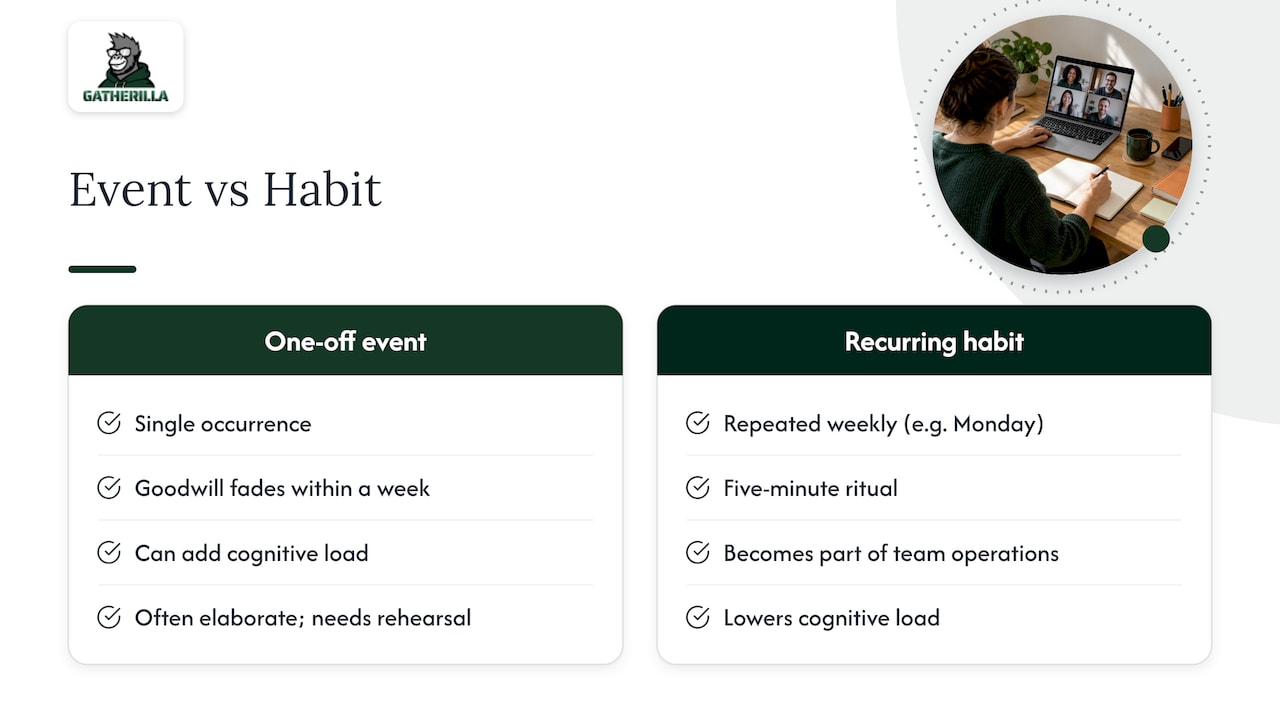
Most virtual team-building fails for a simple reason: it’s designed as an event instead of a habit. A single well-produced holiday party or trivia night generates a burst of goodwill that fades within a week, while a five-minute ritual repeated every Monday becomes part of how the team operates. Gallup’s work on the remote work paradox adds a wrinkle worth sitting with: remote employees can be engaged and still distressed, so connection activities need to lower cognitive load, not add to it. That is the whole argument for optional, no-download, low-friction formats over elaborate productions that need a rehearsal.
Some team-building platforms follow this same logic: browser-based multiplayer games, no downloads, a quick setup, and a daily challenge that gives teams a reason to show up again tomorrow rather than a one-time spike. HR teams looking for ready-made scripts can start with remote icebreaker games or a virtual show and tell playbook, both built around the same weekly-habit principle.
— Thomas
Where Gatherilla fits into your engagement plan
If your team is already stretched thin on logistics, the appeal of Gatherilla is that nobody has to build any of this from scratch. The platform runs entirely in the browser, works with whatever video tool your team already uses, and turns the ideas above into ready-made games and daily challenges instead of a project you have to design and maintain yourself.

You can start with the Free plan to test a few games with your team before committing to anything, then move to Premium, priced at $0.50 to $1.00 per seat per month or $5 to $10 per seat per year, once you want the fuller game library and reporting. For teams building out a facilitation routine, pairing Gatherilla’s daily challenges with general video call productivity practices tends to keep sessions tight and on time. Visit the Gatherilla product page to see the current game library and set up your first session.
Sources
For deeper background, see SHRM’s analysis of why virtual team-building fails, Gallup’s research on trust and engagement, and HBS Online’s guidance on managing remote employees.
- Why Most Virtual Team-Building Fails and What HR Can Do About It
- Gallup leadership insights on engagement and trust
FAQ
How often should we run virtual networking activities?
Short rituals like a question of the day work best weekly or even daily since repetition is what builds the habit. Longer activities, such as browser-based games or show and tell sessions, tend to work better monthly so they stay a treat rather than an obligation.
Do these activities require any downloads or special software?
No. Activities designed around browser-based multiplayer games, including those built by Gatherilla, run through a link with no installation or account creation required. This removes the biggest adoption barrier for distributed teams working across different devices and permissions.
How do we get people to actually show up?
Make attendance genuinely optional and keep sessions short, since SHRM’s guidance points to mandatory, one-off events as a leading reason these programs fail. Rotating meeting times across time zones and offering an asynchronous version also raises participation without adding pressure.
What’s the simplest way to measure if it’s working?
Track participation rate, repeat attendance, and a short pulse question on connectedness rather than building a full analytics dashboard. Gallup’s research supports using a small number of consistent signals over complex reporting to catch problems early.
Can virtual networking activities help with career development, not just morale?
Yes. Interest-based micro-groups and cross-team pairings often surface mentoring relationships and collaboration that would not happen inside a normal reporting line, which HBS Online’s guidance on managing remote teams ties to deliberate onboarding milestones and learning opportunities rather than chance alone.