

Virtual Jeopardy for Work: Run a Great Game in 15 Minutes

The fastest, most reliable way to run virtual Jeopardy at work is to pick one of three routes: a turnkey browser-based platform, a lightweight web app, or a DIY slide template. For most HR teams and team leads, the browser platform wins on speed and polish.
- Turnkey platform (recommended): No downloads, built-in buzzers, automated scoring, and branded boards. Gatherilla is the recommended option for remote and hybrid teams.
- Lightweight web app: Good for quick, low-stakes trivia nights when you already have a slide deck and just need a buzzer layer.
- DIY slides: Maximum control over question wording and internal content, but you handle scoring manually.
The single biggest mistake HR teams make is spending two hours building a slide deck, then losing ten minutes of game time to manual scorekeeping. Pick the route that keeps you hosting, not spreadsheet-wrangling.
Key Takeaways
Virtual Jeopardy works best when you pick one route and commit to it before the session, not during it.
| Point | Details |
|---|---|
| Pick one route before the call | Turnkey platform, web app, or DIY slides each work, but mixing them live creates friction. |
| Three features to insist on | Virtual buzzers, automated scoring, and private game rooms are the non-negotiables for workplace use. |
| Pacing beats perfect questions | Short clues, fast transitions, and a five-minute practice round keep engagement higher than clever content alone. |
| Check privacy settings first | Confirm player data handling and session privacy before using any third-party platform for internal content. |
| Gatherilla for turnkey setup | Gatherilla’s browser-based platform requires no downloads and runs on any video call with quick setup. |
Table of Contents
- What are the best hosting options for virtual Jeopardy at work?
- How do you evaluate a virtual Jeopardy solution for workplace use?
- How do you run a virtual Jeopardy session on Zoom, Teams, or Google Meet?
- What categories and sample questions work best for a company Jeopardy game?
- Where can you find free Jeopardy templates for PowerPoint and Google Slides?
- What facilitation practices keep a virtual Jeopardy game on track?
- Why Gatherilla is worth a look as your turnkey virtual Jeopardy option
- What actually works in real virtual Jeopardy sessions
- Gatherilla brings virtual Jeopardy to your next team meeting
- Sources
What are the best hosting options for virtual Jeopardy at work?
Three routes cover nearly every workplace scenario. The right one depends on your timeline, group size, and how much control you need over the content.
Turnkey browser-based platforms
These are purpose-built for exactly this use case: multiplayer, buzzer-enabled, scoreboard-ready, and playable from any browser on any video call. Setup takes under five minutes. They handle the mechanics so you can focus on the room. The tradeoff is a subscription or per-session fee, and your question content lives on a third-party server, which matters for compliance-sensitive organizations.
Simple web apps and buzzer tools
Tools like Testmoz let you build timed quizzes and collect answers, but they generally skip Jeopardy-style board navigation and buzzer lockout behavior. Pair a quiz engine with a slide deck and a free buzzer site, and you get most of the experience at zero cost. The friction is real, though: you’re duct-taping three tools together in front of a live audience.
For variety beyond Jeopardy, generators like CrosswordLabs and BingoBaker can round out a team engagement calendar without requiring any setup investment.
DIY slide templates (PowerPoint / Google Slides)
Slide-based games give you complete ownership of the content. No third-party account, no data-sharing agreement, no licensing concern. The Jeopardy Template for PowerPoint & Google Slides lets you build a playable board quickly, but there are no built-in buzzers, no automatic score syncing, and no dynamic host controls. You’ll need a co-host to track points while you run the board.
Pro Tip: For compliance training or onboarding quizzes where you need a record of who answered what, choose a platform that offers session verification or completion tracking. DIY slides and most free web apps cannot generate that audit trail.
How do you evaluate a virtual Jeopardy solution for workplace use?
Not every platform built for trivia nights is ready for a corporate environment. Run any candidate through this checklist before committing.
Core features to confirm:
- Virtual buzzers with lockout (first-press wins, others locked out)
- Automated scoring and a live leaderboard
- Private, non-searchable game rooms
- Team mode (multiple players per team, not just individual play)
- Browser-based play with no download or IT approval required
- Breakout-room compatibility with Zoom, Microsoft Teams, and Google Meet
- Session verification or completion tracking for L&D use cases
Accessibility and compliance checks:
- Closed-caption support or compatibility with your video platform’s captioning
- Color contrast that meets WCAG 2.1 AA standards (4.5:1 ratio for normal text)
- Player data privacy: where is it stored, who can access it, and does it comply with your organization’s data retention policy?
- No requirement for players to create accounts or share personal email addresses
The table below maps which features each route typically delivers.
Browser-based team-building games that require no downloads are especially useful in corporate environments where IT restrictions block software installs.
How do you run a virtual Jeopardy session on Zoom, Teams, or Google Meet?
Here is the exact sequence, from zero to first question, in under fifteen minutes.
Pregame setup (5 minutes before)
- Assign roles: one host (runs the board), one scorekeeper if using DIY slides, and one tech monitor for chat.
- Open your game platform or slide deck and test audio on your own machine.
- Share the join link or PIN with participants via calendar invite or chat, not during the call.
- Set your video platform to “spotlight” the host’s screen so participants see the board, not a gallery of faces.
Launching the game
- Start screen-share. On Zoom, use “Share Screen” and select the browser tab or slide window. On Teams, use “Share content” and choose the specific window. On Google Meet, click “Present now” and select the tab.
- Confirm all players can see the board before reading any rules.
- Read the rules aloud in under 60 seconds: team names, buzzer mechanic, point values, and Final Jeopardy wagering.
In-game flow
- Let the winning team (or a volunteer) pick the first category and dollar amount.
- Read the clue, then open buzzers. Award points for correct responses; deduct the same value for wrong ones if you want competitive stakes.
- For Daily Double: pause, ask the player or team to wager, then reveal the clue.
- For Final Jeopardy: reveal the category, give 30 seconds for written wagers in chat, then reveal the clue and give 60 seconds for written answers.
Closing
- Screenshot or export the final leaderboard.
- Announce winners, give a shoutout to the most creative wrong answer, and drop the screenshot in your team Slack or Teams channel.
Pro Tip: Mute all participants before reading each clue. Ask them to unmute only when buzzing in. This eliminates the audio echo that derails most first-time virtual game shows.
Common technical issues and quick fixes:
- Audio echo: Ask all players to use headphones or mute when not answering.
- Score sync lag: Refresh the leaderboard tab; most platforms auto-sync within a few seconds.
- Firewall blocking the platform: Have participants join via mobile data as a backup, or switch to a slide-based fallback.
- Screen-share lag: Lower your video resolution in Zoom/Teams settings before sharing.
What categories and sample questions work best for a company Jeopardy game?
Good workplace trivia hits the sweet spot between “too easy to be fun” and “so obscure it alienates half the room.” These six categories cover that range.
Suggested categories:
- Company Culture (internal history, values, office traditions)
- Industry IQ (sector-specific knowledge relevant to your team’s work)
- Pop Culture Lite (movies, music, and TV from the last decade, nothing too niche)
- Around the World (geography and global business facts, inclusive of international team members)
- Tech & Tools (software your team uses daily)
- Wild Card (fun, low-stakes questions anyone can answer)
Sample clue-answer pairs
Company Culture — $100Clue: “This annual tradition brings our whole company together every December.” Answer: What is [your company holiday party]?
Industry IQ — $200Clue: “This federal agency oversees workplace safety regulations in the United States.” Answer: What is OSHA?
Pop Culture Lite — $300Clue: “This streaming platform released a large number of original titles in recent years.” Answer: What is Netflix?
Around the World — $400Clue: “Home to the world’s largest remote workforce by percentage of total employment, this Nordic country leads in flexible work adoption.” Answer: What is Finland?
Tech & Tools — $500Clue: “This collaboration platform, owned by Salesforce, lets teams organize conversations into channels.” Answer: What is Slack?
Wild Card — $100Clue: “The average American drinks this many cups of coffee per day.” Answer: What is three?
Final Jeopardy prompts
Prompt 1: “Name the U.S. city that is home to the highest concentration of Fortune 500 headquarters.” Suggested wager guidance: Teams in the lead should wager conservatively; trailing teams should go big. Answer: New York City.
Prompt 2: “This management framework, developed in the 1950s, introduced the concept of ‘management by objectives.’” Answer: What is MBO (Management by Objectives)?
Accessibility note: Always collect Final Jeopardy answers in writing via chat. This gives quieter participants equal footing and creates a record you can screenshot.
Where can you find free Jeopardy templates for PowerPoint and Google Slides?
Free templates are a legitimate starting point, especially when you need full control over question content and don’t want a third-party account touching your internal data.
Where to find them:
- Jeopardy Template for PowerPoint & Google Slides: Pre-built boards you can download and edit immediately.
- FigJam Jeopardy Template: A collaborative, in-browser board that design or comms teams can polish and reuse. Note that FigJam boards still need to be exported or screen-shared for live play.
- Microsoft PowerPoint’s built-in template library: Search “Jeopardy” and several community-submitted versions appear.
Quick customization steps:
- Replace placeholder category names with your six chosen topics.
- Swap in your clue-answer pairs at each point value.
- Mark one square per column as Daily Double before the session (keep it secret).
- Check color contrast on every slide. If the text is hard to read on a projected screen, it will be worse on a small laptop display during a video call.
- Save a backup copy before the session. Accidental clicks on a live slide deck can reveal answers early.
The real tradeoffs: Slide-based games require a dedicated scorekeeper, have no buzzer lockout, and can’t generate a completion record. A player who refreshes their browser or drops from the call doesn’t trigger any notification. For a casual Friday icebreaker, that’s fine. For onboarding or compliance training, it isn’t.
One more note on branding: the official Jeopardy! trademark is owned by Sony Pictures. Workplace sessions use Jeopardy-style formats rather than the licensed IP, which is the right call for any internal event.
| Format | Ease of setup | Buzzer support | Scoring | Best for |
|---|---|---|---|---|
| PowerPoint/Google Slides | Easy | None | Manual | Small, informal teams |
| FigJam board | Moderate | None | Manual | Design-forward teams |
| Quiz engine (e.g., Testmoz) | Easy | No lockout | Auto-graded | Timed answer collection |
| Turnkey platform | Very easy | Yes | Automated | Any size, any use case |
What facilitation practices keep a virtual Jeopardy game on track?
The mechanics are the easy part. Keeping twenty people engaged on a video call for thirty minutes is the actual challenge.
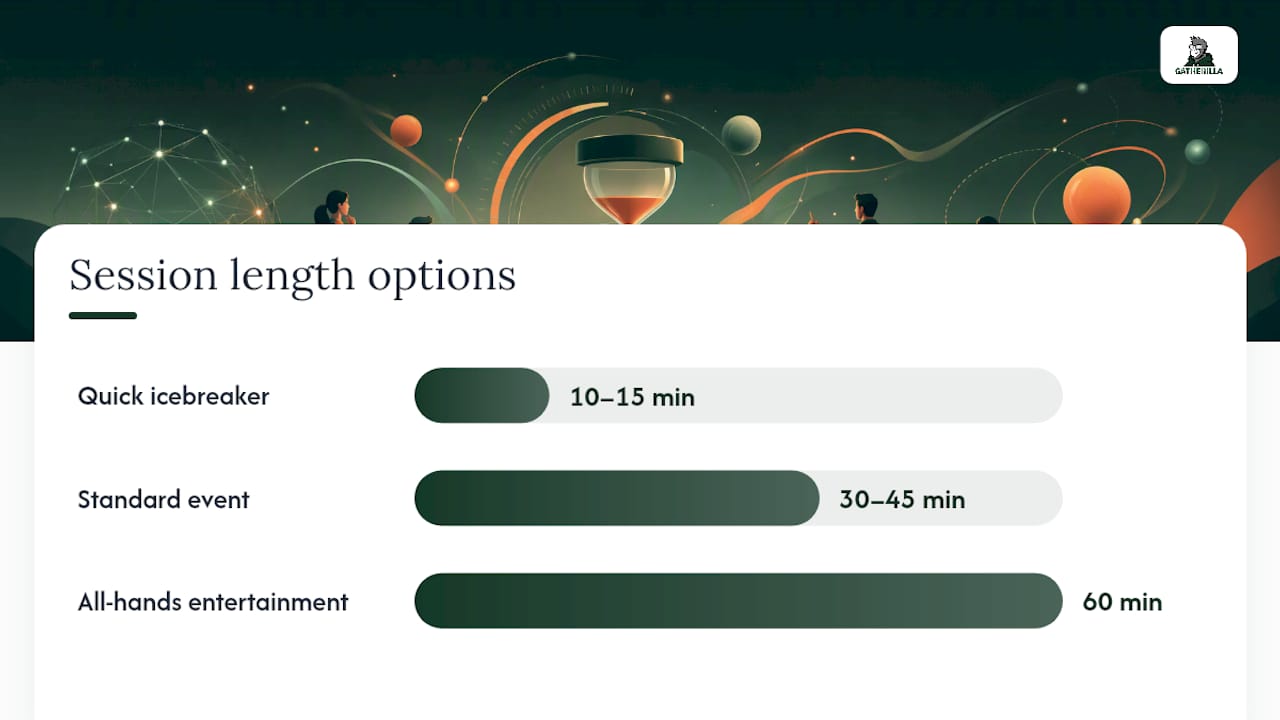
Session length options:
- Quick icebreaker (10–15 minutes): Three categories, two point values each, skip Final Jeopardy. Works for a standup warm-up or meeting opener.
- Standard event (30–45 minutes): Six categories, five point values, Daily Double, and Final Jeopardy. The sweet spot for most team events.
- All-hands entertainment (60 minutes): Add a themed round, a photo-based clue round, or a company-trivia bonus round. Requires a co-host.
Team sizes and scoring:
Teams of a moderate size work best as larger groups tend to have quieter members who coast, while smaller groups can be dominated by a strong player. Scoring values should be set to keep the game competitive without runaway leaders. Allow steals only if you want a faster, more chaotic game. For ties, a sudden-death tiebreaker clue is cleaner than splitting the prize.
Engagement hacks for quieter participants:
- Rotate who picks the next category after each correct answer, not just the winning team.
- Offer a written-answer option for any clue, not just Final Jeopardy. Some people think faster when typing.
- Use breakout rooms for 90 seconds of team strategizing before Final Jeopardy wagering.
- Give a “most creative wrong answer” shoutout at the end. It lowers the stakes and gets laughs.
Avoid categories touching politics, religion, medical conditions, or anything that could single out a team member’s personal background. The goal is connection, not discomfort. For more on picking activities that land well across diverse teams, team-building games that don’t make people cringe is worth a read before you finalize your category list.
The best virtual Jeopardy sessions feel like a break, not a performance review. The moment participants feel judged for a wrong answer, engagement drops and doesn’t recover. Keep the energy light, celebrate effort, and let the leaderboard do the competitive work.
Pro Tip: Run a five-minute practice round with two throwaway questions before the real game starts. It calibrates the buzzer timing, surfaces any audio issues, and gets shy participants comfortable with the mechanics before points are on the line.
Why Gatherilla is worth a look as your turnkey virtual Jeopardy option
Gatherilla is a browser-based team-building platform built specifically for remote and hybrid teams. No downloads, no IT tickets, no app installs. It runs in any browser and connects to Zoom, Microsoft Teams, and Google Meet without a plugin.
The features map directly to the checklist from earlier in this article:
- Browser play, no download: Participants join via a link. Nothing to install.
- Multiplayer team mode: Groups compete as teams, not just individuals.
- Branded boards and leaderboards: Add your company name and logo for a polished, professional feel.
- Quick setup: HR and team leads can have a game ready in minutes, not hours.
- Daily challenges: Keep teams connected between scheduled events with word and trivia challenges.
- Enterprise-ready: Analytics, onboarding games, and company-wide event support for larger organizations.
Use cases where Gatherilla fits:
- Standup icebreaker before a weekly team meeting
- Onboarding quiz for new hires in their first week
- Compliance knowledge refresh disguised as a game
- All-hands entertainment segment for a company town hall
- Recurring remote team trivia night on a monthly calendar
Pro Tip: For onboarding, build a “Company Culture” category using Gatherilla’s customization options and run it in the new hire’s first team meeting. It introduces colleagues, surfaces company values, and breaks the ice in one fifteen-minute session.
For planning ideas beyond Jeopardy-style games, Gatherilla’s virtual activity planning guides cover a range of formats HR leads can reuse across different team calendars.
What actually works in real virtual Jeopardy sessions
The prep time people budget is almost always wrong. Teams spend ninety minutes writing questions, then discover five minutes before the call that their slide deck has a broken hyperlink on slide three. The sessions that go smoothly are the ones where the host spent thirty minutes on content and five minutes confirming the tech worked.

The other thing nobody tells you: the questions matter less than the pacing. A mediocre question delivered at a good clip beats a brilliant question that takes two minutes to read aloud. Keep clues to two sentences maximum, read them at a normal speaking pace, and move on quickly after each answer. Teams stay locked in when the game moves fast.
Gatherilla brings virtual Jeopardy to your next team meeting
Running a polished company Jeopardy game shouldn’t require a production crew. Gatherilla gives HR professionals and team leads a browser-based platform where the buzzers, scoring, and leaderboards are already built in. Your team joins via a link, no downloads, no IT approval, no last-minute tech scramble.

Where DIY slides demand a dedicated scorekeeper and a co-host watching the chat, Gatherilla handles the mechanics so you stay focused on the room. It works with Zoom, Microsoft Teams, and Google Meet out of the box, and the customization options let you brand the board with your company name in minutes. Whether you’re running a quick icebreaker before a standup or a full remote team trivia night for a hundred employees, the setup time is the same: short.
Start with a free account at Gatherilla and have your first game ready before your next team meeting.
Sources
- Jeopardy Template for PowerPoint & Google Slides
- Jeopardy Template | Free Team Building Game | FigJam
- Testmoz