

Virtual Corporate Event Games: 10 Ready-to-Run Activities
The fastest path to a successful virtual corporate event is a three-part mix: one quick icebreaker (5–10 minutes), one collaborative challenge (15–20 minutes), and one light competition (10–15 minutes). That sequence energizes the room, builds genuine connection, and keeps Zoom fatigue from setting in before the real work begins.
Here is the short list planners can act on immediately:
- Quick icebreaker (e.g., Two Truths and a Lie, emoji check-in): 5–10 minutes, any group size, zero prep
- Collaborative challenge (e.g., virtual escape room, team trivia): 15–20 minutes, best with 8–40 participants in breakout teams of 4–6
- Light competition (e.g., photo scavenger hunt, Pictionary-style drawing): 10–15 minutes, works for 10–100 participants with a leaderboard
- Creative break (e.g., virtual show and tell, GIF battle): 10 minutes, optional but effective for longer events
- Async pre-event activity (e.g., photo challenge, trivia warm-up): 24–48 hours before the event, any group size
One-line recommendation: this mix balances high-energy moments with low-pressure participation, so even camera-shy employees stay engaged without screen exhaustion. For groups under 20, you can run all five formats in 60 minutes. For groups of 20–100, stick to three and use breakout rooms for the collaborative round.
Key Takeaways
The most effective virtual corporate events combine a short icebreaker, one collaborative challenge, and one light competition, with a host who sets the tone in the first 90 seconds and a follow-up loop that keeps momentum alive after the session ends.
| Point | Details |
|---|---|
| Use a three-part game mix | Icebreaker plus collaborative challenge plus light competition covers energy, bonding, and friendly rivalry in under 60 minutes. |
| Keep rounds to 5–15 minutes | Short, timed rounds with clear start/stop cues are the most reliable way to prevent Zoom fatigue. |
| Assign a dedicated host and co-host | The host runs the game; the co-host manages breakout rooms, chat, and tech issues so nothing stalls the session. |
| Measure with a 5-question post-event survey | Send it within 30 minutes of closing; participation rate and NPS score are the two numbers that matter most. |
| Gatherilla for turnkey execution | Browser-based, no downloads, with built-in leaderboards and analytics that remove setup friction for planners. |
Table of Contents
- What are the best virtual corporate event games for each goal?
- How to run virtual corporate games without killing the energy
- Ten ready-to-run virtual corporate game blueprints
- How to measure success and keep the energy going after the event
- DIY vs. vendor: what virtual corporate games actually cost
- How Gatherilla removes the friction from virtual corporate event games
- What actually moves the needle in virtual events
- Gatherilla: turnkey virtual games with no setup headaches
- Frequently asked questions
- Sources
What are the best virtual corporate event games for each goal?
Not every game fits every moment. The format that energizes a 15-person team at 9 AM is not the same one that closes out a 200-person all-hands at 4 PM. Matching game type to event goal is the single decision that separates a memorable event from a forgettable one.
Here is how the major team-building game categories map to outcomes:
- Icebreakers: Fast and low-stakes, good for introductions and warming up groups. Outcome: psychological safety, names remembered.
- Trivia and quiz shows: Competitive yet inclusive, scalable with breakout teams. Outcome: friendly rivalry and bonding.
- Scavenger hunts: High-energy, physical or creative, great for mid-event energy. Outcome: laughter and shared experiences.
- Escape-room style: Collaborative puzzles under time constraints, good for cross-functional teams. Outcome: improved communication and trust.
- Creative challenges: Drawing, storytelling, or other low-pressure activities. Outcome: reveals personality and fosters safety.
- Social events: Informal, conversation-based, suited for celebrations. Outcome: informal connection.
- Async activities: Photo contests and challenges over time. Outcome: sustained engagement across time zones.
Pro Tip: Layering gamification elements like virtual badges, leaderboards, and social-media challenges onto any format significantly boosts participation — but only when tied to a clear objective. A badge for “most creative photo” means something. A badge for “attending” means nothing.
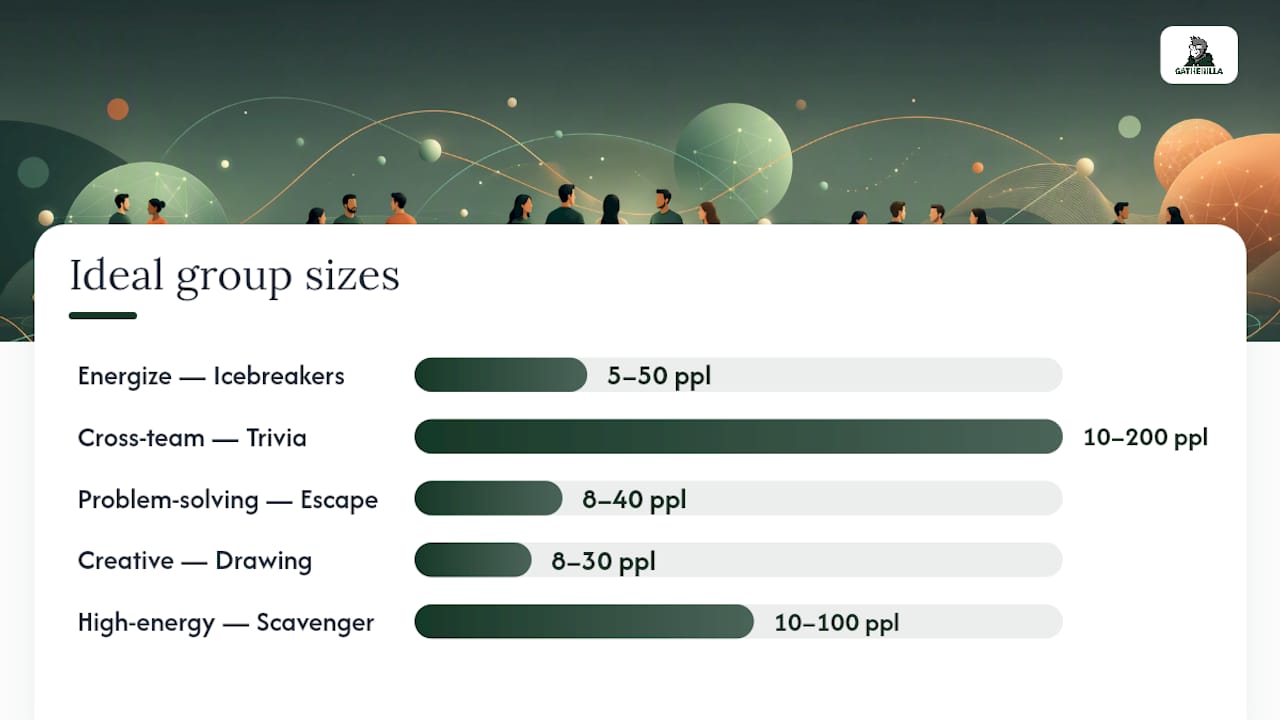
| Event goal | Best game type | Ideal group size | Ideal duration |
|---|---|---|---|
| Energize and warm up | Icebreaker | 5–50 | 5–10 min |
| Cross-team bonding | Trivia / quiz show | 10–200 | 20–30 min |
| Problem-solving culture | Virtual escape room | 8–40 | 20–30 min |
| Celebration / recognition | Social happy hour | Any | 30–60 min |
| Sustained engagement | Async photo or word challenge | Any | 24–48 hr window |
| Creative collaboration | Drawing or storytelling game | 8–30 | 15–20 min |
| High-energy competition | Scavenger hunt | 10–100 | 15–25 min |
For deeper guidance on remote team-building strategy, the format choice matters less than the clarity of the objective going in.
How to run virtual corporate games without killing the energy
The biggest mistake planners make is treating the game as an afterthought. The tech breaks, the host wings it, and half the group sits in silence while someone shares the wrong screen. Experienced facilitators are clear on this: poorly planned virtual events cause Zoom fatigue fast, and the antidote is short rounds, simple mechanics, and a host who knows exactly what to say.
Sample event agenda
- T-minus 10 min: Host joins early, tests audio/video, loads game assets
- 0:00–0:05: Welcome and housekeeping (mute rules, chat use, breakout room heads-up)
- 0:05–0:12: Icebreaker round (whole group, no breakouts)
- 0:12–0:30: Main game (breakout rooms if needed, co-host monitors)
- 0:30–0:38: Debrief, leaderboard reveal, shoutouts
- 0:38–0:45: Optional creative break or async challenge launch
- 0:45: Wrap-up and next steps
Host role checklist
- Send calendar invite with platform link and instructions 48 hours before
- Prepare a one-paragraph facilitator script for opening, rules, and wrap-up
- Assign a co-host to manage breakout rooms and the chat
- Have a backup activity ready if the primary game has a tech failure
- Keep a visible timer on screen throughout every round
Tech checklist
- No-download platform: confirm participants can join from a browser tab
- Breakout rooms: test room assignments and host override controls before the event
- Screen share: verify the host can share audio and video, not just slides
- Polling tool: have at least one polling option ready (built-in or a browser tab)
- Live captions: enable auto-captions on Zoom or Teams for accessibility
- Bandwidth check: ask participants to close unused tabs and disable video if connection drops
Accessibility and troubleshooting
- Provide written instructions in the chat at the start of every round, not just verbal
- Offer a low-movement option alongside any physical scavenger hunt item
- If a participant cannot access breakout rooms, assign them a co-host role instead
- Keep a troubleshooting FAQ in the chat: “Can’t hear audio? Check your speaker settings in the bottom-left corner.”
Pro Tip: Keep active game rounds to 5–15 minutes maximum. Build in one explicit “bio break” signal between the icebreaker and the main game. Participants who know a break is coming stay more focused during the round.
Pro Tip: For remote icebreaker games, display a countdown timer on screen. Visual cues reduce the anxiety of not knowing when a round ends, which is one of the quieter drivers of Zoom fatigue.
Ten ready-to-run virtual corporate game blueprints
These blueprints cover every major category. Each one includes setup, timing, group size, materials, scoring, a facilitator script snippet, and an accessibility note. Copy and run.
1. Two Truths and a Lie (Icebreaker)
- Setup: No tools needed. Each participant prepares three statements about themselves before the call.
- Duration: 8–12 minutes
- Group size: 5–20 (use breakout rooms for larger groups)
- Scoring: Audience votes via chat or polling; most-fooled participant wins
- Facilitator script: “Write two true things and one lie about yourself in the chat — but don’t send yet. When I say go, everyone sends at once. We’ll vote on which one is the lie.”
- Accessibility: Text-based; works for participants who prefer not to speak
2. Team Trivia (Quiz Show)
- Setup: Prepare 20–30 questions across 4–5 categories. Use a polling tool or a shared Google Form for answers.
- Duration: 20–25 minutes
- Group size: 10–100 (teams of 4–6 in breakout rooms)
- Scoring: Points per correct answer; leaderboard updated after each round
- Facilitator script: “Your team has 45 seconds to agree on one answer. Type it in the team chat — only the answer, no discussion visible to other teams.”
- Accessibility: Written questions displayed on screen alongside verbal delivery
3. Virtual Photo Scavenger Hunt (Scavenger Hunt)
- Setup: Prepare a list of 10–15 items to photograph (e.g., “something red,” “your favorite mug”). Share the list at the start.
- Duration: 15–20 minutes
- Group size: 10–100
- Scoring: Points per item found; bonus points for creativity voted by the group
- Facilitator script: “You have 12 minutes. Find as many items on the list as you can and post your photos in the Slack channel or the event chat. Go.”
- Accessibility: Include at least 5 items that require no physical movement (e.g., “a word that describes your week”)
- Note: Gamification layers like virtual badges for the most creative photo extend the energy past the event itself
4. Virtual Escape Room (Collaborative Problem-Solving)
- Setup: Use a browser-based escape room tool or a shared Google Slides puzzle deck. Divide into teams of 4–6.
- Duration: 20–30 minutes
- Group size: 8–40
- Scoring: Fastest team to solve all puzzles wins; partial credit for most puzzles solved
- Facilitator script: “Your team is locked in. You have 20 minutes to solve the puzzles in the shared doc. Assign one person to type answers — everyone else talks through the clues.”
- Accessibility: Ensure all puzzle elements have text descriptions alongside images
5. Codenames Online (Word Association)
- Setup: Codenames has a widely used free browser version. Split into two teams; each team picks a Spymaster.
- Duration: 15–20 minutes
- Group size: 6–20
- Scoring: Standard Codenames rules; first team to identify all their words wins
- Facilitator script: “Spymasters, you can see the key. Give your team one word and one number — that’s it. Team, you have 60 seconds to discuss before guessing.”
- Accessibility: Entirely text-based; no audio or video required to participate
6. Virtual Pictionary (Creative Challenge)
- Setup: Use a browser-based whiteboard (e.g., skribbl.io or a shared Miro board). Prepare a word list relevant to your company or industry.
- Duration: 15–20 minutes
- Group size: 6–30
- Scoring: Points for correct guesses; fastest guesser gets a bonus point
- Facilitator script: “The drawer has 60 seconds. No letters, no numbers. Everyone else types guesses in the chat. First correct guess gets the point.”
- Accessibility: Offer a “describe it in words” option for participants with motor difficulties
7. Virtual Show and Tell (Storytelling)
- Setup: Ask participants 48 hours in advance to bring one object from their desk or home that means something to them. No slides needed.
- Duration: 15–20 minutes (2–3 minutes per person)
- Group size: 5–15
- Scoring: No competition; audience votes for “most surprising story” via emoji reaction
- Facilitator script: “Hold up your object. Tell us what it is and why it’s on your desk in 90 seconds. We’ll ask one question after.”
- Accessibility: Participants can describe an object they cannot hold up; written descriptions accepted in chat
- More detail: The virtual show and tell playbook covers facilitation variations for larger groups
8. Team Quiz Show (Large-Group Competition)
- Setup: Structure as a game-show format with an intro, 3–4 timed rounds, and a final lightning round. Co-host manages the chat and breakout rooms.
- Duration: 25–35 minutes
- Group size: 20–200
- Scoring: Running leaderboard displayed on screen after each round
- Facilitator script: “Round one: pop culture. Teams have 30 seconds per question. Submit answers in your team channel. No Googling — we’ll know.”
- Accessibility: Display all questions as text on screen; provide a written answer-submission option
9. Async Photo Challenge (Async Activity)
- Setup: Post a weekly prompt in Slack or Teams (e.g., “Share a photo of your workspace view”). Collect entries over 24–48 hours.
- Duration: 24–48 hour submission window; 5-minute reveal at the next meeting
- Group size: Any
- Scoring: Team votes on favorites via emoji; winner announced at the next sync
- Facilitator script: “Drop your photo in #team-challenge by Thursday noon. We’ll vote Friday morning and announce the winner at standup.”
- Accessibility: Text descriptions accepted alongside or instead of photos
- More detail: Async team building across time zones covers how to sustain this format across distributed teams
10. Virtual Minute to Win It (Quick Energizer)
- Setup: Prepare 3–5 solo physical challenges using household items (e.g., stack 5 coins in 60 seconds, balance a spoon on your nose). Participants compete simultaneously on camera.
- Duration: 10–15 minutes
- Group size: 5–50
- Scoring: Points for completing each challenge within 60 seconds; audience votes for best attempt
- Facilitator script: “Everyone grab your materials. When I say go, you have 60 seconds. Camera on so we can see. Ready? Go.”
- Accessibility: Offer a seated or low-movement alternative for each challenge; announce alternatives before the round starts
- More detail: Virtual Minute to Win It games includes a full list of challenge variations and facilitation notes
Pro Tip: For groups over 50, run blueprints 2, 4, and 8 with a dedicated co-host per breakout room. The co-host’s only job is to keep time and relay scores. That one change cuts facilitation chaos by more than half.
How to measure success and keep the energy going after the event
A game that ends at the closing slide and leaves no trace is a missed opportunity. The events that actually shift team culture are the ones with a short follow-up loop.
Metrics worth tracking
- Participation rate: number of active participants divided by total invitees
- Active engagement: chat messages sent, polls answered, breakout room contributions
- NPS-style satisfaction: one question, 0–10 scale, sent within 30 minutes of the event
- Qualitative comments: one open-text question (“What would you change?”)
- Follow-up actions completed: did participants join the async challenge, post in the Slack channel, or complete the post-event survey?
Post-event survey template (send within 30 minutes)
| Question | Format |
|---|---|
| How would you rate today’s event overall? | 0–10 scale |
| Did the activities feel relevant to your team? | Yes / Somewhat / No |
| Which game was your favorite? | Multiple choice |
| What would you change for next time? | Open text |
| Would you recommend this format to another team? | Yes / No |
Follow-up tactics that sustain momentum
- Post a leaderboard recap and winner shoutout in Slack or Teams within 2 hours
- Launch a micro-challenge (e.g., “This week’s async photo prompt”) the day after the event
- Share a short highlight reel or screenshot gallery in the company channel
- Create a dedicated Slack channel for the game community (e.g., #team-trivia) to keep the conversation alive
- Recognize top participants in the next all-hands or team newsletter
Gamification layers like badges and micro-rewards work best when paired with a measurable post-event action. A badge alone fades. A badge plus a follow-up challenge keeps the energy alive for another week.
DIY vs. vendor: what virtual corporate games actually cost
Cost varies more than most planners expect, and the gap between a $0 DIY session and a $3,000 hosted experience is not always justified by the outcome.
Common cost drivers:
- Per-person pricing: hosted vendor experiences typically charge per participant, with rates varying by vendor, group size, and session length
- Facilitator or host fees: a professional host adds polish but also adds cost; internal hosts are free but require prep time
- Custom content: branded trivia questions, company-specific scavenger hunt items, or custom escape room puzzles cost more than off-the-shelf formats
- Platform licensing: some browser-based tools charge per session or per seat; others offer free tiers with limited features
- Materials: physical kits mailed to participants (for hybrid events) add per-person shipping costs
DIY vs. vendor, honestly:
DIY works well when the host is confident, the group is under 30 people, and the goal is informal bonding rather than a polished production. The prep time is real — plan for 3–5 hours to build a solid trivia deck, test the tech, and write a facilitator script. For groups over 50, cross-functional events, or leadership off-sites where first impressions matter, a vendor-run experience removes the coordination burden and usually delivers a tighter agenda.
Questions to ask before booking:
- What is the maximum group size, and how does pricing scale?
- Is a live facilitator included, or is it self-run?
- Does the platform require downloads or app installs?
- What accessibility features are built in (captions, screen-reader support)?
- What happens if a participant cannot join the platform mid-event?
- Is custom branding or custom content available, and at what cost?
- What is the cancellation or rescheduling policy?
For multi-activity events or quarterly competitions, the virtual office olympics planning guide covers how to structure a full-day format and estimate time and cost per activity.
How Gatherilla removes the friction from virtual corporate event games
Most of the logistical pain in virtual events comes from the same three places: platform compatibility, setup time, and the gap between what a facilitator plans and what participants actually experience. Gatherilla is built to close all three.
What Gatherilla offers:
- Browser-based, no downloads: participants join from any device without installing anything, which eliminates the “I can’t get it to work” drop-off that kills momentum at the start of an event
- Customizable multiplayer games: trivia, word challenges, icebreakers, and onboarding games that can be branded and adapted to your team’s context
- Real-time leaderboards: visible to all participants, which sustains competition and energy across the full session
- Daily challenges: word and trivia prompts that keep teams connected between events, not just during them
- Analytics and reporting: participation data and engagement metrics available after each session, so planners can track the metrics from the measuring section above without building a separate survey
- Works with all video conferencing tools: Zoom, Teams, Google Meet, and others, so there is no platform conflict
For HR managers running onboarding, Gatherilla’s icebreaker templates give new hires a low-pressure way to meet the team on day one. For team leaders running monthly socials, the daily challenge feature keeps the game going between events. For corporate event planners managing all-hands sessions with 50–500 participants, the leaderboard and analytics combination gives a clear picture of who engaged and how.
Pro Tip: Use Gatherilla’s free tier to run a corporate team-building activity with your next team meeting before committing to a subscription. The no-download setup means you can test it with zero IT coordination.
What actually moves the needle in virtual events
The conventional wisdom says engagement is about game design. Pick the right game, and people will show up. That is only half true.
The other half is structure. The events that consistently generate the most energy share one trait: the host treats the first 90 seconds as the most important moment of the session. Not the game reveal, not the leaderboard, not the prizes. The opening.
Three hacks that hold up across every format:
- Rotate the host role. When a different team member facilitates each month, the event stops feeling like an HR initiative and starts feeling like something the team owns. Participation tends to climb after the second rotation.
- Use small breakout teams of 4–5, always. Even in a group of 200, the real connection happens in a room of five. Large-group formats work for competition and spectacle; small breakouts work for actual bonding. Run both in the same event.
- Send a pre-event prompt 24 hours before. One question in Slack (“What’s the most unusual thing on your desk right now?”) primes participants to think about the event before it starts. The answers become conversation starters during the icebreaker, and the host can reference them by name, which makes the room feel smaller and warmer immediately.
The team-building games that don’t make people cringe guide covers the cultural fit dimension of this in more depth, including how to read a team’s tolerance for competition before picking a format.
Gatherilla: turnkey virtual games with no setup headaches
Running a polished virtual corporate event without a dedicated events team used to mean hiring a vendor, coordinating platform access, and hoping the tech held up. Gatherilla changes that math. It is a browser-based platform where the games, leaderboards, and analytics are already built, so planners spend their prep time on the agenda, not the infrastructure.

The free tier lets any team leader run a multiplayer game in the next meeting without a purchase order or an IT ticket. The paid plan unlocks additional games, deeper analytics, and priority support for larger events. Both tiers require no downloads and work inside any video conferencing tool your company already uses.
If you are planning an all-hands social, a new-hire onboarding session, or a cross-team bonding event, start with Gatherilla’s free games and run your first session this week.
Frequently asked questions
What is the ideal group size for virtual corporate event games? Most formats work best with 8–40 participants in the main session. For groups over 40, use breakout rooms of 4–6 and a co-host per room. Async formats like photo challenges scale to any size.
How long should a virtual corporate game session last? 45–60 minutes is the practical ceiling for a live session before attention drops. A three-part mix (icebreaker, main game, debrief) fits comfortably in that window. For longer events, build in an explicit break between the second and third activity.
Do participants need to download anything? They should not have to. Browser-based platforms like Gatherilla require no downloads and work on any device. Always confirm this before booking a vendor or choosing a tool.
How do you prevent Zoom fatigue during virtual games? Keep active rounds to 5–15 minutes, build in one scheduled break, use breakout rooms to reduce the “everyone watching me” pressure of large-group formats, and give clear visual cues for when each round starts and ends.
What is the best virtual game for a large corporate all-hands? Team trivia in a quiz-show format scales well to 200+ participants with breakout teams and a leaderboard. Async photo challenges work for all-hands events where live scheduling is difficult across time zones.
How much do virtual corporate event games cost? DIY formats using free browser tools cost nothing beyond prep time. Hosted vendor experiences vary by group size, session length, and whether a live facilitator is included. Always ask vendors for per-person pricing and what happens to cost as your group grows.
Can virtual games work for hybrid teams with some people in-office and some remote? Yes, with one adjustment: treat in-office participants as individual remote players rather than one team. Each person joins on their own device so the experience is equal. Shared screens in a conference room create a two-tier dynamic where remote participants feel like spectators.
How do you make virtual games accessible for all employees? Enable live captions on your video platform, provide written instructions in the chat alongside verbal delivery, offer low-movement alternatives for any physical challenge, and confirm that all game tools work with screen readers before the event.
Sources
These references back the claims made throughout this guide and offer deeper reading for planners who want to go further.
- 20 fun games to play on Zoom (that won’t annoy your team) | SessionLab
- 25 virtual event ideas for companies to boost employee engagement | ON24
- 45 team-building games that will bring your team together — Asana
- Codenames (board game) — Wikipedia