

Make Virtual Bingo Work: HR Ready Templates and Platform Runbooks

Yes, virtual bingo is a fast, low-friction way to build connection for remote teams when you run it with opt-in framing and prompts that fit your group, a great fit for corporate wellness programs in Dallas & DFW. Pick a format, pick a platform, set a 10 to 20 minute timebox, and you can launch a session today. The rest comes down to the right template and a few facilitation habits that keep it from feeling forced.
TL;DR:
- Synchronous bingo is effective when most team members are available during the same meeting, while asynchronous play suits teams across multiple time zones or with limited overlap.
- Using simple tools like shared screens, chat-linked cards, and appointing a verifier prevents common technical issues and keeps the game flowing smoothly.
- Design prompts to prioritize low-risk, inclusive topics, and have the host lead by example to foster psychological safety and genuine participation.
- Small prizes such as gift cards or extra time work best, especially when rewards are distributed for different achievements like first bingo or most creative answers.
- Collecting participation data and enabling recurring engagement are advantages of platforms like Gatherilla, which facilitate ongoing game management without software downloads.
Table of Contents
- Which format fits your team: quick warm-up, full icebreaker, or async play
- Step-by-step setup for Zoom, Microsoft Teams, or chat-based play
- Templates and prompt lists you can copy into your next meeting
- Why recognition and design choices matter for participation
- Technical setup and common problems during a session
- Adjusting bingo for team size, culture, and comfort level
- Making prizes and incentives work without feeling forced
- What actually works after running dozens of these sessions
- If you want it handled: Gatherilla’s no-setup route
- Sources
- FAQ
Which format fits your team: quick warm-up, full icebreaker, or async play
The right format depends on how much time you have and whether your team overlaps on video at all. A quick warm-up card works in almost any meeting, while a full session needs more planning and a slightly bigger group.
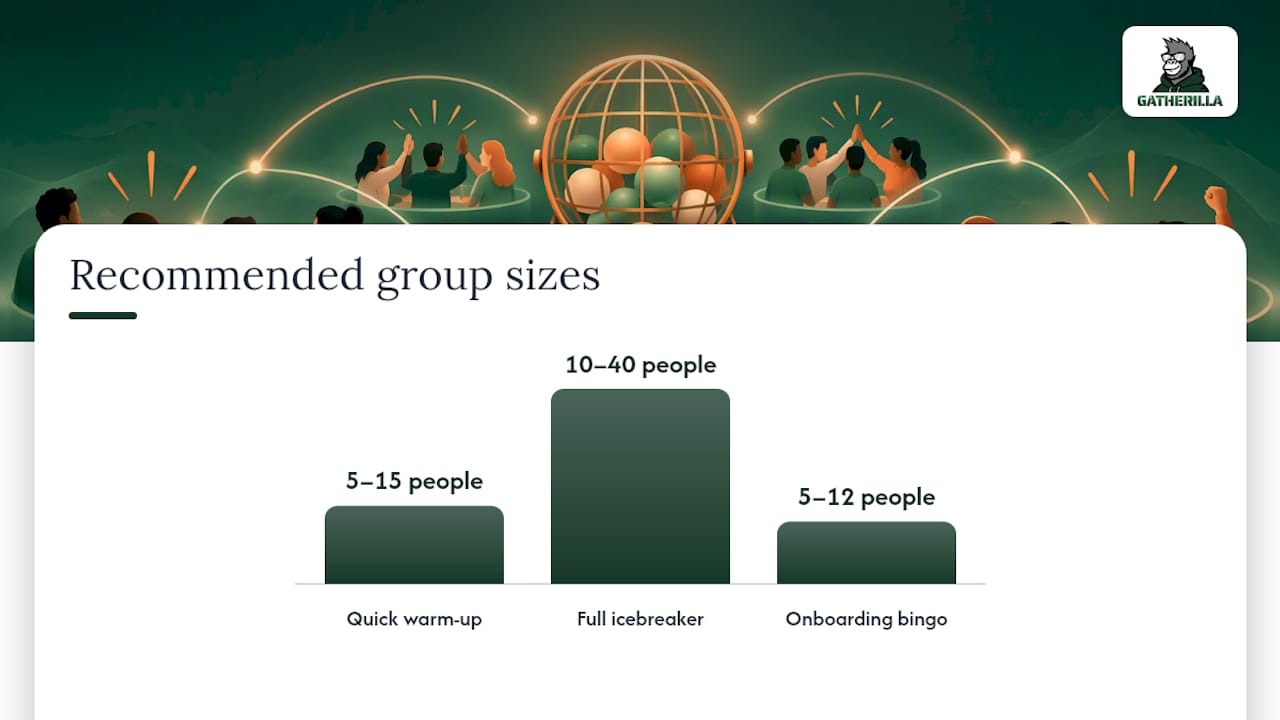
- Quick warm-up (10 minutes, 5 to 15 people): a 4x4 card with light prompts, used to open a standing meeting.
- Full icebreaker session (20 minutes, 10 to 40 people): a 5x5 card with mixed prompts, run as its own event with a host and a small prize.
- Onboarding bingo (15 to 20 minutes, 5 to 12 new hires plus buddies): cards built around meeting colleagues across departments.
- Async bingo (runs over 2 to 5 days, any team size): a shared card in Slack or Teams chat that people fill in on their own time.
Synchronous play works best when your team already has a recurring meeting slot and enough people online at once to make a card fillable within the timebox. Asynchronous play fits distributed teams across time zones or teams that are wary of another meeting on the calendar. A useful rule of thumb: if more than a third of the team works outside a four-hour overlap window, default to async or a hybrid where people submit squares in chat and the host reads out winners live.
To pick a format fast, ask three questions: how much synchronous time do you actually have, how many people need to participate, and is this a one-off or the start of a recurring habit. A recurring weekly or biweekly cadence tends to build more of a habit than a single event, so factor that into which format you choose first.
Step-by-step setup for Zoom, Microsoft Teams, or chat-based play
Running bingo well is mostly about sequencing. Do the setup work before the meeting starts so the live portion feels effortless.
- Build or choose a card template and confirm it matches your group’s size and sensitivity level.
- Send the card and rules at least a few hours ahead, whether as a shared link, a PDF, or a pasted grid in chat.
- Post accessibility notes in the invite: captions will be on, participation is optional, and no one is required to share anything they’re not comfortable with.
- Open the session by restating the one rule that matters: call “bingo” in chat or unmute to claim a line.
- Assign a caller or use a shared leaderboard so one person isn’t juggling both hosting and tracking.
- Use breakout rooms or paired chat threads if the group is large enough that everyone talking at once would be chaotic.
- Verify wins with a single rule, such as the first person to type “bingo” in the main chat wins that round, to avoid disputes over who called it first.
- Close with a 2-minute recap, naming a few of the best answers or connections made.
For platform specifics, Zoom works well with the chat window as the claim mechanism, while Microsoft Teams icebreakers often run smoother using the built-in polls or a shared screen for the card. Chat-based play in Slack or Teams needs no video at all, just a pinned card and a thread for claims.
Pro Tip: Appoint a co-host to watch chat for claims so the main host can keep talking and the game never stalls.
Templates and prompt lists you can copy into your next meeting
Swap any prompt that feels too personal for your team’s culture. A newer team should lean toward professional prompts; a team that already jokes around can handle more personal ones.
Connection prompts (human bingo): has worked in three or more departments, learned a new skill this year, has a pet that appears on video calls, speaks more than one language, has a hobby involving something handmade, has traveled somewhere new in the past year, listens to podcasts during commutes, has a favorite productivity app, grew up in a different region than they live now, has a book they’d recommend.
Meeting bingo prompts: someone’s video freezes mid-sentence, a pet or kid appears on screen, someone says “you’re on mute,” a meeting starts late, someone shares a screen by accident, a new acronym gets used without explanation, someone apologizes for background noise, a meeting ends early.
Onboarding card prompts: find someone who has been at the company more than five years, find someone on a different team who can explain what they do in one sentence, find someone who has worked remotely for more than three years, find your onboarding buddy’s manager, find someone who started the same month as you.
Async list prompts: post a photo of your workspace, share a song you’ve had on repeat, name a skill you want to learn this year, share your go-to lunch.
Use a 4x4 grid for the 10 minute version, a 5x5 grid for the 20 minute version, and a simple checklist format (no grid needed) for async play in chat.
Why recognition and design choices matter for participation
Structured challenges and icebreakers help engagement, but they work less reliably than informal, recognition-focused moments. Research on psychological safety in digital environments found that recognition rituals and informal interactions such as virtual coffee chats ranked highest for effectiveness, while online challenges and icebreakers rated lower unless they were well designed. That gap is closable: the difference is usually in how much choice and recognition you build into the game itself.
One of the more useful findings for team leaders: interactive, gamified challenges like virtual bingo can mediate psychological safety when they foster inclusion and trust rather than forced disclosure.
Design rules that follow from this: frame every round as opt-in, mix low-risk prompts (favorite snack) with a few higher-trust ones (a challenge you overcame), have the leader answer a prompt first to model openness, and call out specific answers by name afterward. Avoid prompts that ask for medical, financial, or family details, and never require someone to share if they’d rather pass.
Pro Tip: Have the host fill out their own card publicly before asking anyone else to, it sets the tone for what’s safe to share.
Technical setup and common problems during a session
Most bingo sessions fail on logistics, not content. Confirm before you start that everyone can see the card, whether that’s a shared screen, a link dropped in chat, or a PDF attached to the invite. Perceived technical ease of joining and using a platform positively affects social communication and engagement in virtual meetings, so the simpler the join process, the better the game plays.
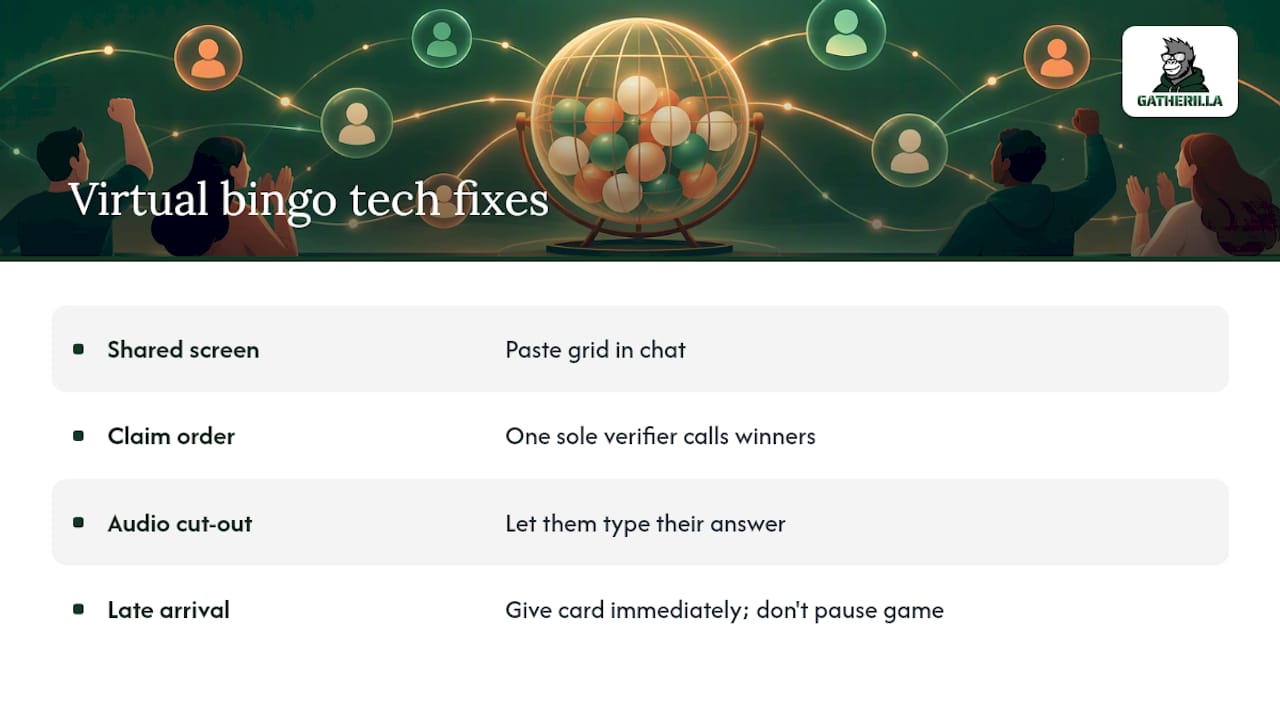
Common issues and fixes: if half the group can’t see a shared screen, switch to a chat-pasted grid instead. If claims flood the chat and no one can tell who won first, assign one person as the sole verifier and have them call it. If someone’s audio cuts out mid-share, let them type their answer instead of holding up the round. If a participant joins late, hand them a card immediately rather than pausing the game to explain rules from scratch.
Test your card link and any embedded images before the invite goes out, not five minutes before the call. For larger sessions, mute-on-entry avoids feedback loops, and a pinned chat message with the rules saves you from repeating instructions every few minutes. None of this requires special software: a shared document, a chat window, and a clear caller are enough for most teams.
Adjusting bingo for team size, culture, and comfort level
A 6-person team and a 200-person company town hall need different versions of the same game. Small teams can run bingo conversationally, with everyone unmuted and answers spoken aloud. Larger groups need structure: breakout rooms, a chat-only claim process, or splitting into smaller card groups that report back to a main host.
Culture matters as much as size. A team that’s new to each other, spread across a merger, or largely introverted should skew prompts toward professional and low-risk personal details, save deeper personal prompts for teams that already have some trust built. International teams benefit from prompts that avoid idioms or culturally specific references, sticking instead to universal categories like hobbies, food, and work history.
For fully distributed teams across many time zones, async play removes the pressure of finding a shared meeting slot altogether. For hybrid teams with some people in a room and some remote, make sure remote participants have equal visibility into the card and equal chance to claim wins, a shared digital card works better here than a printed one only some people can see.
Making prizes and incentives work without feeling forced
A small, low-stakes prize works better for bingo than an expensive one. Gift cards in modest amounts, an extra 30 minutes of flexible time, first pick of a scheduling slot, or public recognition in a team channel all tend to land well without turning the game into a competition people feel they have to win.
Spread the incentive rather than concentrating it: give a small prize for the first bingo, another for the most creative answer, and another chosen at random from all participants. That structure rewards participation itself, not just speed, which matters more for a game meant to build connection than to crown a winner. Keep the prize announcement brief and move on quickly, the game is the point, not the reward.
What actually works after running dozens of these sessions
Three things consistently help: keep the timebox short, let people opt out of any single prompt, and have the host go first. Three things consistently hurt: making it mandatory, using prompts too personal for a new team, and letting one dominant voice run the whole round.
A simple repeatable playbook: one host, one co-host watching chat, a 10 to 20 minute clock, and a two-line recap message sent afterward naming a few good answers. Running these sessions with no software setup, just a browser tab, tends to remove the biggest excuse for skipping them.
— Thomas
If you want it handled: Gatherilla’s no-setup route
Building your own bingo card works fine for a one-off session, but running a recurring program for a whole company gets harder to manage by hand. Gatherilla gives remote and hybrid teams a browser-based set of multiplayer games, including quick daily challenges, with no downloads and no accounts required to join.

- Choose Gatherilla when you want a recurring program, not just a single game, and don’t want to rebuild cards every week.
- Choose Gatherilla when you need participation data, since built-in analytics show who’s engaging and who isn’t across teams.
- Choose Gatherilla when company-wide adoption matters, since it works inside any video conferencing tool without installation.
The Premium plan runs $0.50 to $1.00 per seat per month, or $5 to $10 per seat per year, on top of a Free tier for teams that want to try it first. Check the pricing page to see which tier fits your team size, or visit the Gatherilla product page for a full look at the game library.
Sources
These sources back the psychological safety and engagement claims above: the digital psychological safety study, the PLOS One innovative performance research, the virtual engagement thesis, and the technical ease and engagement study.
- Employee engagement in virtual teams (study) — University repository
- Virtual team building for mental health: creating psychological safety in digital environments (2025)
- Social interaction and work engagement in virtual meetings (2025)
FAQ
How do you play bingo in the workplace?
Give each participant a card with prompts related to coworkers, meetings, or shared experiences, then have them mark squares as those things come up during a call or over a set period. The first person to complete a line or full card calls it out in chat or on mute, and a single verifier confirms the win to avoid disputes.
How do you run virtual bingo on Teams or Zoom?
Share the card as a link or pasted grid before the meeting, assign one host to run the round and one co-host to watch for claims in chat. Set a 10 to 20 minute timebox, restate the one verification rule at the start, and close with a short recap naming a few standout answers.
How does coworker bingo work?
Coworker bingo uses prompts about colleagues instead of trivia, such as finding someone who’s worked at the company for years or someone from a different department. It works best with opt-in prompts and a mix of professional and light personal details so no one feels pressured to overshare.
What is digital bingo?
Digital bingo is the same game played through a shared link, chat window, or video call instead of paper cards, letting distributed teams play together in real time or asynchronously. It’s commonly used as a low-setup icebreaker or team-building activity for remote and hybrid teams.