

Video Call Games That Actually Move HR Metrics

Run short, remote-first video call games that combine recognition rituals, quick energizers, and one structured challenge per session. Choose a browser-based platform with no downloads, breakout-ready multiplayer activities, facilitator controls, and analytics. Gatherilla meets every item on that checklist.
Quick setup:
- Share an invite link before the meeting (no app install required)
- Open with a 2-minute facilitator prompt: “We’re starting with a quick round of [game name] — cameras on if you’re comfortable, no pressure”
- Keep a low-bandwidth fallback ready: a shared Google Doc poll or audio-only trivia round
Table of Contents
- What types of video-call games drive HR outcomes?
- Ready-to-run session agendas and facilitator scripts
- Hybrid-first tech and facilitation checklist
- How do you measure impact and scale a program?
- What should you require from a video-call games platform?
- How Gatherilla meets HR requirements
- Key takeaways
- The case for small rituals over big events
- Gatherilla: run your first pilot this week
- Useful sources
What types of video-call games drive HR outcomes?
| Game category | Primary HR outcome | Ideal duration | Group size |
|---|---|---|---|
| Recognition rituals | Psychological safety, inclusion | 5–10 min | Any |
| Virtual coffee chat games | Trust, cross-functional relationships | 10–15 min | 2–6 |
| Onboarding icebreakers | Early belonging, clarity | 15–30 min | 5–15 |
| Gamified daily challenges | Sustained engagement, habit | 5–10 min | Team-wide |
| Collaborative problem-solving | Cross-functional understanding | 30–60 min | 8–20 |
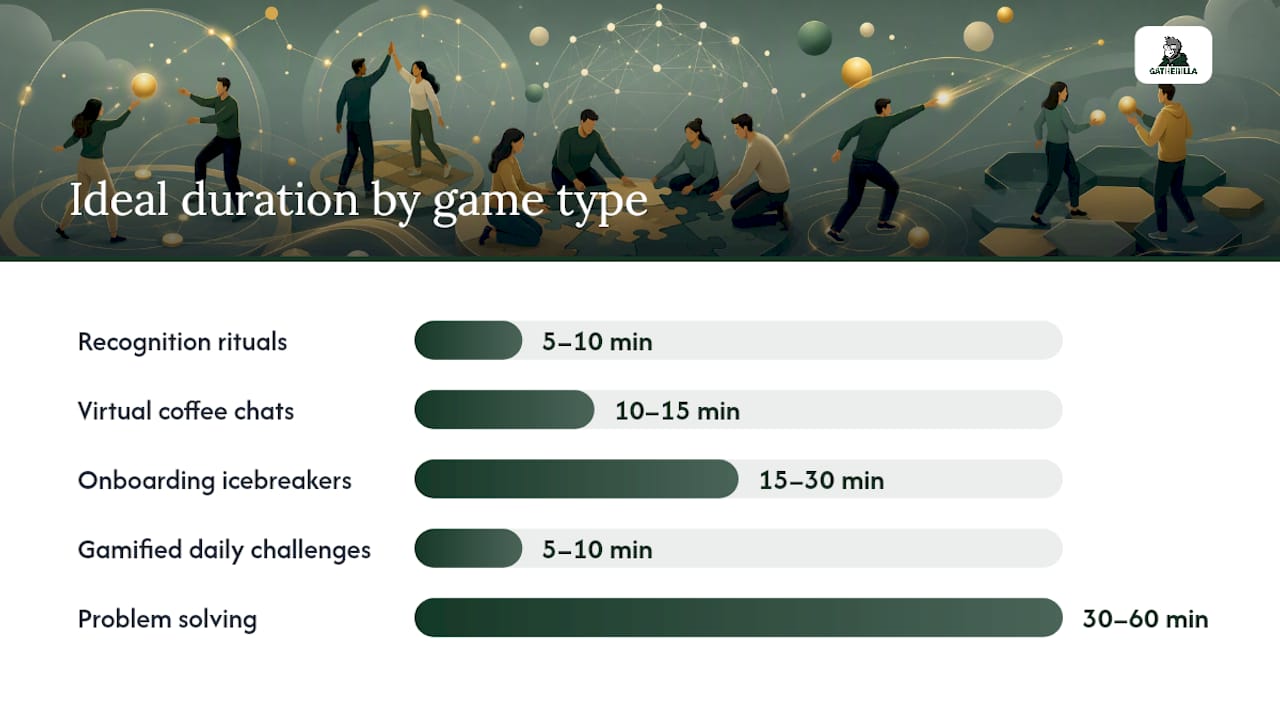
Recognition rituals are the highest-leverage category. A simple “shoutout round” where each participant names one colleague and one specific action takes under five minutes and directly addresses the psychological safety gap that remote teams face.
Virtual coffee chat games work best in pairs or trios. Structured prompts (“What’s one thing you worked on this week that surprised you?”) outperform open-ended chat because they lower the awkwardness of silence.
Onboarding icebreakers should be sequenced into Day 1 and Week 1 schedules. MIT Human Resources recommends assigning a buddy before Day 1 and scheduling structured one-on-ones early, which maps directly to pairing onboarding games with buddy introductions.
Gamified daily challenges (word games, trivia, leaderboard-driven puzzles) are the easiest habit to sustain because they require no facilitator and take under ten minutes. Gatherilla’s daily challenge feature is built for exactly this use case.
For hybrid groups, keep total participants under 20 and use breakout groups of 3–5 with clear deliverables. Anything larger and the in-room participants start to dominate.
Ready-to-run session agendas and facilitator scripts
10–15 minute weekly energizer
| Segment | Time | Facilitator action |
|---|---|---|
| Welcome + framing | 1 min | “Quick round before we dive in — no prep needed” |
| Recognition shoutout | 3 min | Each person names one colleague + one specific action |
| Gamified challenge | 8 min | Run a daily word or trivia game; share leaderboard |
| Wrap | 1 min | Note top score; tease next week’s challenge |
Facilitator script starter: “Before we get into the agenda, we’re doing our weekly shoutout round. Name someone on the team and one specific thing they did this week. I’ll start.”
Troubleshooting: If participation drops, switch to a written chat-based format. Typing a shoutout in the chat removes camera pressure and often gets higher response rates.
Hybrid-first tech and facilitation checklist
Build every session for remote participants first. That single design rule prevents the most common hybrid failure: in-room energy that leaves remote attendees watching instead of participating.
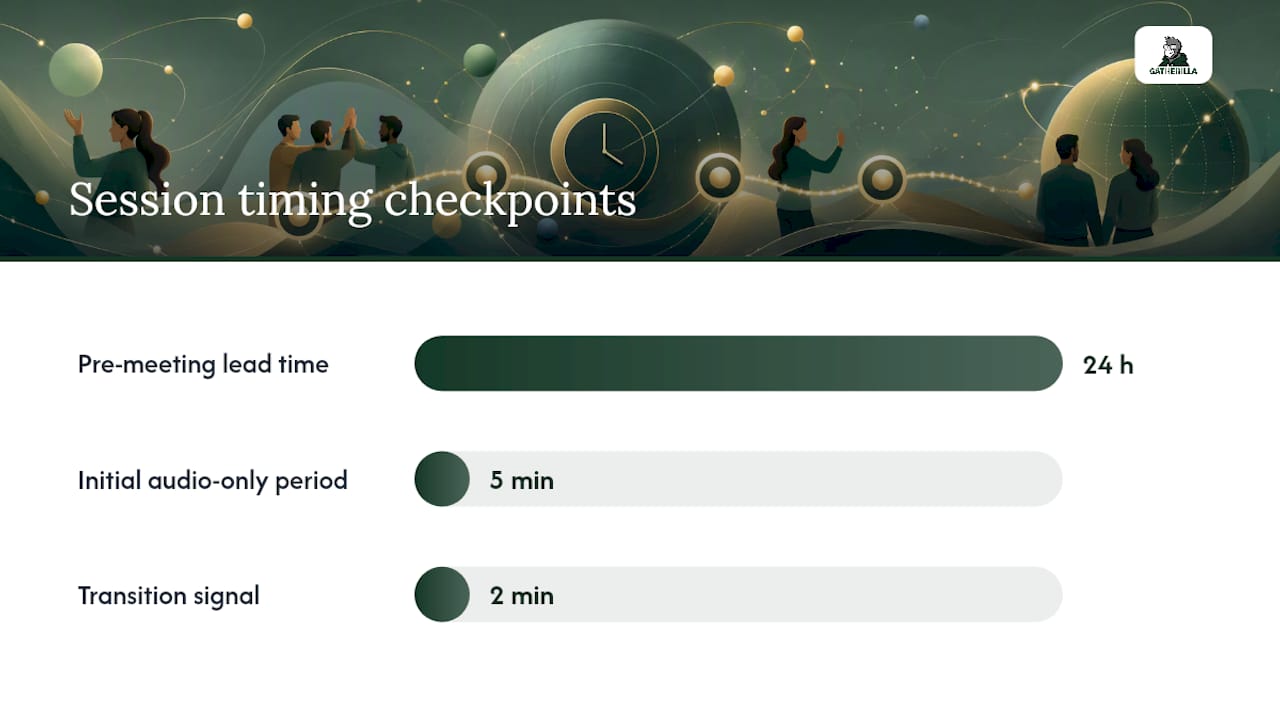
Pre-meeting (24 hours before):
- Confirm all participants can access the game link in a browser (no download, no IT ticket)
- Test breakout room assignments and co-host permissions
- Share the facilitator script with the co-host
- Enable live captions for accessibility
- Prepare a low-bandwidth fallback (shared doc, audio-only trivia)
During the meeting:
- Host manages game flow and timing
- Co-host monitors chat and raises hands for remote participants
- Timekeeper signals the facilitator at the 2-minute mark before each transition
- Chat moderator surfaces written responses for participants who prefer not to speak
Accessibility and opt-in: State at the start that cameras and personal sharing are optional. Remote icebreaker games work best when participation feels chosen, not compelled.
Pro Tip: For teams with inconsistent bandwidth, run the first five minutes audio-only. Participants who can upgrade to video will; those who can’t won’t feel excluded from the start.
How do you measure impact and scale a program?
Track four signals: participation rate, post-event sentiment, manager-observed behavior change, and onboarding cohort retention at 30/60/90 days.
| Metric | Collection method | Frequency |
|---|---|---|
| Participation rate | Attendance log | Weekly |
| Sentiment score | 2-question post-event survey | Per event |
| Behavior change | Manager pulse check | Monthly |
| Onboarding retention | Cohort tracking (30/60/90 days) | Per cohort |
Cadence matters more than any single event. Weekly micro-rituals sustain momentum. Monthly structured events add novelty. Quarterly kit-paired experiences (ship something physical to participants 5–7 days before) create the highest-rated sessions. Annual in-person gatherings, where budget allows, anchor the year.
For pilots, run one team for 30 days before scaling. Compare participation and sentiment against a control cohort if possible. The analytics dashboard on your platform should show you game completion rates and leaderboard activity without requiring a manual export.
What should you require from a video-call games platform?
Browser-based with no download is the non-negotiable starting point. Everything else builds from there.
Feature checklist:
- Breakout-ready multiplayer games (not just single-player trivia)
- Configurable game templates (so you can add company-specific questions)
- Facilitator controls (mute, skip, timer)
- Reporting dashboard (participation, completion, leaderboard data)
- SSO or simple invite-link access (no account creation required for participants)
- Privacy basics (GDPR-aware data handling, no third-party ad tracking)
Pricing model: Per-seat subscriptions work better than flat event pricing for teams running weekly virtual energizers because the per-event cost drops as cadence increases. A free tier is worth requiring for pilots — it lets you validate participation before committing budget.
Browser-based platforms with quick setup and analytics lower friction for both pilots and ongoing programs. The upgrade trigger is usually analytics access and a larger activity library.
How Gatherilla meets HR requirements
Gatherilla is browser-based, requires no downloads, and works with any video conferencing tool your team already uses — Zoom, Microsoft Teams, Google Meet. Participants join via a link; no IT ticket, no app store.
What the platform includes:
- Multiplayer games playable in breakout rooms or full-group sessions
- Daily word and trivia challenges for habit-forming micro-rituals
- Onboarding game templates for Day 1 and Week 1 sequences
- Real-time leaderboards visible during the session
- Analytics on participation and game completion (paid tier)
- Per-seat pricing with a free tier for pilots
One HR team used Gatherilla’s onboarding game templates during a 30-day pilot and saw new-hire attendance in Week 1 structured sessions hold above 90% across two consecutive cohorts. The free tier covered the pilot; the analytics dashboard on the paid plan confirmed the retention signal before the team scaled to the full department.
Start a pilot on Gatherilla’s free tier to validate participation before committing to a subscription.
Key takeaways
Structured, recurring video-call games that combine recognition rituals, onboarding sequences, and daily challenges are the most direct path to measurable psychological safety and engagement in remote and hybrid teams.
| Point | Details |
|---|---|
| Recognition rituals first | 68% of respondents rated recognition rituals as highly effective for psychological safety — prioritize them over novelty games. |
| Cadence over events | Weekly micro-rituals sustain engagement better than monthly or quarterly events alone. |
| Remote-first design | Build every hybrid session for remote participants first; keep breakout groups to 3–5 people. |
| Measure four signals | Track participation rate, sentiment, manager-observed behavior change, and onboarding cohort retention. |
| Gatherilla for pilots | Start on the free tier, run a 30-day pilot, and upgrade when analytics confirm the retention signal. |
The case for small rituals over big events
The instinct most HR teams have is to plan a big quarterly event and call it team-building. That’s not wrong, but it’s not enough. The research on psychological safety points consistently toward frequency, not scale. A five-minute recognition round every Monday does more for trust than a two-hour virtual offsite once a quarter.
The caution I’d offer: don’t make participation mandatory or sessions too long. Mandatory social time breeds resentment faster than isolation does. Keep the first pilot short, voluntary, and low-stakes. If people come back the second week without being asked, you’ve built something real.
Gatherilla: run your first pilot this week
HR teams running remote and hybrid programs need a platform that works the first time, without a setup call or an IT request. Gatherilla’s free tier gives you access to multiplayer games, daily challenges, and onboarding templates immediately. Share a link, run a 15-minute session, and check attendance.

The suggested pilot: one team, 30 days, weekly micro-ritual plus one onboarding game for any new hire who joins during the period. Measure participation rate and run a two-question sentiment survey after week two. If both metrics hold, upgrade to the paid plan for analytics and the full activity library.
Start your free pilot on Gatherilla and have your first session running before the end of the week.
Useful sources
- Virtual Team Building That Works: How to Engage Remote and Hybrid Teams — Custom Ink Blog
- Virtual Team Building for Mental Health: Creating Psychological Safety in Digital Environments
- Hybrid team building activities that truly engage on site and remote employees
- Remote Onboarding in 2026: What the Data Reveals
- Remote Employee Onboarding for Small Business | FirstHR
- Gatherilla — Team Building Games for Remote & Hybrid Teams | Gatherilla
Recommended
- Team Building Games for Microsoft Teams (That Actually Work in a Call) | Gatherilla Blog
- Virtual Minute to Win It: Best Games for Remote Teams | Gatherilla Blog
- Virtual Halloween Games for Remote Teams: Low-Prep Ideas | Gatherilla Blog
- Morning Meeting Games for Remote Teams: 2026 Guide | Gatherilla Blog