

Run Browser Based Team Word Games Online in 15–30 Minutes for HR

Run a short, cooperative shared-board game for teams that need to talk more, and a quick live race for teams that just need energy in the room. Add an asynchronous daily puzzle to keep engagement going between meetings. One platform fits all three because it runs in a browser with no downloads, sets up in minutes, and lets you swap in custom word packs for onboarding or culture moments. The rest of this guide gives you the exact setup checklist and a sample 15 to 30 minute agenda to run it today.
TL;DR:
- Cooperative shared-board games effectively improve team communication and are best suited for groups of 4 to 8, lasting 10 to 15 minutes.
- Speed or race formats work well for split teams of small squads and can be played within 10 to 15 minutes, with rules explained in under a minute.
- Asynchronous daily puzzles and weekly challenges support large, distributed teams because they require no live coordination and facilitate ongoing engagement.
- A quick setup in a browser-based platform takes minutes, with no downloads or IT approval needed, making it ideal to run a session within a 30-minute window.
- For groups over 15 or with mixed comfort levels, default to cooperative or asynchronous formats to avoid engagement drop-offs caused by unclear instructions or tech friction.
Table of Contents
- What Team Word Games Online Actually Build (and Which Format Does It)
- How Do You Run a 15 to 30 Minute Word-Game Session?
- How Do You Pick the Right Game Format Fast?
- Synchronous or Asynchronous: When to Use Each
- Gatherilla in Practice: Matching Features to the Playbook Above
- Why Word Games Reveal More Than They Seem To
- Get Your Team Playing in Under 10 Minutes
- Sources
What Team Word Games Online Actually Build (and Which Format Does It)
Not every word game does the same job. Some are built to force conversation. Others exist purely to get people laughing before a Monday standup. Knowing the difference is what separates a session people remember from one they tolerate.
Multiplayer word games generally split into three engagement styles: live competitive races, collaborative team-solving, and asynchronous daily challenges, and each one serves a different team need instead of being interchangeable, according to Harvest’s research on remote team-building. Pick based on the outcome you want, not just what looks fun on a screenshot.
Cooperative shared-board games put the whole team on one puzzle at once, working toward a single solution instead of racing each other. These build real communication because someone has to explain their reasoning out loud, and quieter teammates often surface as the ones who spot the pattern nobody else saw. Best for groups of 4 to 8, running 10 to 15 minutes.
Short speed or race formats split people into small teams that compete against a clock. They’re loud, fast, and great for shaking off meeting fatigue before a big presentation. Word-guessing games with hint-based mechanics, where one player feeds clues and others race to guess, work particularly well here because the rules take under a minute to explain, per Word Sleuths’ party game format. Best for groups split into small squads, 10 to 15 minutes per round.
Party and guessing formats need almost no prep and flex easily for mixed comfort levels with competition. Word-search races are time-boxed, visually simple, and don’t punish anyone for typing slowly, which makes them a safe entry point for teams still warming up to online play. Asynchronous daily puzzles run outside the meeting entirely, letting people solve on their own schedule and check a shared leaderboard later.
A few operational notes for HR planning any of these:
- Cooperative and party formats scale down easily to a single small team; race formats need at least two competing groups to feel alive.
- Word-search and daily puzzle formats support very large populations because they don’t require live coordination.
- Customizable theme or word-pack options let you tie the activity to onboarding, product knowledge, or a culture moment instead of running a generic session, which Asana’s team-building resources note increases how relevant employees find the exercise.
- Role-specific word lists (sales terms, engineering jargon, company acronyms) turn a generic game into a light onboarding tool.
How Do You Run a 15 to 30 Minute Word-Game Session?
Timing kills more team-building sessions than bad games do. A great puzzle format falls flat if the first eight minutes get eaten by “can everyone see my screen?” Build the tech check into the plan, not around it.
Before the meeting starts, run through this:
- Confirm the game link works on the meeting platform you’re using, whether that’s Zoom, Teams, or Google Meet, and send it in the calendar invite the day before.
- Test audio and screen share on your own device, since half of all facilitation failures trace back to a muted mic or a frozen share.
- Tell participants whether they need mobile or desktop, and flag clearly that no download or app install is required if you’re using a browser-based tool.
- Have a backup plan (a second link or a phone number) in case the primary connection drops.
A sample agenda that fits inside a half-hour meeting block:
- 0 to 3 minutes: Welcome, quick framing of why you’re playing (team bonding, onboarding, or just a Friday reset).
- 3 to 6 minutes: Explain the rules once, demo one round live so nobody has to guess.
- 6 to 20 minutes: Play two or three full rounds, rotating who leads or gives hints each time.
- 20 to 25 minutes: Debrief. Ask what strategy worked, not who won.
- 25 to 30 minutes: Close with next steps, and mention the leaderboard or daily challenge if you’re running one.
For the facilitator script, keep rule explanations to one sentence per mechanic: “One person gives a one-word clue, everyone else types their guess.” When a teammate stays quiet, name them directly: “What’s your read on this one?” works better than a general “anyone?” For the debrief, ask two questions max: “What almost worked?” and “What would you try differently next round?”
If you’re running this across a distributed team, Gatherilla’s browser-based games skip the IT approval step entirely, since there’s nothing to install and nothing for a security team to flag.
Pro Tip: Rotate the “clue giver” or “board leader” role every round instead of letting the same confident person run the show. It’s the fastest way to surface quieter teammates without singling anyone out.
For inclusion, offer live captions where the platform supports them, rotate turns instead of relying on volunteers, and default to cooperative modes when you’re not sure how competitive your group actually is.
How Do You Pick the Right Game Format Fast?
Most facilitation failures aren’t about the game. They’re about picking a format that doesn’t match the room. A 20-person all-hands doesn’t need the same setup as a 5-person weekly sync.
Run through this two-minute checklist before you commit to a format:
- Team size: Under 8, lean cooperative. Over 15, split into competing sub-teams for a race format.
- Time available: Under 15 minutes, skip games with long rule explanations entirely.
- Comfort with competition: If you’re not sure, default to cooperative. Forced competitiveness backfires with mixed personality teams.
- Timezone spread: Heavily distributed teams should lean asynchronous, saving live sessions for smaller windows everyone can actually attend.
- Customization needs: Onboarding sessions benefit from role-specific word packs; general bonding sessions don’t need them.
Word games double as low-stress diagnostic tools. They reveal how people communicate and who steps up to lead under light pressure, all without a formal assessment, according to Harvest’s remote team-building findings.
Watch for these red flags, because they kill engagement faster than a bad game choice: unclear scoring that leaves people arguing instead of playing, instructions that eat more than three minutes, fewer than two rounds (nobody gets into rhythm on round one), and tech friction from download requirements. Fix each by simplifying scoring to one number, capping explanations at 60 seconds, running a minimum of two to three rounds, and choosing browser-based tools that need zero setup.
Synchronous or Asynchronous: When to Use Each
Synchronous play means everyone’s on the call at once, solving together in real time. Asynchronous means people solve on their own schedule and compare results later. Neither is better; they solve different problems. Use synchronous formats when the goal is a shared moment, like an onboarding icebreaker or a live all-hands energizer. Use asynchronous formats when your team spans multiple time zones and forcing a live session would exclude half the group.
Three asynchronous patterns worth running:
- A daily word puzzle with a shared leaderboard, refreshed every 24 hours, works well because completion rates and leaderboard activity give HR an easy read on engagement.
- A weekly themed challenge tied to a company value or product update, announced via a scheduled Slack or email nudge.
- A rolling onboarding puzzle series for new hires, spaced across their first two weeks.
Asynchronous daily challenges and shareable leaderboards tend to be the most sustainable engagement model for distributed teams, since they don’t demand calendar coordination across time zones, per research on multiplayer word-search formats. Track completion rate and leaderboard clicks weekly, and if participation drops, refresh the word pack before you assume people are disengaged. A tool like Otto can help automate the reminder cadence so momentum doesn’t depend on someone manually pinging the channel every morning.
Gatherilla in Practice: Matching Features to the Playbook Above
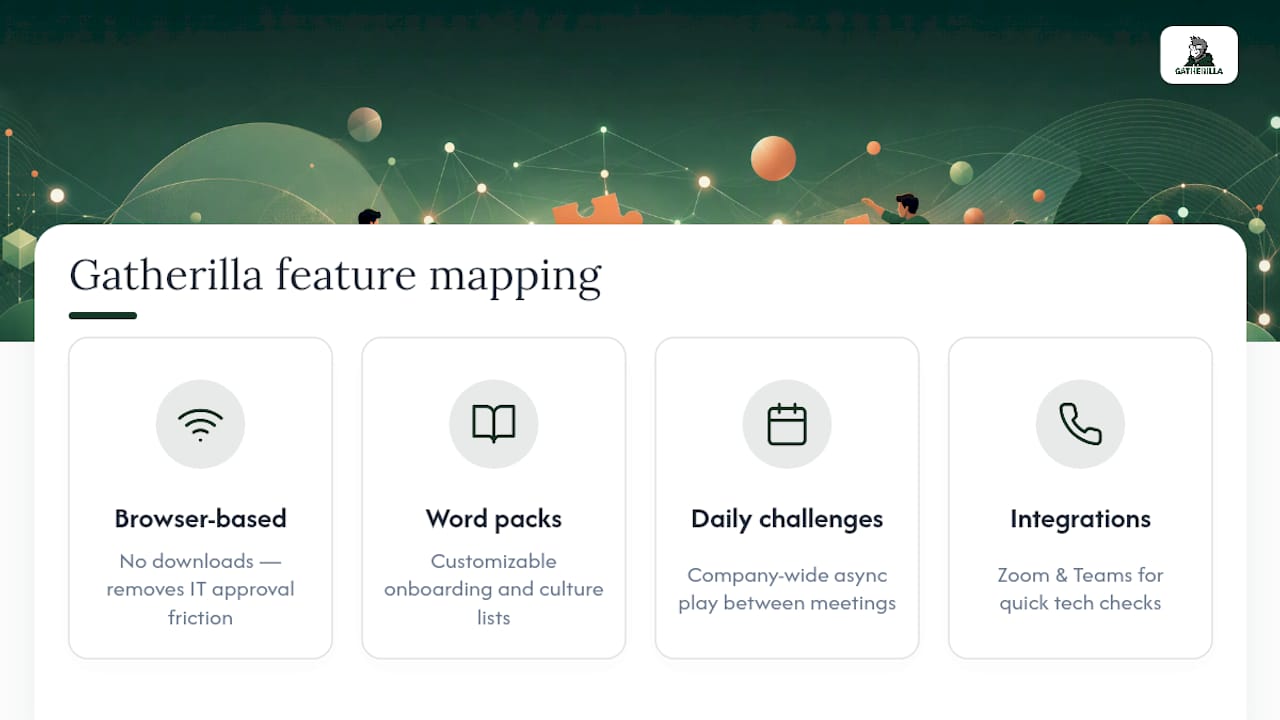
Everything in this guide maps directly onto how Gatherilla is built. Browser-based play means no downloads, which solves the IT-approval friction covered in the setup checklist. Customizable word packs cover the onboarding and culture-specific word lists mentioned earlier. Daily challenges handle the asynchronous pattern for distributed teams, and integrations with Zoom and Teams mean the tech check takes minutes, not a help desk ticket.
In practice, this looks like running a cooperative shared-board puzzle for a 50-person town hall by splitting into parallel rooms with a shared scoreboard, a company-wide daily challenge for casual engagement between meetings, or a themed word pack for a new-hire’s first onboarding call.
Why Word Games Reveal More Than They Seem To
Watch a team play a five-minute word game and you’ll learn more about how they communicate than a quarter of status meetings will tell you. Someone always ends up giving clearer instructions than everyone else, and someone always waits to be asked before speaking up. That’s not trivia, that’s your org chart showing through.
The move isn’t to overthink this. Pick one short format, run it twice, and watch who leads. Adjust from there.
— Thomas
Get Your Team Playing in Under 10 Minutes
Setting up a session shouldn’t take longer than the game itself. Gatherilla is built for exactly the checklist covered above: no download, no IT approval needed, and a setup that takes minutes instead of a meeting of its own.

Every recommendation in this guide, cooperative boards, quick races, custom word packs, daily asynchronous puzzles, maps to something already live on the platform. You get integrations with the video tools your team already uses, custom word packs for onboarding or culture moments, and a daily challenge that keeps people checking in between meetings without adding another recurring calendar invite.
If you want to see it in action, browse the full catalog of activities and pick a format that matches your next team meeting. Start with the free tier, run a 15-minute session using the sample agenda above, and if you’re planning something larger, like a company-wide town hall, reach out for the enterprise setup built for bigger rooms.