

3 Copy Paste Team Trivia Questions for HR Leaders, No Prep
Here are ready-to-run team trivia packs in three sizes, 10, 20, and 50 questions, plus categorized question banks and a short hosting playbook you can copy-paste into your next meeting. You will also find work-appropriate guidelines, format variations, moderator scripts, and a brief explanation of why well-run trivia actually helps teams perform better.
TL;DR:
- Short trivia sessions should prioritize short answer times and clear scoring to maintain engagement and fairness across both virtual and in-person formats.
- Categorized question banks tailored to team interests and difficulty levels ensure relevance and inclusivity, with visual and audio prompts added as needed.
- Pacing questions appropriately—20 to 30 seconds for quick facts and up to two minutes for discussion or media rounds—optimizes flow and energy.
- Implementing simultaneous answer collection and real-time leaderboards helps prevent dominant players and keeps teams motivated throughout the game.
- Short, frequent trivia rounds foster ongoing participation and team bonding, especially when questions are rotated and accessibility considerations are integrated.
Table of Contents
- 1. Copy-paste trivia packs you can run today
- 2. Categorized question banks for every team
- 3. How to host a trivia session that actually runs smoothly
- 4. Keeping questions work-appropriate and inclusive
- 5. Choosing the right game format for your goal
- 6. Scripts, slides, and a simple scoring sheet
- 7. Why trivia works: the research behind the format
- My take on running trivia with remote teams
- Run trivia with zero setup using Gatherilla
- FAQ
- Sources
1. Copy-paste trivia packs you can run today
The fastest way to run team trivia is to skip the planning and grab a pack sized to your meeting. A quick warmup fills a 10 to 15 minute slot before a standup. A standard pack carries a full session. A party pack turns a lunch or an all-hands into an event.
- 10-question quick warmup (10-15 minutes): Ask one question, give 20 to 30 seconds, reveal the answer, move on. No scoring needed, though you can tally correct answers for bragging rights. Sample questions: What planet is known as the Red Planet? (Mars) What year did the first iPhone launch? (2007) What is the capital of Australia? (Canberra) Which ocean is the largest by surface area? (Pacific) What instrument has 88 keys? (Piano) What is the smallest country in the world? (Vatican City) Who painted the Mona Lisa? (Leonardo da Vinci) What gas do plants absorb from the air? (Carbon dioxide) How many sides does a hexagon have? (Six) What currency is used in Japan? (Yen)
- 20-question standard session (20-25 minutes): Split into four rounds of five questions, each round a different theme (pop culture, history, science, food). Give 30 seconds per question and award 2 points for a correct answer within the first 15 seconds, 1 point after. Keep a running score on a shared screen or chat thread so teams stay engaged between rounds.
- 50-question party pack (45–60 minutes): Organize into five themed rounds of ten questions: Pop Culture, History and Geography, Science and Nature, Food and Drink, and a Wildcard round of odd-but-true facts. Add a halftime “name that tune” music round between round three and four to reset energy, and close with a final wager question worth double points where teams can bet some or all of their score.
For a session that leans on visuals (movie stills, logos, album covers), a shared slide deck works better than reading questions aloud, since remote participants need the same visual cue as people in the room. Our playbook for virtual team trivia breaks down slide pacing in more detail if you want a full walkthrough before your first session.
If you need the question text itself rather than a structure, our copy-paste template roundup includes several ready-made 15 to 20 minute sets you can drop straight into a meeting invite.
2. Categorized question banks for every team
A single trivia pack rarely fits every team. A sales team might love pop culture and sports, while an engineering team leans toward science and weird facts. Building from categories lets you mix and match based on who is actually in the room.
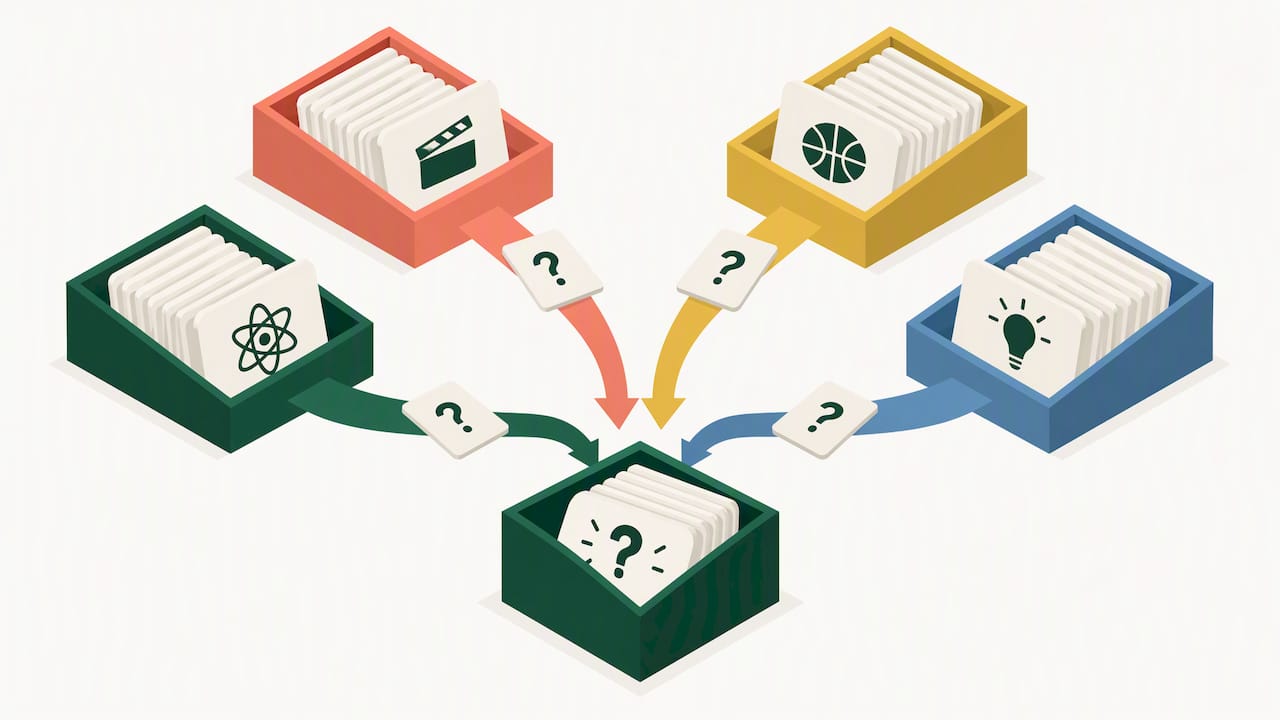
Each category below includes a difficulty label (easy, medium, hard) and a note on whether a question needs an image, audio clip, or prop, since that changes how you run it on a video call versus in a conference room.
Pop culture
- Easy: What social media platform is known for 15-second videos set to music? (TikTok)
- Medium: What is the name of the fictional company in “The Office”? (Dunder Mifflin)
- Hard: What was the first video ever posted to YouTube? (“Me at the zoo,” needs no media but benefits from a quick mention of the title on screen)
Movies and TV
- Easy: What movie features the line “May the Force be with you”? (Star Wars)
- Medium: Which actor played the Joker in “The Dark Knight”? (Heath Ledger)
- Hard: What 1994 film, image-friendly as a still of a feather, opens with “Life is like a box of chocolates”? (Forrest Gump, needs an image for full effect)
Music
- Easy: Which decade is associated with disco? (1970s)
- Medium: Name the band behind “Bohemian Rhapsody.” (Queen)
- Hard: Play a 10-second clip and ask teams to name the artist, a format that needs audio and works best on a call where you can share sound directly.
History
- Easy: In what year did World War II end? (1945)
- Medium: Who was the first President of the United States? (George Washington)
- Hard: What treaty formally ended World War I? (The Treaty of Versailles)
Science and nature
- Easy: What is the chemical symbol for water? (H2O)
- Medium: What organ in the human body produces insulin? (Pancreas)
- Hard: What is the only mammal capable of true flight? (Bat)
Food and drink
- Easy: What fruit is traditionally associated with Newton’s theory of gravity? (Apple)
- Medium: What spice is derived from the Crocus flower and is the most expensive by weight? (Saffron)
- Hard: What country is the origin of the dish “ceviche”? (Peru, though debated between Peru and Ecuador, so accept either)
Sports
- Easy: How many players are on a basketball team on the court at one time? (Five)
- Medium: Which country has won the most FIFA World Cups? (Brazil)
- Hard: What is the only sport played on the moon? (Golf, a prop photo of Alan Shepard helps land the reveal)
Weird and true
- Easy: What animal can sleep for up to three years? (Snail)
- Medium: What is the only food that never spoils? (Honey)
- Hard: Octopuses have three of what organ? (Hearts)
Company-themed Build this category live by swapping in details specific to your workplace. Start from a simple formula: pick a fact about your company’s founding year, a product milestone, or an internal nickname, then write it as a question with three to four answer choices. A few prompts to get started:
- What year was our company founded, and what else happened that year in the wider world?
- Which department has grown the most in headcount over the past year?
- What nickname do we use internally for [a recurring project, tool, or event]?
- Who on the leadership team has the longest tenure at the company?
Company-themed rounds tend to generate the most laughter and the most arguments, since employees will dispute the “correct” answer to things like “who brought donuts most often.” That tension is part of what makes the round memorable. For more theme ideas organized by audience, our work trivia themes roundup lays out six categories with four copy-paste rounds each, useful if you run trivia regularly and want to rotate content without repeating questions.
3. How to host a trivia session that actually runs smoothly
The questions matter less than the mechanics. A great question bank falls flat if people cannot hear the question, cannot submit an answer fairly, or lose track of the score halfway through.
Virtual setup checklist
- Share your question slides directly rather than reading from a document, so remote participants see the same text and images as everyone else.
- Use breakout rooms for teams of three to five to deliberate before answers are due, then bring everyone back to the main room for reveals.
- Collect answers through a private chat thread, a poll, or a shared form rather than having teams shout answers, since loud or fast typers otherwise dominate and quieter participants disengage.
- Display a running leaderboard between rounds to keep energy up and give trailing teams a reason to stay engaged.
In-person setup
- Hand out response cards or small whiteboards so teams write and hold up answers rather than yelling them.
- Use a timer with an audible cue, and queue music during deliberation to keep the room from going silent and awkward.
- Have a moderator script ready with transition lines, since dead air between questions kills momentum faster than almost anything else.
- Track scores on a visible whiteboard or shared screen so the room can see standings update in real time.
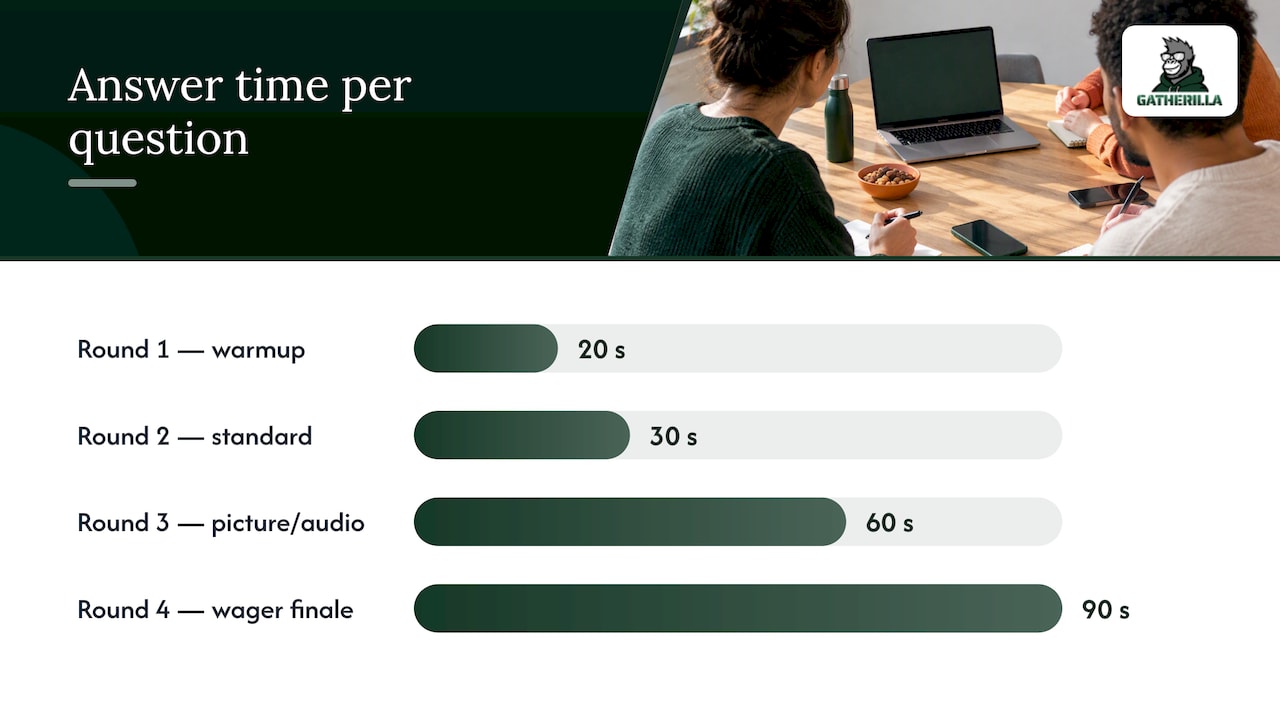
Pacing works best when matched to question complexity. A quick factual question needs 20 to 30 seconds. A multi-part question, a picture round, or anything requiring discussion needs 60 to 120 seconds. A typical four-round structure runs: Round 1 warmup (five easy questions, 20 seconds each), Round 2 standard (five medium questions, 30 seconds each), Round 3 picture or audio round (five questions, 60 seconds each), Round 4 wager finale (one high-value question, 90 seconds).
Scoring and tie-breakers: Flat scoring (1 point per correct answer) is simplest for a quick warmup. Tiered scoring (2 points for speed, 1 for accuracy only) rewards engagement in longer sessions. For ties, keep one extremely specific numeric tiebreaker question in reserve, something like “how many employees do we currently have,” since a precise guess resolves a tie fast without needing a new round.
Pro Tip: Require every team to submit answers at the same moment, whether through a chat message, a poll, or cards held up on a three-count, so no team gains an advantage by hearing another team’s answer first.
Our breakout room guide covers the mechanics of moving groups in and out of deliberation rooms without losing people in the shuffle, which is worth a look if you have not run breakout-based games before.
4. Keeping questions work-appropriate and inclusive
Trivia is supposed to bring a team together, not single anyone out or wander into territory that has no place in a work meeting. A few guardrails keep the game fun for the whole room instead of just the loudest few.
- Avoid questions about politics, religion, medical conditions, or anything that touches an individual employee’s personal life, since even a lighthearted question in these areas can land badly for someone in the room.
- Favor neutral, broadly known facts over niche regional trivia, and offer a hint or an alternate phrasing when a question assumes fluency or cultural context that not everyone on the team shares.
- Build in flexibility for non-native speakers or neurodivergent participants by allowing a few extra seconds on request and by accepting close or phonetically similar answers rather than penalizing spelling.
- Caption any audio clips and add brief alt text or a verbal description for image-based questions, so participants who are deaf, hard of hearing, or visually impaired are not left out of a round.
- Keep answer submission non-verbal where possible (chat, cards, polls) so no one has to call out an answer in front of the group, which matters for employees who are anxious about being wrong publicly.
Inclusive formats also tend to perform better. Research on inclusive leadership has found it strengthens team psychological safety and innovative behavior, and psychological safety is closely tied to how willing people are to participate and take small risks in front of their colleagues. A trivia round that feels safe to get wrong is a round people actually join. Our guide to building psychological safety goes deeper on practical steps if inclusion is a priority beyond the trivia hour itself.
5. Choosing the right game format for your goal
Not every trivia session should look the same. The format you pick should match what you are actually trying to accomplish, whether that is a quick energy boost or a deeper bonding exercise.
- Team huddles versus individual play: Team huddles of three to five work best when the goal is bonding, since quieter members get cover to guess without being individually exposed. Individual play works better for short energizers where speed and friendly competition matter more than collaboration.
- Lightning and speed rounds: Rapid-fire questions with a 10 to 15 second limit each, best used mid-session to spike energy once the group has warmed up. Keep these questions easy, since the point is pace, not difficulty.
- Picture and music-clip rounds: These need a shared screen or shared audio and work well as a change of pace between text-heavy rounds. Prepare the media in advance so there is no fumbling for a file mid-session.
- Wagering rounds: Teams bet some or all of their current score on a single question, which raises stakes and tension, best saved for the final round of a longer session.
- Cooperative variants: Mixed-skill teams work together on a joint problem, such as a puzzle question that requires combining partial clues held by different teammates, which shifts the focus from competition to collaboration.
Our Virtual Jeopardy walkthrough shows how a categorized, tiered-value format can combine several of these ideas, timed rounds, wagering, and visual question boards, into a single 15-minute session.
6. Scripts, slides, and a simple scoring sheet
Having a script ready removes the awkward pauses where a moderator has to think of what to say next.
- 15-minute quick game script: Open with “We’re running a quick 10-question trivia round, no prep needed, just shout out or chat your best guess.” Transition between questions with “Next up” or “Question three.” Close with “Last one, and it’s worth double,” then reveal the winner by name.
- 45-minute party script: Open with round-by-round framing (“We’ve got five rounds today, themes are on the screen”), include a halftime line after round three (“Quick stretch, then back for the music round”), and close with a wager prompt before the final question.
- Slide template notes: Use one slide per question with large, high-contrast text, a separate countdown slide with a visible timer, and a clean answer-reveal slide that shows the correct answer alongside the question text so latecomers to the reveal are not lost.
- Scoring spreadsheet fields: Team name, round 1 through round 4 scores, bonus points, final total, and a tiebreaker column reserved for the one numeric tiebreaker question.
Our company trivia template post includes ready-made slide and invite wording if you want to skip building these from scratch.
7. Why trivia works: the research behind the format
Trivia is not just a nice-to-have filler activity. A randomized controlled trial on team video-game-style activities found that structured team gaming increased perceptions of challenge and team flow, which in turn increased task performance immediately afterward. The effect came from focused immersion rather than simple enjoyment, meaning a trivia round pitched at the right difficulty for your team matters more than making it easy or purely fun.
A psychological safety study found that team safety positively affects employee innovative performance, with communication behavior acting as the link between the two. In practice, a team that feels safe guessing wrong in a trivia round is also a team more likely to speak up and share ideas in the next planning meeting.
The implication for how you design a session is straightforward: pitch questions at a challenge level that stretches the group without embarrassing anyone, protect psychological safety by avoiding call-out formats, and collect answers simultaneously so the game stays fair for everyone in the room.
My take on running trivia with remote teams
Short, frequent trivia tends to beat long, occasional trivia, especially when using the right content per team for remote engagement. A five-minute, zero-prep round dropped into a Monday standup gets more consistent participation over months than a once-a-quarter 45-minute event that people treat as optional. The daily or weekly cadence is what turns trivia from a novelty into a habit people expect and look forward to.
A few things consistently move the needle on participation. Simultaneous answer submission, whether through chat, a poll, or cards, stops the same two or three fast typers from dominating every round. Rotating who picks the category keeps the game from feeling like it belongs to whoever set it up. And company-themed questions, even clumsy ones, generate more genuine laughter than any polished trivia pack, because people love correcting each other about internal history.
Do: keep rounds short, rotate categories, and let teams argue about company trivia answers. Don’t: let one person dominate every question, skip the warmup round, or run a session longer than the room’s attention can actually hold.
— Thomas
Run trivia with zero setup using Gatherilla
Everything in this playbook works with a slide deck and a timer, but if you would rather skip the prep entirely, our browser-based platform runs multiplayer trivia and other team games with no downloads and no accounts required. Sessions launch in minutes and drop straight into any video call, with built-in simultaneous answer collection and live leaderboards already handling the fairness problem covered earlier in this guide.

- Our games run directly in the browser, so there is nothing to install before a meeting starts.
- Some platforms offer daily challenges to keep teams engaged between scheduled sessions rather than only during planned events.
- Many platforms provide a free tier allowing users to try games before deciding whether to upgrade.
If you want the full catalog of ready-made games beyond trivia, our activities page covers the full lineup, and our pricing page lays out the Free plan alongside Premium, which runs $0.50 to $1.00 per seat per month or $5 to $10 per seat per year for teams that want more games and reporting.
FAQ
What are 10 good trivia questions for a work team?
A solid 10-question set mixes easy and medium difficulty across categories like geography, history, pop culture, and science, such as naming the capital of Australia or identifying the chemical symbol for water. The quick-pack set in this guide gives you 10 ready to use with no further prep.
What is the 20 questions game for team building?
The classic “20 Questions” guessing game has teammates ask yes-or-no questions to identify a hidden object or person, which differs from a 20-question trivia session built from fixed questions and answers. For team building, a 20-question trivia pack arranged into four themed rounds tends to work better for groups, since it gives everyone a chance to contribute across different topics.
What are some fun questions to ask a team?
Fun, work-appropriate questions mix categories your team already enjoys, pop culture, food, sports, or weird-but-true facts, along with one or two company-themed questions about shared history or inside references. Keeping questions neutral and avoiding anything political, medical, or personal keeps the fun inclusive rather than awkward.
What are 20 trivia questions I can use right now?
The 20-question standard pack in this guide is split into four rounds of five: pop culture, history, science, and food, each with an answer provided. Running it in four timed rounds of five to six minutes each fits comfortably into a 20 to 25 minute meeting slot.
Sources
- Team building through team video games: randomized controlled trial (PMC)
- When inclusive leadership promotes innovation: the role of team psychological safety and leader power distance orientation (Frontiers, 2026)
- The impact of team psychological safety on employee innovative performance (PLOS One)