

Single List, No Download Team Points System for Distributed Teams

A team points system is a scoring and reward structure inside a browser-based platform that turns participation, wins, and small daily actions into points on a shared leaderboard, redeemable for real rewards. It works best for remote and hybrid teams that need a lightweight way to build connection without scheduling another meeting. Start with a single ranked list, keep the group small, and expand only once people actually use it.
TL;DR:
- Using a simple three-tier scoring system with daily, challenge, and milestone points maintains trust and simplifies management for remote teams.
- Limiting group sizes to between 6 and 17 participants per leaderboard ensures visibility and sustained engagement without overcomplication.
- Running a pilot with a small group for four to six weeks helps identify issues with redemption and awarding consistency before scaling up.
- Publicly sharing earning tables and redemption options, and automating reward distribution, boosts transparency and reduces suspicion.
- Involving team-led activities within existing video meetings and integrating with familiar tools increases adoption and keeps the program lively.
Table of Contents
- What Does a Team Points System Actually Look Like?
- How Should You Set Up Scoring, Leaderboards, and Group Size?
- How Do You Budget Rewards and Keep the Catalog Trustworthy?
- What’s a Realistic Rollout Plan From Pilot to Steady State?
- Which Metrics Actually Tell You the Program Is Working?
- Where Do Points Programs Go Wrong, and How Do You Fix It?
- What Privacy and Data Security Questions Should You Ask Before Rolling This Out?
- How Do You Fit a Points System Into Tools Your Team Already Uses?
- How Do You Keep the Points System Alive Past the First Month?
- Gatherilla’s Take: Turning the Playbook Into a Daily Habit
- Try a No-Download Points System Built for Distributed Teams
- Sources
What Does a Team Points System Actually Look Like?
Strip away the jargon and a team points system has four moving parts: a trigger, a ledger, a scoreboard, and a redemption flow.
- Triggers are the actions that earn points: winning a trivia round, finishing a daily word challenge, showing up to an icebreaker, or completing onboarding tasks.
- The ledger is the running record of who earned what and when, usually handled automatically by the platform rather than a spreadsheet.
- The scoreboard displays standings, and this is where most teams overcomplicate things.
- Redemption is how points convert into something real, from gift cards to an extra half day off.
Practitioner data on workplace programs shows about 73% of active boards run a single ranked list rather than tiers, badges, or progress trees. Complexity tends to reduce how long a program lasts, not extend it. For distributed teams, async formats (daily totals updated whenever people log activity) beat live, synchronous scoring almost every time, since nobody has to be online at the same moment to compete.
How Should You Set Up Scoring, Leaderboards, and Group Size?
Point values only matter if people trust them, and trust comes from simplicity. A three-tier system covers almost every use case: small points for daily participation, medium points for completing a challenge, and larger points for team wins or milestones like onboarding completion. Cap how many points anyone can earn in a single day, and set an expiry window of a few months so points don’t pile up unredeemed for a long period.
Here’s a practical sequence for building out the system:
- Launch with one flat leaderboard for the whole team or department.
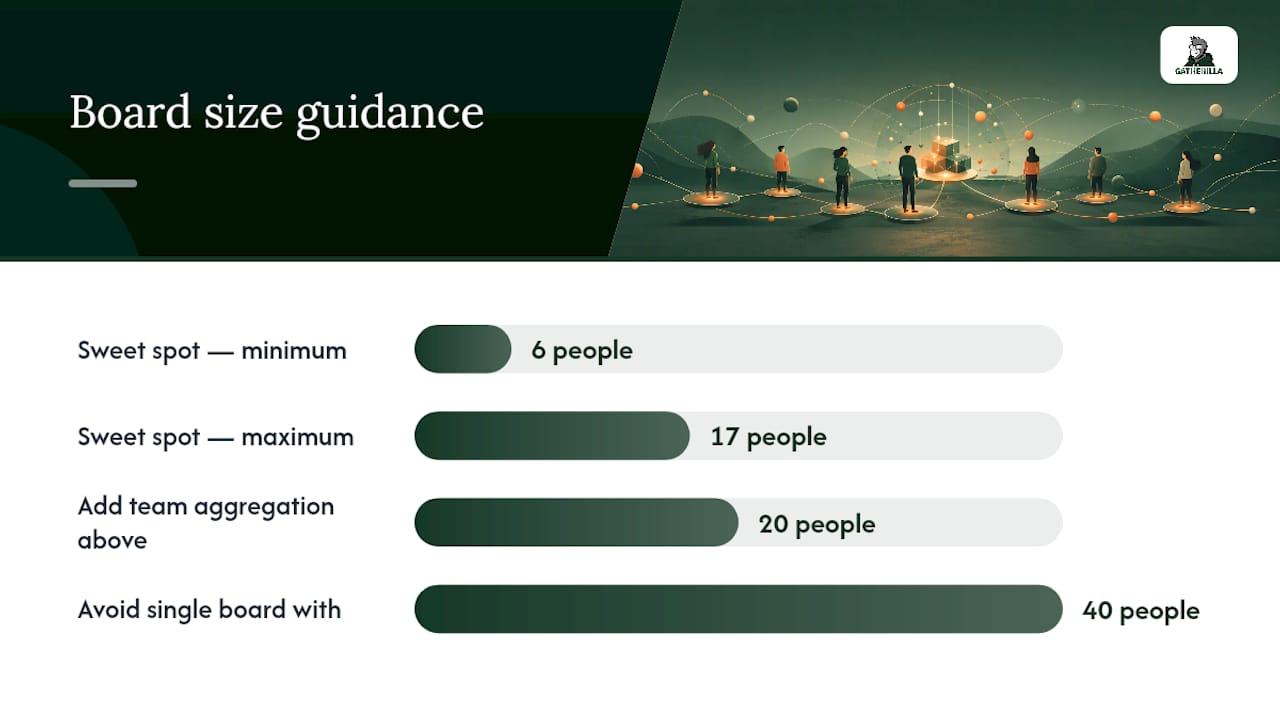
- Add team-based aggregation only once individual boards feel stale or the group grows past 20 people.
- Reserve multi-metric dashboards (speed, accuracy, streaks) for teams that have run the basic version for a few months and want more texture.
On group size, the sweet spot sits between 6 and 17 participants per board. That range is small enough that everyone’s position feels visible and earned, but large enough that the board actually moves week to week. Larger departments should split into sub-boards rather than cram forty names onto one screen.
Cadence depends on your team’s rhythm: daily point totals suit fast-moving remote teams that want a habit, weekly resets suit teams easing into gamification, and round-by-round scoring fits one-off events like an onboarding sprint.
Pro Tip: If you’re not sure which cadence to pick, run daily challenges for the habit and reset the leaderboard weekly. That combination gives people something to check every morning without letting one bad week bury someone until quarter’s end.
How Do You Budget Rewards and Keep the Catalog Trustworthy?
Start the math backward. Take your monthly reward budget, divide it by headcount, and that’s your per-person ceiling. From there, pick a points-to-dollar rate that survives an ordinary week, not just a big campaign week, so someone who participates modestly still sees a redeemable balance within a month or two.
A few things matter more than people expect once the program is live:
- Redemption variety beats redemption value. Gift cards, prepaid cards, and charitable donation options each appeal to different people, and offering a choice keeps the catalog from feeling like a formality.
- Publish the earning table and the catalog publicly. Hidden point values are the fastest way to breed suspicion about how the system really works.
- Watch for point dumping, where people rush to spend points right before an expiry deadline instead of spreading redemptions naturally.
- Avoid weak catalogs. A rewards list with two tired options will kill enthusiasm faster than any leaderboard design flaw. The practitioner framework behind most durable point programs treats triggers, values, catalog, and budget as one connected system, not four separate decisions.
Pulling recognition ideas straight from a curated list of reward options saves you from building a catalog from scratch.
What’s a Realistic Rollout Plan From Pilot to Steady State?
Skip the company-wide launch. Run a pilot first.
- Pick a pilot group of 8 to 15 people for four to six weeks. Monitor weekly active participants and how many people actually redeem points, not just how many earn them.
- Publish the essentials before day one: the earning table, the redemption catalog, who has authority to award points, and which admin role handles disputes.
- Launch on day one with a short, direct announcement explaining how points work and where to check standings.
- Check in around days three to five to catch confusion early, then send weekly summary updates showing participation, not just leaderboard rank.
- Close each challenge cycle with a small celebration, even a five-minute shoutout in a team call, before resetting the board.
The two operational traps that sink most pilots are manual redemption backlog (someone has to actually fulfill gift cards) and inconsistent awarding, where one manager hands out points generously and another barely uses the system. Assign one admin owner for consistency, and automate redemption wherever the platform allows it. Teams researching quick-turnaround engagement experiments generally see whether a format works within that same six-week window.
Which Metrics Actually Tell You the Program Is Working?
Ignore the leaderboard’s top three names when you report results. The number that matters is participation, not who’s winning.
Weekly active participants and the percentage of the team giving or receiving recognition are the leading indicators worth tracking. Points issued per week tell you whether the program has momentum or is quietly dying.
Recognition frequency correlates more strongly with retention than the size of any individual reward, which means a modest weekly cadence tends to outperform a lavish quarterly bonus in terms of sustained engagement. For lagging outcomes, track engagement survey scores over a few months and see whether they move alongside participation rates.
Report results at the group level: “62% of the team earned points this month” tells leadership more than “Sarah has 4,200 points and nobody else is close.” The first framing invites more people in. The second just tells everyone else they’ve already lost.
Where Do Points Programs Go Wrong, and How Do You Fix It?
The most common failure is an insurmountable leaderboard, where one early adopter builds a lead nobody can close, and the rest of the team quietly stops trying. A close second is perceived favoritism, where employees suspect a manager is awarding points unevenly.
- Cap daily and weekly point totals so no one runs away with the board in week one.
- Rotate the metric being scored (this week trivia, next week onboarding tasks) so different strengths get rewarded.
- Aggregate scores by team instead of individual when the group is large or the culture is competitive by nature.
- Report participation rate publicly instead of just the top of the leaderboard.
Leaderboards function psychologically like difficult goals: they can motivate people with high commitment while quietly discouraging everyone else, according to research applying goal-setting theory to competitive digital feedback. The fix isn’t removing the leaderboard. It’s designing it to support competence and relatedness rather than surveillance and ranking for its own sake.
Pro Tip: If someone on your team says the leaderboard feels demoralizing, believe them and act fast. A single vocal complaint about fairness usually means five quiet people already stopped participating.
What Privacy and Data Security Questions Should You Ask Before Rolling This Out?
Points tracking creates a record of individual behavior, and that record deserves the same scrutiny you’d give any employee data system. Before choosing a platform, find out exactly what gets logged: is it just point totals, or does the system track timestamps, activity duration, and participation patterns at a granular level? The more detailed the log, the more it can feel like surveillance rather than recognition, even when that’s not the intent.
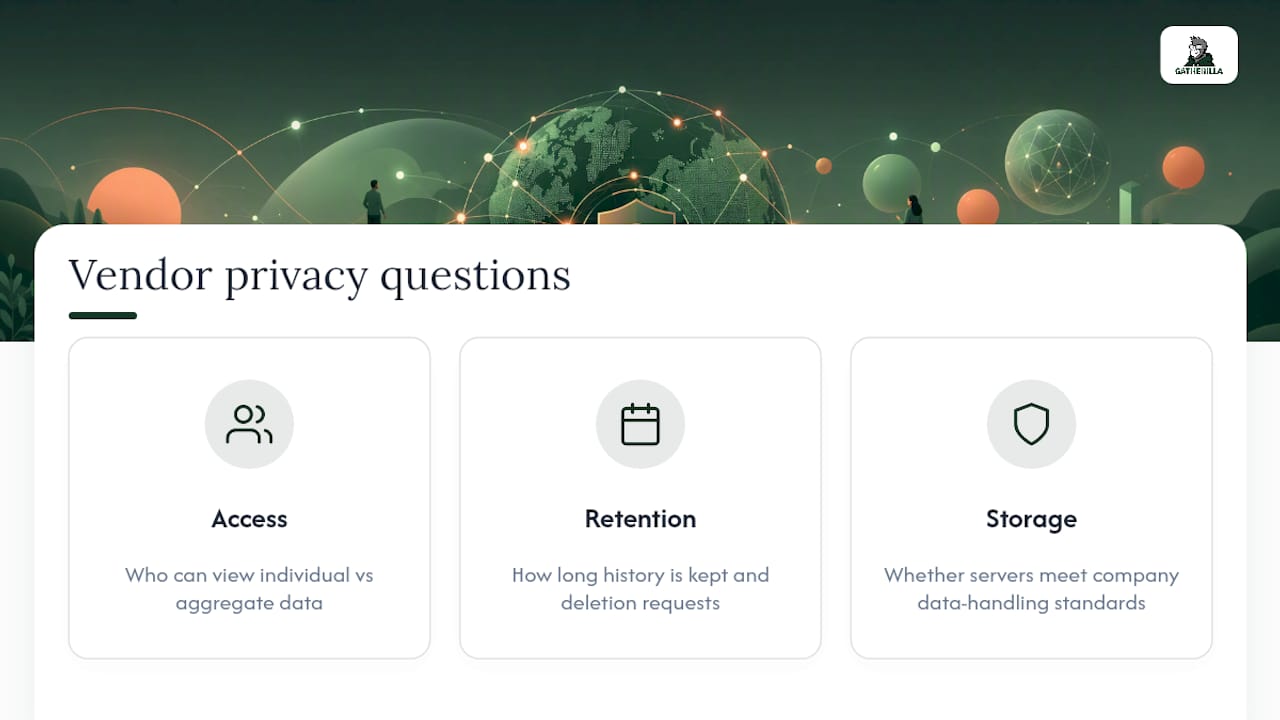
Ask your vendor three concrete questions. First, who inside your organization can see individual-level data versus aggregate team scores. A manager viewing team participation rates is different from a manager scrutinizing exactly when each employee logged activity. Second, how long the platform retains point and activity history, and whether employees can request deletion when they leave. Third, whether the data lives on servers that meet your company’s existing data-handling standards, since a browser-based tool still processes and stores information somewhere.
Transparency solves most of the discomfort here. Tell employees upfront what’s tracked, who can see it, and why it exists (recognition and engagement, not performance surveillance). Programs that keep scoring visible only in aggregate, and reserve individual detail for the participant themselves, tend to generate far less anxiety than ones where everyone can see everyone else’s granular activity history. If your platform supports role-based visibility settings, use them from day one rather than retrofitting privacy controls after people start asking questions.
How Do You Fit a Points System Into Tools Your Team Already Uses?
A points system that lives in a separate app nobody remembers to open is a points system that dies within a month. The goal is friction reduction, not another login.
Browser-based platforms have an advantage here because they don’t require installation, which matters more than it sounds. A tool your team can launch directly inside a Microsoft Teams call or a Zoom meeting removes the single biggest adoption barrier: asking busy employees to download and configure yet another piece of software. If your team already lives in Slack or Teams for daily communication, look for point notifications and leaderboard updates that surface there automatically instead of requiring a separate check-in.
For synchronous moments, like a weekly team call, built-in game formats that run inside the video call itself keep the points system tied to a moment people already show up for, rather than competing with it. For async points, tie the earning triggers to actions people already take: finishing a daily challenge, completing an onboarding module, or reacting to a recognition post. The less new behavior you ask people to learn, the faster the system becomes a habit rather than a chore.
How Do You Keep the Points System Alive Past the First Month?
Most points programs don’t fail because the concept was wrong. They fail because the novelty wore off and nobody refreshed the format.
Rotate what earns points every few weeks. If trivia has driven scoring for a month, swap in a word challenge or an icebreaker theme so the same three fast typers don’t dominate every single cycle. Refresh the reward catalog on a similar rhythm, since a stagnant list of the same two gift cards signals that nobody’s paying attention to the program anymore.
Build in a natural reset. A quarterly “season” structure, where standings clear and a new board starts, gives latecomers a real chance to compete and gives long-time leaders a reason to keep showing up instead of coasting on an old lead. Pair every season close with a small public celebration, even a two-minute mention in an all-hands call, since closing a cycle without acknowledgment quietly signals that the program doesn’t matter that much.
Finally, keep listening. A short quarterly pulse survey asking whether the points system still feels fun or has started to feel like a chore gives you an early warning before participation actually drops. Well-designed feedback loops catch fatigue months before your participation metrics do.
Gatherilla’s Take: Turning the Playbook Into a Daily Habit
Browser-based multiplayer games solve the biggest operational headache in this whole playbook: getting people to generate scoring events without extra admin work. When a trivia round or word challenge lives inside the meeting tool your team already uses, points get earned as a byproduct of showing up, not as a separate task someone has to remember to log.
Daily challenges do the heavy lifting on habit formation. A short, low-stakes activity that resets every 24 hours keeps a leaderboard moving without anyone needing to design a new campaign each week. That’s the low-friction implementation model this article has been describing throughout: no downloads, quick setup, and a scoring loop that runs itself once it’s configured.
— Thomas
Try a No-Download Points System Built for Distributed Teams
There are browser-based platforms where points, daily challenges, and leaderboards are already built in, so you’re not assembling triggers, ledgers, and scoreboards from scratch. No downloads, no IT ticket, and no separate app for employees to forget about, just a link that opens in commonly used video calls.

Teams get a working point system on day one instead of after weeks of internal build time, with a daily challenge that keeps the habit going without extra admin hours. The free tier and paid plans give you room to pilot with a small group before deciding whether to scale it company-wide, and the full activity catalog shows exactly what kinds of games can feed your scoring system from week one. Start a free session and see how many points your team racks up before your next standup.
Sources
- Leaderboard use and motivation in digital contexts (Frontiers in Psychology)
- 6 Rules for a point reward system for employees that sticks — Culture Engine
- Workplace Gamification: What 13,000 Leaderboards Tell Us (2026)