

Team Building for Small Groups: Activities That Work
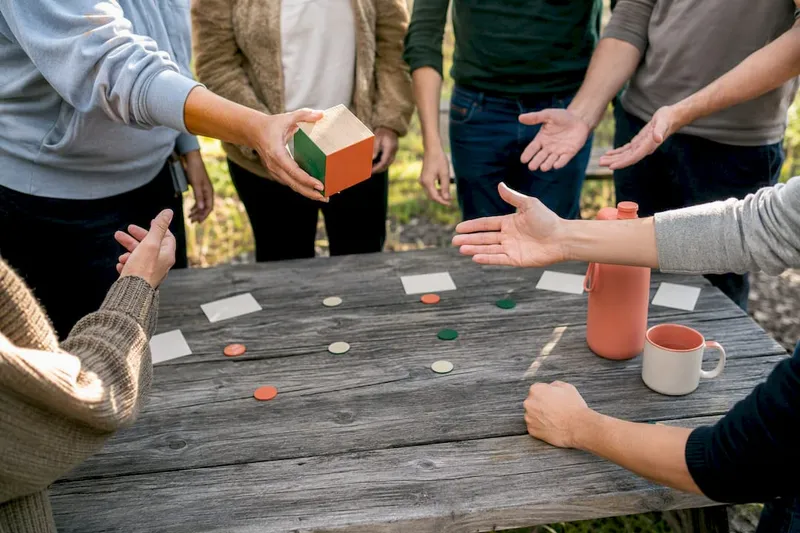
The best team building for small groups matches the activity to the goal: use two-minute energizers to warm up a meeting, vulnerability-based sharing exercises to build trust, and constraint-based challenges to sharpen collaboration and decision-making. Groups of 3 to 10 people get more out of every activity than large teams do, because everyone gets real airtime instead of watching from the back row.
Here’s a fast way to pick:
- Need to energize a Monday call? Run a five-minute icebreaker with no materials.
- Need to build trust after conflict or a reorg? Run a 30 to 60 minute vulnerability or identity-sharing exercise, and only after some baseline psychological safety exists.
- Need better collaboration on real work? Run a constraint-based problem-solving challenge that mirrors your actual project pressures.
- Need steady culture gains over months? Combine all three on a cadence: weekly 15-minute openers, monthly 60 to 90 minute sessions, and a quarterly half-day.
Prep level scales with depth: energizers need zero materials, trust exercises need a facilitator script, and problem-solving challenges need a scenario and maybe a whiteboard or shared doc.
Key Takeaways
Effective team building for small groups matches activity depth to team readiness and runs on a repeatable cadence rather than one big annual event.
| Point | Details |
|---|---|
| Match activity to goal | Use energizers to warm up, vulnerability exercises for trust, and constraint challenges for collaboration skills. |
| Keep groups at 3 to 10 | This size eliminates social loafing and gives everyone real speaking time. |
| Build in a cadence | Run weekly 15-minute openers, monthly 60 to 90 minute sessions, and quarterly half-days. |
| Budget extra time | Add roughly 20% more time than the activity’s listed length for small-group conversation. |
| Remove setup friction remotely | Gatherilla runs browser-based games with no downloads, letting hybrid small teams jump in immediately. |
Table of Contents
- Why Small Groups Need a Different Approach to Team Building
- Quick Wins: Five-Minute Energizers With Zero Prep
- Deep Trust-Building Activities for Small Teams
- Problem-Solving and Creativity Challenges That Mirror Real Work
- Virtual and Hybrid Activities for Distributed Small Groups
- How to Choose and Facilitate the Right Activity
- Materials, Prep, and Time Cheatsheet
- What the Research Says About Small-Group Facilitation
- What Actually Works Across Small Teams
- Make Small-Group Sessions Effortless With Gatherilla
- Frequently Asked Questions
- Sources
Why Small Groups Need a Different Approach to Team Building
Put ten people in a room (or a video call) and something changes that doesn’t happen with fifty: nobody can hide. In groups of 3 to 10 participants, social loafing mostly disappears. There’s no back row. Every silence is noticeable, which means every voice eventually gets used.
That intimacy is exactly why activities built for large-group spectacle tend to flop at small scale, and why activities built for genuine conversation tend to outperform. A 200-person trivia night works because volume creates energy. A 6-person team doesn’t need volume. It needs vulnerability-based sharing, failure stories, and round-robin problem solving, because that’s what a handful of people can actually sustain without it feeling performative.
The mistake most facilitators make isn’t picking a bad activity. It’s picking the convenient one instead of the right one, then wondering why nobody opened up. Matching the activity to what the team actually needs, whether that’s trust, communication, or decision-making practice, matters more than picking something popular.
Pro Tip: Before choosing an activity, name the actual problem you’re solving in one sentence (“half the team stays silent in planning meetings”). If the activity you’re considering doesn’t address that sentence, keep looking.
Quick Wins: Five-Minute Energizers With Zero Prep
These are the activities you run in the first five minutes of a meeting, not the ones you schedule as an event. Because everyone in a small group speaks in the same window, these short formats give each person real time to contribute instead of getting lost in a crowd.
- Two Truths and a Lie. Goal: warm-up and light disclosure. Time: 5 to 10 minutes. Participants: 3 to 10. Materials: none. Facilitator tip: go first so the standard is set low and playful.
- One-Word Check-In. Goal: surface mood and energy fast. Time: 3 minutes. Participants: any small group. Materials: none. Tip: ban the word “fine,” it kills the exercise.
- Desk Object Show-and-Tell. Goal: light personal connection. Time: 5 minutes. Materials: whatever’s on hand. Tip: works equally well in person or on camera.
- Rose, Thorn, Bud. Goal: quick reflection (something good, something hard, something growing). Time: 8 minutes. Materials: none. Tip: keeps venting from turning into a complaint session by forcing a “bud” answer.
- Would You Rather (Work Edition). Goal: quick laugh, low stakes. Time: 5 minutes. Materials: a list of 3 to 4 prepared questions. Tip: keep questions work-adjacent so it doesn’t derail the meeting.
- Appreciation Round-Robin. Goal: quick recognition. Time: 5 minutes. Materials: none. Tip: name a specific action, not a generic compliment.
All of these run inside your existing video call, no downloads, no extra logins. That matters more than it sounds: low-prep, high-impact activities that need no special equipment are the ones that actually get used week after week, instead of sitting in a “team building ideas” doc nobody opens.
Pro Tip: Rotate who picks the energizer each week. It spreads ownership and stops the exercise from feeling like a top-down mandate.
Deep Trust-Building Activities for Small Teams
Trust work needs more time and more care than an energizer, and it only works if the group has some baseline safety already. Skipping straight to vulnerability exercises with a team that just met is how you get blank stares and forced participation.
- User Manual of Me (45 minutes, 4 to 8 people). Each person writes and shares how they like to receive feedback, what stresses them out, and how they recharge. Script note: have people write for five minutes before sharing so nobody freezes on the spot. Debrief: ask what surprised people and what one thing they’ll change about how they work together.
- Identity Affirmation Circle (30 to 45 minutes, 5 to 10 people). Each person shares an identity that shapes how they show up at work, and the group responds with specific, genuine affirmations. This is drawn from the 16Personalities small-group framework and works best with a team that already has some rapport.
- Failure Story Roundtable (40 minutes, 4 to 8 people). Each person shares a professional failure and what it taught them. Facilitator goes first, always. Debrief: what pattern do we notice across everyone’s stories, and where do we need to give each other more grace?
- Appreciation Web (30 minutes, 5 to 9 people, one ball of yarn or a shared doc for remote). Each person tosses the “web” to someone while naming something they appreciate about them, building a visible web of connection.
For every one of these, watch for red flags: someone going quiet and staying quiet, forced or performative sharing, or a dominant voice steering every response. If you see it, pause the activity and check in privately rather than pushing through. The real learning happens in the debrief, not the activity itself, so always leave 10 minutes to ask: what worked, what felt uncomfortable, and what will we do differently next week.
Pro Tip: Sequence these by readiness. A new team should start with User Manual of Me, not Failure Story Roundtable. Save the heavier sharing for teams that have already sat through a few lighter rounds together.
Problem-Solving and Creativity Challenges That Mirror Real Work
The best problem-solving exercises don’t feel like games bolted onto work. They deliberately recreate the constraints, ambiguity, and time pressure your team already deals with, so you learn something about how people actually make decisions.
- The Constraint Sprint (30 minutes, 4 to 6 people). Give the team a real, low-stakes problem (redesign the onboarding email, for instance) with an absurd constraint: no more than 20 words, or a $0 budget. Watch who leads, who defers, and who pushes back on the constraint itself.
- Silent Sort (20 minutes, 5 to 10 people). Team must rank six priorities in order without speaking, using only gestures or written notes. Trains nonverbal coordination and reveals who tends to dominate even without words.
- Two Truths, One Fix (25 minutes, 3 to 6 people). Present a flawed process from your actual workflow. Team has to find two things that genuinely work and one thing to fix, in that order. Trains constructive rather than purely critical feedback.
- Resource Trade (35 minutes, 6 to 10 people, works well split into pairs). Each subgroup gets different information and has to negotiate to complete a shared task. Mirrors cross-functional collaboration under information asymmetry.
Watch for who asks clarifying questions, who jumps straight to solutions, and who stays quiet until a decision is nearly locked. That’s your real signal, more useful than any post-activity survey. For groups smaller than 5, drop the Resource Trade (it needs the extra bodies) and stretch the Constraint Sprint to 45 minutes for deeper discussion.
Virtual and Hybrid Activities for Distributed Small Groups
Remote and hybrid teams lose the hallway moments that used to build rapport for free, which is exactly why deliberate small-group activities matter more, not less, once part of your team stops sharing a physical room.

Everything above translates online with small adjustments. Two Truths and a Lie, Rose Thorn Bud, and the Constraint Sprint all run fine in a standard video call using chat or a shared doc instead of paper. The trust exercises work too, but virtual facilitation only succeeds when the tool requires no downloads and lets the facilitator control pace and visibility, so nobody’s fumbling with an app install while the group waits.
Minimum tech checklist for hybrid sessions:
- A shared screen or doc everyone, remote and in-room, can see at once.
- Camera on for the sharing rounds; it changes the tone of vulnerability exercises significantly.
- A way for remote participants to “raise a hand” so they’re not talked over by the room.
- A timer visible to everyone, not just the facilitator.
If your hybrid setup runs through Microsoft Teams specifically, a dedicated approach for that platform avoids the usual audio-lag and turn-taking problems that kill small-group energy fast.
Pro Tip: In hybrid sessions, call on remote participants by name first, before the room speaks. Once the in-room group starts talking, remote voices get crowded out within thirty seconds.
How to Choose and Facilitate the Right Activity
Match the activity to what the team actually needs right now, not to what’s easiest to run.
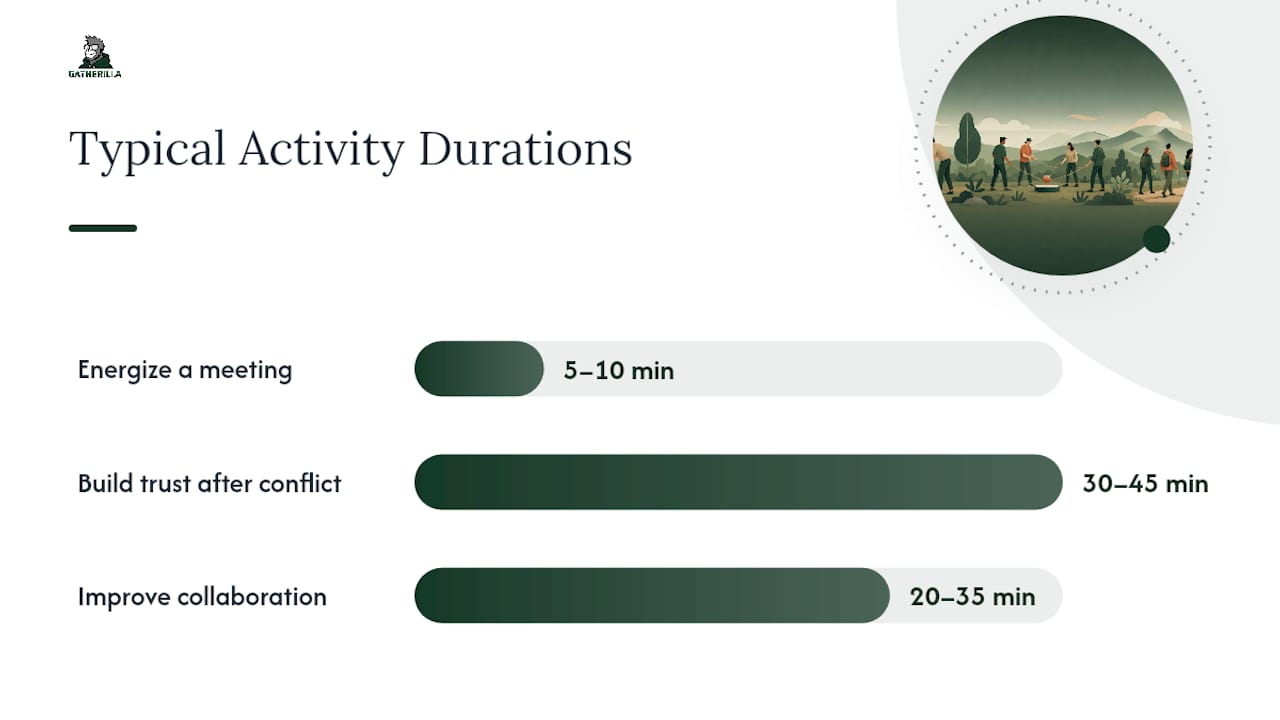
| Goal | Best Format | Typical Time |
|---|---|---|
| Energize a meeting | Quick icebreaker | 5 to 10 minutes |
| Build trust after conflict | Vulnerability-based sharing | 30 to 45 minutes |
| Improve collaboration on projects | Constraint-based challenge | 20 to 35 minutes |
| Sustain culture over months | Mixed cadence of the above | Weekly to quarterly |
Before running anything, walk through a short facilitator checklist: confirm the group size fits the activity (most of these top out around 10 people), have your opening script ready word for word, set one ground rule out loud (“no phones,” “what’s shared here stays here”), and assign someone other than yourself to track time.
For the debrief, keep a short question bank ready rather than improvising: What surprised you? What’s one thing we should do differently next week? Where did you feel most heard, and where least? If someone shuts down mid-activity or a dominant voice takes over every response, that’s your signal to pause, address it directly and privately if needed, and adjust the format rather than pushing through for the sake of finishing on schedule.
Materials, Prep, and Time Cheatsheet
Here’s what to expect across the three activity types when you’re planning your week or your calendar.
| Activity Type | Group Size | Run Time | Prep Level | Materials |
|---|---|---|---|---|
| Energizer | 3 to 10 | 5 to 10 min | None | None |
| Trust exercise | 4 to 9 | 30 to 45 min | Script needed | Paper or shared doc |
| Problem-solving challenge | 3 to 10 | 20 to 35 min | Scenario prep | Whiteboard or doc |
If materials aren’t available, substitute freely: no yarn for the Appreciation Web, use a shared doc where each person tags the next name. No whiteboard for the Constraint Sprint, use a group chat thread. Regardless of format, budget roughly 20% extra time beyond what the activity technically needs. Small groups talk more, and that overflow is the point, not a scheduling failure.
What the Research Says About Small-Group Facilitation
Facilitation research keeps landing on the same point: cadence and low friction beat one-off spectacle. Short, recurring 15-minute micro-sessions embedded in regular meetings compound faster than an annual all-hands event ever does, largely because trust builds through repetition, not intensity.
For virtual sessions specifically, a few habits separate smooth facilitation from awkward silence: keep cameras on for sharing rounds, use polls or reactions instead of “everyone unmute at once,” and set breakout groups only when the activity genuinely needs a smaller sub-conversation.
The best small-group facilitation removes every point of friction between “let’s try this” and actually doing it. No downloads, no new accounts, no setup tax on the team’s time.
A browser-based platform fits that principle directly: nobody installs anything, the facilitator controls pace and visibility from one screen, and hybrid participants join through the same link as everyone else.
What Actually Works Across Small Teams
Across dozens of small-team sessions, the pattern holds: teams that run something short every week outgrow teams that run one big event every quarter, even when the quarterly event is genuinely well-produced. Consistency does more work than production value.
The two failure modes I see most often are a dominant voice steadying itself as the “default answerer” in every round, and a quiet teammate who never volunteers first. Both fix the same way: call on people by name in a set order occasionally, instead of always taking volunteers. It feels slightly forced for the first few sessions. It works.
Pro Tip: If you only have time for one thing this month, run a 15-minute weekly opener instead of planning the perfect quarterly event. Frequency beats production value almost every time.
Make Small-Group Sessions Effortless With Gatherilla
Gatherilla is built for exactly the friction point this article keeps circling back to: getting a small, possibly skeptical, possibly distributed team to actually show up and participate without anyone installing software or creating a new account. Every game runs directly in the browser, works inside your existing video call, and takes minutes to set up, which matters when you’re trying to run a 15-minute weekly opener without it eating your prep time.

For teams cycling through browser-based team building games week after week, the sign-up friction is usually the reason cadence dies after two sessions. Gatherilla’s daily challenges, real-time leaderboards, and no-download setup are built to keep that cadence alive instead, with built-in analytics for HR managers who need to show that the sessions are actually landing. If you’re planning your team’s next round of team building for small groups, start with a free session and see how fast your group actually gets talking.
Frequently Asked Questions
What is the ideal group size for team building activities? Most facilitation research points to 3 to 10 people as the sweet spot for team building for small groups, since that range keeps everyone actively participating without anyone fading into the background.
How often should small teams do team building activities? Run something short weekly (15 minutes), something deeper monthly (60 to 90 minutes), and a longer session quarterly. Frequent short sessions build trust faster than occasional big events.
What are good team building activities for a small remote team? Two Truths and a Lie, Rose Thorn Bud, and the Constraint Sprint all run well over video with no special software. A browser-based platform removes the setup friction that usually kills remote participation.
How do I handle a dominant personality during a small-group activity? Call on people by name in a set rotation instead of relying on volunteers, and privately check in with quieter members afterward. This spreads participation without singling anyone out publicly.
How do I know if a team building activity actually worked? Watch the debrief, not the activity. If people name a specific behavior they’ll change next week, or reference the exercise unprompted in a later meeting, it landed. Silence or vague praise usually means it didn’t.
Sources
- 15 Team-Building Activities for Small Groups | 16Personalities
- Hr
- Team Building Activities for Small Groups: A Guide | FirstHR
- 13 Ideas for Company Team-Building Activities | Slack
- Team Building Exercises for Small Groups – Project Management Formula
The clearest statistic in the research: the ideal small-group size sits at 3 to 10 participants, the point past which individual participation starts to drop off.