

Remote Team Tournament Ideas for Meetings and Daily Play

The best remote team tournaments are short, easy to join and repeatable. A five-minute bracket at the start of a meeting or a daily challenge with a running leaderboard will do more for connection than a once-a-year marathon. Below are tournament ideas sorted by how much time you have, plus how to run them with no downloads and no prep. In our platform, a team plays in the browser and the leaderboard updates in real time.
TL;DR
- Keep most tournaments to 5 to 15 minutes. Short formats get more people to join and are easy to repeat every week.
- A daily word or trivia challenge with a leaderboard gives a distributed team a shared habit, not a single event.
- For new hires, mix low-stakes games with pairing and check-ins in the first two weeks.
- Match the format to the group. Small groups can all play each other, and big groups need teams or quick elimination rounds.
- Pick a tool that runs in the browser with every video platform, so setup never becomes the reason people skip.
Table of Contents
- What makes a tournament work for a remote team
- Five-minute tournaments for meeting openers
- Daily and weekly tournaments that build a habit
- Tournament ideas for onboarding new hires
- Choosing a format for your group size
- What you need: equipment, time and preparation
- How to run a remote tournament in six steps
- Our view: make it a habit, not an event
- Start your first tournament with Gatherilla
- FAQ
- Sources
What makes a tournament work for a remote team
In an office, a tournament is a lunchtime event that people drift into. Remotely, nobody drifts. Every participant has to decide to join, find the link, get their audio working and stay engaged on a small tile. That changes what good design looks like:
- Low friction. If people must install something or create an account before the first round, a share of the team drops out before it starts.
- Short rounds. Attention on video calls fades faster than in a room. Rounds of a minute or two keep everyone involved.
- Visible scoring. A live leaderboard makes progress obvious without a host doing arithmetic.
- Nobody sits out early. Elimination is fun for the winners and dull for everyone else. Formats where people keep playing keep the whole team present.
- Low stakes. Prizes should be jokes and bragging rights. The goal is conversation, not winning.
If your team has a mix of introverts, time zones and roles, these principles matter more than the specific game.
Five-minute tournaments for meeting openers
These fit before a standup or a weekly sync. They need no equipment beyond the video call.
Rock, paper, scissors bracket
Everyone pairs up and plays one round on camera. Losers turn their camera off and cheer for the person who beat them in chat. Repeat until two finalists remain, then play a best-of-three final while everyone watches. It works for groups of six or more and takes around ten minutes. The cheering is the point: eliminated players stay engaged because they now back a champion.
Word association ladder
One person says a word, the next says the first word it brings to mind, and so on around the call. Turn it into a tournament by scoring the chain: any pause over five seconds or any repeated word costs the team a point. Deel lists word association as a five-minute meeting icebreaker, alongside This or That and a zero-preparation scavenger hunt.
This or That showdown
The host offers a pair of options (mountains or beach, call or email, early bird or night owl). Everyone answers in chat at the same time. Add a tournament layer by tallying which side wins each round and crowning the winning side at the end. It also shows teammates what they have in common.
Emoji check-in with a scoring twist
Atlassian suggests a 3 to 5 emoji check-in in which each person shares emojis that summarize how they feel and explains them as much as they are comfortable. To make it a tournament, ask the team to guess whose emoji string belongs to whom and keep score.
Quick trivia round
Ten questions, two minutes of answering each, shared leaderboard. Trivia suits any team because nobody needs special skills, and the questions can be about the company, a shared project or general knowledge. For more one-minute ideas, see our guide to virtual Minute to Win It games and our Zoom icebreakers with scripts.
Daily and weekly tournaments that build a habit
A single event gives a spike of fun. A routine gives a team shared references, inside jokes and a reason to open the same page every day.
The daily challenge league
Everyone plays the same word or trivia puzzle once a day, and a leaderboard tracks the week or month. It takes a couple of minutes, so it fits a coffee break. Because every player faces the same puzzle, a new hire competes on equal footing with a ten-year veteran. Reset the board monthly and give the winner a silly title for the next month, such as Keeper of the Channel.
Weekly rose, thorn, bud
Deel describes Rose, Thorn, Bud as a five-minute activity for any team size: each person shares a weekly highlight, a challenge and something they look forward to. It is not a competition, but it pairs well with a weekly game: play first, then share. Managers also get a quick read on team morale.
The Office Olympics
For a bigger moment, an Olympics-style event works well. Forbes advises deciding whether it is a one-off one-hour video program with an opening ceremony, four or five activities and a medal ceremony, or an ongoing competition of three to five sessions over one to two weeks. The same article suggests smaller groups compete as individuals, while larger groups split into color teams that make custom video backgrounds to show who they represent.
The longer format suits distributed teams better, since people can join the sessions that fit their calendar and time zone. We lay out the full event in our virtual Office Olympics planning guide.
Seasonal brackets
A quarterly tournament gives the calendar a rhythm. A “trivia cup” in spring, a word-game bracket in summer and a holiday-themed finale at year end are easy to run. For the last of these, our virtual New Year party ideas include formats that adapt to a bracket.
Tournament ideas for onboarding new hires
New remote employees often go weeks without casual contact with colleagues. A tournament helps because it gives people something to do together while they get to know one another.
Foothold America’s 2026 guide for new US hires recommends a 60-minute virtual team-building session in the first two weeks, such as online trivia, virtual escape rooms, Pictionary, two truths and a lie, or collaborative storytelling. The same guide suggests a buddy system with daily 15-minute check-ins in week one and weekly check-ins for the first month, plus coffee-chat pairings with different teammates.
Here is how to turn that into a tournament:
- Welcome trivia. Build a team-versus-team quiz about the company, with a few questions about the new hire. Mix new and tenured people on each team so the newcomer meets several colleagues at once.
- Buddy duels. Pair the new hire with their buddy for a head-to-head word game in the first week. It is a low-pressure reason to talk.
- Join the daily league. From day one, the new hire plays the daily challenge. No setup, no account hurdles, and an instant place on the leaderboard.
- Two truths and a lie bracket. In the second week, run rounds in small groups and let each group’s best bluffer advance.
For manager-led versions, see our new manager icebreakers.
Choosing a format for your group size
The format should follow the headcount and the time you have.
| Group size | Format that works | Why |
|---|---|---|
| 4 to 8 | Round robin: everyone plays everyone | Every player gets many rounds, and nobody is knocked out |
| 9 to 20 | Teams, then a short knockout final | Teams build bonds, and a final adds a shared climax |
| 20 or more | Quick elimination with cheering squads, or a points league | Keeps rounds short and lets eliminated players stay involved |
| Any size, any time zone | Daily or weekly leaderboard | People play when it suits them, and scores accumulate |
A few adjustments for common situations:
- Several time zones. Do not schedule one live event for everyone. Use an asynchronous leaderboard that runs for a day or a week, then hold a short live finale for those who can attend.
- Quiet participants. Offer chat-based answers alongside speaking, and let people play on teams rather than alone.
- Hybrid teams. Have everyone, including those in the office, join from their own device, so remote players are never watching a room.
- Prizes. Keep them light: a funny trophy, a custom title or picking the theme of the next game.
What you need: equipment, time and preparation
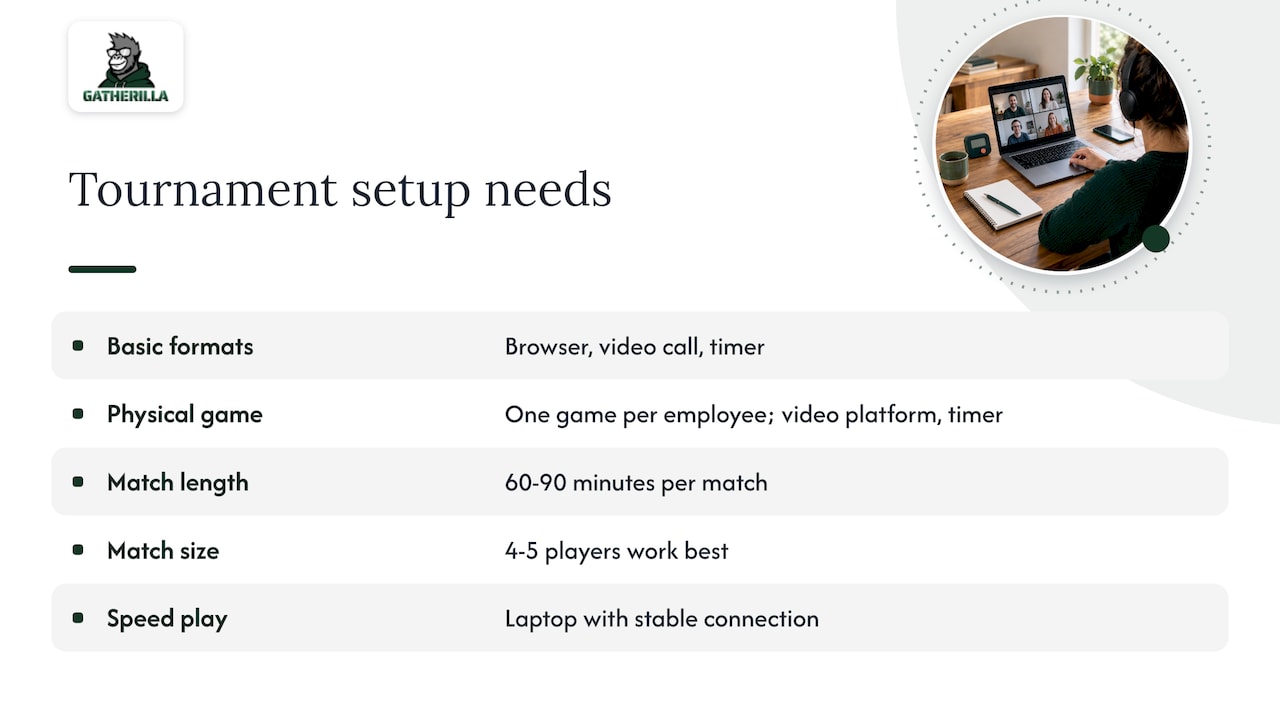
The good news is that the tournaments above need very little. A browser, a video call and a timer cover most of them.
Some formats ask for more. RenoFi describes a physical-block tournament that needs one game per employee, a video platform and a timer, with 60 to 90 minutes per match and, in their experience, four or five players per match being best for remote play. That is a lot of logistics for a team that only wants a quick bonding moment, which is why browser-based games are easier to sustain.
If you want audio-heavy or competitive play, the audio and video basics matter. The PACE National Scholastic Championship’s guide to online tournaments says players generally use a computer with a webcam and a dedicated headset, recommends wired headsets over wireless, and notes ethernet offers the lowest latency. It also does not recommend smartphone play except as a backup. For a workplace tournament, you do not need that level of equipment, but it is a useful reminder: ask players to join from a laptop with a stable connection if the game relies on speed.
Plan the time with a cushion. A bracket of 16 players with a few minutes per match runs longer than the arithmetic suggests, so add padding for late joiners and technical hiccups.
How to run a remote tournament in six steps
- Define the goal. Is it a meeting opener, an onboarding aid or a team habit? The goal decides the length and the format.
- Choose the format. Use the table above. When in doubt, pick the one where nobody is eliminated early.
- Pick a platform that needs no setup. Participants should join from a link in the browser, on whichever video tool your company uses. With Gatherilla, games run in the browser with no downloads and work with all video conferencing tools.
- Announce the rules in one message. State the start time, how scoring works and how long it lasts. Keep it to three lines.
- Host with energy, and keep it moving. Cut rounds that run long. Celebrate the losers as loudly as the winners.
- Close the loop. Share the final leaderboard, award the silly trophy and name the next event. A tournament with a visible next date becomes a tradition.
For more openers to pair with a bracket, see our guides to remote icebreaker games, Microsoft Teams icebreakers and Webex icebreakers.
Our view: make it a habit, not an event
We build Gatherilla around one belief: engagement on a remote team is a daily habit, not an occasional event. A big tournament once a quarter feels good for a week and then fades. A two-minute daily challenge that everyone can join without downloads or accounts keeps people in each other’s day.
That is why our platform combines customizable multiplayer games, a daily word and trivia challenge and real-time leaderboards. The leaderboard turns small, regular plays into a running story. Who is on a streak? Who finally beat the manager at trivia? Those moments are the raw material of team culture.
We also think the best tournament is the one nobody has to prepare. Team leaders and HR managers are busy, and a game that needs a script, a download and a signup form will lose to the next meeting. Zero-preparation play is what lets a team keep going for months.
Our advice: start small, play at the top of a meeting, and let the habit grow into the bigger events, like an Office Olympics, once the team already enjoys playing together.
Thomas
Start your first tournament with Gatherilla
Gatherilla is a browser-based team-building platform for remote and hybrid teams. It offers customizable multiplayer games, daily word and trivia challenges, icebreakers for meetings, onboarding games and real-time leaderboards, all with no downloads, and it works with every video conferencing tool.
The Free plan lets you try games with your team. Premium adds more games, reporting and priority support, and costs $0.50 to $1.00 per seat per month or $5 to $10 per seat per year. See the Gatherilla pricing page for the current plans, or start from the Gatherilla home page.
FAQ
What are some good tournament-style games for remote teams?
Bracket-style rock paper scissors, trivia leagues, word games with a shared leaderboard and an Office Olympics are the most reliable. They all work with a mix of personalities and need little equipment. Choose a short format for meeting openers and a leaderboard for ongoing play.
How long should a remote team tournament take?
For a meeting opener, 5 to 10 minutes is enough. A daily challenge takes a couple of minutes. A one-off event such as an Office Olympics typically runs about an hour, or can be spread over several sessions across one to two weeks, as Forbes outlines. Add a time buffer to any live bracket.
How do I include people in different time zones?
Use an asynchronous format, such as a daily or weekly leaderboard that people play when it suits them. Then hold a short live finale at a time that works for most, and share the results with everyone afterwards.
How can I keep a tournament from feeling forced?
Keep it short, make participation easy and set the stakes low. Let people play on teams rather than alone and give eliminated players a role, such as cheering in chat. Light prizes and humor help more than big rewards.
Do remote tournaments help new employees?
They give new hires something to do with colleagues in their first weeks. Pair them with a buddy, include them in a team trivia round and let them join the daily challenge from day one. Foothold America’s guide for new US hires also recommends regular buddy check-ins in the first month.
Sources
- 5-minute team building activities, Inside Atlassian
- Non-cheesy five-minute virtual team building activities, Deel
- How To Organize Virtual Office Olympics, Forbes
- Virtual Onboarding: 10 Ways to Engage New US Hires, Foothold America
- Looking for a way to bond with your remote team, RenoFi
- Tournament Director’s Guide to Online Tournaments, PACE National Scholastic Championship