

Copyable Day 1 Schedule: Remote Onboarding Checklist for HR

Use a phase based checklist, pre-boarding, Day 1, Week 1, then 30/60/90, and assign a named owner to each task before you do anything else. Ship equipment 7 to 14 days out, create every account in advance, log in as the new hire to confirm access, assign a buddy, send the Week 1 calendar, and line up one small first task. Confirm equipment tracking and owner sign-off 72 hours before start date, and you eliminate most of the failures that sink a new hire’s first week.
TL;DR:
- Proper pre-boarding ensures hardware ships and accounts are provisioned at least three days before start, with each task assigned to a specific owner.
- Day 1 should be limited to no more than three hours of live video to reduce fatigue and include tech checks, a small task, and a manager check-in.
- Weekly check-ins, role-specific shadowing, stakeholder chats, and social activities during the first week foster connection and prevent isolation.
- Establishing clear milestones and scheduled reviews at days 30, 45, 60, and 90 with concrete deliverables ensures continuous progress and retention.
- Verifying account access 72 hours before start prevents login failures and ensures a seamless onboarding experience.
Table of Contents
- What Should Be on Your Remote Onboarding Checklist?
- Pre-Boarding Checklist (1 to 14 Days Before Start Date)
- Day 1: Hour-by-Hour Sample Schedule and Checklist
- Week 1: Structured Onboarding Schedule and Priorities
- 30-60-90 Day Remote Onboarding Plan: Milestones, Reviews, and Manager Actions
- Tools and Tech Checklist: What to Provision, Test, and Stagger
- Culture, Connection, and Engagement Tactics for Remote Onboarding
- How to Measure Onboarding Success: KPIs, Surveys, and Quick Checks
- An HR Practitioner’s Take on Fixing Onboarding Before It Breaks
- Where Gatherilla Fits Into Your Remote Onboarding Plan
- Sources
- FAQ
What Should Be on Your Remote Onboarding Checklist?
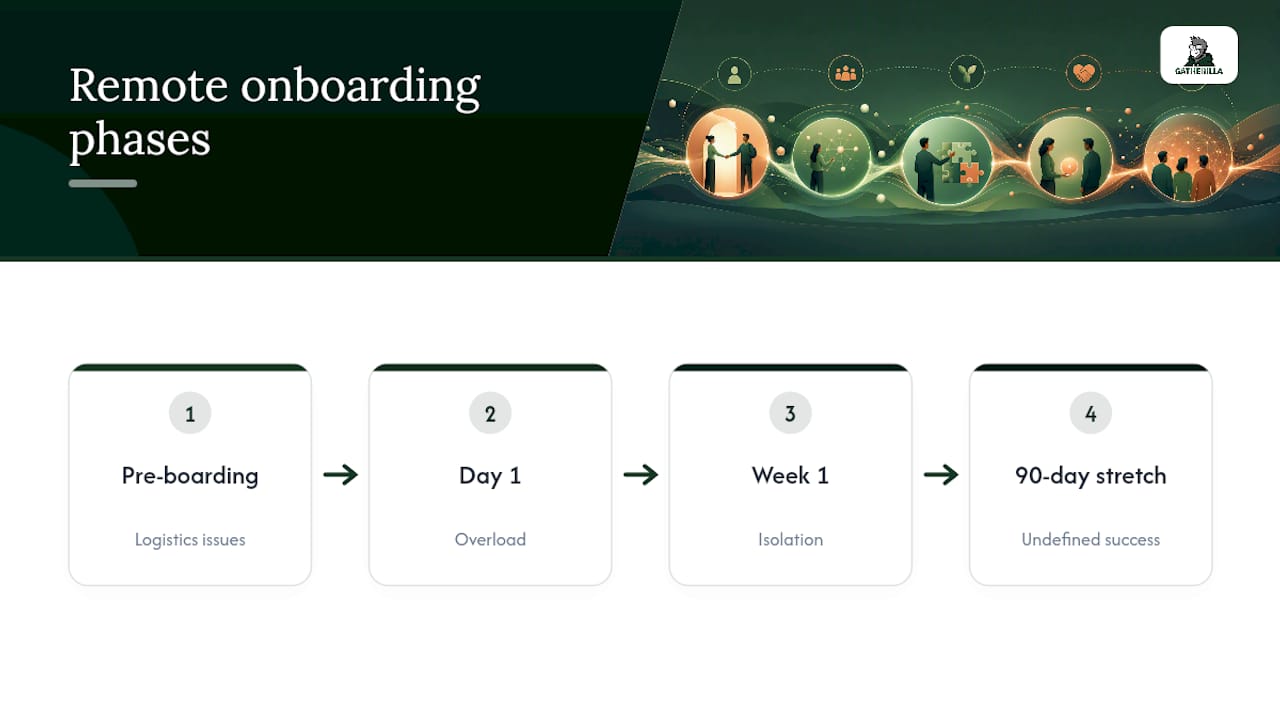
A working remote onboarding checklist has four phases, and each one fails for a different reason if you skip it. Pre-boarding fails because of logistics: equipment stuck in shipping, accounts that don’t exist yet. Day 1 fails because of overload: too many meetings, too much video, no concrete task to grab onto. Week 1 fails because of isolation: nobody checks in, the buddy never reaches out. And the 90-day stretch fails because nobody defined what success actually looks like.
MIT HR’s guidance on remote and hybrid onboarding backs this up directly: the strongest programs schedule daily check-ins during week one and map out a 90-day roadmap before the hire’s first login. That’s the standard worth building toward. The sections below break down exactly what belongs in each phase, with an owner and a deadline attached to every item.
Pre-Boarding Checklist (1 to 14 Days Before Start Date)
Pre-boarding is where most remote onboarding actually breaks. FirstHR’s guidance on remote employee onboarding points to shipped hardware and verified logins as the single highest-leverage phase in the entire process, and it has to be finished before Day 1, not during it.
Here’s the sequence, with an owner and a verify-by date attached to each line:
- Employment paperwork and payroll setup (Owner: HR, Verify by: Day 10 before start). Send e-signature packets for tax forms and I-9 verification early; remote I-9 review often requires a designated agent, so confirm your process now, not on Day 1.
- Order and ship equipment (Owner: IT, Verify by: Day 7 before start). Include a tracking number in the welcome email and a one-page setup guide with a support contact.
- Provision every account (Owner: IT, Verify by: Day 3 before start). Email, SSO, chat, and project tools, then log in as the new hire yourself to confirm nothing is broken.
- Send the welcome package and manager video (Owner: Manager, Verify by: Day 5 before start). A short recorded video explaining why you hired this person beats a text-only welcome email, a practice described in the 30/60/90 onboarding framework.
- Assign and brief the buddy (Owner: Manager, Verify by: Day 5 before start). The buddy reaches out before Day 1, not after.
- Schedule stakeholder coffee chats for Week 1 (Owner: Manager, Verify by: Day 3 before start).
Remote make the same point: assigning an owner to every line item, not just a department, is what stops equipment and account provisioning from slipping through the cracks.
Day 1: Hour-by-Hour Sample Schedule and Checklist
Day 1 should feel manageable, not like a firehose. Here’s a copyable schedule built around one hard rule: cap consecutive video blocks, because HBR’s research on Zoom fatigue shows that unbroken video time drains focus fast, and Day 1 is the worst day to burn that reserve.
- 9:00 to 9:30 AM: Manager welcome call. Cover why you hired them, what success looks like at 30/60/90 days, and who their buddy is.
- 9:30 to 10:00 AM: Solo tech verification. VPN, email, calendar, and repo access, checked against a written list.
- 10:00 to 10:30 AM: Break. No meeting. Let them breathe.
- 10:30 to 11:15 AM: Buddy intro call. Casual, low-stakes, no agenda beyond getting comfortable.
- 11:15 AM to 12:00 PM: First tiny task assigned. Something completable by end of day, like fixing a typo in the docs or submitting a small pull request.
- 12:00 to 1:00 PM: Lunch, offline.
- 1:00 to 2:00 PM: Team overview session, recorded so it can be rewatched.
- 2:00 to 4:00 PM: Independent work time on the first task, with the buddy on standby in chat.
- 4:00 to 4:30 PM: Manager check-in. Log wins, flag any broken access, confirm tomorrow’s plan.
Pro Tip: Never schedule more than three hours of live video on Day 1. Replace at least one “meeting” with an async recorded walkthrough the new hire watches on their own time.
By end of day, every login should work, the first task should be either done or clearly scoped, and any tech issue should already be logged in a shared tracker, not left for the new hire to chase down alone.
Week 1: Structured Onboarding Schedule and Priorities
Week 1 succeeds when it balances three things: relationship building, role learning, and one visible early win. Overload any single piece and the week feels either empty or exhausting.
- Daily manager check-ins, same time each day, focused on blockers and questions rather than status updates.
- Role-specific shadowing sessions, two or three scheduled across the week with a specific colleague, not a generic “shadow the team” instruction.
- Five stakeholder coffee chats, 20 minutes each, with a scripted opener like “What does success in my role look like from where you sit?”
- Buddy-driven social touchpoints, a low-friction icebreaker or short game dropped into a Tuesday or Wednesday slack window, not saved for a big Friday event.
- Friday reflection and draft 30/60/90 plan, written together with the manager based on what actually came up during the week.
MIT’s onboarding guidance frames daily check-ins during week one as the difference between a new hire who feels connected and one who feels forgotten. The Remote.com onboarding checklist adds a related point worth internalizing: a buddy who reaches out before Day 1 measurably shortens how long it takes someone to make their first real contribution.
30-60-90 Day Remote Onboarding Plan: Milestones, Reviews, and Manager Actions
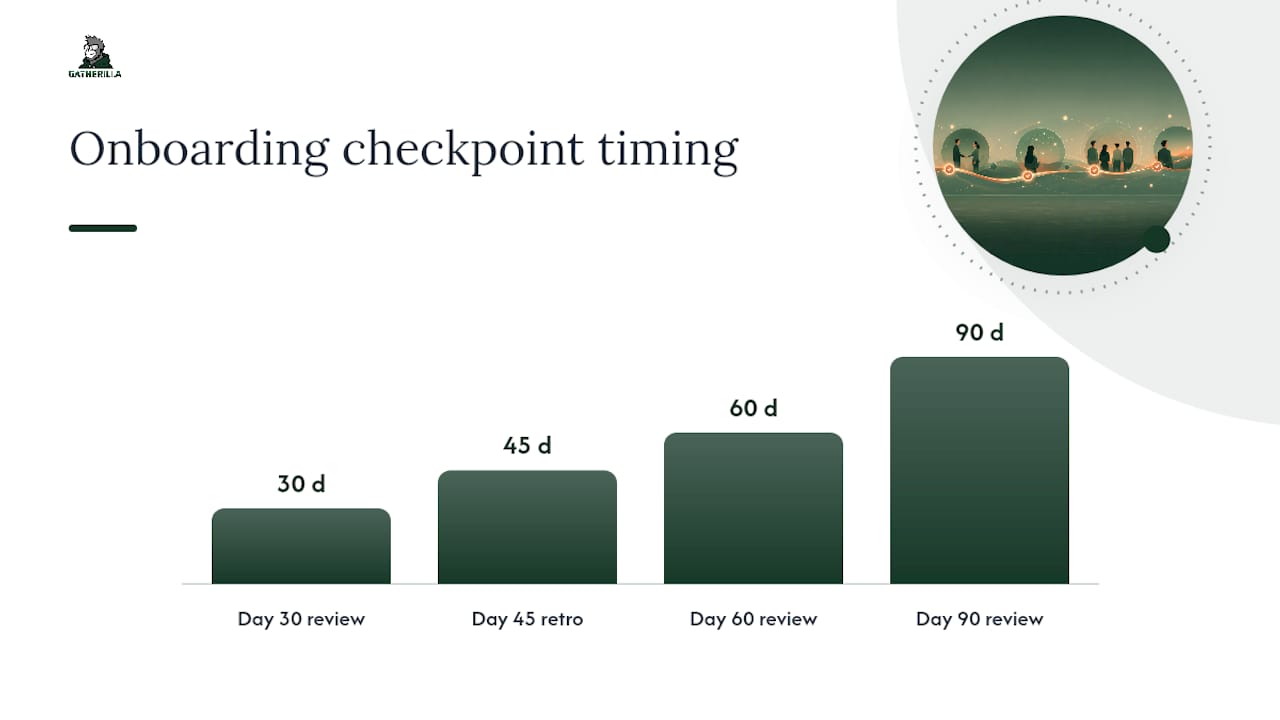
A 30/60/90 plan only works if the milestones are specific enough to fail visibly. Vague goals like “get up to speed” don’t give a manager anything to check against. Coommit’s 30/60/90 framework recommends scheduled reviews at day 30, a day 45 retro, day 60, and day 90, each tied to a concrete deliverable rather than a vague sense of progress.
Here’s what each milestone should actually require:
- Day 30: Solid comprehension of the product and team context, plus one small deliverable shipped end to end.
- Day 45 retro: A structured conversation, ideally on a shared editable canvas, where the new hire flags friction points and the manager commits to fixing at least one of them.
- Day 60: One owned project delivered start to finish, with visibility into at least one adjacent team’s work.
- Day 90: Independent ownership of a work stream, leadership on a small initiative, and at least one contribution outside their primary scope.
The day 45 retro deserves special attention. A manager who runs this conversation and visibly acts on the feedback signals that the new hire’s input matters, which supports retention.
Suggested manager scripts for each checkpoint:
- Day 30 script: “Walk me through the biggest thing you learned this month, and the biggest thing that still confuses you.”
- Day 60 script: “What’s one process you’d change now that you’ve seen how the team actually works?”
- Day 90 script: “Where do you want to grow next, and what would help you get there?”
For metrics, track time to first meaningful contribution (target: 14 days or fewer) and a day-30 engagement score. If either metric misses the target, that’s your cue for a remediation conversation, not a wait-and-see approach.
Tools and Tech Checklist: What to Provision, Test, and Stagger
The Day 1 tech stack should cover core categories: video conferencing, team chat, email, shared documents, and single sign-on with a password manager. Additional tools should be introduced later.
- Provision before Day 1: video, chat, email, shared docs, SSO or password manager, all tested by IT logging in as the new hire.
- Security baseline: multifactor authentication on every account, VPN access confirmed, and least-privilege permissions set through an onboarding template rather than copied from a random existing employee.
- Delay to Week 2 or 3: specialized reporting dashboards, advanced project management features, and any tool the new hire won’t touch in their first real task.
- Test steps for IT: confirm login, confirm access level matches the role, and confirm one basic workflow actually completes end to end.
- Document tool purpose: a one-page reference explaining what each tool is for and which team norms apply, like response-time expectations in chat.
Staggering tools this way keeps Week 1 from turning into a scavenger hunt for passwords. New hires remember the week they spent locked out of a shared drive far longer than they remember the week everything worked.
Culture, Connection, and Engagement Tactics for Remote Onboarding
Belonging doesn’t happen automatically over video calls. It happens through small, repeated, low-friction moments, and the buddy program is the backbone of that.
- Buddy program design: pick someone who isn’t the manager, and have them message the new hire before Day 1, not after.
- Day 1 icebreaker: a 10-minute activity, nothing elaborate, just enough to make the first call feel human instead of transactional.
- Week 1 scavenger hunt: a short, self-guided activity that gets new hires exploring the company’s tools and people without adding another meeting to the calendar.
- Team map exercise: a simple diagram showing who does what, paired with the five scripted stakeholder chats from Week 1.
- Async alternatives: a manager Loom video, a shared editable canvas, or a recorded walkthrough works when time zones make live sessions impractical.
Browser-based, no-download activities fit especially well here, since a lightweight micro-activity dropped into a Tuesday afternoon slot builds more real connection than a single big “welcome event” ever does.
How to Measure Onboarding Success: KPIs, Surveys, and Quick Checks
Three numbers tell you almost everything: time to first meaningful contribution, day-30 engagement score, and 90-day retention. Latestremote’s onboarding checklist research recommends short pulse surveys at days 7, 30, and 90 as the fastest way to catch friction before it turns into a resignation.
- Day 7 pulse question: “Do you have everything you need to do your job?” Score 1 to 10.
- Day 30 pulse question: “How connected do you feel to your team?” Target average: 7 or higher.
- Day 90 pulse question: “Would you recommend this onboarding experience to a friend joining the company?”
Statistic to anchor your targets: aim for first meaningful contribution within 14 days, based on the 30/60/90 onboarding framework’s recommended milestone pacing. If a new hire misses that window or a day-30 score drops below 7, schedule a targeted remediation conversation within 48 hours rather than waiting for the next scheduled review.
An HR Practitioner’s Take on Fixing Onboarding Before It Breaks
The worst onboarding failure isn’t a bad meeting. It’s a login that doesn’t work at 9:05 AM on Day 1, while the new hire sits there wondering if anyone actually planned for them to show up. Fixing that isn’t complicated: verify every account by logging in as the new hire during pre-boarding, not after they’ve already hit the wall.
The habit worth adopting is small but stubborn: check every owner-assigned checklist item 72 hours before the start date, no exceptions. Most onboarding disasters trace back to an assumption that someone else handled a task nobody actually confirmed. Gatherilla’s work with remote and hybrid teams keeps circling back to this same lesson: the technical setup and the human welcome both need a named owner, or neither one happens reliably.
— Thomas
Where Gatherilla Fits Into Your Remote Onboarding Plan
Once the checklist items are handled, the accounts work, the equipment arrived, the real question becomes whether the new hire actually feels like part of the team by Friday. That’s where a browser-based platform like Gatherilla earns its place in the schedule. It runs directly in a video call with no downloads and no setup delay, which matters on a week when IT already has enough tickets open.

A few concrete ways teams use it during onboarding: a 10-minute multiplayer icebreaker dropped into the Day 1 welcome call, a Week 1 scavenger hunt that gets a new hire exploring team culture without another dry meeting, and a daily micro-challenge that keeps momentum going through the first month. None of it replaces the checklist. It fills the gap the checklist can’t, the part where connection actually happens. If you want to see how a 10-minute session fits into your own Week 1 schedule, check out Gatherilla’s team building activities and run one with your next new hire.
Sources
For deeper implementation detail, MIT HR’s remote onboarding guidance covers manager responsibilities in full. HBR’s piece on Zoom fatigue explains the science behind capping video time. Remote.com’s checklist templates offer copyable formats for owner-assigned tasks. For teams managing async developer onboarding specifically, AmmarAI’s resource on AI for developer documentation workflows is worth a look, and Nicole Pyzyk’s guide to recruiting specialized SaaS roles helps when role-specific onboarding gets complicated.
- Onboarding in Remote/Hybrid Work Environments
- How to combat Zoom fatigue | HBR
- 30-60-90 Day Remote Onboarding Plan for 2026
- Onboarding employee checklist for remote hires | Remote
- Remote Employee Onboarding for Small Business | FirstHR
FAQ
How Do You Do Remote Onboarding Correctly?
Run it in four phases: pre-boarding (equipment and accounts ready before Day 1), a capped Day 1 schedule, a structured Week 1 with daily check-ins, and a 30/60/90 plan with scheduled reviews at each milestone.
What Are the 5 Pillars of Onboarding?
Definitions vary across HR sources, but the version most consistently referenced covers compliance paperwork, clarity on the role, culture and connection, a designated check-in cadence, and performance milestones tied to specific dates.
How Long Should Remote Onboarding Take?
Most structured plans run 90 days, with the heaviest lift in the first two weeks and measurable independence expected by day 90.
What Should Be on a New Hire’s First Day?
A manager welcome call, a tech verification check, a buddy introduction, one small completable task, and a light schedule that caps video time to prevent fatigue.
How Do You Keep Remote New Hires Engaged in Week 1?
Pair daily manager check-ins with a buddy-driven social touchpoint, and drop in a short, no-download activity, something like a Gatherilla icebreaker, to build connection without adding another formal meeting.