

11 Photo Icebreakers for Work Facilitators Can Run in 5–20 Minutes

Six formats do most of the work for remote and hybrid teams: Picture Sharing for quick daily check-ins, Caption This for a fast energy boost, Snapshot Throwback for onboarding and small-team bonding, Workspace Who-Am-I? for large distributed groups, Photo Collage for a lasting post-meeting artifact, and a Photo Scavenger Hunt for retros or sprint kickoffs that need movement. Below you’ll find step-by-step rules, timing, remote and hybrid tech tips, ready-to-copy prompts, and the privacy language you should read out loud before anyone shares a single image.
TL;DR:
- Photo sharing works best for small teams of 4 to 10, with a strict 90-second limit per person and pre-opened photos to save time.
- Caption This is ideal for groups of 6 to 20, using quick chat-based captions and optional mini-tournaments to boost humor and engagement.
- Workspace Who-Am-I? suits large teams over 15, anonymizing workspace photos to minimize pressure and encourage participation.
- Frequent, short photo activities, ideally weekly, build stronger team connections than infrequent large events.
- Always include a privacy disclaimer and offer options to describe images instead of showing, ensuring comfort and consent for participants.
Table of Contents
- What Are the Best Photo Icebreakers for Work?
- How Do You Prepare and Run a Photo Icebreaker Well?
- Running Photo Icebreakers Across Remote, Hybrid, and In-Person Setups
- Which Photo Icebreaker Fits Which Meeting?
- What Should You Say About Privacy Before You Start?
- Ready-to-Copy Prompts and Slide Templates
- Making Photo Icebreakers a Daily Habit, Not a Special Occasion
- Try Gatherilla for Your Next Photo Icebreaker
- Sources
- FAQ
What Are the Best Photo Icebreakers for Work?
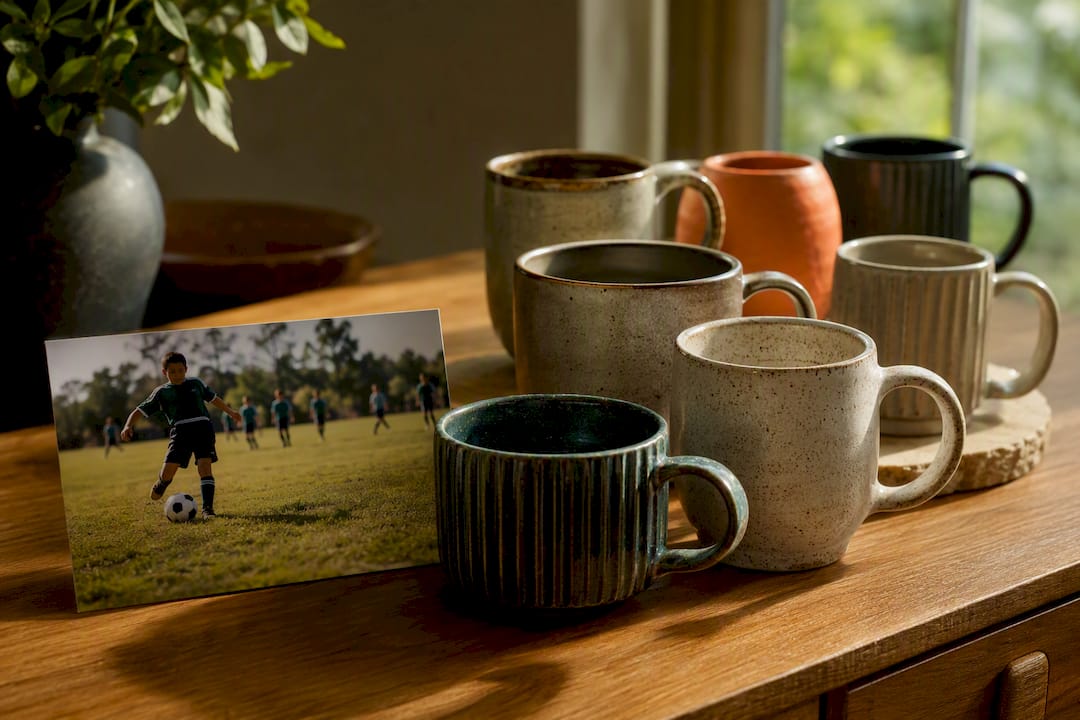
Photo icebreakers beat generic “two truths and a lie” prompts because a picture forces specificity. You can’t hide behind a vague answer when a coworker is looking at your childhood soccer photo or the coffee mug collection on your desk. That specificity is what turns a five-minute warm-up into an actual memory people bring up weeks later.
Here are 11 formats worth keeping in your back pocket, each built to run with almost no setup.
1. Picture Sharing Everyone pulls up one photo already on their phone, no theme required, and shares it in 60 to 90 seconds.
- Give a 24 hour heads-up so people aren’t scrambling.
- Ask each person to share their screen or hold up their phone.
- Set a strict 90 second timer per person.
- Move to the next person immediately after.
Best for groups of 4 to 10. Runs in a few minutes depending on group size. Materials: a phone or laptop camera roll. Virtual tip: ask people to have the photo already open in a tab before the meeting starts, so nobody burns 30 seconds scrolling their camera roll on-screen. Variation: theme it (“something you made this weekend”) to speed up decision paralysis, or leave it open-ended for a more organic feel.
2. Caption This One person shares an odd or funny photo, and everyone else writes a one-line caption before the reveal. This is a low-effort format built for humor and quick perspective-taking, and it works whether you’re passing around printed photo cards in a conference room or running it entirely over chat.
- Facilitator shares one photo (their own or a stock image) on screen.
- Everyone writes a caption in the chat, silently, within 60 seconds.
- Facilitator reads captions aloud without names attached.
- Group votes or just laughs, then reveals who wrote what.
Best for groups of 6 to 20. Runs in several minutes. Materials: one photo, a chat window or sticky notes. Virtual tip: disable chat notifications reading aloud automatically and instead copy captions into a doc to reveal them in order. Variation: run it as a mini tournament with three photos and a bracket if your team likes light competition.
3. Snapshot Throwback People bring a childhood photo or an early-career picture and tell a 60 to 90 second story about it. This format rotates well: pair people up, let them swap stories, then rotate partners so everyone gets two or three conversations instead of sitting through 15 monologues.
- Ask everyone to find one old photo in advance.
- Pair up in breakout rooms of two.
- Each partner tells a 1 to 2 minute story about their photo.
- Rotate pairs after 5 minutes and repeat with a new partner.
Best for onboarding cohorts and small teams of 8 to 16. Runs around 15 to 20 minutes with a couple of rotations. Materials: a personal photo, breakout room capability. Variation: for larger all-hands meetings, skip rotation and have three or four volunteers share with the whole group instead.
4. Workspace Who-Am-I? Collect a photo of everyone’s desk, kitchen table, or home office ahead of time, anonymize them, and let the team guess whose workspace is whose. The mechanics are simple and scale well: compile the images into a numbered slide deck, and reveal answers after everyone has guessed.
- Email a request for workspace photos 2 to 3 days before the meeting.
- Compile them into a slide deck, one photo per numbered slide.
- Show each slide for 20 to 30 seconds while people guess in chat.
- Reveal the answer, then move to the next slide.
Best for distributed teams of 15 or more, since anonymity removes the spotlight pressure that trips up shy participants. Runs about 15 to 25 minutes. Materials: a slide deck (Google Slides or PowerPoint works fine), collected photos. Variation: add a point system and give a small shout-out to whoever guesses the most correctly.
5. Photo Collage Everyone contributes one photo to a shared template, building a single collaborative image the team keeps afterward. This works because the finished collage becomes an artifact you can drop into Slack or email after the meeting, which stretches the connection well past the meeting itself.
- Set up a shared Canva, Google Slides, or Figma template in advance.
- Send the link and a submission deadline (day-before works well).
- Walk through the finished collage live, calling out a few photos.
- Post the final version in a team channel afterward.
Best for teams of any size, though it shines with 10 to 30 people. Prep time is the main effort here, but meeting time is brief, just a few minutes. Materials: a collage template tool. Variation: theme the collage seasonally (“summer plans,” “pet photos”) to give people an easy entry point.
6. Photo Scavenger Hunt Give the team a list of 5 to 8 items to photograph around their home or office within a set time limit, then share results together.
- Announce a themed list (“something red,” “your favorite mug,” “a plant”).
- Give people 3 to 5 minutes to run and grab items.
- Reconvene and have each person show one or two finds.
- Vote on the most creative or unexpected item.
Best for energizers mid-meeting or retro warm-ups, groups of 6 to 15. Runs roughly 10 to 15 minutes including the hunt. Materials: nothing but a phone and a list. Virtual tip: this one genuinely gets people out of their chairs, which makes it a strong pick for the 2 PM slump on a long call. Variation: make it competitive with a timer and a leaderboard, or cooperative by having teams submit one combined gallery.
7. Two Truths and a Photo A photo-based twist on the classic: share three photos, only two of which are true to a claim you make about yourself.
- State three claims, each paired with a photo.
- Group votes on which claim is false.
- Reveal the answer and explain the real story behind the photo.
Best for pairs or small groups of 4 to 8. Runs around 5 minutes per person, so limit group size depending on available time. Materials: three photos, prepped ahead of time. Variation: let the group ask one follow-up question before voting to build in more interaction.
8. Object Show-and-Tell Ask everyone to grab one object within arm’s reach and hold it up to the camera with a 30 second explanation.
- Give a 10 second countdown for people to grab an object.
- Each person holds it up and explains its significance in 30 seconds.
- No prep photo needed. Skip straight to sharing.
Best for spontaneous use with groups of 5 to 12 when you have zero prep time. Runs in a few minutes. Materials: whatever’s on the desk. Variation: theme it (“oldest thing on your desk”) for a sharper hook.
9. Photo Timeline Each person shares three photos that represent a “then, now, next” arc of a project, a skill, or their career.
- Ask for three photos in advance: past, present, future or goal.
- Each person narrates the arc in 90 seconds.
- Group can react with questions after each share.
Best for retros and quarterly reviews, groups of 6 to 12. Runs around 15 to 20 minutes. Materials: three photos per person, a simple slide or shared doc. Variation: narrow the theme to just the current project for sprint kickoffs.
10. Guess the Coworker’s Pet Collect pet photos ahead of time (or “adopted plant” photos for the pet-free), anonymize them, and run it exactly like Workspace Who-Am-I? but with animals.
- Collect pet photos by email 2 to 3 days ahead.
- Build a numbered slide deck.
- Guess, then reveal.
Best for large all-hands meetings of 20 or more, since it’s an easy crowd-pleaser with almost no controversy. Runs roughly 10 to 15 minutes. Materials: slide deck. Variation: allow “honorary pets” (a favorite houseplant, a stuffed animal) so nobody feels left out.
11. Photo Story Chain One person shares a photo and a one-sentence story starter; the next person adds a sentence based on their own photo, building a chain narrative.
- First person shares a photo and one sentence.
- Next person adds a photo and continues the story with one more sentence.
- Continue around the group until everyone has contributed.
Best for creative teams of 6 to 10 who already know each other reasonably well. Runs roughly 10 to 15 minutes. Materials: photos, a shared screen or doc to track the story. Variation: assign a genre (mystery, comedy) to push creativity further.
How Do You Prepare and Run a Photo Icebreaker Well?
Here’s what actually needs to happen before, during, and after.
Preparation checklist:
- Send the invite with the activity named and the ask spelled out (“bring one photo of your workspace, no prep needed beyond that”).
- Give at least a day’s notice. Advance notice of a day or two reduces anxiety and produces better stories, since nobody’s digging through their camera roll live on a call.
- Offer a photo-collection method that fits the format: a shared folder link, an email-in option, or “just have it ready on your phone.”
- Always include an opt-out. Let people describe a memory instead of showing a photo, or pass entirely without explanation.
Facilitator script snippets: Opening line: “We’re doing a quick photo activity today. If you’d rather describe something instead of showing a photo, that’s completely fine. Just say ‘pass’ or ‘describing’ when it’s your turn.”
Time warning: “Thirty seconds left. Wrap up your last thought.”
Closing debrief: “What’s one thing you learned about a teammate today that surprised you?”
Timing templates:
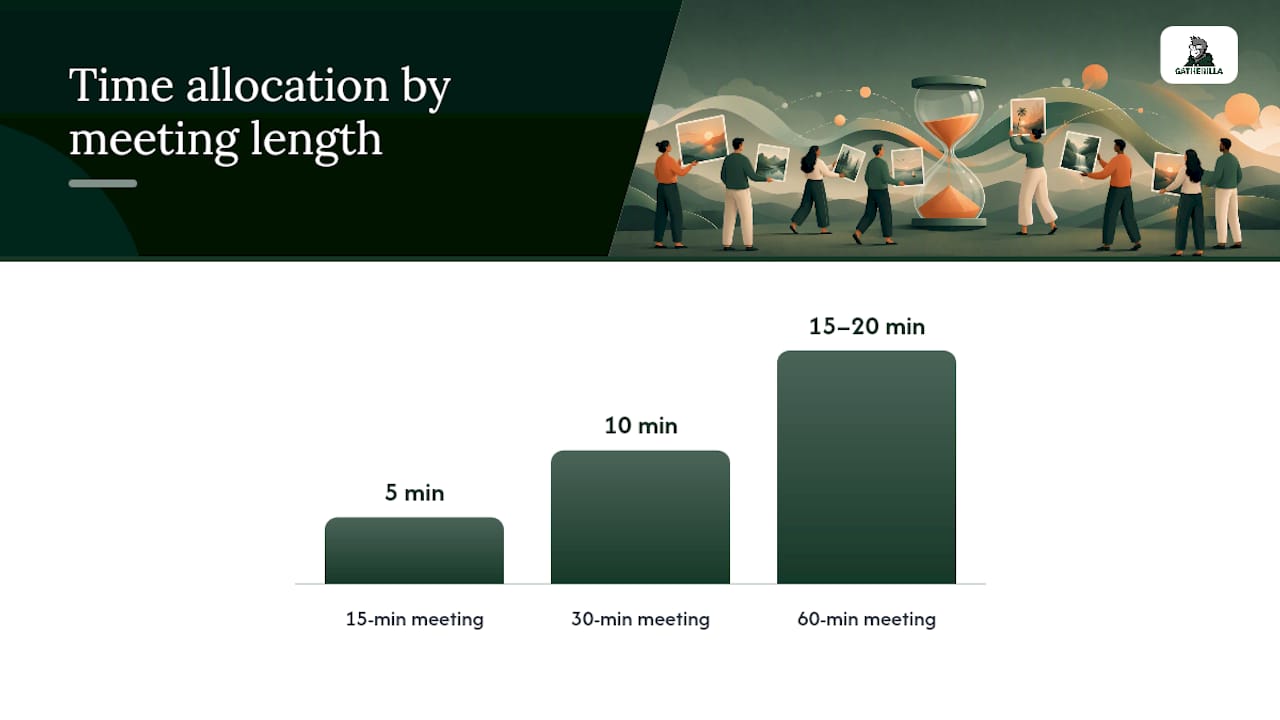
- 15 minute meeting: 5 minutes for Picture Sharing with a group of 5, then straight into the agenda.
- 30 minute meeting: 10 minutes for Caption This or a Photo Scavenger Hunt, leaving 20 minutes for actual work.
- 60 minute all-hands: 15 to 20 minutes for Workspace Who-Am-I? or Guess the Coworker’s Pet, since larger groups need the extra runway.
Common pitfalls and fixes: Technical delays (someone can’t find their photo, a slide won’t load) eat more time than the activity itself. Fix it by asking people to have photos ready before the call starts, and by having a backup slide deck open in a second tab. Off-topic sharing (a story that runs five minutes instead of one) is the other repeat offender. A visible timer, shared on screen, solves this faster than any verbal reminder.
Pro Tip: Keep a folder of three or four facilitator-supplied “starter” photos on hand. If someone forgot to bring one or doesn’t want to share personal images, you can hand them a neutral photo to caption or discuss instead, no one has to sit out.
Running Photo Icebreakers Across Remote, Hybrid, and In-Person Setups
The format doesn’t change much between setups, but the mechanics absolutely do.
Remote: Breakout rooms handle small-group formats like Snapshot Throwback cleanly. For anything with multiple images, build a numbered slide deck ahead of time rather than asking people to unmute and hold photos up to a webcam, which tends to look blurry and eats time. Collect photos by email or a shared drive link at least a day ahead so you’re not waiting on stragglers mid-meeting.
- Use breakout rooms for pair-based formats (Snapshot Throwback, Two Truths and a Photo).
- Build numbered slides for guessing games (Workspace Who-Am-I?, Guess the Coworker’s Pet).
- Collect chat-based captions for Caption This rather than verbal call-outs, which get talked over.
- Set a “photos only, no browsing” guideline when people are using their own devices, since dead air while someone scrolls social media kills momentum fast.
Hybrid: This is where things get trickier, because half the room can see a shared screen instantly and the other half is watching through a laptop camera with lag. Assign one person as the dedicated slide operator so the in-room facilitator isn’t also fumbling with a laptop. Enforce a strict turn order (in-room, then remote, alternating) so remote participants don’t get steamrolled by louder in-room voices. A Slack or Teams channel works well for asynchronous submissions from people in different time zones who can’t make the live activity at all.
- Assign a dedicated slide operator separate from the facilitator.
- Alternate turn order between in-room and remote participants.
- Use a Teams or Slack channel for photo collection and async contributions.
In-person: Print photo cards for a gallery walk format, letting people wander and guess rather than sitting in rows. Group people by table for Snapshot Throwback style pairing.
Accessibility: Add alt text descriptions when sharing slides digitally, offer a text-only description option for anyone who can’t view images clearly, and turn on live captions or ASR transcription for verbal storytelling portions so nothing gets missed.
Which Photo Icebreaker Fits Which Meeting?
Matching the activity to the meeting type is what separates a habit people look forward to from a chore people tolerate.
- Onboarding and new-hire intros: Snapshot Throwback works best here, since a childhood or early-career photo gives new hires an easy, low-stakes story to tell a team they don’t know yet.
- All-hands warmers: Workspace Who-Am-I? or Guess the Coworker’s Pet scale to large groups because the anonymized guessing format removes spotlight pressure.
- Retros: Photo Timeline or Photo Scavenger Hunt fit naturally, since both tie back to the work itself rather than staying purely social.
- Sprint kickoffs: A quick Photo Scavenger Hunt or Object Show-and-Tell gets energy up fast without eating into planning time.
- Small-team check-ins: Picture Sharing or Two Truths and a Photo work in 5 to 10 minutes flat.
Success signals look like people volunteering to go first, chat filling with reactions, or a Slack thread forming afterward referencing someone’s photo. Running one photo icebreaker every week or two, rather than only at big events, is what actually builds the habit instead of a one-off novelty.
What Should You Say About Privacy Before You Start?
Read this out loud before the activity, every time: “We’re doing a photo activity today. Sharing is optional. If you’d rather describe something instead of showing a photo, just say so. No one will screenshot or record without asking first.”
That one sentence, added to the invite and repeated at the start of the meeting, prevents almost every awkward privacy moment before it happens.
- Include a one-line consent statement in the calendar invite itself, not just verbally at the meeting.
- Never screenshot or record a shared photo without asking the person directly first.
- Offer a “describe instead of show” option for every single format on this list, not just the ones that feel sensitive.
- Provide a text-only or audio-only participation path for anyone who prefers not to appear on camera at all.
Pro Tip: Anonymizing photos, like in Workspace Who-Am-I? or Guess the Coworker’s Pet, is one of the easiest ways to boost participation from people who’d otherwise sit out. Nobody has to feel singled out.
Ready-to-Copy Prompts and Slide Templates
Paste these directly into an invite or a slide, no editing needed.
- Share a photo from a proud moment, big or small.
- Bring a photo of your pet (or your favorite plant if you don’t have one).
- Show a workspace object that has a story behind it.
- Share a photo from the best trip you’ve taken.
- Bring a childhood photo from before age 10.
- Show us something red within arm’s reach.
- Share a photo of your first job or first paycheck.
- Bring a photo of the view from your window right now.
- Show a photo of the last meal you cooked.
- Share a photo that represents your current mood.
- Bring a photo from a hobby outside of work.
- Show us your favorite mug and tell us why.
Script 1: 10 minute Picture Sharing. “We’ve got 10 minutes for Picture Sharing. Pull up a photo already on your phone, anything you like. You get 60 seconds each, I’ll give a 10 second warning before time’s up. First volunteer?”
Script 2: Caption This with breakout rooms. “I’m sending one photo to each breakout room of three. You have 90 seconds to write a caption together, then send your best line back to me in the main chat. We’ll read them all out loud without names first.”
Slide template notes: One photo per slide, numbered in the corner, no names attached until the reveal slide. Keep a consistent font size for captions so guessing doesn’t tip off answers by formatting alone.
Making Photo Icebreakers a Daily Habit, Not a Special Occasion
Most teams treat icebreakers like a birthday cake: nice when it shows up, forgotten the rest of the year. That’s backwards. The connection between light social activity and psychological safety tends to compound with frequency, not intensity, meaning a five-minute photo share every week beats a lavish one-hour “culture event” every quarter.
Some platforms build toward exactly that rhythm. Browser-based tools running without downloads or account setups allow a team lead to launch a quick photo-based or trivia challenge in the two minutes before a standup starts. Daily challenges keep the habit alive between the bigger scheduled icebreakers covered above, which matters most for remote employees who don’t get the hallway version of connection.
If you’re building out a broader rotation beyond photo formats, our guide to remote icebreaker games and our breakdown of icebreaker games for large groups cover formats that pair well with the photo activities above. Measuring whether any of this is working doesn’t require a survey team, either. Watch chat reactions, watch whether people volunteer without being asked twice, and watch whether a Slack thread forms after the meeting referencing someone’s photo. Those are the real signals.
— Thomas
Try Gatherilla for Your Next Photo Icebreaker
Running a good photo icebreaker shouldn’t require a slide deck you built at midnight or a Zoom plugin nobody wants to install. Some platforms run entirely in the browser, so a team lead can launch a game during the two minutes before a meeting starts, with no downloads, no account setup for participants, and minimal time lost to explaining tech to a new hire.

Some platforms include daily challenges designed for low-prep, high-frequency connection, plus a library of multiplayer games that go beyond photo formats when teams want variety. Check the pricing page to see what fits your team size, or visit the Gatherilla product page to see the full game library before you commit to anything. This is a straightforward vendor recommendation: we build this tool because we believe in the habit, not because we’re claiming numbers we haven’t proven to you yet. Try a free round with your team this week and see how it lands.
Sources
- Caption This - Ultimate Camp Resource
- Snapshot Throwback — Icebreaker Games
- Virtual Icebreaker – Workspace Who-Am-I? – Leaders for Leaders
FAQ
What is a good icebreaker game using pictures?
Workspace Who-Am-I? and Snapshot Throwback are two of the strongest picture-based icebreakers because they give people a specific, low-pressure story to tell instead of an open-ended question. Both scale from small teams to full all-hands meetings with minor adjustments.
What are good short icebreakers for a quick meeting?
Picture Sharing and Object Show-and-Tell both run in under 10 minutes with almost no prep, making them the best fit for a 15 or 30 minute meeting where you still need time for the actual agenda.
What are some funny icebreaker questions for work?
Caption This works well as a funny format since it turns a random photo into group humor through anonymous captions. Pairing it with a lighthearted prompt like “show us your most questionable desk snack” tends to get the biggest laughs without putting anyone on the spot.
What are some fun drawing icebreakers for work?
Drawing-based icebreakers, like a quick “draw your weekend in 30 seconds” challenge, work as a close cousin to photo icebreakers and follow the same rules: keep the time box short, offer an opt-out, and reveal results as a group rather than one by one under pressure.
Does Gatherilla offer built-in photo icebreaker activities?
Gatherilla focuses on browser-based multiplayer games and daily challenges designed for quick team connection, and current game offerings and pricing are listed on the Gatherilla pricing page.