

Guess Who Game for Work: How to Run It With Coworkers

The workplace version of Guess Who is a short icebreaker. Everyone sends in a little-known fact about themselves, the host reads the facts anonymously, and the team guesses who each one belongs to. It takes about 10 minutes, needs no props, and works on a video call or in a conference room. Below you will find the exact steps, four formats, prompts that stay work-appropriate, and ways to keep it comfortable for everyone.
TL;DR
- Collect one fact per person privately before the meeting, read them anonymously, and let the group guess. The owner reveals themselves and adds a short story if they want to.
- Plan on roughly 10 minutes for a classic round. The U.S. Virtual Team Toolkit lists a closely related exercise at that length.
- Pick prompts that are surprising but safe: hobbies, food, music, the origin of a name. Skip anything medical, financial or family-sensitive.
- Keep it voluntary and let people respond in writing, audio or video, as Columbia University’s HR guidance suggests.
- Use it for new hires, the first five minutes of a recurring meeting, or a hybrid team that rarely shares a room.
Table of Contents
- What the Guess Who coworker game is, and why it works
- How to run a Guess Who round, step by step
- Four formats to choose from
- Prompts that are fun and safe for work
- Adapting the game for remote, hybrid and in-person teams
- Using Guess Who for onboarding and quick meeting openers
- Keeping the game voluntary and comfortable
- Our perspective
- Run it without the prep
- FAQ
- Sources
What the Guess Who coworker game is, and why it works
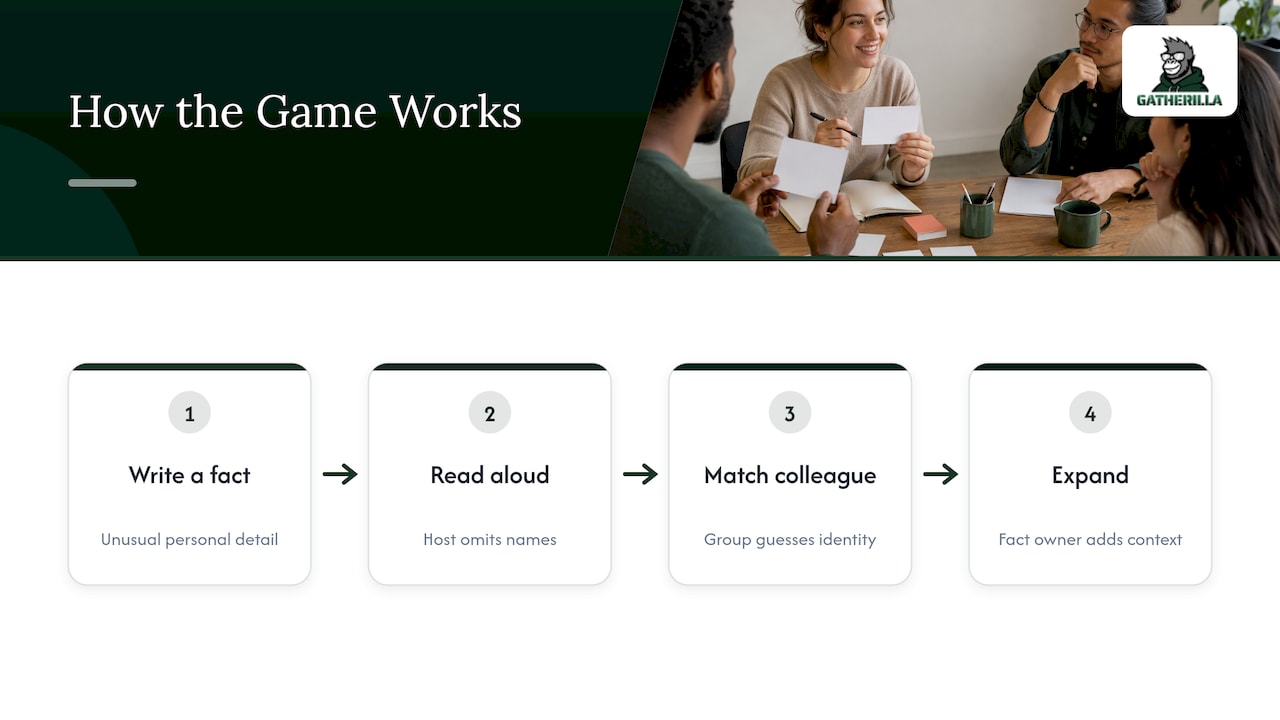
You may know Guess Who as the two-player board game of yes-or-no questions. The office version is different. It is closer to a guessing game about people: each participant writes down an unusual or little-known personal fact, a host reads the facts without names, and the group tries to match each fact to a colleague. The person behind the fact can then expand on it if they feel like it. That is how one workshop-facilitation guide describes the format.
The point is not the guessing. It is what happens after a reveal: someone says, “Wait, you trained for a marathon?” and a real conversation starts. The same guide argues that guessing creates natural conversation and empathy because everyone learns something new. For distributed teams, that matters. OSHA’s guidance on hybrid workplaces recommends planning social gatherings such as trivia, coffee breaks, hobby chats and online games, because chances to interact help keep workers connected to coworkers and the organization. It names Guess Who as one example.
The Virtual Team Toolkit adds a useful angle: icebreakers help team members get to know one another, build trust and understand each other’s backgrounds and experience. Its discussion questions also use the guesses to look at assumptions people make about colleagues’ personalities. That is a good debrief if your team has time for two extra minutes.
The tone matters too. Livestorm’s guide says the activity should stay light and respectful while helping coworkers discover sides of one another they had not seen. If a fact would make someone uncomfortable when read aloud, it does not belong in the round.
How to run a Guess Who round, step by step
Here is a version that combines the common steps from the sources above. It works for 6 to 20 people. Past that, split into groups.
- Send the request ahead of time. Ask everyone to reply privately with one fact that most colleagues would not know. Say it should be obscure but work-appropriate. CRI Resilient’s Guess Who strategy recommends exactly that wording. For remote teams, the Toolkit advises collecting the facts by email before the meeting.
- Explain the rules at the start. The Toolkit also advises making sure everyone understands the activity before you begin. Thirty seconds is enough: one fact at a time, guess out loud or in chat, no hints that expose a colleague.
- Read one fact at a time. Do not read names. Lightly reword facts that reveal too much by style, such as a distinctive phrase or an in-joke.
- Let the group guess. Allow two or three guesses per fact. Chat or a quick vote works well. Livestorm suggests private chat for collecting facts and live polls for voting.
- Reveal the owner. Per Livestorm, the owner steps forward after a correct guess or after a few wrong ones. Give them a few seconds to say more, only if they want to.
- Move on. Keep each fact to about a minute. If a fact sparks a great side conversation, let it run and skip the last one or two facts.
- Close with one takeaway. Ask, “Which fact surprised you most?” It ends the round warmly and takes ten seconds.
An optional twist from CRI Resilient: ask the fact’s owner to submit a decoy guess too, so their name appears among the guesses and they are harder to spot.
Four formats to choose from
The game bends easily. Choose the format that fits your group size and the time you have.
| Format | How it works | Best for | Time |
|---|---|---|---|
| Classic fact matching | One fact per person, read anonymously, group guesses the owner | Most teams, remote or in person | About 10 minutes |
| Five-fact sets | Each person supplies five facts, the leader reads a full set, group names the colleague | Small teams that want a longer round | 15 to 20 minutes |
| Hidden coworker, yes/no questions | One person is secretly chosen and others ask yes-or-no questions about traits | Teams that like the board-game feel | 10 to 15 minutes |
| Impressions | Players act out a coworker or celebrity without saying the name | In-person groups that are comfortable with each other | 15 to 30 minutes |
The five-fact format comes from FigJam’s icebreaker list, where facts for remote teams can be submitted anonymously through an online survey. The yes/no version follows Brigham Young University’s Guess Who: one coworker is selected as the hidden person, others ask yes-or-no questions about applicable traits, a wrong name guess removes that attendee’s video, and the last video left wins. The impressions version is described by FreeIcebreaker.com, which lists a group of 6 to 20 people and 15 to 30 minutes. It calls for respectful impressions only, so skip it if your team is mixed in comfort level.
If you are unsure, start with classic fact matching. It has the lowest barrier and the least prep.
Prompts that are fun and safe for work
A good prompt gets a fact that is surprising but not private. Columbia’s HR guidance suggests these themes:
- A hobby or hidden talent
- The last thing you cooked
- A book or article you read for pleasure
- A weekend highlight
- The music you are listening to right now
- The origin of your name
That gives you plenty of material. Here are a few ways to phrase them so people write something specific rather than something generic:
- “What is the most unusual thing you have learned to do, and where did you learn it?”
- “What is a meal you can make without a recipe?”
- “What was the first concert, game or show you paid for yourself?”
- “Which place have you visited that most of your coworkers would not guess?”
Avoid prompts that lead to health, money, politics, religion or family details. Also avoid “most embarrassing moment” prompts. They can produce stories people regret sharing with the boss in the room.
If you want prompts that tie more closely to how people work, borrow the Head, Heart, Hand questions from Western Michigan University: what could you teach, what do you care about, what are you good at? The university recommends two to five minutes of writing time, and the format works on virtual whiteboards, slides or shared documents. In a Guess Who round, the answers to “what could you teach” make excellent anonymous facts, because they are specific and nobody can easily guess them.
Adapting the game for remote, hybrid and in-person teams
Remote teams
Collect facts through a private form or direct messages so that nobody sees them in a group channel. Read them on the call and take guesses in chat. Run one fact at a time on screen so everyone is looking at the same thing. If your team is large, one tip from IcebreakerGamesHub is not needed: simply split into breakout rooms.
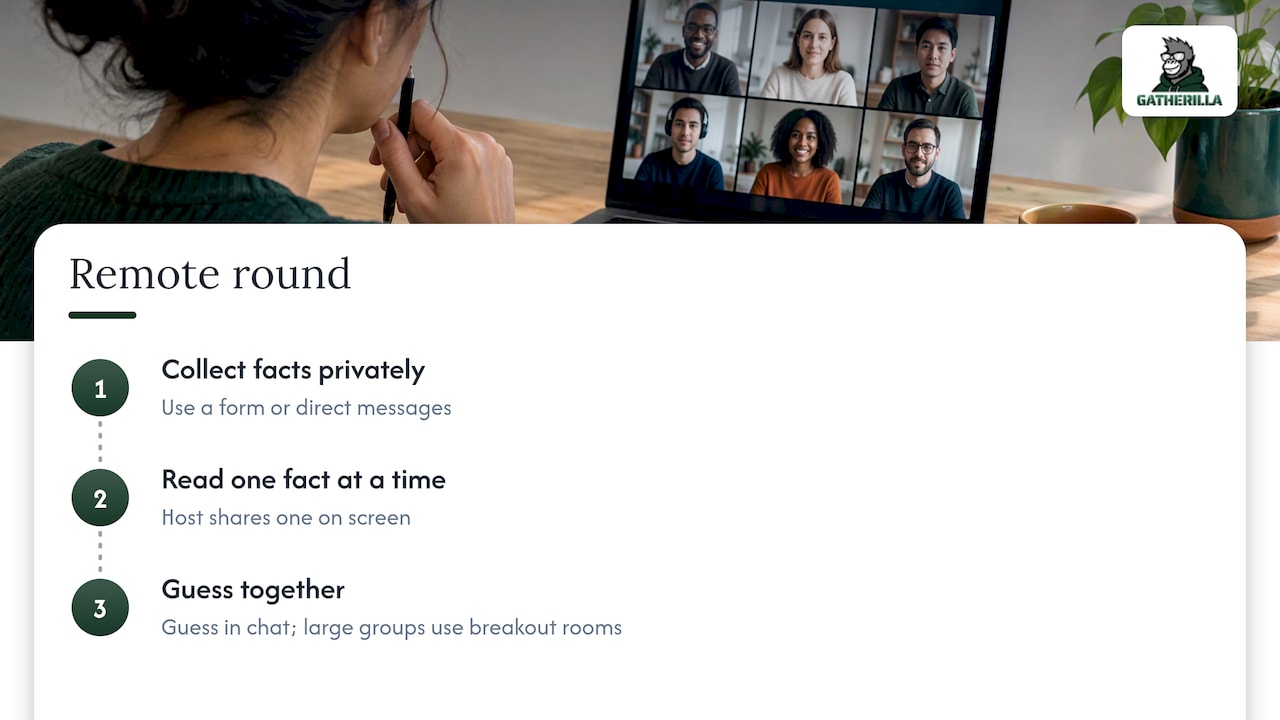
For larger groups, IcebreakerGamesHub recommends rotating breakout rooms of four to five people every five minutes, using private messages or virtual backgrounds to hold identities, and tracking clues on a shared document or whiteboard. Our own guide to breakout room games for remote teams covers how to set up those rooms so they do not turn awkward.
Hybrid teams
The risk in a hybrid meeting is that people in the room have an advantage: they can see each other’s reactions. Keep the game fair by having everyone, in the room or not, submit facts and guesses through the same chat or poll. The host reads the facts, and nobody guesses out loud over the speakers.
If your hybrid team also holds retreats or offsites, a deeper follow-up is a personality-style activity, such as using DISC at team retreats, where the facts people shared in the game become a starting point for talking about working styles.
In-person teams
Paper and a bowl still work. Have each person write a fact on a slip, draw one at a time, and read it. For a more active version, try the impressions format described above. Keep it short. In-person groups tend to chat after each reveal, which is the goal, but a long round loses the people at the back of the room.
Pick the right video platform setup
The game does not depend on any one tool. All you need is a place to collect facts and a way to take guesses. Our guides to Zoom icebreakers with scripts and Microsoft Teams icebreakers show how to run short activities in each platform without extra setup.
Using Guess Who for onboarding and quick meeting openers
New hires
A new employee has the hardest time meeting people when most of the team is remote. The U.K.'s CIPD says, in its hybrid working guide, that induction should support culture and belonging, and should make up for fewer chances to watch colleagues and pick up workplace culture. That is guidance from the U.K., but the problem is the same for U.S. teams.
Guess Who works for this because the new hire is both a participant and a topic. A few ways to use it:
- Ask the new hire’s team to submit facts, and ask the new hire to guess in the first week. They learn names and personalities at once.
- Let the new hire submit a fact too, so the team gets to know them in the same format.
- Keep it as one item in a larger plan. CIPD’s induction guide defines good induction as welcoming the starter and explaining the organization, team, role, responsibilities, expectations and ways of working. A game supports that. It does not replace it.
For more ideas, see our list of virtual onboarding games.
Recurring meetings
You do not need a full round every time. In a weekly meeting, read just two facts in the first five minutes. Over a month, the whole team gets covered without using up the agenda. Columbia’s guidance treats short icebreakers and flexible-format introductions as practical ways to strengthen connection for remote, hybrid and new employees. For more quick options, our remote icebreaker games guide has formats that take two minutes or less.
Keeping the game voluntary and comfortable
A game that makes someone feel exposed does the opposite of what you want. A few habits help.
- Make it optional. Columbia recommends voluntary social activities. Someone who prefers to pass should be able to pass without explaining. Let them guess without submitting a fact, or just listen.
- Offer more than one way to share. Columbia’s guidance says introductions should let people respond in the format most comfortable for them, including written, video or audio. In practice, that means accepting a typed fact and letting the owner reveal themselves in chat rather than on camera.
- Check the facts before you read them. As host, you are the filter. If a fact is too personal or could point to a protected characteristic, ask the person to swap it.
- Rotate who guesses. Do not let the loudest two people dominate. Ask the quiet ones for one guess each.
- Never ridicule a wrong guess. Wrong guesses are the engine of the game. Treat them as funny, not foolish.
There is some research behind the format. A 2016 CHI study on a multiplayer icebreaking game found it offered a comfortable way for newly met strangers to share information and get to know each other, with a relaxed atmosphere and more interaction. The authors designed it around information asymmetry, meaning each player knows something the others do not. That is the same structure as Guess Who: only you know your fact, and everyone else has to work it out. The study was about strangers and a mobile game, not coworkers, so treat it as support for the design idea rather than proof for your team.
Our perspective
Most teams we talk to do not lack good icebreaker ideas. They lack the time to prepare one. A Guess Who round is a great example: the idea is simple, but someone has to collect the facts, shuffle them, read them out and keep track. Three weeks later, nobody has the energy to do it again.
That is why we built Gatherilla around zero-preparation games that run in the browser, with no downloads or accounts needed to join and no change to the video tool your team already uses. We think connection at work grows from small, repeated moments, not one big annual event. A daily challenge, a quick icebreaker at the start of a call, a game for a new hire’s first week: each is small, and together they become a habit.
Use Guess Who for what it does best, which is turning a name on a screen into a person with a story. Then keep the rhythm going with short, low-effort activities, so that engagement is a routine rather than a rescue plan.
Thomas
Run it without the prep
If you like the idea but not the logistics, Gatherilla is a browser-based platform of customizable multiplayer games for remote and hybrid teams. It includes icebreakers for meetings, onboarding games, daily word and trivia challenges and real-time leaderboards, and it works with any video conferencing tool, with no downloads.
You can start on the free plan. Premium adds more games, analytics and priority support, at $0.50-$1.00 per seat per month or $5-$10 per seat per year, as listed on our pricing page. To see what the games look like, start at Gatherilla.
Want more formats to rotate with Guess Who? Try our virtual team trivia playbook or the Zoom games for work list.
FAQ
How long does a Guess Who game at work take?
A classic round with one fact per person takes about 10 minutes. The U.S. Virtual Team Toolkit lists a similar exercise at that length. For a team of 15 or more, read only part of the facts per meeting or split into breakout rooms.
How many people can play?
Six to 20 people works well in one group, which matches the range given for the in-person impressions version. Smaller groups run out of surprises, and larger ones run out of time. For a big department, use breakout rooms of four or five and rotate every few minutes.
What if nobody guesses correctly?
That is part of the fun. The Toolkit says the author reveals themselves when no one guesses right. Give the owner a moment to explain the fact, then move on. If a fact is too obscure, you can offer a hint such as the category it falls into.
Can I play Guess Who on Zoom or Teams without special software?
Yes. You need only a way to collect facts privately, such as email, direct messages or a form, and a chat or poll for guesses. Read the facts on the call and take answers in the chat. A browser-based game platform can remove the manual work, but it is not required.
Is it appropriate for a new hire’s first week?
Yes, if it is voluntary and the facts are screened. Give the new hire the choice to submit a fact or only to guess. Pair it with a proper induction plan, so the game is one friendly moment rather than the whole welcome.
Sources
- OSHA: Workplace Stress, Hybrid Workforces
- Virtual Team Toolkit
- Icebreakers for meetings and workshops
- Guess Who? ice breaker guide
- Brigham Young University: Guess Who
- CRI Resilient: Guess Who strategy
- FreeIcebreaker.com: Guess Who
- Columbia University HR: Best in Flex
- Western Michigan University: Head, Heart, Hand
- FigJam: icebreaker ideas
- CIPD: Effective hybrid working
- CIPD: Employee induction
- CHI 2016 multiplayer icebreaking game study
- Using DISC at team retreats