

Miro Icebreakers Under 10 Minutes, With Scripts to Read Aloud

Yes, Miro has dozens of ready-to-run icebreakers, and this article gives you a practical set of 12 you can copy and run in under 10 minutes. We cover categories, exact timing, one-line facilitator scripts, a setup checklist, and a short research summary so you know why the five minutes you spend on an icebreaker actually pays off. The basic pattern: open with a quick warmup under five minutes, use a check-in when the meeting calls for reflection, and reach for an energizer when the room feels flat.
TL;DR:
- Match the format to the meeting: warmups take 2 to 5 minutes, reflection activities suit groups under 15, and energizers work for 5 to 50.
- For large groups, prepare labeled zones and lock frames; offer chat replies for people using small screens, slow connections, or unfamiliar devices.
- Demonstrate the board for 30 to 60 seconds, set a visible timer, and assign a second host to handle technical questions while you facilitate.
- For quieter or hierarchical teams, use written or anonymous responses; global groups benefit from literal prompts and asynchronous boards across time zones.
- Track participation and conversation afterward, then use quarterly pulse surveys to assess whether comfort speaking up improves over repeated sessions.
Table of Contents
- Choosing the right type of Miro icebreaker for your meeting
- 12 ready-to-run Miro icebreaker activities
- How to set up and run a Miro icebreaker without friction
- Where to find Miro icebreaker templates and how to adapt them fast
- Why icebreakers actually work for remote teams
- Quick tips for first-time Miro users
- Customizing Miro icebreakers for your team’s culture
- Running Miro icebreakers alongside your other meeting tools
- Measuring whether your icebreakers are actually working
- Why we think the daily ritual matters more than the perfect icebreaker
- Try browser-based team games that fit into every meeting
- FAQ
- Sources
Choosing the right type of Miro icebreaker for your meeting
Not every icebreaker fits every meeting. A fast warmup works when you need quick engagement before diving into an agenda, while a check-in works better when the group needs space to reflect or process something. Energizers solve a different problem: they inject movement and creativity into a meeting that has gone flat, and onboarding prompts help new hires get oriented without feeling put on the spot.
Matching the activity to the moment matters more than picking the “best” icebreaker on a list.
- Warmups (2 to 5 minutes, any group size): quick, low-stakes prompts that get everyone clicking before the real agenda starts.
- Check-ins (5 to 10 minutes, best under 15 people): reflective prompts that surface how people are actually doing, useful at the start of a sensitive meeting or a weekly sync.
- Energizers (3 to 7 minutes, works for 5 to 50 people): movement or creativity-based activities that reset attention mid-meeting.
- Onboarding prompts (5 to 10 minutes, small groups work best): structured introductions that help new hires learn names, roles, and a few personal details fast.
Group size changes what works. A board with 40 people needs pre-placed zones and clear visual boundaries, while a team of six can work more freely on a shared canvas. Keep text minimal wherever possible: long instructions slow people down, and some participants will be on a phone screen or a slow connection. Offer an alternative response method (a one-word chat reply instead of a sticky note) for anyone who can’t easily use the board, and avoid activities that require video or audio for participation.
12 ready-to-run Miro icebreaker activities
Each of these works straight out of a blank Miro board. Durations include setup time inside the meeting, not prep time beforehand.
- Two truths and a lie wall: Each person posts three sticky notes, two true and one false, and others guess which is the lie. Ideal for 6 to 15 people, 8 minutes. Script: “Post three notes about yourself, two true and one made up, then we’ll guess together.”
- Emoji mood check: Everyone drags one emoji sticker onto a shared grid to show their current energy. Works for any group size, 3 minutes. Script: “Drop one emoji on the board that matches how you’re feeling right now.”
- Desk or window view: Participants paste or describe what they see from where they’re sitting. Good for 5 to 20 people, 5 minutes. Script: “Paste a quick snapshot or describe what’s in front of you right now.”
- One word check-in: Each person writes a single word describing their week on a sticky note. Fits any size, 4 minutes. Script: “One word, no explanation needed, post it now.”
- Virtual scavenger hunt: Participants find and photograph an object matching a prompt, then post it. Best for 5 to 15 people, 7 minutes. Script: “Find something nearby that’s older than you and snap a photo.”
- Map pin intro: Everyone drops a pin on a world map template and adds their name. Works for 10 to 50 people, 5 minutes. Script: “Pin your current location and tell us one thing about it.”
- Rose, thorn, bud: Share one good thing, one challenge, and one hope for the week on three sticky notes. Best for 5 to 12 people, 8 minutes. Script: “One rose, one thorn, one bud, post all three.”
- Draw your weekend: A 60-second sketch of a weekend highlight using Miro’s drawing tool. Good for 5 to 15 people, 6 minutes. Script: “You have 60 seconds, draw your weekend, go.”
- Would you rather grid: Vote on playful either-or questions by moving a dot to a side of the board. Any group size, 4 minutes. Script: “Move your dot to the option you’d pick.”
- Team trivia sprint: Answer three quick trivia questions about the company or industry as a group. Best for 8 to 25 people, 7 minutes. Script: “Three questions, shout out your guess in chat.”
- Gratitude wall: Post a sticky note thanking a teammate for something specific. Works for any size, 6 minutes. Script: “Name someone and one thing you appreciated this week.”
- New hire bingo: New employees fill a bingo card with facts about teammates gathered through quick chat questions. Best for onboarding groups of 5 to 10, 10 minutes. Script: “Find a teammate who matches each square and write their name.”
Scale any of these down by cutting the group into breakout boards, or scale up by pre-placing more zones before the meeting starts.
How to set up and run a Miro icebreaker without friction
A smooth icebreaker depends more on setup than on the activity itself. Doing the prep before the meeting starts prevents the long silent pause where everyone stares at a blank board wondering what to click.
Before the meeting:
- Duplicate the template and rename the board so you’re never editing the original.
- Set permissions so participants can edit but not delete or rearrange locked frames.
- Build a short master demo board with one or two example entries already filled in.
- Create labeled zones or frames so people know exactly where their contribution goes.
During the meeting:
- State the goal in one sentence before explaining the mechanics.
- Show the master demo board for 30 to 60 seconds before opening the live board.
- Set a visible timer and call out when half the time has passed.
- Ask people to narrate their sticky note over camera or chat so quieter participants get seen too.
- Assign a co-host to answer “how do I” questions in chat so you can keep facilitating.
After the activity:
- Ask for one-sentence takeaways before moving to the next agenda item.
- Save the board instead of deleting it, since recurring rituals work better with a visible history.
Pro Tip: Keep a duplicate “clean” template saved separately from your working boards so you never have to rebuild from scratch for the next session.
Where to find Miro icebreaker templates and how to adapt them fast
Miroverse is the fastest place to browse ready-made icebreaker templates by category, and most listings show how often a template has been used, which gives you a rough signal of how well-tested it is. When evaluating a template, check three things: how many times it’s been duplicated, whether the instructions are clear enough to run without a facilitator script, and how visually dense the board is. A board crowded with widgets, images, and overlapping frames slows everyone down, especially first-time Miro users.
Facilitator School’s write-up on the Character Mix & Match icebreaker is a good example of what a well-documented template looks like: it specifies a 6-minute creation window and walks through exactly how to demo duplication before participants start, which cuts down on confusion.
Once you’ve picked a template, small tweaks make a bigger difference than building from scratch:
- Shorten written instructions to one line per step; cut anything that isn’t essential to understanding the task.
- Add labeled zones or color-coded frames so contributions land in the right place automatically.
- Pre-place a few sticky notes as examples so the board never opens completely blank.
- Swap generic icons or graphics for your own team’s colors or logo to make the board feel familiar.
Reuse the same board for recurring rituals rather than rebuilding each week, and treat small changes as experiments: try a different prompt one week and see whether participation or chat activity goes up before locking in a format.
Why icebreakers actually work for remote teams
A longitudinal Organization Science study based on seven years of qualitative research, including 275 interviews and roughly 330 hours of observation, identified “mutual humanization” through self-disclosure as a key process that strengthens psychological safety in remote work. Small, structured prompts, like the ones above, give people a low-stakes way to self-disclose without needing a deep personal conversation.
A 2026 survey of 300 employed individuals found that casual conversation during and outside of meetings significantly increases psychological safety and engagement for remote and hybrid teams. That finding lines up with the mutual humanization research: the two studies point to the same mechanism from different angles.
In practice, this means the goal isn’t entertainment. A short, structured prompt that invites a small piece of self-disclosure does more for participation and inclusion than a flashy activity with no personal stakes attached.
Quick tips for first-time Miro users
Most friction in an icebreaker comes from people fumbling with Miro itself rather than the activity. A short demo and a few defaults fix most of it.
- Run a 60 to 90 second live demo before opening the board to the group.
- Set up a sandbox area where people can test clicking and dragging before the real activity starts.
- Use large click targets (big sticky notes, wide zones) instead of small icons that are easy to miss.
- Assign a technical co-host whose only job is answering “how do I” questions in chat.
- Offer a simple alternative, like a one-line chat response, for anyone on a slow connection or unfamiliar device.
If the board gets chaotic mid-activity, simplify on the fly: close extra frames, mute non-essential layers, or switch the group to naming their answer out loud instead of posting it.
Pro Tip: Keep a fallback version of every template with half the steps removed, ready to switch to if the live board gets overwhelming.
Customizing Miro icebreakers for your team’s culture
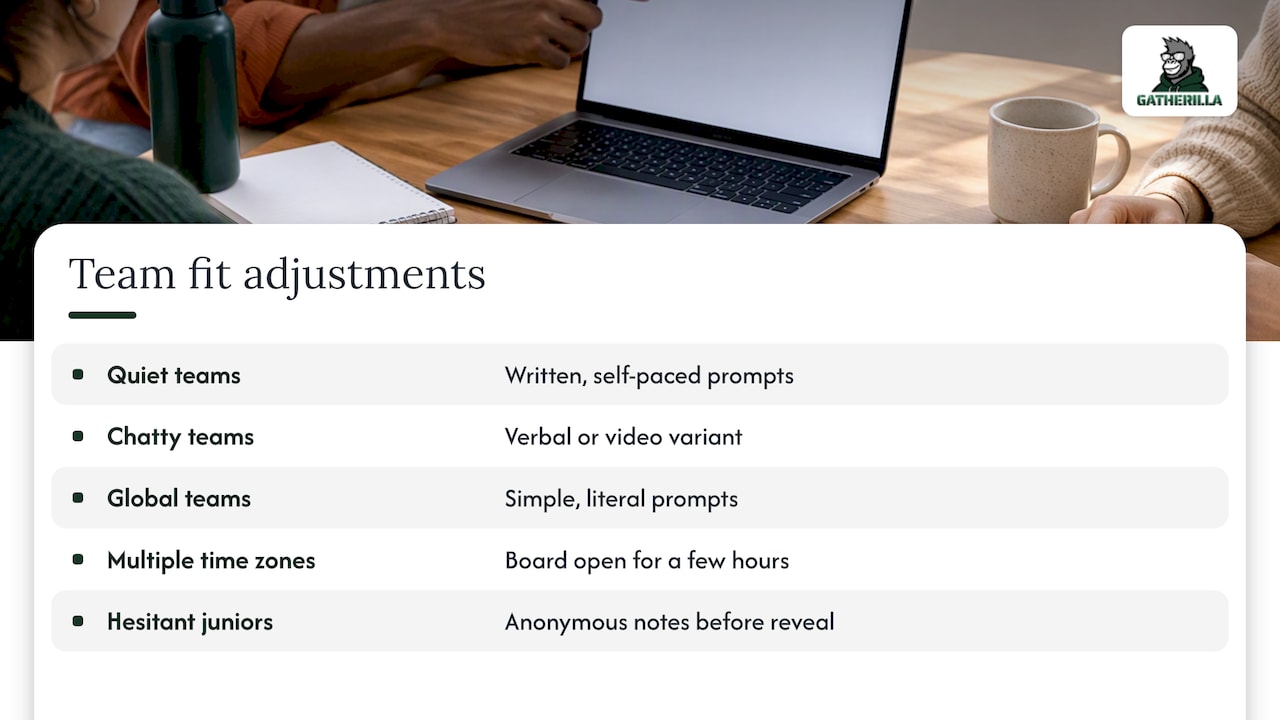
A template built for one team rarely fits another without a few changes. A team that leans quiet and task-focused usually does better with a written prompt they can answer at their own pace, while a team that’s naturally chatty gets more out of a verbal or video-based variant of the same activity.
Language and humor matter too. A prompt built around idioms or pop culture references can leave international teammates guessing, so simple, literal prompts travel better across a global team. If your team spans multiple time zones, favor asynchronous-friendly formats, like a board people can contribute to over a few hours, instead of a strict live-only activity.
Consider hierarchy as well. In teams where junior staff are hesitant to speak first, anonymous sticky notes (no name attached until reveal) can surface more honest responses than a live round-robin. For teams that already know each other well, skip generic “two truths” formats and lean into specific, in-joke-friendly prompts that reflect shared history.
Small adjustments, like swapping a generic map template for one centered on your team’s actual office locations, or rewording a prompt to reference a recent team milestone, make a borrowed template feel built for your group rather than copied from a gallery.
Running Miro icebreakers alongside your other meeting tools
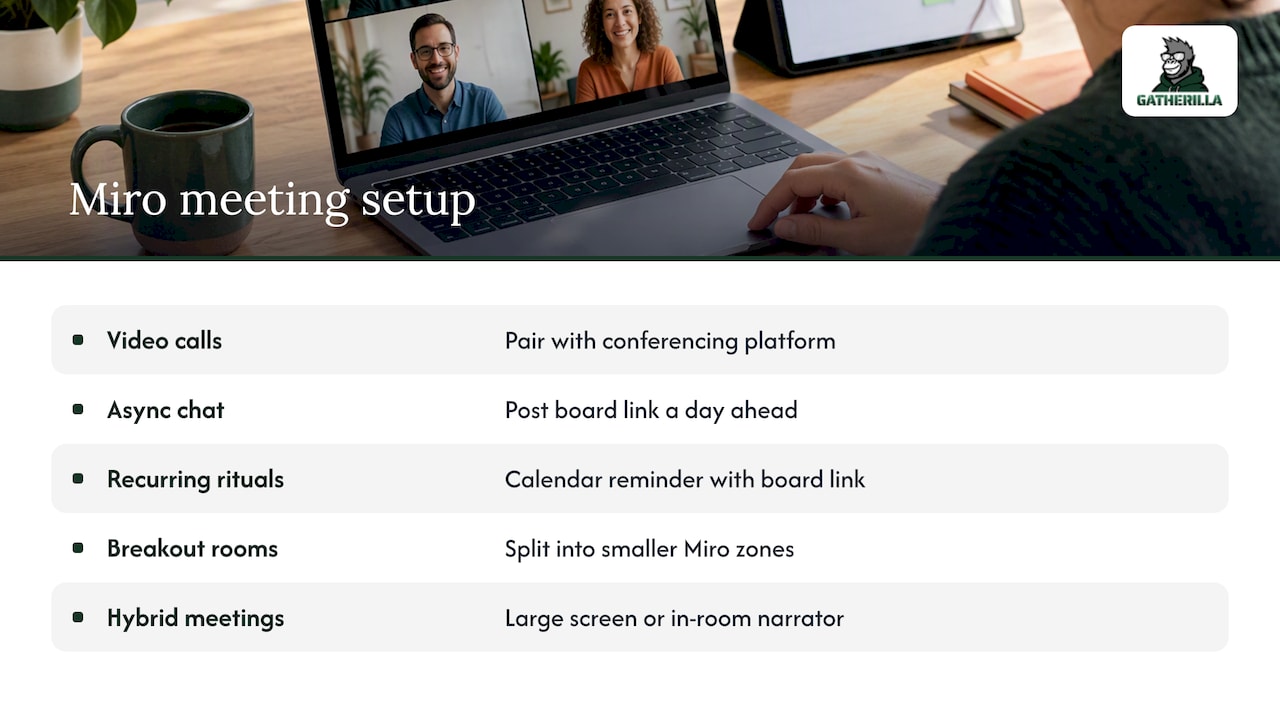
Miro works as a shared canvas, not a video or audio tool, so pair it with whatever conferencing platform your team already uses. Share the board link in the meeting invite or drop it directly in chat once the call starts, and keep video on if your team’s norms support that, since facial reactions add a layer of connection that sticky notes alone can’t capture.
For teams using chat-based platforms between meetings, posting a board link a day ahead lets people pre-fill a response asynchronously, which helps anyone who struggles to think on the spot during a live call. Calendar integrations also help: setting a recurring calendar reminder with the board link attached removes the “which board do we use again” friction that kills momentum on recurring rituals.
If your meeting platform supports breakout rooms, split a large group into smaller Miro zones or separate frames so each subgroup isn’t staring at forty sticky notes at once. For hybrid meetings where some people are in a conference room and others are remote, make sure the in-room screen is large enough for everyone to see cursor movement, or assign one in-room person to narrate what’s happening on the shared screen.
Measuring whether your icebreakers are actually working
An icebreaker that nobody enjoys isn’t worth the five minutes, so track a few simple signals instead of assuming it’s working. Watch participation rate: how many people actually posted a sticky note or voted versus how many stayed silent. A consistent drop-off in the same few people is worth a private check-in rather than a bigger or flashier activity.
Chat and camera engagement right after the icebreaker is another useful signal. Teams often talk more freely for the next few minutes once the ice is actually broken, so a facilitator who pays attention will notice whether that carries into the rest of the agenda or fades immediately.
Team-based interventions paired with recurring reminders have been shown to produce sustained improvements in psychological safety, which suggests the real measure of success isn’t any single session but whether the habit holds over weeks. A short pulse survey question, like asking people to rate how comfortable they felt speaking up, run quarterly, gives you a trend line instead of a one-off impression. If scores climb alongside consistent participation, the ritual is doing its job.
Why we think the daily ritual matters more than the perfect icebreaker
Most advice on icebreakers treats them as one-off events: pick a great activity, run it well, move on. We think that misses the real lever. A single well-run icebreaker creates a nice moment, but the research on mutual humanization points to repeated, small self-disclosures over time, not a single clever prompt.
We built our daily challenges and quick multiplayer games around that idea: zero downloads, a few minutes, and a recurring slot in the week rather than a special occasion. A simple cadence works well: a 3-minute warmup on Monday, a trivia round midweek, and a gratitude prompt on Friday.
— Thomas
Try browser-based team games that fit into every meeting
We built Gatherilla so teams never have to choose between skipping connection time and adding another download or setup step. Our games run entirely in the browser, work with whatever video tool your team already uses, and take minutes to launch during a meeting.

- No downloads or accounts are required for participants to join a session.
- A daily challenge keeps engagement going between scheduled meetings.
- Plans range from a free tier to Premium starting around $0.50 to $1.00 per seat per month, depending on billing cycle.
Check our pricing page or visit Gatherilla to see which plan fits your team’s size and start a free session today.
FAQ
Do icebreakers actually work for remote teams?
Research points to yes: a longitudinal Organization Science study based on seven years of research found that mutual humanization through self-disclosure strengthens psychological safety in remote work, and a 2026 survey of 300 employed individuals found that casual conversation during and outside of meetings significantly increases psychological safety and engagement. Short, structured prompts give people a low-stakes way to build that connection.
What is a Miro team in this context?
A “Miro team” simply refers to a group of colleagues collaborating together on a shared Miro board, whether that’s a department, a project group, or an entire company running a shared activity. It isn’t a special product feature, just a term for the people working on the same canvas.
Where can I find ready-made Miro icebreaker templates?
Miroverse is the main gallery for browsing icebreaker templates by category, and you can gauge quality by checking usage counts and how clearly the instructions are written. Facilitator guides like the one covering the Character Mix & Match icebreaker also walk through exact timing and setup steps.
Were Miro icebreaker templates discontinued?
No, Miro continues to offer icebreaker templates through its template gallery and Miroverse community library. If a specific template link stops working, searching the gallery by category, like “icebreaker” or “team building,” will surface current equivalents.
Sources
- Repatterning interactions in remote work environments: mutual humanization and psychological safety (Organization Science)
- Study on online meeting behaviors (2026)
- Character Mix & Match Icebreaker for Miro | Facilitator School