

25 Icebreakers for Training Sessions That Actually Work

The fastest shortlist: use One-Word Check-In for groups of 10 or fewer, Two Truths and a Lie for mixed groups of 11–30, and a live poll or quick trivia rounds for 100+ participants or fully virtual sessions. Classic icebreakers like these remain staples because they are low-prep, scalable, and easy to adapt for any format.
Before you pick one, run through this 30-second check:
- Group size: Under 10, 11–30, or 30+?
- Time available: Can you spare 2 minutes or 10?
- Energy and comfort level: Are participants strangers, or do they already know each other?
Key Takeaways
The most effective icebreakers for training sessions are short (5–10 minutes), matched to group size and modality, and debriefed immediately to connect the activity to learning objectives.
| Point | Details |
|---|---|
| Match activity to group size | Use verbal rounds for under 10, movement or bingo for 11–30, and polls or trivia for 100+. |
| Keep it to 5–10 minutes | Longer icebreakers lose the room; timebox each contribution and move on. |
| Always debrief | One question connecting the opener to the session topic turns a warm-up into a learning moment. |
| Build in inclusion | Offer camera-off, anonymous poll, and typed-response options so every participant can engage. |
| Plan for remote and hybrid | Open the virtual room early, use a soft opener, and have a chat-based fallback ready. |
| Use Gatherilla for scale | For virtual or hybrid groups of 15+, Gatherilla’s browser-based games run without downloads and track engagement automatically. |
Table of Contents
- Why icebreakers matter in training sessions
- How to choose the right icebreaker in under a minute
- A copy-ready activity bank for trainers
- Facilitation tips that make icebreakers land
- Running icebreakers remotely and in hybrid rooms
- What experienced facilitators actually get wrong
- Gatherilla makes remote icebreakers easy to run at scale
- Sources
Why icebreakers matter in training sessions
A training session that opens cold rarely recovers. Participants who hold back in the first few minutes tend to stay quiet for the rest of the session, and that silence costs you the participation data you need to calibrate your delivery.
Stat to know: Participants who speak within the first five minutes are about three times more likely to stay engaged for the full session, and interactive tools like polls and chat can push engagement rates above 85% in large events.
The practical benefits go beyond a warm feeling in the room:
- Rapport: Shared laughter or a surprising personal fact lowers social risk fast.
- Faster readiness to learn: Participants who feel seen settle into content more quickly.
- Audience diagnostics: A well-chosen opener tells you who is in the room, what they already know, and where energy is sitting before you commit to a pace.
- Psychological safety: When the facilitator models vulnerability first, the group follows.
For sales team icebreakers specifically, a quick competitive trivia round or a “best cold-call story” prompt also warms up the competitive instinct you want active during skills practice.
How to choose the right icebreaker in under a minute
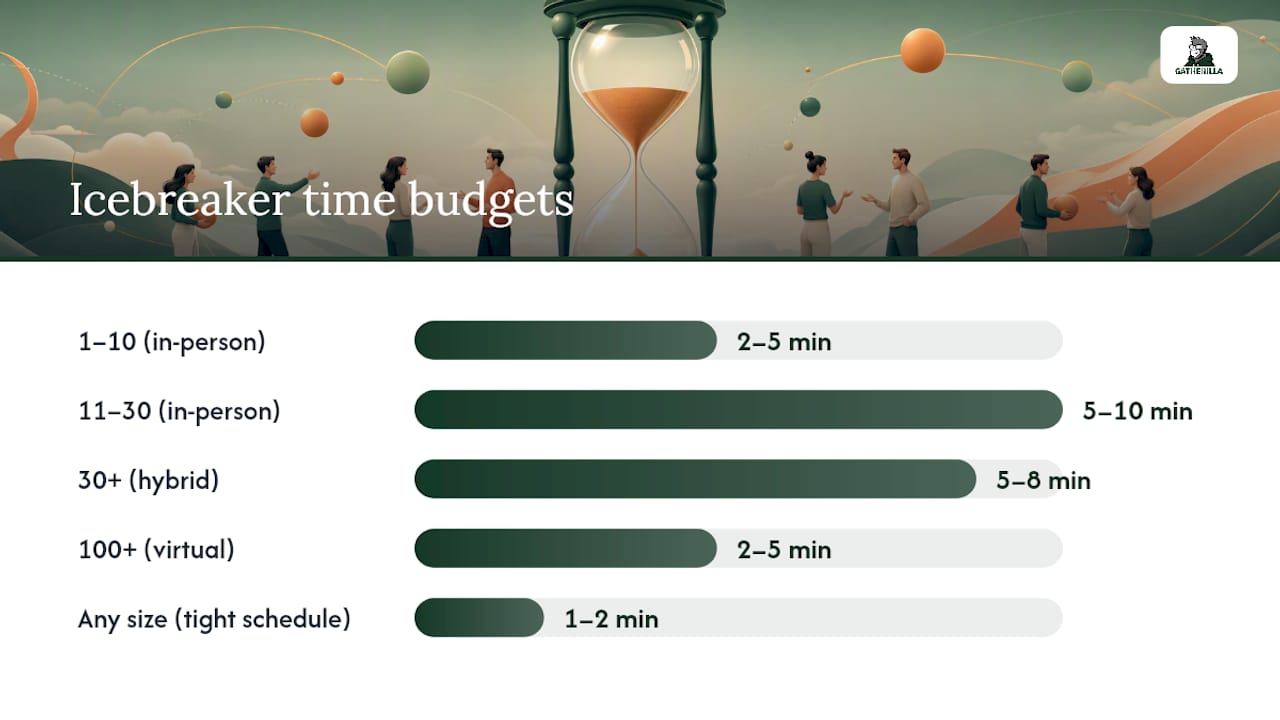
The matrix below covers the four variables that matter most. Cross-reference your situation and you have a shortlist in seconds.
| Situation | Best format | Time budget |
|---|---|---|
| 1–10 participants, in-person | Round-robin verbal (One-Word Check-In, Two Truths) | 2–5 min |
| 11–30 participants, in-person | Movement-based (Four Corners, Human Bingo) | 5–10 min |
| 30+ participants, hybrid | Poll + breakout pair-share | 5–8 min |
| 100+ participants, virtual | Live poll, emoji reaction, or quick trivia | 2–5 min |
| Any size, tight schedule | One-question chat prompt or emoji check-in | 1–2 min |
Accessibility and inclusion checklist before you run anything:
- Offer a camera-off option for virtual sessions.
- Use anonymous polls when the topic is sensitive or the group is new.
- Keep language simple and avoid idioms for multilingual groups.
- Enable live captions on your video platform.
- Never require physical movement without offering a seated or typed alternative.
Sample pairings that work well together:
- 5-minute energizer + 10-minute pair-share: Open with Four Corners to surface opinions, then send pairs to breakout rooms to discuss their position for 3 minutes before reporting back.
- 2-minute poll + 5-minute debrief: Run a quick poll on a topic-relevant question, display results, and spend 5 minutes unpacking what the spread tells you about the group.
- 1-minute emoji check-in + full group share: Ask everyone to drop an emoji in chat that represents their energy level, then call on two or three people to explain theirs.
Pro Tip: Prepare 3–5 icebreaker variants and a fallback poll before every session. Variation keeps repeat audiences engaged, and a fallback prevents dead air when an activity does not land.
A copy-ready activity bank for trainers
Each card below includes duration, group size, materials, three facilitator steps, and a virtual or hybrid variation. Pull any card directly into your session plan.
Quick openers (1–5 minutes)
## 1. One-Word Check-In
Time: 1–3 min | Group size: 2–20 | Materials: None | Cost: $0
- Ask participants to think of one word that describes how they are arriving to the session (energy, mindset, or mood).
- Go around the room or call on each person by name.
- Thank each response without evaluating it.
Virtual variation: Ask everyone to type their word in chat simultaneously on your count of three. Read a few aloud.
## 2. Two Truths and a Lie
Time: 5–8 min | Group size: 5–25 | Materials: None | Cost: $0
- Each participant prepares two true statements and one false one about themselves.
- They share all three; the group votes on which is the lie (show of hands, chat, or a poll).
- The participant reveals the answer and adds a sentence of context.
Virtual variation: Use your platform’s polling tool to collect votes before the reveal. Works well for icebreakers for webinars with groups up to 30.
## 3. Emoji Check-In
Time: 1–2 min | Group size: Any | Materials: Chat function | Cost: $0
- Post a prompt in chat: “Drop an emoji that shows how you’re feeling right now.”
- Give 30 seconds for responses.
- Call on two or three participants to explain their choice.
In-person variation: Write emojis on a whiteboard and ask participants to point or walk to their pick.
## 4. Quick Poll
Time: 2–4 min | Group size: Any | Materials: Poll tool | Cost: $0
- Prepare a single topic-relevant question with 3–4 answer options before the session.
- Launch the poll as participants arrive or at the session open.
- Display results and spend 60 seconds noting what the spread reveals.
Best for: Virtual workshop icebreakers and large-group diagnostics. Short activities like polls lower barriers because they require minimal explanation and never put anyone on the spot.
## 5. Rose, Bud, Thorn
Time: 3–5 min | Group size: 5–20 | Materials: Sticky notes (in-person) | Cost: Under $2
- Ask each participant to share one positive from the past week (rose), one challenge (thorn), and one thing they are looking forward to (bud).
- Go around the room or use a shared digital board.
- Acknowledge patterns you notice across the group.
Virtual variation: Use a shared Miro or Google Jamboard with three color-coded sticky note columns.
Introductions (5–10 minutes)
## 6. Human Bingo
Time: 8–10 min | Group size: 10–40 | Materials: Printed or digital bingo cards | Cost: Under $5 to print
- Distribute bingo cards where each square contains a trait or experience (“has worked remotely,” “speaks two languages,” “has run a marathon”).
- Participants circulate and find someone who matches each square, writing that person’s name in it.
- First to complete a row calls “Bingo!” and introduces the people they found.
Virtual variation: Share a digital bingo card via Google Slides or a shared doc; participants use the chat to find matches. Works well for icebreakers for corporate training with new cohorts.
## 7. Show and Tell
Time: 5–10 min | Group size: 5–20 | Materials: Any personal object | Cost: $0
- Ask participants to grab one object near them that represents something about their work or personality.
- Each person holds it up and gives a 30-second explanation.
- Invite one follow-up question from the group per person.
Virtual variation: Run this as a virtual show and tell where participants hold items up to their camera. Keeps energy high and reveals personality fast.
## 8. Fill-the-Gap Pair Share
Time: 5–7 min | Group size: Any (pairs) | Materials: One prompt | Cost: $0
- Post a sentence starter: “The last time I learned something new at work, I felt _____ because _____.”
- Pair participants (breakout rooms virtually) and give them 3 minutes to share.
- Bring the group back and ask two or three pairs to share one thing they heard.
Best for: Reflective training workshop icebreakers that connect directly to learning goals.
Energizers (3–8 minutes)
## 9. Four Corners
Time: 5–8 min | Group size: 10–50 | Materials: Four labeled signs or slides | Cost: $0
- Label four corners of the room (or four slides) with options: “Strongly Agree,” “Agree,” “Disagree,” “Strongly Disagree.”
- Read a statement relevant to the training topic. Participants move to their corner or vote via poll.
- Ask one person from each corner to explain their position.
Four Corners reliably increases movement, thinking, and connection and gives you real-time insight into where the group stands before you dive into content. Virtual variation: Replace corners with a four-option poll or breakout rooms labeled by position.
## 10. Virtual Minute to Win It
Time: 3–5 min | Group size: Any | Materials: Browser-based game or simple challenge | Cost: $0–varies
- Announce a 60-second challenge (stack objects on your desk, find something blue, type a word backward in chat).
- Set a visible timer.
- Celebrate the winner and move directly into the session.
Best for: High-energy openers in virtual workshops where you need to shift the group from passive to active fast.
## 11. Remote Team Scavenger Hunt (Micro Version)
Time: 5–7 min | Group size: 10–50 | Materials: A short list of items | Cost: $0
- Share a list of five items participants can find in their home or workspace (a book, something green, a mug).
- Give 90 seconds to gather items and return to camera.
- Ask two or three participants to explain one item’s significance.
A remote scavenger hunt works especially well for onboarding cohorts or new-hire training days.
Reflective and topic-tied openers
## 12. One Question, One Minute
Time: 3–5 min | Group size: Any | Materials: None | Cost: $0
- Pose a single question tied directly to the training topic: “What’s one thing you hope to walk away with today?”
- Give participants 60 seconds to write their answer privately.
- Call on three or four people to share; capture themes on a whiteboard or shared doc.
Best for: Icebreakers for sales meetings or skills-based training where you want to surface expectations before you set the agenda.
## 13. Word Association
Time: 2–3 min | Group size: Any | Materials: Chat or whiteboard | Cost: $0
- Say one word related to the training topic (e.g., “negotiation,” “feedback,” “data”).
- Ask participants to type the first word that comes to mind in chat simultaneously.
- Read a handful of responses aloud and note any surprising patterns.
## 14. Two-Minute Sketch
Time: 4–6 min | Group size: 5–25 | Materials: Paper and pen | Cost: $0
- Ask participants to draw (in two minutes) how they feel about the topic you are about to cover.
- Invite volunteers to hold up their sketch and explain it in one sentence.
- Use the sketches to gauge prior knowledge and anxiety levels.
Whole-group formats for 100+ or large virtual events
## 15. Live Trivia Round
Time: 3–5 min | Group size: 50–500+ | Materials: Poll or trivia tool | Cost: $0–varies
- Prepare three topic-relevant trivia questions with multiple-choice answers.
- Launch each question via your poll tool and display a live leaderboard or results bar.
- Reveal answers with a brief explanation that ties each to the session content.
Best for: Icebreakers for webinars and large-scale corporate training events. A leaderboard adds friendly competition without requiring anyone to speak.
Pro Tip: For icebreakers for remote training with 50+ participants, always have a chat-based fallback ready. If your poll tool lags, a simple “type your answer in chat” keeps momentum going.
Facilitation tips that make icebreakers land
The single most important rule: state the purpose, model the activity yourself first, and make participation optional. When you go first, you lower the social risk for everyone else. When you explain why you are doing the activity, participants stop wondering if it is a waste of time.
Do:
- Keep the activity to 5–10 minutes maximum. Longer than that and it starts to feel like the main event.
- Timebox each person’s contribution (30–60 seconds per person for small groups; polls or chat for large ones).
- Debrief immediately after. Connect what just happened to the session’s learning objectives.
Don’t:
- Force anyone to share personal information.
- Choose activities that require physical ability without offering an alternative.
- Run the same opener with the same group twice in a row.
Debrief questions to connect the icebreaker to learning
A good debrief takes 2–3 minutes and turns a fun opener into a learning moment:
- “What did you notice about the range of responses in the group?”
- “How does what you just shared connect to what we’re here to learn today?”
- “What surprised you about your own answer?”
- “Where do you see this showing up in your day-to-day work?”
- “What’s one thing you want to remember from what you heard?”
Common pitfalls and quick fixes
- Overrun: Set a visible timer and stick to it. Announce the time limit before you start.
- Silence: If no one responds, answer the question yourself first, then call on someone by name with a warm tone.
- Exclusion: Avoid activities that assume everyone can stand, move freely, or speak fluently. Always offer a typed or seated alternative.
- Mismatch: A high-energy physical game before a sensitive topic lands badly. Match the activity’s energy to what follows.
Running icebreakers remotely and in hybrid rooms
Remote and hybrid icebreakers work when you plan for modality-specific triggers and build in a fallback before the session starts.
The most reliable tool patterns for virtual contexts:
- No-download browser interactions: Polls, chat prompts, and emoji reactions require nothing from participants beyond a browser tab.
- Breakout-compatible formats: Pair-shares and small-group discussions work in any platform’s breakout feature.
- Chat-first options: Asking everyone to type simultaneously removes the awkward “who goes first” problem entirely.
- Soft openers before the session officially starts: Open the virtual room 5–10 minutes early and post a low-stakes question in chat. Participants practice the platform tools while warming up socially, which reduces technical friction during the main session.
Pro Tip: For hybrid rooms, always give remote participants a way to respond that does not depend on audio. A chat prompt or poll keeps them in the conversation even when the in-room microphone setup is imperfect.
A concrete remote run-flow (5 steps)
- T-10 minutes: Open the virtual room early. Post a chat prompt: “Drop your city and one emoji in chat.”
- T-0 (session open): Launch a 2-minute poll on a topic-relevant question. Display results as participants finish joining.
- Minutes 2–7: Run your main icebreaker (Two Truths and a Lie for groups under 25; Four Corners poll for larger groups).
- Minutes 7–9: Debrief with one question that connects the opener to the session topic.
- Minute 9: Transition: “Here’s what your responses tell me about where we’re starting today…”
For teams that run recurring virtual training or want to skip the setup entirely, Gatherilla offers browser-based multiplayer games and icebreaker activities that work across all video conferencing platforms with no downloads required. It fits naturally into step 3 of the run-flow above, especially for large-group remote training where managing a live activity manually gets complicated fast.
What experienced facilitators actually get wrong
The conventional wisdom says “just pick something fun and keep it short.” That is mostly right, but it misses the part that separates a forgettable opener from one that actually shifts the room.
The real mistake is treating the icebreaker as separate from the session. When you debrief it, even briefly, you turn a social warm-up into a diagnostic tool and a learning moment. Participants start connecting with each other AND with the content before you have even introduced your first slide.
The second thing trainers underestimate is the value of going first. Modeling the activity yourself, with a real and slightly vulnerable answer, does more for psychological safety than any carefully worded instruction. Participants read the room before they read the prompt.
Finally, adapt freely. The activities in any list, including this one, are starting points. A Four Corners activity about negotiation tactics lands differently with a sales team than with a group of new managers. Change the statements, change the framing, keep the structure. Your participants will not know the difference, and the activity will fit your room instead of fighting it.
Gatherilla makes remote icebreakers easy to run at scale
Running a live icebreaker for 50 remote participants without the right tool is a coordination problem. Someone’s audio cuts out, the poll takes three minutes to load, and by the time you recover, the energy you were building is gone.

Gatherilla is built for exactly that moment. It is a browser-based platform with no downloads required, so participants join from any device in seconds. The game library includes multiplayer icebreakers, trivia rounds, and daily challenges that work across Zoom, Teams, Google Meet, and any other video conferencing tool your organization uses. For HR managers and team leaders running recurring training sessions, the analytics dashboard shows who engaged and how, so you can adjust future sessions based on real participation data rather than guesswork.
It fits best when your group is 15 or more, your session is virtual or hybrid, and you want something that runs itself while you focus on facilitation. Start with Gatherilla to see the full game library and find the right fit for your next training session.
Sources
- Icebreaker Questions for Online Events: 15+ Ideas
- Slidea: Top Icebreaker Questions for Workshops 2025 Guide
- 23 Webinar Ice Breakers to Engage Learners
- How to Use the Four Corners Activity to Kick Off Any Workshop or Training Session - Teri C Brooks, M.Ed.
- 14 fun icebreakers for training sessions