

5 Minute Browser Only Icebreaker Bingo for HR Managers, No Downloads

Icebreaker bingo, run right, is a browser-only game where every attendee gets a card and a shared link, plays live in chat or a poll while the meeting is on camera, and needs zero downloads or apps. Open the link, drop it in chat two minutes before your call starts, and you’re playing. This format suits HR teams who need a short connection ritual that works well in typical meetings.
TL;DR:
- Use a themed bingo card with a shareable browser link and keep a plain-text backup ready to counteract firewalls or loading issues.
- For groups under 10, spoken answers or chat are ideal, while larger teams (10-40) should rely on chat; over 40, polls or reactions enhance participation.
- Hybrid meetings benefit from a designated moderator, a single response channel, and explicit talking and camera policies to ensure remote engagement.
- Customizing bingo cards with recent team jokes or inside references significantly boosts engagement and makes the game a lasting team ritual.
- Browser-based bingo scales well to large groups because multiple players participate simultaneously, requiring no downloads or turn-taking, unlike trivia or other formats.
Table of Contents
- How Do You Set Up Icebreaker Bingo for a Meeting?
- Which Participation Mechanism Should You Use?
- Ready-to-Run Prompts and Card Ideas for Icebreaker Bingo
- How Do You Run Icebreaker Bingo in Hybrid Meetings?
- Sample Run of Show for Icebreaker Bingo
- Why Browser-Based Bingo Actually Scales for Remote Teams
- Try Icebreaker Bingo With Gatherilla
- Where to Find More Icebreaker Templates and Hosting Tips
- Sources
How Do You Set Up Icebreaker Bingo for a Meeting?
You can prep this in under five minutes, and most of that time is just deciding which mechanism to use once you’ve picked a card.
- Pick or generate a card. Choose a themed bingo card (onboarding, monthly all-hands, remote culture) and copy the shareable browser link. No app, no login wall for players.
- Check your platform controls first. Confirm chat is open, polls are enabled if you’re using them, and breakout rooms are configured before the meeting starts, not during it. A platform-neutral hosting playbook recommends verifying these controls ahead of time and having a single backup ready.
- Paste the join link a few minutes early. Drop it in chat with one line stating camera policy (“cameras optional, chat is how you play”) so latecomers aren’t scrambling.
- Keep a plain-text backup. If a link gets blocked by a corporate firewall or a poll fails to load, have the prompts typed out so you can paste them straight into chat and keep moving.
That fourth step matters more than it sounds. Corporate networks block browser games more often than hosts expect, and a typed backup means you never lose the room.
Which Participation Mechanism Should You Use?
- Under 10 people: spoken round or open chat. Fast, personal, low setup.
- 10 to 40 people: chat is your best default. SessionLab’s research on short virtual icebreakers maps larger groups to chat and poll formats specifically because they don’t bottleneck on one speaker.
- 40+ people, all-hands scale: polls or reactions, since chat can scroll too fast to track. Zoom’s own guidance on virtual team building points to chat-based methods precisely so everyone can participate without waiting their turn.
- Any size, split subgroups: breakout rooms, if you have time to debrief afterward.
Your host script should be almost boring in its simplicity: “Type your square number and one detail in chat. I’ll go first.” Model an answer yourself before asking anyone else to go. It removes the awkward five seconds of silence every time.
If polls fail to load or breakout rooms won’t launch, fall back to a chat waterfall: ask people to reply in order, tag the next person, and keep going.
Pro Tip: Make cameras optional and say so out loud. People engage faster in chat when they aren’t worried about how they look on video.
Ready-to-Run Prompts and Card Ideas for Icebreaker Bingo
You don’t need to write your own squares from scratch. Pull from categories and swap in details specific to your team.
Icebreaker facts: “Has visited 3+ countries,” “Owns a pet with a weird name,” “Can play an instrument,” “Has run a marathon (or refuses to).”
Onboarding prompts: “Started a job during a pandemic,” “Worked in a totally different industry before this one,” “Has met the CEO,” “Knows someone else on this call outside work.”
Scavenger hunt items: “Has a plant on their desk,” “Owns more than 3 coffee mugs,” “Has a book visible in their space,” “Can show a houseplant on camera.”

Meeting-buzzword squares: “Someone says ‘synergy’,” “Someone says ‘circle back’,” “Someone’s dog barks,” “Someone joins from their car.”
For timing, a quick five-minute round works fine with a small card, maybe a 3x3 grid, and one win pattern: any full row. A longer fifteen-minute round supports a full 5x5 card with multiple patterns (row, column, four corners) and room for two or three follow-up questions once someone shouts bingo.
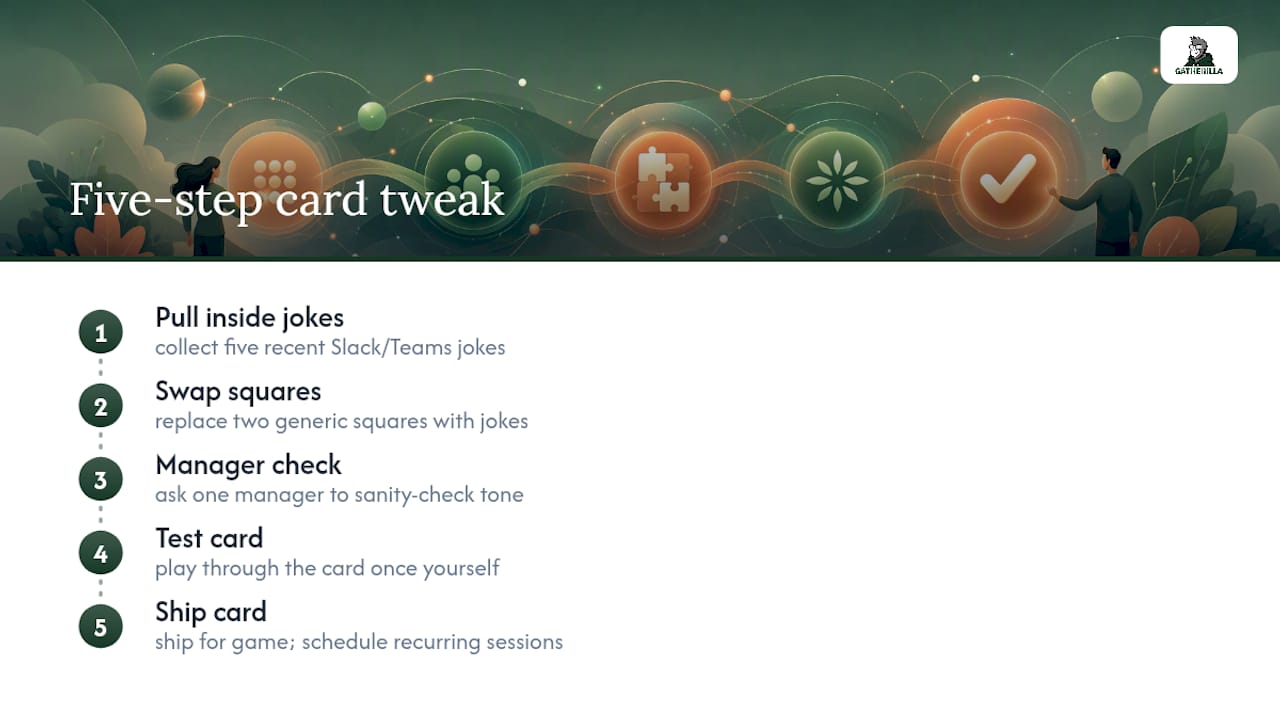
To adapt prompts to your team’s actual culture, run this five-step tweak before your first game: pull five recent Slack or Teams inside jokes, swap two generic squares for them, ask one manager to sanity-check tone, test the card yourself once, then ship it. Oak Innovation’s research on virtual bingo notes that customized cards and small prizes measurably increase engagement over generic templates, and recurring scheduling helps it stick as a ritual rather than a one-off.
How Do You Run Icebreaker Bingo in Hybrid Meetings?
Hybrid is where most icebreakers quietly fail, because in-room laughter drowns out the remote chat window nobody in the room is watching.
- Assign a room moderator. One in-room person’s job is to read chat aloud and repeat remote comments so nobody’s response gets lost. SessionLab’s guidance on hybrid formats specifically credits this role with improving remote inclusion.
- Keep one shared response channel. Don’t let the room shout answers while remote types them. Pick chat as the single source of truth and have the moderator relay it.
- Give screen-reader users extra time. Add 30 to 60 seconds to your round timer, and read square text aloud rather than relying on visual-only cards.
Pro Tip: Announce accommodations before anyone has to ask for them. “Chat or speak, whichever’s easier” costs you nothing and removes a barrier nobody wants to raise out loud.
Sample Run of Show for Icebreaker Bingo
A five-minute round can follow this exact timing, adapted from the structure in the virtual icebreaker hosting guide:
- 0:00 to 0:30: State the purpose and the response channel. “We’re playing icebreaker bingo, type your answers in chat.”
- 0:30 to 0:45: Model one answer yourself so people see exactly what’s expected.
- 0:45 to 3:30: Play. Watch chat, prompt quiet squares if needed.
- 3:30 to 4:20: Read out one or two standout answers.
- 4:20 to 5:00: Announce the transition to the meeting agenda.
For a fifteen-minute version, run the same opening, extend play to eight minutes, send people into breakout rooms for a three-minute discussion of their favorite square, then regroup for a two-minute debrief. When two people claim bingo at once, just call it a tie and move on. Nobody’s tracking the score card.
Why Browser-Based Bingo Actually Scales for Remote Teams
Most icebreaker formats fall apart past 20 people because they depend on one person talking at a time. Bingo doesn’t have that constraint. Everyone plays their own card simultaneously, which is what makes it work as a “parallel play” activity rather than a turn-taking one, and it’s part of why the format holds up in large, distributed meetings without demanding a skilled facilitator running every move.
That’s the gap most HR teams don’t see until they’ve tried both: a trivia round needs a strong host reading questions and judging answers, while bingo just needs a shared link and a chat window. Gatherilla builds on that structural advantage. Its browser-based multiplayer games need no downloads, run inside whatever video tool your team already uses, and set up fast enough to open cold at the start of a standup. The daily challenge format keeps a rotating icebreaker warm between meetings instead of making bingo a special-occasion event, which is closer to how the games actually stick as a ritual.
If you want to see the range of formats that pair well with bingo for bigger meetings, large-group icebreaker templates cover the all-hands scale case in more depth. After any round, ask two pulse questions: “Did this feel worth the five minutes?” and “Would you play again next week?” That’s enough signal to know if the ritual is landing or needs a refresh.
— Thomas
Try Icebreaker Bingo With Gatherilla
The format this guide describes is a browser-based bingo round that opens with one shared link, needs no downloads, and runs inside whatever meeting tool your team already uses, Zoom, Teams, or Meet included.

If your team runs occasional check-ins, the free tier covers a quick round without commitment. If you’re running recurring rituals across multiple teams, or want reporting on which activities actually land, the paid per-seat plan adds more games, analytics, and priority support. Start with a live round of icebreaker bingo on the Gatherilla team building platform and see how fast your next meeting opens with everyone already talking.
Where to Find More Icebreaker Templates and Hosting Tips
- SessionLab’s virtual meeting icebreakers list durations and group-size guidance for dozens of formats beyond bingo.
- Remote icebreaker games for team leaders covers low-prep alternatives when bingo doesn’t fit the meeting.
- Microsoft Teams icebreakers walks through platform-specific card sharing and breakout setup.
- Virtual team trivia playbook offers a question-based warm-up as a change of pace.
Sources
- Ice breakers for virtual meetings — SessionLab
- Virtual team building — Zoom blog
- Virtual Team Building Bingo: Building Connections Remotely — Oak Innovation