

Daily Trivia for Work: How to Run It So Teams Keep Playing

The best daily trivia for work takes under five minutes, needs no preparation from you, and lets everyone play without sharing anything personal. Most teams that fail with it fail on the routine, not the questions: someone has to write them, post them, tally scores and chase answers, and after two weeks that someone stops. The fix is a format that runs itself. Gatherilla is a browser-based platform with a daily word and trivia challenge, real-time leaderboards and icebreaker games that need no downloads and work with any video conferencing tool, so the habit does not depend on one person’s free time.
Below you will find how to pick a format, how many questions fit in a short meeting, what to ask, how to keep it welcoming, and a four-week rollout you can start this week.
TL;DR
- Daily trivia works when it is short (two to five minutes), low stakes and automatic. Manual question writing is what kills most programs.
- Use shared-knowledge questions, not personal ones, and always make participation optional.
- Run it two ways: a one-question daily challenge people answer on their own time, plus a three to five question round at the start of a meeting.
- Rotate themes weekly and keep a light leaderboard so the competition stays friendly.
- Gatherilla has a free plan, and Premium is listed at $0.50 to $1.00 per seat per month or $5 to $10 per seat per year.
Table of Contents
- Why a daily habit beats an occasional trivia night
- Three formats that work, and who each one fits
- How many questions fit in a short meeting
- Running the daily challenge asynchronously
- What to ask: question types that work at work
- Keeping it welcoming for everyone
- Using daily trivia for onboarding
- A four-week rollout
- Common mistakes
- Where Gatherilla fits
- FAQ
- Sources
Why a daily habit beats an occasional trivia night
A quarterly virtual trivia event gets a burst of attendance and then silence. A daily question does something different: it gives remote colleagues a small, repeated reason to interact that has nothing to do with deadlines. Over a few weeks, people start comparing answers, teasing each other about misses and sharing how they got there. That is the kind of casual contact that offices produce by accident and distributed teams have to build on purpose.
The daily format also lowers the cost of participation. Nobody has to block an hour, dress up or find a quiet room. A single question takes under a minute, so a person who skips Tuesday can come back Wednesday without feeling behind.
There is evidence that a recurring, lightweight format holds up over years. Stanford Medicine’s educational technology group has run a weekly trivia routine since 2018: team members submit questions about colleagues’ accomplishments and learnings, and a 30-minute remote session turns them into a friendly competition. Their team has contributed more than a thousand questions over that time. The takeaway for any team is that the format lasts when the content comes from the work and the people, and when the effort per session stays small.
Three formats that work, and who each one fits
Before you pick questions, pick the shape of the routine. Three formats cover almost every remote and hybrid team.
| Format | Time per day | Best for | What it needs from you |
|---|---|---|---|
| One daily challenge people play on their own time | 1 to 2 minutes | Teams across time zones, shift workers, large companies | A platform that serves the question and keeps score |
| A three to five question opener at a recurring meeting | 3 to 5 minutes | Weekly team meetings, all-hands, onboarding cohorts | A question set and a way for everyone to answer at once |
| A weekly 20 to 30 minute themed round | 20 to 30 minutes per week | Teams that want a real social moment | A host, themes and a scoreboard |
Most teams do best combining the first two. The daily challenge builds the habit, and the meeting opener turns that habit into shared conversation. Gatherilla’s daily word and trivia challenges cover the first, and its multiplayer icebreaker games cover the second, so a team can use both in one place with real-time leaderboards.
How many questions fit in a short meeting
The honest answer is fewer than you think. Allow roughly 30 to 45 seconds per question once you count reading it aloud, answering and revealing the result, and add a minute of buffer for late joiners and banter. That gives you:
- Two minutes: two questions. Enough for a standup opener.
- Five minutes: four or five questions. The sweet spot for a weekly team meeting.
- Fifteen minutes: a full themed round of about ten questions with a short recap.
- Twenty minutes: a main-event round with a tiebreaker, when trivia is the meeting’s agenda item.
If you want ready-made structures for those time boxes, our guides to 15 to 20 minute company trivia and running six work trivia themes in 20 minutes lay out copy-and-paste rounds.
The most common mistake is overloading the slot. Ten questions in a five-minute opener means the meeting starts late and the game starts to feel like a tax. Stop while people still want one more.
Running the daily challenge asynchronously
Async play is how daily trivia survives across time zones and schedules. The pattern is simple:
- Post one question at a predictable time. Morning in the team’s main time zone works for most groups. Consistency matters more than the exact hour.
- Leave the window open all day. Anyone can answer when they sit down at their desk, whether that is 8 a.m. in New York or 9 a.m. in Los Angeles.
- Reveal the answer the next morning with a one-line explanation, so the reveal is itself a tiny moment of learning.
- Keep a running score, weekly rather than all-time. An all-time board is unreachable for new hires within a month, and a weekly reset gives everyone a fresh start.
- Mention the weekly winner in the team channel. A short shout-out is plenty.
Where teams slip is steps 3 and 4. Revealing answers and updating scores by hand is a recurring chore, which is why we built the daily challenge and leaderboards into the platform. Players open a link in the browser, with no download, and play right away. Your part is encouraging people to join, not administering the game.
If your team spans countries, think about the whole communication rhythm around the game, not just the questions. These remote team communication tips cover setting expectations across locations, which applies directly to deciding when your daily question goes out and how long it stays open.
What to ask: question types that work at work
Good workplace trivia uses shared knowledge: things most adults could plausibly know or guess, with no personal disclosure required. That keeps the field level between a new hire and a ten-year veteran and between an engineer and someone in finance.
General knowledge. Geography, science, food, history. These are the safest and work in any company. Multiple-choice versions are quicker and kinder than open-ended ones.
Pop culture and everyday life. Movies, music, sports, brands. Keep them broad. A question only people in one region or age group can answer excludes the others, so mix eras and avoid regional references if your team spans several countries.
Company and industry questions. Founding year, product milestones, how many offices, what a common internal acronym stands for. These double as onboarding content. A new hire learns the business while playing.
Work-world facts. Questions based on public labor data, such as median wages for a given occupation or how long new businesses survive, give people a surprising fact and a reason to talk about their own field.
Team-sourced questions. Ask people to submit questions about the team’s own wins, as the Stanford group does. It builds recognition into the game: the answer to a question is a colleague’s accomplishment.
A workable weekly rotation looks like this:
| Day | Theme | Example prompt style |
|---|---|---|
| Monday | General knowledge | “How many bones does an adult human body have?” (206) |
| Tuesday | Geography or food | Which country grows the most coffee? |
| Wednesday | Company or industry | A milestone from your own history |
| Thursday | Pop culture | Movie or music, spanning decades |
| Friday | Team-sourced | A kudos-based question submitted by a colleague |
If you want a no-prep starting point, we have three copy-paste team trivia questions and a work question of the day guide for the non-trivia days.
Keeping it welcoming for everyone
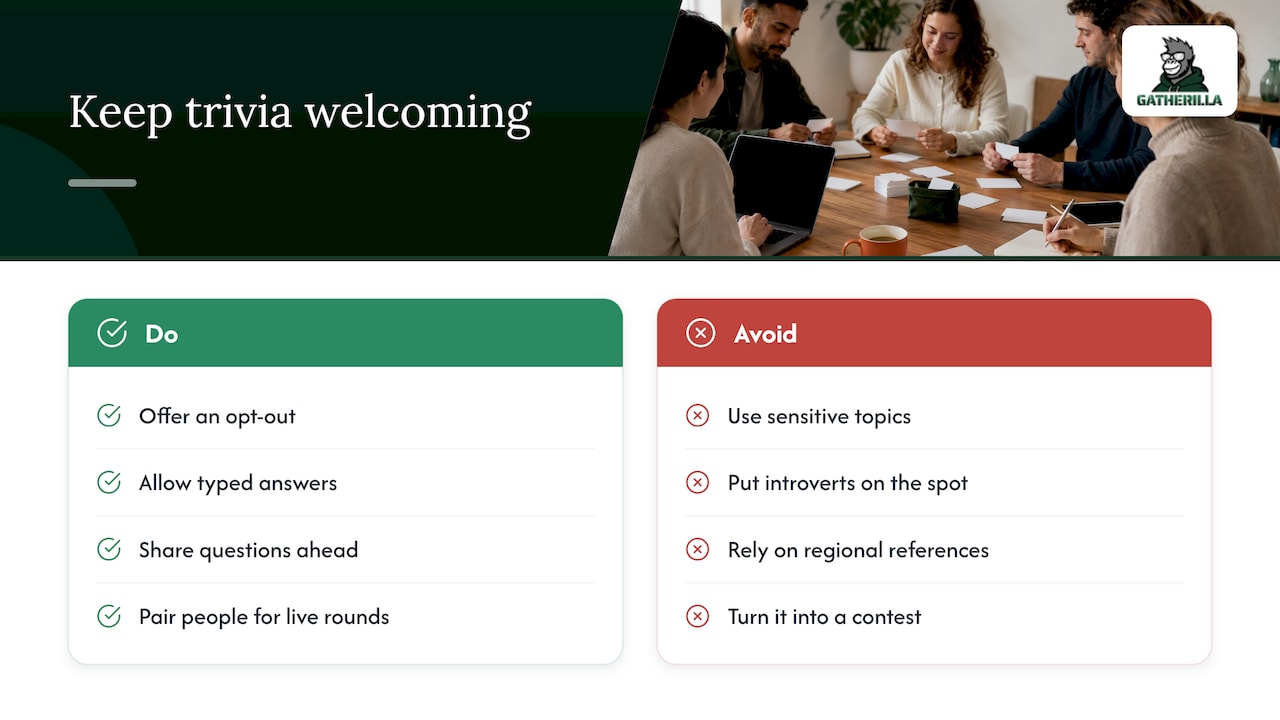
Trivia can go wrong in a quiet way. A competitive question about pop culture from the 1990s makes a 24-year-old feel out of the loop. A “fun fact about yourself” round puts introverts on the spot. A few habits prevent most of this.
Steer clear of sensitive topics. HR guidance on workplace icebreakers advises avoiding religion, politics, romantic relationships, finances, health issues and family planning. Trivia built on shared knowledge avoids these almost automatically.
Make participation optional. The same guidance recommends always offering an opt-out. In a daily format that is built in: nobody has to answer, and a missed day costs nothing.
Give people options in how they answer. Allow typed answers, and consider sharing questions ahead of time for live rounds. Using small groups before whole-group sharing also helps quieter people contribute.
Use teams for live rounds. Pairing people up spreads the pressure, and it pairs new hires with established colleagues, which is useful in onboarding.
Keep the stakes small. Bragging rights are enough. Prizes turn a social ritual into a contest and tempt people to look answers up.
Our piece on building psychological safety in your team goes deeper on why this matters and how to extend it beyond games.
Using daily trivia for onboarding
New remote hires often go days without a casual conversation with anyone outside their immediate manager. Daily trivia gives them a low-pressure way in. A few ideas:
- Add a new-hire round. Questions about company history, product names and team members’ roles teach context while playing.
- Pair the newcomer with a veteran in live rounds so they are never answering alone.
- Invite them to submit a question in their second week, such as a fun fact about their previous city or an industry term. It gives them a voice without asking them to present.
- Show them the leaderboard framing early: weekly resets mean they start level with everyone.
Onboarding is one of the places we hear the “quick setup” benefit matter most: an HR manager can start a game without building anything or asking new employees to install software or sign up for yet another tool. Our virtual team trivia playbook for HR shows a ready-to-run version.
A four-week rollout
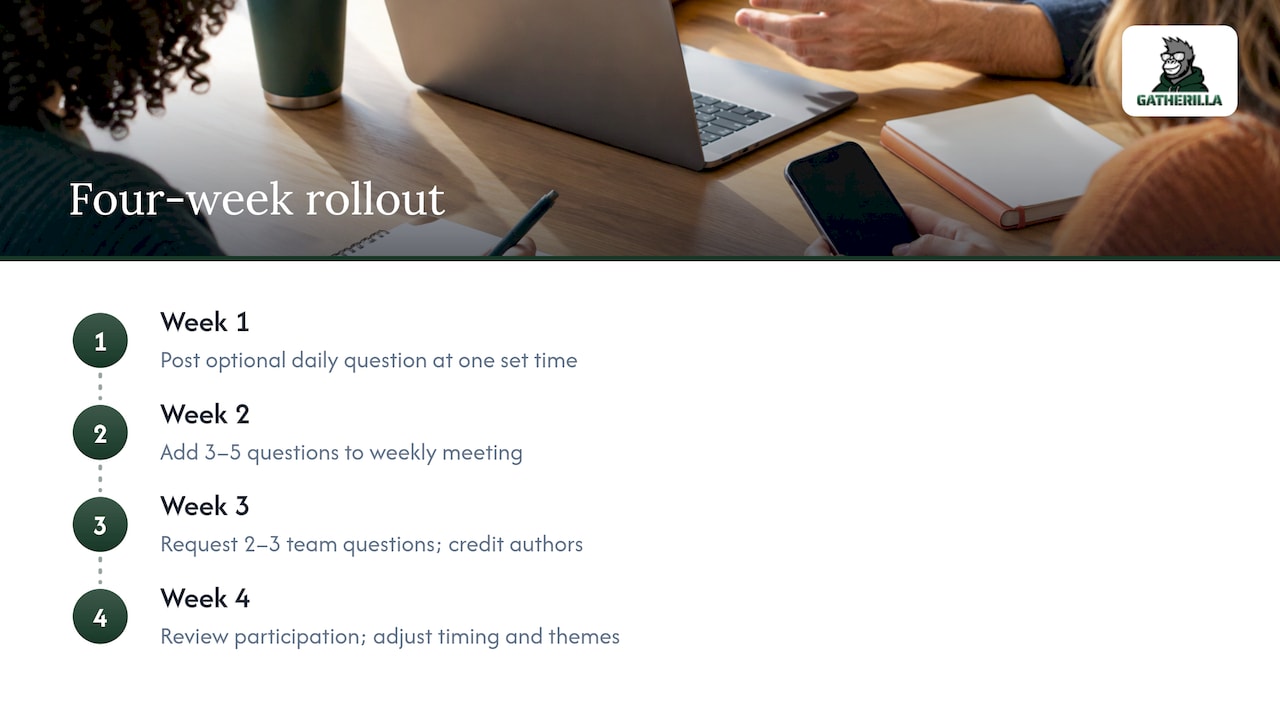
Week 1: Start small. Announce a daily question, explain it is optional, and run it for the whole team. Pick one posting time and keep it.
Week 2: Add the meeting opener. Use three to five questions at your weekly team meeting. Pair people up if the group is large.
Week 3: Introduce themes and team questions. Ask for two or three team-sourced questions. Credit the author when you read them out.
Week 4: Look at participation and adjust. Check who plays, at what time, and which themes get the most reactions. If a time zone is under-represented, move the posting time or extend the window. If a theme falls flat, replace it.
After a month, you will know whether the habit has stuck. Teams that keep going usually do so because the routine costs the organizer almost nothing.
Common mistakes
- Writing every question yourself. It works for two weeks. Use a platform or a rotating question owner.
- Making it too hard. If most people miss most questions, they stop playing. Aim for questions that about half the team can get right.
- Letting one person dominate. Weekly score resets and team play keep it from becoming a contest among the same three people.
- Skipping the answer reveal. The explanation is where the learning and the conversation happen.
- Treating it as mandatory. Required fun is not fun. Invite, do not assign.
- Forgetting hybrid colleagues. Pick a format that works identically in a conference room and on a laptop at home. A browser-based game does.
Where Gatherilla fits
Gatherilla is built for exactly this routine. Teams get a daily word and trivia challenge, customizable multiplayer games for meetings, icebreakers, onboarding games and real-time leaderboards, all running in the browser with no downloads and compatible with every video conferencing tool. The Free plan lets you try it with your team. Premium is listed on our pricing page at $0.50 to $1.00 per seat per month or $5 to $10 per seat per year, and adds more games, reporting and priority support.
If you want to see how it looks for your team, start at gatherilla.com and run your first daily question this week.
Our view on daily trivia
We think engagement is a habit, not an event. Teams do not drift apart because they skipped a quarterly offsite; they drift because there is no small, regular reason to talk to each other. A daily trivia question is that reason: it takes a minute, asks nothing personal, and gives people something to react to.
That is why we focus on zero-preparation games that work in the browser, with no downloads or accounts to slow people down. If starting a game takes more effort than playing it, the habit dies. We also care about recognition that fits company values, so a quick game can become a moment where colleagues notice each other’s work.
Our advice to every HR manager and team lead: start with one question a day, keep it optional, and let the leaderboard reset weekly. Consistency beats ambition every time.
Thomas
FAQ
How long should daily trivia at work take?
Aim for one to five minutes. A single daily question takes about a minute, and a meeting opener of three to five questions fits in about five. Longer themed rounds of 15 to 20 minutes work best weekly, not daily.
What makes a good trivia question for coworkers?
It uses shared knowledge, such as general facts, geography, food or broad pop culture, so anyone can attempt it without revealing personal details. Multiple choice keeps it quick, and a one-line explanation with the answer makes it worth reading. Mixing difficulty means newcomers and veterans both get wins.
Can remote teams in different time zones play together?
Yes. Post one question and keep the window open for a full day so everyone answers at their own convenience, then reveal the answer the next morning. Weekly leaderboard resets keep late-time-zone players competitive.
How do I keep trivia comfortable for everyone?
Avoid sensitive topics like religion, politics, health and finances, make participation optional, and allow typed answers. Using small groups before whole-group sharing helps quieter team members, and keeping stakes to bragging rights prevents pressure.
What does Gatherilla cost?
There is a Free plan, and Premium is listed at $0.50 to $1.00 per seat per month or $5 to $10 per seat per year. Premium adds more games, reporting and priority support. See the pricing page for current details.
Sources
- Inspiration Trivia, Stanford Medicine Educational Technology
- 50+ Best Icebreaker Questions for Work Teams
- Remote Team Communication Tips