

Coffee Chat Games That Actually Get Remote Teams Talking

A coffee chat game works when it’s short, has almost no rules to explain, and gives quiet people a reason to unmute. Games running 15 to 30 minutes reliably get people talking because they replace the awkward “how was your weekend” silence with a structure nobody has to think about. Here’s a shortlist you can run in your next chat, starting today.
- Two truths and a lie — 10 minutes, works for groups of 4 to 10, everyone submits one lie and two facts in chat.
- Three-item scavenger hunt — 5 minutes, unlimited group size, “find something red, something older than you, and a snack” works every time.
- Five-question rapid-fire — 10 minutes, best with 3 to 8 people, one host asks quick personal questions round-robin style.
- Tiny show and tell — 15 minutes, caps out around 8 to 10 people before it drags, one item each from someone’s desk or kitchen.
- Coffee or tea culture poll — 5 minutes, works at any scale, a quick chat poll on drink preference sparks instant side conversation.
- One-photo share — 10 minutes, ideal for 5 to 12 people, everyone drops a phone photo from the last week with zero explanation required.
- Three-minute trivia round — 10 to 15 minutes, scales to large groups with breakout prep, works especially well with a browser-based quiz tool.
That last point matters more than it sounds. Teams that add games to their virtual coffee breaks report better relationship-building than teams that just leave a video call open and hope for conversation.
Key Takeaways
Short, low-friction coffee chat games with rotating hosts and browser-based tools sustain far higher recurring participation than long, ad hoc, or download-heavy formats.
| Point | Details |
|---|---|
| Keep it short | Run games in 15 to 30 minutes; longer sessions quietly turn into meetings people start skipping. |
| Rotate the host | Sharing facilitation duty prevents burnout and keeps the ritual alive past the first few weeks. |
| Match format to group size | Use whole-group chat for 3 to 12 people and breakout rooms for anything larger. |
| Prep two prompts, no more | One host, one clock, one or two questions keeps sessions moving without dead air. |
| Cut setup friction | Browser-based, no-download tools like Gatherilla remove the biggest reason recurring programs stall out. |
Table of Contents
- How To Run A Coffee Chat Game People Actually Show Up For
- A Categorized List Of Low-Prep Coffee Chat Games
- Running Coffee Chat Games When Your Team Is Big Or Scattered
- Choosing The Right Tool For Recurring Coffee Chat Games
- Why Facilitation And Low-Friction Tech Keep People Coming Back
- Sources
How To Run A Coffee Chat Game People Actually Show Up For
Most failed coffee chats aren’t a games problem. They’re a facilitation problem. The game list above only works if someone owns the fifteen minutes and keeps it moving.
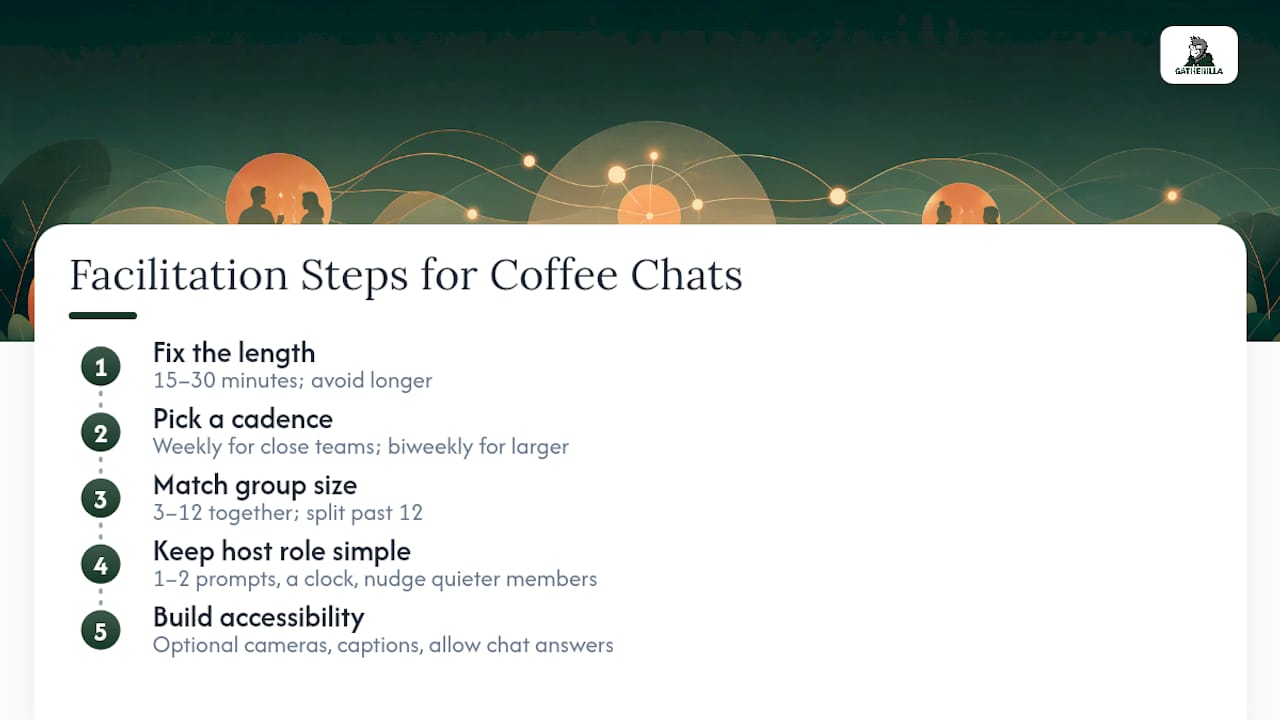
1. Fix the length before you fix anything else. Fifteen to 30 minutes is the sweet spot. Anything longer turns a fun break into another meeting people quietly start avoiding.
2. Pick a cadence and stick to it. Weekly works for close teams; biweekly suits larger or more distributed groups. Rotating who hosts each session keeps the load light and helps the ritual survive past the first month, since one person carrying the whole thing is the fastest way to kill it.
3. Match group size to format. Three to twelve people can run as one conversation. Past twelve, split into breakout rooms; nobody meaningfully bonds in a video call with 30 unmuted strangers.
4. Give the host exactly one job: one or two prompts, a clock, and a soft nudge toward quieter members. A host juggling five discussion threads and a stopwatch will drop the ball on both.
5. Build accessibility in from the start. Make cameras optional, turn on captions, and let people answer in chat instead of out loud. A prompt like “type your answer or say it, whatever’s easier” removes pressure without anyone noticing it’s there.
The most repeatable structure is dead simple: a 30-second intro round, a 10-minute game, and 10 minutes of open chat. That three-part template gives people a clear start and a clear end, which is exactly what a good coffee chat needs and a rambling one lacks.
Pro Tip: Write your two prompts on a sticky note before the call starts. Hosts who improvise questions on the spot lose 3 to 4 minutes to dead air, and dead air is what kills a coffee chat’s momentum for good.
Watch for these red flags: sessions that run long because “we were having fun,” games with rules nobody explained clearly before starting, and any format where one person wins and everyone else just watches. Coffee chats should feel like a shared moment, not a competition with spectators.
A Categorized List Of Low-Prep Coffee Chat Games
Here’s the full working list, organized by category so you can scan for whatever your team needs this week. Each entry gives you the setup, the time, who it fits best, and one variation for hybrid teams mixing in-office and remote folks.
Quick icebreakers
Speed questions. Setup: one host, one list of quick personal questions. Time: 5 minutes. Best for: 3 to 10 people. Hybrid variation: in-office folks answer out loud while remote folks type in chat simultaneously, so nobody’s waiting on a mic.

Virtual I Spy. Setup: everyone looks around their space for an object matching a category (“something you’d never throw away”). Time: 5 minutes. Best for: any group size. Chat-only friendly, no game needed.
Mini-trivia rounds
Three-minute trivia. Setup: five quick questions on a shared theme (company history, pop culture, geography). Time: 10 to 15 minutes. Best for: 4 to 20 people, scales well with breakout prep for larger teams. Hybrid variation: run it as a live browser quiz so remote and office participants compete on the same leaderboard instead of shouting answers over each other.
This or that trivia. Setup: rapid binary choices (pineapple pizza or plain, mountains or beach). Time: 5 minutes. Best for: any size, works great as a simple poll.
Show and tell
Tiny show and tell. Setup: everyone grabs one item from their desk within 10 seconds. Time: 10 to 15 minutes. Best for: 5 to 10 people before it drags. Hybrid variation: in-office team members can hold up items to the camera while remote folks share via a quick photo drop in chat.
Pet or plant parade. Setup: bring your pet or plant to camera for 15 seconds each. Time: 10 minutes. Best for: 6 to 12 people.
Scavenger hunts
Three-item scavenger hunt. Setup: host names three categories, everyone runs to find matching items. Time: 5 to 8 minutes. Best for: unlimited group size. Scavenger-hunt formats are popular specifically because they need zero advance prep and translate well across time zones.

Home office hunt. Setup: find the oldest thing in your workspace, something borrowed, something you’ve had since college. Time: 10 minutes. Best for: 5 to 15 people.
Photo prompts
One-photo share. Setup: drop a phone photo from the last week, no context needed. Time: 10 minutes. Best for: 5 to 12 people, chat-only friendly.
Desk view challenge. Setup: share your current view without moving anything first. Time: 5 minutes. Best for: any group.
Creative micro-challenges
60-second doodle. Setup: draw an assigned word in 60 seconds on paper or a shared whiteboard, others guess. Time: 10 minutes. Best for: 4 to 8 people. Works best with a lightweight shared whiteboard tool rather than chat alone.
Two truths and a lie. Setup: three statements, group votes on the lie. Time: 10 minutes. Best for: 4 to 10 people, chat-poll friendly.
Emoji and gesture games
Emoji story. Setup: retell your weekend using only five emoji, others guess what happened. Time: 5 to 10 minutes. Best for: any size, chat-only.
Charades, remote edition. Setup: act out a word on camera, no talking. Time: 10 minutes. Best for: 4 to 8 people, needs cameras on.
Coffee-themed prompts
Coffee or tea culture poll. Setup: quick poll on drink preference, follow with “what’s your go-to order?” Time: 5 minutes. Best for: any size.
Brew and tell. Setup: show your current drink and rate it 1 to 10. Time: 5 minutes. Best for: any size, camera-optional.
One quick note on naming: if you search “coffee chat games” for inspiration, you’ll bump into single-player narrative titles like Coffee Talk, a story-driven indie game about running a café. That’s a different thing entirely. Nothing wrong with it as a personal game, but it’s not built for group facilitation, and confusing the two categories when planning a team session wastes research time.
Fifteen icebreaker prompts to copy into chat
- What’s the best thing you’ve eaten this week?
- Coffee, tea, or neither?
- What’s a skill you have that has nothing to do with work?
- What’s the last show you binged?
- Window seat or aisle seat?
- What’s on your desk that shouldn’t be?
- Morning person or night owl?
- What’s a word you mispronounced for years?
- What’s your comfort food?
- If you could teleport anywhere right now, where?
- What’s the oldest app still on your phone?
- What’s a hobby you’d pick up if you had more time?
- Sweet or savory breakfast?
- What’s your go-to karaoke song?
- What’s a small win from this week?
Polls and plain chat handle the emoji games, photo prompts, and simple this-or-that rounds fine. Trivia, doodle games, and anything with a leaderboard benefit from a small browser game instead, since keeping score by hand in a video call gets messy fast once more than six people join in.
Running Coffee Chat Games When Your Team Is Big Or Scattered
Whole-group formats work up to about twelve people. Past that, breakouts aren’t optional; they’re the only way anyone actually talks instead of watching a gallery view scroll by.
- Open with 5 minutes together. Host explains the one rule, drops people into rooms.
- Run breakouts for 10 to 15 minutes. Four to six people per room is the reliable range; smaller rooms mean everyone gets airtime.
- Reconvene for 5 minutes. One person per room shares a highlight, host wraps.
Speed coffee rotates people through 3 to 4 minute one-on-one breakout pairings, three or four rounds total, similar to speed networking but with lower stakes. Micro breakout prompts give each room one specific question rather than an open floor, which keeps quieter groups from stalling out in silence. Assign a facilitator per room, even informally, someone whose job is just to ask the prompt and keep time.
For large-group-friendly games, team trivia with breakout prep works well: give each room 5 minutes to agree on answers, then reconvene for a live scoring round. Leaderboard micro-challenges, where each breakout submits one score that feeds into a shared board, keep competitive energy high without anyone waiting through 40 individual turns. Curated show and tell, where each breakout nominates one person to share with the full group, solves the problem of a 30-person show and tell taking an hour.
A moderator can paste this into chat before splitting the room: “Rooms of 5, you have 12 minutes, one prompt: share your most-used emoji and why. Back here at [time].” Simple, copy-pasteable, no explaining required twice.
Choosing The Right Tool For Recurring Coffee Chat Games
Not every game needs software. A quick poll or a show of hands in chat covers this-or-that questions and simple votes just fine. But once you’re running trivia, leaderboards, or anything with a score, the tool you pick decides whether the session runs smoothly or eats ten minutes on setup nobody budgeted for.
Five categories cover most of what teams actually use:
- Polls and reactions built into your video platform, best for 5-minute icebreakers with no extra tool needed.
- Shared whiteboards for doodle games and creative prompts.
- Browser-based multiplayer game platforms for trivia, leaderboards, and recurring challenges.
- Scheduled micro-challenges that run outside the live call, like a daily word game.
- Breakout-capable video platforms, the baseline requirement once your group passes twelve people.
When evaluating any tool in the third or fourth category, check four things: does it require a download (it shouldn’t), can setup happen in under five minutes, does it support your actual group size, and does it give you any read on who’s actually engaging over time.
Gatherilla was built around exactly that checklist. It runs entirely in the browser with no downloads, sets up in minutes, and includes a daily challenge and a battle quiz format designed for recurring team rituals rather than one-off events.
Pro Tip: Test any new tool with three people before rolling it out to the whole team. A five-minute dry run catches setup friction before it becomes a live-call scramble in front of 15 coworkers.
Why Facilitation And Low-Friction Tech Keep People Coming Back
Most coffee chat programs don’t die from a bad idea. They die from friction: a confusing sign-up link, a game with rules nobody explained, a tool that makes half the team install something. Logistical friction is the most common reason recurring coffee breaks quietly stop happening, not lack of enthusiasm.
Browser-based platforms fix the first failure point by removing setup entirely. No download means no IT ticket, no “wait, which link do I click,” no five minutes lost before the game even starts.
Teams that build a connected culture through regular informal touchpoints see measurable gains in productivity and well-being. The mechanism isn’t complicated: people who talk casually work better together.
Start with a monthly 20-minute session to build the habit, then layer in weekly 10-minute micro-challenges once the format feels normal. Track something simple: attendance and one quick reaction poll. That’s enough signal to know if the ritual is working without turning a coffee chat into a metrics project.
Thomas’s three rules for coffee chat rituals that stick
Short is sacred: never let a 15-minute game become a 45-minute meeting. Share the facilitation duty; one host every week burns out and the ritual dies with them. And cut the tech friction wherever you can. Browser-based games remove the single biggest reason people stop showing up. For more structured formats, the remote icebreaker games guide on the Gatherilla blog has additional templates worth borrowing.
— Thomas
Try Gatherilla for coffee chat games your team will actually keep playing
Gatherilla skips the setup tax entirely. Everything runs in the browser, no one downloads anything, and a new game or daily challenge is ready in under five minutes, so your coffee chat doesn’t lose its first ten minutes to tech troubleshooting.

The battle quiz format handles trivia-style rounds with a live leaderboard built in, and the daily challenge keeps momentum going between scheduled sessions without asking anyone to organize anything extra. If you’re managing a distributed team across time zones, the breakout-friendly formats scale from a five-person huddle to a company-wide event without changing tools halfway through. Start with the free tier at Gatherilla and run your first session this week, no credit card, no download, no IT request required.
Sources
- 12 Excellent Ideas for Your Next Virtual Coffee Break
- How to Host Amazing Virtual Coffee Breaks
- Best virtual break ideas to improve workplace engagement
- New Study Reveals Boost in Employee Productivity and Well-Being Among Companies That Foster a ‘Connected Culture’ in Work-from-Anywhere Environment