

Breakout Room Games for Remote Teams That Actually Work
Use short energizers, focused collaboration tasks, and lightweight competitive games. Pick one purpose, hand each group a shared deliverable, and run it for 10 to 15 minutes. That combination covers the three moments distributed teams actually need help with, and it beats generic icebreakers that fizzle after two questions.
- Start-of-meeting energizer: brief prompts that wake people up before the real agenda starts.
- Onboarding or bonding: small-group intros built around a shared doc, not a spreadsheet of trivia.
- Training or problem-solving: a scenario with a deliverable, so the debrief has something to point at.
Examples include a two-truths-and-a-lie sprint with a Google Doc tally, a “desert island” negotiation exercise, and a short virtual scavenger hunt using items nearby.
Key Takeaways
The most reliable breakout rooms pair a clearly stated purpose with a small group, a shared deliverable, and a strict time limit.
| Point | Details |
|---|---|
| Match game to moment | Use energizers to open meetings, icebreakers for bonding, and problem-solving games for training. |
| Follow the five-rule structure | Clear instructions, small groups, an assigned facilitator, a time limit, and a concise report-back. |
| Time activities around 12 minutes | Use ATD’s rule of thumb for most games; extend to 20 to 30 minutes for strategy tasks. |
| Use a shared deliverable | A Google Doc or Slides file lets facilitators monitor progress and speeds up the debrief. |
| Reach for Gatherilla when prep time is short | Its browser-based games and templates replace manual doc setup for fast, ready-to-run breakouts. |
Table of Contents
- Breakout Room Games Grouped by Purpose and Prep Time
- How to Run Breakout Rooms So They Actually Land
- Quick Reference: Time and Group Size by Activity Type
- Why These Rules Work, Backed by Research and Practice
- Most Teams Overthink the Game and Underthink the Facilitation
- Gatherilla Speeds Up the Part Everyone Dreads: Setup
- Sources
Breakout Room Games Grouped by Purpose and Prep Time
Breakout activities fall into five natural buckets: quick energizers, get-to-know-you icebreakers, creative collaboration, problem-solving challenges, and higher-prep competitive formats. Fit Small Business categorizes these by complexity as easy, intermediate, or difficult, which is a useful lens for a busy team lead deciding how much setup time they actually have this week.
Quick energizers (1 to 10 minutes)
1. Emoji Check-In. Goal: surface mood and energy fast. Setup: none, just a chat prompt. Group size: any, works in pairs or the full room. Time: 2 minutes. Facilitation tip: ask people to react with an emoji before they type a sentence; it lowers the bar to participate.
2. Desk Item Show-and-Tell. Goal: build familiarity through small personal reveals. Setup: cameras on, no materials. Group size: 3 to 5. Time: 5 minutes. Facilitation tip: give a 20-second cap per person so quieter folks don’t get skipped.
3. Rapid Word Association. Goal: loosen up the room before a heavier agenda. Setup: none. Group size: 4 to 6. Time: 3 minutes. Facilitation tip: start with a work-neutral word so the game doesn’t feel like an assignment.
Icebreakers and get-to-know-you (5 to 15 minutes)
4. Two Truths and a Lie, Doc Version. Goal: build connection through guessing games. Setup: a shared Google Doc where each person types their three statements. Group size: 4 to 6. Facilitation tip: have the group vote in the doc’s comment column instead of out loud to keep the game moving quickly.
5. Desert Island Negotiation. Goal: reveal working styles through a low-stakes debate. Setup: none beyond a prompt (“you can only keep three items”). Group size: 3 to 5. Time: 10 to 20 minutes, based on SessionLab’s tested range for this format. Facilitation tip: assign a tiebreaker role in advance so the group doesn’t stall on consensus.
6. This or That, Rapid Fire. Goal: surface preferences and personality quickly. Setup: a slide with 8 to 10 forced-choice questions. Group size: 4 to 6. Time: 8 minutes. Facilitation tip: keep questions light (coffee or tea, beach or mountains) unless the group already knows each other well.
7. Onboarding Buddy Intros. Goal: pair new hires with a tenured teammate for a structured conversation. Setup: a shared doc with three guided questions. Group size: 2. Time: 12 minutes. Facilitation tip: give the new hire the first question so they aren’t waiting to be interviewed.
Creative collaboration (10 to 25 minutes)
8. Collaborative Storytelling Slide. Goal: build something together under a tight structure. Setup: one shared Google Slides file with a slide per group. Group size: 4 to 5. Time: 15 minutes. Facilitation tip: give a genre constraint (mystery, sci-fi) to avoid a blank-page freeze.
9. Company Value Mashup. Goal: connect abstract values to concrete behavior. Setup: a doc listing your company’s stated values. Group size: 4 to 6. Time: 20 minutes. Facilitation tip: ask groups to write one example per value from the last month, not a hypothetical.

10. Design a Mascot. Goal: light creative bonding with a visual output. Setup: shared slide or whiteboard tool. Group size: 3 to 5. Time: 15 minutes. Facilitation tip: cap it at stick-figure quality on purpose so nobody feels judged on drawing skill.
Problem-solving and strategic games (15 to 30 minutes)
11. Shrinking Budget Challenge. Goal: practice prioritization under constraint. Setup: a shared doc listing a fictional budget and line items. Group size: 4 to 6. Time: 20 minutes. Facilitation tip: cut the budget by half partway through to force real tradeoffs.
12. Reverse Brainstorm. Goal: solve a real work problem by first listing how to make it worse. Setup: shared doc, one prompt. Group size: 4 to 5. Time: 15 minutes. Facilitation tip: this format loosens up groups that freeze on direct “how do we fix X” prompts.
13. Marketplace Simulation. Goal: practice negotiation and resource trading under time pressure. Setup: a simple ruleset doc assigning each group different resources to trade. Group size: 4 to 6. Time: 25 minutes. Harvard Business Publishing notes facilitators often simulate competitive marketplaces specifically to raise the stakes and pull more people into the conversation.
Higher-prep virtual escape and competition (30 to 60 minutes)
These take real setup time: links to test, puzzles to build, and a run-through before the actual session. Fit Small Business flags this tier as genuinely difficult to prepare, so budget a planning session, not just an afternoon.
14. Virtual Escape Room. Goal: high-engagement team problem-solving with a countdown clock. Setup: a licensed or custom puzzle platform, tested links, and a designated tech support person. Group size: 4 to 6. Time: 45 to 60 minutes. Facilitation tip: run a solo test the day before; broken links kill momentum fast.
15. Office Trivia Tournament. Goal: competitive fun tied to shared company knowledge. Setup: a slide deck or quiz tool with company-specific questions. Group size: teams of 4 to 6. Time: 30 to 45 minutes, in line with SessionLab’s suggested range for trivia formats. Facilitation tip: mix easy and inside-joke questions so newer hires aren’t shut out.
16. Lightning Scavenger Hunt. Goal: get people moving and laughing under a countdown. Setup: a list of household items to find, a shared timer. Group size: any. Time: 5 to 30 minutes depending on round count. Facilitation tip: keep early rounds easy so slower internet connections don’t fall behind.
How to Run Breakout Rooms So They Actually Land
Picking a good game only gets you halfway. What actually determines whether a breakout works is facilitation, and there’s a well-tested five-rule structure worth stealing wholesale from ATD’s guidance on virtual breakout activities:
- Give clear instructions before the split, not after people land in their rooms confused.
- Keep groups small, ideally five or fewer, so nobody can hide and nobody dominates.
- Assign a facilitator and a recorder in each room before you send them off.
- Set a visible time limit, and stick to it even when a group asks for “two more minutes.”
- Require a concise report-back, one sentence or one shared-doc line per group, not a five-minute recap.
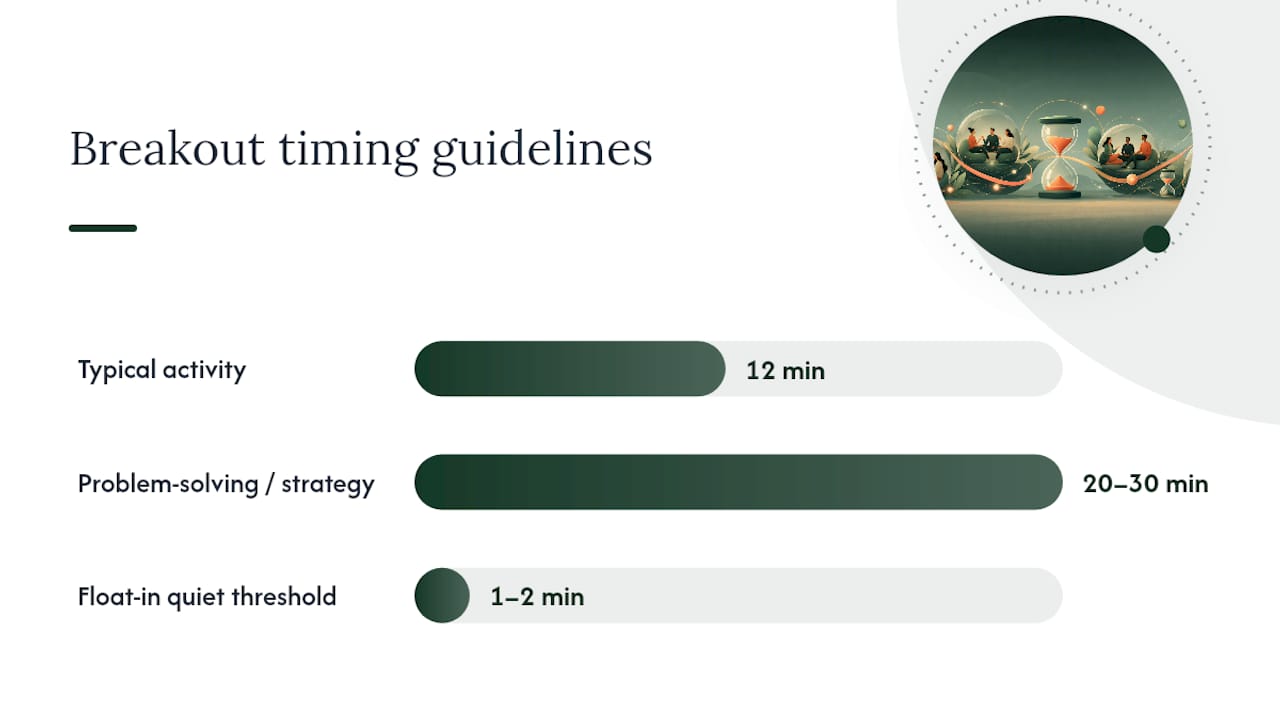
On timing, ATD’s rule of thumb is roughly 12 minutes for many activities. That’s long enough for a real conversation and short enough that attention doesn’t drift. Problem-solving or strategy tasks can run longer, 20 to 30 minutes, but add a halfway “waypoint” message in chat so groups self-check their pace instead of discovering at minute 25 that they’ve barely started.
A shared Google Doc or Slides file changes the whole dynamic. Instead of guessing what’s happening in five silent rooms, you can watch the doc update in real time and nudge a stalled group before they lose the thread. Float into a room only if it’s been quiet for more than a minute or two; otherwise let the assigned facilitator run it.
Pro Tip: Paste your instructions into the meeting invite and the chat right before you launch breakouts in Zoom. This helps ensure participants remember the details when the session begins.
Host checklist before you launch:
- Instructions posted in chat, not just spoken aloud
- Shared doc link tested and permissions set to “anyone with the link can edit”
- Time limit stated out loud and in writing
- Facilitator and recorder roles assigned or randomly picked
- Report-back format specified (“one sentence per group, spoken or typed”)
Copy-paste slide example: “Breakout groups of 4. Goal:. Deliverable: add your answer to the shared doc, slide [X]. Time: 12 minutes. One person reports back when we return.”
Quick Reference: Time and Group Size by Activity Type
| Activity type | Suggested time | Ideal group size | Best for |
|---|---|---|---|
| Quick energizer | 2 to 5 minutes | Any size | Start-of-meeting warmup |
| Icebreaker | 8 to 15 minutes | 4 to 6 | Bonding, onboarding |
| Creative collaboration | 15 to 20 minutes | 3 to 5 | Team culture building |
| Problem-solving | 15 to 25 minutes | 4 to 6 | Training, strategy |
| Marketplace/negotiation | 20 to 25 minutes | 4 to 6 | Stakes-raising exercises |
| Trivia tournament | 30 to 45 minutes | Teams of 4 to 6 | Company-wide events |
| Virtual escape room | 45 to 60 minutes | 4 to 6 | High-effort celebration events |
Google Doc prompt template: “Group [X]: In one paragraph, describe [scenario]. Add your answer below by [time]. Tag your recorder’s name at the top.”
Slide template: one slide per group, pre-labeled with the group number, a single prompt at the top, and blank space below for their answer or drawing.
Low-tech fallback: if a shared doc feels like overkill, drop the prompt directly in the meeting chat and have each group’s recorder paste their answer there when time’s up. It’s less elegant, but it works when someone’s Wi-Fi can’t handle another open tab.
Why These Rules Work, Backed by Research and Practice
The five-rule structure isn’t a hunch. It comes from facilitators who run virtual sessions professionally, and the ATD framework exists because vague instructions and oversized groups are the two most common reasons breakouts flop. Indiana University’s teaching center makes a related point worth repeating:
Make the purpose of the breakout explicit and tie it to the session’s larger goal, or participants will treat the activity as a distraction rather than useful work.
That single habit, stating the “why” before the “what,” is the cheapest fix available to any team lead.
- Deliverables work because they give facilitators something to check without hovering.
- Group size caps work because five or fewer people means everyone has to talk.
- Timing waypoints work because they replace guesswork with a visible checkpoint.
Thomas, who covers team engagement for Gatherilla, has spent time cataloging which formats hold up across different meeting sizes and platforms. That groundwork shapes how Gatherilla’s own templates are built: pre-structured prompts and shared boards that cut setup time down to almost nothing, so a team lead isn’t building a Google Doc from scratch ten minutes before a call.
Most Teams Overthink the Game and Underthink the Facilitation
Here’s the uncomfortable truth: the game matters less than people assume. A mediocre icebreaker run with clear instructions, a five-person cap, and a stated time limit will outperform a clever game run without structure, every time. Teams keep hunting for a better activity list when the actual gap is facilitation discipline.
The conventional advice, “just try a fun game,” skips the part that determines whether people participate or quietly multitask. Assigning a facilitator and recorder feels like unnecessary overhead until you watch a leaderless breakout room sit in silence for ninety seconds because nobody wanted to go first.
If you take one thing from this playbook, make it the report-back requirement. Knowing they’ll have to summarize something in front of the group changes how a group behaves for the entire activity, not just the last thirty seconds. Prioritize that discipline over finding the “perfect” game, and your breakout rooms will improve overnight.
— Thomas
Gatherilla Speeds Up the Part Everyone Dreads: Setup
Building a shared doc, testing links, and writing instructions eats up real prep time, time most team leads don’t have between back-to-back meetings. Gatherilla is built to skip that step entirely: browser-based multiplayer games with no downloads, ready-made prompts, and templates that replace the “build a Google Doc from scratch” work covered above.

Sign up and you get instant access to a library of games spanning energizers, icebreakers, and problem-solving formats, plus daily challenges that keep momentum going between scheduled meetings. Real-time leaderboards handle the report-back and scoring automatically, so nobody’s manually tallying points in a chat window. For HR managers running onboarding across multiple cohorts, or team leads who just need something ready in the next five minutes, try Gatherilla and launch your first game before your next standup.
Sources
- Virtual breakout room ideas (Fit Small Business)
- Using Zoom Breakout Rooms Effectively (Indiana University CITL)
- 20 fun games to play on Zoom (SessionLab)
- Fostering collaboration with shared documents (Washington State University Learning Innovation)