

Breakout Room Activities That Actually Get People Talking
Breakout rooms boost participation, networking, and skill practice, but only when groups stay small and every group walks away with something concrete to report back. Skip the deliverable, and you get five minutes of awkward silence and one person doing all the talking. Get it right, and even a 12 minute session can outperform an hour of lecture-style meeting.
The activity categories worth building around are:
- Icebreakers — quick, low-stakes ways to get people talking before the real work starts
- Networking — structured pairings or rotations that mimic hallway conversations
- Games — trivia, bingo, and minute-to-win-it formats that inject energy
- Problem-solving — case consults and design sprints that produce a real recommendation
- Micro-presentations — lightning talks and show-and-tell formats
- Wellness — short mindfulness or reflection prompts for high-stress sessions
Most facilitators aim for groups of five or fewer participants and sessions of 5 to 15 minutes depending on task complexity. That range shows up so consistently across training guidance that it’s worth treating as a default, not a suggestion.
Table of Contents
- Why Breakout Room Activities Work Better Than a Big Group Discussion
- 24 Breakout Room Activities for Virtual, In-Person, and Hybrid Sessions
- How Do You Run a Breakout Room So It Doesn’t Fall Flat?
- What Should You Set Up Before Launching Virtual Breakout Rooms?
- Facilitator Runbooks for the Top 8 Breakout Activities
- Where Gatherilla Fits Into Your Breakout Room Toolkit
- Where Gatherilla Fits for Your Next Session
- Run Your Next Breakout Session Without the Setup Headache
- Sources
Why Breakout Room Activities Work Better Than a Big Group Discussion
A 50-person Zoom call has room for maybe six voices before the hour runs out. Split that same group into breakout rooms of four, and every single person gets a turn to talk within minutes. That’s the entire case for breakouts in one sentence: they trade broadcast time for participation time.
The research backs this up in a specific way. Breakout rooms work best when they’re tied to explicit learning objectives, and participants engage more when they understand how their small group’s output feeds back into the larger session. A breakout that exists just to “mix things up” tends to fizzle. One that ends with each group naming a recommendation for the whole room tends to produce sharper conversation, because people know their five minutes matter.
Breakouts earn their place in specific situations:
- Practicing a skill immediately after it’s taught, while it’s still fresh
- Networking events where attendees need structured reasons to talk to strangers
- Brainstorming sessions where quantity of ideas matters more than polish
- Sensitive topics where people speak more freely in groups of three or four
They’re the wrong tool for pure information delivery, urgent announcements, or any topic where a single expert needs to control every word said. If you’re just going to read a slide, keep everyone in the main room.
The group-size guidance matters enough to repeat: five participants or fewer per group, running 5 to 15 minutes, works for most tasks, with longer windows reserved for genuinely complex deliverables like a design sprint or a full case analysis.
24 Breakout Room Activities for Virtual, In-Person, and Hybrid Sessions
Here’s a working menu. Each entry lists the goal, ideal group size, run time, and how to launch it in one sentence. Use the format tags to match the activity to your setting.
- Speed networking (virtual/in-person/hybrid) — Goal: build connections fast. Groups of 2, 3 to 4 minutes per pairing. Rotate pairs every round and give one prompt per round (“what’s a project you’re proud of?”).
- Two truths and a lie (all formats) — Goal: icebreaker. Groups of 4 to 5, 8 minutes. Each person shares three statements; the group votes on the lie.
- Trivia quiz (virtual/hybrid) — Goal: energy and light competition. Groups of 4 to 6, 10 minutes. One person reads questions from a shared doc while others discuss answers.
- Lightning talks (all formats) — Goal: knowledge sharing. Groups of 3 to 5, 12 minutes. Each person gets 90 seconds to explain one idea, no slides required.
- Roundtable discussion (virtual/in-person) — Goal: deeper conversation. Groups of 4 to 5, 15 minutes. Assign a topic and a note-taker who logs three key points.
- Creative craft challenge (in-person/hybrid) — Goal: hands-on bonding. Groups of 3 to 4, 15 minutes. Give each group identical simple materials and one build prompt.
- Scavenger hunt (hybrid/in-person) — Goal: movement and collaboration. Groups of 4 to 6, 15 to 20 minutes. Provide a list of items or clues tied to the venue or home office.
- Micro case consult (virtual/hybrid) — Goal: applied problem solving. Groups of 4, 12 minutes. One person presents a real work problem; the group offers three suggestions.
- Wellness pause (all formats) — Goal: reset attention. Groups of 3 to 5, 5 minutes. A facilitator leads a two-minute breathing exercise, then a one-word check-in round.
- Problem-solve clinic (virtual/hybrid) — Goal: collective troubleshooting. Groups of 4 to 5, 15 minutes. Each participant brings one blocker and the group ranks solutions.
- Show and tell (virtual/hybrid) — Goal: personal connection. Groups of 4, 10 minutes. Each person shows one object on camera and explains its story.
- Collaborative whiteboard sprint (virtual/hybrid) — Goal: rapid ideation. Groups of 4 to 5, 10 minutes. Everyone adds sticky notes to a shared board simultaneously.
- Minute to win it (all formats) — Goal: quick fun. Groups of 3 to 4, 5 to 8 minutes. Run a timed physical or digital mini-challenge with a clear winner.
- Participant bingo (virtual/in-person) — Goal: mingling. Groups of any size, 10 minutes. Give each person a bingo card of traits to find among teammates.
- Roleplay scripts (in-person/hybrid) — Goal: skill rehearsal. Pairs or trios, 10 minutes. Assign a scenario card (a difficult client call, a negotiation) and swap roles halfway.
- Design sprint micro-challenge (virtual/hybrid) — Goal: applied creativity. Groups of 4, 20 minutes. Give a narrow design problem and require one sketched solution.
- Photo prompt story (all formats) — Goal: creative warmup. Groups of 3 to 4, 8 minutes. Show a random image and have the group build a one-minute story around it.
- Collaborative story-building (virtual/hybrid) — Goal: creative teamwork. Groups of 4 to 5, 10 minutes. Each person adds one sentence to a shared document in turn.
- Rapid prototyping (in-person/hybrid) — Goal: tangible output. Groups of 3 to 4, 20 minutes. Use basic materials to build a rough model of a concept.
- Peer feedback pairs (virtual/in-person) — Goal: skill improvement. Pairs, 10 minutes. Each person presents work for three minutes and receives two minutes of feedback.
- Values auction (virtual/hybrid) — Goal: reveal priorities. Groups of 4 to 5, 12 minutes. Give fake currency and a list of values to “bid” on as a team.
- Would-you-rather debate (all formats) — Goal: light engagement. Groups of 4, 8 minutes. Pose a work-related dilemma and have the group defend a side.
- Skills swap (in-person/hybrid) — Goal: cross-training. Groups of 3, 15 minutes. Each person teaches a 60-second mini-lesson on something they’re good at.
- Gratitude round (all formats) — Goal: closing connection. Groups of 4 to 6, 5 minutes. Each person names one colleague and one specific thing they’re grateful for.
How Do You Run a Breakout Room So It Doesn’t Fall Flat?
Five rules separate a breakout that hums along from one where everyone just stares at their webcam. Skip any of these and you’ll feel it within the first two minutes.
- State one clear objective. “Discuss the quarter” is not an objective. “Name the top blocker to hitting Q2 targets” is.
- Keep groups small. Three to five people per room is the sweet spot for actual conversation rather than a few dominant voices.
- Assign roles before you launch. A facilitator, a timekeeper, and a note-taker prevent the awkward “who’s going to start?” pause. Role assignment and a required deliverable measurably increase accountability and focus in group settings.
- Set a hard time limit. Five to 15 minutes covers most tasks; scale up only for genuinely complex deliverables like a full case analysis or design sprint.
- Require one concrete output. One bullet point, one recommendation, one shared slide. Nothing kills report-out time faster than groups that produced nothing specific.
For timing, a rough heuristic works well: budget about two to three minutes per participant for real discussion, plus a fixed two minutes for setup and instructions, and another two minutes buffer for reporting out.
Three templates you can paste directly into your meeting chat or slide:
- Quick brainstorm: “In your group, generate as many ideas as possible for [problem] in 8 minutes. One person writes on the shared doc. We’ll ask for your top 2 ideas.”
- Problem-solve deliverable: “Discuss [scenario] for 12 minutes and agree on one recommendation. Note-taker: write it as a single sentence on slide [X].”
- Report-back prompt: “When we return, one representative per group shares your single best idea in 30 seconds. No slides needed.”
Pro Tip: Broadcast a two-minute warning before time runs out. Facilitators who send time warnings and make brief, timed visits to rooms see higher completion rates because groups stay focused instead of drifting into small talk.
What Should You Set Up Before Launching Virtual Breakout Rooms?
Whether you pre-assign groups or let people self-select depends on your goal. Pre-assignment works better when you need balanced skill levels or want to separate people who already know each other well; self-selection works for casual networking sessions where friction actually hurts turnout. Whichever you pick, announce it clearly before you launch, since confusion at this stage eats into your actual discussion time.
A few setup habits make virtual and hybrid breakouts run noticeably smoother:
- Require a shared Google Doc or slide deck as the deliverable. Shared documents let the host monitor progress without interrupting groups, and they make reporting out faster when you have six or eight rooms running at once.
- Use broadcast messages for time warnings instead of popping into every room, which disrupts flow.
- Turn on the Ask for Help feature so groups can flag confusion without derailing their own conversation.
- Offer a phone-only or chat-based fallback for anyone with a weak connection, so a bad signal doesn’t mean missing the activity entirely.
For teams juggling in-office and remote participants at once, hybrid sessions carry their own engagement challenges worth planning around.
Facilitator Runbooks for the Top 8 Breakout Activities
These eight cover most use cases, from a five-minute energizer to a full problem-solving session. Each one gives you the exact script to run it.
- Speed networking. Prep: prompt list, timer visible to all. Script: “You have 3 minutes with this partner. Answer: what’s one win from this month?” Roles: none needed. Deliverable: one interesting fact about your partner to share aloud.
- Trivia quiz. Prep: 8 to 10 questions in a shared doc. Script: assign a reader, give 60 seconds per question. Deliverable: final score, no report-out needed.
- Lightning talks. Prep: none required from participants. Script: “90 seconds each, no interruptions, we’ll time it.” Roles: timekeeper. Deliverable: one sentence recap per speaker for the main room.
- Roundtable problem-solve. Prep: one real scenario. Script: “Facilitator reads the scenario, then open discussion for 10 minutes.” Roles: facilitator, note-taker. Deliverable: top three suggestions written down.
- Icebreaker bingo. Prep: bingo cards distributed beforehand. Script: “Find someone matching each square, mark it off.” Deliverable: first to complete a row announces it.
- Mini case consult. Prep: one participant preps a two-minute problem summary. Script: “Presenter shares for 2 minutes, group asks questions for 3, then offers advice for 5.” Deliverable: three actionable suggestions.
- Creative prompt (sketch or craft). Prep: shared materials list or a digital drawing tool. Script: “You have 10 minutes to sketch [concept]. No talking for the first 5.” Deliverable: one image shared to the group.
- Hybrid scavenger hunt. Prep: item or clue list distributed to both remote and in-room participants. Script: “Find or photograph each item, first team to finish all five wins.” Deliverable: photo proof or verbal confirmation.
Pro Tip: For the mini case consult, require the deliverable to be a single, concise recommendation rather than a list of options. Comparing one clear answer across four or five groups takes half the report-out time.
Where Gatherilla Fits Into Your Breakout Room Toolkit
Gatherilla runs as a browser-based platform, so nobody downloads anything before a session starts, which matters when you’re trying to launch a breakout in under two minutes flat.
- Customizable multiplayer games that map directly to trivia, minute-to-win-it, and icebreaker bingo formats from the list above
- Real-time leaderboards that turn a quiet report-out into something people actually watch
- Daily challenges that keep momentum going between scheduled team sessions
- Built-in analytics so team leads can see participation patterns without manually tracking who spoke
If you want to see a single game in action before committing to a broader rollout, What The Zoom shows how the no-download, browser-play experience actually feels for participants.
Lessons From Running Hundreds of Small-Group Sessions
The single biggest mistake I see is launching a brand-new activity format on the day it matters most, a board meeting, a big all-hands, a client kickoff. My go-to opener is still two truths and a lie, because it needs zero prep and reliably gets even a stiff room laughing within ninety seconds. Pilot anything new with a small group first; establishing the norms early saves you from an awkward silence in front of the people who actually matter.

Where Gatherilla Fits for Your Next Session
Small groups with a clear deliverable outperform open discussion because they force participation instead of hoping for it.
| Point | Details |
|---|---|
| Group size | Keep breakout groups to five people or fewer for the strongest discussion quality. |
| Session length | Run activities for 5 to 15 minutes, scaling up only for complex deliverables. |
| Assign roles upfront | A facilitator, timekeeper, and note-taker prevent the awkward startup pause. |
| Require one output | One bullet, one recommendation, or one slide makes report-out fast and comparable. |
| Try Gatherilla | Gatherilla’s no-download multiplayer games map directly to trivia, bingo, and quick-energy formats. |
Run Your Next Breakout Session Without the Setup Headache
Planning a great activity is only half the job. Booking a room, distributing materials, and chasing down who’s presenting eat up the time you meant to spend actually connecting with your team. Gatherilla is built for the moment right after you’ve picked an activity from this list and just need it to work, no downloads, no software install, no fumbling with shared docs mid-session.

For HR managers and team leads running recurring sessions, that setup friction adds up fast across a year of meetings. Gatherilla’s customizable games cover the trivia, bingo, and minute-to-win-it formats above out of the box, with real-time leaderboards that make report-out genuinely fun instead of a formality. Pair it with solid communication practices for distributed teams and you’ve got a session that runs itself. Head to Gatherilla and start a free session with your team this week.
Frequently Asked Questions
What is the ideal group size for a breakout room activity? Most facilitation guidance points to five participants or fewer per group, since that size lets everyone speak within a short window without the conversation fragmenting.
How long should a breakout room session last? Plan for 5 to 15 minutes for most activities, reserving the longer end for complex tasks like a design sprint or full case analysis.
Should I pre-assign breakout groups or let people choose? Pre-assign when you need balanced skill levels or want to separate people who already cluster together; let people self-select for casual networking where flexibility matters more than structure.
What’s the single biggest mistake organizers make with breakout rooms? Skipping the deliverable. A group with no required output tends to drift into small talk or silence within a few minutes.
Can breakout room activities work for hybrid meetings with some people remote and some in person? Yes, though it takes deliberate setup, shared digital documents so remote participants aren’t left out, clear audio, and someone assigned to bridge both groups during report-out.
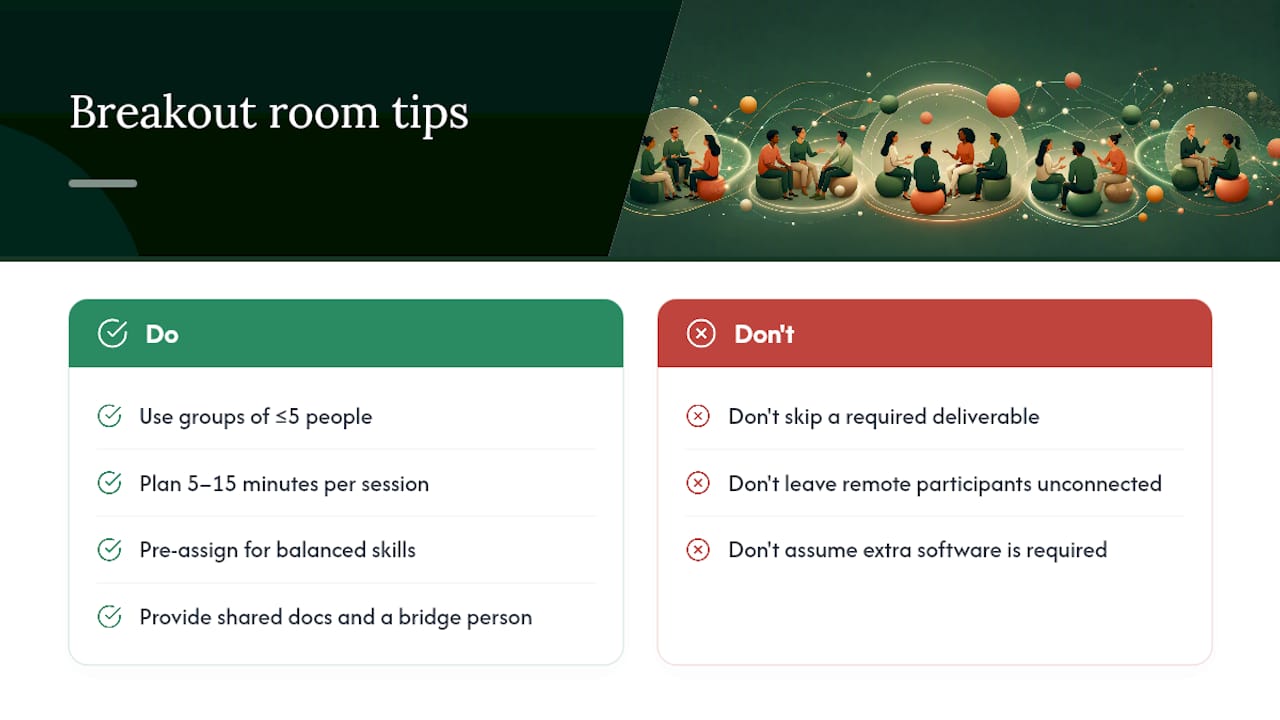
Do I need special software to run breakout room games? Not necessarily. Platforms like Zoom include breakout functionality natively, and browser-based tools like Gatherilla require no downloads at all, which cuts setup time significantly.
Sources
- How to Lead Successful Virtual Breakout Room Activities
- Get Creative with Your Use of Breakout Rooms
- Using Zoom Breakout Rooms Effectively