

All-Hands Meeting Games That Work for Remote and Hybrid Teams
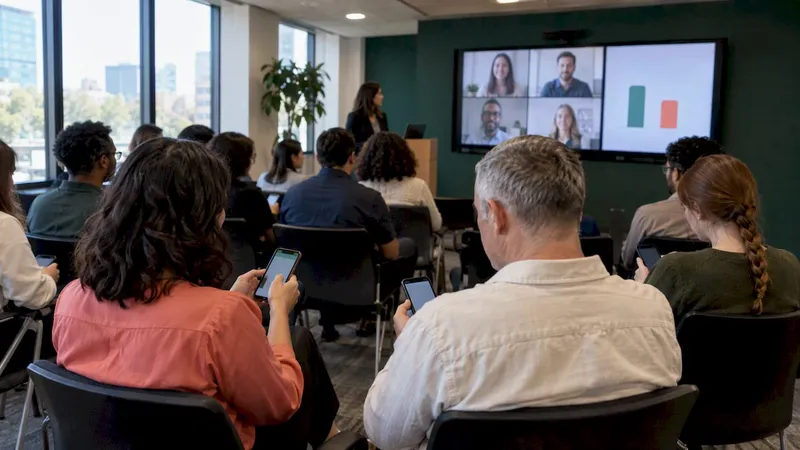
The best all-hands meeting games are short, optional and built for large groups: Human Bingo, Would You Rather polls, Two Truths and a Lie in small breakouts, team trivia, and the 1-2-4-All discussion method. Keep each one to 5 to 15 minutes, put people in pairs or trios rather than spotlighting individuals, and pick formats that remote and in-room colleagues can play on equal footing. Below you will find what to run, for how many people, how long it takes and how to avoid the forced-fun trap.
TL;DR
- Pick the game by headcount: Human Bingo suits 15 to 100+ people, while Two Truths and a Lie works best for groups of 5 to 30, so split a big meeting into breakouts.
- Budget 5 to 20 minutes for an icebreaker, and keep the all-hands agenda itself intact. The game opens the meeting; it does not replace it.
- Make every game optional and low-stakes, and offer a written or poll-based way to take part for people who would rather not speak.
- Test your tech before the meeting, and design for remote players first so hybrid attendees are never spectators.
- Browser-based tools with no downloads remove the biggest setup headache for a company-wide session.
Table of Contents
- Why games belong in an all-hands at all
- Match the game to your headcount
- Quick openers for the first five minutes
- Games that build connection in small groups
- Friendly competition for big groups
- A collaborative option: 1-2-4-All
- Welcoming new hires in an all-hands
- Make it work for remote and hybrid attendees
- How to keep it from feeling forced
- A sample 60-minute all-hands run of show
- Our perspective: engagement is a habit, not an event
- Run these games without the setup headache
- FAQ
- Sources
Why games belong in an all-hands at all
An all-hands is usually the one meeting where everyone is present and almost nobody talks to each other. Leaders present, people mute, and the chat stays quiet. A short game changes the dynamic in the first five minutes because it asks every person to do something small, which is the opposite of watching.
There is research behind the instinct. A 2021 study of videoconference fatigue found that higher feelings of group belongingness were the most consistent protective factor against it. Games are a cheap way to build that sense of belonging, as long as they are done well. For engineering-heavy organizations this connects to the wider conversation about remote developer productivity, where well-being signals matter alongside raw activity.
The flip side: a badly chosen game makes people feel exposed. The rest of this guide is about picking games that avoid that.
Match the game to your headcount
Group size is the first filter. A game that is delightful with 12 people can be painful with 300. Here is a quick map based on the sizes the sources give, plus the format changes we recommend for big rooms.
| Game | Best group size | Typical time | Works for remote and hybrid? |
|---|---|---|---|
| Human Bingo | 15 to 100+ | 10 to 15 min | Yes, in breakout rooms or a shared board |
| Two Truths and a Lie | 5 to 30 | 5 to 15 min | Yes, in small breakouts |
| Would You Rather | Any size | 3 to 5 min | Yes, via live poll |
| Team trivia | Any size, in teams | 10 to 20 min | Yes, with a shared board |
| 1-2-4-All | 8+ | 30 to 60 min | Yes, with breakouts |
| Fast Friends questions | Pairs inside any size | 3 to 45 min | Yes, in pairs |
The figures for Human Bingo and Two Truths and a Lie come from The Be There icebreaker guide, and the 8+ and 30 to 60 minute range for 1-2-4-All comes from the University of Minnesota method guide. Time ranges for the rest are our working estimates, so adjust to your agenda.
As a general rule, Cvent puts icebreakers at 5 to 20 minutes, depending on group size and activity. In an all-hands with a packed agenda, aim for the low end.
Quick openers for the first five minutes
Would You Rather polls
This is the lowest-effort game on the list. Everyone answers a question with two choices, and the results appear live on screen. The U.S. Chamber of Commerce notes that creative or unrealistic questions often get the best answers, so skip “coffee or tea” and try “only ever use a whiteboard, or only ever use sticky notes?”
Because it is a multiple-choice poll, it also suits cross-functional groups. PigeonLive’s hybrid all-hands guide describes it as a starter that prompts lighthearted choices without asking people to reveal too much about themselves. That matters in a room where the intern and the CFO are both attending.
How to run it:
- Prepare three to five questions that tie loosely to the meeting topic or the season.
- Show one question at a time and give people 20 to 30 seconds to vote.
- Reveal the split, then ask one volunteer from each side to explain in a sentence. Volunteers only.
Meeting bingo
Two versions exist, and they serve different purposes. Human Bingo is a networking game. Meeting bingo, where squares hold things likely to happen during the call (“someone says you’re on mute”), is a running joke that keeps people paying attention.
For networking, Cvent describes Get to Know You Bingo as a 5-by-5 board of personal facts. Participants circulate, find colleagues who match each square, record names, and win by completing five in a row. Each person’s name can be used only once, and you cannot use your own. On video, the digital version works well in breakout rooms, which keeps in-person and remote participants on equal footing.
We have written templates and platform runbooks for this in our guides on virtual bingo for work and a five-minute browser-only icebreaker bingo.
Games that build connection in small groups
Two Truths and a Lie
The classic. Cvent defines it simply: each person prepares two true statements and one false one, shares them, and the group guesses the lie. It breaks down past about 30 people because there is not enough airtime, so in an all-hands, send people to breakout rooms of four to six and give each person about a minute.
A tip for work settings: ask for “two truths and a lie about your first job” or “about your commute”. Prompts like these keep the content safe and still reveal personality. Our copy-ready triples for HR give you examples if people freeze.
Fast Friends questions
This is a structured self-disclosure exercise, described in a Wharton Executive Education nano tool. It can support virtual collaboration, cohesion, productivity and well-being. The full session runs 45 minutes, which is too long for an all-hands, but the same source says even 3 to 5 minutes can be beneficial.
For an all-hands, pair people at random and give each pair one gentle question, such as “what is a small thing that made your week better?” Keep the escalation to deeper questions for team meetings, not a 400-person call.
Breakout room activities
Breakout rooms are the workhorse of a large virtual meeting. The IEEE hybrid meeting guide says breakout rooms suited to groups of four to six are beneficial. That size is also a good fit for conversation: everyone can talk, nobody can hide. For more formats that get people talking, see our breakout room activities.
Friendly competition for big groups
Team trivia
Trivia scales better than almost anything else. People can play alone or in teams, the host controls the pace, and a leaderboard gives the room a shared focus. Mix topics: a third company history, a third general knowledge, a third light and silly. Company-history questions double as a quiet way to share context with new hires.
To avoid the same loud five people winning every time, assign teams randomly across departments and offer a prize that is symbolic, such as choosing the next meeting’s opening song.
Quick word and guessing challenges
Short daily-style challenges, like a word puzzle everyone solves in a browser tab, work well because they take two minutes and need no explanation. Run one while people join the call and you fill the awkward waiting period. Our morning meeting games guide covers this style in more depth.
A collaborative option: 1-2-4-All
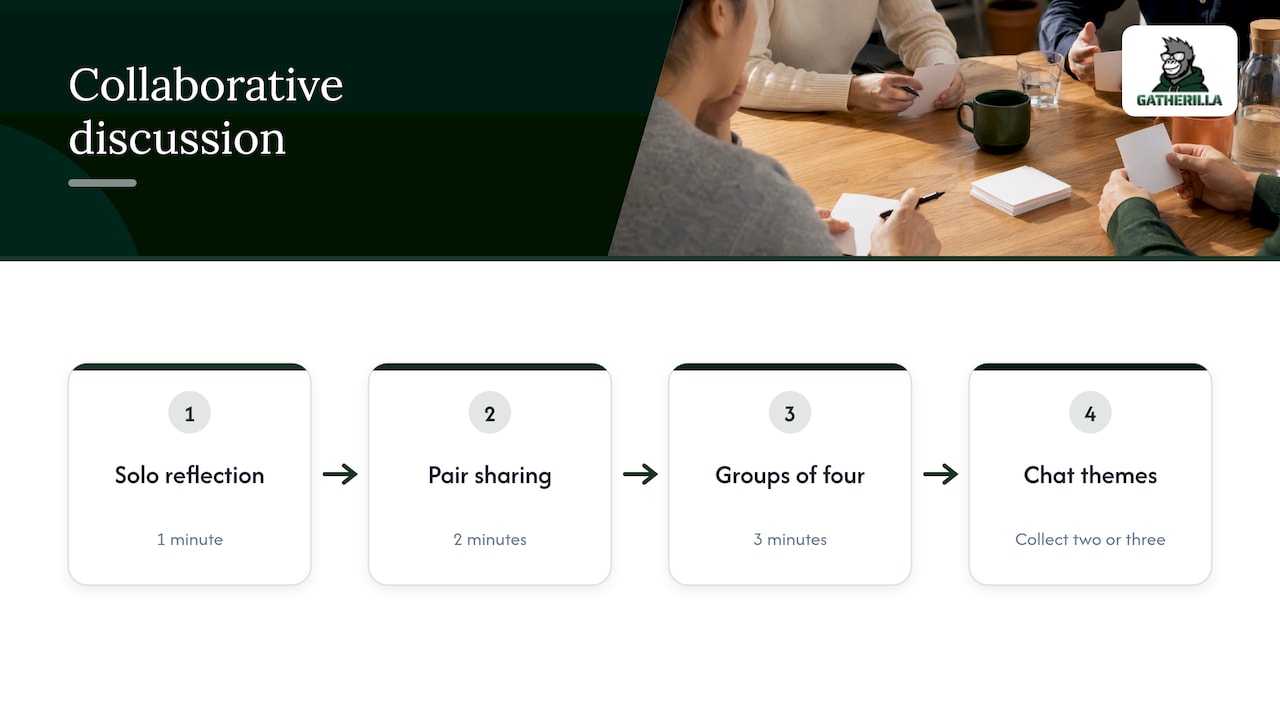
Not every game has to be a game in the playful sense. The 1-2-4-All method is a structured way to get a big group thinking together. According to the University of Minnesota guide, it starts with silent reflection, moves to pair sharing and then quad sharing, and finally brings everyone together to share as a full group. It is intended for groups of 8 or more and takes 30 to 60 minutes.
In an all-hands, you can shrink it. Ask one question tied to a company priority, such as “what is one thing that would make our next quarter easier?” Give a minute alone, two minutes in pairs, three minutes in fours, then collect two or three themes in chat. Everyone contributes, and leadership gets real input rather than the usual silence at the Q&A.
The same logic applies to trust-building. The University of Wisconsin-Madison offers the BRAVING trust framework as a 45 to 60 minute virtual team exercise. That is a team offsite session, not an all-hands opener, but it shows how structured conversation can build a shared vocabulary for trust.
Welcoming new hires in an all-hands
All-hands meetings are often where new employees are introduced, and a badly handled introduction is awkward for everyone. The U.S. Chamber of Commerce suggests that icebreakers are best reserved for onboarding a new team member or starting a project with new teams. That is a useful rule: games for the sake of games get stale, while games with a purpose land.
Practical ways to do it:
- Introduce through a poll. Ask the room “what was your first job?” and show the result, then have the new hire answer too. They become part of the data, not the center of attention.
- Pair new hires with a veteran. Use a short Fast Friends style question in breakouts so the newcomer meets at least one person well.
- Use trivia with a twist. Include two or three questions about the new hires’ announced hobbies (with their consent beforehand).
For team leaders and HR running onboarding more broadly, our hybrid team building ideas need about ten minutes of prep.
Make it work for remote and hybrid attendees
The biggest failure mode in hybrid all-hands is a two-tier experience: people in the room laugh at something while remote colleagues watch a lagging feed. Several simple rules prevent it.
Design for the remote player first
Choose formats that work on video, use polls to collect non-verbal input, and make sure any icebreaker is optional, as SessionLab advises. If a game needs physical props or running around a room, it is not an all-hands game. Everyone should play from their own device, including people sitting in the office. Our guide on keeping remote participants engaged in hybrid meetings goes deeper.
Test the technology
The IEEE hybrid meeting guide lists adequate preparation, including testing equipment and systems in advance, as a success factor for hybrid meetings. For meetings of more than 100 people, it recommends classroom-style seating, multiple microphones, one or two projectors and screens, and reliable network access. Run a dry test of your game link on a guest account and on mobile, and have a backup poll ready.
Collect input before the meeting
The U.S. Chamber’s virtual-meeting guidance recommends collecting questions and comments beforehand and rotating the host to suit different communication styles in large or cross-cultural groups. The same applies to games: ask for trivia submissions or bingo squares in a short form a few days ahead, and people feel ownership before the meeting starts.
Use the tools your people already have
If your company lives in a specific meeting platform, pick games that fit it. We cover this in our post on team building games for Microsoft Teams.
How to keep it from feeling forced
Nobody wants mandatory fun. The advice from the sources converges on the same handful of principles.
- Make it optional. Wharton’s guidance says facilitators should explain the purpose and structure, stress that participation is voluntary, and agree on confidentiality expectations in advance. Say it out loud: “Join in, or just watch the poll results, both are fine.”
- Use small groups. The U.S. Chamber recommends pairs or trios and light, non-intrusive questions instead of forcing individuals to speak in front of a big room.
- Offer a written route. Written or asynchronous options help introverts and remote employees take part. Chat answers and poll votes count as participation.
- Read the room. The same source says to skip activities when the team is stressed or already has strong rapport. After a layoff announcement or a rough quarter, a trivia round is the wrong move.
- Keep it relevant. Tie the game to the purpose of the meeting. A question about “favorite learning moment this year” fits an all-hands about growth, while a random one feels like filler.
- Keep it short. If a game runs longer than the reason you started it, cut it.
A sample 60-minute all-hands run of show
Here is how a games-in-moderation agenda might look for a distributed company. Adjust the timings for your size.
| Time | Segment | Format |
|---|---|---|
| 0 to 5 min | Arrival challenge | Word puzzle or poll while people join |
| 5 to 10 min | Would You Rather | Live poll, two volunteers comment |
| 10 to 30 min | Leadership updates | Presentation, questions collected in advance |
| 30 to 40 min | 1-2-4-All on one question | Solo, pairs, fours, themes in chat |
| 40 to 50 min | Live Q&A | Moderated, anonymous option |
| 50 to 58 min | Trivia finale | Teams, leaderboard |
| 58 to 60 min | Wrap-up and shout-outs | Short peer recognition |
Notice what this does. The games never take more than a quarter of the hour, and each one has a job: arrival, input, energy, close. If you want more ideas about what to run, our roundup of hybrid meeting icebreakers for HR and team leaders is a good next step.
Our perspective: engagement is a habit, not an event
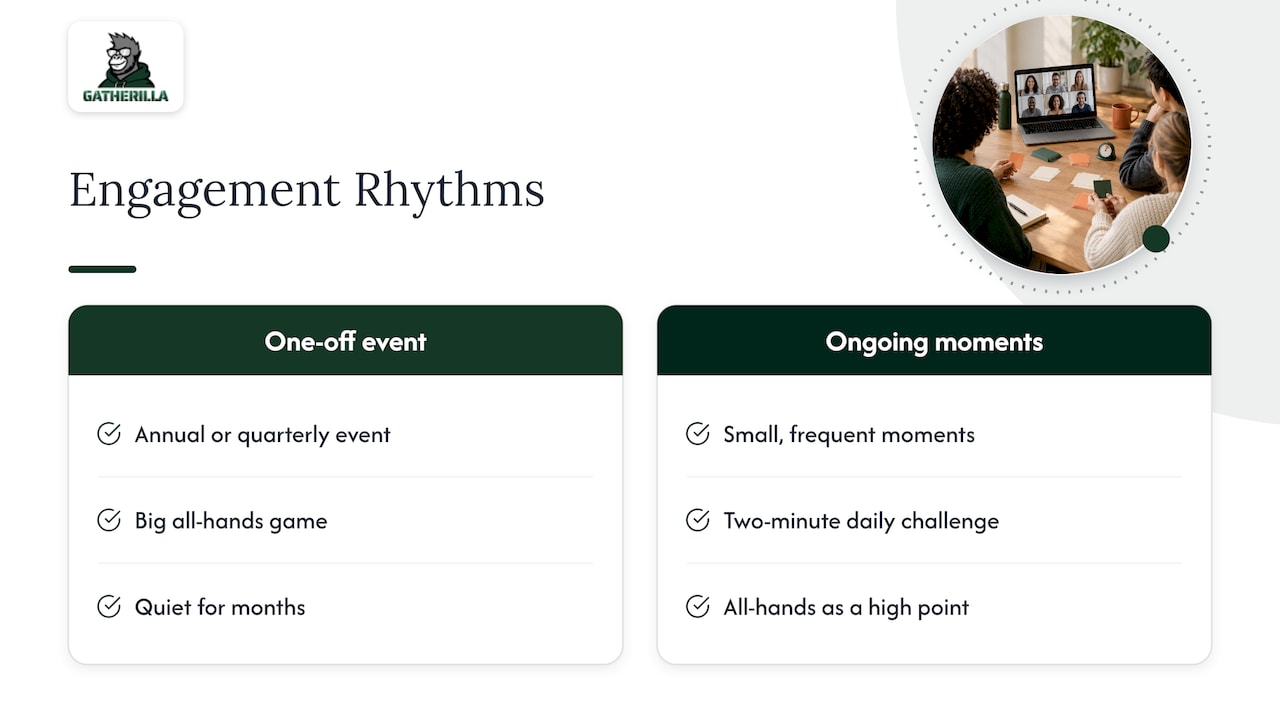
Most companies treat team connection as an annual or quarterly event. They book an expensive offsite, run a big all-hands game and then go quiet for months. We think that gets it backwards.
We build Gatherilla around the idea that connection is built through small, frequent, low-friction moments. A two-minute daily word or trivia challenge does more over a quarter than a single heroic afternoon, because it makes engagement part of the daily routine instead of a special occasion. The all-hands then becomes a high point in an ongoing rhythm, not a cold start. People who already have a shared in-joke from last Tuesday’s puzzle walk into the big meeting warmer.
Two other beliefs shape our work. First, zero preparation matters: if HR or a team lead needs an hour to set up a game, it will not happen weekly. That is why our games run in the browser with no downloads, and they work with any video conferencing tool. Second, recognition should come from peers, not just from the top. When coworkers can acknowledge each other in line with company values, the all-hands shout-out segment stops being a list of managers’ favorites.
And a note of caution from us: a platform does not fix a culture. If the meeting itself is a monologue, no game will save it. Use games to make people feel they belong, then give them something worth belonging to.
— Thomas
Run these games without the setup headache
If you want to try these formats without building boards, polls and leaderboards by hand, Gatherilla gives you multiplayer games, daily word and trivia challenges, icebreakers and onboarding games that run in the browser. There is nothing to download, and it works with whichever video tool your company uses.

There is a free tier to start with. Premium adds more games, reporting and priority support, and is priced at $0.50 to $1.00 per seat per month, or $5 to $10 per seat per year, as published on our pricing page. You can browse the full games and activities library before deciding. If you are comparing the field, our overview of virtual team building tools for HR teams lays out what to look for.
FAQ
What are the best games for an all-hands meeting with hundreds of people?
Choose formats that scale without spotlighting individuals: live polls like Would You Rather, team trivia with a leaderboard, and Human Bingo, which suits 15 to 100+ people. For anything conversational, send people to breakout rooms of four to six. Skip games that need each person to speak to the full group.
How long should an all-hands icebreaker be?
Icebreakers generally run 5 to 20 minutes, depending on group size and the activity. For an all-hands, aim for five to ten minutes so you do not squeeze out announcements and Q&A. Even a three to five minute structured exercise can have a benefit.
How do I include remote employees in a hybrid all-hands game?
Have everyone play from their own device, including people in the office, so nobody is a spectator. Use polls and chat for input and run discussions in breakout rooms that mix locations. Test your setup before the meeting and keep participation optional.
What if my team hates icebreakers?
Tie the game to a real purpose, keep it short and make it clearly optional. Use pairs or trios, offer written answers, and skip the game when the team is stressed. Often people dislike icebreakers because they are forced, long or personal, so fix those three things first.
Are there free tools for all-hands meeting games?
Yes. Many polling tools and browser games have free tiers, and ours does too. Check how many players each free plan allows, because company-wide sessions often exceed the limits.
Sources
- CREATE AUTHENTIC CONNECTIONS WITH VIRTUAL TEAM MEMBERS, Wharton Executive Education
- BRAVING: Anatomy of Trust, University of Wisconsin-Madison
- Fun and Unique Meeting Icebreakers, U.S. Chamber of Commerce
- Tips for Cross-Cultural Communications in Virtual Meetings, U.S. Chamber of Commerce
- 10 Effective Icebreakers for Company Meetings, Be There
- 20 Fun Icebreakers to Kickstart Hybrid All-Hands, PigeonLive
- 55 Engaging Meeting Icebreakers, Cvent Blog
- 1-2-4-All Method Guide, University of Minnesota
- 32 engaging ice breakers for virtual meetings, SessionLab
- Videoconference fatigue study, 2021
- Hybrid Meeting Practices Guide, IEEE