

5 to 7 Virtual Event Survey Questions and Microgames to Boost Results

For virtual events, send a 5 to 7 question post-event survey within 24 to 48 hours that pairs an overall rating or NPS score with one open-ended “why” question. Add a short in-platform pulse before attendees log off, and keep every rating item on the same 1 to 5 scale so you can track trends across future events. That combination beats a long survey almost every time, because completion drops fast once the event ends.
TL;DR:
- Sending a brief, targeted survey within 24 to 48 hours with a consistent 1 to 5 rating scale ensures higher response rates and meaningful trend analysis.
- Focusing on key categories such as content relevance, platform usability, and overall experience helps identify specific issues affecting virtual event satisfaction.
- Including role-specific skip logic and limiting open-text responses increases survey completion and actionable insights.
- Conducting a closing activity or mentioning the survey during the last moments of the event boosts response rates compared to post-event reminders.
- Analyzing segment-based data and open-ended comments enables precise improvements, avoiding reliance on overall satisfaction scores alone.
Table of Contents
- Virtual Event Survey Questions Organized by Category
- How to Design a Post-Event Survey That Actually Gets Used
- How to Get More Virtual Event Survey Responses
- Turning Survey Answers Into Actual Changes
- Three Ready-to-Send Survey Templates
- Using Gatherilla to Boost Survey Completion
- What Most Organizers Get Wrong About Feedback Data
- Make Your Next Event Easier to Give Feedback On
- Sources
- FAQ
Virtual Event Survey Questions Organized by Category
A good question bank is not one long list. It is a set of categories you pull from depending on what you actually need to learn after a given event. Below is a practical bank built specifically around what makes virtual events different from in-person ones: no hallway conversations, no easy read on the room, and a much higher chance attendees just close the tab if the survey feels long.
Overall experience
- “How would you rate your overall experience with this event?” (1 to 5 scale)
- “How likely are you to recommend this event to a colleague?” (0 to 10 or 1 to 5, followed by “What is the main reason for your score?”)
Content and sessions
- “How relevant was the session content to your work?” (1 to 5)
- “Was the length of each session about right, too short, or too long?” (multiple choice)
- “How would you rate the pacing of the agenda overall?” (1 to 5)
Content relevance matters more than most organizers assume. Academic research on virtual conference formats found that “interest,” meaning how relevant the topics felt to attendees, was one of the two strongest predictors of how much value people took from the whole event. The other was interaction, which is why the next two categories carry real weight.
Speakers and presenters
- “How clear and organized was the speaker’s presentation?” (1 to 5)
- “Did the Q&A session address the questions that mattered to you?” (yes/no/partially)
Platform and technical experience
- “How easy was it to join the event and navigate the platform?” (1 to 5)
- “How would you rate the audio and video quality?” (1 to 5)
- “Did you encounter any technical issues? If so, please describe.” (open text, optional)
Virtual-specific friction shows up here more than anywhere else. Practical guidance on event survey questions points out that platform usability and lag are the kind of thing in-person surveys never had to ask about, and skipping this category means missing the most common source of frustration.
Networking and engagement
- “How would you rate the quality of breakout room discussions?” (1 to 5)
- “Did the event offer enough opportunities to network with other attendees?” (1 to 5)
- “Was the chat feature useful for engagement?” (yes/no/somewhat)
Logistics and communications
- “Was the registration process clear and easy to complete?” (1 to 5)
- “Did you receive enough reminders and clear agenda information beforehand?” (yes/no)
Exhibitor and sponsor questions (include only if applicable)
- “How valuable was your interaction with exhibitors or sponsors?” (1 to 5)
- “Did you connect with any exhibitor as a potential business lead?” (yes/no, useful for sponsor reporting)
Demographics and segmentation
- “What is your role?” (dropdown: attendee, speaker, exhibitor, sponsor, staff)
- “Is this the first time you’ve attended this event?” (yes/no)
- “How many sessions did you attend?” (numeric or ranges)
Use skip logic here. A first-time attendee doesn’t need the “compared to last year” question, and someone who attended one session shouldn’t rate a full-day agenda.
How to Design a Post-Event Survey That Actually Gets Used
Question wording and scale choice decide whether your data is useful or just noise. Get these wrong and you end up with a survey people abandon halfway through, or worse, one they finish but answer carelessly.
- Cap it at 8 to 12 questions total. That range balances depth against completion, according to guidance on post-event survey design. A 5-question pulse works fine for a single session; save the 10-plus question version for your flagship annual conference.
- Standardize every rating item to a 1 to 5 scale. Mixing a 1 to 10 NPS question with 1 to 5 satisfaction items inside the same survey creates confusing mid-range answers and makes it nearly impossible to compare results across events. A consistent 1 to 5 scale also makes trend tracking far simpler in a spreadsheet or dashboard.
- Rewrite leading questions into neutral ones. “How much did you enjoy our amazing keynote?” invites a biased answer. “How would you rate the keynote session?” does not. This single fix is one of the most overlooked levers in survey design for actionable insights.
- Use skip logic for role-specific questions. Speakers get a short block about the presenter dashboard and tech support; exhibitors get a lead-quality question; general attendees skip both.
- Keep free text optional and limit it to two or three prompts. Best moment, worst moment, one thing to change next time. Experienced organizers recommend capping required free-text fields at this level because open text is where completion rates quietly collapse.
- Add a one-line privacy note in the footer. Something like “Your responses are confidential and used only to improve future events” is enough. Don’t turn it into a paragraph.
Pro Tip: Put your single most important question first, not last. If someone abandons the survey after question two, you still want the data that matters most.
How to Get More Virtual Event Survey Responses
Timing does more work than any other single factor. Academic research comparing formats found that virtual event response rates fall noticeably below in-person response rates, and that the gap closes fastest when surveys go out immediately rather than days later.
- Send the survey within 24 to 48 hours of the event ending, while the experience is still fresh.
- Drop a 1 to 2 question pulse directly inside the platform during the closing minutes, before attendees have a chance to log off.
- If you send an email reminder, send exactly one, within 48 hours, with a subject line that states the ask plainly (“2 minutes on today’s session?” beats “We value your feedback!”).
- Optimize for mobile and make the first question visible without scrolling; prefill name or session data you already have.
- Test small incentive offers (a prize drawing, an early look at session recordings) against no incentive at all before assuming they’re worth the cost.
Turning Survey Answers Into Actual Changes
Raw scores sitting in a spreadsheet don’t fix anything on their own. The value shows up once you segment the data and connect it to specific decisions.
- Break results down by role, session attended, and first-time versus returning attendee. A platform complaint clustered among first-time attendees points to an onboarding problem, not a tech problem.
- Keep every score on the same 1 to 5 scale event over event so you can actually chart a trend line instead of comparing apples to oranges.
- Treat your NPS or overall rating as the headline number, then read the open-ended responses to find out why it landed where it did. Experts on event survey questions recommend this pairing specifically because a number alone never tells you what to fix.
- For detractors, follow up directly: “You mentioned the platform felt clunky. Was it joining the session, the video quality, or something else?”
- Rank fixes by impact versus effort. A broken audio setting affects everyone and is usually cheap to fix; a request for an entirely new networking format is high effort and needs more evidence before you commit budget to it.
- Report back to stakeholders with three or four numbers, not twenty: overall score, NPS, top complaint category, and top praised category.
Three Ready-to-Send Survey Templates
Pick the template that matches how much time you and your attendees actually have.
1-minute pulse (best inside the platform, right before close)
- “How would you rate today’s session?” (1 to 5)
- “Did this session meet your expectations?” (yes/no, with optional one-line comment)
5-question short survey (email, sent within 24 hours)
- Overall rating (1 to 5)
- Content relevance (1 to 5)
- Speaker effectiveness (1 to 5)
- Platform experience (1 to 5)
- “What’s one thing we should improve next time?” (open text)
10-question full survey (flagship or multi-day conferences)
- Role and first-time/returning demographics
- Overall rating and recommendation likelihood
- Two content questions (relevance, pacing)
- Speaker clarity and Q&A quality
- Platform and technical experience
- Networking sufficiency
- Exhibitor interaction (if applicable)
- “If you could change one thing about this event, what would it be?”
Using Gatherilla to Boost Survey Completion
Before you send anything, run through a quick checklist: confirm session recordings are ready to share, clean your attendee list of duplicates, and have a short templated email drafted in advance so you’re not writing it at 11 p.m. after the event ends.
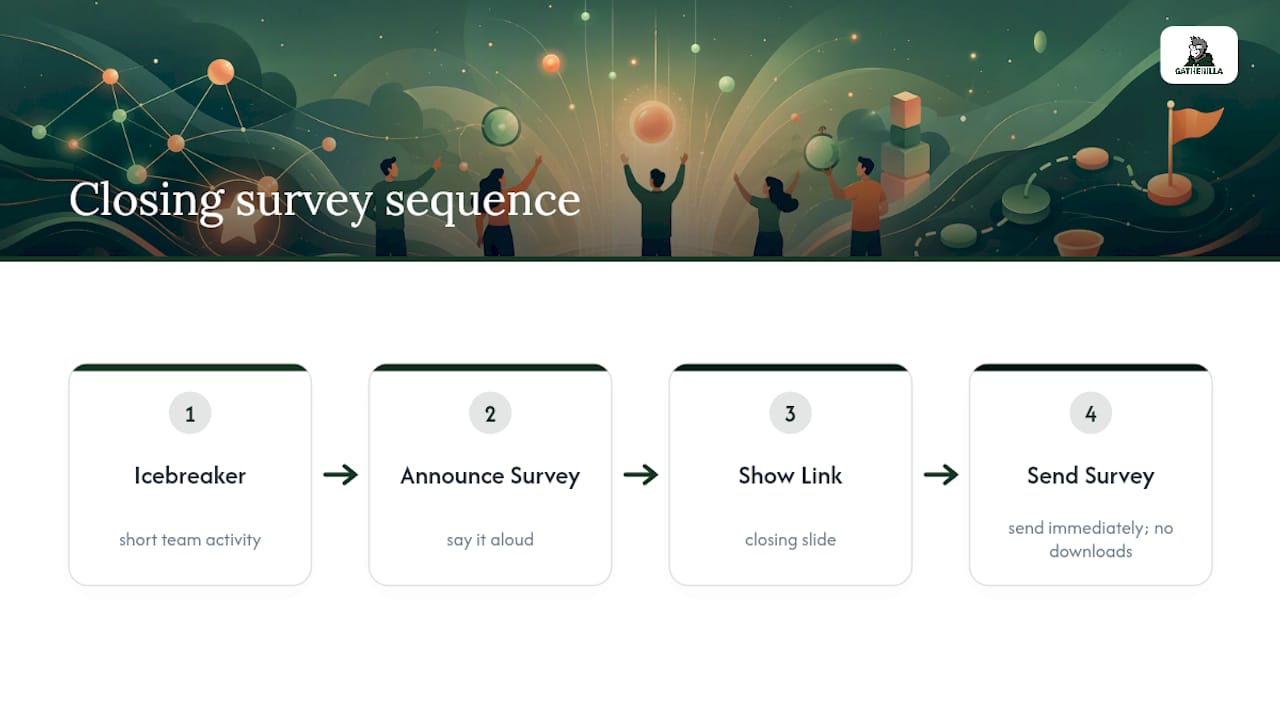
One trick that consistently helps: run a short icebreaker or team activity in the last few minutes of your event, mention the survey link on your closing slide, and send it the moment the session ends. Attendees who just had a good closing moment are more likely to give you two honest minutes. Browser-based games that require no downloads work on any video call, making this closing moment easy to set up on basic and upgraded plans.
Pro Tip: Announce the survey out loud during the closing icebreaker, not just in the chat. Verbal mentions get noticed; chat messages get scrolled past.
What Most Organizers Get Wrong About Feedback Data
The biggest blind spot is treating the overall satisfaction score as the whole story. It’s a useful headline, but it hides which specific thing broke the experience for which specific attendee segment. Track your overall score and NPS across an entire season to spot drift. Review the open-text comments per event, not per quarter. Survey data works best as a diagnostic tool, not a scorecard for blame. Read it that way and organizers actually fix what’s wrong instead of just reporting a number that sounds fine.
— Thomas
Make Your Next Event Easier to Give Feedback On
Attendees answer surveys more honestly when the event itself felt worth their time, and the moments right before you send that survey matter more than most organizers realize. Gatherilla gives remote and hybrid teams a way to close out virtual events on a genuinely engaged note, with browser-based multiplayer games that need no downloads and work inside whatever video call tool you’re already running.

Run a quick daily challenge or icebreaker before the closing slide, mention your survey link while attendees are still logged in, and you’ll see completion rates hold up better than sending a cold email an hour later. Gatherilla’s free plan covers the basics, and the Premium tier unlocks more games and reporting for teams that run virtual events regularly. Check the pricing page and set up your first session before your next event goes live.
Sources
- Post-Event Survey Design: Getting Honest Feedback That Actually Drives Improvement | VenueSight
- Event survey questions (Qualaroo)
- Study on response-rate differences for virtual vs in-person events (Journal/2024)
- Learning at and From a Virtual Conference: A Comparison of Conference Formats and Value Contributing Factors
FAQ
What are some good questions to ask in an event survey?
The strongest questions cover overall satisfaction, content relevance, speaker effectiveness, and platform experience for virtual events specifically. Pair a numeric rating like “How would you rate this event overall?” (1 to 5) with an open-ended follow-up such as “What’s the main reason for your score?”
What are 5 good survey questions examples?
A solid 5-question set includes an overall rating, a content relevance question, a speaker effectiveness question, a platform experience question, and one open-text improvement prompt. This mirrors the short template built for quick post-event sends within 24 to 48 hours of the event ending.
What are some examples of virtual events?
Virtual events include webinars, multi-day virtual conferences, online workshops, and remote team-building sessions run entirely through video conferencing platforms. Each format needs slightly different survey questions. A single webinar might only need a 1-minute pulse, while a multi-day conference calls for the full 10-question template.
What are the 5 basic questions for surveys?
At minimum, cover overall satisfaction, content or session quality, speaker or presenter effectiveness, technical or platform experience, and one open-ended question asking what to improve. These five categories capture the core of what most attendees will actually have an opinion about.
How much does Gatherilla cost?
Gatherilla offers a free plan alongside Premium options for teams that want more games and reporting features. Exact pricing details are listed on the Gatherilla pricing page.