

Top 30 New Hire Icebreakers for HR Teams

The six best new hire icebreakers you can run right now include Two Truths and a Lie, Virtual Trivia, Rose/Bud/Thorn, GIF Reaction, Human Bingo, and the One-Word Check-In. Each activity varies in length and format to suit different onboarding needs. The rule for choosing among them: match the activity to your objective first, then your format. An energy lift needs something fast and low-stakes. A get-to-know-you moment needs a little more time and a prompt with some texture. A cultural signal needs an activity that reflects how your team actually works.
- Two Truths and a Lie — in-person or virtual, 5 min, get-to-know-you
- Virtual Trivia — remote/hybrid, 10–15 min, energy lift + bonding
- Rose/Bud/Thorn — any format, 10 min, reflection + psychological safety
- GIF Reaction — async or virtual, 5 min, low-pressure, fun opener
- Human Bingo — in-person, 10 min, large group, get-to-know-you
- One-Word Check-In — any format, 3 min, quick pulse + inclusion
Key Takeaways
The most effective new hire icebreakers are short, purposeful, and always followed by a structured debrief that converts the activity into a real onboarding outcome.
| Point | Details |
|---|---|
| Match activity to objective | Choose by goal first: energy lift, get-to-know-you, deep connection, or cultural signal. |
| Start short, build over time | Run a 3-minute opener on day one; save deeper activities for the end of week one. |
| Debrief every time | A 2-minute debrief after any activity converts a fun moment into a learning event. |
| Make participation optional | Always offer an opt-out path; social anxiety is common and forced participation damages trust. |
| Use Gatherilla for remote teams | Browser-based, no-download games reduce setup friction and keep virtual new hires engaged. |
Table of Contents
- What are new hire icebreakers and how do they fit into onboarding?
- Why use icebreakers during new hire onboarding?
- Icebreaker ideas organized by use case and environment
- Ten plug-and-play templates you can run immediately
- Facilitator checklist: how to run icebreakers well
- What to avoid and when to skip an icebreaker entirely
- Quick tech and logistics tips for virtual and hybrid icebreakers
- What the research says about purposeful icebreakers
- What HR leaders consistently get right (and wrong) in new-hire onboarding
- Gatherilla makes virtual onboarding icebreakers effortless
- Sources
What are new hire icebreakers and how do they fit into onboarding?
An icebreaker, in the context of onboarding, is a short, structured warm-up activity with a specific social objective. It is not a team-building retreat, not a training exercise, and not a social happy hour. The distinction matters because each of those has a different purpose, a different time commitment, and a different facilitator role.
A well-designed icebreaker lowers the social temperature so that a new hire can participate in what comes next without the friction of feeling like a stranger. It typically runs a few minutes, requires no preparation from participants, and ends before it overstays its welcome.
The clearest signal that an icebreaker is working is that people start talking to each other, not just to the facilitator. If it becomes a performance with one person talking while others watch, it no longer functions as an icebreaker.
When to skip it entirely: if the team is in crisis mode, if a layoff just happened, or if the new hire is joining a group with visibly low morale, a forced warm-up will land badly. Read the room. A brief, genuine welcome is always better than a game nobody wants to play.
Why use icebreakers during new hire onboarding?
The business case is straightforward. Shared experiences created by short team activities accelerate trust and collaboration, which makes icebreakers one of the most cost-efficient early onboarding tactics available. A new hire who feels socially connected to at least one teammate in the first week is more likely to ask questions, flag problems early, and stay past the 90-day mark.
Three specific outcomes icebreakers support during onboarding:
- Faster social integration. A new hire who has laughed with their team once is more likely to send a Slack message than one who has only sat through a benefits presentation.
- Early psychological safety. A well-run opener signals that this team tolerates imperfection and values participation. That signal matters more in week one than almost anything else.
- Communication pattern visibility. Who speaks first? Who defers? Who makes the group laugh? A 5-minute activity surfaces team dynamics that a manager might otherwise take weeks to observe.
Icebreakers also create natural entry points for buddy alignment. A new hire who discovers a shared interest with their onboarding buddy during a quick opener has an immediate conversation thread to pull on.
When to skip them:
- The team just received difficult news (restructuring, layoffs, a missed target)
- The new hire is joining a high-stress sprint with no bandwidth for social warmth
- The group’s psychological safety is already low and a forced activity would feel patronizing
- The new hire explicitly signals discomfort with group activities before the session
Pro Tip: Run the shortest possible opener first. A 3-minute One-Word Check-In costs almost nothing and almost always works. Save the 15-minute deep-connection activity for the end of week one, once the new hire has had time to observe the team’s norms.
Icebreaker ideas organized by use case and environment
The most useful way to organize these activities is by what you are trying to accomplish, not by how clever they sound. Facilitators who categorize activities by use case and test them before deploying get better results because the activity feels purposeful rather than arbitrary.
Quick openers (2–5 min)
These work at the top of any meeting. Low stakes, no preparation, no wrong answers.
One-Word Check-In. Ask everyone to describe their current energy in one word. Go around the room or call in order. Script: “Before we start, let’s do a quick one-word check-in. What’s one word that describes how you’re showing up today? I’ll start.” Time: 3 min. Group: any size. Async adaptation: post the prompt in Slack the morning of the meeting.
Two Truths and a Lie. Each person shares three statements about themselves; the group guesses which one is false. Script: “We’ll go around and each share two true things and one lie about ourselves. The group guesses the lie. Keep it light.” Time: 5 min for groups up to 8. Virtual: use the chat for guesses to keep it fast.
GIF Reaction. Ask everyone to find a GIF that describes their mood or their weekend. Works especially well in Slack or Teams before a call. Script: “Drop a GIF in the chat that sums up your week. No explanation needed.” Time: 5 min. Async-friendly.
Deep-connection activities (10–20 min)
These belong in week one or two, once the new hire has had a chance to observe the team’s norms. They require a bit more vulnerability and a facilitator who can hold space for that.
Rose/Bud/Thorn. Each person shares one positive (rose), one challenge (thorn), and one thing they are looking forward to (bud). Script: “We’ll each share a rose, a bud, and a thorn from the past week. There are no wrong answers.” Time: 10–15 min. Group: 4–12. Virtual: use a shared whiteboard or a simple chat format.
My First Job Story. Ask each person to share their first job and one thing it taught them. Script: “What was your first job, and what’s one thing it taught you that still applies today?” Time: 15 min for groups up to 10. This one surfaces values and work history without feeling like an interview.
Personal User Manual. Each person shares 3–5 bullet points about how they work best (communication style, peak hours, pet peeves). Script: “Take 3 minutes to jot down three things people should know about working with you. Then we’ll share.” Time: 20 min. Works especially well for remote teams where working norms are invisible.
Large-group activities (15+ people)
Human Bingo. Create a bingo card with traits or experiences (“has lived in more than two states,” “speaks a second language,” “has a pet”). Participants find colleagues who match each square. Script: “You have 8 minutes to fill your bingo card by finding someone who matches each square. First to get a line wins.” Time: 10 min. In-person only; virtual adaptation uses a shared Google Sheet.
This or That. Read a series of either/or prompts (coffee or tea, early bird or night owl, Slack or email). Participants move to one side of the room or raise a hand. Script: “I’ll read two options. Move to the left side for the first, right side for the second. No explaining your choice.” Time: 5–8 min. Scales to any group size. Virtual: use reactions or the chat.
Virtual and hybrid-specific activities
Virtual icebreakers like trivia, scavenger hunts, and photo sharing help remote new hires relax and bond in ways that text-heavy onboarding simply cannot replicate.
Virtual Trivia. Run a short 5-question trivia round on a topic the team cares about (pop culture, company history, industry facts). Script: “We’re doing a quick 5-question trivia round. No Googling. Ready?” Time: 10–15 min. Use a browser-based tool that requires no download. For remote icebreaker game ideas that work across platforms, Gatherilla’s blog has a full guide.
Virtual Scavenger Hunt. Ask participants to find a household object that represents something about them (a book they love, something that makes them laugh, a tool they use every day). Script: “You have 90 seconds to grab one object from your home that tells us something about you. Go.” Time: 10 min. No setup required.
Shared Playlist. Before the call, ask everyone to add one song to a shared Spotify or Apple Music playlist. Play it as people join. Script: “Everyone added a song to our team playlist. We’ll play it as background music today. Bonus points if you can guess who added which song.” Time: ongoing, async-friendly.
Asynchronous icebreakers
Question of the Day. Post a single low-stakes question in your team channel each morning of the new hire’s first week. Examples: “What’s a skill you’re working on right now?” or “What’s the best meal you’ve had this month?” For a full bank of daily question prompts, Gatherilla’s question-of-the-day resource covers remote and hybrid teams specifically.
Photo Introduction. Ask the new hire to share 3 photos that represent who they are outside of work. Post in a team channel and invite colleagues to react or comment.
Quick-reference selection table
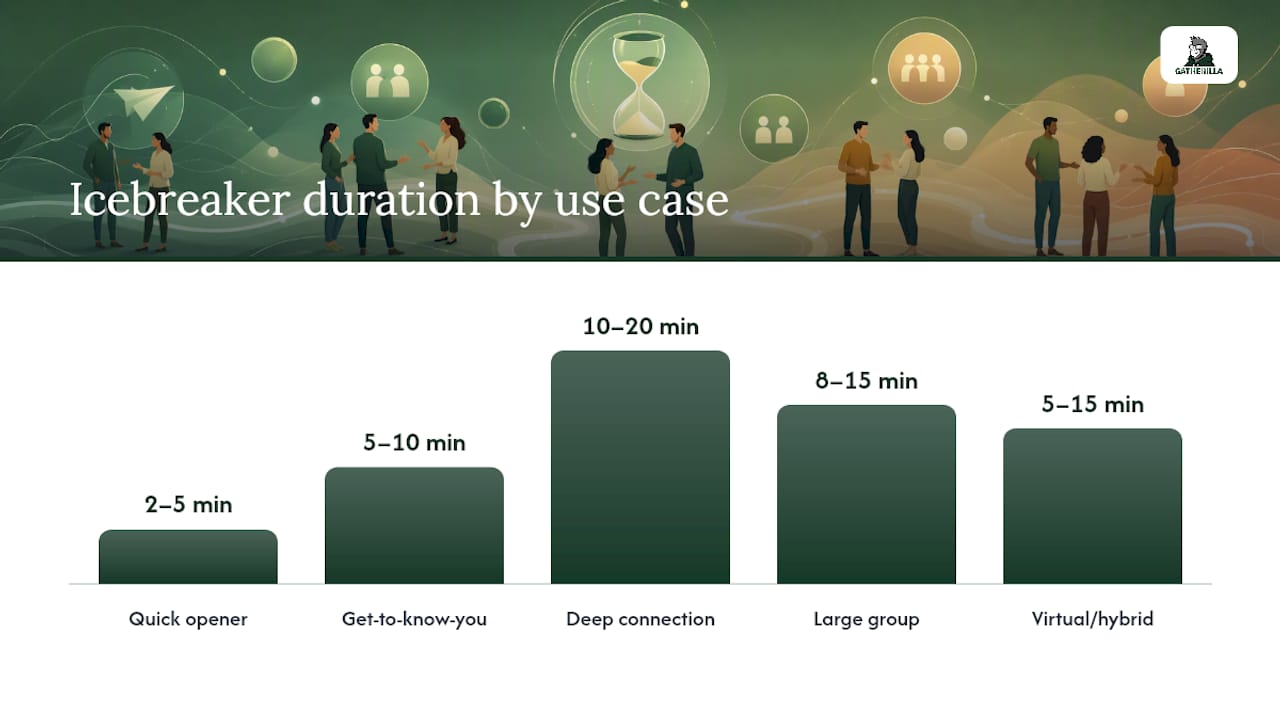
| Use case | Ideal time | Group size | Primary objective |
|---|---|---|---|
| Quick opener | 2–5 min | Any | Energy lift, inclusion |
| Get-to-know-you | 5–10 min | 4–15 | Social connection |
| Deep connection | 10–20 min | 4–12 | Trust, psychological safety |
| Large group | 8–15 min | 15+ | Scalable bonding |
| Virtual/hybrid | 5–15 min | Any | Remote engagement |
| Asynchronous | Flexible | Any | Inclusion, low pressure |
Ten plug-and-play templates you can run immediately
These templates are designed for the three most common onboarding contexts: the first-day team meeting, the first-week check-in, and the remote welcome call. Each includes an exact facilitator script, timing, materials, and a debrief prompt.
One-Word Check-InGoal: Quick pulse on energy. Script: “Before we dive in, one word each — how are you showing up today? I’ll start: focused.” Time: 3 min. Materials: None. Debrief: “Notice anything interesting about the range of words we heard?” Remote: Use chat for simultaneous answers.
Two Truths and a LieGoal: Get-to-know-you, low stakes. Script: “Share two true things and one lie. Group guesses the lie. Keep it fun.” Time: 5–8 min (up to 8 people). Materials: None. Debrief: “What surprised you about what you learned?” Remote: Guesses in chat.
Rose/Bud/ThornGoal: Reflection, psychological safety. Script: “One rose (something good), one thorn (a challenge), one bud (something you’re looking forward to). I’ll go first.” Time: 10–15 min. Materials: Optional whiteboard. Debrief: “What themes do you notice across our thorns?” Remote: Shared Google Slide or Miro board.
Virtual TriviaGoal: Energy lift, bonding. Script: “Five questions, no Googling, teams of two. Ready?” Time: 10–15 min. Materials: Browser-based trivia tool. Debrief: “What did you learn about your teammate’s knowledge gaps?” Remote: Breakout rooms for team huddles.
My First Job StoryGoal: Values and work history. Script: “What was your first job, and what did it teach you that still applies?” Time: 15 min (up to 10 people). Materials: None. Debrief: “Any common threads in what we all learned early on?” Remote: Works identically on video.
Personal User ManualGoal: Working norms, communication clarity. Script: “Take 3 minutes to write three things people should know about working with you. Then we’ll share.” Time: 20 min. Materials: Shared doc or sticky notes. Debrief: “Where do our working styles overlap? Where might we need to adapt?” Remote: Shared Google Doc.
Virtual Scavenger HuntGoal: Fun, remote bonding. Script: “90 seconds to grab one object from your home that tells us something about you. Go.” Time: 10 min. Materials: None. Debrief: “What did the objects reveal that we wouldn’t have guessed?” Remote: Native to video calls.
This or ThatGoal: Quick energy lift, large groups. Script: “I’ll read two options. Raise your hand for the first, keep it down for the second. Coffee or tea?” Time: 5–8 min. Materials: None. Debrief: “Any surprising splits?” Remote: Use reactions or poll.
GIF ReactionGoal: Async-friendly opener. Script: “Drop a GIF in the chat that sums up your week. No explanation needed.” Time: 5 min. Materials: Slack, Teams, or any chat tool. Debrief: “Notice any patterns?” Remote: Native to async channels.
Question of the DayGoal: Async inclusion, first-week connection. Script: Post daily: “Today’s question: [prompt]. Reply by end of day.” Time: 5 min per person. Materials: Team chat channel. Debrief: Weekly: “What’s one thing you learned about a teammate this week?” Remote: Fully async.
Template quick reference
| Template | Time | Group size | Modality |
|---|---|---|---|
| One-Word Check-In | 3 min | Any | Any |
| Two Truths and a Lie | 5–8 min | Up to 8 | Any |
| Rose/Bud/Thorn | 10–15 min | 4–12 | Any |
| Virtual Trivia | 10–15 min | Any | Remote/hybrid |
| My First Job Story | 15 min | Up to 10 | Any |
| Personal User Manual | 20 min | 4–10 | Any |
| Virtual Scavenger Hunt | 10 min | Any | Remote |
| This or That | 5–8 min | Any | Any |
| GIF Reaction | 5 min | Any | Async/virtual |
| Question of the Day | 5 min | Any | Async |
Facilitator checklist: how to run icebreakers well
The difference between an icebreaker that builds trust and one that makes people cringe is almost always execution, not the activity itself. Treating activities as controlled practice reps with a clear objective and an immediate debrief is what converts a fun moment into a workplace behavior change.
Pre-session setup
- Confirm the time slot is protected (no one is joining late from another meeting)
- Test any tech tools before the call starts
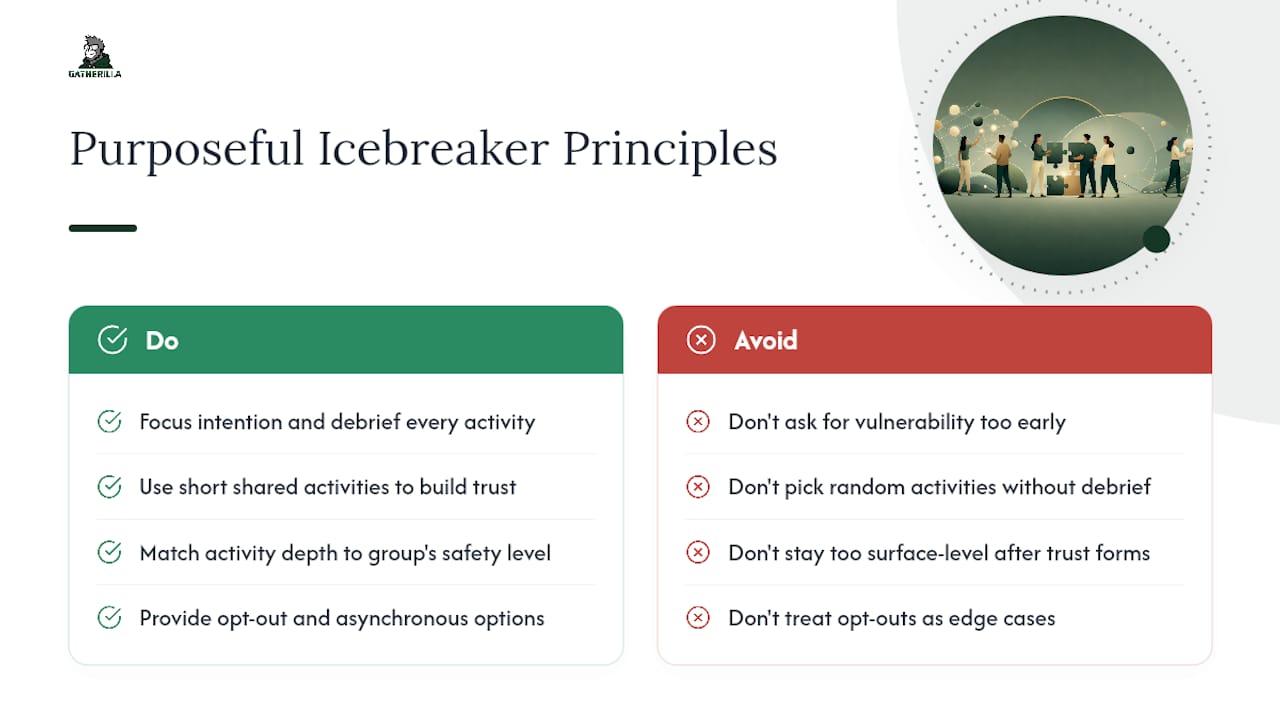
- Prepare an opt-out path: “If you’d prefer to observe today, that’s completely fine”
- For hybrid sessions, assign a dedicated remote host so virtual participants are not an afterthought
- Check for accessibility needs (captions, screen reader compatibility, physical limitations)
Opening lines that set the tone
The first 30 seconds of a facilitated activity determine whether people lean in or check their phones. Try: “This is low-stakes and there are no wrong answers. The goal is just to get us talking before we get to the agenda.” That one sentence does three things: it removes performance pressure, it signals optionality, and it frames the activity as purposeful rather than filler.
The debrief: where the learning actually happens
Most facilitators skip the debrief. That is the single biggest mistake in running icebreakers for new hires. A structured debrief converts a 5-minute game into a 2-minute conversation that sticks. The ORCA model (Objective, Result, Cause, Action) works well: What were we trying to do? What actually happened? Why? What do we take forward? For onboarding, the “Action” step often becomes a note in the new hire’s 30-day check-in doc.
Pro Tip: Match the intensity of the activity to the team’s current psychological safety level. A team that has never met should start with a One-Word Check-In, not a Personal User Manual. Build toward deeper activities over the first two weeks as trust accumulates. For a practical framework on building psychological safety before running deeper activities, Gatherilla’s guide covers the key steps.
What to avoid and when to skip an icebreaker entirely
Some activities backfire not because the facilitator ran them badly, but because the activity itself was the wrong choice. Non-physical, low-pressure activities are the right default for hybrid and remote teams, and making participation optional is not a nice-to-have — it is a trust signal.
Never ask or require:
- Physical contact of any kind (trust falls, handshakes, partner exercises)
- Sensitive personal topics (relationship status, family structure, religion, politics, health)
- Forced performances (singing, dancing, acting out a scenario in front of the group)
- Sharing salary history or career failures in a first-meeting context
- Anything that requires a participant to reveal their home environment on camera
Red-flag situations where you should skip the icebreaker entirely:
- A layoff or restructuring was announced in the past 30 days
- The team is in a high-pressure sprint with a deadline this week
- The new hire has signaled anxiety or discomfort before the session
- The group’s psychological safety is visibly low (people are not speaking up in regular meetings)
Sample opt-out script: “We’re going to do a quick activity to kick things off. If you’d prefer to just listen today, that’s completely fine — just drop a wave emoji in the chat so we know you’re here.” That language removes the social cost of opting out without making it feel like a big deal.
Because social anxiety affects a meaningful portion of the population, building opt-out paths into every icebreaker is not just good manners. It is the difference between an activity that builds psychological safety and one that quietly damages it for the people who needed it most.
Quick tech and logistics tips for virtual and hybrid icebreakers
The most common reason virtual icebreakers fail is not the activity — it is the setup. Browser-based tools that integrate with video conferencing and require no downloads materially increase participation, especially for new hires who are already navigating an unfamiliar tech stack on day one.
Minimal-setup rules:
- Default to browser-based tools. Asking a new hire to download an app before their first meeting adds friction and signals poor planning.
- Enable captions on every call. This is an accessibility baseline, not an optional feature.
- Keep the activity under 15 minutes. Anything longer needs a stronger justification than “it seemed fun.”
- Timebox breakout rooms explicitly: “You have 4 minutes in your breakout. I’ll bring you back at the timer.”
Platform-specific tips:
- Zoom: Use the built-in polling feature for This or That; breakout rooms for small-group activities.
- Microsoft Teams: Use the Together Mode for large-group openers; Teams-specific game formats work well when the whole company is on the platform.
- Slack/async: GIF Reaction and Question of the Day require nothing beyond a channel and a prompt.
Fallbacks for common failures:
- Slow connection: switch to a text-based activity (chat-only trivia, typed responses)
- Mic-off participants: use reactions, polls, or chat as the primary response channel
- Late joiners: design the activity so it works whether someone arrives at minute 1 or minute 4
Hybrid-specific note: the biggest failure mode in hybrid icebreakers is treating in-room participants as the default and remote participants as observers. Assign a dedicated remote host whose only job is to watch the video grid and make sure virtual participants are called on. For a deeper look at keeping remote participants engaged during hybrid sessions, Gatherilla’s hybrid meeting guide covers the specific facilitation moves that prevent the two-tier dynamic.
What the research says about purposeful icebreakers
The practitioner research on this topic points in a consistent direction: the activity itself matters less than the intention behind it and the debrief that follows.
Shared experiences created by short team activities are the fastest route to early trust. That is not a soft claim — it is the mechanism behind why a 5-minute activity can do more for a new hire’s sense of belonging than a 2-hour orientation presentation.
Facilitator-tested, categorized activities outperform randomly chosen ones because they match the activity’s depth to the group’s current psychological safety level. An activity that asks for vulnerability before trust exists will backfire. An activity that stays too surface-level once trust is established will feel like a waste of time.
Organizing icebreaker questions by depth — get-to-know-you, fun, work-related — gives facilitators a practical filter for choosing the right prompt without overthinking it. A first-day group gets fun and light. A second-week group can handle work-related and values-based questions.
Classic facilitator-tested games offer reusable mechanics and debrief prompts that HR teams can adapt across cohorts without reinventing the wheel each time. The mechanics are not the point — the debrief is.
On inclusivity: social anxiety affects a significant portion of the population, and new hire onboarding is already a high-anxiety context. Opt-out paths and asynchronous alternatives are not accommodations for edge cases. They are standard design for any activity that claims to build psychological safety.
What HR leaders consistently get right (and wrong) in new-hire onboarding
The pattern that shows up most often in effective onboarding programs is deceptively simple: start smaller than you think you need to, then build.
Most HR teams err in one of two directions. Either they skip icebreakers entirely because they feel awkward to facilitate, or they front-load the first day with a 45-minute “team bonding” block that exhausts a new hire who is already processing an enormous amount of new information. Neither works.
What does work: a 3-minute opener on day one (One-Word Check-In or GIF Reaction), followed by a 10–15 minute deep-connection activity at the end of week one (Rose/Bud/Thorn or My First Job Story), with async touchpoints (Question of the Day) filling the gaps in between. That sequence respects the new hire’s cognitive load, builds trust incrementally, and gives the facilitator two natural debrief moments to document and carry forward into the 30-day check-in.
The other consistent pattern: the facilitators who get the best results are the ones who have run the activity themselves before deploying it with a new hire. Not because they need to rehearse, but because they need to know where the awkward pause lands and how to hold it without rushing past it. That pause is often where the most interesting thing gets said.
Gatherilla makes virtual onboarding icebreakers effortless
Running new hire icebreakers on a remote or hybrid call gets a lot easier when the activity is already built and the only thing you need to do is share a link. Gatherilla’s browser-based platform gives HR teams a ready library of multiplayer games, trivia challenges, and onboarding activities that work inside any video call with no downloads and no IT tickets.

Two use cases where it saves the most time: first-day welcome calls (drop a game link into the meeting invite and it’s ready when participants arrive) and weekly first-month check-ins (rotate through Gatherilla’s daily challenges to keep new hires connected without repeating the same activity twice). Every game runs in the browser, works alongside Zoom, Teams, or Google Meet, and takes under two minutes to set up.
If you are running onboarding for a distributed team and want to stop rebuilding icebreakers from scratch each cohort, explore Gatherilla’s team-building games and start with the free tier today.
Sources
- Team icebreaker games
- Icebreaker games
- Team Building Activities for Work That Actually Drive Results - Afterburner USA Inc
- 15 virtual onboarding icebreakers to spark conversation
- Fun and Unique Meeting Icebreakers Your Employees Will Love | CO- by US Chamber of Commerce
- team_buildinggamesactivitiesideas.pdf
- Best Icebreaker Questions For Work
- Nimh