

Multiplayer Meeting Games That Actually Build Team Rapport

Run a mix of 2 to 5 minute icebreakers to open meetings and 15 to 30 minute bonding activities every week or two for deeper connection. Gallup finds that 25% of remote workers struggle with loneliness, compared with 16% of in-person staff, and even a 5-minute game can re-energize a flat call. For teams that want this running without setup headaches, a no-download platform like Gatherilla handles the logistics.
TL;DR:
- Short icebreakers under five minutes can significantly improve team energy and reduce loneliness, especially for remote workers.
- Mid-length activities like trivia or Pictionary offer effective energizers without disrupting the meeting flow.
- Longer bonding activities, such as team timelines or escape challenges, foster deeper connections but should be scheduled outside regular meetings.
- Selecting games based on objective, group size, tech access, and inclusion ensures meaningful engagement and avoids exclusion.
- Using a platform like Gatherilla simplifies setup, eliminates downloads, and provides analytics, making consistent team-building easier and more effective.
Table of Contents
- The Best Multiplayer Meeting Games To Run This Week
- Fast Icebreakers You Can Run in Under Five Minutes
- Mid-Length Energizers That Fit Between 5 and 15 Minutes
- Longer Bonding Activities for Deeper Team Rapport
- How To Choose and Run the Right Game Every Time
- How Gatherilla Makes Running These Games Easier
- Where This Article’s Evidence Comes From
- What Actually Moves the Needle on Team Connection
- Run These Games Without the Setup Work
- Sources
The Best Multiplayer Meeting Games To Run This Week
Every entry below tells you how long it takes, who it works for, and exactly what to say to kick it off. None require downloads unless noted, and most run entirely through your existing video call and chat window.
One-Word Check-In. 2 minutes, any group size, no setup. Ask everyone to type one word describing their week into chat, then read three aloud. Works in hybrid rooms because in-person folks can say theirs out loud while remote folks type.
This or That. 3 minutes, works for 5 to 50 people, no setup. Pose a rapid-fire choice (“coffee or tea, beach or mountains”) and have people react with an emoji or shout their answer. Shy participants can just react instead of speaking.
Would You Rather. 3 minutes, any size, no setup. Read two absurd scenarios and take a quick poll. Keep it light. Skip anything that edges into personal territory.
Emoji Story Chain. 5 minutes, best under 15 people, needs a shared chat. One person starts a story with an emoji, the next adds one, and you read the chain back at the end.
Two-Truths-and-a-Lie, Team Edition. 5 minutes, groups of 6 to 10, no setup. One person shares three facts about a work project instead of themselves, lowering the personal-disclosure bar while still building familiarity.
Rapid Trivia. 8 minutes, any size, browser quiz tool or shared doc. Five questions, timed, with a leaderboard if you have one running. Works well as a recurring Friday opener, similar to the format covered in virtual team trivia playbooks.
Lightning Scavenger Hunt. 5 minutes, groups of 8 or more, no setup beyond a webcam. Call out an object (“something red,” “a mug with a logo”) and the first person back on camera with it wins the round.
Collaborative Pictionary. 10 minutes, teams of 4 to 8, needs a shared whiteboard like the one built into Microsoft Teams. One person draws, teammates guess in chat, and the reveal usually gets the biggest laugh of the meeting.
Codenames-Style Word Guessing. 15 minutes, teams of 4 to 8, browser-based clue board. This party classic has been adapted into countless remote formats because the rules translate cleanly to a shared screen.
Two-Minute Interviews. 10 minutes, pairs, no setup. Split into breakout pairs, each person interviews the other for 90 seconds, then introduces their partner to the group.
Mini Puzzle Relay. 12 minutes, teams of 3 to 5, shared doc or simple puzzle app. Break a riddle into three parts and pass clues between team members.
Story Chain Improv. 10 minutes, groups of 6 to 12, no setup. Each person adds one sentence to a group story, building something ridiculous by the end.
Quick Debate. 8 minutes, any size, no setup. Assign silly sides (“cats vs. dogs at work”) and give each 90 seconds to make a case.
Desk Show-and-Tell. 5 minutes, any size, webcam only. Everyone grabs the nearest object and explains why it’s on their desk. Genuinely reveals more about people than most formal icebreakers.
Virtual Escape Room Mini-Challenge. 20 minutes, teams of 4 to 6, browser-based puzzle set. A scaled-down version of a full escape room that fits inside a standard meeting slot.
Connection Bingo. 15 minutes, any size, shared doc with a bingo grid of facts (“has traveled to three continents,” “plays an instrument”). People mingle in breakout rooms to fill their card.
Collaborative Build Challenge. 20 minutes, teams of 4 to 8, shared whiteboard. Give a prompt like “design the ideal team retreat” and let the group sketch it together, which taps into the same dynamic HBR found improves creative output in virtual formats.
Talent Show Lightning Round. 15 minutes, groups of 8 to 15, no setup. Give people 30 seconds each to show a hidden skill, from a card trick to a terrible pun.
For quick openers specifically built around video-call quirks, a Zoom-tested game roundup covers platform-specific tweaks worth knowing before you run any of these live.
Fast Icebreakers You Can Run in Under Five Minutes
Short openers work because they hit a specific window. Gallup’s loneliness data shows remote workers need more of these small connection points, not fewer, and a well-timed 5-minute game does more to shift a meeting’s energy than a 30-minute agenda item ever will.
- One-word check-in: “Type one word for how your week’s going, then I’ll read a few.” Chat-only option for anyone who doesn’t want to talk.
- This or That: “Coffee or tea? React with the emoji that matches.” Zero verbal requirement, works great for camera-shy folks.
- Would you rather: Two scenarios, thumbs-up vote, done in 90 seconds.
- Highlight of the week: “Drop one good thing from this week in chat, work or personal.” Nobody’s forced to unmute.
- Emoji reaction poll: Ask a simple yes/no/maybe question and read the reaction bar.
- Quick desk show-and-tell: “Grab whatever’s closest to you and tell us why it’s there.” Genuinely surprising every time.
Give each one a hard 60 to 90 second cap and announce it up front, since ambiguous timing is what makes icebreakers drag. For hybrid rooms, always offer a chat-based alternative alongside the spoken one, matching the inclusion approach recommended by remote-work practitioners who track which formats actually get used.
Pro Tip: Rotate who picks the icebreaker each week. A rotating host keeps the format from going stale and quietly builds facilitation skills across the team instead of leaving it all on one person’s shoulders.
For a longer bank of these, browse a dedicated icebreaker guide built specifically for recurring video meetings.
Mid-Length Energizers That Fit Between 5 and 15 Minutes
This band is where most meetings get their energy back without derailing the agenda. Rapid trivia works with almost no setup: five questions, a timer, and a simple show of hands or chat-typed answers. A lightning scavenger hunt needs nothing but a webcam and a countdown clock.
- Rapid trivia round — use a shared quiz sheet or a browser tool, keep it to five questions, and settle ties with a tiebreaker question rather than a coin flip.
- Collaborative Pictionary — a shared whiteboard tool works fine; assign one drawer per round and rotate.
- Quick debate — two sides, 90 seconds each, moderator picks a “winner” by applause emoji count.
- Two-minute interviews — breakout rooms in pairs, then 30-second partner introductions back in the main room.
- Mini puzzle relay — split a riddle into pieces and pass them through chat between teammates.
- Lightning scavenger hunt — call an object category and race to show it on camera first.
For hybrid meetings, assign one remote participant as the “chat scorekeeper” so in-room energy doesn’t drown out what’s happening on screen. A ready-to-run energizer playbook has timing templates if you want to skip building your own.
Longer Bonding Activities for Deeper Team Rapport
Reserve 15 to 45 minute activities for retros, offsites, or a dedicated monthly slot rather than squeezing them into a status meeting.
- Team Timeline: Each person adds one career or life milestone to a shared doc timeline. Objective: surface shared history nobody knew about. Materials: one shared document. Facilitator role: keep entries brief and prompt quieter members directly.
- Talent Show: 30 seconds per person to demonstrate a skill. Objective: humor and vulnerability in equal measure. Works best with 8 to 15 people so nobody waits too long for their turn.
- Virtual Escape or Puzzle Challenge: Teams of 4 to 6 solve a linked series of clues. Objective: collaborative problem-solving under mild time pressure, which Kellogg’s research on creativity and controlled embarrassment suggests can loosen up teams that are usually too polished in meetings.
- Connection Bingo with Storytelling: A bingo grid of personal facts, filled through breakout-room conversations, then a few winners share the story behind their square.
- Collaborative Design Challenge: Teams sketch a solution to a light-hearted brief (“redesign the office kitchen”) on a shared whiteboard, then present in two minutes.
Close every longer activity with one reflection question: “What did you learn about a teammate today?” That single prompt, dropped into a chat poll or asked aloud, is often the difference between an activity people remember and one they forget by lunch. A short pulse survey the next day, asking whether the activity felt worth the time, gives you a real read on whether to repeat it. Groups focused on employee engagement broadly, like the frameworks in this employee connection activity guide, use the same before-and-after pulse check to justify repeat sessions to leadership.
How To Choose and Run the Right Game Every Time
Run every game idea through the same short checklist before it hits your calendar.
- Objective: pick one — energize, bond, or build a specific skill. HBR’s research on workplace relationships is clear that mixing objectives in one activity dilutes the result.
- Time: match the format to the slot you actually have, not the one you wish you had.
- Group size: trivia scales to 50 people; two-minute interviews fall apart past 12.
- Energy level: don’t schedule a high-energy scavenger hunt right after a layoff announcement or a tense client call.
- Inclusion: always offer a nonverbal or chat-based option alongside the spoken one.
- Tech: confirm everyone can access the tool before the meeting, not during it.
- Privacy: never require disclosure of anything genuinely personal.
- Fallback plan: have a backup game ready in case the first one falls flat or the tech breaks.
Watch for three red flags: games that force personal disclosure without an opt-out, tech requirements that quietly exclude anyone on a slow connection or older device, and competitive formats with a clear loser and no debrief afterward. A simple closing script covers most of this: “That’s time. Nice work, everyone. One thing you noticed about a teammate today?” Ten seconds, and it turns a game into an actual connection point.
Pro Tip: Keep a running list of which games your team has already played. Repeating the same trivia format every week burns goodwill fast, even if each individual round was fun.
How Gatherilla Makes Running These Games Easier
Most of the friction in running multiplayer meeting games isn’t picking the format. It’s the setup: finding a tool, sharing a link, hoping nobody needs to download an app mid-meeting. Gatherilla removes that step entirely, with browser-based games that launch inside whatever video call you’re already running.
- No downloads for any participant, on any device
- Quick setup, typically under a minute before a session
- Daily challenges that keep engagement going between scheduled meetings
- Analytics HR teams can use to track participation over time
A typical use case: an HR manager sets up a weekly trivia session for a 40-person department and a separate onboarding mini-game for new hires in their first week, both running through the same dashboard.
| Getting started | What it takes |
|---|---|
| Step 1 | Pick a game category matched to your meeting’s objective |
| Step 2 | Share the browser link, no install required |
| Step 3 | Review participation data to see what’s landing with your team |
Where This Article’s Evidence Comes From
The loneliness figures come from Gallup’s workplace research, and the case for structured virtual collaboration draws on Harvard Business Review’s brainstorming study. For more ready-to-run mechanics, Mural’s team meeting game collection and TeamRetro’s icebreaker library are both worth bookmarking.
What Actually Moves the Needle on Team Connection
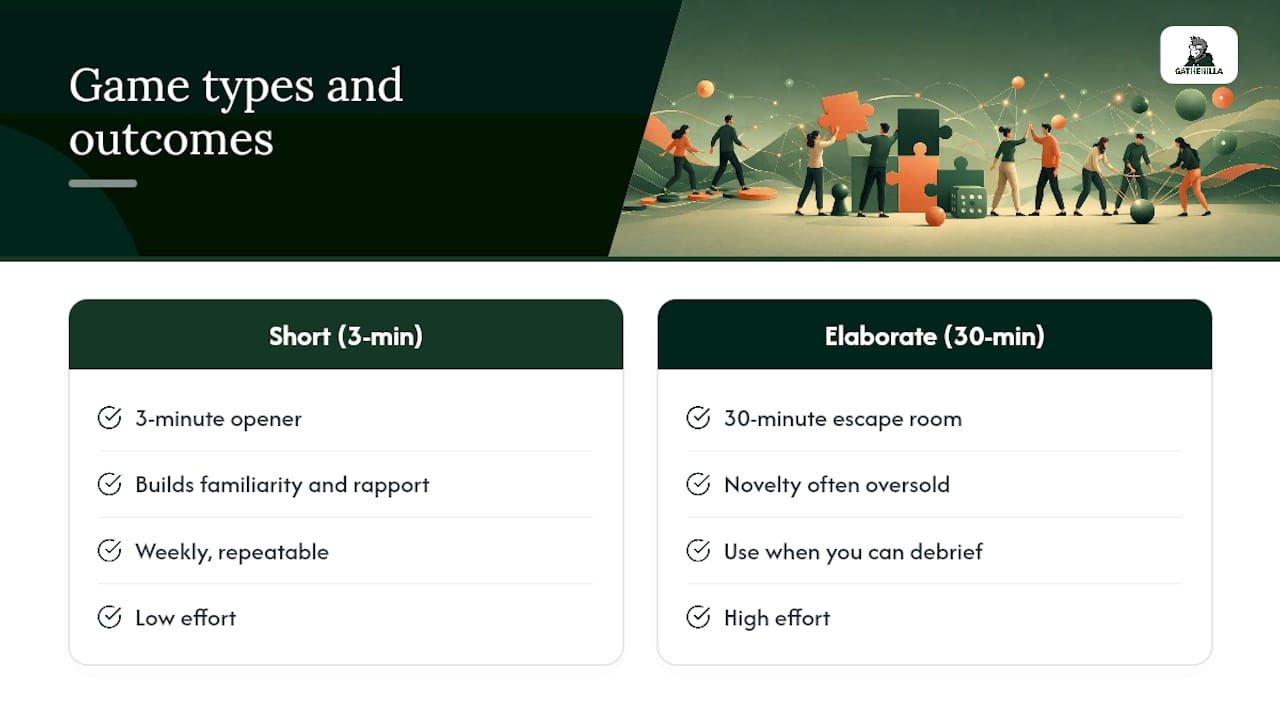
Most advice on this topic treats every game like it solves the same problem, and that’s the biggest mistake I see teams make. A 3-minute icebreaker and a 30-minute escape room aren’t different sizes of the same tool. They serve different jobs, and running the wrong one at the wrong moment wastes goodwill fast.
The conventional wisdom oversells novelty. Teams don’t need a new game every week. They need a small, reliable rotation they can trust, run consistently, and retire when it goes stale. Consistency beats cleverness here, which is why repeatable, low-effort formats tend to outperform elaborate one-off events over a full quarter.
If you take one thing from this, prioritize the short stuff. A well-run 3-minute opener, done weekly, builds more familiarity over six months than a single elaborate offsite game ever will. Save the 30-minute activities for when you actually have the room to debrief properly, and don’t skip that debrief. It’s the step people cut first and the one that mattered most.
— Thomas
Run These Games Without the Setup Work
Picking the right format is only half the job. Someone still has to build the trivia deck, set up the whiteboard, and make sure the remote hire on a work laptop can actually join without an IT ticket. Gatherilla handles that part. It’s a browser-based platform built specifically for the games in this article, with no downloads, a setup that takes under a minute, and daily challenges that keep momentum going between scheduled meetings.

For HR teams managing onboarding, weekly check-ins, and company-wide events all at once, Gatherilla adds participation analytics so you can see what’s actually landing instead of guessing from a few comments in chat. It fits teams of any size, remote or hybrid, and works inside whatever video tool you already use. If you’re ready to stop rebuilding icebreakers from scratch every Monday, check out Gatherilla’s game library and set up your first session today.
Sources
- Employees worldwide feel lonely | Gallup
- Why virtual brainstorming is better for innovation | Harvard Business Review
Recommended
- Team Building Games for Microsoft Teams (That Actually Work in a Call) | Gatherilla Blog
- Team Building Games That Don’t Make People Cringe | Gatherilla Blog
- Morning Meeting Games for Remote Teams: 2026 Guide | Gatherilla Blog
- Browser-Based Team Building Games: Play Together Without Downloads or IT Approval | Gatherilla Blog