

Ready to Run Hybrid Meeting Icebreakers for HR and Team Leaders

Short, parity-focused icebreakers work best for hybrid meetings: prompts under five minutes for remote attendees and in-room staff alike, with a facilitator who deliberately routes attention to whoever is on screen. This article gives ready-to-run scripts, timing, and facilitator roles grouped by length, plus the research behind why they matter. Team-based interventions like these can measurably foster psychological safety in mixed-location teams, and tools like Gatherilla exist specifically to make running them easier.
TL;DR:
- Short icebreakers should be quick, simple, and designed to equalize remote and in-room participation by using chat, polls, or visual sharing.
- Activities like two truths and a lie, quick trivia, and show-and-tell are effective at engaging hybrid teams within 10 to 15 minutes.
- Longer collaborative exercises such as escape rooms or story-building sessions require role rotation and proper planning to maintain inclusion.
- Facilitators must assign roles, test technology, and use tools like polls to ensure remote and in-room voices are equally heard and valued.
- Consistent use of micro-challenges and inclusive formats over time can measurably improve team psychological safety and communication.
Table of Contents
- 1. Quick icebreaker questions for standups and short meetings
- 2. Short interactive activities that scale in hybrid meetings
- 3. Longer collaborative games and energizers for retros and all-hands
- 4. How to run inclusive hybrid icebreakers: a facilitator checklist
- 5. Why icebreakers matter: the research on psychological safety
- 6. A practitioner’s rules of thumb for hybrid icebreakers
- How Gatherilla helps: a zero-setup option for hybrid icebreakers
- Sources
- FAQ
1. Quick icebreaker questions for standups and short meetings
When a meeting has five minutes or less to spare, the icebreaker has to be nearly frictionless. The prompts below take one to five minutes each and work whether you have three people on a video call or thirty split across a conference room and their kitchen tables.
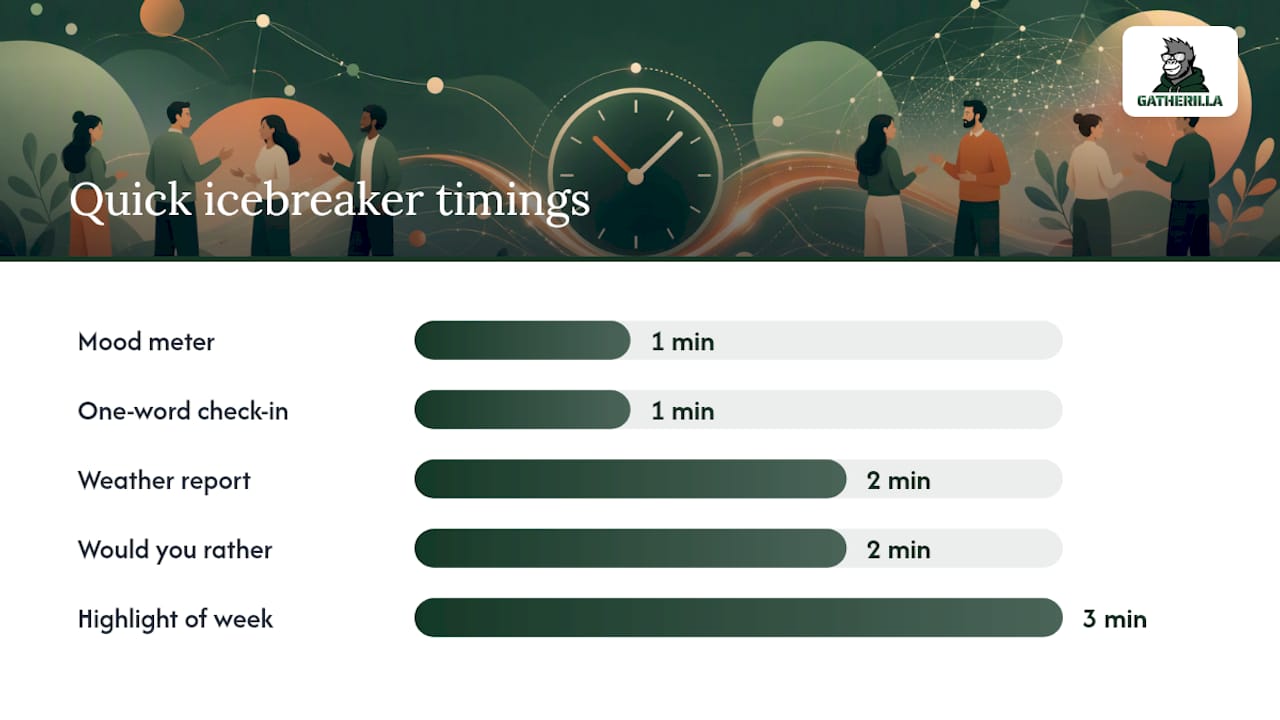
- Mood meter check-in (1 minute): Ask everyone to type a number 1-10 in chat for how they’re feeling, then call out two or three to comment on. Remote parity: reading chat aloud stops in-room voices from dominating.
- One-word check-in (1 minute): Go around (or scroll chat) for a single word describing the week so far. Opt-out: allow “pass” as a valid answer.
- Where are you joining from today? (2 minutes): Useful for distributed teams with flexible locations; keep it light, no personal address details needed.
- Emoji reaction round (1 minute): Ask people to react with an emoji that matches their energy, visible to both room and remote screens.
- Quick poll: coffee or tea? (1 minute): Use your video platform’s native poll feature so remote and in-room votes count the same way.
- Two-minute weather report (2 minutes): Each person describes their mental state as a weather pattern, sunny, cloudy, stormy. Low-stakes and easy to skip.
- Highlight of the week (3 minutes): One sentence each, rotating between remote and in-room speakers to avoid a room-first bias.
- Would you rather (2 minutes): A quick binary choice question, voted on via poll or chat reaction.
- Song stuck in your head (2 minutes): Playful and quick, and ties into research on music’s role in group creativity.
- Rose and thorn (3 minutes): One good thing, one challenge, said in a single breath each.
- Guess the answer (3 minutes): Facilitator shares a trivia fact about a team member (with permission) and others guess who it is.
- Gratitude in five words (2 minutes): Short, positive, and works well before difficult meetings.
- Show us your view (2 minutes): Everyone briefly shows their screen background or workspace on camera, an easy inclusion cue for remote staff.
For each, the facilitator’s job is the same: call on remote names first, read chat responses out loud, and never let the in-room energy carry the whole exercise. Anyone who wants to skip should be able to type “pass” without explanation.
Pro Tip: Pin the chat window so you never miss a remote response while scanning the room.
2. Short interactive activities that scale in hybrid meetings
Activities in the 5 to 15 minute range need a bit more structure: an objective, a script, and a clear way for remote participants to contribute without being an afterthought. These work well as the opening segment of a longer meeting.
- Two truths and a lie (10 minutes, any group size): Each person states three facts, two true and one false, and others guess. Hybrid tweak: use a poll for votes so remote guesses are counted the same as raised hands.
- 60-second show-and-tell (10-15 minutes, groups of 6-10): Everyone grabs an object near them and explains its story in one minute. Remote employees show items from home, which levels the playing field rather than favoring whoever is in the office.
- Quick trivia with live poll (10 minutes, any size): Five questions, answered via poll, with a shared leaderboard visible to everyone. Works well before retros to lighten the mood.
- Paired breakout prompts (10 minutes, pairs): Send people into breakout rooms with one discussion question, then bring them back to share one insight. In Microsoft Teams, hosts can set up breakout rooms directly from the meeting controls, which makes pairing remote and in-office staff simple.
- Virtual scavenger hunt (10-15 minutes, groups of 4+): Call out an item category (something red, something older than you) and everyone races to find it on camera. Pre-clear categories to avoid anything invasive.
- Caption this (10 minutes, any size): Share a neutral image and ask for the funniest caption via chat, voted on afterward.
- This or that bracket (10 minutes, any size): Run a quick single-elimination poll (tacos vs. pizza, mornings vs. nights) to build a shared bracket over a few rounds.
- Team trivia relay (12 minutes, teams of 3-4): Small teams answer rounds of questions together in breakout rooms, then report scores to the main room.
A few things make these hold up in hybrid settings:
- Keep group sizes small enough that no one waits more than a minute to participate.
- Always surface remote answers in the same room-visible space as in-person ones (shared screen, poll results, or read-aloud chat).
- Time-box strictly. A 10-minute activity that runs to 18 minutes erodes goodwill fast.
3. Longer collaborative games and energizers for retros and all-hands
Formats running 15 minutes or more belong in retros, all-hands, or offsites, where the investment pays off in deeper connection rather than just a warm-up. These need more planning but also more payoff if run well.
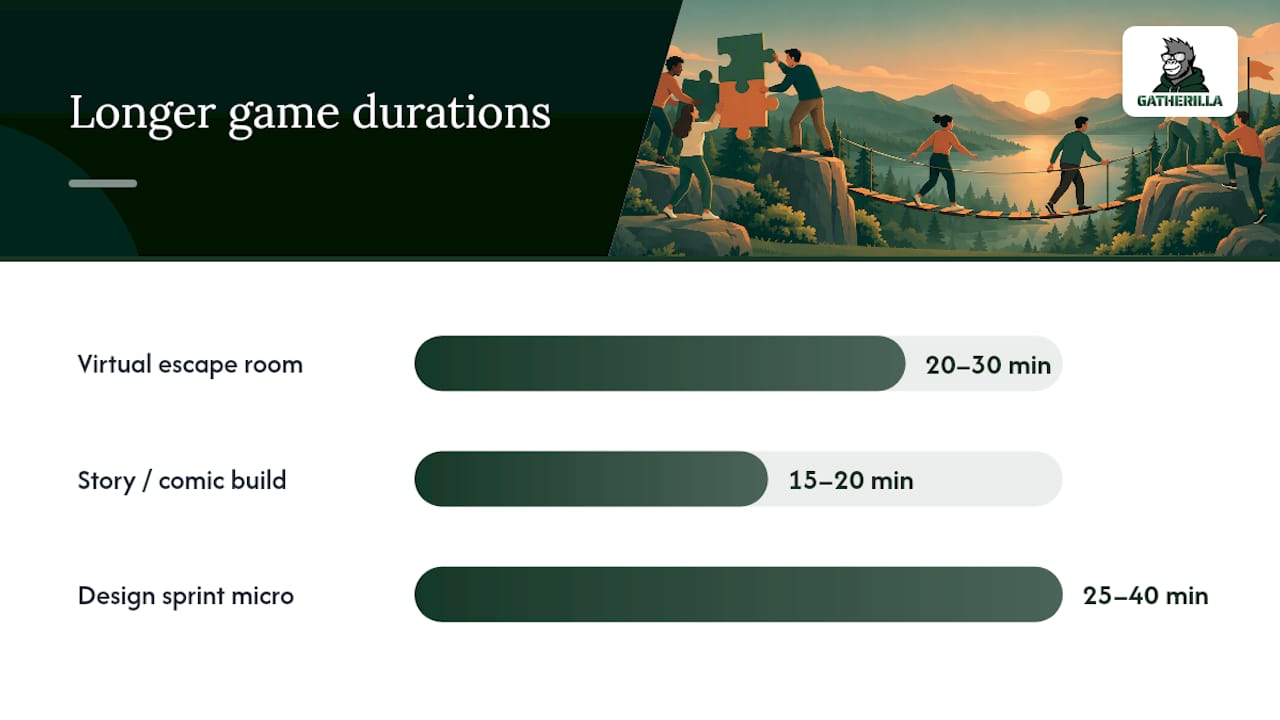
- Virtual escape room or puzzle (20-30 minutes): Small mixed teams solve a shared puzzle using clues split between remote and in-room members, forcing genuine collaboration rather than parallel work.
- Collaborative story or comic build (15-20 minutes): One person starts a story or comic panel, then passes it along, remote and in-room alternating, until everyone has added a piece.
- Synchronous design sprint micro-challenge (25-40 minutes): Teams get a small, constrained problem (design a logo for a fictional product) and present results at the end, rotating who presents so remote members aren’t always the ones summarizing quietly in chat.
The key hybrid rule for longer games is role rotation. If the same in-room person always ends up narrating results or holding the marker, remote participants slide into passive observers. Assign a “reporter” role each round and alternate it deliberately between locations.
Reach for a longer format when the team has the full meeting slot free, energy is already low from back-to-back calls, or you’re kicking off a retro that needs people to feel safe speaking up before the harder conversation starts. Skip it during a standard weekly sync where 20 minutes on a game means cutting real agenda items. After a longer session, a short follow-up message or async recap the next day helps the connection outlast the meeting itself.
4. How to run inclusive hybrid icebreakers: a facilitator checklist
Running an icebreaker well in a hybrid room takes more setup than doing it fully remote or fully in person, mostly because it’s easy for remote attendees to become passive spectators to an in-room conversation.
Assign two roles before the meeting starts: a host running the activity and a remote co-facilitator whose only job is watching chat, unmuting quiet voices, and flagging anyone stuck in a queue. Hybrid meeting guidance consistently recommends treating everyone as remote by default. This means the same poll or chat tool decides outcomes for the whole group rather than a show of hands that only the room can see.
Before you start:
- Test audio and video ahead of time so remote voices aren’t muffled by room mics.
- Set the room camera to gallery view or a wide shot so remote attendees can see faces, not just the back of heads.
- Use polls and chat for every vote or response, never just a show of hands.
- Pre-announce anything personal (photos, family stories) so people can opt out gracefully.
- Time-box every activity and stick to it, even mid-activity.
Watch for red flags: activities that ask people to share sensitive personal information, show their home in detail, or reveal physiological data without consent all raise real privacy concerns and should be dropped or made strictly optional.
Pro Tip: Agree on a light “safe word” the team can drop in chat or say aloud to signal an activity has gone on too long or feels exclusionary, no explanation required.
5. Why icebreakers matter: the research on psychological safety
The case for icebreakers isn’t just cultural nicety. A 2024 study on global virtual teams found that team-based interventions and digital reminder nudges help build psychological safety, the shared sense that it’s safe to speak up, ask questions, or admit a mistake. Brief recurring micro-challenges, not just one-off events, sustain that effect over time.
Psychological safety isn’t a soft metric. Research using structural equation modeling on 580 employees found that higher team psychological safety improves innovative performance, with communication behavior mediating the effect, meaning safer teams talk more openly, and that openness is what drives better ideas.
Teams that feel psychologically safe communicate more openly, and that communication behavior is what connects safety to better innovative outcomes.
The practical takeaway for HR leaders: favor task-based, low-pressure activities over anything that puts people on the spot, and assign a role (like the remote co-facilitator above) specifically to protect quieter voices. One caveat worth noting: exploratory work on embodied hybrid icebreakers, including shared avatar or heartbeat-based cues, found they can raise privacy and distraction concerns even as they boost a sense of presence. Simple, low-effort creative tasks tend to lower social pressure better than anything that shares physiological or highly personal data. The lesson isn’t to avoid icebreakers, it’s to avoid overusing intrusive ones.
6. A practitioner’s rules of thumb for hybrid icebreakers
Three rules cut through most of the decision-making: start tight (never open with more than five minutes unless the whole session is built around connection), enforce parity (the same tool decides outcomes for remote and in-room alike, no exceptions), and rotate formats so the same three people aren’t always running the show.
Skip icebreakers entirely when the agenda is already tense or overloaded; forcing warmth rarely lands well under pressure. Double down on longer formats before major transitions, a reorg, a new team merger, when the payoff in trust is worth the time. Daily micro-challenges, kept small and optional, do more for culture over time than any single elaborate activity.
— Thomas
How Gatherilla helps: a zero-setup option for hybrid icebreakers
For teams that want icebreakers without building scripts from scratch each week, some platforms offer browser-based multiplayer games that require no downloads or accounts, enabling a facilitator to launch one quickly.

Such tools fit naturally into the formats above: a 1-2 minute opener before a standup, a 10-15 minute engagement segment mid-meeting, or a daily company-wide challenge that keeps remote and in-office staff checking in with each other between meetings.
- They typically work inside common video conferencing tools without requiring plugins.
- Daily challenges provide teams a low-effort way to sustain psychological safety benefits over time, rather than relying on occasional events.
Compare plans and seat pricing on the Gatherilla pricing page, or see the full range of games on the Gatherilla product page.
Sources
- Fostering Psychological Safety in Global Virtual Teams: The Role of Team-Based Interventions and Digital Reminder Nudges
- The impact of team psychological safety on employee innovative performance: communication behavior as a mediator
- Use breakout rooms in Teams meetings - Microsoft Support
- MagHeart: Exploring Playful Avatar Co-Creation and Shared Heartbeats for Icebreaking in Hybrid Meetings
FAQ
What are some good 5-minute icebreakers for meetings?
A one-word check-in, a mood meter poll, or “where are you joining from today” all work well within five minutes and need no preparation. Keep the prompt short and use chat or a live poll so remote attendees answer the same way as anyone in the room.
What are some good icebreakers for online meetings?
Two truths and a lie, quick trivia with a live poll, and paired breakout room prompts all translate well to fully online meetings. Tools like Microsoft Teams breakout rooms make small-group versions easy to set up without extra software.
What are some fun icebreakers for meetings?
Caption contests, a “this or that” poll bracket, and 60-second show-and-tell tend to land well because they’re playful without asking anyone to share something too personal. Rotating the format week to week keeps the same few activities from feeling stale.
What are 5 great icebreaker questions?
Strong options include: what’s your rose and thorn this week, what’s a song stuck in your head, what’s one word for how you’re feeling, what would you rather do this weekend, and what’s a small highlight from your week. Each takes under a minute and works whether someone is in the room or joining remotely.
Why do icebreakers actually help hybrid teams?
Structured icebreakers are a form of the team-based interventions shown to build psychological safety in virtual and hybrid teams. That safety is linked to more open communication and, in turn, to better innovative performance, according to survey-based research on the topic.