

See Results in Six Weeks: Employee Engagement Games for HR

This article sorts practical employee engagement games by time, group size, and setting, so any HR professional or team lead can pick one and run it today. You will find quick meeting warmups, browser-based virtual formats, in-person and hybrid challenges, and big-event ideas, plus a decision framework and simple metrics. Gatherilla comes up as a fast, browser-based option when your team is remote or hybrid.
TL;DR:
- Weekly engagement games like emoji check-ins and two truths and a lie build familiarity more effectively than infrequent events, especially when capped at 15 minutes.
- Browser-based virtual activities such as online trivia, scavenger hunts, and asynchronous prompts work best for remote teams by minimizing setup and technical barriers.
- In hybrid settings, physical games require deliberate role assignments for remote participants, such as scavenger-hunting or scoring, to ensure inclusive participation.
- Consistent, small engagement rituals over six weeks yield higher participation than sporadic big events, and maintaining voluntary participation improves long-term involvement.
- Using no-download platforms with real-time leaderboards and participation analytics increases the likelihood of recurring engagement and ease of measurement.
Table of Contents
- Employee Engagement Games You Can Run in 5 to 15 Minutes
- Virtual Employee Engagement Games for Remote Teams
- In-Person and Hybrid Games for Mixed Teams
- Big-Event Ideas for Offsites and Company Celebrations
- How to Pick the Right Engagement Game for Your Team
- Measuring Whether Your Engagement Games Are Working
- Setting Up Browser-Based Team Games the Right Way
- A Sustainable Cadence Beats a Big Splash
- Try Gatherilla for Your Next Team Game
- Sources
Employee Engagement Games You Can Run in 5 to 15 Minutes
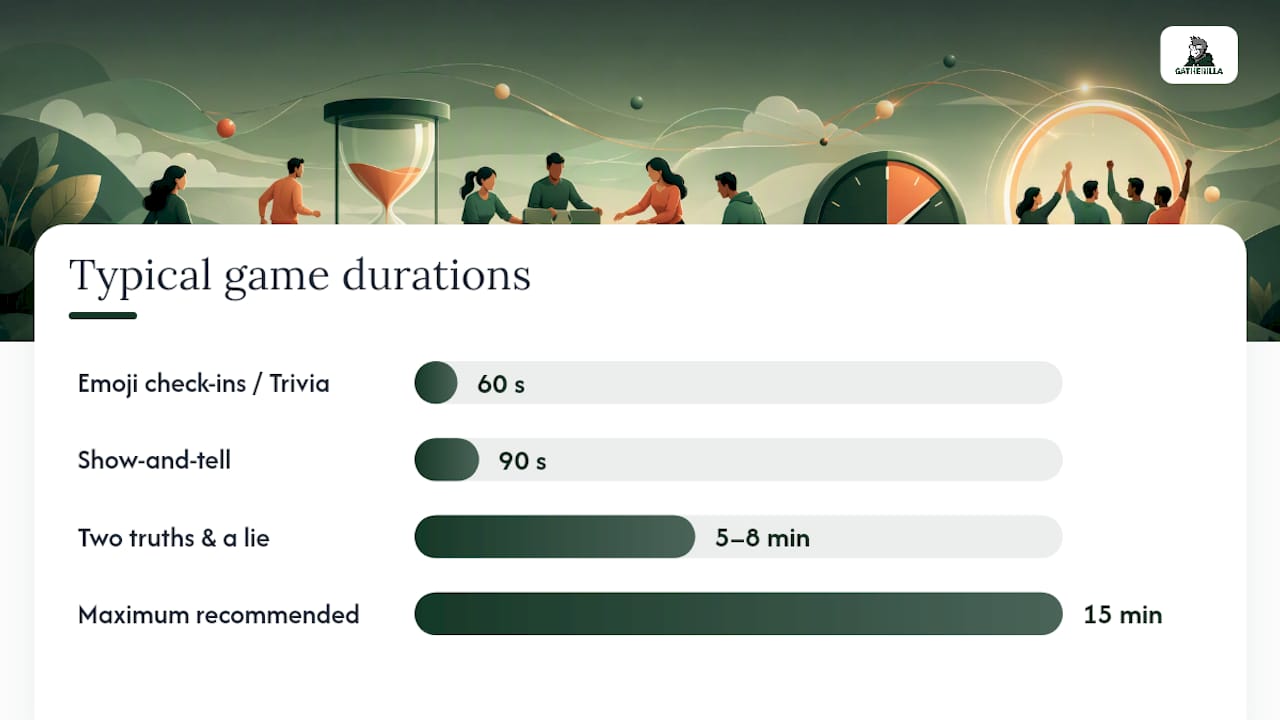
The shortest games get the most reps in, and reps are what actually build familiarity between coworkers. A game that takes 90 seconds and runs every Monday beats a 90-minute event that happens once a year, because lightweight weekly rituals compound engagement more reliably than infrequent big swings. Here are formats that fit inside a standing meeting without derailing the agenda.
- Emoji check-ins: Ask everyone to drop one emoji describing their week in chat. Takes 60 seconds, works for any group size, needs zero setup, and gives quiet teammates an easy way in.
- Two truths and a lie: One person shares three statements; the group votes on the fake one. Budget 5 to 8 minutes for a team of 6 to 10. Script line: “Give us three things about your weekend, one of them is a lie, we vote in chat.”
- Show-and-tell: Someone grabs an object near their desk and explains its story in 90 seconds. Works equally well on video or in a conference room.
- 60-second trivia: One rapid-fire question, first correct chat answer or raised hand wins. Keep a running scoreboard in a shared doc.
- Rapid-fire polls: “Coffee or tea?” “Beach or mountains?” Use your video platform’s built-in poll feature for instant results with no extra tool.
- Rotating category questions: “What’s a skill you’re weirdly good at?” One person answers per meeting, no pressure on the rest.
- Word association warmup: Say a work-related word, go around and each person free-associates in one phrase. Good for 5 people, awkward past 12.
- Silent nod appreciation: Ask “who helped you this week?” and let people type one name in chat. No talking required, which matters for quieter personalities.
Two things make or break these formats: timing and inclusion. Cap every one at 15 minutes, announce the time limit up front, and build a non-verbal or text-based option into each so nobody is forced to unmute or appear on camera. If your video tool supports live captions, turn them on by default rather than waiting for someone to ask.
Pro Tip: Rotate who hosts the check-in each week instead of always defaulting to the manager. It spreads ownership, and quieter team members often design better questions than the person running the meeting normally would.
For scripted versions of several of these, the remote icebreaker games guide has ready-to-paste prompts by team size.
Virtual Employee Engagement Games for Remote Teams
Distributed teams need games that work in a browser tab, not another app to install and get IT sign-off on. Remote-friendly formats like virtual trivia, online escape rooms, and asynchronous rituals perform well across distributed teams specifically because they minimize the friction between “let’s play” and actually playing. The formats below are built for that constraint.
- Virtual trivia: A facilitator reads questions from a pre-made bank; teams answer in breakout rooms or a shared chat thread. Best for 8 to 30 people, 20 to 30 minutes total.
- Online scavenger hunts: Everyone has 5 minutes to find a specific object at home or in the office and hold it up on camera. Works for any group size, no materials needed beyond what’s already around.
- Breakout-room improv: Small groups get a two-line scenario prompt and 3 minutes to act it out, then present to the full group. Needs a facilitator comfortable keeping energy up.
- Virtual Pictionary: One person draws on a shared whiteboard tool while their team guesses. Works in almost any video platform with screen share.
- Online escape puzzles: Teams solve a linked sequence of clues within a time limit, often 30 to 45 minutes. Puzzle-based formats tend to report strong engagement when teams get shuffled across departments and time zones, which also doubles as informal cross-team networking.
- Async rotating prompts: A weekly question posted in Slack or Teams that people answer whenever their schedule allows, useful for teams spanning multiple time zones.
- Coffee roulette pairing: Random one-on-one pairings for a 15-minute informal chat. Nearshore’s data shows a roughly 49% lift in reported feelings of connection where teams ran this consistently.
Setup matters more than the game itself. Keep sessions between 20 and 30 minutes, give one person a clear facilitator role instead of hoping the group self-organizes, and decide on scoring or small rewards before you start rather than mid-game. A points leaderboard, even an informal one in a spreadsheet, keeps repeat participation higher than a one-off event with no continuity.
Teams that pilot a small set of engagement rituals and run them consistently for six weeks tend to see measurable participation increases, compared to teams that try a new activity every time and never build a habit. Sociabble’s research backs the case for consistency over novelty.
Browser-based, no-download platforms remove the single biggest source of friction: getting people to actually show up and play instead of fumbling with a download link two minutes before the meeting starts. The virtual team trivia playbook has a question bank you can drop into your next session, and if your team runs meetings inside Microsoft Teams specifically, these games are built to work inside a call without extra tabs.
In-Person and Hybrid Games for Mixed Teams
Physical games build a different kind of energy than screen-based ones, but hybrid teams need every activity adapted so remote teammates aren’t just watching a video feed of other people having fun. Here’s what works, and how to bring distributed teammates into the room.
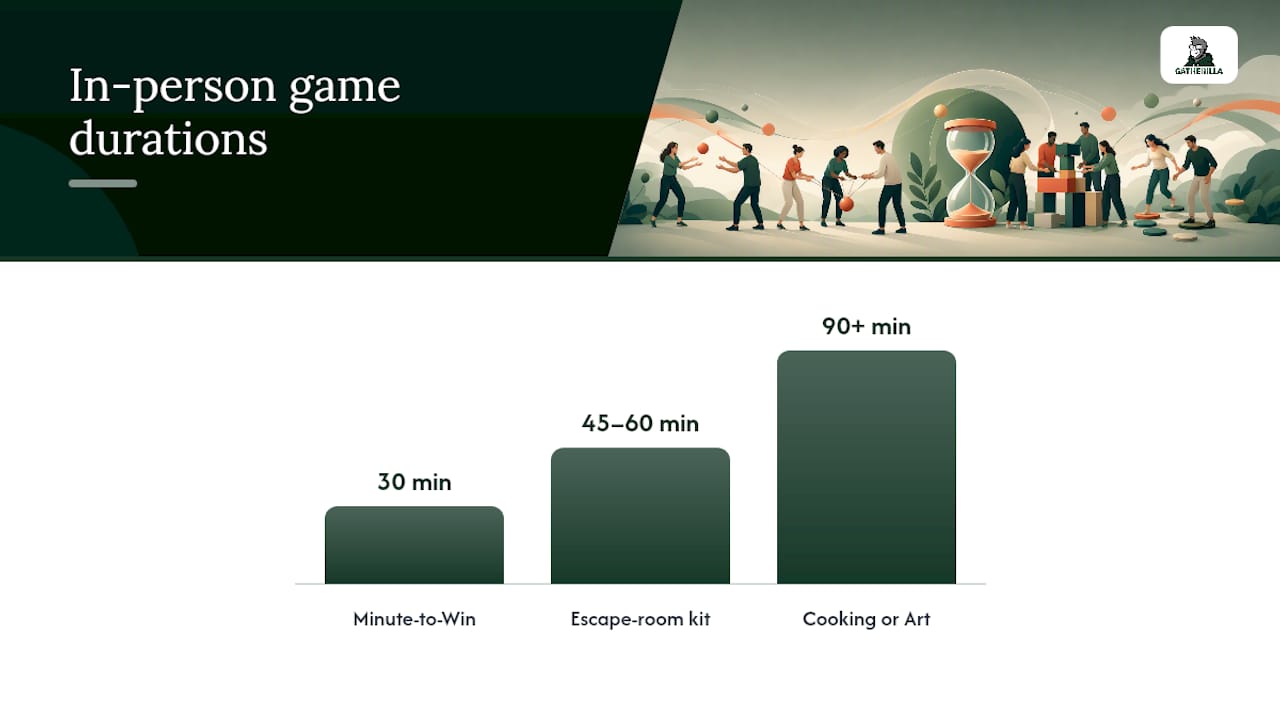
- Minute to Win It relays: Simple physical challenges (stacking cups, balancing objects) done solo against a 60-second clock. Needs cheap household materials and roughly 30 minutes for a group of 15 to 20.
- Escape room kits: Portable puzzle kits you bring into a conference room, usually 45 to 60 minutes for teams of 4 to 8 per kit.
- Team puzzles: A jigsaw or logic puzzle split across small groups racing to finish first. Low cost, low physical demand, good for mixed-mobility teams.
- Collaborative cooking or art challenges: Teams build something together (a dish, a mural, a Lego structure) within a time budget. Works well for offsites with 90 minutes or more.
Space and safety come first when you’re planning any of these. Confirm you have enough room for people to move without knocking into furniture, check that any physical challenge has a seated or low-mobility alternative built in from the start, and never make a game mandatory if it involves physical contact or exertion.
Including remote teammates takes deliberate role design, not an afterthought camera pointed at the room. Sociabble’s guidance is direct on this: give distributed participants an actual job such as navigator (calling out instructions), scribe (tracking scores), or timekeeper, instead of leaving them to passively watch. Pairing one in-person and one remote teammate as a scoring duo works better than assigning remote staff to a single “remote team” that competes separately. For teams new to this format, Gatherilla’s guide on avoiding cringe-inducing games is worth a read before you finalize the agenda.
Big-Event Ideas for Offsites and Company Celebrations
Large-format events carry more risk and more cost than a quick meeting game, so they need real planning behind them, not just enthusiasm.
- Company Amazing Race: Teams rotate through stations (physical or virtual) completing challenges against a clock. Budget half a day and a cross-functional planning lead at least three weeks out.
- Game Jam: Cross-department teams build a small project, prototype, or presentation within a fixed window, then demo it. Works well for engineering-heavy or creative cultures specifically.
- Volunteer challenge: Teams compete on a shared community service goal (hours logged, funds raised). Strong fit for companies where culture already leans toward social impact.
- Themed seasonal celebration: A costume contest, trivia tournament, or decorating challenge tied to a holiday or company milestone.
Decide vendor versus DIY early, since that decision drives your entire timeline. A vendor-run escape room or Amazing Race removes logistics work but costs more and locks you into their date availability; a DIY version costs less but needs a dedicated internal lead for weeks beforehand. Either way, name that lead and a deadline for finalized headcount before you announce anything company-wide.
The bigger mistake companies make with big events isn’t the event itself, it’s treating it as a standalone. A single offsite generates a burst of goodwill that fades within weeks unless you follow it with something smaller and more frequent. Send a short recap, publish photos internally, and schedule the next micro-game within two weeks of the big event so the energy doesn’t just evaporate. HR consulting perspectives on cross-functional event coordination in polarized workplace environments are useful reading if your event spans multiple departments with different comfort levels around social activities.
How to Pick the Right Engagement Game for Your Team
Most failed engagement games fail for one of two reasons: the wrong format for the group, or unclear rules going in. Run through these axes before you commit to anything.
- Objective: Are you building cross-team relationships, celebrating a win, or just breaking up a long week? A trivia game and a recognition ritual solve different problems.
- Time available: 5 minutes calls for a check-in question, not a scavenger hunt. Match the format to the actual slot on the calendar.
- Group size: Two truths and a lie gets awkward past 12 people; trivia scales to 50 or more with breakout rooms.
- Physical and accessibility constraints: Confirm any physical element has a seated or non-physical alternative built in, not bolted on after someone asks.
- Remote/hybrid mix: If more than a third of your team is remote, default to browser-based formats over anything that requires being physically present.
Before you roll a new game out to the whole team, run a short pilot with a friendlier group and ask directly what people thought. Micro-games tied to a specific behavioral goal, like cross-team introductions or knowledge sharing, are easier to evaluate afterward than generic “let’s have fun” activities with no clear intent.
A short pre-launch checklist covers most of what goes wrong: survey preferences before locking in a format, pilot with one team before rolling out company-wide, state clearly whether participation is optional, and set one measurable goal (not five) for what the game should accomplish.
Watch for three red flags that sink engagement programs fast: mandatory participation with no opt-out, prompts that skew personal or off-color for a professional setting, and physical challenges without a low-mobility version. Any one of these turns a fun idea into a compliance headache.
Pro Tip: If you’re unsure whether a game will land, ask two or three people from different departments to preview it before the full rollout. A joke that lands with your closest team can flop, or worse, offend, with people who don’t know you as well.
Measuring Whether Your Engagement Games Are Working
You don’t need a dashboard to know if a game is working, but you do need more than a gut feeling. Track four things: participation rate (how many people showed up versus how many were invited), repeat participation (do the same people come back next time), a one-line happiness or engagement pulse, and any qualitative comments people volunteer afterward.
Two pulse questions cover most of what you need:
- “On a scale of 1 to 5, how much did you enjoy today’s activity?”
- “Would you want to do something like this again next month?”
Send these within a day of the activity while it’s still fresh, and run the same two questions every time so you can compare trends over months, not just react to one bad week. Running a consistent set of rituals for roughly six weeks tends to surface a measurable participation lift, which gives you a real baseline instead of a one-off snapshot.
Once you have a few cycles of data, act on it. Iterate on formats that score well but see declining attendance, retire anything that consistently scores low, and scale up whatever earns both high enjoyment and high repeat turnout into a recurring slot on the calendar.
Setting Up Browser-Based Team Games the Right Way
Author Thomas covers remote team engagement for the Gatherilla blog, and the pattern across every format above holds: friction kills participation faster than a bad game design does. Platforms that strip out login and download steps and layer in simple analytics tend to see stronger repeat participation than tools that require setup before every session.
A working checklist for evaluating any browser-based multiplayer game platform:
- No-download access: Anyone with the link should join from a browser tab, no app store, no IT ticket.
- Real-time leaderboards: Visible scoring keeps energy up mid-session and gives people a reason to come back.
- Participation analytics: You should be able to see attendance and repeat rates without manually tallying anything.
- Facilitator controls: One person needs the ability to start, pause, and score a session without technical hiccups.
- Cross-tool compatibility: The platform should work regardless of whether your team is on Zoom, Teams, or Google Meet.
The full breakdown of how browser-based games avoid the download-and-approval bottleneck walks through the mechanics in more detail if you’re evaluating options for your own team.
A Sustainable Cadence Beats a Big Splash
Run weekly micro-games, a medium event monthly, and a big event once a quarter. Rotate hosts so ownership doesn’t sit on one person’s shoulders, keep every activity voluntary, and pair games with genuine recognition when someone contributes something worth noting. Refresh the rotation every few months before it goes stale, and always keep a no-camera, no-physical option in the mix.
— Thomas
Try Gatherilla for Your Next Team Game
If your team is remote or hybrid, the alternatives listed throughout this piece still leave you doing the setup work yourself: writing trivia questions, building an escape-room puzzle from scratch, or coordinating a vendor’s calendar for an in-person event. Gatherilla skips that step. It’s a browser-based platform built specifically for remote and hybrid teams, with no downloads, no IT approval, and games ready to launch inside whatever video tool you already use.
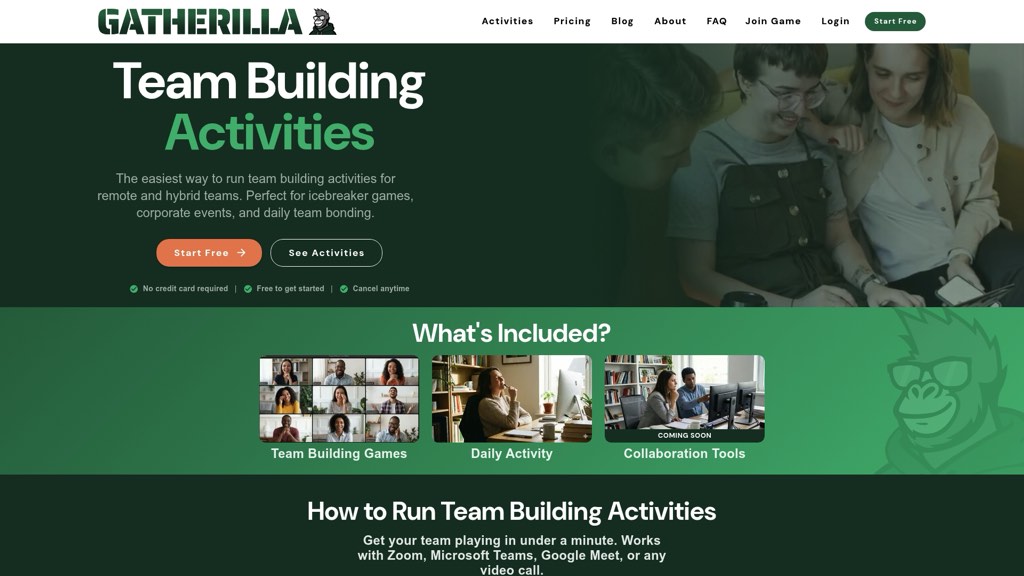
You get multiplayer trivia, daily word and icebreaker challenges, real-time leaderboards, and participation analytics out of the box, plus a free tier if you want to test it with one team before rolling it out company-wide. If your engagement program runs mostly through scheduled meetings and you need something that works today rather than after a week of planning, check out Gatherilla’s game library and start a session with your next standing meeting.
Sources
For deeper research behind the recommendations above, the Nearshore engagement roundup, QuickBooks’ remote engagement tips, and eLearning Industry’s activity list all cover ground worth reading in full.
For ready-to-run formats specifically, Gatherilla’s complete remote team building guide and large-group icebreaker collection go deeper than what fits in a single article.
- 25 Remote Employee Engagement Ideas That Work (2026)
- Employee engagement ideas for remote workers | 22 tips | QuickBooks Blog
- 10 Employee Engagement Ideas for Remote Workers in 2026
- 50 Fun Employee Engagement Activities And Ideas For Workplaces | eLearning Industry