

Best Virtual Team Building Tools for HR Teams in 2026

The best approach to virtual team building is a browser-based, no-download platform that combines ready-to-run games with analytics and native meeting integrations. Gatherilla fits that description well for U.S. HR teams. Three reasons that combination works:
- Low join friction drives participation. When employees click one link and play in their browser, attendance climbs. Every extra step (download, account creation, plugin install) sheds participants.
- Analytics make the program measurable. Participation rates, repeat usage, and sentiment data let you prove ROI and iterate, rather than guess whether last month’s trivia night landed.
- Meeting integrations cut facilitator effort. Activities that launch inside Zoom, Microsoft Teams, or Google Meet require no context-switching, which means a team leader can run a 10-minute opener without a rehearsal.
Start this week: drop a short browser-based game into your next all-hands or standup and track who joins.
Key Takeaways
The most effective virtual team-building programs combine low-friction, browser-based activities with a repeatable cadence and measurable KPIs, rather than relying on one-off events.
| Point | Details |
|---|---|
| Start with a 5–10 min opener | Drop a quick browser-based game into your next meeting to test participation with zero prep. |
| Run a two-week pilot | Use the 3-step pilot plan: run, measure participation and sentiment, then iterate before scaling. |
| Track three KPIs | Participation rate (70%+ target), repeat usage (50%+ target), and sentiment pulse (4.0+ average) tell you what’s working. |
| Prioritize low-friction formats | No-download, one-link-join activities consistently outperform those requiring installs or accounts. |
| Gatherilla for HR pilots | Gatherilla’s browser-based games, daily challenges, and analytics dashboard are built for exactly this pilot-and-scale approach. |
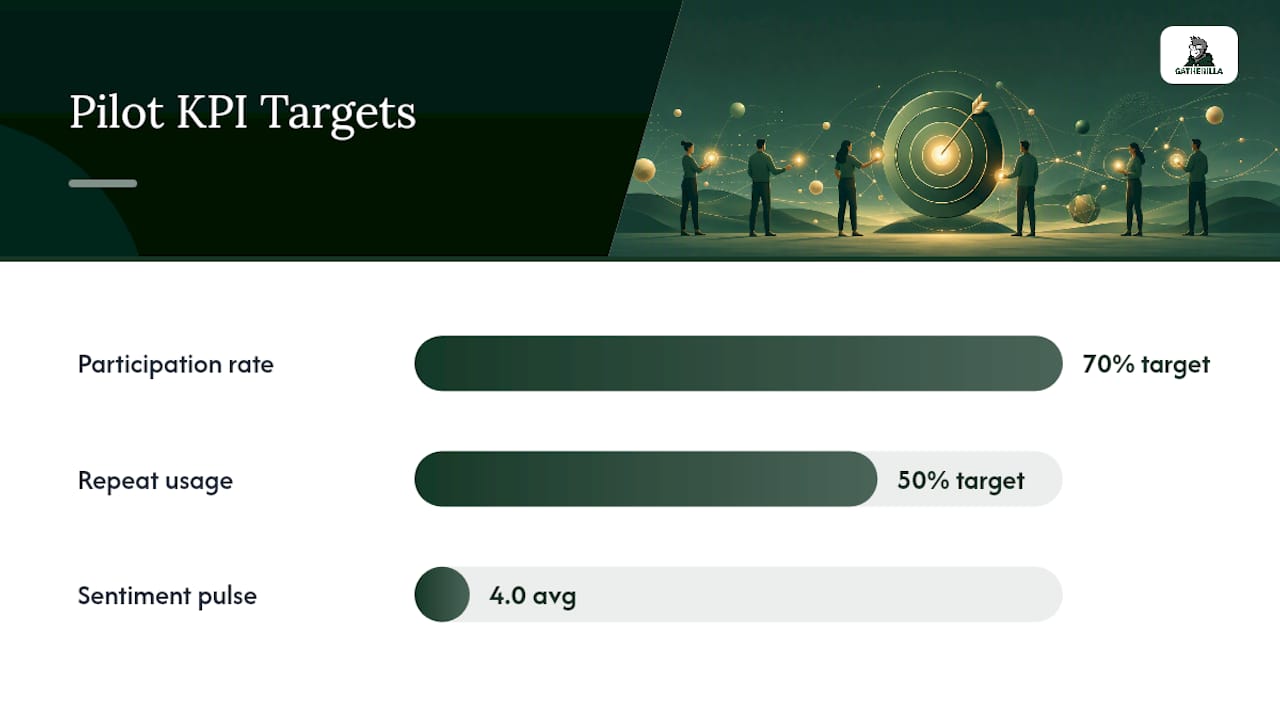
Table of Contents
- Ten quick virtual activities for meeting openers (5–15 minutes)
- Mid-length activities that build real trust (15–45 minutes)
- Which types of tools enable virtual team building?
- The part most HR teams get wrong about virtual team building
- Gatherilla makes the pilot easy for U.S. HR teams
- Useful sources and templates
Ten quick virtual activities for meeting openers (5–15 minutes)
These work as warm-ups before a standup, retrospective, or all-hands. None require pre-work from participants. Formats marked async-ready can also run in Slack or Microsoft Teams channels before the meeting starts.
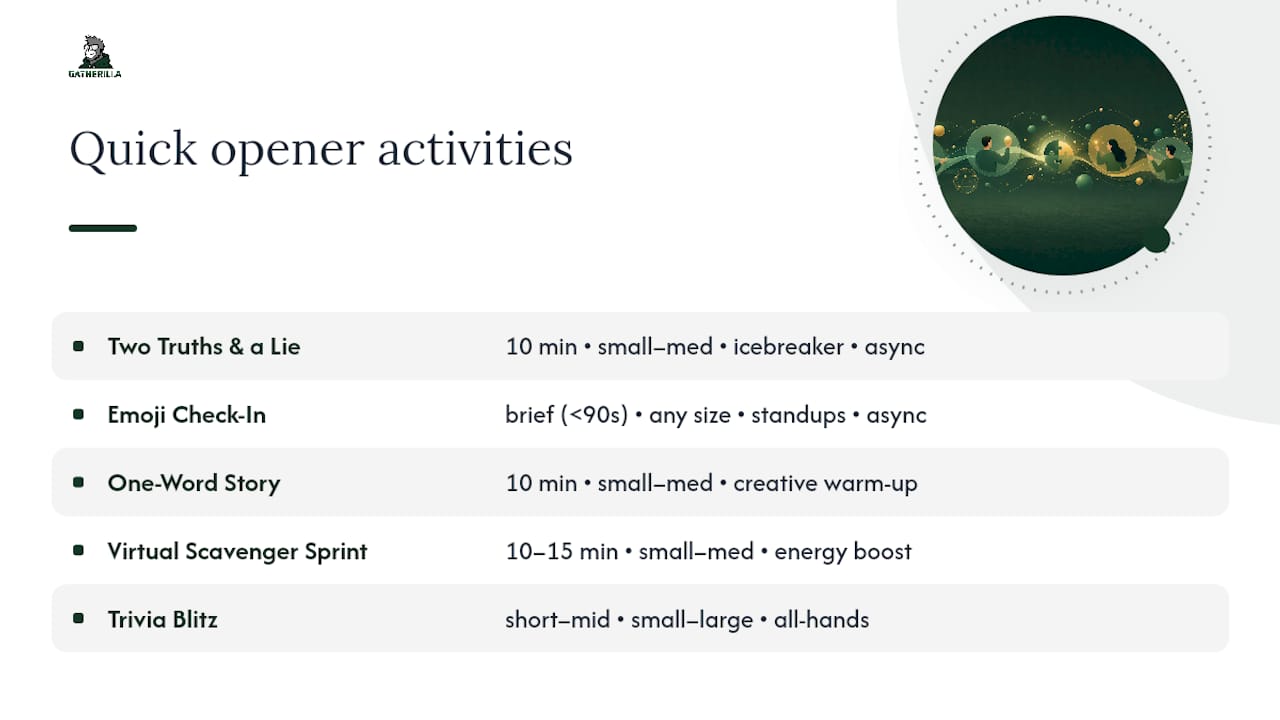
1. Two Truths and a Lie Duration: about ten minutes | Participants: small to medium groups | Best for: icebreaking, new teams
Each person posts three statements in chat; the group votes on the lie via poll or emoji reaction. Setup: open a poll in your video platform, paste three statements per round, reveal. Async-ready in Slack with a simple thread.
Pro Tip: Ask people to make their truths specific (“I once missed a flight to Tokyo”) rather than generic (“I like hiking”) — specificity sparks real conversation after the reveal.
2. Emoji Check-In Duration: brief | Participants: any size | Best for: daily standups, psychological safety
Everyone drops one emoji in chat that represents their current energy or mood. No explanation required. Camera-optional, silent-friendly, and takes under 90 seconds to run. Works async too.
3. One-Word Story Duration: about ten minutes | Participants: small to medium groups | Best for: creative warm-ups, retrospectives
The facilitator starts a sentence; each person adds one word in turn via chat or unmuted mic. The story goes until it reaches a natural (or absurd) end. No setup needed beyond a starting phrase.
4. Virtual Scavenger Sprint Duration: around 10 to 15 minutes | Participants: small to medium groups | Best for: energy boost, all-hands openers
Participants race to find a household object matching a prompt (“something blue,” “something older than you”). First person back on camera wins the round. Three rounds keep it moving.
5. GIF Battle Duration: brief | Participants: any size | Best for: low-energy Mondays, async channels
Post a prompt (“describe your weekend in a GIF”) in Slack or Teams; the most-reacted GIF wins. Zero facilitation required. Async-ready.
6. Trivia Blitz Duration: short to mid-length | Participants: small to large groups | Best for: all-hands warm-ups, large teams
Five rapid-fire questions via a poll tool or a platform like Gatherilla’s built-in trivia. Leaderboard reveals at the end. SessionLab’s Zoom game library has ready-made question sets you can pull directly.
7. Would You Rather? Duration: brief | Participants: any size | Best for: low-prep standups, camera-optional sessions
Post a dilemma in chat (“Would you rather present to 1,000 strangers or your entire family?”); participants vote via poll or reaction. Facilitator reads the split and asks one person to defend their choice.
8. Virtual Background Challenge Duration: brief | Participants: small to medium groups | Best for: creative teams, Friday openers
Give a theme (“your dream vacation,” “a movie you love”) and ask everyone to set a matching virtual background. Facilitator picks a winner by team vote in chat.
9. Daily Word Challenge Duration: brief | Participants: any size | Best for: daily standups, async channels
A Wordle-style word puzzle posted in Slack or run live. Gatherilla’s daily challenge format does this natively, with no setup from the facilitator. Async-ready.
10. Rose, Bud, Thorn Duration: about ten minutes | Participants: small to medium groups | Best for: retrospectives, team check-ins
Each person shares one positive (rose), one concern (thorn), and one opportunity (bud) in a round-robin. Run via chat for camera-optional sessions. Pairs well with a daily question prompt to keep the format fresh week to week.
Mid-length activities that build real trust (15–45 minutes)
These formats go deeper than a warm-up. They require a bit more prep but produce stronger team bonds, especially for newer or distributed groups. Mixing live and async formats keeps participation sustainable without adding meeting fatigue.
Virtual scavenger hunt
Duration: 20–30 min | Participants: 8–40 | Objective: collaboration, energy
Split into breakout rooms of 4–6. Each team gets a list of 10 items to find at home or online. A shared Google Doc or Slides deck collects photo evidence. The team with the most verified items wins. Assign one timekeeper per breakout and a judge in the main room.
Team trivia with brackets
Duration: 25–40 min | Participants: 10–60 | Objective: friendly competition, morale
Divide into teams of 4–6, run three rounds of 8–10 questions each, and use a leaderboard to track scores. Brain-teasers and logic puzzles from sources like Popular Mechanics add variety beyond standard trivia. Gatherilla’s trivia format handles scoring automatically.
Whose Story Is It?
Duration: 20–30 min | Participants: 6–20 | Objective: storytelling, psychological safety
Before the session, collect one unusual true story per person via a form. During the meeting, read each story aloud and let the group vote on whose it is. No cameras required. Works well for globally distributed teams with wide time-zone spreads.
Virtual escape-lite
Duration: 30–45 min | Participants: 6–24 | Objective: problem-solving, collaboration
Build a short puzzle sequence in a shared doc or use a pre-made template. Teams of 4–6 work through clues in breakout rooms; the first team to solve the final puzzle wins. The MuchSkills team-building playbook has breakout-room facilitation notes that translate directly to this format.
PowerPoint Karaoke
Duration: 20–30 min | Participants: 6–20 | Objective: creativity, humor
Participants present a random slide deck they have never seen before, improvising a presentation on the spot. Audience votes on the most convincing presenter. Prep: collect 3–5 absurd slide decks in advance (stock photos, random charts). Low-cost, high-laugh.
Collaborative playlist or mood board
Duration: 15–20 min | Participants: any size | Objective: creative connection, async-friendly
Each person adds one song or image to a shared Spotify playlist or Miro board based on a theme. Works async before a meeting and becomes a conversation starter live. Camera-optional, no breakouts needed.
Timing and prep overview:
| Activity | Duration | Prep effort | Tech needed |
|---|---|---|---|
| Virtual scavenger hunt | mid-length | Medium (item list, shared doc) | Breakouts, shared doc |
| Team trivia with brackets | mid-length | Medium (question bank) | Polls or trivia platform, leaderboard |
| Whose Story Is It? | mid-length | Low (pre-session form) | Poll or chat |
| Virtual escape-lite | mid-length | High (puzzle build) | Breakouts, shared doc |
| PowerPoint Karaoke | mid-length | Low (slide decks) | Screen share |
| Collaborative playlist | mid-length | Low (theme prompt) | Shared doc or Spotify |
Accessibility notes: For teams with limited bandwidth or mic access, run Whose Story Is It? and the playlist activity entirely in chat. For escape-lite, provide a text-only version of all clues so participants with screen readers can follow along. Schedule sessions across two time slots when your team spans more than three time zones.
Which types of tools enable virtual team building?
Not every tool fits every format. Here’s how the main categories break down, with the features that matter most for each.
Browser-based game platforms (e.g., Gatherilla)
- No download, one-click join via shared link
- Built-in multiplayer games, daily challenges, trivia, and leaderboards
- Analytics dashboard for participation and engagement tracking
- Integrates with Zoom, Microsoft Teams, and Google Meet
- Best for: recurring programs, HR-managed pilots, onboarding
Async engagement bots (Slack/Teams-native)
- Deliver daily prompts, polls, and challenges inside existing channels
- No live facilitation required
- Limited analytics; participation is visible but depth is shallow
- Best for: low-effort daily energizers between live sessions
Virtual world spaces
- Persistent avatar-based environments (think spatial audio, virtual offices)
- High immersion, but require downloads, onboarding time, and stronger hardware
- Better for longer sessions or culture-building programs than quick openers
- Trade-off: higher friction at join, higher engagement ceiling once inside
For a comparison of virtual world platforms versus browser-based tools, the Kumospace alternatives breakdown on Gatherilla’s blog covers the key trade-offs clearly.
Meeting-integrated quiz/poll tools
- Lightweight polling and quiz overlays inside Zoom or Teams
- Fast to run, but limited to Q&A formats; no persistent leaderboards or game variety
- Best for: one-off icebreakers, not sustained programs
Turnkey hosted events
- External vendors run the full session; HR just sends the invite
- High quality, low internal effort, but expensive per event and hard to repeat frequently
- Best for: quarterly milestones, company anniversaries, large-scale launches
Feature checklist when evaluating any tool:
- One-click join with no download required
- Works across Zoom, Teams, and Google Meet without a plugin
- Built-in analytics (participation rate, repeat usage, sentiment)
- Breakout room support or native small-group formats
- Leaderboards and scoring for competitive formats
- Accessibility: keyboard navigation, screen-reader compatibility, caption support
- Scalable from 5 to 500+ participants without a separate enterprise contract
The part most HR teams get wrong about virtual team building
The conventional wisdom says virtual team building fails because remote work is inherently isolating. That framing is wrong, and it leads HR teams to over-invest in elaborate one-off events that solve the wrong problem.
The real failure mode is inconsistency, not isolation. A team that plays a 10-minute trivia game every other week will build more genuine connection than one that attends a polished two-hour virtual escape room once a year. The research backs this up: deliberate, repeated social practices are what sustain remote cohesion, not the production value of any single event.
The “cheesy” problem is also misdiagnosed. Activities don’t feel cheesy because they’re games. They feel cheesy when they’re forced, when participation isn’t optional, or when the format doesn’t match the team’s actual culture. A team of engineers who communicate primarily in GIFs will find a GIF battle genuinely fun. The same team will disengage from a mandatory “share your childhood dream” exercise in 30 seconds flat. The fix isn’t to avoid games. It’s to read your team and make participation feel like an invitation, not a performance review.
What I’d tell any HR leader starting a program: don’t launch with your biggest, most ambitious event. Launch with the smallest thing that could possibly work, measure it honestly, and build from there. A 5-minute emoji check-in that 80% of your team actually does beats a 90-minute virtual gala that 40% attend and nobody mentions again.
The long-term team engagement guide covers the cadence design in more depth, but the core principle is simple: frequency beats spectacle, every time.
Gatherilla makes the pilot easy for U.S. HR teams
Running a virtual team-building pilot shouldn’t require a project plan. Gatherilla gives HR teams a browser-based platform with no downloads, no plugins, and no IT ticket required. Participants join via a single link, which means your participation rate reflects genuine interest, not technical friction.

The platform includes a suite of multiplayer games, a daily word and trivia challenge, onboarding activities for new hires, and real-time leaderboards. Analytics are built in: you can track who joined, how often they return, and how engagement trends over time. That data is what turns a one-off game into a defensible HR program.
Why Gatherilla over a DIY playbook:
- No facilitator training required — games run themselves
- Analytics dashboard replaces manual participation tracking
- Daily challenges keep teams connected between scheduled sessions
- Works inside Zoom, Teams, and Google Meet without switching tools
- Free tier available to pilot before any per-seat commitment
Start your pilot this week: try Gatherilla’s team-building games with a small group, run two sessions, and check your participation and sentiment numbers before expanding.
Useful sources and templates
A short reading list for HR teams building or refining a virtual team-building program:
- PMC article on remote work / collaboration (peer-reviewed evidence)
- 20 fun games to play on Zoom (that won’t annoy your team) | SessionLab
- Remote & Virtual Team Building: Fun Games For Work
- Team building activities for remote teams | MuchSkills playbook
- Riddles, brain teasers and logic puzzles | Popular Mechanics
- Team Building Games for Remote & Hybrid Teams | Gatherilla