

Slido Alternatives: Best Browser Games for Remote Teams

For browser-based multiplayer team-building, Gatherilla is the strongest pick among the slido alternatives available to HR managers and team leaders today. No downloads, no code-entry friction, and games built specifically for remote and hybrid teams set it apart from polling-first platforms.
- No downloads or installs required: participants join directly from a browser link inside any video call
- Multiplayer games with real-time leaderboards replace passive Q&A with genuine play
- Setup takes under 10 minutes, with sessions running 15–30 minutes inside an existing meeting
- Works with Zoom, Microsoft Teams, Google Meet, and any other video conferencing tool
The audience response software market was valued at $2.36 billion in early 2026, reflecting how seriously HR and L&D teams now take engagement tooling. The challenge is matching the right tool category to the actual job.
Table of Contents
- What are the best Slido alternatives for team-building?
- How do you choose the right Slido alternative for your team?
- Polling and Q&A vs. gamified team games: which approach fits your goals?
- What do pricing models look like when switching from Slido?
- Why Gatherilla is built for browser-based team-building
- Which tool fits your specific use case?
- Does your engagement tool meet data privacy requirements?
- What should you expect from customer support?
- How well do these tools work on mobile devices?
- Key Takeaways
- The case for low-friction play over feature-rich polling
- Gatherilla brings no-download team-building to every meeting
- Useful sources and further reading
What are the best Slido alternatives for team-building?
Alternatives to Slido fall into four distinct categories, each built around a different primary job. The table below maps categories to the criteria HR teams actually use to evaluate them.
| Category | Best for | Standout features | Join friction | Integrations | Scalability | Pricing shape | Customization |
|---|---|---|---|---|---|---|---|
| Gatherilla | Browser-native multiplayer team-building | Multiplayer games (Slim Digits, Sketchy at Best), leaderboards, daily challenges, onboarding games | Zero friction — browser link, no download | All video conferencing tools, calendar invites | Small to company-wide events | Free tier + per-seat subscription | Custom game settings, branding options, admin analytics |
| Presentation-embedded polling (e.g., Mentimeter, AhaSlides) | Slide-based polls and word clouds during presentations | Multiple poll types, word clouds, Q&A moderation | Low — join via code or link | PowerPoint, Google Slides, Zoom, Teams | Up to large audiences | Freemium; paid tiers unlock branding and analytics | Branding on paid plans |
| Gamified quiz platforms (e.g., Kahoot!) | Game-based learning and trivia | Timed quizzes, leaderboards, AI question generation | Low — join via game PIN | LMS integrations, Teams | Medium audiences | Freemium; per-seat or per-event paid plans | Limited on free tier |
| Enterprise moderated Q&A (e.g., Vevox, Pigeonhole Live) | Town halls, all-hands, conference panels | Upvoting, sentiment analysis, translation, moderation queues | Low to medium — app or browser | Zoom, Teams, PowerPoint | High — built for large conferences | Per-event or annual subscription | Branding and analytics on paid plans |
| Integrated event platforms (e.g., CrowdParty) | Full-event management with engagement | Check-in, badging, native app, live polls | Medium — native app often required | Event registration platforms | High | Per-event or annual | Full event branding |
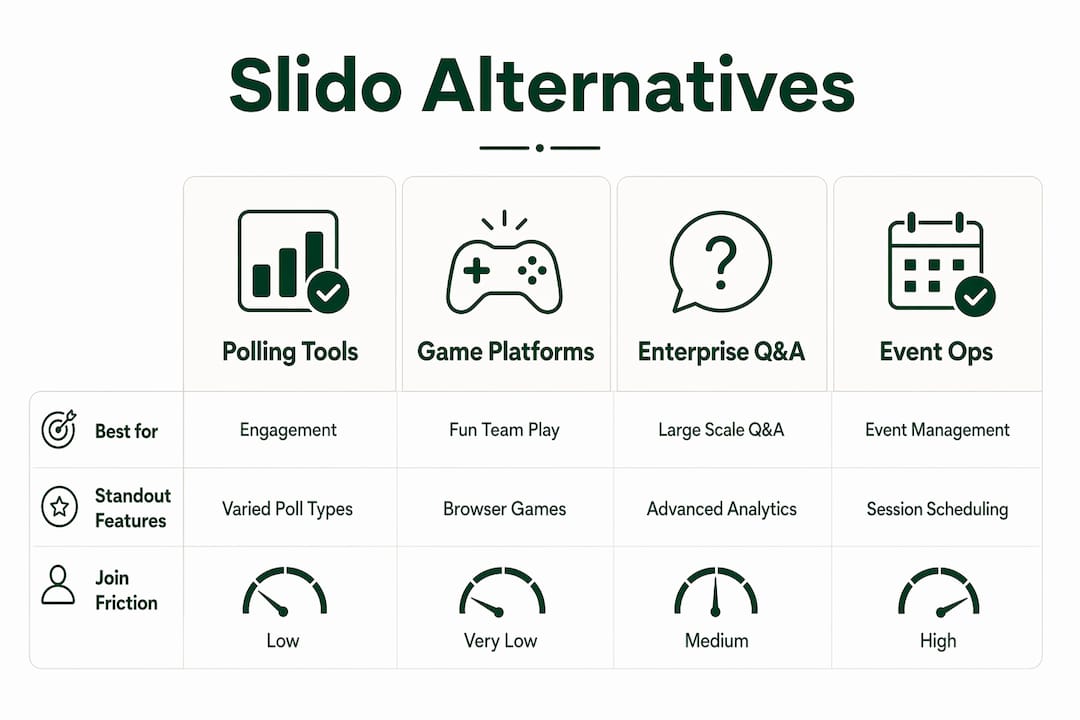
Pro Tip: If your primary use case is a 20-minute weekly standup or onboarding session, skip the event-ops platforms entirely. Check-in and badging features add overhead with no payoff for internal team meetings.
How do you choose the right Slido alternative for your team?
The one-line rule: pick the category that matches your primary use case before comparing features within it.
Start by answering these four questions:
- What is the actual session format? Weekly icebreaker, onboarding game, training quiz, or large all-hands? Each maps to a different category.
- How much join friction can your team tolerate? Tools that require attendees to open a new tab, enter a code, or sign in consistently see lower participation. Frictionless access is a stronger predictor of engagement than the number of poll types offered.
- Which integrations are non-negotiable? PowerPoint-heavy organizations benefit from slide-native polling tools. Teams running everything inside Zoom or Microsoft Teams need confirmed native integrations.
- What do you need after the session? Basic participation counts, or exportable analytics for HR reporting?
Red flags to watch during vendor trials: any tool that requires attendees to create an account, any platform that watermarks outputs on the free tier without disclosing it upfront, and any vendor that cannot confirm participant capacity for your team size before you commit.
Pro Tip: Run a 10-minute pilot inside a real meeting before buying anything. Send the join link in the chat, watch how many people actually click it, and note whether anyone asks “how do I join?” If more than two people need help, the friction is too high for regular use.
Polling and Q&A vs. gamified team games: which approach fits your goals?
The functional split matters more than most buyers realize. HR teams often switch away from Slido not because it lacks polls, but because they need gamification, event operations, or tighter slide integration.

Here is how the feature families map to outcomes:
| Feature family | What it enables | Best session type |
|---|---|---|
| No-download browser access | High participation, no IT approval needed | Any internal meeting |
| Multiplayer games and leaderboards | Genuine play, team bonding, friendly competition | Weekly standups, onboarding |
| Live polling and word clouds | Real-time feedback, audience sentiment | Town halls, training |
| Moderated Q&A with upvoting | Structured question management at scale | All-hands, conferences |
| LMS and grading integrations | Assessment tracking, compliance training | Formal L&D programs |
| Check-in, badging, native app | Full event data continuity | Large external events |
The non-obvious trade-off: more poll types do not equal more participation. Ease of use and frictionless access are stronger predictors of whether people actually engage. A platform with six question types that requires a new browser tab will underperform a simpler tool that works inside the call.
Education-focused polling platforms prioritize LMS connectivity and grading analytics, which is genuinely useful for formal training but unnecessary overhead for a 15-minute Friday icebreaker. Match the feature family to the actual job, not the longest feature list.
What do pricing models look like when switching from Slido?
Most tools in this space use one of three pricing shapes:
- Per-seat monthly or annual subscription: You pay per active user or admin seat. Predictable cost, but scales up quickly for large teams.
- Per-event licensing: You pay per session or event. Cost-effective for infrequent use, expensive if you run weekly sessions.
- Freemium with participant caps: Free tiers commonly cap at 25–50 participants and restrict advanced features, branding, or analytics to paid plans.
Before committing, run through this checklist:
- How many recurring participants will join each session?
- How often do you run sessions per month?
- How many admin or presenter seats do you need?
- Do you need exportable analytics for HR reporting, or is a basic summary enough?
- What support level do you need — email only, or live chat during events?
Hidden costs to watch: per-event fees that compound with weekly use, analytics locked behind enterprise tiers, and branding watermarks that require an upgrade to remove.
Why Gatherilla is built for browser-based team-building
Gatherilla is purpose-built for the use case most polling platforms treat as secondary: multiplayer team-building games that run inside a video call with zero setup friction for participants.
Key proof points:
- No downloads, ever. Participants join via a browser link shared in the meeting chat. No app install, no account creation, no code entry.
- Games built for teams, not classrooms. Activities like Slim Digits and Sketchy at Best are designed for adult remote teams, not quiz-show formats borrowed from education tools.
- Real-time leaderboards keep energy up across the session and give teams a shared focal point.
- Daily word and trivia challenges let teams stay connected between scheduled meetings, not just during them.
- Onboarding games give new hires a low-pressure way to meet teammates in their first week.
A typical session flow: 5 minutes to set up the game and share the link, 15–30 minutes of play with live leaderboard updates, and a short debrief. The whole thing runs inside your existing Zoom or Teams call without switching windows.
Pro Tip: Add the Gatherilla link to your recurring meeting invite so it is already there every week. Participants click it once and it becomes a habit, not a task.
For teams evaluating browser-based team-building games without IT approval requirements, Gatherilla’s no-download architecture removes the single biggest adoption barrier.
Which tool fits your specific use case?
The right answer depends on what you are actually trying to accomplish. Here is a quick map:
- Weekly 15-minute icebreakers (remote or hybrid): Browser-native game platforms like Gatherilla. Pilot with one standup; if people laugh, you have your answer.
- New employee onboarding: Gatherilla’s onboarding games. Share the link in the welcome email and run it in the first team meeting.
- Large all-hands or town halls (200+ attendees): Enterprise moderated Q&A platforms with upvoting and sentiment analysis. Test moderation workflows before the live event.
- Formal training and compliance quizzes: Education-focused polling platforms with LMS integration and grading. Confirm your LMS is on their integration list before signing.
- Slide-heavy presentations with embedded polls: PowerPoint-native tools that reduce context switching for presenters.
- Full external events with registration and check-in: Integrated event platforms. Budget for setup time and a dedicated event coordinator.
For sustainable team engagement over weeks and months, the tools that win are the ones people actually use without being reminded.
Does your engagement tool meet data privacy requirements?
For US-based HR teams, CCPA compliance is the baseline. If your organization has employees or contractors in the EU, GDPR applies to any platform processing their data. Before deploying any tool company-wide, confirm:
- Where participant data is stored (US-based servers vs. international)
- Whether the vendor offers a Data Processing Agreement (DPA) for GDPR purposes
- How long session data and analytics are retained, and whether you can delete them on request
- Whether the free tier includes the same data protections as paid plans
Vendors that are vague about data residency or refuse to provide a DPA are a compliance risk, regardless of how good the games are.
What should you expect from customer support?
Support quality varies sharply by pricing tier across this category. Free-tier users typically get documentation and community forums. Paid plans usually unlock email support with a 24–48 hour response window. Enterprise plans often include live chat, a dedicated success manager, and priority response during live events.
For HR teams running recurring weekly sessions, the most important support question is not “how fast do they respond?” but “can they help me during a live session if something breaks?” Test this during your trial by submitting a support request and timing the response.
How well do these tools work on mobile devices?
Most browser-based tools work on mobile without a dedicated app, which is the right architecture for internal team use. Participants on phones can join via the same browser link as desktop users, with no separate download required.
Event platforms that rely on a native app introduce a different friction point: participants must download and install before the session, which creates a meaningful drop-off rate for one-time or infrequent events. For hybrid meetings where some participants are on phones and others on laptops, a browser-first tool is the more reliable choice.
Key Takeaways
For remote and hybrid team-building, the tools that consistently outperform are those that minimize join friction and match their feature set to the actual session format.
| Point | Details |
|---|---|
| Match category to use case | Polling platforms, game platforms, and enterprise Q&A tools solve different problems — pick the category first. |
| Friction beats feature count | Tools that require a new tab, code entry, or account creation see lower participation than simpler browser-native options. |
| Free tiers have real limits | Most free plans cap at 25–50 participants and restrict analytics or branding to paid tiers — test with your actual team size. |
| Pilot before you buy | Run a 10-minute test inside a real meeting to measure actual join rates and adoption before committing to a subscription. |
| Gatherilla for browser-native play | Gatherilla’s no-download multiplayer games and leaderboards are purpose-built for remote and hybrid team-building sessions. |
The case for low-friction play over feature-rich polling
The conventional wisdom in this space is that more features equal better engagement. After seeing how remote teams actually behave in meetings, that framing gets it backwards. The platforms with the longest feature lists are often the ones that get abandoned after two sessions because participants found the join process annoying or the interface confusing.
What actually sustains engagement week over week is a short path to play: one link, no account, a game that starts in under a minute. That is not a simplified version of a “real” engagement tool. It is the correct design for the use case. HR managers who evaluate tools by poll-type count are optimizing for the wrong variable. The question worth asking is: “Will my team actually open this link next Friday without being reminded?” If the answer is yes, the tool is working.
Gatherilla brings no-download team-building to every meeting
If you have been running the same icebreaker questions in every standup, Gatherilla is the direct fix. The platform gives your team multiplayer games, real-time leaderboards, and daily challenges that work inside any video call without a single download or IT ticket.

Start a free trial at Gatherilla and run your first game session this week. The free tier includes sample games and an admin dashboard so you can see how it fits your team before spending anything.
Useful sources and further reading
- Slido Alternatives 2026: 7 Tools Compared — Nunify
- 7 Best Slido Alternatives in 2026 — StreamAlive
- 8 Best Slido Alternatives for a More Interactive Classroom in 2026 — ClassPoint
- 7 Best Slido Alternatives for All Presenters — Mentimeter Blog
- Slido Alternatives: Best Alternative Polling Tools — Wooclap
- List of Best Slido Alternatives and Competitors 2026 — TrustRadius
- Browser-Based Team Building Games — Gatherilla Blog
- The Employee Engagement Crisis: 2025 Data — Gatherilla Blog
Recommended
- Browser-Based Team Building Games: Play Together Without Downloads or IT Approval | Gatherilla Blog
- Kahoot Alternatives for Team Building (That Aren’t Just Quizzes) | Gatherilla Blog
- Team Building Games That Don’t Make People Cringe | Gatherilla Blog
- Team Building Games for Microsoft Teams (That Actually Work in a Call) | Gatherilla Blog