

Gamification at Work: A Remote Team Playbook
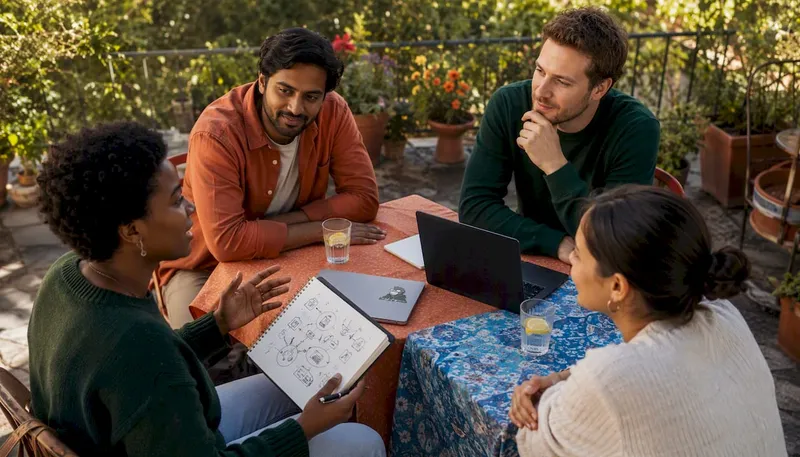
Gamification at work means applying game mechanics — progress tracking, challenges, team quests, and real-time feedback — to everyday work activities to increase intrinsic motivation. The fastest first move for any HR manager or team leader: run a 10–15 minute browser-based multiplayer game during your next regular meeting. No prep week required, no IT ticket needed.
Why does this matter right now? Only about 13% of employees are engaged globally, according to Gallup data. That gap is not a morale problem you can fix with a pizza party. Structured game mechanics work because they satisfy what Self-Determination Theory (Deci & Ryan) identifies as the three core drivers of intrinsic motivation: autonomy, mastery, and social connection. Hit all three and you get sustained behavior change, not a one-week spike.
- Define the goal first. Engagement, onboarding speed, or cross-team connection? Pick one.
- Start small. One team, one meeting, one game format.
- Use no-download tools. Browser-based platforms remove the biggest barrier to participation.
- Measure before you start. Capture a baseline participation rate or eNPS score so you have something to compare.
Pro Tip: Gatherilla runs entirely in the browser with no downloads, making it a practical first choice for a same-week pilot inside Zoom, Microsoft Teams, or Slack calls.
Table of Contents
- What multiplayer games work best for remote teams?
- How do you design gamification that actually lasts?
- How do you run a gamification pilot with remote teams?
- Facilitator scripts for a 10–15 minute team game
- How do you measure gamification impact and scale it?
- How do you tailor games to different team cultures?
- How do you get leadership and team buy-in?
- How do you sustain engagement past the first few sessions?
- What technical problems should you expect with remote gamification tools?
- Key Takeaways
- The case for patience over perfection
- Gatherilla makes your first pilot easy to run this week
- Useful sources and further reading
What multiplayer games work best for remote teams?
The format you pick should match the time you have and the outcome you want. Short formats build daily connection; longer ones deepen relationships and accelerate onboarding.
| Format | Time | Group Size | Setup | Best Use Case |
|---|---|---|---|---|
| Daily word or trivia challenge | 5–10 min | 5–30 | No download | Standup opener, daily habit |
| Icebreaker quest | 10–15 min | 5–20 | No download | Meeting kickoff, new hire intro |
| Team trivia tournament | 20–30 min | 10–40 | No download | Retrospectives, cross-team mixers |
| Collaborative puzzle mission | 30–40 min | 8–15 | Browser-based | Onboarding, team bonding |
| Virtual hackathon or escape room | 60+ min | 10–30 | Light setup | Company events, all-hands |
A few formats worth knowing in detail:
- Icebreaker quests (10–15 min): Players answer rapid-fire questions about teammates or complete short challenges together. Works inside any video call. Gatherilla’s icebreaker activities are built for exactly this slot — paste a link into the meeting chat and everyone joins in under 60 seconds.
- Team trivia tournaments (20–30 min): Split into teams of 3–5, run three rounds on rotating topics. Browser-based team building games eliminate the “can you share your screen?” friction that kills momentum.
- Daily micro-challenges: A single word puzzle or trivia question posted each morning in Slack or Teams. Low commitment, high repetition. Daily question formats keep teams connected between meetings without adding calendar load.
Corporate programs using gamified learning have reported substantial increases in course completions after introducing badges — a reminder that even lightweight mechanics move real numbers when applied consistently.
How do you design gamification that actually lasts?
Most programs fail within 90 days. The reason is almost always the same: they rely entirely on extrinsic rewards (points, prizes, leaderboards) and ignore what actually sustains motivation.
The science is clear. Atlassian’s research on gamification design warns that extrinsic-only rewards and forced participation can backfire, reducing intrinsic motivation over time. The fix is designing for autonomy, mastery, and relatedness from the start.
Practical design rules:
- Narrative over points. The Octalysis Group’s case studies show that collective missions and narrative-driven campaigns produce deeper engagement than leaderboards alone. Frame activities as team quests, not competitions.
- Rotate leaderboard themes. “Most improved” and “best collaborator” categories prevent permanent rank stigma and keep lower-ranked employees from disengaging entirely.
- Co-design with employees. Programs co-designed with frontline staff see higher adoption. A small design guild of 3–5 volunteers keeps content fresh and authentic.
- Make progress personal. Progress bars tied to individual learning goals outperform public rankings for employees who are not naturally competitive.
- Never make it mandatory. Forced participation is the fastest way to turn a game into a chore.
Pro Tip: Show each participant their own progress trajectory, not just where they rank against others. Personal growth visibility drives repeat participation far more reliably than public leaderboards.
How do you run a gamification pilot with remote teams?
A 30–90 day pilot is the right scope. Anything shorter produces noise; anything longer without a check-in wastes budget.
- Define scope. One team (10–30 people), one facilitator, one executive sponsor who will review results at day 30.
- Choose a browser-based tool. No-download platforms remove IT approval delays and work across devices. Confirm compatibility with Zoom, Microsoft Teams, and Slack before launch.
- Check accessibility. Screen-reader compatibility, caption support, and mobile-friendly interfaces are non-negotiable for inclusive pilots.
- Capture baseline metrics. Record current participation rate in optional activities, eNPS score, and (if onboarding-focused) time-to-proficiency for new hires.
- Run week one. One 10–15 minute game per meeting for two weeks. Track who joins, who repeats, and any qualitative feedback.
- Review at day 30. Compare participation rate and eNPS delta. Decide whether to expand or adjust format.
| Pilot Stage | Timeline | Budget Signal | Key Metric |
|---|---|---|---|
| Setup and baseline | Week 1 | Minimal (free tier) | Baseline eNPS, participation rate |
| Active pilot | Weeks 2–8 | Per-seat SaaS cost | Repeat participation, session completion |
| Review and decision | Day 30–90 | Analytics access | eNPS change, time-to-proficiency delta |
Running games inside Microsoft Teams calls requires zero additional software when the platform is browser-based — a detail that matters when your IT department has a six-week approval queue.
Facilitator scripts for a 10–15 minute team game
Copy these directly into your meeting invite or facilitator notes.
Icebreaker quest script (10–15 min):
- (0:00) “Before we get into the agenda, we’re doing a quick team challenge. Click the link in the chat — it opens in your browser, no download needed.”
- (0:30) “You’ve got 60 seconds to answer the first question. No wrong answers here.”
- (2:00) “Let’s see the results. [Name], you picked [answer] — tell us why in 10 seconds.”
- (8:00) “Last round. Team score goes up on the board. Ready?”
- (12:00) “Nice work. [Team/winner] takes the lead today. We’ll pick this up next week.”
Learning micro-quest script (15–20 min):
- Open with a 2-minute framing: “This challenge connects to [topic we covered last month].”
- Run two rounds of 4 questions each, team-based scoring.
- After round one, give teams 90 seconds to discuss one answer they got wrong.
- Close with a 2-minute debrief: “What surprised you? What do you want to revisit?”
Facilitation tips:
- Name one person as the “energy anchor” — their job is to react visibly and keep the chat active.
- If participation is low in week one, make the first game optional but celebrate participants publicly in Slack or Teams afterward.
- For hybrid groups, assign a room facilitator to ensure in-person participants are on camera and visible to remote players.
How do you measure gamification impact and scale it?
Measurement is where most pilots stall. Teams run a few games, feel good about it, and never connect the activity to a business metric.
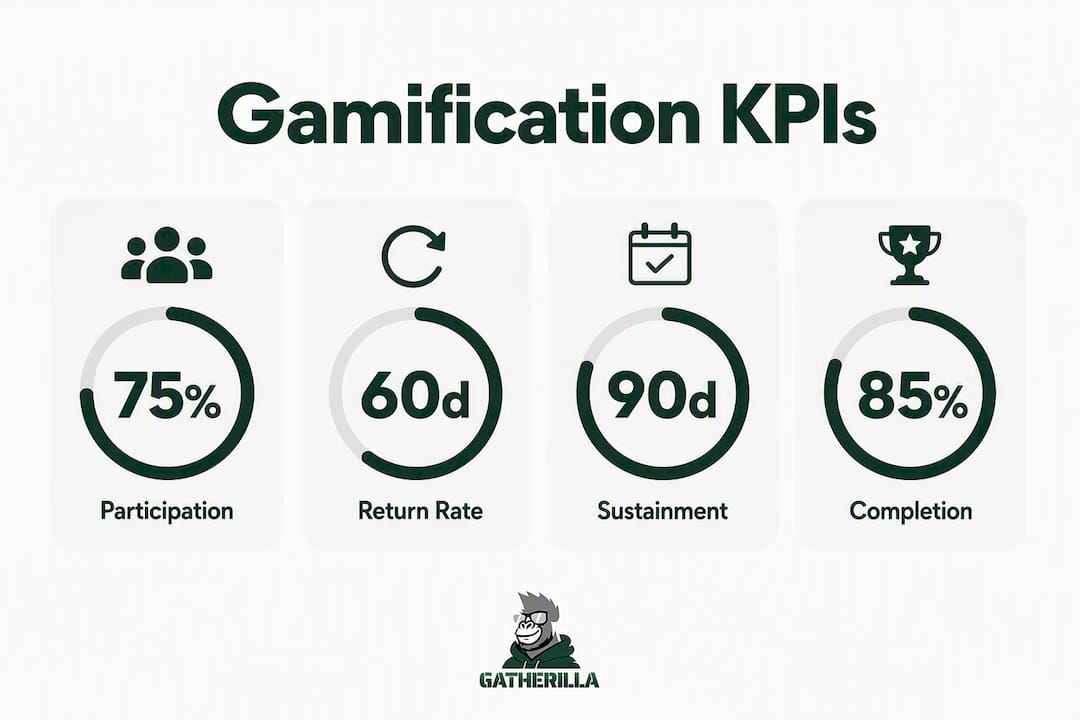
| KPI | How to Measure | Success Signal at 90 Days |
|---|---|---|
| Participation rate | Game platform analytics | Most invited employees join at least once |
| Repeat participation | Week-over-week return rate | Most invited employees return for a second session |
| eNPS change | Pulse survey (monthly) | +5 to +10 point improvement |
| Time-to-proficiency | Manager assessment or LMS data | 10–15% reduction for onboarded employees |
Suggested cadence: weekly check on participation, monthly pulse survey, 90-day full review with the executive sponsor.
Scaling checklist:
- Appoint a cross-team champion in each department to run local sessions.
- Build a game library with at least 5–8 formats so content doesn’t repeat weekly.
- Unlock analytics access at the paid tier to track cohort behavior over time.
- Track eNPS improvements over 90 days as the primary leadership-facing metric.
Pro Tip: Track both short-term participation spikes and 60-day return rates. A spike in week one that collapses by week four is a design problem, not a success.
How do you tailor games to different team cultures?
Not every team responds the same way. A sales team that thrives on competition will engage differently than a product team that values deep collaboration.
Start by asking, not assuming. A one-question pre-pilot survey (“Do you prefer individual or team challenges?”) gives you enough signal to choose the right format. Competitive cultures respond well to leaderboards with rotating themes. Collaborative cultures prefer team missions where no individual is singled out. Introverted team members often engage more when games allow async participation — a daily Slack challenge rather than a live tournament.
Personality-type considerations matter too. Research on gamified HRM confirms that gaming preference moderates how much gamification boosts engagement. Someone who dislikes games will not become a convert because you added a leaderboard. Give those employees a non-game path to the same outcome — a peer recognition channel, a learning badge system — so participation feels like a choice.
How do you get leadership and team buy-in?
Leadership buy-in lives or dies on one thing: connecting the activity to a metric they already care about. “We’re running team games” gets a polite nod. “We’re running a 30-day pilot to move eNPS by 5 points and reduce onboarding time” gets a calendar invite.
For team members, the ask is different. Skepticism usually comes from two places: fear of looking foolish and distrust that this is just another mandatory HR initiative. Address both directly. Make the first session optional, keep it short, and let results speak. When three people who joined week one tell their colleagues it was actually fun, you’ve done more than any internal memo could.
Frame it as an experiment, not a program. “We’re trying something for four weeks” lands better than “We’re launching a new engagement initiative.”
How do you sustain engagement past the first few sessions?
The novelty effect is real. Participation typically peaks in weeks one and two, then drops. The teams that sustain engagement past week four share one habit: they rotate content.
Rotating themes every 3–4 weeks prevents the “same game again” fatigue. Seasonal challenges, department-vs-department tournaments, and new-hire welcome quests all give returning participants a reason to show up. Letting employees submit trivia questions or challenge ideas gives them ownership — and ownership drives repeat behavior far more reliably than prizes.
Connect gamification to real work milestones. A product launch trivia round, a retrospective quiz on lessons learned, or an onboarding scavenger hunt tied to company values all make the activity feel purposeful rather than decorative. The engagement trends research consistently shows that perceived relevance is the strongest predictor of sustained participation.
What technical problems should you expect with remote gamification tools?
Browser compatibility is the most common issue. Test your chosen platform on Chrome, Firefox, Safari, and Edge before the pilot launch — not during it. Corporate network firewalls occasionally block WebSocket connections that real-time multiplayer games depend on. A quick IT check 48 hours before the first session prevents a dead link in front of 30 people.
Latency matters in live games. If participants are spread across time zones with variable internet quality, avoid formats that require split-second responses. Turn-based or async formats work better for globally distributed teams.
Single sign-on (SSO) integration with your company’s identity provider removes the “I forgot my password” drop-off that kills participation in the first 90 seconds. Prioritize platforms that support SSO or allow joining via a shared link with no account creation required.
For hybrid meetings specifically, audio bleed between in-room participants and remote players can disrupt the experience. Mute in-room participants on their individual devices and use one shared room microphone instead.
Key Takeaways
Well-designed gamification at work drives sustained engagement by targeting intrinsic motivation — autonomy, mastery, and social connection — rather than relying on points and prizes alone.
| Point | Details |
|---|---|
| Start with one pilot | Run a 10–15 minute browser-based game in your next meeting; measure participation before and after. |
| Design for intrinsic motivation | Build autonomy, mastery, and relatedness into every format; avoid points-only or leaderboard-only systems. |
| Rotate content to sustain engagement | Change themes every 3–4 weeks; let employees co-design challenges to prevent novelty fatigue. |
| Measure at 30/60/90 days | Track participation rate, repeat return rate, and eNPS change — not just session headcount. |
| Gatherilla for fast pilots | Gatherilla’s no-download, browser-based multiplayer games integrate with Zoom, Microsoft Teams, and Slack for same-week deployment. |
The case for patience over perfection
Most gamification programs fail not because the games are bad but because the organization treats them as a launch rather than a practice. A single well-run session generates goodwill. A consistent cadence of rotating, employee-influenced activities generates culture.
The conventional wisdom says to start with a leaderboard and a prize. Skip it. The teams I’ve seen sustain engagement past the six-month mark almost always started with something smaller and weirder: a five-question trivia round about the team’s own history, a collaborative puzzle with no winner, a daily Slack challenge that three people answered and then ten more joined because they saw the thread.
Employee co-design is the most underrated lever in this space. When a team member submits a trivia question that shows up in the next session, they’ve become a stakeholder in the program’s success. That shift in ownership is worth more than any analytics dashboard.
Measure for behavior change, not momentary spikes. A participation rate that holds steady for three months beats a spike in week one that collapses by week four. The latter is novelty. The former is culture.
Gatherilla makes your first pilot easy to run this week
If you’ve been waiting for the right moment to test workplace gamification, the barrier is lower than you think. Gatherilla gives HR managers and team leaders a full suite of browser-based multiplayer games — no downloads, no IT tickets, no complicated setup. Paste a link into your Zoom, Microsoft Teams, or Slack call and your team is playing in under a minute.

The free tier lets you run real games with a real team before committing to anything. The paid plan unlocks additional game formats, analytics for tracking participation and eNPS trends, and priority support for company-wide rollouts. Daily challenges keep teams connected between meetings without adding another calendar event. Whether you’re running a 30-person onboarding cohort or a 200-person all-hands, the platform scales without changing how it works.
Start your first team game today and see what a 15-minute pilot looks like in practice.
Useful sources and further reading
The sources below back the research and recommendations throughout this guide.
- Gamification at Work: The Neuroscience of Productivity and Enjoyment — Wharton Neuroscience Initiative; use for the dopamine-feedback loop rationale behind short game formats.
- Gamified Human Resource Management as a Driver of Employee Engagement — Frontiers in Psychology; structural equation modeling study (n=418) on intrinsic motivation and gamified HRM.
- Why Gamifying Work Works (and How to Do It Right) — Atlassian; design principles for autonomy, mastery, and relatedness; warnings on extrinsic-only rewards.
- Gamification in the Workplace — ADP; operational guidance on low-code, platform-based implementations.
- Procter & Gamble Sales Gamification Case Study — The Octalysis Group; narrative-driven campaign evidence for long-term engagement.
- 10 Best Enterprise Gamification Examples That Work — Yu-kai Chou; enterprise-specific design principles and visibility mechanics.