

Weekly 5 Minute Rituals That Make Distributed Team Building Stick

The best distributed team building activities follow a simple rhythm: weekly five-minute quick wins, monthly half-hour connection sessions, and one deeper quarterly event. That cadence works because newly remote employees are more likely to report declining mental health than their in-office peers, and casual social contact is what closes that gap. Start today: run a five-minute icebreaker at your next standup, then build the monthly and quarterly layers around it.
TL;DR:
- Consistency in scheduling quick, mid-length, and deep activities is crucial to sustain remote team engagement and mental health support.
- Activities should be chosen based on specific goals like boosting morale, onboarding, or fostering cross-team collaboration, and tailored to team size and time zones.
- Platform features such as browser-based access, easy breakout room management, and recording options significantly influence activity success.
- Regular assessment through participation metrics and pulse surveys helps identify activity fatigue and guide necessary adjustments.
- Using tools like Gatherilla can reduce setup friction, increase activity consistency, and provide ready-made game libraries for ongoing team building.
Table of Contents
- Quick-Win Activities: 5 to 10 Minutes for Meeting Openers
- Mid-Length Connection Activities: 15 to 30 Minutes
- Deeper Experiences: 30 to 60+ Minutes for Lasting Connection
- How to Choose and Schedule the Right Activity
- Platform Features That Actually Matter
- Measuring Whether It’s Actually Working
- A Copyable 3-Week Schedule
- Gatherilla in Practice
- Handling Common Challenges and Pitfalls in Remote Team Building
- Building a Habit, Not a One-Off Event
- Try Gatherilla for Your Next Team Session
- Sources
Quick-Win Activities: 5 to 10 Minutes for Meeting Openers
Quick wins solve a specific problem: meetings that start cold and stay cold. You don’t need a budget or a facilitator’s certificate to fix that. You need a script, a timer, and the discipline to run the same low-lift ritual often enough that people stop dreading it.
Short, consistent rituals in the two to ten minute range are more likely to survive long term than infrequent big events, and they carry measurable benefits for belonging even at that small scale. That’s the whole case for quick wins: frequency beats spectacle.
Here are five that work in almost any meeting format:
- This or That. Ask a binary question (“coffee or tea,” “morning person or night owl”) and have everyone answer in one word. Takes 3 minutes for a 10-person team. Script: “Before we dive in, quick one: coffee or tea? Go around the room.” Accessibility alternative: drop answers in chat or use emoji reactions instead of speaking.
- Two Truths and a Lie. One person shares three statements, the group guesses the lie. Takes 5 to 8 minutes for groups of 6 to 10. Works best when you rotate who shares each week so it doesn’t always fall on the same extrovert.
- Micro Kudos. Each person names one teammate who helped them that week and why. Takes 5 minutes, scales to any group size. This one doubles as a light performance signal, since public recognition tends to surface who’s actually unblocking work.
- Desk Photo Share. Everyone posts a photo of their workspace, pet, or view in the chat. Zero speaking required, which makes it the most accessible option on this list for people uncomfortable on camera.
- What Made You Smile This Week. A 30-second round robin, one sentence each. Good for daily standups because it takes almost no setup and works over voice, video, or text.
Use these during daily standups, the first five minutes of onboarding check-ins, or as a warm-up before any meeting where you need people mentally present instead of half-listening while they finish an email. Managers already report that it’s harder to gauge how remote employees are actually doing without face-to-face cues, and a two-minute check-in is one of the few tools that closes that gap without adding a meeting to anyone’s calendar.
Pro Tip: Rotate the question or prompt every two weeks. The exact same icebreaker repeated for months stops being a connection ritual and starts being background noise people tune out.
Mid-Length Connection Activities: 15 to 30 Minutes
Once a team has the quick-win habit, mid-length activities are where actual rapport starts forming. These need more setup than a standup opener, but they’re still light enough to run monthly without anyone treating them as a chore.
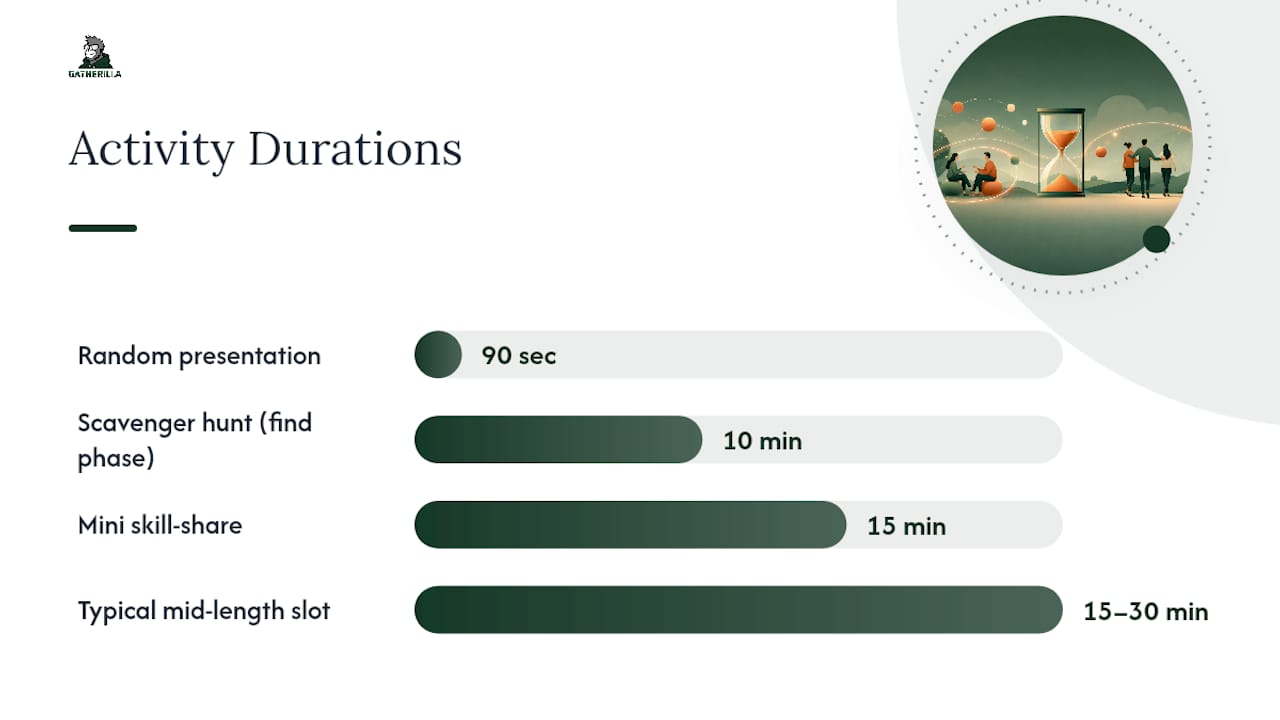
- Virtual scavenger hunt. Give teams 10 minutes to find five items around their home or workspace matching clues (“something older than you,” “something you’d grab in a fire”). Groups reconvene and show their finds on camera. Works well for 15 to 40 people split into breakout rooms of four or five.
- Connection bingo. Build a bingo card of facts (“has traveled to three continents,” “speaks two languages,” “has a pet reptile”). Participants mingle in breakout rooms to fill squares by asking each other questions. This is one of the few formats that forces cross-team conversation instead of the usual clique clustering.
- Totally random presentation. Someone gets a random topic five minutes before presenting (“explain the plot of your favorite childhood movie”) and gives an off-the-cuff 90-second talk. Hilarious in practice, and it lowers the stakes around public speaking for people who dread formal presentations.
- Mini skill-share. One team member teaches a 15-minute skill unrelated to work: a cooking technique, a photography trick, a card game. Great for onboarding cohorts because new hires get to see colleagues outside their job function.
- Coworking jam session. Everyone stays on a shared video call while working independently, checking in every 20 minutes. Sounds low-key, but it recreates the ambient companionship of an office far better than a scheduled meeting does.
Breakout timing matters more than people expect. Give groups a hard stop with a two-minute warning, and assign one person per breakout to report back a single sentence to the full group. That report-back step is what turns four separate small conversations into one shared team memory.
For teams spread across time zones, record the instructions and let one shift run the activity live while others submit written or video responses async. High-performing distributed teams already build synchronous rituals into an otherwise async-first schedule precisely because trust needs some real-time contact to form, even when most work happens on staggered clocks.
Mid-length activities fit best as monthly team socials, cross-functional mixers between departments that rarely interact, or the second week of a new hire’s onboarding cohort.
Deeper Experiences: 30 to 60+ Minutes for Lasting Connection
Deep activities are where you spend real budget and facilitation effort, and they should happen quarterly at most. Run them more often and they lose their weight; run them less and teams stop feeling like a cohesive group at all.
- Team talent show. Each person performs, presents, or demonstrates something for three minutes: a song, a magic trick, a hidden hobby. Creative sessions like this genuinely help, since making art or music supports both brain function and social bonding in ways passive entertainment doesn’t.
- Structured learning circles. Small groups work through a shared book, course, or case study over several sessions, discussing one chapter or module each time. This works especially well for teams that already value professional development.
- Virtual volunteer projects. Teams pick a cause and contribute together through a virtual service platform, from letter-writing campaigns to skills-based pro bono work. Virtual volunteering programs give teams shared purpose beyond the day job, which tends to build a different kind of loyalty than any game night can.
- Virtual escape rooms. Teams solve puzzles together against a clock. For distributed groups without full-day overlap, choose formats with async puzzle stages so people in non-overlapping time zones can contribute pieces of the solution ahead of the live session.
- Facilitated retrospectives. Not just a sprint retro. A structured, guided conversation about what’s working and what isn’t in team culture, run by someone trained to hold space for honest feedback without it turning into a complaint session.
Logistics separate a memorable deep event from an awkward one. Designate specific roles ahead of time. Engageli’s guidance on virtual events recommends naming a host, facilitator, tech runner, and timekeeper rather than asking one person to juggle all four jobs live, and building a one-page event brief so nobody is improvising the run of show. Budget for materials if the activity needs them (kits mailed in advance for a cooking session, subscriptions for an escape room tool), and plan an alternate participation path for anyone who can’t attend live.
Done well, these events build the kind of psychological safety and shared narrative that a five-minute standup opener never will. A team that solved an escape room together at 11pm their time, adjusting for four colleagues on another continent, remembers that story for years.
How to Choose and Schedule the Right Activity
Pick the activity by working backward from a goal, not forward from a list of games. Ask what you’re actually solving: low morale, poor cross-team visibility, slow onboarding, or just meeting fatigue. Each points to a different category.
- Goal. Morale dips call for quick wins run more often. New-hire isolation calls for mid-length connection activities in the first two weeks. Team fracture after a reorg calls for a deep event.
- Team size. Groups under eight can run most mid-length activities as one unit. Above 15, plan breakout rooms from the start.
- Time zone spread. If your team spans more than four hours of non-overlap, build an async option into every activity above the quick-win tier.
- Accessibility. Confirm captions are on, offer a chat-based alternative to speaking, and never require camera-on participation.
- Psychological safety. Skip anything that puts someone on the spot to share personal information they haven’t volunteered.
A simple cadence template covers most teams: weekly quick win, monthly mid-length session, quarterly deep event. Small teams under 10 can compress the mid-length tier to every six weeks since coordination is easier. Larger distributed teams may need to run quick wins at the sub-team level and reserve company-wide gatherings for the quarterly event only, since coordinating everyone weekly across time zones burns out whoever’s organizing it.
Before any activity, run through a short checklist: purpose defined, facilitator assigned, materials ready, an alternate participation path for anyone who can’t attend live, and a follow-up plan for gathering reactions afterward.
Pro Tip: If you can’t name the goal of an activity in one sentence before scheduling it, skip it that week. A vague “let’s do something fun” invite gets lower turnout than a specific one.
Platform Features That Actually Matter
Most of what makes a virtual activity fall apart isn’t the game itself. It’s the tech friction around it: a download nobody has time for, a poll tool that breaks, a breakout room nobody can find.
- Browser-based entry. Anything requiring a download loses a chunk of participants before it even starts, especially on locked-down work laptops.
- Breakout rooms with easy return. Look for one-click return to the main session; manual room switching eats the clock you budgeted for the activity itself.
- Built-in polling or quizzes. Native polls beat switching to a third-party tool mid-meeting.
- Collaborative whiteboards. Useful for scavenger hunts, bingo cards, and skill-shares where people need a shared visual space.
- Recording or async capture. Essential for any team with meaningful time-zone spread.
Do a dry run with whoever’s facilitating before the live session, assign a dedicated tech runner separate from the host, and give clear spoken timing prompts (“two minutes left”) instead of relying on people watching a shared timer. A guide to keeping remote participants engaged during hybrid meetings covers more of these facilitation details if your team mixes in-office and remote attendees regularly.
Measuring Whether It’s Actually Working
Skip presence-based tracking entirely. Output metrics like sprint completion and milestone achievement expose delivery problems earlier than watching who’s logged in, and the same logic applies to team building: track outcomes, not attendance alone.
- Participation rate across activities, tracked over a few months to spot a downward trend.
- Cross-team interaction count: how often people outside someone’s direct team show up in the same breakout or bingo card.
- A two-question pulse survey after each activity: energy level and sense of belonging, on a 1 to 5 scale.
- Time-to-first-meaningful-contribution for new hires, a strong signal of whether onboarding activities are actually working.
Declining participation, lopsided engagement across roles or time zones, or a string of flat pulse scores are your cue to swap the activity, not just repeat it louder.
A Copyable 3-Week Schedule
- Week 1: Daily five-minute quick opener (This or That, Two Truths and a Lie) plus one 30-minute mid-length session, like a virtual scavenger hunt, on Thursday.
- Week 2: Daily quick openers continue, with a mini skill-share swapped in for the mid-length slot, since it needs less prep than a full scavenger hunt.
- Week 3: Quick opener on Monday and Wednesday, then a 60-minute deeper event, like a facilitated retrospective or virtual escape room, on Friday to close the cycle.
Small teams can run this as-is. Widely distributed teams should record Friday’s deep event instructions and let non-overlapping shifts submit async video responses instead of forcing a single live window. Always have a backup facilitator named in advance and a five-minute fallback activity ready if the main tool glitches or half the team is a no-show.
Gatherilla in Practice
Every activity above works better with zero setup friction, and that’s the specific gap Gatherilla was built to close. It’s a browser-based platform, so there’s no download standing between your team and a five-minute quick win before a meeting starts. Its daily challenges cover the quick-win tier automatically, its multiplayer games slot into the mid-length category for monthly socials, and its icebreaker library gives new-hire onboarding a ready-made mini skill-share alternative without a facilitator scripting anything from scratch.
Handling Common Challenges and Pitfalls in Remote Team Building
The most common failure mode isn’t a bad activity. It’s inconsistency. A team runs three great sessions, then skips two months because nobody owned the calendar, and momentum dies quietly.
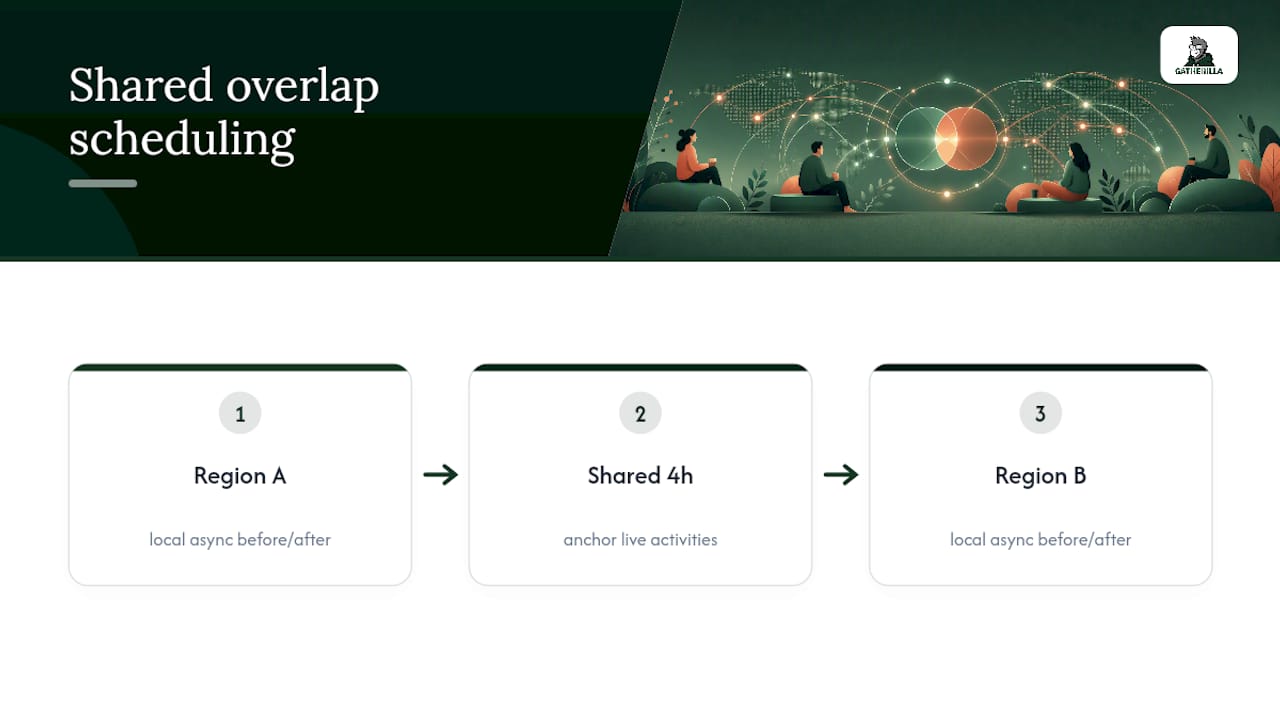
Time zone spread causes the second most common breakdown. Scheduling every activity for one region’s convenience quietly excludes another, and people notice even when they don’t say so out loud. Roughly four hours of daily overlap is enough for effective collaboration when that overlap is used well, so anchor live activities to whatever window the whole team actually shares, and build an async path for everything outside it.
Uneven participation is the third pitfall. A handful of vocal team members dominate every icebreaker while quieter colleagues fade into chat silence. Rotate who leads each activity and offer non-verbal ways to contribute, since forcing everyone through the same camera-on, speak-up format guarantees some people opt out entirely.
Finally, watch for activity fatigue disguised as engagement. If attendance stays high but energy scores from your pulse survey keep dropping, the format has gone stale even though the calendar invite still gets accepted. Swap the specific game, not just the date.
Building a Habit, Not a One-Off Event
Most teams treat team building as an event instead of a system, which is exactly why it stops after two or three tries. Start with one quick win this week, track participation for a month, then decide whether to add the mid-length layer. Iteration matters more than picking the “perfect” activity on the first attempt. Try the 3-week schedule above, adjust based on what your own pulse survey tells you, and don’t be afraid to retire an activity that’s gone flat even if it worked great in month one.
— Thomas
Try Gatherilla for Your Next Team Session
This platform offers a low-effort alternative to building your own rotation of scavenger hunts, bingo cards, and skill-shares from scratch. No downloads, no software your IT team has to approve, and no facilitator script to write at 11pm the night before a meeting.

A daily challenge feature can help solve the consistency problem covered above, allowing the quick-win tier to run without manual scheduling. For the mid-length and quarterly deep-event layers, a multiplayer game library provides a ready-made option instead of researching new activities every month. If your team building keeps stalling out after a strong first month, that’s usually a tooling problem, not a motivation problem. Check out Gatherilla and run your first session this week.
Sources
- Confronting mental health in remote work (Qualtrics)
- Best practices for distributed engineering teams (N-iX)