

15–20 Minute Company Trivia With Copy Paste Templates for Remote Teams

Run a 15 to 20 minute mixed-team trivia round with 8 to 10 questions split between company history and office-safe pop culture, and you’ll see something most icebreakers never deliver: people from different departments actually talking to each other after the meeting ends. Below you’ll find ready-to-run themes, copy-paste templates for 10, 20, and 45-minute sessions, and a categorized question bank you can drop into your next all-hands.
TL;DR:
- Most trivia sessions should match the theme to the audience, with company history for new hires and pop culture for casual, fun breaks.
- Use team-based scoring to foster collaboration across departments and keep questions office-safe, broad, and moderately challenging for engagement.
- Tech setup should rely on familiar, no-download platforms, with clear pacing of 20 to 30 seconds per question and mixed formats to maintain energy.
- Remote and hybrid teams benefit from sharing visual and audio questions via screen share, with asynchronous options spreading questions over a week for sustained participation.
- The key success indicator is ongoing conversation or sharing related to the trivia afterward, not the score, which requires careful moderation of question difficulty.
Table of Contents
- Company Trivia Ideas Sorted by Theme
- Ready-to-Run Trivia Templates for 10, 20, and 45-Minute Sessions
- A Question Bank You Can Copy Into Your Next Round
- Hosting Logistics: Tech, Scoring, Timing, and Fairness
- Making Trivia Work for Remote and Hybrid Teams
- Behind This Guide: Author Expertise and Ready-Made Playbooks
- A Host’s Take on What Actually Signals Success
- Run Your Next Session Without Building It From Scratch
- Sources
- FAQ
Company Trivia Ideas Sorted by Theme
Picking the wrong theme is why most workplace trivia falls flat. A team of engineers doesn’t light up over celebrity gossip, and a sales floor doesn’t care about historical footnotes from 1987. The fix isn’t more questions. It’s matching the theme to the room.
Start by asking what you’re actually trying to accomplish. If the goal is reinforcing company identity for new hires, run history and culture rounds. If the goal is pure fun before a heavy quarterly review, lean into pop culture and lightning rounds. Mixing the two in one session, which is what AhaSlides recommends, tends to outperform either extreme because it lets different kinds of knowledge shine.
Company-specific themes. These rounds turn institutional memory into a game. Cover founding stories, product launch dates, office milestones, the origin of a company mascot or nickname, or that one legendary client story everyone half remembers. TeamBonding’s research on workplace trivia points to company-history questions as the strongest opener because they’re low pressure. Nobody feels dumb for not knowing when the company logo changed, and everyone learns something.
People and culture rounds. This is where trivia becomes a bonding tool instead of a quiz. “Match the pet to the coworker” works almost every time because pet photos are the one thing everyone in a Slack channel has already seen and loved. Other reliable formats:
- Employee fun facts, submitted anonymously, guessed by the group
- “Who wrote this lunch order?” using anonymized cafeteria or delivery app history
- Guess the coworker’s hometown from a clue about local food or weather
- “First job ever” reveal rounds, which almost always produce a laugh
General knowledge, kept office-safe. Pop culture, basic science, and geography rounds work as connective tissue between company-specific segments. Keep pop culture broad (decades-spanning movies and music, not niche fandoms) so a 24-year-old and a 58-year-old have equal odds. Geography questions are particularly forgiving here. A prompt like “what’s the highest point on Earth” pulls from clean, neutral facts that NOAA documents clearly, and nobody can accuse a mountain height of favoring one generation over another.
Role and skill-based rounds. These work well in department-specific meetings but need careful framing in mixed groups. A sales trivia round about quota terminology will alienate engineers, and vice versa. If you want a cross-functional round that touches on job function, keep it light: “guess the department based on this inside joke” or “which team submitted the most support tickets last quarter” (framed as a fun stat, not a callout). Avoid anything that could read as a performance evaluation in disguise.
Activity-based formats. Picture rounds (blurred product photos, zoomed-in office spaces, old headshots from LinkedIn) and audio clips (a few seconds of the company’s hold music, a snippet from an old all-hands recording) break up the standard question-answer rhythm. Lightning rounds, where you fire off five rapid-fire true/false questions in sixty seconds, work well right before a break because energy is already dropping and a fast burst resets attention.
The best sessions rotate through two or three of these categories rather than sticking to one. A session structure that mixes company history with general knowledge keeps engagement level across a room where not everyone has the same tenure or the same trivia strengths.
Ready-to-Run Trivia Templates for 10, 20, and 45-Minute Sessions
You don’t need to build a trivia session from scratch every time. Here are three templates you can drop straight into a calendar invite or meeting agenda, based on how much time you actually have.
Template A: 10 to 15 minute warm-up. Use this before a standup or a Monday planning meeting when you want energy without eating into the agenda.
- Open with a one-line framing: “Quick five-minute trivia before we get into the agenda. Winning team gets bragging rights for the week.”
- Run 6 to 8 questions total, split evenly between company trivia and general knowledge.
- Use simple hand-raise or chat-based answering. Don’t overthink scoring; first correct answer in chat gets a point.
- Close with one post-answer fact on the final question to leave people talking as the “real” meeting starts.
Template B: 15 to 20 minute meeting opener. This is the workhorse format, and it lines up with what Uplup’s guidance on workplace trivia sessions recommends for sustainable engagement: short enough to run weekly or biweekly without burning people out.
- Round one: 4 to 5 company-history or culture questions.
- Round two: 4 to 5 general knowledge questions, ideally with one picture-round question mixed in.
- Tie-breaker: one rapid-fire numeric guess (“how many total years of tenure are represented on this call?”) to settle ties without dragging things out.
- Announce the winning team, then spend 30 seconds on the single most interesting post-answer fact from the session.
Template C: 45 to 60 minute full event. Reserve this for quarterly all-hands, onboarding cohorts, or a dedicated culture event.
- Round 1 (10 minutes): company history and milestones.
- Round 2 (10 minutes): people and culture, including at least one “match the pet” or “guess the coworker” segment.
- Round 3 (10 minutes): picture round using blurred or cropped internal photos.
- Round 4 (10 minutes): audio clip round, using short internal recordings if you have them, or generic pop culture audio if not.
- Final round (10 to 15 minutes): “company insider” round, mixing hardest-difficulty history questions with a live audience-submitted question or two.
Async variant. For fully distributed teams where a live session is hard to schedule, post one question per day for a week using a shared form or a tool like Gatherilla’s daily engagement format. Keep the form open for several days before revealing the leaderboard. That delayed reveal is intentional. Async quizzes that stay open a few days before a single leaderboard moment tend to double as an evergreen Slack thread rather than a one-off event.
Pro Tip: Write your facilitator script word for word before the session, even the transitions between rounds. A scripted “okay, question five, everyone type your answer in chat now” sounds more natural live than you’d expect, and it keeps you from freezing when 40 people are staring at a Zoom grid waiting on you.
For a done-for-you version of Template B, Gatherilla’s virtual team trivia playbook has pre-built rounds you can launch without writing a single question yourself.
A Question Bank You Can Copy Into Your Next Round
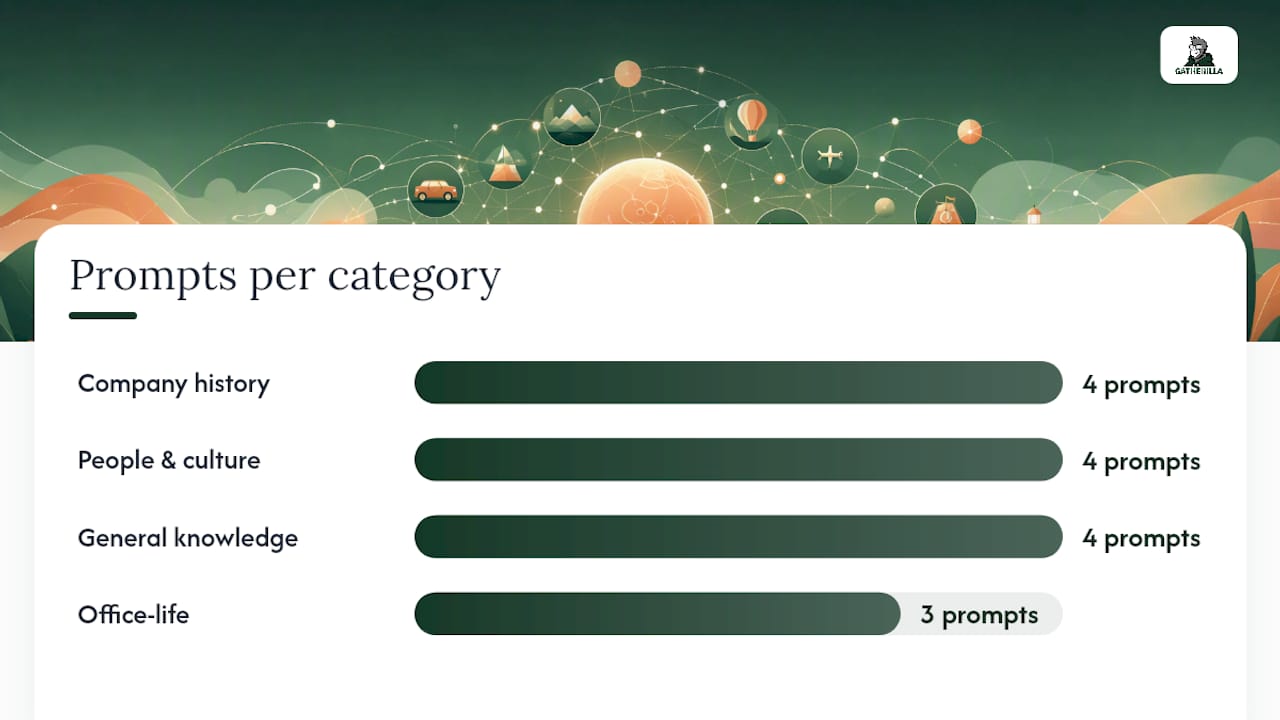
Here’s a working set of questions across the core categories, each with a one-line fact to drop right after someone answers. That post-answer fact matters more than the question itself. It’s the single easiest lever for turning a correct guess into an actual conversation instead of a dead pause before the next question.
Company history and milestones
- When was your company founded? Answer: varies by company. Post-answer fact: mention what else was happening in the industry that year. It reframes a dry date as a piece of context.
- What was the company’s first product or service? Answer: varies. Post-answer fact: name how different that first offering looks compared to today’s flagship product.
- How many office locations (or time zones, for remote teams) does the company currently operate across? Answer: varies. Post-answer fact: note which location or time zone opened most recently.
- What’s the origin of the company’s name or logo? Answer: varies. Post-answer fact: most naming stories have a small twist. Share it.
People and culture prompts
- Match the pet photo to the coworker. This works with zero written questions, just a slideshow of pet photos and a list of names. Post-reveal fact: ask the owner for one sentence about the pet’s personality.
- Who has the longest commute on this call? Answer: revealed live. Post-answer fact: compare it to the shortest commute for contrast.
- Whose first job was in a completely unrelated field? Answer: revealed live. Post-answer fact: ask for one detail about that first job.
- Guess the coworker based on three anonymized fun facts. Post-answer fact: let the person confirm or correct any detail that got exaggerated in translation.
General knowledge (office-safe)
- What is the highest point on Earth? Answer: Mount Everest, at roughly 8,848 meters (about 29,000 feet), according to NOAA’s ocean and geography facts, according to NOAA’s ocean and geography facts. Post-answer fact: note that measured from base to peak underwater, Mauna Kea in Hawaii is actually taller.
- Which decade produced the most number-one movies by box office count? Answer: varies by dataset, useful as a discussion starter rather than a hard fact.
- What’s the chemical symbol for gold? Answer: Au. Post-answer fact: it comes from the Latin word “aurum.”
- Which continent has the most countries? Answer: Africa, with 54. Post-answer fact: that’s more than double the number of countries in Europe.
Office-life and light-personal prompts
- Guess which coworker submitted this anonymized “most used emoji” stat. Keeps things playful without singling anyone out negatively.
- What’s the most popular lunch order in the building or on the team Slack channel? Works well as a light icebreaker with no wrong answers.
- Guess how many total years of company tenure are on this call, combined. Great tie-breaker question because it’s numeric and hard to game.
On difficulty, aim for a mix where most teams land a correct answer roughly two-thirds of the time. That 60 to 70% target range, a benchmark several workplace trivia guides converge on, keeps sessions feeling energizing instead of like a test nobody studied for. If your team is skewing all correct answers, add one harder “insider” question per round. If nobody is getting anything right, cut your hardest question and replace it with something closer to common knowledge.
For a themed bundle you can lift wholesale, Gatherilla’s six-theme, four-round copy-paste guide covers most of the categories above in a ready format.
Hosting Logistics: Tech, Scoring, Timing, and Fairness
The questions matter less than most hosts think. What actually breaks a trivia session is bad pacing, unclear scoring, or a platform that makes half the room fumble with a download link while the other half is already three questions ahead.
Tech checklist. Stick to no-download platforms your video conferencing tool already supports, or a dedicated browser-based tool that works inside the call. Use built-in polling for quick multiple choice, chat for open-answer questions, and screen share for any picture or audio round. Test the audio clip volume before the session starts. Nothing kills momentum faster than a host fumbling with unmuted background noise while trying to play a ten-second sound bite.
Scoring: team-based versus individual. Team-based scoring wins for mixed-department sessions because it turns trivia into a small collaboration exercise instead of a solo performance review. Randomized cross-department teams work better than letting people group with their usual desk neighbors. It’s one of the more reliable ways to surface unexpected commonalities between people who rarely interact day to day. Reserve individual recognition for things like the tie-breaker winner, and keep it lighthearted rather than a leaderboard people obsess over week to week.
Pacing and timing. Give roughly 20 to 30 seconds per question for live rounds, longer for picture rounds where people need a second to actually look. A 15 to 20 minute total session length is the sweet spot backed by multiple hosting guides, long enough to build momentum, short enough that it doesn’t eat your whole meeting.
Fairness rules.
- Avoid culturally or regionally specific trivia that only people from one background will know (obscure regional slang, niche local sports).
- Anonymize sensitive personal questions (salary-adjacent facts, family details) even in “fun fact” rounds.
- When an answer is ambiguous, give credit for a reasonable close answer rather than enforcing a rigid exact match. A generous host builds more goodwill than a strict scorekeeper.
- Mix question formats (multiple choice, picture, “guess who”) so that different kinds of knowledge get a chance to shine instead of the same three people winning every round.
Pro Tip: Assign a co-host to watch chat while you run the questions. Live sessions move fast, and a single host trying to read the question, watch the timer, and scan chat for answers will miss things. A second set of eyes catches the quiet correct answer that got buried under emoji reactions.
For a proven 15-minute format that handles most of this logistics work for you, Gatherilla’s virtual Jeopardy guide is built around exactly this kind of team-based, fairness-first structure.
Making Trivia Work for Remote and Hybrid Teams
Distributed teams need a slightly different setup than a room full of people who can all see the same whiteboard. Picture rounds need to be shared as a full-screen slide rather than held up to a webcam, and audio clips need to play through the meeting platform’s audio share, not through someone’s laptop speakers picked up by a microphone.
Low-bandwidth adaptations. Not every team member has a strong connection. Offer a text-based alternative to picture rounds (a written clue instead of an image) so nobody’s stuck staring at a frozen thumbnail while everyone else has already answered.
Running it async. Post one question per day for a week using a shared form. Keep the window open through the week, then reveal the full leaderboard in one go rather than after each question. That single delayed reveal moment does more for engagement than daily scorekeeping ever does.
- Use randomized cross-department teams rather than letting remote employees cluster by office or region.
- Add captions to any audio clip round for accessibility.
- Include alt text on picture-round images for screen reader users.
- Give async participants a slightly longer answer window than live participants get, since they’re often juggling the quiz between other tasks.
Behind This Guide: Author Expertise and Ready-Made Playbooks
This guide comes from Thomas at the Gatherilla blog, where the team spends its time studying what actually keeps remote and hybrid teams engaged, rather than what sounds good in a meeting about engagement. The templates and question categories above draw on patterns that show up again and again across dozens of company trivia sessions run by HR teams and team leads.
If you’d rather not build a session from scratch, Gatherilla’s virtual team trivia playbook covers the same structure as Template B above, pre-built and ready to launch inside a video call with no downloads required. The six-theme copy-paste round guide maps almost one-to-one onto the themed categories covered earlier in this article, so if a particular theme caught your attention, that’s the fastest place to find a full round already written.
Interactive formats like trivia also tend to perform well beyond the meeting room itself. Teams that document and share their favorite rounds internally often see them resurface in onboarding decks or culture pages, a pattern that lines up with broader research on interactive content and engagement showing that participatory formats hold attention longer than passive ones.
A Host’s Take on What Actually Signals Success
The real signal isn’t the score. It’s what happens in the five minutes after the session ends. If people are still talking about a question in the Slack channel an hour later, or a thread pops up where someone shares a photo related to the trivia topic, that’s the session working. Scoreboards fade from memory by the next morning. Conversations don’t.
The most common mistake I see hosts make is loading a round with too many hard questions because they want to look clever. It backfires. A room full of people who got nothing right goes quiet, not competitive.
Track it lightly. A quick one-question pulse check right after the session (“did that feel worth the fifteen minutes?”) tells you more than any formal survey, and a quarterly look back at which themes generated the most chat activity will tell you what to run again.
— Thomas
Run Your Next Session Without Building It From Scratch
Everything in this guide works as a live-hosted session, a screen-share deck, or a script you read off a sticky note. There are browser-based platforms built specifically for remote and hybrid teams, with no downloads and no setup beyond sharing a link in your existing video call.

The multiplayer trivia templates map directly onto the formats covered above, so a 15 to 20 minute meeting-opener round or a full 45-minute themed event is ready to launch rather than something you build question by question the night before. Gatherilla also runs a daily challenge, so the engagement doesn’t disappear the moment the live session ends. If you want to see how the templates in this article translate into an actual game, start with Gatherilla’s team-building platform and run your first round this week.
Sources
The question categories and hosting guidance above draw on a handful of sources worth bookmarking directly:
- What is the highest point on Earth? | NOAA Ocean Service
- Trivia Questions for Work for Better Team Building and Meetings - AhaSlides
- 75 Trivia Questions for Work + Team Building Tips | Uplup
FAQ
What are some fun trivia questions about companies?
Company founding dates, first products, logo history, and milestone stories work well because they’re low-pressure and teach something new even to longtime employees. Pair each answer with a one-line fact to keep the conversation going.
What are some good trivia games for the workplace?
Match-the-pet rounds, picture rounds using cropped office photos, and mixed team-based general knowledge rounds all perform well because they let different kinds of knowledge shine. Platforms like Gatherilla offer no-download multiplayer versions of these formats built for remote and hybrid teams.
What are some good trivia topics for a work meeting?
Company history, light people-and-culture prompts, and office-safe general knowledge (geography, basic science, decades-spanning pop culture) cover the widest range of employees without excluding anyone by tenure or background.
What are some fun trivia questions about the workplace?
Questions about longest commutes, most common lunch orders, or combined years of team tenure work well because they’re specific to your group and impossible to look up in advance.
How long should a company trivia session run?
Fifteen to 20 minutes works best for a regular meeting opener, based on guidance from multiple workplace trivia resources. Save 45 to 60 minute sessions for dedicated quarterly events.